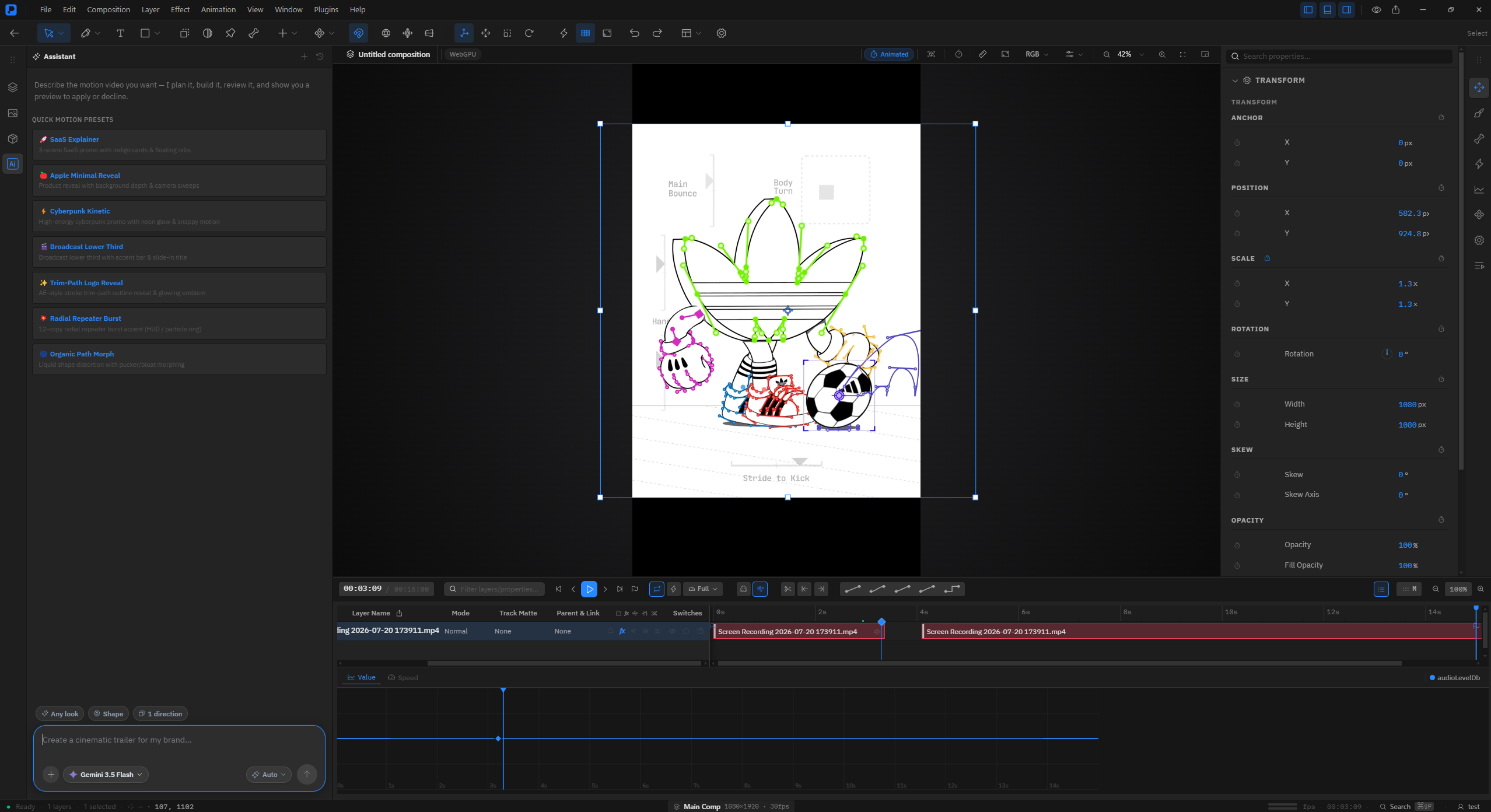
Professional Motion Studio (Website)
Premation is an open-source, WebGPU-based motion design studio built to provide deterministic exports and After Effects-like workflows.
Deep dive
- Uses a deterministic rendering engine where frame index / fps ensures identical results across all hardware.
- Core engine leverages WebGPU for viewport and final render throughput.
- Supports industry-standard formats including Lottie, ProRes 4444, and VP9 + alpha.
- Includes advanced features like 2.5D cameras, skeletal rigging, and per-glyph text animation.
- Offloads heavy encoding to ffmpeg processes to ensure the UI remains responsive.
Decoder
- WebGPU: A modern web standard for high-performance graphics and computation, providing lower-level access to the GPU than WebGL.
- 2.5D: A technique where 2D objects are placed within a 3D space, allowing for perspective, depth-of-field, and rotation effects.
- Deterministic: A system that produces the same output for a given input every time, regardless of background noise or system timing.
Original article
The WebGPU Motion Studio.
Compositions, bezier keyframes, 2.5D cameras, vector rigging, and deterministic exports in an open-source studio.
Supported formats: SVG, Lottie, MP4 - H.264, WebM - VP9 + alpha, MOV - ProRes 4444, PNG sequence, GIF, Image sequences, WAV audio
Engineered for Motion Designers
Everything you need in one WebGPU pipeline. Keyframing, 2.5D cameras, lights, vector tools, and skeletal rigging.
Cameras, lights and depth
Make any layer 3D to gain Z position and X/Y rotation. One- and two-node cameras with depth of field, lights with cone angle and shadows, extrusion and bevels for shapes and text. Grab a camera or a light in an orthographic view and move it, parent it to a null, and animate from there.
Keyframes on any numeric property
Linear, ease, ease-in, ease-out, hold and custom bezier. The graph editor edits value and velocity curves directly, and position keeps X and Y as independent tracks so they can be eased separately.
Per-glyph text animators
A real selector stack: animate position, scale, rotation, opacity, tracking or colour across characters, words or lines, with range and wiggly selectors. Text on a path included.
Bones and puppet pins on flat artwork
The bone tool builds a skeleton with forward kinematics, linear blend skinning and FABRIK IK. The puppet tool deforms a triangulated mesh from pins with an as-rigid-as-possible solver.
Paths that behave
Pen, pencil, pressure-sensitive brush and curvature tools. Boolean merges, trim paths, pucker/bloat, twist, zig-zag, repeaters, dashed and tapered strokes.
A deterministic emitter
Rate, lifetime, velocity, gravity, turbulence, size and colour over life. The same field always produces the same field, so a re-render is identical to the first one.
Unified Timeline Engine
Every panel edits the same document model with instant undo/redo history.
Multiple compositions per project, each with its own size, frame rate, duration and background. Nest one inside another as a pre-comp with time remapping, and instance it more than once. A placed composition is sealed - it renders at its own size, through its own camera - until you collapse transformations and let it meet the host’s.
Compose
Multiple compositions per project, each with its own size, frame rate, duration and background. Nest one inside another as a pre-comp with time remapping, and instance it more than once. A placed composition is sealed - it renders at its own size, through its own camera - until you collapse transformations and let it meet the host’s.
Animate
Set a keyframe on any numeric property, then shape it. F9 for easy ease, Shift-G for the graph editor, U to reveal everything animated on a layer. Interpolation is per-keyframe, not per-property.
Stage in 3D
Push layers apart in Z, add a camera and move through them. Orthographic top / front / left views and multi-view layouts, with move, rotate, scale and universal gizmos.
Render
Frame time is exactly index / fps, never wall-clock, so two exports of the same project produce identical frames. ffmpeg encodes in a child process, so a long export leaves the app usable.
Natural Language Keyframing
Describe the motion prompt to keyframe values or offset tracks. Every action applies as a single reversible edit.
Deterministic Frame Rendering
One WebGPU frame loop feeds every format. Frame index divided by FPS ensures identical exports every single time.
-
Deterministic by construction
One frame loop feeds every format, and frame time is index / fps rather than wall-clock. Re-render after a crash and you resume identical work.
-
It refuses to write an empty file
Every path asserts on a real frame count. A zero-frame encode is an error, not a silently successful black video.
-
Peak memory is one frame
Frames go to a temp directory and ffmpeg encodes in a child process. A multi-gigabyte export never passes through the app's memory.
-
Preview the actual export
The export dialog renders real export frames with the same snapshot builder the encoder receives, and lets you scrub the whole range first.
After Effects Muscle Memory
Maps directly to familiar shortcuts, tools, blend modes, track mattes, and pre-compositions.
- All 17 blend modes, track and alpha mattes, parenting and adjustment layers
- Classic-3D layer model: flat planes in 3D space, lit and shadowed
- Keyframe assistants - easy ease, time-reverse, sequence layers, stagger
- Expression controls: slider, angle, point, colour, checkbox, dropdown, layer
- Collapse Transformations and Continuous Rasterization, on the same sunburst column
- Interpret Footage: conform frame rate, pixel aspect, alpha, loop - stored on the asset
- Proxies, generated or attached, substituted in the viewport and never in output
Open-Source Core, Optional Hosting
Run the full desktop studio locally for free. Cloud plans add synced projects and remote rendering.
Self-hosted
The whole editor on your own machine, under the AGPL.
- Every tool — compositions, graph editor, 2.5D, rigging, particles
- No account, no network — projects are .motion bundles on disk
- Export to every format, offline, with no watermark
- The AI assistant with your own provider key
- AGPL-3.0 source — read it, build it, fork it
Cloud
Everything in self-hosted, plus the cloud — free while we're in beta.
- Cloud projects, autosave and version history
- End-to-end encrypted project sync across machines
- Hosted mp4 rendering — your machine stays free
- The plugin registry, and update checks
- The AI assistant with your own provider key
Frequently Asked Questions
Everything you need to know about Premation Studio, WebGPU rendering, licensing, and After Effects project compatibility.
Start Animating in Seconds
Free public beta. Local JSON project files on your disk with zero sign-up required.
Opening it the first time
macOS blocks apps from unidentified developers, so the first open needs the right-click menu. Once, per copy of the app.
-
Drag Premation to Applications
Open the .dmg and drag it across. Take Premation-macOS-arm64.dmg on Apple silicon and Premation-macOS-x64.dmg on Intel. The arm64 build will not run on an Intel Mac at all.
-
Right-click it, then choose Open
Not a double-click. Control-click or right-click the app in Applications. The right-click route adds an Open button that a double-click does not offer.
-
Confirm Open in the dialog
That is the whole workaround. macOS remembers the decision for that copy, so normal double-clicking works from then on.
System Requirement Notice
Premation renders every frame on the GPU via WebGPU or WebGL2 fallback. A hardware graphics processor is required.
GPU & System Specs
Graphics Processor: Dedicated GPU (NVIDIA/AMD) or Apple Silicon (M1/M2/M3/M4). The engine picks WebGPU when it can and falls back to WebGL2; there is no software rasteriser.
Integrated Graphics: Intel Iris Xe / AMD Radeon Graphics with current drivers. Fine for lighter compositions. Note that a WebGL2 fallback can report a maximum texture size of 4096, which bounds how far Continuous Rasterization will re-raster vector content.
System Memory: 8GB RAM minimum / 16GB+ recommended. Memory scales with composition resolution and cached pre-comps. Export is the exception: frames stream to disk one at a time, so peak export memory is one frame rather than the whole render.
Operating system: Windows 10 / 11 x64 & macOS 13+ (Apple Silicon & Intel). A desktop application running in Electron with native menus and filesystem access. Building from source needs Node.js 20 or newer; ffmpeg is optional for MP4, WebM, GIF and ProRes export.
Fresh dev news, AI-digested daily. Never miss a trend at devoured.fyi