Unpacking ChatGPT Work: the Agent for a Billion Users
OpenAI's ChatGPT Work product serves as a unified agent interface that will soon replace standard ChatGPT for its billion-user base.
Deep dive
- Persistent Cloud Workspaces: Tasks run on isolated microVMs that persist across sessions, maintaining state for file creation and tool execution.
- Work Mode vs. Chat: Work runs in an isolated Linux-based environment (scratch space) while ChatGPT manages high-level context/memory.
- Browser Use: The agent operates a managed Chrome instance remotely via tool calls, allowing it to navigate complex web UIs.
- Proactivity: The platform can analyze user calendars and data to proactively suggest task completions before the user prompts them.
- Plugins & SDKs: The system uses the App Directory and MCP-compatible tools to interface with enterprise services like Slack and Salesforce.
Decoder
- MicroVM: A lightweight virtual machine designed for quick isolation and execution of untrusted or task-specific code.
- Agentic Commerce: The ability for an AI to execute transactions or use tools to buy and sell services autonomously.
Original article
Unpacking ChatGPT Work: the Agent for a Billion Users
An external reconstruction of how Memory, Proactivity, Scheduling, Browser Use, Plugins, Skills and Tools work in the new ChatGPT Work.
On July 9th, OpenAI released ChatGPT Work, their agent product for knowledge work. It was, by any measure, a busy launch: three new models across fourteen configurations, a consolidation of the ChatGPT and Codex desktop apps, and cloud agents brought to the mainstream in their most accessible form yet.
Three weeks in, Work (along with Codex) has reportedly crossed 10 million users.
Chat and Work currently sit side by side as separate modes inside ChatGPT, but Greg Brockman has confirmed that they will merge by the end of the year. Work, then, is not just a niche product for power users, but a preview of how ChatGPT’s billion weekly users will soon use the app.
Work in its current form takes some decoding. It’s an amalgamation of ChatGPT (in chat form), Codex the app, Codex the harness, Codex the original cloud agent, ChatGPT agent, Atlas, OpenClaw, and more. The product lineup around it is confusing. And the web and mobile versions diverge from the desktop one (unless you run it in cloud mode?!).
What is Work?
At its core:
- An agent for knowledge work. You connect it to the places you already work—Slack, email, Drive, calendars, CRMs, project trackers, and hundreds of other plugins—and it gathers context across all of them to produce finished work.
- Runs on the Codex harness. So it inherits the same models, sub-agents, browser use, and the ability to grind on a task for hours. Its UI is stripped of the evidence (git controls, diff-traces) that would give away you’re talking to a coding agent.
- Lives in a cloud computer. Specifically, a beefy, isolated microVM: Pro accounts get 8 CPUs, 20GB of RAM, and a 64GB disk; Plus gets 14GB of RAM. Alongside the VM, Work gets a managed Chrome service that the agent operates through tool calls.
- Produces artifacts. Sheets, docs, and slides rendered in interactive viewers, plus Sites: hosted web apps and dashboards it can build, share via URL, and keep updated.
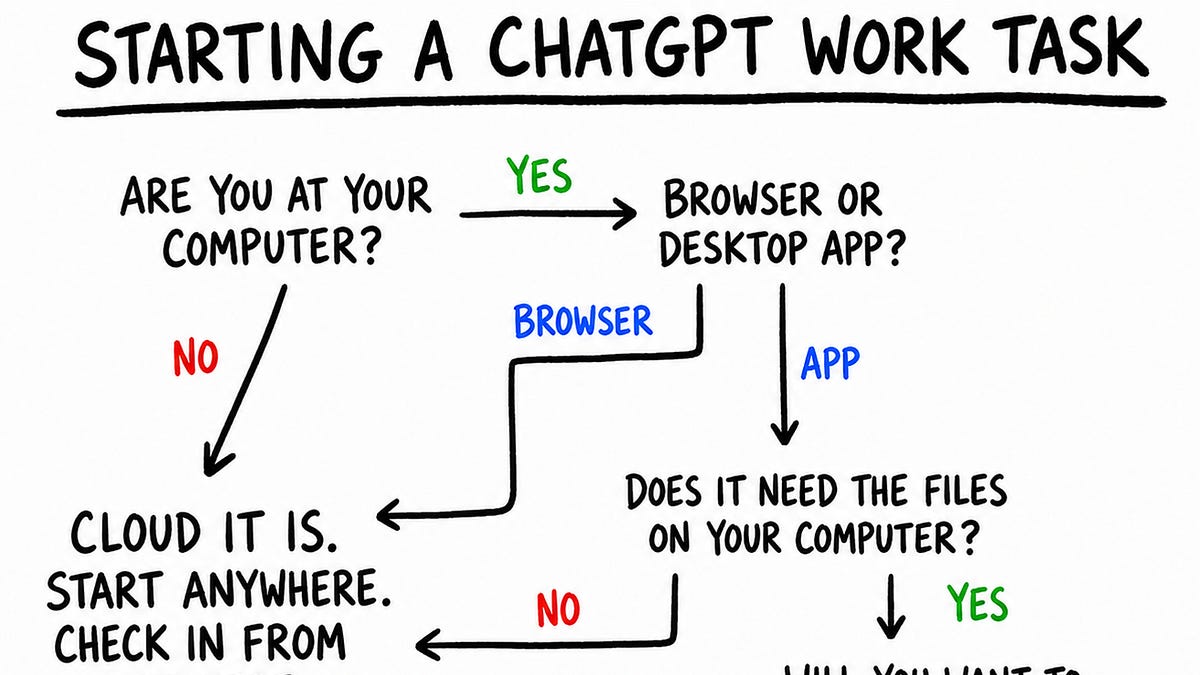
Every new conversation in Work is called a task. On web and mobile, Work runs in the cloud. You can kick off a task on web, track progress and give directions in the ChatGPT app on your phone, then view the result (maybe a report or a spreadsheet) back on your laptop.
Work on the desktop app is slightly different and comes in two modes: cloud and local. In cloud mode, tasks run on the same cloud computer as web and mobile and sync across all three.
In local mode, the agent works directly on your machine, across your files and apps, with full computer use. These tasks don’t appear on web or mobile, and there’s no way yet to move a local task to the cloud. This makes local mode essentially Codex, minus the code-related UI traces that would scare off a non-developer.
Persistence & Memory
Work’s cloud computer is persistent too. But rather than running in one VM that stays on forever, its workspace is synchronised to persistent storage and restored onto isolated microVMs as needed. So the underlying machine can change, but the working state carries over.
Every Work task (thread) gets a working directory under /workspace/scratch, where the agent has the freedom of a normal computer: it can make folders, install dependencies, write scripts, keep databases, and search everything with ordinary Linux commands.
When I ask it to make a presentation for Acme, it can create clients/acme, copy in the source material, perform some analysis through code, and create charts and slides, all as files in the directory. When I follow up in the same thread, it returns to that working state and can continue editing it.
By default, each new thread receives a compressed summary of recent tasks and files worked on. Raw conversation transcripts are not stored on the computer for the agent to browse. When a task needs context from previous threads, the agent calls Personal Context, a dedicated tool that queries Chat and Work history through a separately managed service and returns the relevant excerpts.
Files follow the same pattern. ChatGPT’s Library is the central user-facing repository for all files and artifacts. User uploads land there automatically; agent-created files are saved when the user asks, or when the agent judges them worth retaining. Like conversations, the Library doesn’t live on the computer, and can only be reached through dedicated tools.
Hints of useful proactivity
Today’s AI products are still reactive. Before the model can help, you have to notice that something needs doing, gather the relevant context, and translate it all into a prompt. Proactivity, where agents figure out how to be useful on their own, is one of the holy grails of personal AI.
Work offers an early glimpse of that. When you open a new Work conversation, alongside the composer, you get personalized tasks generated from your own context. It had reasoned asynchronously across my context: noticed the calendar event, inferred that preparation would help, pulled data from Calendar and Gmail, and framed a task around the interests and preferences in my memory.
Scheduled Tasks
Automations let Work run tasks at a future time or on a recurring schedule, without the user manually prompting it. They are ChatGPT’s abstraction for reminders and cron jobs. Work builds on the same scheduler but makes it agentic: each run can use the agent’s context and tools to complete the task.
A standalone scheduled task begins each run from a saved prompt and opens a fresh task for the result. A scheduled task inside an existing conversation, triggered by a “heartbeat”, reawakens that task with its context intact.
Browser Use
The Work browser doesn’t live on the same computer as the agent. Instead, the agent controls a separately hosted Chrome service through tool calls. It can inspect the page, click, type, scroll, take screenshots, manage tabs and dialogs, and move files between the browser and its computer.
The browser service also keeps its own persistent profile. New browser instances inherit preferences and logged-in sessions. The Work agent never sees this profile or its credentials. Instead, a small permission ledger is synchronised into its computer alongside the workspace, recording, globally and per conversation, which sites it may act on and whether it may move files to or from them.
Plugins, skills, and tools
In March 2026, plugins returned to Codex as packages of apps and skills. With the July 9 launch, the App Directory became the Plugin Directory, existing apps were packaged into plugins, and the directory expanded across Work and Codex.
A plugin today can contain:
- Apps, which connect the agent to services such as Gmail, Slack, or Salesforce.
- Skills, which combine instructions with supporting material—references, templates, and sometimes scripts—to teach the agent a workflow.
- App templates, which let an organisation configure the private or organisation-specific app a workflow depends on.
What’s Next
When Work folds into Chat later this year, its design choices will become the default for a billion people. Before then, OpenAI has to resolve a few tensions that kept surfacing as I used it:
- Does the cloud computer become the user’s primary AI computer? And how can syncing between it and the local machine feel seamless?
- Do Work agents get more OpenClaw-like sovereignty over that computer?
- How does Work come to feel as familiar to users as Chat?
None of this should detract from the fact that Work is an impressive, ambitious, yet underrated launch. It consolidates years of scattered products and experiments into one increasingly cohesive whole.
Fresh dev news, AI-digested daily. Never miss a trend at devoured.fyi