Salesforce Observability with New Relic
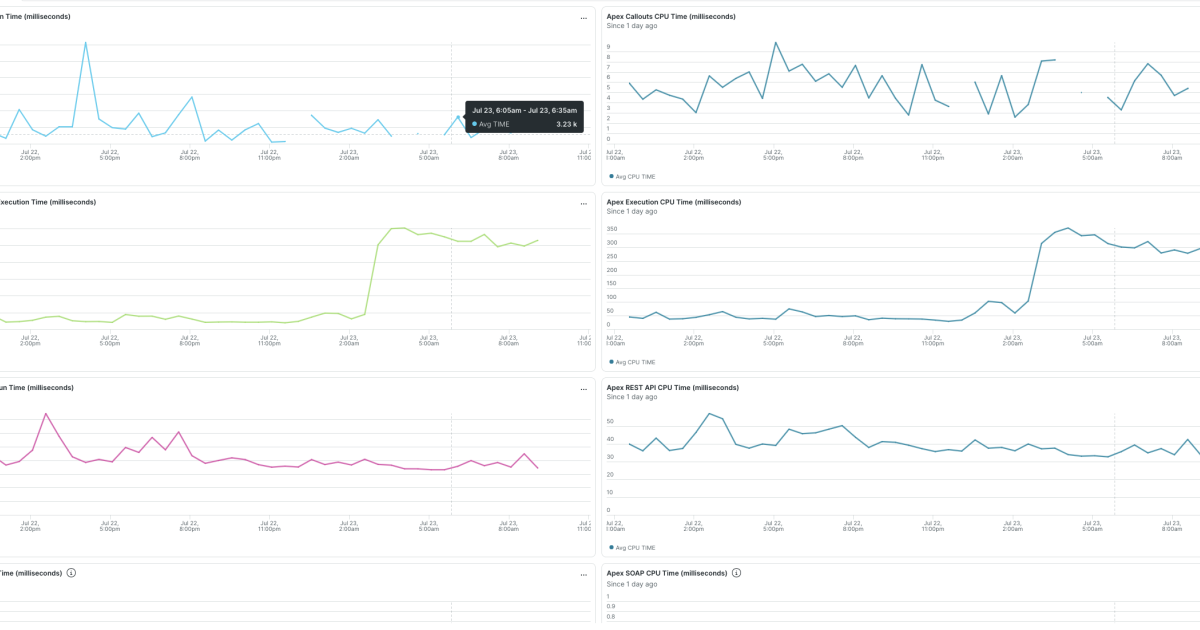
New Relic released an open-source Salesforce Exporter to stream telemetry, providing dashboards for API usage, Apex performance, and org limits.
Decoder
- Apex: A proprietary, object-oriented programming language by Salesforce used to execute flow and transaction control statements on the platform's servers.
Original article
Introduction
The New Relic Salesforce Exporter provides a unified view of Salesforce telemetry by funneling usage, performance, errors, and security metrics directly into the New Relic platform.
Why Salesforce Observability Matters
New Relic empowers you to move from reactive troubleshooting to proactive optimization across four key areas:
Ensuring System Performance
Stop waiting for user complaints to find issues. By centralizing Salesforce telemetry, you can configure proactive alerting that identifies performance degradation before it impacts your global users, minimizing downtime and protecting your company’s bottom line.
Optimizing Critical User Journeys
Understand exactly how your users interact with the platform. By tracking Lightning usage and performance, you can identify slow-loading pages or high-latency interactions, allowing you to optimize workflows and enhance the digital experience for your sales and service teams.
Security and Compliance
Maintain a rigorous security posture with real-time monitoring. Detect login anomalies, track critical permission updates, and surface CSP or CORS violations as they happen, ensuring your Org remains compliant and secure against external and internal threats.
Managing Org Limits
Avoid the "limit exceeded" errors that halt business processes. New Relic provides constant visibility into your Org limits, ensuring your usage stays safely within thresholds and giving you the data needed to plan for future capacity needs.
The New Relic Solution
To support these use cases, New Relic provides two robust, open-source integrations that serve as the technical foundation for your observability strategy:
- Event Log Integration: Collects historical data in batches, including Event Log Files, Standard Objects, Tooling Objects, and Org Limits.
- Event Stream Integration: Provides a continuous, real-time flow of security and system events for immediate visibility.
The following list outlines the specific KPIs you can collect with the New Relic Salesforce Exporter.
Apex usage and performance
- Apex callouts
- Apex execution time
- Apex API access
- Apex triggers
- Apex exceptions
Lightning usage and performance
- Lightning interactions
- Lightning errors
- Lightning page views
- Lightning app load duration
- Lightning logs
Errors, permissions and violations
- CSP violations
- Permission updates
- Operations on groups
- CORS violations
- Insufficient access
Real-time security alerts
- Login anomalies
- Session hijacking
- Credentials stuffing
User access
- User logins
- User logouts
- User impersonations
API access
- Usage of different APIs
- Run times
- DB activity
Documents, contents and DB access
- Content sharing
- Transfers
- DB usage
- Unique queries
- Attachment downloads
Report access
- Reports generated
- Reports exported
- Async report runs
- Multiblock reports
- Dashboards
CRM analytics (Wave) usage and performance
- Wave changes
- Wave downloads
- Wave download errors
- Wave interactions
- Wave performance
Org limits
- Consumed
- Remaining
- Usage rate
To visualize this data effectively, we provide out-of-the-box dashboards for all these KPIs.
Get Started Fast
We understand that your time is your most valuable asset. That’s why we’ve built a fast-path to full visibility.
Our Installer Tool streamlines the entire configuration process. Starting with a simple questionnaire, the tool automatically generates the configuration files, Docker files, and dashboards required to launch your Salesforce observability environment in minutes, not days.
For more information, check out the project repository.
Fresh dev news, AI-digested daily. Never miss a trend at devoured.fyi