How to Achieve Pruning When Querying by Non-Partitioned Columns in PostgreSQL
PostgreSQL can perform partition pruning on non-partition keys by using CHECK constraints that map specific value ranges to partitions.
Deep dive
- Partition pruning is typically only available on the partition key.
- CHECK constraints act as a source of truth for the query optimizer.
- By creating ranges that cover outlier values within partitions, you can ensure the optimizer correctly prunes during filter operations.
- Gaps and islands analysis can identify the correct value ranges for these constraints.
- This method works automatically with the
constraint_exclusionparameter, which is enabled by default.
Decoder
- Partition Pruning: The query optimization process where the database ignores partitions that cannot possibly contain matching data.
- CHECK Constraint: A database rule that ensures all values in a column meet a specific condition.
- Gaps and Islands: A classic SQL problem identifying consecutive sequences (islands) separated by missing values (gaps).
Original article
One of the most valuable things about partitioned tables is pruning - the database's ability to eliminate entire partitions based on a query predicate. Under conventional wisdom, pruning can only be achieved when querying by the partition key - this makes choosing the right key extremely difficult. However, if your data follows certain patterns, using some clever tricks you can achieve pruning even when filtering by non-partition key columns.
In this article, I demonstrate how to achieve partition pruning when filtering by non-partition key columns.
Table Partition
Imagine you run a popular website with many users. Your product team wants to gain some insight into how the system is used, so you start logging events. To give events context, you group them into sessions and keep the time, the type, and some data in a database table:
CREATE TABLE event (
  id         BIGINT GENERATED ALWAYS AS IDENTITY,
  timestamp  TIMESTAMPTZ NOT NULL,
  session_id BIGINT NOT NULL,
  type       TEXT NOT NULL,
  data       JSONB
) PARTITION BY RANGE (timestamp);
You have many users so you expect many events. Most queries use only a subset of the data, usually a specific date range, so you create a partition for each year based on the timestamp:
CREATE TABLE event_y2025 PARTITION OF event
FOR VALUES FROM ('2025-01-01 UTC') TO ('2026-01-01 UTC');

CREATE TABLE event_y2026 PARTITION OF event
FOR VALUES FROM ('2026-01-01 UTC') TO ('2027-01-01 UTC');
You now have two partitions - one for events from 2025 and another for 2026. A session can look like this:
INSERT INTO event (session_id, timestamp, type, data) VALUES
  (1, '2025-12-28 15:00:00 UTC', 'view',         '{"page": "/login"}'),
  (1, '2025-12-28 15:00:06 UTC', 'click',        '{"selector": "#login"}'),
  (1, '2025-12-28 15:00:07 UTC', 'login_failed', '{"attempt": 1}'),
  (1, '2025-12-28 15:00:10 UTC', 'click',        '{"selector": "#forgot-password"}'),
  (1, '2025-12-28 15:00:17 UTC', 'view',         '{"page": "/reset-password"}'),
  (1, '2025-12-28 15:00:23 UTC', 'click',        '{"selector": "#reset-password"}');
Partition Pruning for Key Columns
The partition key of the table is timestamp, so queries that filter by timestamp can benefit from partition pruning. For example, query events in December 2025:
EXPLAIN SELECT * FROM event
WHERE timestamp >= '2025-12-01 UTC' AND timestamp < '2026-01-01 UTC';
Notice that the database was smart enough to figure out it only needs to scan the partition for 2025. The partition for 2026 was not even accessed. This is partition pruning.
Another common query is to find all events for a given session:
EXPLAIN SELECT * FROM event WHERE session_id = 1;This time, the database accessed all partitions - partition pruning was not used. In this query, the database has no way of eliminating partitions, so it had no other choice but to scan all partitions to look for matching events.
Local Indexes
Getting events for a specific session is fairly common, so it needs to be fast. To make things fast in databases you should just create an index, right?
CREATE INDEX event_session_ix ON event(session_id);Using an index is faster than scanning the entire partition, but the database is still forced to scan through all of the partitions. Right now there are only two partitions, but if the table had a hundred partitions, this query would be like querying a hundred tables!
Global Indexes
Another approach to indexing partitioned tables is to create a single index that spans multiple partitions. This is called a global index. Unfortunately, as of version 19, PostgreSQL does not support global indexes on partitioned tables.
Pruning on Non-Partition Key Columns
The events table is partitioned by timestamp, so queries by timestamp can benefit from partition pruning. However, there are still many situations where you want to query by session ID. At this point you reached the limit of what the database can just do out of the box, and you need to tap into your domain expertise and knowledge of the data:
- The events table is append only: no updates to the table, events are immutable.
- Session IDs are generated sequentially: session IDs increment over time.
- Sessions are short lived: a normal session is usually no longer than a couple of minutes or hours.
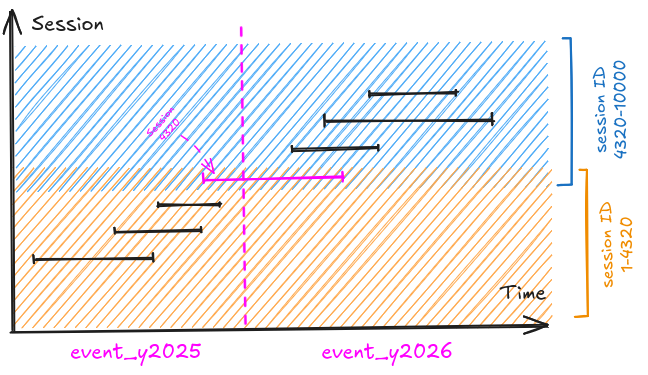
Session ID is strongly correlated with the timestamp. This means it should be possible to identify a distinct range of session IDs for each partition.
Talking to the Optimizer
The only information the optimizer can rely on, is information that is guaranteed to always be correct. In databases, to guarantee that something is always correct, you use a constraint. Check constraints can be used to communicate information about your data to the optimizer.
To check if you can influence the optimizer, add a simple check constraint on each partition to enforce a specific range of session IDs:
ALTER TABLE event_y2025 ADD CONSTRAINT event_y2025_session_id_range
  CHECK (session_id between 1 and 4320);

ALTER TABLE event_y2026 ADD CONSTRAINT event_y2026_session_id_range
  CHECK (session_id between 4320 and 10000);
Now to see if the database can actually use the check constraint to eliminate entire partitions, query events for session with ID 1000:
EXPLAIN SELECT * FROM event WHERE session_id = 1000;Amazing! With the check constraint in place, the database was able to eliminate the partition for 2026. The database ended up scanning only one partition.
The constraint_exclusion Parameter
This pruning mechanism is controlled by the parameter constraint_exclusion. Constraint exclusion is on by default for partitioned tables. The database will use any check constraint you have on a partitioned table to achieve pruning.
Introducing Outliers
Unfortunately, reality is usually not that tidy! What if some sessions become days or weeks long? This can introduce outliers into the ranges. If you create check constraints based on these ranges, any session ID between 1 and 4320 will hit both the 2025 and the 2026 partitions.
Handling Outliers
Inspired by the multi-minmax BRIN index operator, adjust the check constraint to use multiple ranges:
ALTER TABLE event_y2026 ADD CONSTRAINT event_y2026_session_id_range
  CHECK (session_id BETWEEN 1 AND 1 OR session_id BETWEEN 4320 AND 10000);
Notice the check constraint for 2026 now includes two ranges - one for [1, 1], and another for [4320, 10000]. This means values between 2 and 4320 will no longer have to query the second partition.
Gaps and Islands
So far you achieved pruning on non-partition key columns and created a mechanism to handle potential outliers. The only thing left is to identify the ranges, a classic "gaps and islands" problem. You can parameterize the query and have it generate the command to create the check constraint.
The Backstory
Earlier this year I attended Django Con EU in Athens to give a talk. I found it most interesting how some speakers used check constraints to achieve pruning when querying large partitioned tables by non-partition key columns. I was mostly interested in how they handle outliers. I suggested using a check constraint on a multirange type, but realized those don't work for pruning. Exploring a bit further led me to try multiple simple conditions joined with an OR.
Final Thoughts
Choosing the right partition key is very challenging. One of the reasons it is so difficult is that the partition key is used for pruning, and unless all queries are using it, you need to make a compromise. Using constraint exclusion on non-partition key columns opens up a whole new way to gain pruning. If your data follows a predictable pattern, the compromise isn't so bad and deciding on a partition key becomes a bit easier.
Fresh dev news, AI-digested daily. Never miss a trend at devoured.fyi