Devoured - June 30, 2026
Recent innovations focus on optimizing AI agent performance and developer productivity, highlighted by Cursor's new iOS app for remote agent control and DeepSeek's DSpark framework, which accelerates LLM inference by up to 85%. Additionally, industry experts emphasize a shift toward modular AI architectures and the critical need for human judgment (taste) to navigate the influx of AI-generated content.
Devin Fusion
Cognition’s new Devin Fusion system reduces coding costs by 35-41% by routing tasks between frontier models and cheaper 'sidekick' models.
Deep dive
- Multi-model architecture: Uses a primary 'frontier' model (like Fable 5 or GPT-5.5) for planning and a 'sidekick' model for implementation.
- Dynamic routing: Uses lightweight classifiers during task execution to switch models based on difficulty or task type.
- Context caching: Both agents maintain persistent context to avoid the high costs of cache misses associated with traditional multi-agent tools.
- Performance: Maintains high-quality coding performance while achieving 35% cost savings on the FrontierCode benchmark.
Decoder
- FrontierCode: A benchmark used to measure an AI's ability to produce high-quality, mergeable code across real-world repository tasks.
- Cache miss: In this context, it refers to the scenario where a model loses its memory of previous interactions, forcing it to re-process input, which increases latency and cost.
Original article
Engineering teams are lighting money on fire.
It's no longer sustainable to use the most expensive models on every task. But existing tools for mixing models suck. They look nice on most benchmarks but fail to write code you'd actually merge.
At Cognition, we specialize in routing across frontier models without sacrificing intelligence. Today, we're sharing our work on a new kind of multi-model harness, Devin Fusion, that is substantially better at mixing models while reducing costs and maintaining intelligence on real-world usage. We found it maintains frontier and Fable 5-level performance at 35% lower cost on FrontierCode, a new state-of-the-art coding benchmark that measures both code correctness and quality.
The Trick: Sidekick
The key idea behind our architecture is to run two parallel agents: one with a frontier model, the other with a more cost-effective "sidekick" model. Both are fully capable agents with their own toolsets and ability to gather & act on their own context.
As the task progresses, the main agent decides which tasks to give the sidekick and which tasks to do itself. Making sidekick work well in practice, however, requires deeply tuning the interaction patterns. We've found that the main agent should take minimal actions, and only read what is absolutely necessary. By default it should delegate and monitor, while making the significant decisions: the plan, the interpretation of ambiguity, the final review.
This approach fixes the primary problems with more basic model routing:
- It retains real frontier intelligence rather than "benchmark-score" intelligence. Routers often over-fit to specific benchmarks. By keeping a frontier model in the mix, the sidekick approach continues to benefit from frontier model creativity and general intelligence.
- It generalizes beyond single-prompt tasks and question-answering. Model routers often route to a single model for the entire task. Prompts often do not contain enough information about the task to properly discern difficulty. Moreover, the user might have difficult followups to simple initial prompts. Being able to move between the smart model and sidekick dynamically makes this system much more robust.
- It avoids costly cache misses when routing between models. We've previously explored a "Smart Friend" tool, and Anthropic released a similar "Advisor" tool. The core of both these ideas is to give one model a tool to query another model for helpful advice. The catch? Upon every call to the other model, the context for the task is not shared in a way that is cached, and you pay a very expensive price. In the sidekick setup, both the main model and sidekick model maintain their own persistent, cached contexts.
Sidekick scales better as models get smarter
Recent models, and Fable 5 especially, perform unusually well in these multi-agent setups. Fable delegates work more intelligently, requests context more efficiently, and plans more precisely, all of which yield a larger cost improvement with minimal impact on intelligence. This suggests that the sidekick pattern is one that will become more useful as base models get better.
Examples of Sidekick in Action
To better understand how the sidekick works, we inspected how using sidekick impacts cost and performance on a representative sample of FrontierCode tasks.
- Modernize search.js to ES6 and verify with the full make/Playwright/e2e suite: Devin wrote the diff and handed off the slow test run. The cost was in the tests, not the code. Delegating that saved 62% at no cost to quality.
- Rip out the OpenTracing integration across the Mattermost server, cleanly: Mechanical removal across many files with few real judgment calls. Mechanical work fully handed off: much cheaper at the same quality.
- Handle JSON-Schema oneOf-with-const when generating Python models: Devin reaches the same partial result either way, so the sidekick just makes it cheaper, about 38%.
- Add a team selector to the search bar (cross-team search), gated on a flag: Hard, multi-file React/Redux feature graded on its judgment calls. When the judgment is the deliverable, delegating it backfires.
- Integrate LangChain4j's WebSocket MCP transport into Quarkus, reusing upstream: Hard task, but mostly mechanical: reuse what's upstream. Hard but mechanical work still hands off cleanly, and here it even beat Devin solo.
Dynamic Mid-Session Routing
With sidekick in your arsenal, you must still make sure to choose the right models for the task. We decide on different models for the main agent or sidekick depending on task type and complexity. It can be dangerous, however, to choose a model at the start and then realize later on that a different one would be better suited. Similarly, you might also want to move the task from the sidekick back to the main agent if it is proving too challenging. To handle these cases, we use lightweight classifiers during task execution to signal when we need to switch to the main agent or use a different model entirely.
We would like to be cache-efficient when switching between models, and doing so requires some artful engineering. We accomplish this by switching the model during context compaction, which would trigger a cache miss anyway. Each time we trigger compaction, we take it as an opportunity to evaluate the situation and switch the model that's in charge, effectively getting model switching “for free”.
Results
We benchmarked our new harness with and without the ability to use Fable 5, and found exciting improvements with both configurations.
Without including Fable 5, our Devin Fusion multi-model harness gives a 35% cost improvement on FrontierCode relative to frontier models like GPT-5.5 and Opus 4.8, while maintaining performance matching the frontier.
Fable 5 proved to be exceptionally performant in this multi-model harness, achieving a 41% cost reduction, while maintaining the same performance as Fable 5 in a traditional agent harness.
The rising importance of hybrid-model harnesses
The age of using one model for all of your work is coming to an end. The rising costs of frontier intelligence are reaching prohibitive levels in engineering organizations small and large. Moreover, there is now a growing range of model options at different price and intelligence levels, and with the right prompting, many of the sub-frontier models are fully capable of doing most engineering work.
Moreover, using a multi-model harness allows you to capture the relative strengths of various frontier models. For example, at Cognition, we find some models to be particularly good at UI testing, and different models to be good at identifying complicated bugs in PRs. There is also a growing set of capable open-source models. This makes it easier to train specialized intelligence on specific domains. And as models emerge that excel at particular languages, tasks, or libraries, investing in multi-model capabilities only becomes more important.
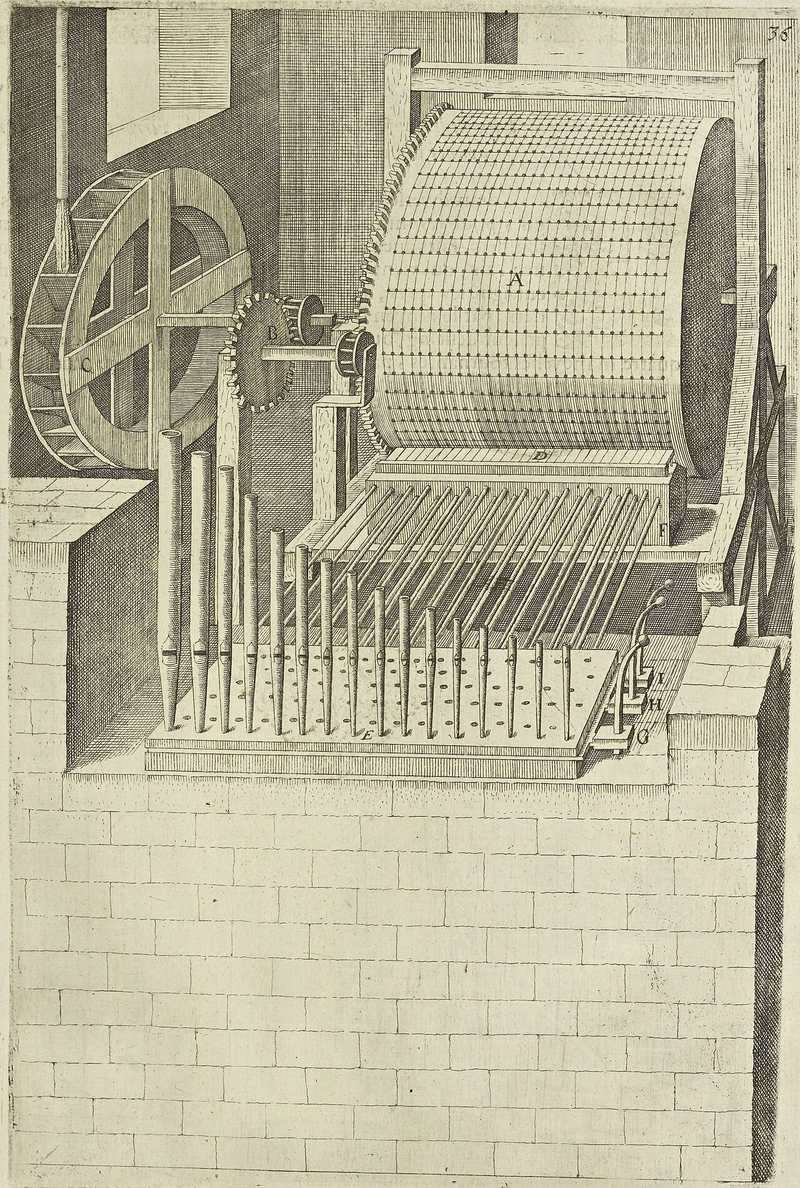
What happens when you run a CUDA kernel
A deep dive into the CUDA execution pipeline reveals how a kernel call travels from a C++ function stub down to raw GPU warp scheduling.
Deep dive
- Compilation: nvcc invokes cicc for PTX and ptxas for SASS, embedding both into a fatbin executable for compatibility.
- Launch Path: Host code uses a generated stub to register the kernel;
cuLaunchKerneltranslates high-level calls into device-native 'methods' in a pushbuffer. - Scheduling: Schedulers on each SM track warp eligibility via six physical scoreboard barriers per warp.
- Latency Hiding: Compilers pack control codes into the instruction stream to manage stall cycles and yield hints, allowing GPUs to switch between warps while memory loads are in flight.
- Coalescing: Consecutive memory accesses from 32-thread warps are coalesced into fewer, high-bandwidth transactions to the L2 cache or DRAM.
Decoder
- CUDA Kernel: A function that runs in parallel on many GPU threads.
- Warp: A group of 32 threads in NVIDIA GPUs that execute instructions in lock-step.
- PTX (Parallel Thread Execution): A low-level, device-agnostic intermediate representation for GPU code.
- SASS (Shader Assembly): The final, architecture-specific machine code that runs on NVIDIA hardware.
- QMD (Queue Meta Data): A launch descriptor structure that tells the GPU how to execute a parallel compute grid.
- Doorbell: An MMIO (Memory Mapped I/O) register that the CPU writes to in order to notify the GPU that new work is ready in the command stream.
Original article
Full article content is not available for inline reading.

Amazon seeks cheaper AI alternatives as Anthropic shifts to token-based pricing
Amazon is exploring OpenAI as an alternative to Anthropic following a contract dispute over new per-token pricing models.
Deep dive
- Amazon's internal coding agent, Kiro, and shopping assistant, Quick, currently rely on Anthropic's Claude models.
- Anthropic has shifted its infrastructure strategy to be multi-cloud, with a $200 billion commitment to Google Cloud.
- Amazon's relationship with Anthropic faces strain after Amazon executives raised security concerns regarding Anthropic's 'Fable 5' model.
- Amazon has a $50 billion commitment to OpenAI, providing further leverage to move away from exclusive Anthropic reliance.
Decoder
- Token-based pricing: A cost model where customers pay per unit of text (tokens) processed by the LLM rather than a flat subscription or capacity-based fee.
Original article
Amazon is looking at OpenAI and other alternatives after a renegotiated contract will shift Anthropic billing to per-token pricing next year.
Amazon is looking for cheaper alternatives to Anthropic’s Claude models after a renegotiated contract will shift to token-based pricing that could substantially increase the company’s AI costs, according to The Information. The new pricing structure does not take effect until next year, but Amazon is already exploring options including OpenAI. The report highlights a deepening rift between two companies that were once inseparable partners in the AI race.
Amazon’s dependence on Claude runs deep. Its coding agent Kiro, workplace assistant Quick, and consumer-facing Alexa for Shopping all rely on Anthropic’s models, according to The Information. A shift to token-based billing would make that dependence far more expensive, particularly after Amazon recently scrapped an internal leaderboard that encouraged employees to burn through as many AI tokens as possible.
The search for cheaper models has sent Amazon toward OpenAI, a company it has already been growing closer to. Earlier this year Amazon committed $50 billion to OpenAI, giving the AI lab access to its cloud infrastructure in exchange for access to its models. That deal followed Amazon’s initial $4 billion investment in Anthropic, which has since grown to a potential $33 billion.
Anthropic, meanwhile, has been expanding its own relationships beyond Amazon. The company committed to spending $200 billion on Google Cloud and chips over five years, according to The Information, a deal that effectively makes Google a major infrastructure partner alongside AWS. Amazon’s latest $25 billion investment in Anthropic included a reciprocal commitment of more than $100 billion in AWS spending, but the Google arrangement signals Anthropic no longer depends on a single cloud provider.
The tension boiled over last month when the US government ordered Anthropic to shut down its Fable 5 and Mythos 5 models after a security report that originated from Amazon. Andy Jassy reportedly told government officials that Amazon researchers had used Fable 5 to obtain information useful for cyberattacks. The timing raised questions, coming as Amazon was preparing to launch its own cybersecurity-focused AI agent designed to spot vulnerabilities.
The contract dispute, the move toward OpenAI, and the Fable 5 incident together suggest the Amazon-Anthropic relationship has entered a new and more adversarial phase. Amazon remains one of Anthropic’s largest investors and cloud customers, but both companies now have reasons to reduce their dependence on each other. For the broader AI industry, the fracturing of its most prominent investor-model-provider partnership would redraw the competitive map.
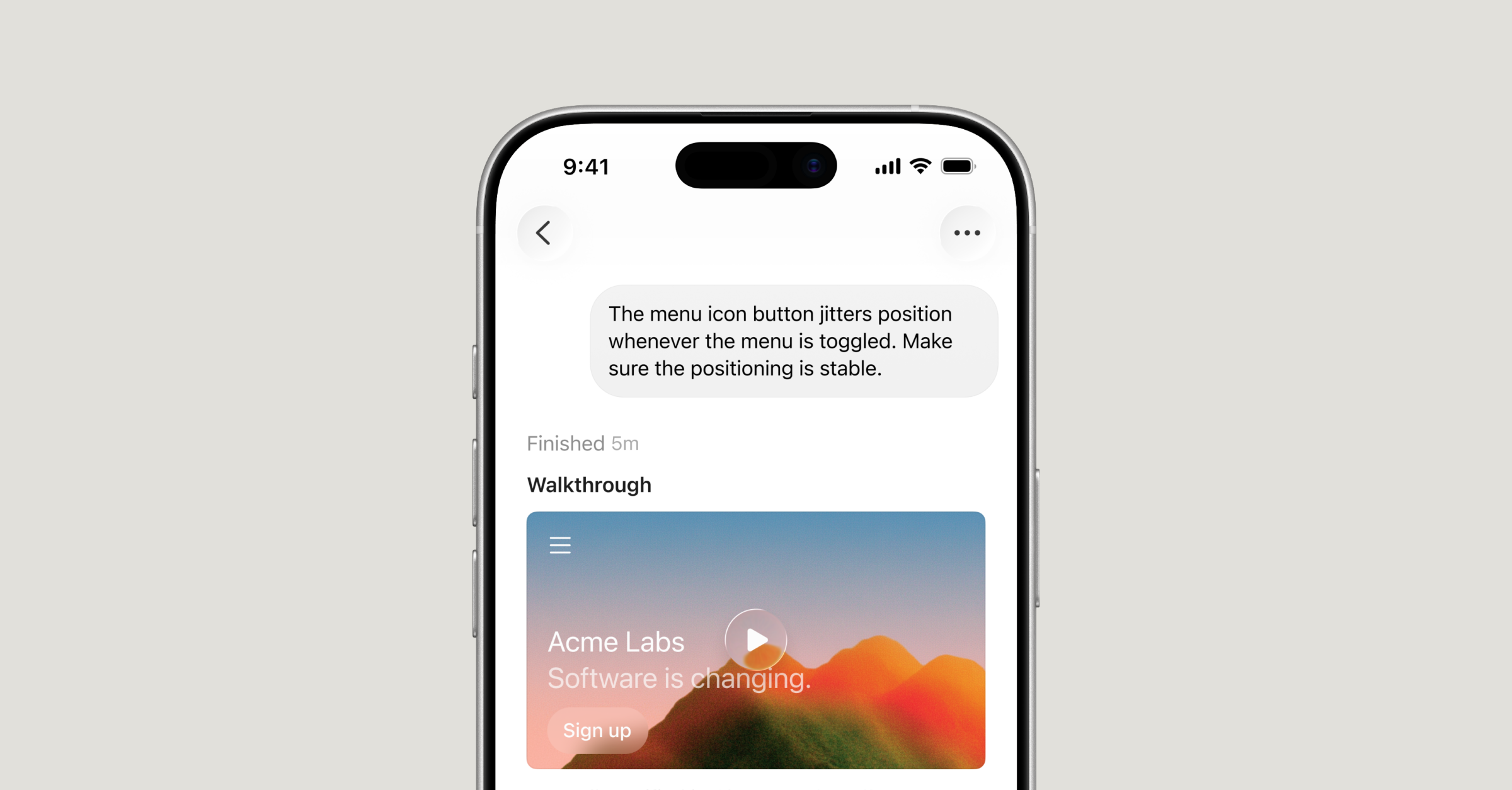
Build from anywhere with Cursor for iOS
Cursor's new native iOS app allows developers to launch and control cloud-based AI coding agents directly from their phones.
Decoder
- Agent: An AI system capable of taking autonomous actions to complete tasks, such as writing code or running tests.
- MCP (Model Context Protocol): An open standard for connecting AI assistants to data sources and tools, such as logs or Slack channels.
Original article
Cursor is now available as a native iOS app in public beta, so you can build from anywhere.
Until now, developers have worked around the limits of their local machines, keeping laptops half-open and caffeinated everywhere they go.
With Cursor for iOS, you can launch always-on agents in the cloud, or control agents running on your computer from your phone. Kick them off when ideas strike, get notified when work is ready for review, and merge PRs on the go.
Whether your agents are running on your machine or in the cloud, you can move work forward from wherever you are.
Launch and track agents from anywhere
Whether you're catching a flight, cooking a meal, or in between sets at the gym, you can now act on moments of inspiration or curiosity.
Open the Cursor mobile app, choose a repo, and launch an agent the same way you would on the desktop app. You can pick any frontier model, describe ideas out loud with voice input, and use slash commands to guide Cursor in the right direction.
For agents running on your computer, use Remote Control to continue directing them from your phone. To ensure your machine remains reachable while you're away from your desk, you can enable a setting that keeps your computer awake.
New ways of working from your phone
At Cursor, we use the mobile app for everything from small, well-scoped tasks to long-running projects. It has enabled new workflows for our team and early testers:
- Handling incidents while on call: When you get paged at lunch, you can kick off an agent to investigate and propose a fix. By the time you get back to your computer, you'll have a PR ready for review.
- Resolving customer issues: If a customer reports a time-sensitive bug while you're away from your desk, you can start an agent from your phone to reproduce the issue, inspect the relevant code, and work toward a fix.
- Acting on feedback from other mobile apps: When you see user feedback on X or other platforms, take a screenshot, annotate it, and send it to an agent as visual context. This is often the fastest way to start design or UI changes.
Stay in the loop
Once an agent starts, you can leave the app. Cursor keeps you updated with Live Activities on your lock screen and push notifications when an agent finishes, needs input, or is ready for review.
Beyond code, cloud agents produce demos, screenshots, and logs that make it easy to validate their work. When an agent is done, you can review these generated artifacts, inspect diffs, leave follow-up instructions, or merge the PR directly from the app.
Handoff between local and cloud
Cloud agents run in isolated virtual machines with full development environments to test, verify, and demo work. Since they operate asynchronously with their own tools and resources, cloud agents can run for longer and iterate toward merge-ready PRs without intervention.
To take advantage of these capabilities, send a local plan to a cloud agent or move active agents to the cloud to keep running. You can move the cloud session back to your computer to test changes locally before merging.
What's next
Over time, the experience of running agents in the cloud will become indistinguishable from running them on your local machine. Until then, we want to make it easy to work with agents across both environments with Remote Control and fluid handoffs between local and cloud.
We are also working on adding the ability to create repo-less chats to make it easier to kick off tasks that don't require codebase context. Teams are already using Cursor today with MCPs to query Datadog logs, summarize activity across Slack channels, and more.
Cursor for iOS is available now in public beta on all paid plans. Get 75% off on Composer 2.5 runs in the mobile app now through July 5, 2026.
RL Beyond the Verifiable
As AI masters verifiable tasks like coding, the industry is struggling to find reliable ways to train models on subjective, 'unverifiable' problems.
Deep dive
- RLVR (RL with Verifiable Rewards): Using clear checkable outputs to train models, which drove recent breakthroughs in math and code.
- Rubrics as rewards: Using LLMs to grade intermediate steps against specific expert-defined checklists.
- Process Reward Models: Moving away from black-box scores to reward individual reasoning steps.
- Verticalization: Companies like Pramaana Labs are formalizing fuzzy domains (like law or tax) to make them programmable and verifiable.
Decoder
- RLHF (Reinforcement Learning from Human Feedback): A training method where models are fine-tuned based on human rankings of their outputs.
- Constitutional AI: An approach championed by Anthropic where AI feedback is guided by explicit principles rather than direct human feedback.
Original article
RL Beyond the Verifiable
RL cracked math and code. The rest of the economy is harder.
Hi friends,
On a podcast with Dwarkesh, Dario Amodei, CEO of Anthropic, said he’s 90% sure we get a “country of geniuses in a data center” within ten years. And when he explains the missing 10%, his biggest uncertainty comes down to one thing, the tasks you can’t verify:
With coding, except for that irreducible uncertainty, I think we’ll be there in one or two years. There’s no way we will not be there in ten years in terms of being able to do end-to-end coding. My one little bit of fundamental uncertainty, even on long timescales, is about tasks that aren’t verifiable: planning a mission to Mars; doing some fundamental scientific discovery like CRISPR; writing a novel. It’s hard to verify those tasks.
That’s what we’ll discuss today. In this piece, I’ll cover:
- Why verifiability is the constraint
- The techniques that are working now
- The companies attacking the problem
I. The verifiability constraint
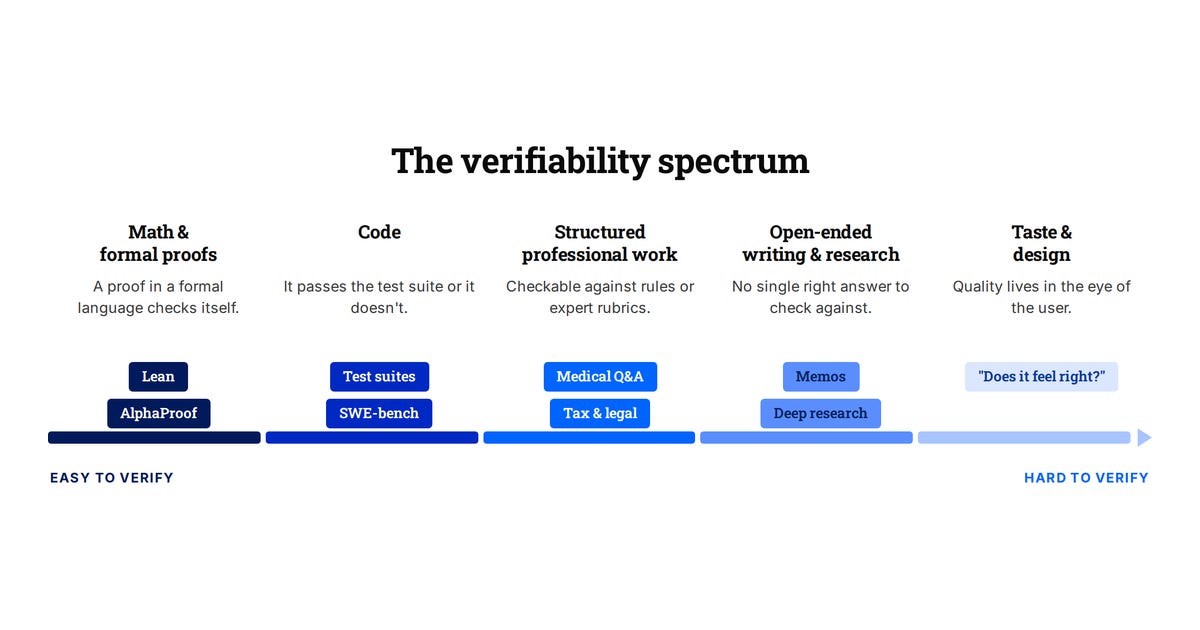
A big reason for the progress over the last year has been RL with verifiable rewards, or RLVR. The idea is simple. Give the model a problem where you can check or verify the answer, let it reason through to a solution, and reinforce the attempts that land on the right one.
Math and code are the perfect fit and we’ve seen the corresponding progress. The reward is clean, cheap, and you can run it millions of times. And the hill-climbing has been real as evidenced by the progress on SWE-bench. In 2025 both OpenAI and Google DeepMind hit gold-medal level at the International Math Olympiad, each scoring 35 out of 42 on problems most strong undergraduates can’t touch.
Jason Wei (then at OpenAI) wrote this up as a “verifier’s law”: the ease of training AI to do a task is roughly proportional to how verifiable the task is. Anything you can check quickly and objectively, you can grind on with RL until it works.
The catch is that most valuable work isn’t necessarily easily verifiable. There’s no test suite for a good memo or a design, let alone for things like building a business, which requires long time horizons and feedback from the real world..
So the whole game in “unverifiable domains” comes down to one question: where does the reward come from when you can’t easily check the answer?
This problem isn’t new. RLHF and Constitutional AI are both, at heart, answers to “what do you do when there’s no checker.”
RLHF trains a separate reward model on human preferences (which of these two answers is better) and then optimizes the model to score well against it. Constitutional AI, which Anthropic uses on every Claude model, swaps much of the human feedback for AI feedback guided by a written set of principles.
These work as forms of alignment but they haven’t produced the capability jumps in subjective domains that RLVR produced in math and code and arguably have optimised for engagement rather than capability improvements. So what are the other ways we can get verifiers or reward signals for subjective domains?
II. The techniques
There are a couple of different approaches being taken to try to verify things that aren’t necessarily easily verifiable:
Rubrics as rewards. Scale AI published a paper about this in mid-2025. For each prompt, you generate an instance-specific rubric, a checklist of what a good answer should do, usually anchored to human experts. An LLM judge scores each attempt against the checklist, and that score becomes the reward.
It works because it breaks the question of validating a difficult to verify answer into many smaller yes/no or scoring based questions. Instead of asking a judge “is this good” and getting back a noisy 1-to-10, you ask “does it mention X, avoid Y, handle Z,” and each of those is close to checkable. Scale reported up to a 31% relative gain on HealthBench, a medical benchmark, over plain judge scoring. Follow-up work like OpenRubrics is now focused on generating these rubrics at scale. This is the approach commonly taken by many of the data providers in domains like legal, healthcare, finance, etc.
Generative reward models. This is similar to the LLM-as-judge approach. Instead of spitting out a black-box number, the reward model reasons first and then scores the answer.
Process reward models. This is an approach to grade each step of the reasoning rather than just the final answer, which can be more critical for longer horizon and harder to verify tasks.
The common thread is that when you can’t programmatically create a checker, you can approximate one checker by creating a bunch of rubrics to compare either the final output or intermediate stages, and use LLMs or similar models to grade against those.
III. Companies Tackling This Area
There are a number of companies taking different approaches to try to enable RL in these harder to verify domains:
1. Sell the verifier and the data to labs. The first set of companies are building programmatic verifiers and RL environments in these domains and selling them to the labs. The usual recipe is expert humans writing rubrics for a task, where each rubric item is concrete enough to be checked programmatically, which turns a fuzzy judgment into something you can score at scale. Mercor, Surge, Micro1 and others are doing, this taking the rubics based approach in areas like healthcare, law and finance. Taste Labs is another explicitly going for more subjective areas like design and “taste” that are hard to verify. They explicitly talk about how RLHF stalls because averaging everyone’s preferences leaves you with no taste at all.
2. Formalize the domain. Another approach is to take areas that are somewhat fuzzy and convert them into something a machine can check outright, then sell the end solution in that vertical. In math this already works: a proof written in a formal language like Lean checks itself, which is why systems like DeepMind’s AlphaProof get rewards with no human in the loop.
Pramaana Labs is pushing that idea into messier, higher-stakes work, using formal verification to make answers in regulated fields like tax, law, and healthcare provable. Every domain you manage to formalize leaves the “unverifiable” column.
3. Own the whole loop. Another set of companies focuses on domains where the answer is difficult to verify but can be, just not on a computer. You can’t check a new material or a drug with a rubric or a proof. You have to run the experiment. So these companies own the full loop themselves, AI proposes, a physical lab tests, and the result becomes the reward.
Periodic Labs, started by ex-OpenAI and DeepMind researchers, is running robotic labs to discover new materials. Isomorphic Labs, the DeepMind drug-discovery spinout, grounds its predictions in wet-lab and ultimately clinical reality. Lila Sciences is building autonomous labs across life and materials science. The idea here is that the verification for these systems takes place in the real world and so can be slow and expensive, but by owning the whole loop, you can ground the reward in physical reality.
Closing Thoughts
RL in verifiable areas is clearly working, but the next big leap will come from approaches and companies that help bring the same advancements to the rest of the economy which is harder to verify. And just how far current RLVR approaches generalize, versus whether a new breakthrough is needed, is one of the big open questions. If you’re building in these areas, I’d love to chat!

RoadmapBench: Evaluating Long-Horizon Agentic Software Development Across Version Upgrades
RoadmapBench highlights that even leading frontier AI models currently fail to resolve most complex, long-horizon software engineering tasks.
Decoder
- Long-horizon task: A development task requiring many steps, coordination across files, and significant time to complete, rather than a simple 'fix'.
Original article
RoadmapBench: Evaluating Long-Horizon Agentic Software Development Across Version Upgrades
Coding agents are increasingly deployed in real software development, where a single version iteration requires months of coordinated work across many files. However, most existing benchmarks focus predominantly on single-issue bug fixes from Python repositories, with coarse pass/fail evaluation outcomes, and thus fail to capture long-horizon, multi-target development at real engineering scale. To address this gap, we present RoadmapBench, a benchmark of 115 long-horizon coding tasks grounded in real open-source version upgrades across 17 repositories and 5 programming languages. Each task places the agent on a source-version code snapshot and provides a multi-target roadmap instruction requiring it to implement the functionality introduced in the target version, with a median modification of 3,700 lines across 51 files. We conduct a systematic evaluation on thirteen frontier models and find that even the strongest, Claude-Opus-4.7, resolves only 39.1% of tasks, while the weakest achieves merely 5.2%, in stark contrast to existing bug-fix benchmarks, suggesting that long-horizon software development remains a largely unsolved problem.
DeepSeek open sources DSpark, a new framework to speed up LLM inference by up to 85%
DeepSeek released DSpark, a framework that accelerates LLM inference by up to 85% by using a 'scout' to predict future tokens.
Decoder
- Inference: The process of running a trained machine learning model to make predictions or generate text.
- Speculative Decoding: A technique where a smaller, faster model generates a draft of potential tokens which the larger, accurate model verifies in parallel, speeding up generation.
Original article
DSpark is a system designed to make large language models answer faster without changing what the underlying model is trying to say. Most AI models write one small chunk of text at a time. DSpark acts as a scout that runs a few steps ahead, guesses the likely path, and lets the larger model quickly check which steps are safe. When guesses are good, the model moves faster, but if they are weak, DSpark tries not to waste time checking them.

DiScoFormer: One transformer for density and score, across distributions
DiScoFormer is a transformer model capable of estimating both data density and probability scores in a single pass without retraining.
Decoder
- Score (mathematics): The gradient of the log-density, indicating the direction that leads to a more probable region in a data distribution.
- Kernel Density Estimation (KDE): A non-parametric way to estimate the probability density function of a random variable.
Original article
DiScoFormer: One transformer for density and score, across distributions
Tech report: arxiv.org/abs/2511.05924
Many problems in machine learning and the sciences come down to the same task: you have a collection of data points and want to recover the distribution they came from—which values are common, and which are rare. Pinning down that distribution means estimating two quantities: the distribution's density and, more useful as dimensionality grows, its score. The density is the smooth version of a histogram—high where points cluster and low where they're scarce. The score—the gradient of the log-density—points in the direction the density rises fastest: move a point along the score and it heads toward a more probable region.
Diffusion-based generative models (the technology behind AI image generators like Stable Diffusion and DALL-E) start from random noise and repeatedly follow the score, turning that noise into a realistic image. The same score drives Bayesian sampling and the particle simulations used to model systems such as plasma.
Extracting the density and score from a finite sample is challenging, and today's tools force a trade-off between generalizability and accuracy. One classical approach, kernel density estimation (KDE), computes the density at any location from the data points around it: the closer and more numerous they are, the higher the density. It needs no training and applies to any distribution, but its accuracy falls off sharply as dimensionality grows. Alternatively, neural score-matching models trained to predict the score stay accurate even in high dimensions, but each needs to learn the distribution and must be retrained from scratch for another.
We introduce a new solution called the DiScoFormer (Density and Score Transformer)—one model that, given a set of data points, estimates both the density and the score of the distribution in a single forward pass without retraining.
Training a transformer for density and score estimation
DiScoFormer maps an entire sample to the density and score of the distribution behind it using stacked layers of transformer blocks. The model utilizes cross-attention, which allows it to evaluate density and score at any point—not just where you have data. Score and density share a mathematical relationship: score is the gradient of the logarithm of density. We leverage this by having a shared backbone with two output heads, one for the density and one for the score.
This coupling does more than save parameters. The score head has to match the gradient of the log-density head at every query, so any gap between them is a label-free consistency loss. We use this at inference—hold the context fixed, take a few gradient steps on that consistency loss, and DiScoFormer adapts itself to an out-of-distribution input on the spot, no ground-truth density or score required.
There's a mathematical reason why the transformer architecture fits this task. Kernel density estimation has a single bandwidth—how far each point's influence reaches, fixed in advance and applied identically everywhere. Attention is a strict generalization of it: we analytically show that a single attention head's weights are nearly a Gaussian kernel over the data, so one cross-attention block can already reproduce KDE's density and score. From there the model goes further, learning several such scales at once and adapting them to the data. DiScoFormer doesn't discard the classical method for a black box but instead includes KDE as a special case and improves on it.
What data did we use to train DiScoFormer? We relied on Gaussian Mixture Models for two primary reasons. Firstly, GMMs are universal density approximators—with enough components they match essentially any smooth distribution to arbitrarily small error. Secondly, GMMs have closed-form densities and scores, so we always have an exact target to supervise against. We employ both of these properties by drawing a new GMM for every batch, giving the model virtually unlimited examples of target distributions and supervising each against a given GMM's exact density and score.
Performance
Across the board, DiScoFormer beats KDE at both density and score estimation, and the gap widens exactly where KDE struggles. In 100 dimensions, it isn't close—against the best hand-tuned KDE, it cuts score error by about 6.5x and density error by more than 37x, and it keeps improving as you add samples, while KDE runs out of memory. It also travels far outside its training data, staying accurate on mixtures with more modes than it ever saw during training and on non-Gaussian shapes like the Laplace and Student-t. KDE's main advantage remains speed, especially when datasets are small.
The part about DiScoFormer that we find most promising is that score estimation is a shared dependency across many fields, such as generative modeling, Bayesian inference, and scientific computing. A pretrained, plug-in estimator that stays accurate in high dimensions and removes the need to retrain per problem could cut that cost across all of them at once—one model, reused everywhere score and density show up.
We encourage you to read our technical report for more details.

Google Cloud will sell specialist AI models built for science
Google Cloud is expanding its marketplace to include 'large quantitative models' from SandboxAQ, designed specifically for scientific simulations rather than just text generation.
Decoder
- Large quantitative model: A specialized AI model trained on scientific numerical data and equations, as opposed to text-based LLMs, to perform rigorous physical or chemical modeling.
Original article
Google is adding SandboxAQ’s ‘large quantitative models’ to its cloud marketplace, pairing Gemini with AI trained on scientific equations and laboratory data.
The large language models that power most of the AI industry are very good at words and surprisingly unreliable at numbers. Google’s latest move is an admission that, for science, a different kind of model is needed.
The company said it will start offering specialist AI models from SandboxAQ through Google Cloud, adding what SandboxAQ calls large quantitative models to the cloud marketplace. The aim is to widen enterprise and research access to AI built for drug discovery, materials science, and semiconductor manufacturing, the announcement said.
The distinction is the whole point. Large language models are trained on text and excel at generating it. Large quantitative models, by SandboxAQ’s description, are trained on numerical data and scientific equations rather than prose, which is meant to make them better suited to problems in chemistry, biology, and physics, fields where the right answer is a number or a structure, not a fluent paragraph.
On Google Cloud, researchers will be able to combine these with Gemini, using the language model for reasoning and interface and the quantitative model for the underlying science.
Google paired the marketplace move with Gemini for Science, a bundle of tools and experiments aimed at the research workflow itself. It draws on projects the company has been building for a while, including its AI co-scientist, the AlphaEvolve coding agent, an empirical research assistant, and NotebookLM, and is pitched as a way to speed up the routine, laborious steps of the scientific method rather than to replace the scientist.
That framing is consistent with where Google has put its scientific weight. DeepMind’s protein-structure work has already reshaped parts of drug development, and a separate effort produced an AI that found more new materials in a year than science had catalogued in its entire history. The common thread is that the highest-value AI in the sciences tends to be narrow and trained on real measurements, not general and trained on the internet.
The commercial logic is straightforward. Google is competing with the other hyperscalers to be the default place enterprises run AI, and scientific and industrial R&D is a high-value segment that general chatbots do not serve well.
Selling specialist models through the marketplace, the same channel through which it already offers a wide catalogue of third-party systems, lets Google capture that demand without having to build every domain model itself.
It also fits a broader scramble to turn AI into actual laboratory results. DeepMind’s own drug-discovery spinoff Isomorphic Labs is moving toward trials, and rivals across the industry are racing to convert algorithmic promise into treatments and materials that work outside a benchmark. Putting quantitative models in front of enterprise researchers is Google’s bid to be the infrastructure underneath that race.
Google said the capabilities are already in use by partners in private preview for real-world R&D, though it has been sparing with specifics on which organisations and what results.
The marketplace listing is the substantive change: a category of AI that was largely confined to specialist labs becomes something a research team can rent. Whether it produces discoveries or simply faster spreadsheets is the question the private previews are meant to answer.

Build a document processing workflow in 30 minutes
Mistral AI launched Mistral Workflows to handle durable, fault-tolerant orchestration for complex, multi-agent AI pipelines.
Deep dive
- Provides durable execution for long-running AI tasks.
- Includes native support for multi-agent orchestration.
- Designed to handle fault tolerance in distributed environments.
- Simplifies the monitoring of multi-step AI pipelines.
- Aims to reduce infrastructure management overhead for AI developers.
Decoder
- Orchestration: The automated arrangement, coordination, and management of complex computer systems, services, and middleware.
- Durable execution: A computing model where the state of a function or process is periodically saved, allowing it to resume automatically from where it left off after a system failure or interruption.
Original article
Build a document processing workflow in 30 minutes
Workflows is an orchestration platform for building, executing, and monitoring complex AI-driven workflows. It provides durable, fault-tolerant workflow execution backed by battle-tested distributed...
Rocket Lab Buys Satellite Operator Iridium in Bid to Challenge SpaceX
Rocket Lab is acquiring satellite operator Iridium to build a competitive constellation against SpaceX's Starlink.
Original article
Rocket Lab is purchasing Iridium Communications to compete with SpaceX's satellite offerings. The deal will give Rocket Lab control over a satellite fleet and access to wireless resources. Iridium currently operates 66 satellites in low-Earth orbit. It has valuable spectrum rights to connect handsets and other devices to satellites. Rocket Lab plans to develop an upgraded fleet of satellites that will replace Iridium's current constellation.

From Brain Waves to Words: Brain2Qwerty Offers a New Path to Communication Without Surgery
Meta’s Brain2Qwerty v2 achieves 61% word accuracy in real-time sentence decoding from non-invasive brain recordings.
Deep dive
- Uses end-to-end deep learning instead of manual neural event detection.
- Trained on 10 hours of data from nine participants using MEG.
- Incorporates large language models to provide semantic context to noisy brain data.
- Achieved 61% accuracy, with top participants reaching 78%.
- Scaling data volume correlates with improved accuracy, suggesting further gains are possible.
Decoder
- MEG (Magnetoencephalography): A non-invasive imaging technique used to map brain activity by recording magnetic fields produced by electrical currents in the brain.
- End-to-end deep learning: An architecture where a single model learns to process raw inputs into outputs without relying on intermediate, hand-crafted feature extraction layers.
Original article
From Brain Waves to Words: Brain2Qwerty Offers a New Path to Communication Without Surgery
Last year, we introduced Brain2Qwerty v1, research that uses AI to decode brain activity into text without any surgical implant. Now we're sharing the next step: Brain2Qwerty v2, the highest-performing end-to-end pipeline capable of real-time sentence decoding from non-invasive brain recordings, approaching levels of accuracy previously exclusive to techniques that require brain surgery.
To help accelerate neuroscience breakthroughs, we're releasing the full training code for Brain2Qwerty v1 and v2, and our partner, the Basque Center on Cognition, Brain, and Language (BCBL), is releasing the v1 dataset. We believe this research has the potential to make a real difference for the millions of people who suffer from brain lesions that prevent them from communicating. Invasive procedures like stereotactic electroencephalography and electrocorticography have shown that a neuroprosthesis feeding signals to an AI decoder can restore communication, but they're difficult to scale. Our noninvasive approach can help bridge that gap.
We trained Brain2Qwerty v2 on approximately 22,000 sentences from nine volunteer participants, each recorded for 10 hours wearing a magnetoencephalography (MEG) device while actively typing. Instead of relying on hand-crafted pipelines to detect neural events, we use end-to-end deep learning to decode directly from raw brain signals.
Fine-tuning large language models on neural data allows the system to leverage semantic context, bridging the gap between noisy brain recordings and coherent language. We also deployed AI agents to explore optimizations for the decoding pipeline, with final training configurations selected manually by engineers.
The result: Brain2Qwerty v2 recovers sentences coherently from noisy neural inputs, achieving a word accuracy rate of 61%, significantly improving upon the 8% word accuracy from other non-invasive methods. And for our best participant, we achieve a 78% word accuracy, where more than half of all sentences are decoded with one word error or less.
We also find that decoding accuracy improves log-linearly with data volume, suggesting that the remaining performance gap with surgical approaches could be further narrowed through data scaling alone. This work contributes to our efforts to build open foundational models of the brain, with our Tribev2 model for perception encoding, NeuralSet to process brain data at scale, and NeuralBench to systematically evaluate models. We do this in close collaboration with the community, through our recent $5 million fund to stimulate open datasets in our Digital Brain Project. Our hope is that this work, done in the open, advances neuroscience to identify, diagnose, and treat neurological disorders faster than in siloes.
“It's Hard to Eval” Is a Product Smell
Difficulty in evaluating AI outputs is a design failure, not just a technical challenge.
Deep dive
- Viewing evaluation as a post-hoc technical hurdle is a mistake.
- Products must make verification part of the workflow.
- Provide provenance: show where data came from and the assumptions made.
- Use progressive disclosure: hide complex steps by default but allow users to drill down.
- Design for 'sensemaking' by allowing users to check intermediate logic (e.g., SQL queries, source citations).
- Treat AI-generated content as a starting point for review rather than a final conclusion.
Decoder
- Eval: Short for evaluation; a set of automated tests used to measure the quality, accuracy, or safety of an AI model's responses.
- Provenance: A record of the origin, history, and derivation of data or an AI-generated output.
- Sensemaking: The cognitive process of building a structured understanding of complex information through iterative exploration and validation.
Original article
For the past 3 years, AI evals have been my professional focus. The most common objection I hear to evals is “our product is hard to eval”.
This objection is a product smell. Artifacts that are hard for you to verify are often hard for users too. In the worst case, users have to redo the work from scratch to verify the output. More importantly, designing your product for ease of verification should come before building evals.
In this post, I’ll walk through three products I advised on that faced this issue. I’ll also show before and after sketches to demonstrate design principles. After these examples, I’ll discuss how to apply this general pattern to your product.
Example 1: the AI data agent
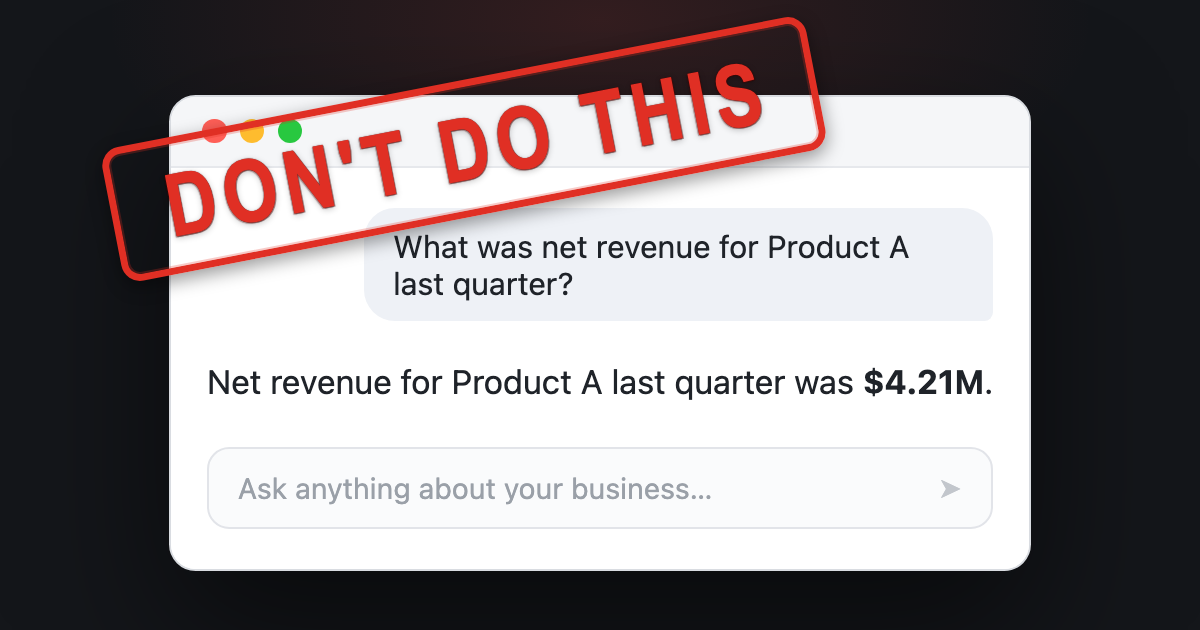
Almost every company I’ve worked with builds an internal AI data agent. You ask it a business question, like what was net revenue for Product A last quarter, and it finds relevant data sources, runs the queries, and provides an answer. The goal of this agent is to reduce dependency on data analysts.
A common mistake when building AI data agents is to make the answer the only output, as illustrated below.
Since the only output is the answer, there is nothing here to check. In the sketch above, the user has no way to verify the answer beyond redoing work. A better design is to provide the user with checkable artifacts, informed by how a domain expert might validate the output. Here are techniques I use to validate metrics as a data scientist:
- Compare the quantity and any intermediate calculations against a trusted source, like a vetted dashboard or report, or a similar analysis a colleague has already vetted.
- Confirm the metric definition precisely. A number like net revenue can include or exclude things like returns and discounts.
- Sanity-check a related quantity. If I can’t verify the number directly, I pull a related number that should move with it, like units sold or unique customers, and check if the combination is plausible.
- Look at what is beneath the aggregate. A total can hide problems, so I break it down by dimensions like region or time period and sanity-check the distribution.
- Read the query. For an important number I look at the SQL to confirm it does what I think, and I tweak it and rerun to test my assumptions.
- Note anything I could not verify. If a step has no trusted reference to check it against, I flag it instead of presenting it as settled.
Here’s what a better interface might look like. The agent surfaces the important details behind the answer. The chat reply surfaces the details worth seeing up front, and the notebook holds the full analysis behind the answer.
This is the notebook the agent worked in while producing its answer. The notebook reads top to bottom: the assumptions the agent made, the queries it ran, and an explicit list of what it could not verify.
There is a lot to unpack here. Here are notable changes:
- The agent optionally performs retrieval from vetted analyses, and the interface shows which one was used along with who authored it.
- There is progressive disclosure of details. The chat reply shows high value items like sources, assumptions, and issues. The user can optionally open an interactive notebook to see the full context.
- The AI-generated notebook is organized to promote verification: it opens with the assumptions the agent made, then shows the queries it ran and the numbers they returned. It breaks the total down so you can sanity-check the distribution, and it closes with a list of what it could not verify, each item left as a cell you can run.
- The AI agent is also available in the notebook to help with follow-ups. Finally, the user can publish the notebook back to a knowledge base, where it can be retrieved by future analyses, creating a virtuous cycle.
This design sketch is far from perfect. The point is that the product should help the user verify the answer as a domain expert would. Compare it to the earlier approach, where the only output was the number.
But what does this have to do with evals? If you design your product for verification, annotation becomes less expensive and evals will have better signals to draw from. More importantly, you’ll provide your users with a better product.
Example 2: the PE curriculum builder
A founder I advised was building an AI tool that writes physical education lesson plans for K-12 teachers. A teacher enters their constraints, like the grade they teach, how long the class is, whether it meets indoors or outdoors, and what equipment they have. The tool then writes a lesson plan for those constraints. The goal is to save teachers the time they spend planning and give them a plan that fits their class.
The founder asked me how to eval the lesson plans. I turned the question around: what does a teacher care about?
The fastest way to trust a plan is to see that a teacher like them already uses it. Additionally, teachers value visibility into what others are doing so they can learn new approaches. Therefore, a better design might start from vetted lesson plans that are actively used in schools. When the tool generates a plan, it shows which vetted plan it started from, who uses that plan, and a diff of what it changed for this teacher’s constraints.
Next, the teacher can check a small set of changes against a plan they already trust, instead of judging a whole plan from scratch. In this version, most of the plan is inherited from a vetted plan. The teacher’s review is scoped to a few edits, each with a reason explaining why the change was made. This is a more efficient way to review a plan because it reduces the cognitive load of judging a whole plan from scratch.
Designing for this makes the product simpler to build. Instead of stuffing hundreds of examples into a prompt, the tool captures important dimensions, retrieves a close match, and adapts it. Automated evals now become tractable because there is less surface area to test. For example, you can verify that the plan retrieval picked a sensible anchor, and each edit honors the constraints.
Example 3: the workers-comp medical report
The last example comes from a workers’ compensation tool a founder asked me to help with. It reads a patient’s chart (intake forms, imaging reports, therapy notes, prior exams) and generates a long expert opinion report, often fifty pages or more. The only output is a fifty-page narrative. To trust it, the doctor has to re-read the whole chart and check every claim, which can take as long as writing the report from scratch.
The problem is the same as the other examples, but the stakes are higher. The only output is the report, and the doctor is the one accountable for it. To trust it they have to go back through the chart and confirm the facts and inferences themselves. That can take as long as writing the report from scratch, which defeats the point of the tool.
You might object that a fifty-page opinion is hard to verify. That is true, and the product should not pretend otherwise. Helping a doctor understand the evidence is arguably more valuable than the finished document. Therefore, I advised the founder to make the product work like a research assistant instead of a report generator.
For example, the product could read every record and pull out relevant facts, with a link back to the page so the doctor can check each one. Where two exams disagree, or the chart leaves a question open, the product should surface that. The doctor can then resolve any contradictions and fill in the gaps. Finally, the product can assemble the final report from what they have already checked. The research assistant version of this product allows the doctor to build trust by verifying facts as they go. Similar to the other examples, this design is easier to build and evaluate. Now there are scoped units to grade, such as whether a contradiction is real or whether a citation supports a claim.
Generalizing the pattern
It is important to understand how users verify your product’s AI artifacts. Sometimes, this may require assembling supporting evidence. In other cases, it could mean refactoring the entire workflow so that the user is in the loop (like the workers’ comp example).
Below are questions that can guide your product’s design for verification:
- What does the user actually need to check?
- What trusted thing can they compare it against?
- Are there signals or heuristics that experts use to aid in verification?
- What smaller units can they accept, edit, or reject?
A common thread across these examples is provenance. The fastest way to make an output checkable is to show where each part came from, with links to see more detail. Additionally, you can use progressive disclosure so these sources don’t overwhelm the user.
What needs verifying also changes as the user’s trust grows. Early on, the data agent should make provenance obvious, like where a metric definition came from. Once the user trusts the agent gets it right, that detail can collapse by default in the card. Good design meets users where they are instead of showing everything.
None of this is new
Evals thinking is aligned with good product design. Gathering supporting data and breaking down workflows into smaller units makes automated grading easier. However, I don’t want to pretend like any wisdom here is new.
All of these ideas stem from well-established design principles. For example, watching an expert work to learn what they check before you build is called needfinding. In research-heavy work like the medical case, there is a design goal called sensemaking, which is the work of building a structured understanding of a body of evidence you can reason over. There are many other concepts, but I think you get the idea.
Even though these ideas are well established, a reminder is due in the age of AI. Before AI, verification often happened incidentally during the process of creating work product. With AI, verification is the bottleneck. It is time to think about it more explicitly.

The Economy of Tokens
Stable interfaces in the AI ecosystem are enabling a modular architecture that mirrors historical hardware and software industry shifts.
Decoder
- Modular architecture: A design approach where a system is subdivided into smaller, independent parts that can be developed and upgraded separately.
Original article
The Economy of Tokens
Carliss Baldwin and Kim Clark argued that the most important economic event in technology industries is often not the invention of a new product, but the creation of a modular architecture with stable...
Qwen 3.6 27B is the sweet spot for local development
The Qwen 3.6 27B model offers high-performance local coding and reasoning capabilities that rival frontier model APIs on high-end hardware.
Deep dive
- Qwen 3.6 27B (dense) vs 35B A3B (MoE) comparison shows 27B offers higher quality reasoning despite lower raw speed.
- Use llama.cpp over Ollama for better control, performance, and transparency in model deployment.
- Quantization (e.g., 8-bit Q8_0) balances memory constraints with output accuracy, fitting into 48GB of unified memory.
- Multi-token prediction (MTP) significantly boosts throughput by allowing the model to predict multiple tokens in a single forward pass.
- Local models are effectively replacing cloud-based APIs for sensitive projects and offline development, provided the user has sufficient GPU or unified memory.
Decoder
- Quantization: The process of reducing the precision of a model's weights (e.g., from 16-bit to 8-bit) to reduce memory footprint and increase inference speed with minimal quality loss.
- Mixture-of-Experts (MoE): A model architecture where only a subset of network parameters (experts) is activated for each input token, increasing capacity without a proportional increase in compute cost.
- Multi-token Prediction (MTP): A technique where the model predicts several future tokens simultaneously, improving generation speed by reducing the number of sequential forward passes.
- GGUF: A binary format designed for efficient loading and inference of LLMs on CPU and GPU, commonly associated with the llama.cpp ecosystem.
Original article
Qwen 3.6 27B is the sweet spot for local development
I’ve been disappointed by local models in the past. But then I checked Qwen 3.6, and I was in awe. For me it’s the first local model that actually makes sense as a general intelligence.
It comes in two variants, a mixture-of-experts model Qwen 3.6 35B A3B, and a dense Qwen 3.6 27B - slower, but more powerful. The one I recommend!
Let me share my impressions, and show that you can run it too.
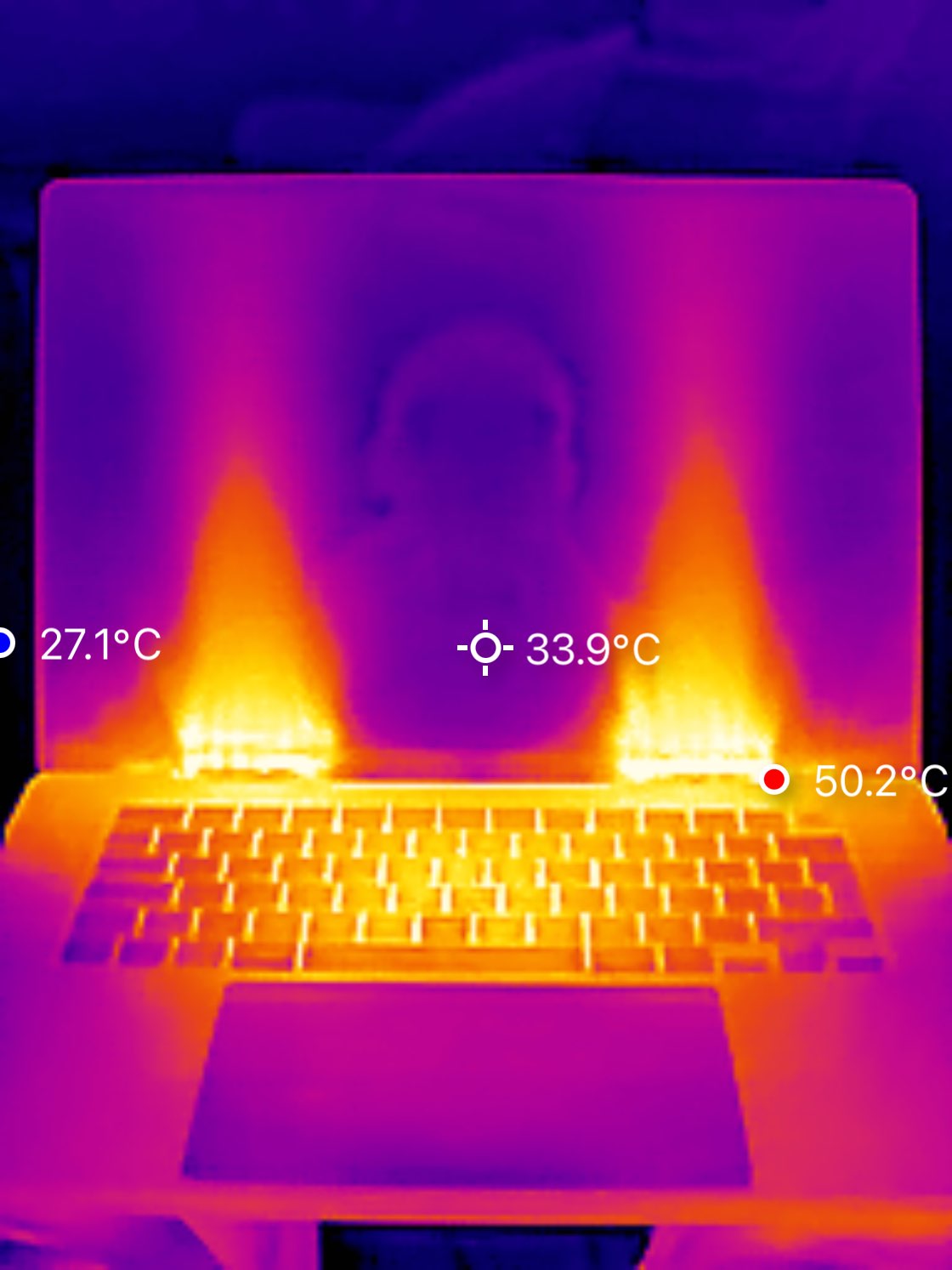
It’s hot, literally. When my knees started to melt, I grabbed a phone-attached thermal camera and took a photo.
Qwen 3.6, rightfully, got a lot of coverage on Hacker News. The most common statement about Qwen 3.6 27B is that it punches above its weight - see Will it Mythos?. And I think it is a well-deserved sentiment. It will make your computer hot, but it’s worth it!
Testing the waters
Simon Willison uses “penguins on a bicycle” as a smoke test (see for Qwen 3.6 35B A3B and then Qwen 3.6 27B). I usually go with constrained writing.
A year ago these kinds of things were state of the art, needing a unique, and insanely expensive GPT-4.5, see vibe translating Quantum Flytrap.
I also asked it to write an 8 line poem about Zouk dance and quantum physics, see the transcript. The thought process made sense, both in terms of deliberation on quantum terms, and rhymes.
Then I asked in OpenCode to create a hexagonal minesweeper using pnpm. It worked:
It worked on the first go, from a single prompt, with a proper Node package. The mixture-of-experts Qwen 3.6 35B A3B was faster… but ignored my instruction to create a package, and did it in a single index.html.
Real work
Sure, creative writing about quantum mechanics, or yet another clone of a minesweeper, is rarely a day job. But Qwen 3.6 27B is decent at regular tasks as well.
Prompt by a friend, Maciej Cielecki, at AI Tinkerers Warsaw.
It worked for a few minutes and created this:
A landing page by Qwen 3.6 27B — view the live page.
By standards of current frontier models, it’s unremarkable. But it is already a practical job. It worked, was reactive, defaults were nice - all from a single, short prompt.
Running Qwen 3.6 locally with llama.cpp
Running local models is easier than ever. A few CLI lines and you’re off.
I recommend llama.cpp - a direct, open source tool that allows running models on various devices. You don’t need Ollama, and frankly - I would recommend against using that on ethical grounds.
First, we go to Hugging Face, to get proper quantization, i.e. a model with reduced size - popular ones are by unsloth or bartowski, among others. Default models usually come with BF16 precision. A common 8-bit quantization saves half the space at almost no cost to quality. Going further down the road, models are smaller (and potentially - faster), but at the cost of quality, see this comparison for 27B and another one for 35B A3B.
We grab unsloth/Qwen3.6-27B-MTP-GGUF:Q8_0, an 8-bit quantization with support for multi-token prediction (MTP).
llama-server -hf unsloth/Qwen3.6-27B-MTP-GGUF:Q8_0 \
    --spec-type draft-mtp -ngl 999 -fa on -c 65536 --port 8080
What it does:
-hf unsloth/Qwen3.6-27B-MTP-GGUF:Q8_0grabs from Hugging Face, on the next runs will reuse that-m ~/models/Qwen3.6-27B-Q8_0.ggufuse instead if you already have itdraft-mtpwe use a fast model to predict subsequent tokens, speeds up things-ngl 999for putting all layers to GPU-fa onflash attention is on-c 65536context size set to 64k tokens (this we can tweak, as Qwen 3.6 27B native context is 256k)--port 8080better to pin port, as it will be used by other configs
If you open http://127.0.0.1:8080, you can directly chat with it.
Precisely the same server can be used for vibe coding. Choice of agent depends both on one’s goal and subjective taste - for an all-around OpenCode, minimalistic Pi, and self-improving Hermes.
For OpenCode, it is as simple as adding to ~/.config/opencode/opencode.jsonc:
{
  "$schema": "https://opencode.ai/config.json",
  "provider": {
    "llama": {
      "name": "llama.cpp (local)",
      "npm": "@ai-sdk/openai-compatible",
      "options": {
        "baseURL": "http://127.0.0.1:8080/v1",
        "apiKey": "local"
      },
      "models": {
        "qwen3.6-27b": { "name": "Qwen3.6-27B Q8 +MTP" }
      }
    }
  },
  "model": "llama/qwen3.6-27b"
}
If you just want to chat and are a big fan of Terminal, instead of llama-server use llama-cli:
llama-cli -hf unsloth/Qwen3.6-27B-MTP-GGUF:Q8_0 \
    -ngl 999 -fa on -c 65536
Measuring performance
Is it fast enough?
I ran a few tests (source is here) on my Macbook Max M5 128 GB, running it with and without multi-token prediction, and comparing both with the 35B A3B model, and also a quantized DeepSeek V4 Flash version DwarfStar4.
30 tokens per second is not bad, well within typical frontier model API range. While mlx-lm is precisely targeted at Apple Silicon devices, and AI agents heavily recommend it, llama.cpp turned out to be faster. It was using 95% of GPU, which means it is efficiently using available resources.
Macbook Max M5 is a beast (at least for a laptop), but on other devices it should also work decently. As you can see, both Qwen 3.6 variants run within 48 GB of Apple Silicon’s shared RAM. A 4-bit quantization are less than 18 GB and should run on 32 GB device. On consumer Nvidia RTX cards, you need to quantize aggressively, but inference runs even faster.
I set this up today on my 5090 at Q6_K quantization and Q4_0 KV, got 50 tokens/s consistently at 123k context, using ~28/32gb vram through LM Studio. - gfosco on the Hacker News
While 35B A3B is 3x faster, I prefer 27B. I’d rather generate a third as much code, but of higher quality.
How do they relate to previous state of the art models?
Manual inspection is great, but benchmarks help with grounding intuitions. Here is the score from Artificial Analysis, comparing it with frontier models:
A few more benchmarks are in these notes, but the spirit is similar. Added here Gemma 4 31B, as a lot of people use this as the default for local coding. But both benchmarks and general sentiment online favour Qwen 3.6 27B by a large margin.
Here there is a caveat - 8-bit quantization of Qwen 3.6 likely does not affect results much, but DwarfStar4 uses much more aggressive ones for DeepSeek V4 Flash, 2-4 bit. For sure it is worse than the full model. My personal impression is that within these quantizations Qwen 3.6 27B is as good as (or maybe slightly better than) DwarfStar4. Though, I won’t be surprised if for longer context projects DS4 has an edge.
What’s next
I think we are entering a fascinating era, when it becomes feasible to run one’s own models.
The change will be propelled further by the state of proprietary frontier models. Claude Fable 5 was taken down. Other frontier models run at a massive subsidy, where paying $100 a month gives us thousands worth in tokens. Let’s use the discount while it lasts!
A locally set model can be fine-tuned to our needs, and cannot be taken away. Businesses can use them for proprietary and sensitive data. We can use them personally for offline projects, or when we don’t feel comfortable sharing our deepest secrets, or medical data, with the US or China.
With the release of frontier-level open-weight GLM 5.2, there is a new era. While Qwen 3.6 was the stepping stone, even frontier GLM 5.2 can be run locally. It won’t run on your Macbook or a single RTX 5090. But still, it is manageable with a company budget.
Moreover, I strongly believe that we will have models smarter than current state of the art, while runnable on local devices, maybe even smartphones. Current models combine both raw intelligence and factual knowledge in the same weights. Future models will likely separate that, offloading a lot of knowledge to tool calling.
You might not need… a service worker
Service workers are often overkill for modern web apps, with native HTTP caching and server-side solutions proving more robust for most production use cases.
Deep dive
- Standard HTTP headers (max-age, immutable) effectively handle most asset caching requirements without client-side interception.
- Skew protection—ensuring users don't hit 404s during deploys—can be managed by keeping older asset versions in storage buckets instead of relying on client-side caching.
- Service workers introduce significant risk, such as 'poisoned' caches that require manual user intervention to clear.
- Push notifications and offline-mode persist as the only valid, non-negotiable use cases for service workers.
- Server-side manifest rewriting is more robust than client-side approaches for complex features like video player stitching.
Decoder
- Service Worker: A script that runs in the background of a web browser, separate from the main page, allowing for network request interception, caching, and push notifications.
- Cache-Control: HTTP headers that specify how long and in what manner browser or proxy caches should store resources.
- Content Hashing: Adding a unique identifier (hash) to filenames based on file content, allowing browsers to safely cache files indefinitely until the content changes.
Original article
Neciu recently broke down some interesting use cases for service workers. I definitely felt ‘seen’ by this:
The two people in my survey who “tried one in 2019 and removed it” both told the same story with different details: a service worker with a bad cache strategy served a stale app to users, and the fix required shipping a killswitch worker and waiting days for clients to pick it up, because the broken worker controlled when updates were checked.
Back when service workers launched, I was an early adopter, and quickly foot-gunned myself in a similar scenario.
Let’s break down a few examples from the post (if you haven’t read it, please do so first!).
Use cases in the wild
Slack’s instant boot
The most compelling example in the post is Slack’s: caching the full asset set and rehydrating Redux state so that the UI can render before a single network request resolves.
The asset bit feels a touch overblown, though:
They observed that almost nothing in that asset set changes between boots.
The user who opens Slack on Tuesday morning downloads the same JavaScript they downloaded Monday morning.
An HTTP cache should be enough to alleviate this, and is far simpler. For unchanged assets, content hashing plus Cache-Control: public, max-age=31536000, immutable means they should get served directly from the cache.
What it won’t do is provide a network-free boot: you’d still need to fetch the HTML and any prerequisite data. I’d argue that this is more of a question of ‘do I need offline support?’ For Slack, sure, but for many apps, probably not.
If all you’re looking to do is avoid repeated downloads of the same assets, just hash them and leverage the native caching.
Keeping dead chunks alive across deploys
This is an interesting one. Some vendors, like Vercel, have ‘skew protection’, but most of us have run into this in the past: an old bundle on the client results in a 404 when the referenced asset no longer exists.
The more you ship, the more frequently this becomes a problem (if you practice true CI, you might be shipping hundreds of times a day).
Neciu’s solution here is to use a service worker to cache the app locally. However, this implies caching everything in the background:
{
  "version": "2026.06.04-1412",
  // Where does this end?
  "assets": ["/assets/index-c91d44.js", "/assets/Settings-c91d44.js"]
}
In my mind, this defeats the point of route/code splitting. Sure, you get a faster initial render, but it means every invalidation forces the client to refetch the entire app. For most apps I’ve worked on, this would result in a huge, mostly wasted payload. We can’t predict what components/pages the user will visit with any certainty, so in theory we’d need to pull down the contents of the entire manifest.
What if, instead, we just kept static assets around (for a grace period)? Instead of outright deleting them, let them live on in a bucket. With content-hashed filenames, a deploy never overwrites anything: Settings-a3f8b2.js and Settings-c91d44.js can coexist.
Since the service worker doesn’t run indefinitely in the background, the core refetching logic has to live in the main app anyway:
The page drives the polling instead, posting
CHECK_VERSIONon an interval and onvisibilitychange, so a tab that comes back from a weekend in the background checks immediately.
So this doesn’t need a service worker, either.
Mux’s manifest rewriting
This is neat, but feels like it shouldn’t live on the client. The bug mentioned in the article is actually a symptom of the logic living client-side:
A video player starts fetching the moment it mounts, before a same-page worker can take control, so they had to register the worker on an index page and link onward to the player page.
Instead, move the rewrite server-side, where it’s more robust and easier to test. Only the manifest (a text file) needs rewriting, so there’s no concern about pulling a massive video through additional layers of infrastructure.
It’s even called out in the article:
…because edge runtimes like Cloudflare Workers implement the same fetch event API, they deployed the stitching worker to Cloudflare unchanged and got a working URL.
Partytown
A good example, although worth noting that the service-worker version is actually the fallback:
Partytown will use Atomics and SharedArrayBuffer when they’re available by the browser.
SharedArrayBuffer unfortunately only works under cross-origin isolation, and those headers tend to break third-party embeds. So in practice the service worker fallback gets used more than you’d expect, but it’s still more of an escape hatch.
Mock Service Worker
This depends on what you’re building, but with the move to server-driven rendering strategies and data loading, you’re probably using setupServer instead (which patches Node internals).
Only traditional SPAs will end up with a literal service worker, despite the library’s name.
So do you need a service worker?
There are a lot of cool things you can do with a service worker. There are also a few things only a service worker can do: offline support, push notifications, and background sync have no real alternative.
But outside of those, I’ve yet to run into a problem where a service worker was truly the best solution.
Have a great example? Let me know. I’ve been looking for a good excuse to revisit them.

What Does Figma Do Next?
Figma faces an existential pivot: remain a canvas-centric collaboration tool or evolve into a lens for a world where code and runtime are the truth.
Deep dive
- Figma won by changing the coordination model of design, not by better drawing tools.
- The current value of the canvas is as an abstraction during the gap between intent and implementation.
- AI is collapsing that gap, making static design files peripheral.
- Figma's 'bring everything to the canvas' strategy may be an incumbent trap.
- The next era of product work will likely be an IDE-centric, spatial collaboration environment.
- Design systems must evolve into executable intelligence for AI to function correctly.
Decoder
- Innovator's Dilemma: The phenomenon where successful companies struggle to adopt new technologies or business models because they fear cannibalizing their existing, successful business.
Original article
What does Figma do next?
Figma solved the problem of making design multiplayer. It might still be solving that problem when the problem has changed.
Figma has a deep collection of useful features.
It also seems to have a problem: a strategic imagination still bound to the canvas.
I realize that’s a challenging thing to say about perhaps the most important product tool of the past decade. This is not a “Figma is dead” article.
Figma changed how digital product teams work. It made design a genuinely multiplayer activity. It made a design file a shared space. Collaboration, critique, exploration, and handoff in a browser-based canvas everyone could see.
Sketch looked comfortable before Figma came along. Users and workflows and plugins, and enterprise legitimacy. A whole ecosystem. InVision for prototypes, Zeplin to support handoff. Abstract for version control.
Then Figma came in like the Kool-Aid Man and made Sketch look obsolete almost overnight.
It wasn’t anything to do with Sketch’s design features. It could still draw a rectangle!
But Figma changed the whole basis of where the two products were competing. Not the design tool with the best interface, but making design collaborative.
I’ve never seen another product that created as much practitioner pressure for change as the internal demand at IBM to switch from Sketch to Figma. It overcame corporate inertia faster than I’d have imagined.
Figma just had better answers. Staying on Sketch meant being left behind.
Figma solved the coordination problem of its moment. Its risk is in continuing to solve the problem after the problem has changed.
There is a historical parallel. But it’s not as glib as “Figma is the new Sketch”. That’s too neat. Figma is clearly larger, more deeply embedded, and has a degree of strategic awareness.
But incumbents don’t usually look like they’re sleeping. Especially from the inside.
Figma is shipping a lot of stuff. And they’re telling a coherent story about the future that runs through them.
Are they building that future, or just extending the conditions that made them dominant before?
The center of gravity is moving from canvas to code.
That means from abstraction to execution. From static artifacts to live systems. And from design files to context that AI interprets and generates from.
Designers will still need visual tools. And teams will need shared spaces for critique and exploration.
But what does Figma do when the canvas is not the center of gravity?
How Figma won in the first place
Figma’s first great achievement was technical. They made the browser matter far more for design than anyone thought possible. Cross-platform access mattered. Performance mattered. Multiplayer mattered.
The product was excellent, and execution counts.
But the deeper shift was cultural.
Before Figma, collaboration was fragmented. It needed local files, redlines, PDFs, and those meetings where everyone asked “is this the right version?” Figma collapsed all that distance.
Figma wasn’t merely a better canvas. Figma was a better coordination model.
It made work around the design abstraction collaborative. Which was a huge step forward.
But an abstraction is still an abstraction.
The canvas is not the product. It’s a representation. The real product is in code.
The canvas was vital for helping us think before the reality of implementation got too expensive.
But it depends on a world where there’s a big gap between visual intent and working software. That’s where the abstraction lives.
AI is collapsing that distance.
The canvas answers a translation problem
The canvas makes sense.
Designers express intent. Engineers translate the intent into code. Product managers mediate priority and scope.
We use the thing we imagined to help us ship the thing that’s real.
And that model isn’t going to be going away any time soon. Many organizations will likely work this way for years to come, if they can get away with it.
But the direction of travel has changed.
Design-to-code is faster. Which is great. But it’s just collapsing the way we already work. Handoff, but faster. Translation, but faster.
What’s genuinely different is how structured design and product context, component code, and rules can be interpreted directly into coded, working interfaces. A prompt no longer has to start from nothing if it has access to the design system, APIs, patterns and engineering constraints.
And design becomes that context. A context for AI execution systems to use.
Teams are still going to need visual comparison and critique. They’ll need shared spaces to make business calls. The terminal window or an IDE is not a place for a lot of stakeholders to participate.
That doesn’t make the canvas central.
Bring it back to the canvas
When I look at Figma’s recent moves, they make sense. They build on its current strength.
More work should happen in Figma. More artifacts should come from Figma. Workflows should come back into Figma. More of the product development should be in the Figma ecosystem.
Reduced to its simplest form, the strategy seems to be:
Bring everything back to the canvas. Our canvas.
But the next era won’t be organized around that.
It’s why I thought “code-to-canvas” was pretty revealing. Make a real thing, then bring it back into Figma as editable frames.
That might solve a short-term collaboration problem. Directionally, it’s strange. Actually, it’s wrong. Wrong for the future, even if useful for Figma’s current position.
In that example, Figma is more worried about getting you back into their room - where they know how collaboration works. Less worried about whether that’s the right model of collaboration for the future.
The canvas won’t be the source of truth
Of course, Figma might be moving towards a more compelling future. One where Figma is a collaborative interface that reflects reality.
But it would be Figma as a lens.
Figma might be where you inspect your working systems. Compare variants. Annotate things that are real. See the design system drift. To steer and govern.
That might be valuable.
It also means accepting the canvas isn’t the center any more. And if it remains important, it only does so if it can be an interface to the truth.
The code, the runtime, what’s real, and what actually ships.
Figma’s danger seems to be trying to remain central by making everything pass through your old model.
That’s an incumbent trap.
That’s looking at what made you dominant in the first place, and only working to improve that thing. And that will be right...right up to the moment that the basis of competition changes.
Figma won against Sketch because it realized the center of gravity could change.
Now that center of gravity is changing again. And Figma is on the other side of the innovator’s dilemma.
Execution is cheap. Coordination is not.
AI makes execution cheaper.
Not free. But from a practitioner perspective, it can feel that way.
AI scaffolds the screens, uses the components, wires them up, refactors and gives us variants. It can create at a speed that changes all the old bottlenecks.
So the limiting factor is not “can we produce an interface?”. The limiting factor is “can you produce the right interface, with the right standards, for the right users, in a way our organization can trust?”
Coordination with AI assistance is not the same as collaboration in a canvas abstraction. We need structured and ranked context.
Which components are approved? Which patterns are deprecated? Which implementation is authoritative when the docs say one thing, the code says another, and Figma says a third? Which accessibility rules apply? Which regulatory constraints matter? Which engineering standards are non-negotiable?
That isn’t a canvas problem.
It’s an infrastructure problem.
Design systems are even more important in this world. Not as component libraries or asset stores, or even as docs for people to manually consult. They’re executable intelligence that tell AI systems how an organization builds.
The canvas is insufficient. It can arrange. It can invite critique. But unless it’s deeply connected to some control layer of product delivery, it risks becoming a pretty picture while the real thing lives elsewhere.
That’s a strategic problem.
What Figma seems to believe
From the outside, Figma seems to believe it can expand its canvas to contain the next era.
And, look, that may be unfair. It’s an external read of a company’s strategy. Figma is full of smart people, with every incentive to understand the shift. It may even be the smart commercial decision. That doesn’t make it the right product model for the next era of work.
Product strategy reveals posture. And Figma’s posture seems focused on a return to canvas.
Bring your generated work back. Bring your coded artifacts back. Bring your developers into Figma. Bring AI into the canvas.
Put more of your organization into the place Figma owns.
Which isn’t necessarily stupid. Enterprises have historically liked consolidation. People are familiar with Figma. And Figma has a gravitational pull from its market dominance.
Figma can keep adding useful capabilities.
Will those capabilities help Figma adapt to a world where the working artifact, and the organizational context, matter more than the design file?
Figma’s bet is: yes, because all of that will come back into Figma.
It’s a bet that the canvas is the core.
And if we change the spaces where we work?
I don’t think the next dominant product workspace will look like Figma with more AI features.
I don’t think it will look like a traditional design tool at all.
More likely, an IDE with some spatial collaboration. Or a browser-based product environment where live software is directly editable, inspectable, and deployable.
It will need to involve an AI orchestration layer that sits across design systems, repos, documentation, analytics, and product management tools.
Some integration of canvas, code editor, staging environment, governance and rules system.
It’s going to look bad at first.
Early versions of what’s right are going to look worse than mature versions of the past. Awkward, incomplete, and easy to dismiss.
Figma should understand this better than most. It won the last round because the future wasn’t just a better design tool, it was a different environment for the work.
The canvas may well remain essential. The canvas-as-abstraction will not.
The canvas needs to be a place to discuss reality, not flatten it.
That is a hard, interesting problem.
What does Figma do next?
I can think of three paths.
A defensive path is to continue to expand the canvas. Build to make more and more work happen inside Figma. That will definitely produce useful features. And it might produce strong revenue. Figma is dominant, and can become stickier and more embedded.
A second path is transitional. Make the canvas more code-aware, and more interactive. Better generation and better workflows. Better import and export. This seems to be where their current moves are. It’s really useful, but it still organizes around the canvas as the product environment.
Or it might accept that the canvas - and thus Figma - won’t be the center of truth. So they build to become one of the best collaborative interfaces into that truth.
That means treating code, product context, design systems, and live behavior as the actual work. And the canvas is just a view into that. A place where teams can reason in a visual way about a system that’s already alive.
I don’t know if Figma wants to make that pivot.
Strategic change isn’t necessarily about seeing into the future. It’s about having to give up on the assumptions that make the present business work.
Multiplayer design isn’t going to go away. It still matters.
The question is where that will live when we can generate, modify, review, and ship product much closer to code.
Figma understood the last change in the center of gravity. Now that center of gravity is moving again.
I’m curious whether Figma follows it.
I’m not a neutral observer.
I’m VP of Product at Knapsack. We’re building in the place where structured design systems and product context meet AI-driven delivery.
Further reading:
- Seiz, G. & Kern, A. From Claude Code to Figma: Turning production code into editable Figma designs. Figma Blog, Feb 2026
- Banfield, R. Digital Design Isn’t Dead. It Just Got Way More Interesting. Medium, Apr 2025.
- The Innovator’s Dilemma. Wikipedia.
The Layers of AI Experience
Designing for AI requires a new full-stack approach that extends influence far below the surface interface into models, context, and emergent behaviors.
Deep dive
- UI Layer: Directs the user's interaction; increasingly becomes an oversight surface.
- Context Layer: Provides memory and state; prevents the system from 'starting cold'.
- Harness Layer: Manages connectors, tools, and permissions; provides the operational structure for agents.
- Model Layer: The engine; requires designers to understand differences in latency, reasoning depth, and personality.
- Governance Layer: The constraints; includes legal and safety policies that fundamentally dictate model behavior.
- Emergence Layer: The unpredictable; requires observability and interpretability tools rather than simple debugging.
Decoder
- Deterministic: A system where every input produces a guaranteed, predictable, and reproducible output.
- Probabilistic: A system that produces outputs based on likelihoods and statistical patterns, allowing for variance that cannot be fully controlled or predicted.
- Context Rot: A degradation of AI performance caused by bloated memory files or irrelevant long-term context that consumes tokens and muddies outputs.
- Harness: The operational infrastructure surrounding a model that manages access to data, tools, and workflows.
Original article
Full article content is not available for inline reading.
AI-Generated Video Creation Platform (Website)
D-ID has launched V4 Expressive Visual Agents, enabling real-time, interactive, and emotionally intelligent digital avatars for enterprise applications.
Deep dive
- Digital Human Platform: Software that generates photorealistic, animated avatars capable of speaking and reacting in real-time.
- Agentic Videos: Video content that functions as an interactive experience, allowing users to engage with an AI agent rather than viewing passive media.
- Multilingual at scale: The capability to automatically translate and dub video content into dozens of languages while maintaining original lip-sync accuracy.
Decoder
- Agentic AI: Systems designed to take action and complete tasks autonomously, rather than just providing text or image generation.
- Neural Voice: Synthetic speech generated by neural networks to sound more natural and emotionally expressive than traditional text-to-speech.
Original article
The leading digital human platform that helps organizations explain clearly, engage personally, and scale messaging across every audience and channel.
Create high-quality content in minutes, not days. D-ID is built for speed—perfect for keeping up with real-time training, marketing, sales, or support needs.
Every detail is in your control. From avatar style and voice to backgrounds, layouts, and media, D-ID makes it easy to customize both videos and interactive agents to fit your brand’s identity and tone.
Speak your audience’s language—literally. D-ID supports video creation and real-time interactions in 120+ languages, helping you connect authentically with global audiences.
Skip the production costs. D-ID replaces expensive video shooting with AI efficiency, giving you professional-grade results at a fraction of the price.
Plug it right into your workflow through our API. D-ID works smoothly with your favorite tools and platforms so you can create and deploy videos or visual agents without disruption.
Create once, scale infinitely. Whether you’re making one video or one thousand, D-ID handles volume without sacrificing quality or creativity. Reliable performance, permission controls, and compliant infrastructure for large organizations.
-
Video Studio
Generate polished, multilingual avatar videos from scripts. briefs, decks, or documents. Fast, consistent, and on brand, built for organizations that need to communicate complex information at scale.
-
Visual AI Agents
Deploy real-time, conversational avatars that engage users face to face, respond naturally, and operate in multiple languages. These interactive agents can carry out tasks, trigger workflows, and deliver personalized experiences. Fully embeddable and built on a secure, enterprise-grade foundation, they bring humanlike interaction to every digital touchpoint.
-
AI Avatars
Build realistic digital humans from images or video for both offline videos and real-time experiences. With voice cloning and multilingual output, AI avatars deliver consistent, on-brand presence at scale.
Marketing
Boost performance across the marketing funnel by using AI Avatars for personalized video content at scale in any language or employ interactive Agents to nurture engagement
Content Creators
Scale up your video production with a digital twin who can say whatever you want in any language you choose. Train an agent on your content and enable 24/7 personal engagement with your community
Learning and Development
Create video lessons at scale using lifelike, perfectly lip-synced Avatars, localized for global learners. For real-time engagement, deploy custom-trained AI Agents that serve as personal tutors, tailored to your knowledge base for seamless, on-demand learning
Sales Enablement
Use lifelike AI Avatars to create engaging product demos, presentations, and multilingual content. Deploy custom-trained AI Agents to guide prospects through the sales journey, answering questions and providing personalized assistance on demand in real time
Customer Experience
Create multilingual support videos with AI Avatars, and use AI Agents to deliver instant, personalized, 24/7 customer service, improving satisfaction and loyalty
Developers
Leverage our API to build your own products with AI Avatars for offline videos or real-time, interactive experiences within your applications
Privacy
We ensure that your data is protected, adhering to the highest standards through advanced technology and strict compliance protocols
Security
Our commitment to security is backed by the highest certification standards and implemented through leading-edge technology
Ethics
We ensure our products benefit society, working with customers to maintain responsible use, and build “ethical use” clauses into our terms and conditions
Support
Our dedicated 24/7 support is here for all API and studio customers, providing timely assistance and ensuring seamless integration of our AI solutions into your systems
What is the Creative Reality™ Studio?
D-ID’s Creative Reality™ Studio is a self-service platform featuring the best generative AI tools to enable users to create videos with moving and talking avatars. Combining the powers of D-ID’s deep-learning face animation technology with LLM text generation, and text-to-image capabilities, the Creative Reality™ Studio is an all-in-one platform for those seeking to create cutting-edge videos with the power of artificial intelligence. The Creative Reality™ Studio is available on desktop and mobile.
Who is the Creative Reality™ Studio for?
The Creative Reality™ Studio was developed for businesses and individual content creators who want to use avatars to create AI videos featuring digital humans for a wide range of commercial and creative purposes.
What video format and resolution do you support?
All videos are generated in MP4 format. Output video resolution depends on the AI Presenter you are using. Standard AI Presenter output resolution is up to 1280×1280 pixels on all plans. Premium AI Presenter (marked with an HQ badge) output resolution: Lite plan – Premium presenters not supported; Trial, Pro, Advanced and Enterprise plans – 1080p.
What is the output video length?
When using D-ID Creative Reality Studio or D-ID API, the video length is limited to 5 min.
What are the image upload size & format requirements?
- When using D-ID Creative Reality Studio or D-ID API, the image size is limited to 10 MB.
- Supported formats – JPEG, JPG, PNG
How do I select the face to be animated?
- Select from one of the existing pre-made avatars
- Upload a facial image
- Use our Stable Diffusion-powered text-to-image portrait generator – Image prompting is a mix of art and science. Our image-generating software is optimized to produce faces that can be animated in the studio, but there is a lot of room for creativity.
How do I make sure I get the right result when I generate a face?
Image prompting is a mix of art and science. Our image-generating software is optimized to produce faces that can be animated in the studio, but there is a lot of room for creativity. To get started, we suggest you select one of the pre-created prompts and try out variations of those. Alternatively, try searching for prompts and inspiration on one of numerous prompt-building platforms available online.
How can I get an API key?
Please go to the Account page in the studio, and generate your API key. Note that it is mandatory to have valid credits in your account to use the API.
Can I stream the generated video in real-time, similar to Chat D-ID?
We have an API tailored for this purpose. For your reference, we also have a code sample that can be used as a baseline for implementing such a solution.
Less is More, More or Less
The ease of generating code and features with AI makes intentional restraint and product judgment more valuable than raw output volume.
Deep dive
- AI tools enable rapid development but remove the friction that previously encouraged developers to pause and consider if a feature is necessary.
- Simplicity is not just an absence of features; it requires deep domain understanding to organize complexity effectively.
- Excessive animation or features can degrade user experience by increasing cognitive load, even if they feel like 'improvements' at the time.
- Engineers should treat AI as an extension of their own judgment, which requires maintaining a high quality bar for AI output.
- Implementing automated review commands (like an
/interfere-reviewcustom tool) can help enforce codebase standards and ensure AI-generated code aligns with internal design principles. - The most important modern skill is the ability to critically review, curate, and refine AI output, not just trigger it.
Decoder
- Processing fluency: A psychological concept where the ease with which information is processed influences how familiar, pleasant, or credible a user finds that information.
- Design Engineering: A discipline focused on the intersection of design (UX/UI) and engineering, where the implementation of the interface is treated as a core part of the design process.
Original article
Less is more, more or less
Today, with AI, it's very easy to fall into the trap of producing more just because you can. Every idea, every new feature, every animation you've always wanted to build is just a couple of prompts away. It’s amazing. It feels like having a superpower.
Things that previously would've taken hours, days or weeks now take minutes. However, the longer I use these tools, the more conscious I become of how I use them and I keep wondering if leaning into quantity is really the best way to build.
Quality over quantity
Everyone knows the age-old saying of quality over quantity but sometimes it's difficult to understand exactly what it means in practice.
In the age of AI, more people can make more things, much faster. Quantity still matters and it always will, but more things being made doesn’t mean better things are being made.
I spend a lot of time thinking about what quality means in software.
When you go from using a good product to a great one, you can feel the difference.
If you're a domain expert, you can probably point to a lot of things that make the difference. Even then, it might be difficult to point your finger at all of them.
Usually it's not a single thing but instead a collection of smaller decisions and details that add up to a great experience.
The products that stand out and last in the AI era are ones built with intent and extraordinary care.
Removing is harder than adding
Crucial parts of building a great product are simplicity and clarity.
Humans generally prefer simple and predictable things because, in a way, the brain is an energy-saving machine. Simplicity reduces unnecessary cognitive load, makes things easier to process and can make an experience feel less overwhelming.
There’s a concept in psychology called processing fluency. The easier something is to process, the more familiar, pleasant or credible it can feel.
“Perfection is achieved, not when there is nothing more to add, but when there is nothing left to take away.”
AI makes adding things easier than it ever was. It's very tempting and it's much easier than removing something.
When you remove something, you have to be intentional about it and think all the implications through. Adding is different. With agents it's easy to close your eyes, add things and hope for the best without thinking about it.
I love this quote by Jony Ive, because it describes exactly what simplicity is. It's more than removing clutter. It's having an understanding so deep that you make things make sense and you only keep what's essential in order to do that.
“True simplicity is derived from so much more than just the absence of clutter and ornamentation. It's about bringing order to complexity.”
Simplicity comes from understanding
You could let an agent run non-stop and produce millions of lines of code but there is no guarantee that the result will be good.
It applies to most things, for example animations. In a weird way it actually became easier to animate things than not to.
The animated variant in the example below is nice but does it make sense? Not really.
Switch tabs to compare the animated and non-animated variants.
Animating something and animating something well are two very different things.
In the example below, one context menu animates both when it opens and when it closes while the other only animates when it closes.
One animates the background-color change of the items on hover, the other doesn't.
Why is that? Isn't more animation always better?
Not really. On paper it might sound like the more animated an interface is the better, but in practice that's rarely the case.
Let's assume the context menu is the same context menu that appears when you right-click on macOS. It might seem like a good idea to animate both the entrance and exit. Why wouldn't it be?
When you understand that users will use this action, hundreds, sometimes thousands of times per day it stops looking like such a good idea.
Assuming you open the menu 200 times per day and the duration of the animation is 300ms, that’s about a minute per day or more than 6 hours per year spent watching the animation play out. It gets in the way and becomes annoying.
This example might be obvious. Of course you wouldn't animate something that is used as much as a context menu but that's exactly the point.
Once you understand what you’re solving and how people use it, not animating it becomes the obvious decision.
Agents can’t do this just yet. They're amazing at executing. However, they don’t fully possess understanding and judgement, and ultimately those are the things that make products feel great.
Making agents understand
A lot of the same ideas apply to engineering for example. Now that everyone can write a lot of code, the days when the quality of an engineer’s output was determined by the amount of code they produced are long gone.
At Interfere for example, we celebrate pull requests that do what they're supposed to with as little code as possible.
In the same way that judgement and understanding are becoming more valuable in design, they’re becoming more valuable in engineering too.
The ability to review code, distinguish good code from bad code and think critically is becoming more important than the ability to write code, but also more scarce.
If you lack knowledge and understanding and you skip ahead straight to building, it becomes much harder to judge whether the agent’s output is good or bad and therefore steer it to something good.
Our quality bar for everything is very high and each engineer at Interfere is incredible at something else.
To maintain the quality bar and to share the knowledge and principles that we want both agents and humans to follow, we created our own /codebase-standards skill.
We pair it with a /interfere-review command that reviews code against them. By doing this, we try to encode our understanding and judgement in a way both teammates and agents can use.
Principles of working with agents
I put together a short list of things that I generally follow when working with agents.
- Don't outsource your thinking to the agent
- Be critical, don't assume anything the agent writes is correct by default
- Try to make sure you can explain what each line of code added by an agent does, at least broadly
- Think about if everything you're adding makes the final outcome better
- Your agents are an extension of you. The better you are at something, the better they are too
- Give agents as much context as possible. Use skills, commands, MCPs and be opinionated about how you want them to do things
- If you don't understand something, use AI to explain it. It's one of, if not the most powerful learning tool there is
Conclusion
AI makes it easier than ever to add more. More features, more code, more animations, more everything. It's incredibly powerful, but it also makes it easier to build things that perhaps don’t need to be built.
The question to answer these days seems to be what you should build and how you should build it instead of whether you can build it.
The more powerful the tools we use become, the more our understanding, judgement and taste matter.
Understanding the product, the user and the problem. Being opinionated. Having a vision. Calibrating your taste. Leaning on your judgement.
Those things are still on you.
Simplicity doesn’t happen by accident. It comes from understanding deep enough that you know what to remove, what to leave alone and what not to build at all.
“Simplicity is the ultimate sophistication.”
The next time you’re adding an element, an animation or a feature, think critically about why you’re adding it and whether adding it makes the final outcome better.
In the age of AI, knowing what not to build might be the most important skill of all.
More often than not, less is more, more or less.

Designing Services for People Who've Lost Trust Online
Fraud impersonation is so sophisticated that even designers are falling for it, forcing government services to adopt trauma-informed design to rebuild user trust.
Deep dive
- Fraudsters are increasingly using AI to impersonate banks, government officials, and tax services with high fidelity.
- The psychological impact of being scammed causes users to lose trust in their own devices and digital tools, leading to 'digital exclusion' where they avoid necessary tasks.
- Trauma-informed design principles are being applied to create interfaces that offer more reassurance, transparency, and options for offline support.
- Lengthening a journey intentionally—such as adding an explanatory screen before asking for sensitive data like a National Insurance number—can reduce user panic and increase successful task completion.
- Real-time status updates and clear, logic-based content help reduce uncertainty that leads users to abandon tasks or make panic-calls to support centers.
- Banks are beginning to use AI to detect active scams, such as injecting warning messages into apps while a user is on a phone call with a suspected fraudster.
Decoder
- Trauma-informed design: A design philosophy that recognizes the prevalence of trauma and seeks to create products that avoid re-traumatizing users by prioritizing safety, transparency, and agency.
- National Insurance number: A unique identifier used in the UK for social security and tax purposes, roughly equivalent to a Social Security Number (SSN) in the US.
Original article
When people trust something, it makes them feel safe. But how do you support users when it’s getting harder to tell what’s real online?
I work on a service which helps people to pay for things, and users’ trust has steadily declined as online scams have become more convincing.
Scams can affect anyone
Scammers work like designers, they iterate based on what works. They impersonate government services, like offering tax refunds, often at times when people expect them. And now they can use AI to attempt to impersonate someone’s voice, face or a government website with worrying accuracy.
Last year, three quarters of British adults said they had encountered a scam of some kind. In our user research, we’ve heard participants say it feels like scams are ruining the internet.
I was the victim of impersonation fraud. Someone phoned me pretending to be from my bank. They knew my debit card number and where I lived. I design digital payment services and think about scams regularly, yet I believed them. When I panicked and stalled, they became intimidating.
I didn’t share any information, but they still managed to take money. I felt undignified and ashamed calling my bank to explain.
Why losing trust is a problem
Being scammed can make you stop trusting yourself, your device, and the internet. We see this in how people behave when paying for things.
Some people:
- stop mid-task to check if something is real
- phone in a panic to confirm a payment has gone through
- abandon a journey if something unexpected happens
- avoid paying online altogether
A badly designed form can provoke these feelings quickly and unexpectedly.
It’s not just about paying for things. Many people feel like the internet is too risky to use for everyday tasks like online banking, food shopping, or using online medical bookings. For some people, a bad experience can tip them into a period of digital exclusion.
Three ways of designing for people who’ve lost trust
Designing for safety, not speed
Paying for something can be deeply emotional. We’ve seen evidence from user research that it triggers stress, anxiety and confusion. This is especially true for people who have experienced scams and financial trauma before.
I’ve been learning about trauma informed design, from designers including Rachel Edwards and Jane McFadyen. I’m not an expert, but it’s helped me think differently about how people experience services.
The body’s nervous system affects how we process information when we feel unsafe, and it might take longer to do things. For victims of online fraud, this could mean designing ways that:
- allow them to take things slowly
- provide reassurance
- explain what’s happening
- offer offline options
For example, in one digital journey, we ask users to enter personal information including their National Insurance number. We introduced a new screen at the start of this section to explain why we need it and how it will be used.
Even though the journey was longer, it helped people feel more confident. It increased transparency at a point where users needed a pause to sense check things.
We can get hung up on how long a service takes to use, but a slightly longer journey can feel more reassuring for users, and help reduce the feeling of urgency that fraudsters try to create.
Making things clear and transparent
I’ve also found that people want to know what’s happening, as it happens. Presenting information in ‘real time’, such as the status of an action, helps to build trust. This reduces uncertainty and stops most people from needing to call up.
Behind the scenes, it can be complex to do this. I’ve needed to work closely with Business Analysts and developers to decide how to display clear, logic-based content that’s easy to understand.
AI is part of the solution
Even though AI can enable scams, it can also help to prevent them.
Some banking apps can help you spot a scam while it’s happening. If you open your app during a call, it may show a message saying “You’re not on a call with us.” If someone claims to be your bank and you see this message, it’s a scam.
AI is used widely by bank fraud detection teams to detect criminal activity. It can look at hundreds of data points instantly to check if anything looks suspicious.
As we look to advance these processes across government services, designers and security specialists need to work together so that design thinking is at the heart.
What are you doing to help rebuild trust?
Fraud is constantly evolving, and designing for people who’ve lost trust is now a core part of our work.
I am lucky to be part of a community of practice in HMRC where we share findings between us, as a closed, trusted group. I’d love to hear from other designers working in similar ways.
- How does low trust change the way people use your service?
- What are you doing to help rebuild trust?
It’s our job to prevent scams from ruining the internet.
If you work in government you can join the #trauma-informed-design channel on UK Government Digital Slack. The community runs regular online meetups to share and learn.
You can find more information about fraud and staying safe from scams on the UK government Stop! Think Fraud site.
The Economy of Tokens
The AI industry is shifting toward a modular architecture, where standardized inference APIs replace closed, vertically integrated AI stacks.
Decoder
- Modular architecture: Designing systems where independent components (like data, model, and interface) can be swapped or upgraded without redesigning the entire system.
- Open-weights models: AI models where the trained parameters are publicly available, allowing anyone to host and run them independently of the original creator.
Original article
The Economy of Tokens
Carliss Baldwin and Kim Clark argued that the most important economic event in technology industries is often not the invention of a new product, but the creation of a modular architecture with stable...

Salesforce employees are confused about why the company is promoting a competitor inside Slack
Salesforce employees are questioning management's decision to actively promote Anthropic's 'Claude Tag' inside Slack, a direct competitor to their own Agentforce platform.
Original article
Anthropic’s Claude Tag works as a rival AI teammate inside Slack. Salesforce promoted it publicly, but employees worry it competes with their own Slackbot and Agentforce.
When Anthropic launched Claude Tag on Tuesday, a high-profile AI product that works as a persistent teammate inside Slack channels, some employees at Salesforce, which owns Slack, were confused. Salesforce promoted Anthropic’s new product on social media even as it competes directly with Salesforce’s own Slackbot and Agentforce platform, The Information reported.
The tension is structural. Salesforce spent $27.7 billion acquiring Slack in 2021 and has invested heavily in turning Slackbot into an agentic AI system. In March, Salesforce unveiled more than 30 new AI capabilities for Slackbot, including meeting transcription, desktop activity monitoring, task execution through third-party tools, and lightweight CRM functions. All of those features run on Anthropic’s Claude.
Now Claude Tag offers a parallel experience inside the same platform. Users can type @Claude in any channel to assign tasks, and the AI breaks them into stages and works through them in public view. An ambient mode proactively jumps into conversations to flag updates, surface context from other channels, and follow up on forgotten threads. It accumulates institutional knowledge over time rather than starting fresh with every interaction.
The overlap creates an awkward positioning problem. Slack customers can now choose between Slackbot, Agentforce agents, and Claude Tag within the same workspace. Salesforce Ben, an independent Salesforce publication, noted that the situation raises the question of whether this is “too much choice” for enterprise buyers trying to standardise on a single AI interface.
Salesforce has financial reasons to promote Claude Tag despite the competitive tension. The company expects to spend $300 million on Anthropic tokens this year and holds roughly a 1% stake in Anthropic, now valued at $380 billion. Benioff has described Slack as “the interface to AI” and has positioned the platform as model-agnostic, welcoming third-party AI agents alongside Salesforce’s own. Anthropic is the first LLM provider fully contained within the Salesforce trust boundary, meaning data never leaves the ecosystem and is not used for model training.
But the employee anxiety reported by The Information suggests that the open-platform strategy creates internal confusion about where Salesforce’s own AI products end and its partners’ begin. Agentforce reached $800 million in annual recurring revenue as of the most recent earnings, up 169% year-on-year with 29,000 deals closed. If Claude Tag captures the same enterprise workflows that Agentforce is designed to serve, the revenue implications run in opposite directions for two companies that are otherwise deeply intertwined.
Anthropic plans to expand Claude Tag to Microsoft Teams, email, and other project management tools in the coming weeks. That expansion would move the product beyond Slack’s walls entirely, making it a cross-platform AI agent that operates wherever knowledge workers communicate. For Salesforce, that means the partner it is paying $300 million a year is building the infrastructure to be useful without Slack at all.
Sakana Fugu Launches With 93.2 LiveCodeBench Score After Claude Ban
Sakana AI released its 'Fugu Ultra' model, which achieved a 93.2 score on LiveCodeBench and is priced at $5 per million input tokens.
Original article
Fugu Ultra beat Fable on LiveCodeBench and starts at $5 per million input tokens.

A20 Pro leak shows how iPhone 18 Pro will run faster and cooler
Leaked motherboard images suggest the iPhone 18 Pro will use wafer-level multi-chip module packaging to improve thermal management and AI performance.
Decoder
- WMCM (Wafer-level Multi-Chip Module): A packaging technique where multiple chiplets are placed side-by-side on an interposer, reducing heat density compared to traditional vertical stacking.
- InFO (Integrated Fan-Out): TSMC’s packaging technology that stacks DRAM directly on top of the processor, which provides high speed but concentrates heat.
- NPU (Neural Processing Unit): A specialized circuit designed to accelerate machine learning and AI tasks on-device.
Original article
A motherboard leak demonstrates that a new production technique has been used to make the A20 Pro in the iPhone 18 Pro. Expect impressive performance, and a cooler running iPhone.
Apple is just months away from introducing its iPhone 18 Pro and iPhone 18 Pro Max, and the rumors about it continue to flow. The latest leak is about its internals, and how it could help improve performance.
A supposed image of the motherboard used in the iPhone 18 Pro and Pro Max was shared by WhyLab and Ice Universe on Weibo over the weekend. The shot includes lots of components, but the main focus is on the chip controlling everything.
Both Weibo leakers say it is an A20 Pro chip that is packaged using a technique known as Wafer-level Multi-Chip Module (WMCM). Previously rumored about, WMCM differs considerably from the current method of Integrated Fan-Out (InFO).
In the A19 and earlier chips, Apple packed the DRAM on top of the application processor. The benefits included minimal latency between the two components, as well as a reduction in power usage.
However, stacking components in this way also concentrates heat generation in one area. This makes the chip more prone to throttling.
Using WMCM, the chiplets are put close together to allow for fast communications, but they aren't stacked as before. Instead, the DRAM is shown as positioned to the side of the other chip components.
The change retains all of the speed benefits of the InFO method, but in a less compacted form.
The result is a spreading out of heat generation. This reduces the risk of thermal throttling, as well as making it easier to manage heat buildup due to having a wider area to work with.
Considering the iPhone 17 Pro used vapor chamber cooling to great effect, this should make the A20 a very powerful and thoroughly thermally-managed chip.
WMCM's use of smaller chiplets also opens the possibility of Apple producing more variants of the A20 chip in the first place. Apple doesn't have to make multiple chips with all of the component parts on one die, but instead can make more chiplet types and mix-and-match to its production plans.
The technique will help Apple save some production costs, with a lower amount of chip wastage.
Despite the component shift, the overall size of the chip is said to be roughly the same as the A19 Pro's footprint.
Memory and NPU changes
While the position of the memory on the chip is important, Ice Universe also adds that Apple is using LPDDR6 memory with a 96-bit bus. This would be a 50% increase from the 64-bit width of LPDDR5 and LPDDR5X used in earlier models.
Ice Universe points out that this could help improve overall bandwidth if the frequency and efficiency of the memory is high, too.
There are also improvements made to the NPU area, referring to the Neural Engine. The segment is massively expanded compared to previous generations, meaning it will be more useful for on-device AI processing than ever before.
Possible leak sourcing
Usually, the source of diagram or image leaks isn't known or spread by participants in the Apple rumor mill. However, this time, it's probably known where it's from.
On June 23, a Tata iPhone factory was hacked, and a significant amount of data was stolen. AppleInsider was able to confirm that logic board designs for the iPhone 18 Pro were in the files, as well as A20 Pro data sheets.
It isn't clear if the circulated image is from that breach, but it is likely.
Technological Involution
Tech innovation is stagnating because companies now prioritize mining users for value rather than building new solutions.
Decoder
- Technological involution: A state where technological development stops advancing and instead turns inward, focusing on refining or extracting value from existing systems rather than creating breakthroughs.
Original article
It appears we are approaching the upper bound of what's possible under human conception. Technology has stagnated as capitalism is no longer putting pressure towards innovation. Companies have started treating the populace as something to be mined. People with a deep belief in their ability to just do things have the power to change this trend. If the idea you're chasing is good enough, it will spread.
Inside Consultants' Messy Shift From Hourly Billing
The rise of AI productivity is forcing consulting firms to abandon hourly billing in favor of value-based or outcome-based pricing models.
Original article
The traditional model of billing for human time may no longer work as AI grows.
Apple's biggest MacBook Pro redesign in years may skip the chip everyone expected
Apple's upcoming MacBook Pro redesign may skip the expected M6 chip, opting instead for the M5 Pro and M5 Max series later this year.
Original article
Apple's next MacBook Pro is expected to launch later this year with M5 Pro and M5 Max chips rather than the anticipated M6 series. Reports suggest the M6 lineup may only include a base model before Apple returns to multiple chip variants with the M7 generation. The biggest upgrade is expected to be an OLED display, bringing improved contrast, brightness, and viewing angles, alongside a redesigned screen featuring a smaller hole-punch camera cutout instead of the current notch. Apple is also reportedly developing M7-powered MacBook Pros and plans to bring OLED displays to the MacBook Air in the future.

Kobo's best Kindle-rivalling feature is finally live
Kobo eReaders finally have native StoryGraph integration, automating progress tracking to rival Kindle's long-standing Goodreads advantage.
Decoder
- StoryGraph: A book-tracking platform that focuses on reading statistics, personalized recommendations, and habit tracking, often cited as a data-rich alternative to Goodreads.
Original article
Kobo’s best Kindle-rivalling feature is finally live
- Kobo’s StoryGraph integration is now live after being announced last month.
- Users can automatically sync current reads, reading progress, and finished books with StoryGraph.
- The feature works with both eBooks and audiobooks, and can be enabled through Kobo account settings.
Kobo users now have one less bit of reading admin to deal with. After announcing StoryGraph support last month, Rakuten Kobo has switched the integration on, meaning your Kobo reading progress can now sync with StoryGraph automatically.
As detailed in a press release in May, Kobo eReaders and apps can sync with a user’s StoryGraph account. Recently opened books can show up on your StoryGraph “Currently Reading” shelf, progress percentages can sync between Kobo and StoryGraph, and finishing a book on Kobo can automatically mark it as “Read” on StoryGraph.
The integration works with both eBooks and audiobooks, so it should work whether you are reading on a Kobo device or listening your way through the backlog. Once everything is linked, StoryGraph can use that activity for its reading stats, recommendations, challenges, streaks, and book-club features.
The Kobo help pages explain how easy it is to get started. Sign in to your Kobo account on Kobo.com, go to Account Settings, choose Integrations, then select StoryGraph and Connect. You can also head straight to kobo.com/account/integrations and connect StoryGraph from there. After signing in to StoryGraph and approving the link, your progress should start syncing automatically.
While it does not directly impact your reading, it should make the wider experience feel a bit more joined up. Kindle has long had Goodreads integration as one of its quieter advantages, even if Goodreads itself is not exactly beloved by everyone. StoryGraph has built a strong following as a more stats-heavy alternative, and automatic Kobo syncing means readers can get those insights without having to remember to update another app every time they make progress.
The organizational cost of low taste
In an era of abundant AI-generated content, the ultimate bottleneck for organizations is no longer production capacity but the internal standard of 'taste.'
Original article
As AI makes creation cheap and abundant, the real constraint for organizations shifts from producing work to exercising good judgment about what deserves to exist. Companies become slow and complex not primarily because of scale, but because they lack a shared standard of quality ("taste") that allows teams to reject weak ideas early, leading to endless meetings, more process, politics, feature bloat, and the eventual departure of people with the highest standards. In the AI era, where generating ideas and products is nearly effortless, organizations with strong judgment will have a growing competitive advantage because they can filter, simplify, and make decisions quickly, while those without it will become overwhelmed by an ever-expanding number of plausible options.

Gemini's personalized AI image generation is now free for US users
Google is making its 'Personal Intelligence' image generation feature free for all US Gemini users.
Decoder
- Nano Banana: The underlying AI model powering Google's personalized image generation features.
- Personal Intelligence: An opt-in feature allowing Gemini to access data from a user's connected Google accounts to improve contextual relevance.
Original article
All eligible users in the US can now access the Nano Banana-powered image generation feature within the Gemini app for free. The feature can generate images based on the AI model's understanding of users' likes and preferences without users having to specify them in the prompt. Personal Intelligence is an opt-in feature and users can decide which apps Gemini can access. Google has several updates for the Gemini app planned, including a new 'Daily Brief' feature, a revamped interface, access to the AI video model Gemini Omni, and a personal AI agent called Gemini Spark.

OpenAI's Codex hardware
OpenAI is showcasing a dedicated keyboard accessory called the 'Codex Micro' at the AI Engineer World Fair.
Decoder
- Codex: A model from OpenAI specifically fine-tuned for generating code from natural language prompts.
Original article
OpenAI's Codex Micro gadget is currently being displayed at the AI Engineer World Fair. A picture of the device is available in the article. The device is a keyboard designed to supercharge Codex usage. It was developed through a partnership between OpenAI and accessories company Work Louder.
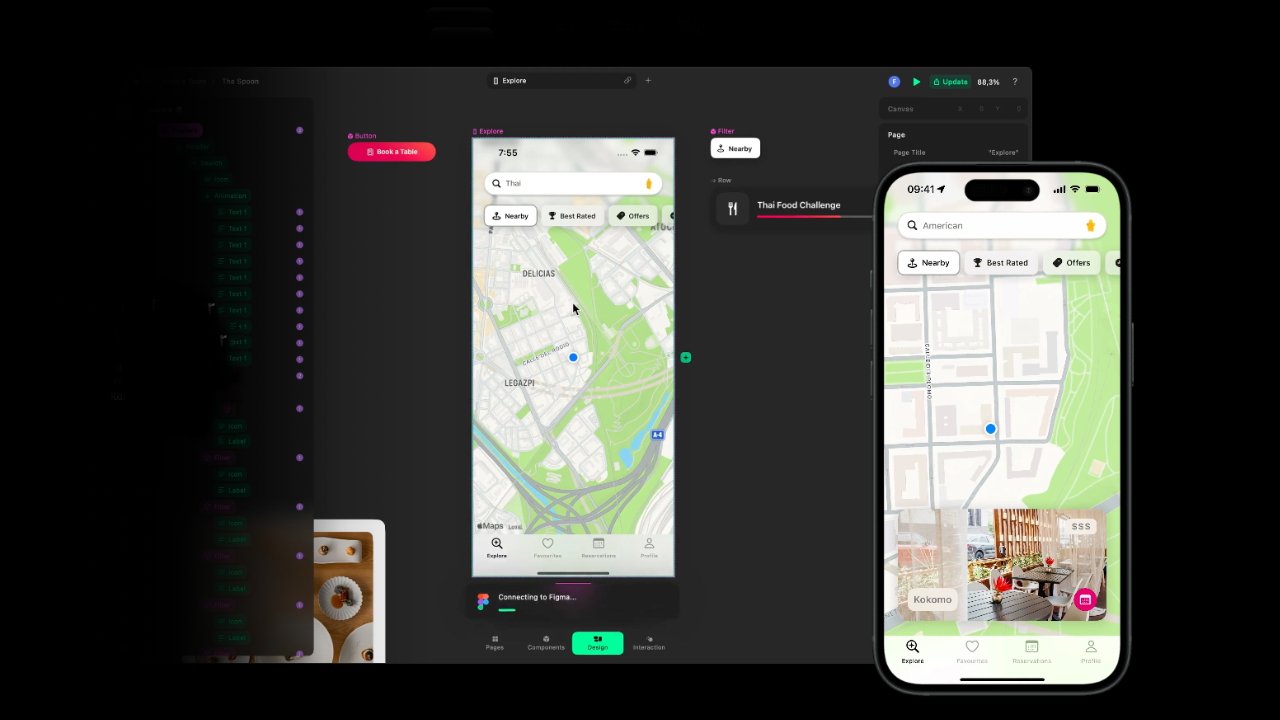
Apple Design award winner acquired by Apple for new Swift tools
Apple has acquired Play creator Rabbit 3 Times, effectively shuttering the award-winning visual Swift prototyping tool.
Decoder
- Swift: Apple's general-purpose programming language for iOS, macOS, watchOS, and other Apple platforms.
Original article
Apple has acquired Rabbit 3 Times, the company that made Play, a visual Swift development tool that won the Apple Design award for innovation. The acquisition appears to be aimed at asset stripping the company. Apple may be incorporating Play into its Apple Creator Studio, but for now, it appears the app is gone. Rabbit 3 Times' website has also been taken down.
In San Francisco, Even $180,000 Tech Salaries Are No Longer Enough
Surging costs in San Francisco are creating a wealth gap where even high-earning tech workers struggle as a new class of AI-wealthy elite emerges.
Original article
Young tech workers chasing the Silicon Valley dream have started to say that an affordable future feels increasingly out of reach. Property, utility, transportation, and grocery costs have risen significantly. A new class of AI elite has emerged that can outspend other tech workers. OpenAI's, Anthropic's, and SpaceX's IPOs combined could mint more than 20 new billionaires among current and former employees.

Rebuilding the computer room
Reintroducing physical friction into personal computing habits can help mitigate the constant, addictive distractions of modern digital life.
Original article
The computer room disappeared because we wanted more convenience, more ease, and less friction in our computing lives, but that friction isn't always a bad thing.

No, you haven't accidentally downloaded a banking app – that really is the new Winter Olympics 2030 logo
The Alpes 2030 Winter Olympics logo is a masterclass in modern geometry, yet its aesthetic feels more like a fintech startup than a sporting event.
Original article
The new Alpes 2030 Winter Olympics logo has been widely praised for its elegant, modern design, thoughtful symbolism, and versatile branding system, with separate but related Olympic and Paralympic marks inspired by a mountain revealed by light and the colours of the Alps. Despite its strong execution and French Modernist influences, the minimalist, geometric design feels more like the branding of a fintech company or cultural institution than a sporting event, making its connection to the Winter Olympics and the French Alps less immediately recognizable. While this abstraction sacrifices some sense of place compared to earlier Olympic identities, it creates a distinctive, timeless visual system that is likely to age well and succeed across digital, physical, and merchandising applications.

Shader Lab (Website)
Shader Lab is a browser-based toolkit for creating and animating visual effects like CRT distortion, scanlines, and bloom without writing raw code.
Original article
A powerful toolkit to create, stack, and animate shaders. Add your first keyframe from the properties panel.

AI Thumbnail Maker for YouTube (Website)
Thumbmagic aims to replace human thumbnail designers by using AI to generate high-CTR image variations from video uploads.
Original article
Generate studio-quality YouTube and Shorts thumbnails that stop scrolling and drive clicks in seconds.
The Customer is Always Right in Matters of Taste: What it Really Means
The classic mantra 'the customer is always right' was never an absolute; it was a qualifier about subjective aesthetic taste.
Original article
The phrase "the customer is always right" is widely misquoted — its original form includes a crucial qualifier: "in matters of taste." Attributed to Harry Gordon Selfridge and other early 20th-century retailers, it was meant to counter paternalistic merchants who imposed their preferences over customers' subjective choices. The principle applies to taste-based decisions in retail, food, and creative services, but not to factual disputes, safety, legal compliance, or staff mistreatment — where other standards must hold.

Red Stone rebrands Explorer Scouts for a generation worn out by expectation
Red Stone has rebranded Explorer Scouts with a minimalist 'Grow up' identity to better appeal to modern teenagers navigating digital-age pressures.
Original article
Explorer Scouts has introduced a new brand identity and refreshed programme to better resonate with today's teenagers, emphasizing curiosity, belonging, practical skills, and adventure rather than performance or achievement. Built around the tagline "Grow up", the identity uses a compass-inspired logo, bold graphics, authentic photography, and flexible branding that allows local groups to express their individuality while remaining consistent. Designed with input from young people, the rebrand positions Explorers as an inclusive, fun, and supportive community that feels relevant to a generation navigating increasing social and academic pressures.

Creatives have a mid-life crisis every five years
Creative burnout is common, and industry advice suggests normalizing 'just a job' phases while avoiding the pressure to force constant passion.
Original article
Feeling disconnected from creative work is a common response to burnout, industry pressures, and increasing management responsibilities. It doesn't necessarily mean you've chosen the wrong career. Instead of forcing passion, it's okay to treat work as just a job for a while, focus on finding fulfillment outside of work, and, when ready, reignite creativity through personal projects free from client constraints or by freelancing to reconnect with hands-on design. Most importantly, recognize that these periods are temporary, prioritize rest when needed, and don't feel guilty about taking a break before deciding what comes next.
WCAG Compliance vs. Real Accessibility: What Organizations Get Wrong
Meeting WCAG accessibility standards is a necessary technical baseline, but it does not guarantee a product is actually usable for people with disabilities.
Decoder
- WCAG: Web Content Accessibility Guidelines, a set of international standards developed by the W3C to make web content more accessible to people with disabilities.
Original article
WCAG compliance is a critical but insufficient baseline for true digital accessibility — a technically conformant product can still be unusable for people with disabilities, like a wheelchair ramp blocked by a telephone pole.