%20(1).png)
Request-Based Autoscaling Is Now Generally Available on App Platform
DigitalOcean's App Platform now offers generally available request-based autoscaling, allowing applications to scale based on real-time HTTP traffic like requests per second and P95 latency across all CPU plans.
Deep dive
- DigitalOcean's App Platform now supports request-based autoscaling as a generally available feature, announced on May 22, 2026.
- This allows applications to scale based on immediate HTTP traffic signals, specifically "requests per second per instance" and "P95 request latency."
- Unlike CPU-based autoscaling, which is reactive, request-based scaling acts on leading indicators, improving responsiveness to traffic spikes.
- The feature is now available for both shared and dedicated CPU instances, removing the previous restriction that required a dedicated CPU plan for autoscaling.
- Users can combine request-based and CPU-based metrics on dedicated plans, with scaling up occurring if any threshold is crossed and scaling down only when all metrics are back in range.
- Configuration can be done via the App Platform console's "Settings" tab or by adding an autoscaling block to the app spec using
doctl apps updateor the Apps API. - Autoscaling decisions are based on a 5-minute rate window to react to sustained load rather than brief, momentary spikes.
- This feature applies to web service components receiving external HTTP traffic; worker and function components are not eligible, nor can it be used alongside "Scale to Zero (Inactivity Sleep)".
Decoder
- P95 response latency: The 95th percentile response latency, meaning 95% of requests are served within this time or faster.
- CPU-based autoscaling: Automatically adjusting the number of instances based on the CPU utilization of the running application.
Original article
Request-Based Autoscaling Is Now Generally Available on App Platform
By Bikram Gupta and Greeshma Pillai
Today, we’re excited to announce that request-based autoscaling on DigitalOcean App Platform is now generally available. Your apps can now automatically scale based on live HTTP traffic signals (requests per second and P95 response latency) so your infrastructure reacts to what’s actually happening, not what happened minutes ago.
Now Available for Shared and Dedicated CPU Instances
Until now, autoscaling on App Platform required a dedicated CPU plan. That meant a good portion of App Platform users (anyone running on shared CPU instances) had no path to automatic horizontal scaling at all.
That changes today. Request-based autoscaling works on both shared and dedicated CPU instances. Whether you’re running an early-stage project on a shared plan or a high-throughput production service on dedicated resources, you can now configure autoscaling to match your traffic—no plan upgrade required.
Faster, More Responsive Scaling
CPU-based autoscaling is reactive by nature. CPU is a lagging indicator: your containers have to be visibly struggling before the scaler knows there’s a problem, and by then, your users are already waiting.
Request-based autoscaling acts on the signals that actually reflect user experience:
- Requests per second per instance: how many requests each container is handling right now
- P95 request latency: the response time that 95% of your users are seeing
When traffic rises and either threshold is exceeded, new containers spin up immediately. When load drops and all metrics fall back below their targets, the scaler brings containers back down. You get the capacity headroom you need, faster, and pay only for what you use.
You can also combine request-based and CPU-based metrics on dedicated plans. The autoscaler scales up when any configured threshold is crossed, and scales down only when all metrics are back in range.
Know Your Baseline Before You Set Thresholds
Configuring good autoscaling thresholds starts with understanding your normal traffic patterns. The Insights tab in the App Platform console gives you exactly that. 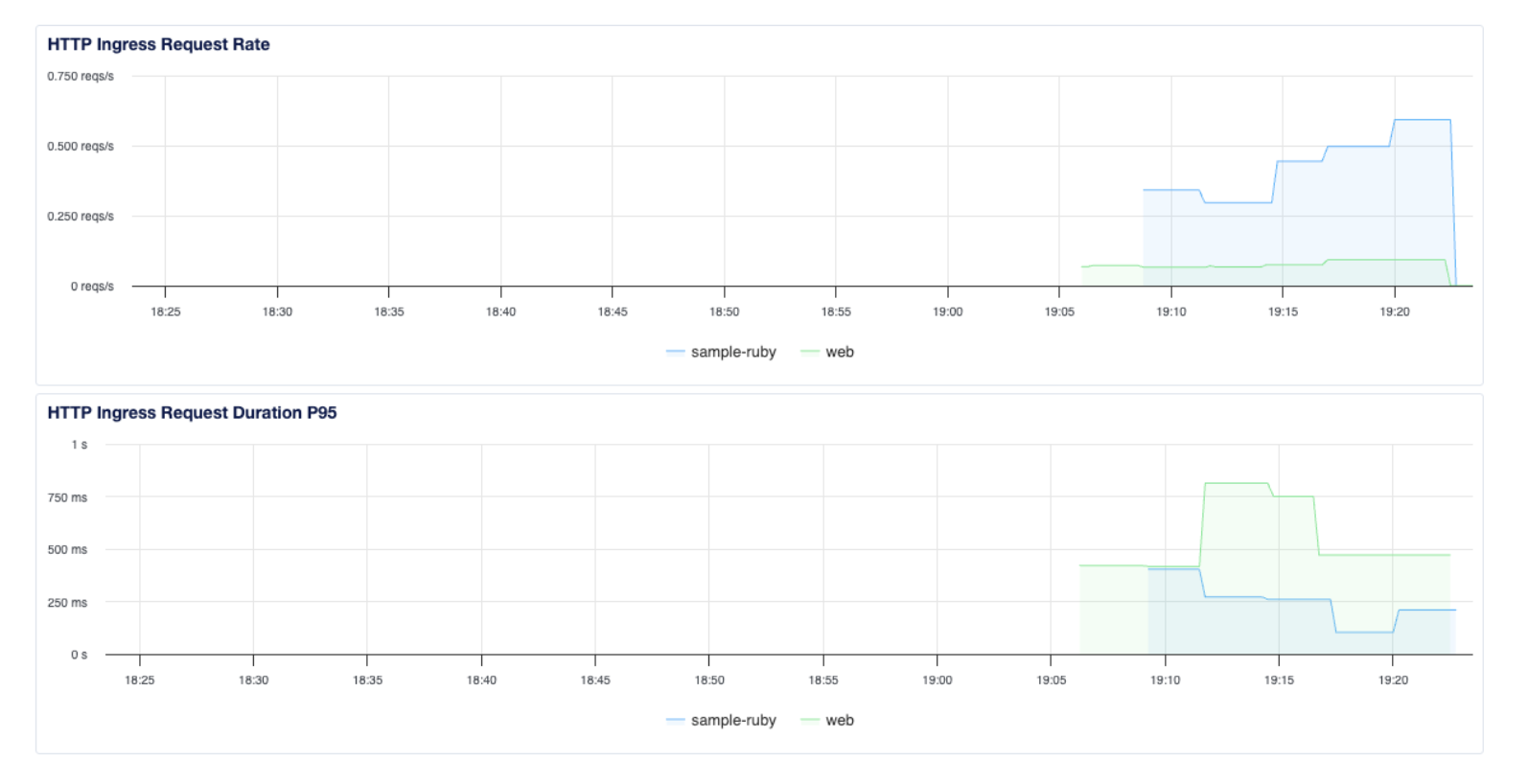
The Insights tab shows you HTTP Ingress Request Rate (requests per second) and HTTP Ingress Request Duration P95 (your 95th-percentile latency) over time. Use this to understand how your service behaves under normal load before dialing in your autoscaling rules.
How to Configure Request-Based Autoscaling
Using the Control Panel
Go to the Apps page, select your app, open the Settings tab, and select your web service component. In the Resource Size section, click Edit.
Select the Shared CPU or Dedicated CPU tab. Under Scaling, toggle Autoscale on. Set your Minimum Containers and Maximum Containers, then configure at least one autoscaling rule:
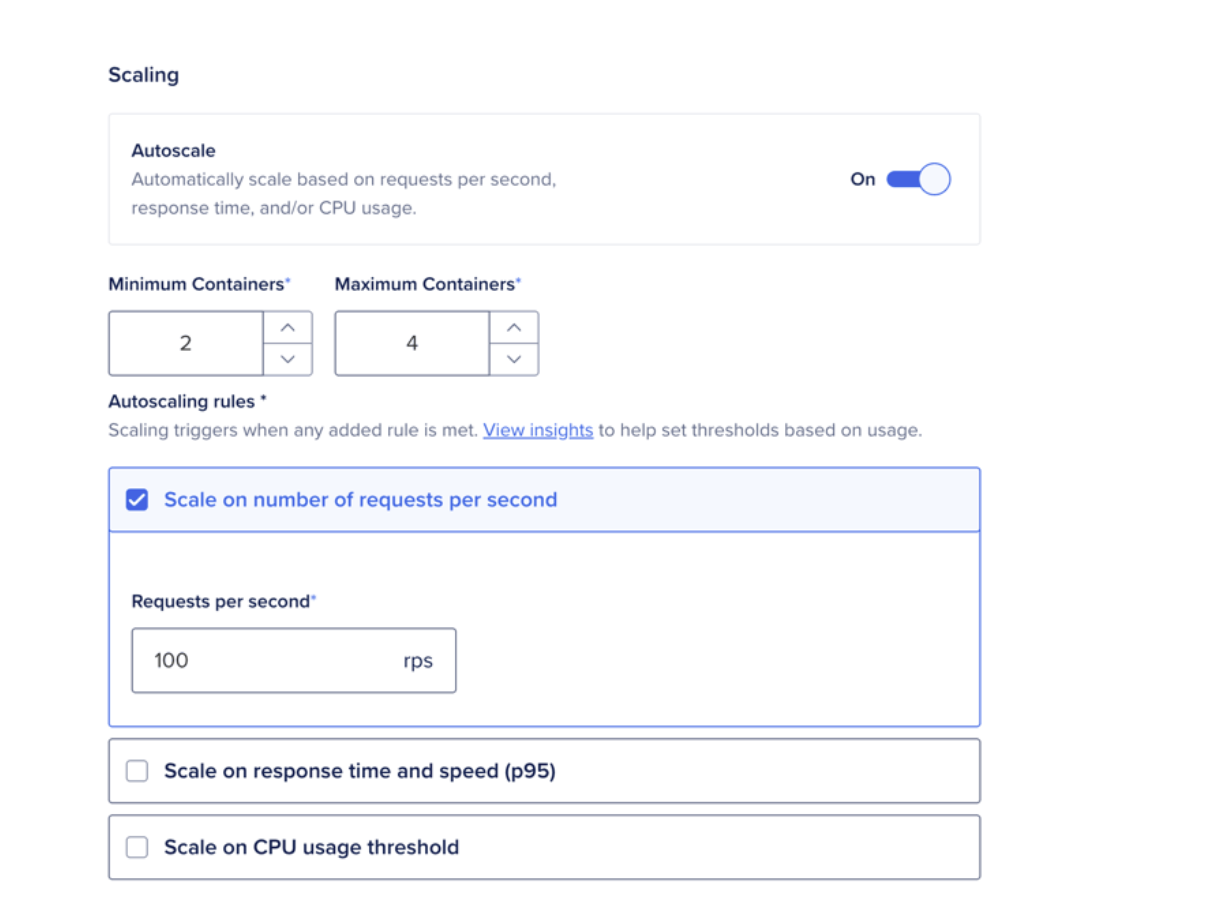
- Scale on number of requests per second set a target RPS per instance
- Scale on response time and speed (P95) set a target P95 latency in milliseconds
- Scale on CPU usage threshold available on dedicated CPU plans
Click Save. A redeployment kicks off automatically and your app starts autoscaling.
Using the App Spec
Add an autoscaling block to your service component in your app spec. The example below scales between 1 and 10 containers, targeting 100 requests per second per instance and a P95 latency of 500 ms:
name: my-app

services:

- name: web

  github:

    repo: your-org/your-repo

    branch: main

  autoscaling:

    min_instance_count: 1

    max_instance_count: 10

    metrics:

      requests_per_second:

        per_instance: 100

      request_duration:

        p95_milliseconds: 500
Submit your updated spec via doctl apps update or the Apps API. You can tune these values at any time—if your service is scaling earlier than you’d like, raise the target; if you’re seeing latency before new containers arrive, lower it.
A few things to keep in mind:
- Request-based autoscaling applies to web service components that receive external HTTP traffic. Worker and function components are not eligible.
- It cannot be used alongside Scale to Zero (Inactivity Sleep) on the same service.
- Scaling decisions are based on a 5-minute rate window, so the autoscaler responds to sustained load rather than momentary spikes.
Get Started With Request-Based Autoscaling
Your traffic doesn’t follow a schedule. Your scaling shouldn’t either. Request-based autoscaling is available now on every DigitalOcean account. Head to the Insights tab to understand your traffic patterns, then configure your autoscaling rules directly in the console or via the app spec.
Read the documentation to get started
About the author(s)
Bikram Gupta
Greeshma Pillai
- Product Updates
Start building today
From GPU-powered inference and Kubernetes to managed databases and storage, get everything you need to build, scale, and deploy intelligent applications. Sign up
Related Articles
Powering the Inference Era: Inside the DigitalOcean AI-Native Cloud
Vinay Kumar, Chief Product & Technology Officer
Product updates
Introducing DigitalOcean AI-Native Cloud for Production AI Workloads
Paddy Srinivasan
Product updates
The Agentic Era Demands a New Class of Infrastructure: DigitalOcean Acquires Katanemo Labs
Vinay Kumar, DigitalOcean Chief Product & Technology Officer
Product updates
Fresh dev news, AI-digested daily. Never miss a trend at devoured.fyi