Add dynamically updating context to logs with Reference Tables and Observability Pipelines
Datadog Observability Pipelines now provides centralized log enrichment using dynamic Reference Tables, integrating real-time context from sources like Snowflake and ServiceNow.
Deep dive
- Datadog Observability Pipelines now offers centralized log enrichment using dynamically updating Reference Tables, generally available as of May 1, 2026.
- This feature allows security and platform engineering teams to add real-time context to logs before they are routed to downstream tools like SIEMs, logging solutions, or data lakes.
- Reference Tables integrate with various external sources, including Snowflake (threat intelligence, user profiles), ServiceNow CMDB (asset/service metadata), Salesforce (customer data), and cloud storage (allowlists/denylists).
- The "Enrichment Table processor" automatically updates Reference Tables from integrations, reducing manual effort compared to local CSV files.
- Log enrichment helps accelerate threat investigations by applying fresh context, even to rehydrated historical data from archives, allowing for updated correlation with current detections.
- Enriched attributes can also be used for conditional routing, sending high-signal, lower-volume data to expensive SIEMs (e.g., Microsoft Sentinel, CrowdStrike, Datadog Cloud SIEM) while benign, high-volume data goes to cheaper storage (e.g., Amazon S3).
- The process involves the Enrichment Table processor looking up values in a local cache, buffering logs if not found, and fetching entries from the Datadog Reference Tables API for dynamic updates.
Decoder
- Log enrichment: The process of adding additional context or metadata to log events to make them more informative and easier to analyze.
- Reference Tables: Dynamic lookup tables within Datadog Observability Pipelines that contain contextual data from external sources, used to enrich logs in real-time.
- Observability Pipelines: Datadog's feature that allows teams to process, filter, and route telemetry data (logs, metrics, traces) before sending it to destinations.
- SIEM (Security Information and Event Management): A security solution that aggregates and analyzes log data and security events from various sources across an organization's IT infrastructure.
- CMDB (Configuration Management Database): A database that contains all relevant information about hardware, software, and network configuration items within an organization's IT environment.
Original article
Security and platform engineering teams rely on context-rich logs to investigate threats, prioritize incidents, and meet compliance requirements. Context is often stored separately from applications that generate logs, in sources like threat intelligence feeds in Snowflake, asset lists in Amazon S3, ownership data in ServiceNow CMDB, and risk scores produced in Databricks. Enriching logs after ingestion means duplicating lookups in every downstream tool and manually correlating logs with external sources during every investigation. The results are slower resolution of performance and security issues as well as increased cost.
To address these challenges, Datadog Observability Pipelines supports centralized log enrichment with Reference Tables before you route data to your preferred SIEM, logging solution, or data lake. You can use dynamically updating Reference Tables that integrate with SaaS applications, data lakes, and cloud storage to attach fresh metadata to events before data leaves your infrastructure.
In this post, we’ll explain how Observability Pipelines helps you:
- Centrally enrich logs with data stored in Reference Tables
- Apply fresh context to data during threat investigations
- Process and conditionally route enriched data to your downstream logging tool, SIEM, or data lake
Centrally enrich logs with data stored in Reference Tables
Logs provide indicators of what is happening in your system, but many lack critical context that helps you answer who owns what or which Indicators of Compromise (IOCs) might be present. Moreover, key data sources like threat intelligence feeds and configuration management databases (CMDBs) receive regular updates that need to be accounted for in production data. When enriching with locally stored datasets, teams have to spend critical time manually updating CSV files and coordinating update jobs across environments. And when enrichment happens after ingestion, teams have to redo the same lookups for each downstream tool that they manage, adding latency and creating inconsistencies.
The Enrichment Table processor in Observability Pipelines helps solve these problems by enabling you to enrich logs with data stored in SaaS-hosted Reference Tables. Reference Tables stay up to date automatically with your integrations, reducing engineering effort since you don’t have to manually update datasets.
Reference Tables support several common enrichment sources that teams already use for operational and security context:
- Snowflake stores threat intelligence feeds, user profiles, compliance mappings, and business intelligence data that teams can join with authentication logs, access logs, or detection signals.
- ServiceNow CMDB provides asset and service metadata that teams can use to enrich logs to accelerate investigations and route issues to the right responders.
- Salesforce provides customer and billing metadata such as account owners, contract tiers, and account segmentation that helps teams prioritize customer-impacting issues.
- Databricks offers model outputs such as anomaly scores and fraud likelihood values that teams can attach to transaction and authentication events.
- Cloud storage sources (including Amazon S3, Microsoft Azure Blob Storage, and Google Cloud Storage) hold CSV reference data such as allowlists, denylists, asset inventories, and IP reputation lists that update on a schedule.
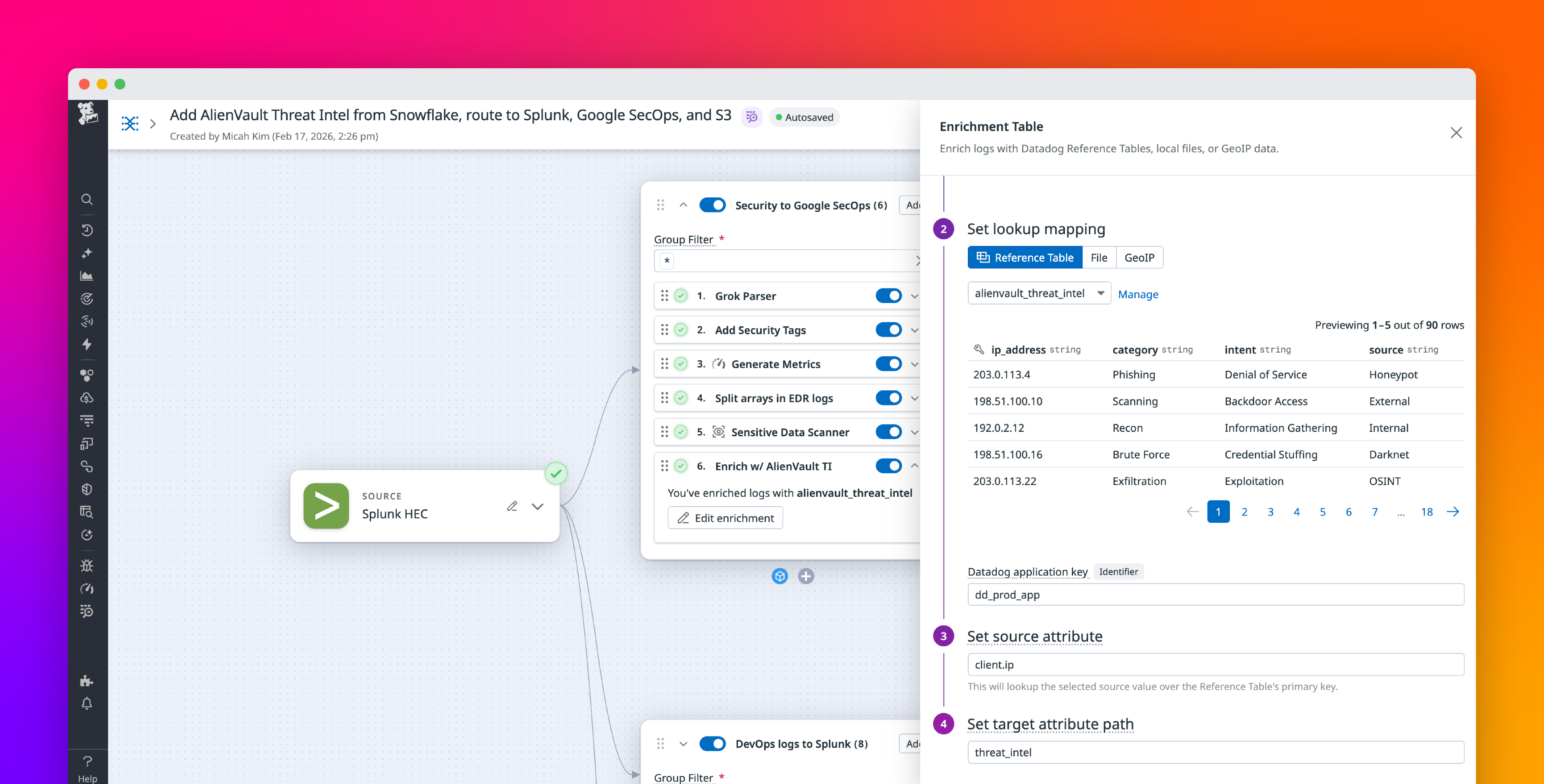
For example, you can enrich logs with threat intelligence from feeds like AlienVault that are stored in Snowflake. The following screenshot shows the Enrichment Table processor configured to enrich logs from the alienvault_threat_intel table that dynamically updates from Snowflake.
Once the processor is configured, logs containing values that match keys found in ip_address are enhanced with information from the table.
After Observability Pipelines enriches events in your infrastructure, you can route enriched logs to the SIEM or data lake of your choice, including Microsoft Sentinel, CrowdStrike, and Datadog BYOC (Bring Your Own Cloud) Logs.
Apply fresh context to data during threat investigations
Investigating security threats often requires you to revisit historical data for a specific user, device, or process. An IP reputation list can change after an incident begins, or a new fraud model can assign new risk scores to historical transactions. Security investigations become more difficult when older logs lack newer context, especially when this data is stored in cloud storage archives and separated from your logging or SIEM solution because of cost controls or retention strategy.
Using Observability Pipelines, you can rehydrate and extract archived data before applying processing and routing rules. You can pull historical information from your storage buckets and enrich it with current context stored in Reference Tables, and then route normalized data to your SIEM. This workflow helps you apply updated context without rebuilding custom joins in every downstream system.
For example, let’s say that you’re a security engineer investigating a Tier 0 threat by using Microsoft Sentinel and Azure Blob Storage. You can rehydrate archived authentication logs from Azure Blob Storage, enrich the logs with an up-to-date asset list from Snowflake, and route the enriched output into Microsoft Sentinel for correlation with current detections. The enriched logs can highlight connections that were not visible at original ingest time, especially when threat intelligence and scoring datasets changed after the fact.
Process and conditionally route enriched data to your downstream logging tool, SIEM, or data lake
Application logs often lack context that teams need to help them prioritize and make smart routing decisions. Without that context, routing rules tend to rely on static heuristics that have limited business meaning. Enrichment becomes especially valuable when it helps teams keep high-volume, low-risk data in less expensive storage while sending smaller, higher-signal subsets to a SIEM or analytics platform.
With log enrichment in Observability Pipelines, teams can make routing and volume control decisions by using attributes derived from external sources. A pipeline can enrich an event with a threat classification, a customer tier, an ownership team, or an environment label, and then use that information to route data to a destination that matches operational goals. The following diagram shows how Observability Pipelines enriches logs with Reference Table data on-stream:
The numbered steps in the diagram map to the following workflow:
- The Enrichment Table processor looks up the value of the key field in the local cache (e.g.,
ip_address:192.0.2.1). - If a matching entry is found in the cache (e.g., the IP address matches a row in the table that is cached) or if the log does not have a valid key field, the log is immediately enriched and sent downstream.
- A. If the value is not found in the cache, the log is buffered in memory.
B. The value is also added to the client queue to be checked against the Datadog Reference Tables API.
- The client is triggered every second or when the queue reaches a certain length, and it fetches all pending keys from the Datadog Reference Tables API.
- On a successful API response, the entries are stored in the cache and the corresponding logs are pulled out of the buffer, enriched, and sent downstream.
Consider a security pipeline that processes endpoint or network telemetry data. The pipeline can enrich events by using a threat intelligence feed stored in Snowflake and add an attribute that indicates whether an IP address or indicator appears on a benign list, suspicious list, or malicious list. Routing rules can then send benign high-volume activity to Amazon S3 while forwarding suspicious and malicious activity to a SIEM such as Microsoft Sentinel, CrowdStrike, or Datadog Cloud SIEM for faster investigation. This approach reduces noise in expensive downstream tools while keeping richer context attached to high-priority events.
Start enriching your logs with Observability Pipelines
Centralized log enrichment with Reference Tables in Observability Pipelines brings dynamic, managed lookups into log processing that runs inside your infrastructure. You can enrich logs, apply fresh context to accelerate investigations, and use the enriched attributes to guide routing and volume control across destinations such as SIEM tools and cloud storage. To learn more, check out the Observability Pipelines documentation and the Reference Tables documentation.
If you don’t already have a Datadog account, you can sign up for a 14-day free trial to get started enriching your logs.
Further reading
Datadog Platform Datasheet
Learn about the key components, capabilities, and features of the Datadog platform.
Download to learn moreRelated jobs at Datadog
We're always looking for talented people to collaborate with
Featured positions
We have positions
View allStart monitoring your metrics in minutes
find out howFresh dev news, AI-digested daily. Never miss a trend at devoured.fyi