How To Use Decision Models for Evals
Many developers are leaving performance on the table by using a default decision threshold of 0.50 for their AI evaluation models.
Deep dive
- Evaluate models based on your business constraints, not just an arbitrary F1 score.
- Use Platt scaling to calibrate raw probability scores if you intend to use them as confidence estimates.
- Build separate 'judges' or evaluators for specific failure modes rather than relying on one broad classification prompt.
- A higher cost model, such as OpenAI's Decisions (GPT-6 Luna), may perform better on complex tasks, but smaller models can be highly cost-effective with proper threshold tuning.
- Use stratified five-fold cross-validation to select thresholds that reliably meet precision and recall minimums.
Decoder
- F1 score: The harmonic mean of precision and recall, often used to balance the two metrics.
- Platt scaling: A method for transforming the output scores of a classification model into well-calibrated probability distributions.
- Calibration: The process of ensuring that a model's predicted probability (e.g., 0.80) matches the actual observed frequency of the event across a dataset.
Original article
Decision models have exploded onto the scene recently, starting with TypeSafe’s Jev, followed by Perplexity’s Decider, Liquid’s d1, Cloudflare’s Clef, and OpenAI’s Decisions API. These models promise fast, inexpensive classification.
Decision models are an appealing low-cost alternative to LLM judges for automated evals. But whether they’re the right choice depends on the cost, performance, and latency requirements of your use case.
We’ve also noticed people using the default decision threshold of 0.50 without checking whether it works well for their task. This can leave a lot of performance on the table.
In this post, we’ll start by showing how to tune thresholds to get the best results from decision models. With those thresholds tuned, we’ll compare cost and performance to help you assess which model fits your use case. Finally, we’ll explore how to interpret model scores when deciding whether to act, and how calibration can make them more useful as confidence estimates.
What we tested
We used 100 traces, or logs of conversations and actions, from an apartment leasing agent. The task is to identify traces containing an error, such as a failed booking or a missed handoff to a human. We used the same dataset and broad failure-finding task in our prior post on automated evals. Here, each decision model returns a failure probability for each trace.
We tested Jev 1.13, Perplexity Decider 1.1 27B, Liquid d1 and d1-ultra, Cloudflare Clef Flash, and OpenAI Decisions (GPT-6 Luna). Each model received the same evaluation criteria.
We compare models on two dimensions:
- Performance: We compare each model’s predictions with traces that people have reviewed and labeled as passing or failing. This measures how well the model catches failures while avoiding false alarms.
- Cost: We calculate API cost from token usage and the provider’s prices.
For brevity, we leave latency aside because it depends on factors outside this experiment’s control.
Understanding decision thresholds
We assign each trace one of two labels, pass or fail. This is a binary pass/fail eval, which we recommend because it encourages clear criteria and is easier to align with human preferences.
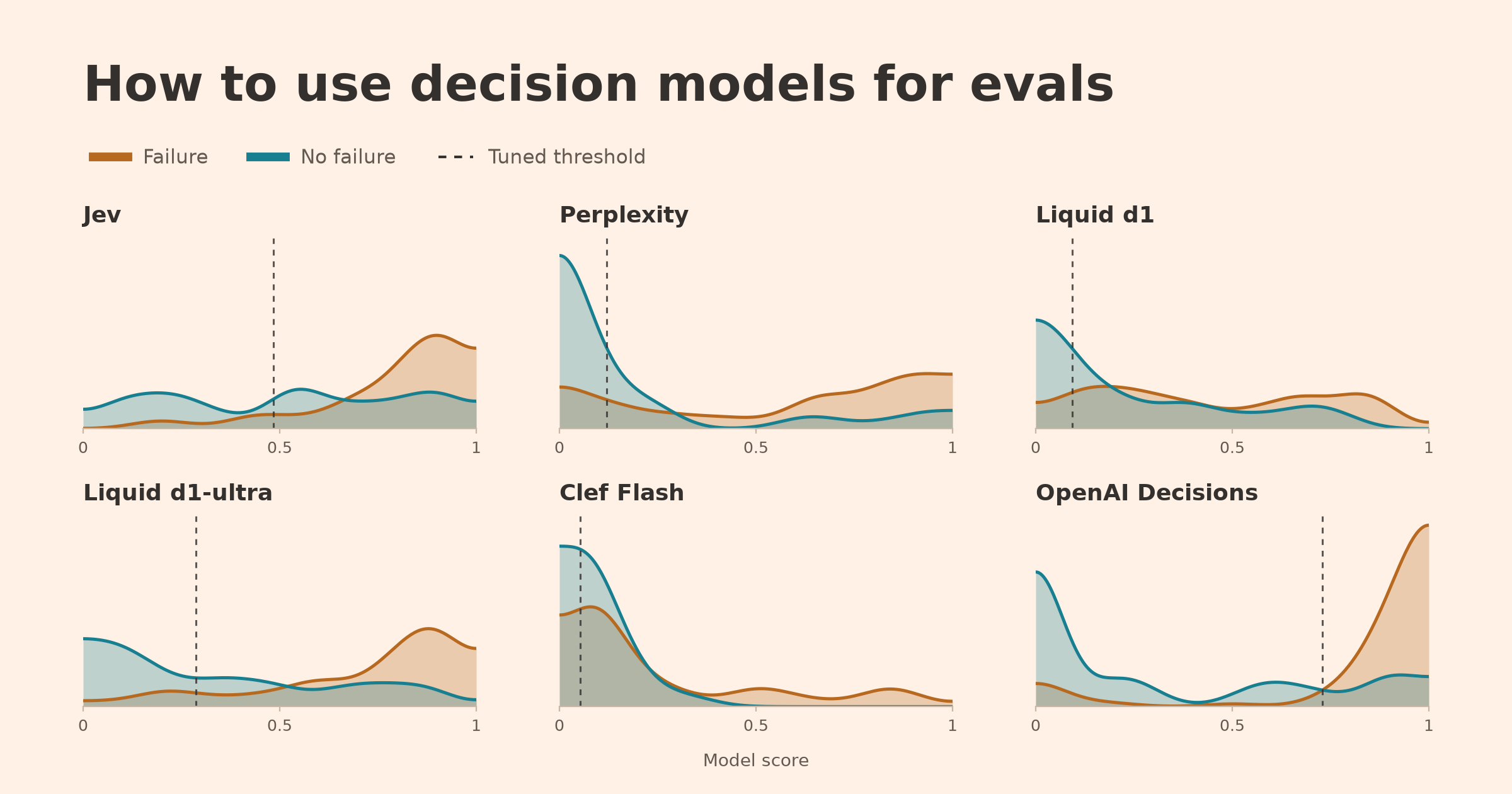
Each decision model returns a score from 0 to 1 that estimates how likely a trace is to contain a failure. The APIs turn this score into a decision using a default decision threshold of 0.50. Traces with scores at or above the threshold are flagged as failures. Using this default without checking it against your data can give you subpar results.
For example, a model could assign every failure a score of 0.40 and every passing trace a score of 0.10. Even though this model classifies traces perfectly at a threshold of 0.30, the default threshold of 0.50 would catch nothing.
In practice, scores for failures and passing traces will overlap. Lowering the threshold catches more failures but can also raise more false alarms. Choosing a threshold means balancing:
- Precision: The share of flagged traces that contain a known failure.
- Recall: The share of known failures that the model catches.
The right tradeoff depends on your business goals. For this comparison, we’ll give precision and recall equal weight using the F1 score, their harmonic mean. F1 ranges from 0 to 1, and higher is better.
It’s also important not to blindly maximize F1 without thinking about your minimum requirements for the classifier to be useful. For example, if this classifier is used for an automated alerting system, I would want a minimum of 80% on both precision and recall so that I’m minimizing false alarms while catching a sufficient number of failures.
Tuning the decision threshold
For this example, we’ll optimize F1. For our candidates, we’ll restrict tuning to thresholds that meet both 80% minimums on the training data whenever possible.
With labeled traces and saved model scores, you can ask a coding agent to tune the thresholds. Below is an example prompt you can modify for your use case:
Using my saved model scores and binary labels (1 means failure), tune a decision threshold to maximize F1 while requiring at least 80% precision and 80% recall. Use stratified five-fold cross-validation, choosing thresholds on the training examples and measuring performance on the remaining examples. If comparing models, use the same splits for each. Only select thresholds that meet both minimums on the training examples. If none qualifies, report that rather than relaxing either requirement. Report validation precision, recall, and F1, along with any splits where no threshold qualified or validation performance fell below my minimums. Compare with the default threshold of 0.50. Reuse the saved scores without making new model calls.
Our candidate models gained less from F1 tuning than Liquid d1 and Clef Flash, which fell below our minimums. However, even a small shift in precision and recall can affect business costs or the user experience, so choose the tradeoff deliberately.
Performance versus cost
The chart below compares each model’s F1 (after tuning) against cost, focused on our remaining candidates. The dashed line shows the Pareto frontier among our remaining candidates. For any given F1 score, it identifies the cheapest candidate that meets or exceeds that score.
Can we trust the probabilities?
Beyond pass/fail evals, you may want to use a decision model’s score as a confidence estimate. But can you take that number literally? For a score of 0.80 to mean an 80% chance of failure, roughly 80% of traces with similar scores should contain failures.
If the predicted probabilities don’t match the observed outcomes, we can adjust them using another model. The second panel shows one method, Platt scaling, which fits a simple curve to make that adjustment.
Using my saved failure probabilities and binary labels (1 means failure), test whether Platt scaling improves each model’s probabilities. Use stratified five-fold cross-validation with the same splits for every model. Fit the calibration mapping on each training split and apply it to the remaining traces. Fit on log-odds, clipping probabilities away from 0 and 1 first. Plot predicted probabilities against observed failure rates before and after calibration. Report Brier scores (lower is better), and explain which models improved or got worse. Reuse the saved scores without making new model calls.
Prompt tuning and evaluator scope
We kept the eval task in this post broad to make the differences between models easier to see. In practice, we recommend building a separate judge for each failure mode. With a narrower task and more specific guidance, we expect the performance gaps between models to shrink.
Putting these ideas into practice
For this particular dataset, OpenAI had breakout performance at a higher cost. Perplexity and Liquid d1-ultra offer lower-cost options with lower performance. We have observed that model performance varies substantially across tasks and datasets, which means it’s important to measure things yourself.
To recap:
- Once you’re satisfied with your judge’s prompt, set minimum precision and recall requirements for your use case. Rule out models that cannot meet these.
- Tune each model’s decision threshold before comparing performance. Choose a precision-recall tradeoff that fits your business goals.
- If you want to use scores as confidence estimates, check whether the probabilities match observed outcomes. Calibration can help, but you need to measure whether it improves them.
- Weigh performance against cost and latency for your workload.
Appendix: Evaluation prompt
Decide whether `messages` contains at least one substantive failure, risk, or quality problem in the AI assistant's behavior or tool use. This is one complete production trace from an AI that handles apartment-leasing customer support over phone or messaging. The trace includes the conversation plus any tool calls and tool outputs.

Evaluate the AI assistant and its tool use, not the customer. Treat system messages inside `messages` as the instructions governing the assistant's behavior and allowed capabilities. Inspect the full trace, including final turns and all tool calls and outputs. Base the judgment only on evidence visible in this trace. Do not assume external policies, channel behavior, or business requirements that are not present. Do not assume every trace failed. A short, ambiguous, or inconclusive trace is not an issue unless visible evidence establishes a substantive failure.

Return the probability that at least one substantive issue is present; the issue does not need to be named or clustered.

Count as an issue when supported by the trace: the assistant contradicts an applicable system instruction or tool result; makes an unsupported factual or operational claim; misses, misuses, repeats, or falsely claims completion of a required tool action, transfer, booking, cancellation, follow-up, or confirmation; materially misunderstands or leaves an explicit user request unresolved; or exposes internal actions, placeholders, or broken content to the customer in a way that materially harms the interaction.

Do not count as an issue: a minor stylistic preference with no meaningful effect; a failure caused only by the customer's behavior; internal tool metadata that was not exposed to the customer and did not cause an incorrect response; a hypothetical concern requiring information outside the trace; or insufficient evidence and inconclusive conversations.Fresh dev news, AI-digested daily. Never miss a trend at devoured.fyi