Metal3 meets KubeVirtBMC: Provisioning KubeVirt VMs like bare metal
Pairing Metal3 with KubeVirtBMC allows developers to provision virtual machines using the same bare-metal tooling and Redfish workflows used for physical servers.
Deep dive
- KubeVirtBMC creates virtual BMC pods linked to VMs.
- Metal3 (Bare Metal Operator) manages lifecycle via Ironic.
- Redfish virtual media is used to boot ISOs, bypassing DHCP/PXE complexity.
- Demo requires cert-manager, KubeVirt, and the Ironic Standalone Operator.
- Configures custom Redfish virtual media for streamlined VM booting.
Decoder
- BMC (Baseboard Management Controller): A specialized microcontroller embedded on a server motherboard that allows remote management of hardware regardless of the CPU or OS state.
- Redfish: A standard API for managing hardware platforms and components, replacing older protocols like IPMI.
- Metal3 (Metal Kubed): A project that manages bare-metal servers through Kubernetes by using Custom Resources.
Original article
In the previous post, we introduced KubeVirtBMC and showed how it provides virtual BMC endpoints for KubeVirt VMs. We tested it with raw IPMI and Redfish commands. That was fun, but the real power of KubeVirtBMC shines when you pair it with actual bare-metal provisioning tools.
In this post, we’ll walk through a complete end-to-end demo: using Metal3 to manage and provision KubeVirt VMs through KubeVirtBMC, just as if they were physical servers. You’ll be able to follow along and replicate every step.
Why Metal3?
Metal3 (Metal Kubed) is a CNCF Incubating project that brings bare-metal host management into the Kubernetes ecosystem. Under the hood, it uses OpenStack Ironic to handle the heavy lifting, inspecting hardware, setting boot devices, and writing OS images to disks.
The core abstraction is the BareMetalHost custom resource. You declare what you want (BMC address, credentials, desired image), and Metal3 takes care of the rest. The typical BareMetalHost lifecycle goes like this:
Metal3 expects to talk to a BMC via IPMI or Redfish. Physical servers have these built in. KubeVirt VMs don’t—unless you give them one with KubeVirtBMC.
What We’re Building
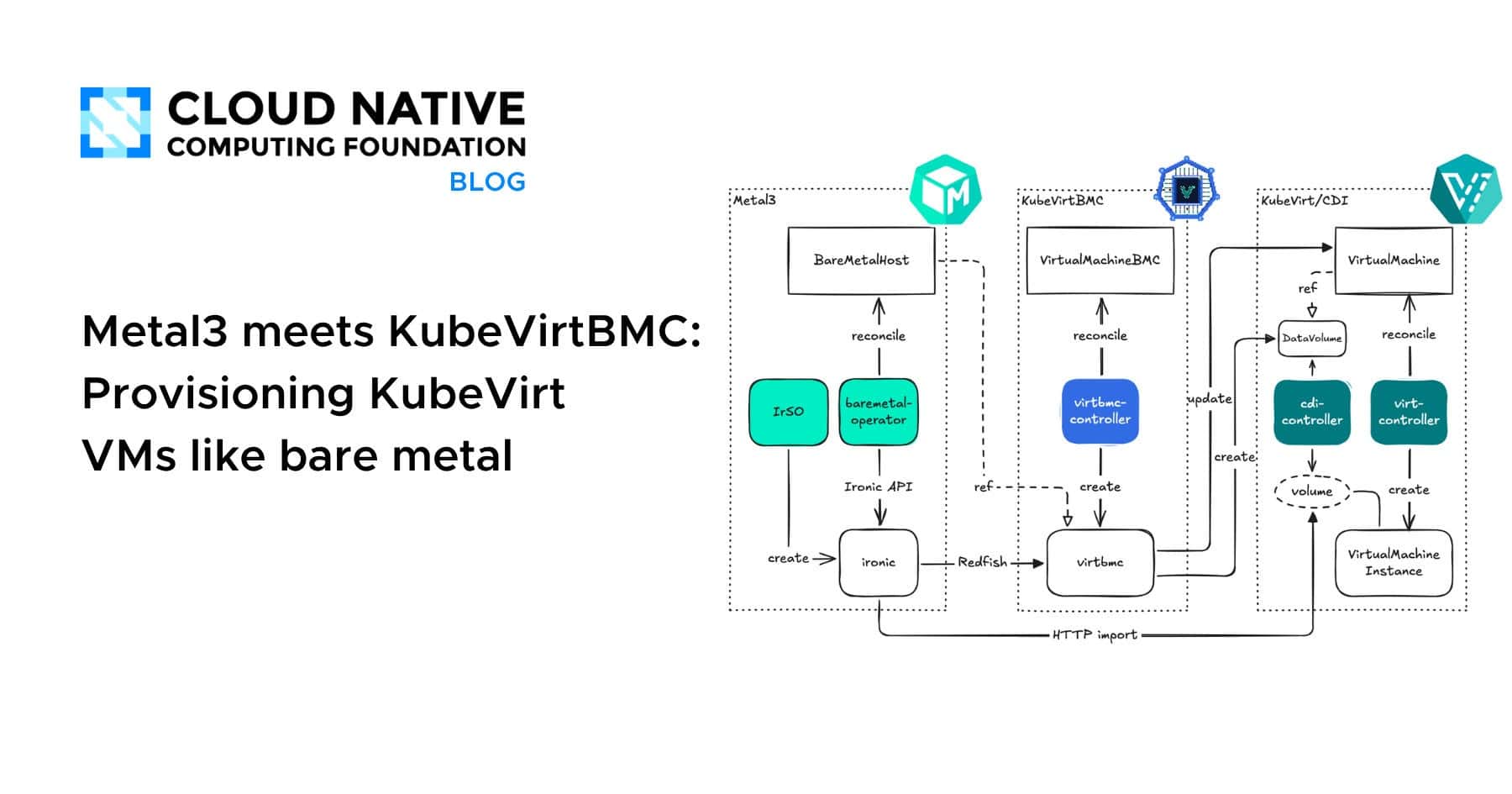
Here’s a high-level overview of the demo environment:
Everything runs in a single Kubernetes cluster. Metal3 manages BareMetalHost resources that point to the virtual BMC endpoints created by KubeVirtBMC. When Metal3 tells Ironic to power on a host or attach a boot image, Ironic sends Redfish requests to the BMC pod. The BMC pod translates these into Kubernetes API calls to control the KubeVirt VM. Metal3 doesn’t know (or care) that it’s talking to a VM.
Prerequisites
Before we start, make sure you have:
- A Kubernetes cluster with virtualization support (nested virtualization or bare metal)
- KubeVirt installed and functional
- A storage provider (for VM disks)
- kubectl, helm, and kustomize installed locally
Step 1: Install cert-manager
Both KubeVirtBMC and Metal3 components require cert-manager for webhook certificates.
helm upgrade --install cert-manager oci://quay.io/jetstack/charts/cert-manager \
    --namespace=cert-manager \
    --create-namespace \
    --set=crds.enabled=true
Step 2: Install KubeVirtBMC
helm upgrade --install kubevirtbmc kubevirtbmc \
    --repo=https://charts.kubevirtbmc.io \
    --namespace=kubevirtbmc-system \
    --create-namespace
Step 3: Create a KubeVirt VM with BMC
We’ll create a VM that simulates a bare-metal server. It needs a disk, a network interface, and it should start in a powered-off state so that Metal3 can manage its lifecycle from scratch.
Create a PVC for the VM’s root disk:
cat <<EOF | kubectl apply -f -
apiVersion: v1
kind: PersistentVolumeClaim
metadata:
  name: metal3-demo-vm-disk
  namespace: default
spec:
  accessModes:
  - ReadWriteOnce
  resources:
    requests:
      storage: 20Gi
EOF
Create the VirtualMachine with runStrategy: Halted so it stays powered off:
cat <<EOF | kubectl apply -f -
apiVersion: kubevirt.io/v1
kind: VirtualMachine
metadata:
  name: metal3-demo-vm
  namespace: default
spec:
  runStrategy: Halted
  template:
    spec:
      domain:
        cpu:
          cores: 4
        memory:
          guest: 8Gi
        devices:
          disks:
          - name: rootdisk
            disk:
              bus: virtio
          - name: cdrom
            cdrom:
              bus: sata
          interfaces:
          - name: default
            macAddress: "02:00:00:00:00:01"
            bridge: {}
        firmware:
          bootloader:
            efi:
              secureBoot: false
      networks:
      - name: default
        pod: {}
      volumes:
      - name: rootdisk
        persistentVolumeClaim:
          claimName: metal3-demo-vm-disk
EOF
Now create the VirtualMachineBMC and its credential Secret:
cat <<EOF | kubectl apply -f -
apiVersion: v1
kind: Secret
metadata:
  name: demo-bmc-secret
  namespace: default
stringData:
  username: admin
  password: password
---
apiVersion: bmc.kubevirt.io/v1beta1
kind: VirtualMachineBMC
metadata:
  name: demo-bmc
  namespace: default
spec:
  virtualMachineRef:
    name: metal3-demo-vm
  authSecretRef:
    name: demo-bmc-secret
EOF
Step 4: Install the Metal3 Stack
Install the Ironic Standalone Operator
git clone https://github.com/metal3-io/ironic-standalone-operator.git
cd ironic-standalone-operator
make install deploy

kubectl -n ironic-standalone-operator-system wait --for=condition=Available \
    deploy/ironic-standalone-operator-controller-manager \
    --timeout=120s
Deploy Ironic
First, create the namespace and the required TLS certificates:
kubectl create ns baremetal-operator-systemcat <<EOF | kubectl apply -f -
apiVersion: cert-manager.io/v1
kind: Issuer
metadata:
name: selfsigned-issuer
namespace: baremetal-operator-system
spec:
selfSigned: {}
---
apiVersion: cert-manager.io/v1
kind: Certificate
metadata:
name: ironic-cacert
namespace: baremetal-operator-system
spec:
commonName: ironic-ca
isCA: true
issuerRef:
kind: Issuer
name: selfsigned-issuer
secretName: ironic-cacert
---
apiVersion: cert-manager.io/v1
kind: Issuer
metadata:
name: ca-issuer
namespace: baremetal-operator-system
spec:
ca:
secretName: ironic-cacert
---
apiVersion: cert-manager.io/v1
kind: Certificate
metadata:
name: ironic-cert
namespace: baremetal-operator-system
spec:
secretTemplate:
labels:
environment.metal3.io/ironic-standalone-operator: "true"
dnsNames:
- ironic.baremetal-operator-system.svc
- ironic.baremetal-operator-system.svc.cluster.local
issuerRef:
kind: Issuer
name: ca-issuer
secretName: ironic-cert
EOFcat <<EOF | kubectl apply -f -
apiVersion: v1
kind: Secret
metadata:
labels:
environment.metal3.io/ironic-standalone-operator: "true"
name: ironic-credentials
namespace: baremetal-operator-system
type: kubernetes.io/basic-auth
stringData:
username: ironic
password: supersecret
EOFcat <<EOF | kubectl apply -f -
apiVersion: ironic.metal3.io/v1alpha1
kind: Ironic
metadata:
name: ironic
namespace: baremetal-operator-system
spec:
apiCredentialsName: ironic-credentials
networking:
disableHostNetwork: true
tls:
certificateName: ironic-cert
disableVirtualMediaTLS: true
version: "37.0"
EOFInstall the Bare Metal Operator
git clone https://github.com/metal3-io/baremetal-operator.git
cd baremetal-operator
mkdir -p config/overlays/kubevirtbmc-demo
cat > config/overlays/kubevirtbmc-demo/kustomization.yaml <<EOF
apiVersion: kustomize.config.k8s.io/v1beta1
kind: Kustomization
namespace: baremetal-operator-system
resources:
- ../../default
components:
- ../../components/basic-auth
- ../../components/tls
EOF
cat > config/default/ironic.env <<EOF
DEPLOY_KERNEL_URL=
DEPLOY_RAMDISK_URL=
IRONIC_ENDPOINT=https://ironic.baremetal-operator-system.svc
IRONIC_CACERT_FILE=/opt/metal3/certs/ca/tls.crt
IRONIC_INSECURE=false
EOFkustomize build config/overlays/kubevirtbmc-demo | kubectl apply -f -Step 5: Register the VM as a BareMetalHost
cat <<EOF | kubectl apply -f -
apiVersion: v1
kind: Secret
metadata:
  name: metal3-demo-vm-bmc-secret
  namespace: default
stringData:
  username: admin
  password: password
---
apiVersion: metal3.io/v1alpha1
kind: BareMetalHost
metadata:
  name: metal3-demo-vm
  namespace: default
spec:
  online: true
  bootMACAddress: "02:00:00:00:00:01"
  bmc:
    address: redfish-virtualmedia+http://metal3-demo-vm-virtbmc.default.svc.cluster.local:80/redfish/v1/Systems/1
    credentialsName: metal3-demo-vm-bmc-secret
    disableCertificateVerification: true
  rootDeviceHints:
    deviceName: /dev/vda
EOF
Step 6: Provision the Host with an OS Image
kubectl patch bmh metal3-demo-vm --type=merge -p '
{
  "spec": {
    "image": {
      "url": "https://releases.ubuntu.com/resolute/ubuntu-26.04-live-server-amd64.iso",
      "format": "live-iso"
    }
  }
}'
Step 7: Verify and Clean Up
To deprovision (wipe the host and return it to the available pool):
kubectl patch bmh metal3-demo-vm --type=json \
   -p '[{"op": "remove", "path": "/spec/image"}]'
Gotchas and Tips
- MAC address mismatch. The
bootMACAddressin BareMetalHost must match an actual interface on the VM. - HTTP vs HTTPS. KubeVirtBMC serves Redfish over plain HTTP by default. Use
redfish-virtualmedia+http://. - Virtual media vs network boot. The
redfish-virtualmediadriver boots the IPA ramdisk and provisioning images via virtual media (ISO attachment), which means no PXE, no DHCP, and no provisioning network is required. - Ironic host networking. In this article, we disable host networking solely for demonstration purposes, allowing us to rely on in-cluster DNS.
- Cross-cluster scenarios. If Metal3 runs in a different cluster than KubeVirt, you can expose the KubeVirtBMC Services externally using Ingress or NodePort.
Why This Matters
- CI/CD for bare-metal tools. Metal3, Ironic, and similar projects can use KubeVirtBMC to run their integration tests on KubeVirt VMs instead of maintaining a fleet of physical servers.
- Developer inner loop. If you’re developing bare-metal provisioning features, you can iterate much faster with VMs that spin up in seconds.
- Training and demos. Showcasing Metal3 no longer requires a rack of servers. A single Kubernetes cluster with KubeVirt is enough.
What’s Next
The KubeVirtBMC project is actively evolving. There is more work underway to improve Redfish compatibility and extend the BMC feature set. If you want to follow the progress or contribute, head over to the GitHub repository.
Fresh dev news, AI-digested daily. Never miss a trend at devoured.fyi