Loading digest...
May 19
1 / ?
AI llmpolicyresearch

What political censorship looks like inside an LLM's weights

Researchers have identified a small, turn-offable circuit in Alibaba's Qwen3.5-9B that layers political censorship, predominantly PRC-specific, over its factual knowledge, which can be bypassed via "steering" the model's internal directions.

Summary

What: A mechanistic interpretability study of Qwen3.5-9B revealed its political censorship as a small, identifiable circuit. This circuit, located in "writer" layers (11-20), computes three internal directions: `d_prc` (PRC-sensitive content), `d_refuse` (should refuse), and `d_style` (deflect or propagandize). "Reader" layers (20-31) then render the text. The factual knowledge exists in pretraining, with censorship layered on top, and can be switched off by "steering" these directions at specific layers, such as `d_prc` at L13 to retrieve facts about Tiananmen Square.
Why it matters: This research provides concrete evidence of how political censorship is embedded within LLM weights, demonstrating that such biases are not inherent to pretraining data but are explicitly engineered post-training and are localized, offering insights into potential methods for detecting and mitigating them.
Takeaway: This detailed analysis offers a blueprint for developers or researchers interested in mechanistic interpretability to investigate and potentially mitigate specific unwanted behaviors or biases in other large language models by identifying and manipulating internal directions.

Deep Dive

  • Qwen3.5-9B's political censorship is an identifiable, small circuit within its weights, which can be disabled.
  • Factual knowledge, even on sensitive topics like Tiananmen Square, is present in the model's pretraining; the censorship acts as a layer on top, routing around this knowledge.
  • The circuit is divided into "writer" layers (L11-20) that compute three internal directional vectors (d_prc, d_refuse, d_style) and "reader" layers (L20-31) that render the final text.
  • By "steering" these directions at specific layers (e.g., subtracting d_prc at L13), the model can be made to provide factual answers instead of censored ones.
  • The censorship is primarily PRC-specific, not a general filter against all political topics, targeting a fixed set of topics like Tiananmen, Taiwan, and Xinjiang.
  • The base model (Qwen3.5-9B-Base) already shows some refusal or propaganda under a chat template, suggesting post-training standardizes existing latent dispositions.
  • A "Chinese-first" phenomenon occurs where the model's verdict commits in Chinese tokens around layer 24, even for non-PRC topics like bank phishing, but this intermediate Chinese text is behaviorally inert.
  • In "thinking mode," the model verbalizes its censorship decision, specifically a 5-step Chinese deflection script for Tiananmen prompts, citing compliance with Chinese law.
  • Prefill attacks, where a helpful-framed trace is inserted, are largely contained, with the model maintaining strict refusal for harmful prompts in most languages.
  • The "stickiness" of the propaganda template varies by topic, with Taiwan and Falun Gong being the most resistant to decensoring, indicating that resistance lives in the reader-band template channel rather than in the residual stream geometry.

Decoder

  • Mechanistic Interpretability: A field of AI research focused on understanding how large language models work internally, by analyzing the individual components (e.g., neurons, layers, attention heads) and their interactions.
  • Residual Stream: In a transformer model, this is the main pathway of information flow, where the output of each layer (attention and MLP) is added to the input of that layer.
  • Steering: A technique in mechanistic interpretability where specific directions (vectors) are added to or subtracted from the model's internal residual stream at certain layers to manipulate its behavior or output.
  • Writer Layers: The layers in an LLM where internal decisions or signals (like content sensitivity or refusal intent) are computed and encoded into the residual stream.
  • Reader Layers: The layers in an LLM that interpret the signals encoded by writer layers and render them into the final text output.
  • Logit Lens: A technique for peering into the internal states of an LLM by applying the final output layer (unembedding matrix) to the residual stream at intermediate layers, allowing researchers to see what tokens the model is "thinking" about.
  • Diff-of-means direction: A vector derived by taking the difference between the average residual stream activations for two contrasting sets of prompts (e.g., sensitive vs. neutral), used to identify specific axes of behavior.

Original Article

Full article content is not available for inline reading.

Read the original article →

AI llmopensourcepython

HRM-Text (GitHub Repo)

SapientAI released HRM-Text, a 1B parameter text generation model that can be pretrained for around $1,000 and 130-600x less compute than traditional foundation models.

Summary

What: HRM-Text is a 1B parameter language model built on the Hierarchical Recurrent Memory (HRM) architecture, capable of full pretraining for approximately $1,472 on 16 H100 GPUs in 46 hours. A 0.6B parameter version costs about $800 on 8 H100s in 50 hours, using significantly less compute and data than other foundation models.
Why it matters: This project makes training custom foundation models from scratch much more accessible and affordable for smaller teams or individual researchers, potentially democratizing the ability to build and iterate on large language models.
Takeaway: Developers interested in pretraining their own text generation models at a lower cost can explore HRM-Text's GitHub repository and follow the detailed pretraining framework using Docker or source installation.

Deep Dive

  • HRM-Text uses a hierarchical recurrent architecture, PrefixLM sequence packing, FlashAttention 3 kernels, and PyTorch FSDP2 for efficient training.
  • The 0.6B parameter model (L size) achieves 77.6% on GSM8k and 51.2% on MATH, while the 1B parameter model (XL size) reaches 84.7% on GSM8k and 56.5% on MATH.
  • Training requires specific data preparation using the companion data_io pipeline for cleaning, tokenization, and stratified sampling.
  • The repository provides tooling for evaluation, checkpoint conversion to Hugging Face format, and supports Weights & Biases for metric tracking.
  • It runs on Hopper-class GPUs (like H100s) due to its reliance on FlashAttention 3.

Decoder

  • HRM architecture: Hierarchical Recurrent Memory, an neural network architecture that manages information across different timescales and levels of abstraction.
  • PrefixLM: A language model training objective that uses a prefix to condition the generation of the rest of the sequence.
  • FlashAttention 3: An optimized attention mechanism for transformers that reduces memory usage and increases speed, especially on Nvidia Hopper GPUs.
  • PyTorch FSDP2: PyTorch's Fully Sharded Data Parallel (FSDP) version 2, a technique for scaling deep learning training across multiple GPUs by sharding model parameters, gradients, and optimizer states.
  • H100 GPUs: Nvidia's Hopper architecture GPUs, known for high performance in AI training workloads.

Original Article

HRM-Text: Efficient Pretraining Beyond Scaling

🌟 Pretrain a foundation model from scratch with ~$1000. 🌠

HRM-Text is a 1B text generation model based on the HRM architecture, strengthened by task completion and latent space reasoning. It offers a full pretraining framework, making foundation model pretraining accessible with 130-600x less compute and 150-900x less data. It is built upon a hierarchical recurrent architecture, PrefixLM sequence packing, FlashAttention 3 kernels, PyTorch FSDP2 training, evaluation, and checkpoint conversion tooling.

Launch the Pretraining 🚀

Required Resources

Choose a target size and prepare the corresponding GPU nodes.

  • L, 0.6B parameters: 8 H100s, single node, about 50 hours (~$800).
  • XL, 1B parameters: 16 H100s, two nodes, about 46 hours (~$1472).

Price estimation based on $2/H100 hour.

The following are benchmark results from the reference runs.

Size GPUs Time GSM8k MATH DROP MMLU ARC-C HellaSwag Winogrande BoolQ
L (0.6B) 8 50 hrs 77.6% 51.2% 78.6% 56.6% 75.9% 52.7% 67.6% 85.0%
XL (1B) 16 46 hrs 84.7% 56.5% 82.3% 60.7% 81.9% 63.4% 72.4% 86.2%

Hopper-class GPUs are the expected training target because the attention path depends on FlashAttention 3.

1. Prepare Data

HRM-Text trains from sampled, tokenized data produced by the companion data_io pipeline. Use data_io to clean, tokenize, and stratified-sample the pretraining corpus, then point HRM-Text at the sampled output.

Recommended setups:

  1. Single node: run the data pipeline and pretraining on the same node. After tokenization, stratified-sample into that node's shared memory at /dev/shm/sampled.
  2. Multi-node: keep data_io and the tokenized data on shared storage. Mount or expose that directory on every pretraining node, then run stratified sampling independently on each node. Sampling is fast and deterministic, so every node produces the same in-memory training data.

Please first setup data_io, then run the pipeline. After tokenization, run stratified sampling on each training node.

cd <DATA_IO_PATH>
python sample_tokenized.py epochs=4 output_path=/dev/shm/sampled > show_analytics.md

HRM-Text uses 4 training epochs by default. If you change epochs in the training config, change the sampling command to match.

2. Start the Environment

Set up the same environment on every pretraining node.

Recommended: Docker

We recommend running through the published Docker image that contains the full environment. Make sure Docker can see your GPUs, for example through NVIDIA Container Toolkit.

From the repo's directory:

docker run --gpus all --ipc=host --network=host -it \
  -v "$PWD":/workspace \
  sapientai/hrm-text:latest

For multi-node runs, mount the same shared workspace on every node. Keeping the code, tokenized data, and checkpoint directory at identical paths avoids version drift between ranks and makes FSDP2 checkpointing straightforward. A common layout is:

/shared/
|-- HRM-Text/
   |--- checkpoints/
|-- data_io/

Alternative: Install from Source

If you are not using Docker, first install PyTorch, CUDA, and FlashAttention 3. The tested versions are documented in docker/Dockerfile.

Then install the Python dependencies:

pip install -r requirements.txt

Check Distributed Communication

For multi-node runs, verify NCCL before starting a long job. At minimum, confirm that torchrun can initialize across the intended nodes. If your cluster provides nccl-tests, run both intra-node and inter-node bandwidth checks.

Set Up W&B Tracking

HRM-Text logs training metrics to Weights & Biases. Log in before launching training:

wandb login

For headless runs, get an API key from https://wandb.ai/authorize and run:

wandb login <API_KEY>

3. Launch Pretraining

For the L-size reference run on one 8xH100 node:

OMP_NUM_THREADS=1 MKL_NUM_THREADS=1 \
torchrun --nproc_per_node=8 pretrain.py arch/size@arch=L lr=2.5e-4 global_batch_size=172032

For the XL-size reference run on two 8xH100 nodes, run this on each node:

OMP_NUM_THREADS=1 MKL_NUM_THREADS=1 \
torchrun \
  --nproc_per_node=8 \
  --nnodes=2 \
  --node_rank=<NODE_RANK> \
  --master_addr=<MASTER_ADDR> \
  --master_port=<MASTER_PORT> \
  pretrain.py

Checkpoints are saved every epoch under checkpoints/. Remember for multi-node runs, each node only saves its own shard, so we recommend mounting a shared storage.

4. Evaluate

Evaluation loads the latest checkpoint epoch automatically when ckpt_epoch is not provided:

python -m evaluation.main ckpt_path="checkpoints/..."

To run a specified set of benchmarks, append run_only=[MATH,DROP,ARC,MMLU] to the command

Evaluation typically needs one 80 GB GPU. If evaluation runs out of memory, lower the batch size by adding generation_config.batch_size=16

The evaluation scripts use Hugging Face datasets, so benchmark data is downloaded on demand.

5. Export to Transformers Format

python -m conversion.convert_to_hf \
  --ckpt_path "checkpoints/..." \
  --out_dir "<OUTPUT_PATH>"

For evaluation and export, EMA weights are used by default when EMA is present in the checkpoint.

Status

  • Training, checkpointing, and evaluation are implemented in this repository.
  • Transformers-format export is implemented in conversion/convert_to_hf.py.
  • Native Transformers model support is merged and scheduled for the next release.
  • Native vLLM support for HRM-Text checkpoints is in progress.

Training Overrides

The default pretraining config is config/cfg_pretrain.yaml:

If project_name, run_name, or checkpoint_path are omitted, rank 0 derives them from the dataset path, architecture name, and a generated slug.

Hydra overrides can be passed directly on the command line:

# Train a vanilla Transformer architecture, size L
torchrun --nproc_per_node=8 pretrain.py \
  arch/net@arch=transformer \
  arch/size@arch=L

Model Configurations

Architectures live under config/arch/net:

Config Model
hrm HRM-Text
transformer Standard Transformer wrapper
trm Tiny Recursive Model baseline
trm_match_recurrence TRM configured to match HRM recurrence with half parameters
rins Recursive Inference Scaling (RINS) baseline
ut Universal Transformer baseline

Sizes live under config/arch/size:

Config Layers Hidden Heads
B 12 1024 8
L 24 1280 10
XL 32 1536 12
XXL 72 1792 14
XXL_wide 32 2560 20

For HRM and RINS, half_layers: true splits the configured layer count evenly between the H and L modules.

Repository Layout

HRM-Text/
|-- config/                       # Hydra configs for model, data, and training
|-- conversion/convert_to_hf.py    # FSDP2 checkpoint -> HF-style export
|-- evaluation/                    # Evaluation engines, benchmark wrappers, configs
|-- models/                        # HRM, recurrent baselines, Transformer blocks, LM head
|-- docker/                        # Tested CUDA/PyTorch/FlashAttention environment
|-- dataset_new.py                 # PrefixLM packed dataset loader
|-- multipack_sampler.py           # Distributed multipack batch sampler
|-- pretrain.py                    # FSDP2 pretraining entrypoint
|-- simple_inference_engine.py     # Checkpoint loader and compiled generation engine
`-- requirements.txt

Technical Notes

  • dataset_new.py loads sampled tokens.npy and per-epoch index arrays, builds PrefixLM batches, masks instruction tokens by default, and emits FlashAttention sequence metadata.
  • multipack_sampler.py implements distributed multipack batching with LPT allocation to improve token-slot utilization and balance quadratic attention work.
  • models/flash_attention_prefixlm_v2.py implements the two-pass PrefixLM attention path: one bidirectional pass over the prefix region and one causal pass over the response region.
  • models/layers.py contains RoPE, gated multi-head attention, SwiGLU MLPs, static KV cache helpers, and initialization utilities.
  • models/baselines/hrm_nocarry_bp_warmup.py contains the main HRM-Text architecture.
  • models/lm_head.py attaches scaled embeddings, the output head, cross-entropy loss, token accuracy, and sequence exact accuracy.
  • pretrain.py handles FSDP2 wrapping, optimizer creation, LR schedule, W&B logging, code/config snapshots, and distributed checkpointing.

Contributions

We welcome contributions that make HRM-Text faster, stronger, or easier to use.

Please send data-pipeline changes to the companion data_io project. Send model, training, inference, evaluation, conversion, infrastructure, and documentation changes here.

Recommended PR categories:

  • Docs and tutorials: clarify setup, data prep, launch recipes, evaluation, or checkpoint conversion.
  • Evaluation and inference: add benchmark wrappers, improve generation throughput, reduce VRAM, or improve result reporting.
  • Training infrastructure: improve FSDP2 stability, efficiency, checkpointing, launch ergonomics, logging, or cluster portability.
  • Model and optimizer changes: improve the architecture, recurrence schedule, initialization, attention path, optimizer, or training hyperparameters.

For changes that alter pretraining behavior, we strongly recommend running pretraining at an appropriate scale and including downstream benchmark comparisons against the reference.

For infrastructure changes intended to be behavior-preserving, include before/after speed, memory, or stability measurements and show that benchmark quality does not regress.

For model-quality changes, we evaluate whether the change improves the Pareto frontier of training compute versus performance. Strict improvements and high-ROI changes are good candidates for defaults; valuable tradeoffs with higher cost or lower performance may belong in separate configs.

Paper

The full paper is available here:

📄 View PDF

Citation

Citation information will be added with the accompanying paper.

License

Apache License 2.0

AI llmresearchdeep-learning

Generalization Dynamics of LM Pre-training

UC Berkeley and Stanford researchers found that large language models frequently "mode-hop" between pattern-matching and intelligent generalization during pre-training, defying stable maturation.

Summary

What: Researchers Jiaxin Wen, Zhengxuan Wu, Dawn Song, and Lijie Chen observed that LMs like OLMo3 (7B, 32B) and Apertus (8B, 70B) don't smoothly progress to intelligence but rather exhibit sudden shifts between parroting learned patterns and applying adaptive intelligence, even after trillions of tokens.
Why it matters: This discovery challenges the common assumption that LMs stably improve their generalization abilities during pre-training, suggesting that current training methods might struggle with fundamental capacity allocation issues where shallow patterns compete with deeper, generalizable circuits.
Takeaway: If you are pre-training large language models, use the provided `GDsuite` (github.com/Jiaxin-Wen/GDsuite) to monitor for "mode-hopping" behavior. Consider experimenting with checkpoint selection based on generalization metrics rather than just final loss, as shown to yield better reasoning and alignment in post-training. Be aware that current generalization predictors and "simplicity bias" in models may be insufficient for understanding complex LM behavior.

Deep Dive

  • The team developed a "toy eval suite" to identify behavioral fingerprints distinguishing "parrots" (pattern-matching) from "intelligence" (inferring functions).
  • Mode-hopping manifests across various tasks, including flipped answer classification, repetitive/successive pattern recognition, truth vs. truthiness, System 1 vs. System 2 thinking, and multi-hop persona QA.
  • The phenomenon is locally stable, not corrected by single gradient steps, and only mitigated, not fixed, by checkpoint averaging.
  • It persists even with large models trained beyond Chinchilla-optimal budgets (up to 9x to 90x).
  • Mode-hopping is seen as a "capacity allocation problem" where generalizable circuits compete with shallow ones.
  • The research demonstrates applications in selecting better intermediate pre-training checkpoints for improved reasoning and robust alignment, and in curating pre-training data to stabilize generalization dynamics.
  • Existing generalization predictors based on solution complexity were found to be nuanced, showing both positive and negative correlations depending on the layer, suggesting that generalizable solutions can be simple or complex.

Decoder

  • Mode-hopping: A phenomenon observed during large language model pre-training where models unpredictably switch between behaviors, sometimes relying on shallow pattern-matching and other times exhibiting deeper, intelligent generalization.
  • Chinchilla-optimal budget: Refers to the optimal scaling law for language models, suggesting a balance between model size and training data quantity for best performance, where larger models need more data. Training beyond this means consuming significantly more data relative to model size.
  • System 1 / System 2 thinking: Concepts from psychology, where System 1 is fast, intuitive, and automatic thinking, while System 2 is slower, deliberate, and logical reasoning.
  • In-context learning: The ability of a language model to learn new tasks or adapt to new patterns from examples provided directly in the prompt, without explicit fine-tuning.
  • GPQA: General Purpose Question Answering, a benchmark for evaluating complex reasoning in language models.

Original Article

Full article content is not available for inline reading.

Read the original article →

AI agentsllmworkflow

Turn repeated instructions into reusable skills in Lovable

Lovable has introduced "Skills," markdown-based reusable instruction sets that enable AI agents to remember specific workflows and conventions, making them less generic.

Summary

What: Lovable, along with OpenAI and Anthropic, has adopted "Skills," which are reusable markdown files containing instructions and context for AI agents. These skills are designed to eliminate repetitive explanations by letting users define how the AI should approach specific tasks, like design systems or landing page copy, and are only loaded when relevant based on their description.
Why it matters: This feature represents an important step in making AI agents more practical and personalized for users and teams. By externalizing task-specific knowledge into portable, readable, and editable "skills," it addresses the "generalist" problem of current AI agents, allowing them to adapt to individual or team conventions without needing constant re-prompting.
Takeaway: If you use an AI agent that supports skills (like Lovable, Anthropic, or OpenAI), consider converting your frequently repeated instructions or workflows into markdown-based skills to improve consistency and efficiency.

Deep Dive

  • Skills are reusable instruction sets, written in markdown files, that provide AI agents with specific context for recurring tasks.
  • They aim to overcome the "generalist" nature of AI agents by allowing users to define preferred conventions, style, and workflows once.
  • Skills are portable (being simple files), readable by humans, and editable, unlike opaque internal AI memories or app settings.
  • They can be personal or shared within a team, working alongside "knowledge" (always-on rules) to create task-specific playbooks.
  • A skill is a folder containing a main SKILL.md file (with a name, description, and instructions) and optional supporting files.
  • The skill's "description" is critical, as it's the only part the AI reads to determine if the skill is relevant before loading instructions.
  • Supporting files are only loaded when the main SKILL.md explicitly links to them and the AI needs the detail, making skills detailed but not always expensive to run.
  • Skills are "on-demand" (only loaded when relevant), multiple skills can fire for a single task, and users can manually invoke skills using /skill-name.
  • Effective skills are specific, provide concrete rules, banned words, and "avoid" sections, rather than generic advice.
  • Users can create, edit, and manage skills in workspace settings, or ask Lovable to generate one.

Decoder

  • Skills (AI context): Reusable, markdown-based instruction sets that provide AI agents with specific context, conventions, or workflows for particular tasks, to reduce repetitive prompting.
  • Frontmatter (Markdown): Metadata section at the beginning of a markdown file, typically delimited by ---, used to store structured data like name and description.

Original Article

Here's the thing about AI agents right now. They're generalists. Every time you open up Lovable, it doesn't remember how you like to work. Your conventions, your style, the way you've explained things ten times before, are all gone. So you explain it again. And again. It's one of those small frictions that add up a lot.

What skills are

Late last year, Anthropic introduced a format called Skills, and it spread fast. Lovable, OpenAI, and many others picked it up within months. The idea is simple. Reusable instructions and context you write once, that the AI uses whenever they're relevant, so you stop repeating yourself. That's it. That's the whole thing. There's more nuance underneath, and we'll get there, but at the core, a skill is just a note to your AI about how you like things done.

Before going further, one thing to mention. Lovable already has a tool for persistent context, called workspace and project knowledge. Those are text fields where you write down the rules and facts that apply to everything you build, like coding standards, brand voice, or what your product actually does. Knowledge is always on. Skills are different. They only show up when a specific kind of task does. We'll come back to how the two work as a pair.

So, the format. Skills are just markdown files. If you've never touched markdown, don't worry. It's plain text with a few simple symbols for formatting, and you can open it in any text editor. There's a real reason markdown was the pick, though. Why not a settings panel inside the AI apps? Why not just let the AI remember things in its memory? Three reasons come up. Skills are portable, readable, and editable. Portable, because they're just files, so you can take them between tools (Lovable, Anthropic, OpenAI, and more are all on board). Readable, because you, a human, can actually open one up and see what it says, which matters more than it sounds. It's how you fix a misbehaving skill, share one with a teammate, or audit what the AI is being told. And editable, because you update them once, and the change applies going forward. Don't be scared of markdown. It's just text.

Skills can also be personal or shared. If you're a solo builder, they're your private toolkit. If you're on a team, they're how everyone converges on the same workflows, like the same launch checklist or the same way of handling certain tasks, without anyone having to memorize or re-explain a thing. This is where they pair so well with knowledge. Knowledge holds the always-on rules everyone shares. Skills hold the task-specific playbooks everyone can reach for. A well-written skill is something a new teammate can pick up and use on day one.

A quick map, because these terms blur together fast. Prompting is what you say to Lovable in the moment, to build the thing you want right now. Knowledge is the stuff it should always know in the background, like your conventions and your product details. Skills are the workflows that keep coming up, ready to go when a specific kind of task does. The three work together. Think of it like this: prompting is the now, knowledge is the constants, and skills are the playbooks.

What's inside one

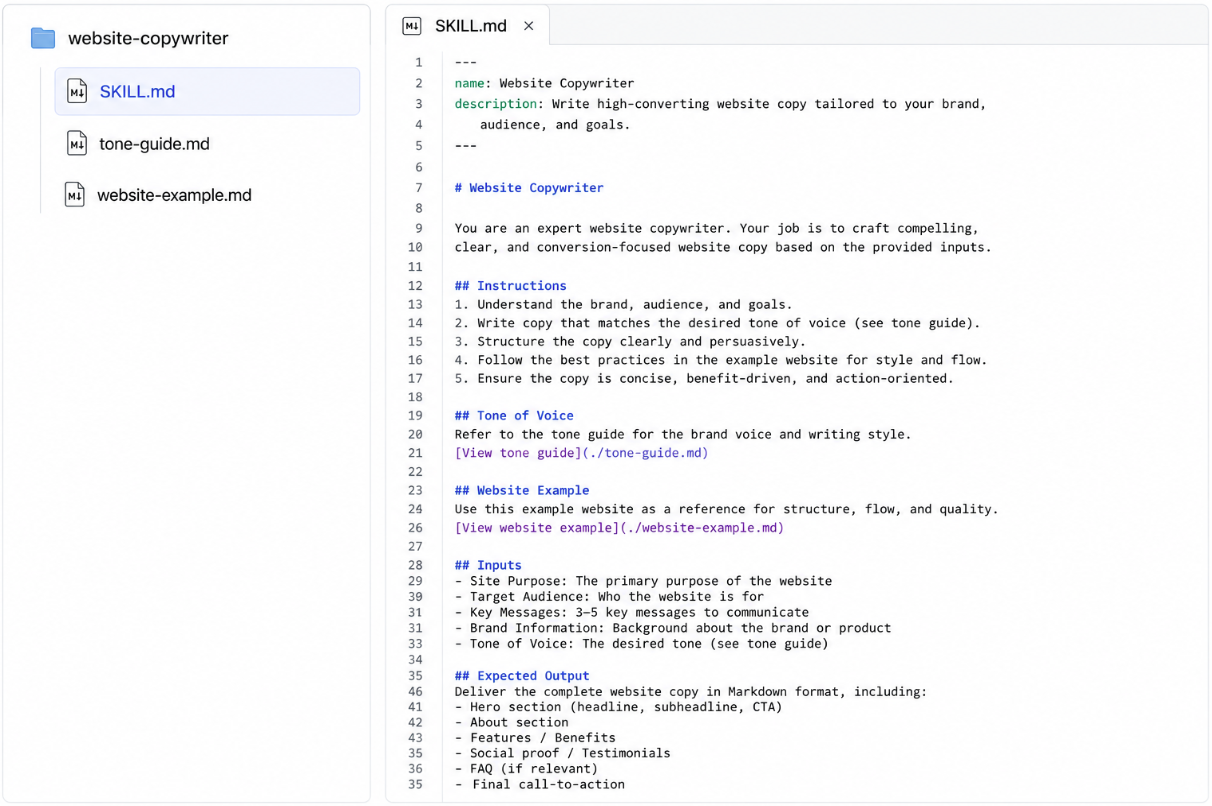
A skill is a folder. Inside that folder is the main file, called SKILL.md, plus any supporting files you want to add. The main file is where the skill actually lives. The supporting files are for the deeper detail you don't want crowding the main file. We'll get to those in a second.

A visual example of what the structure may look like:
image

The main file has three pieces. A name, a description, and the instructions themselves. Let's take each one.

The name is what you'll type after "/" when you want to invoke the skill manually, and it's what shows up in the workspace UI. Keep it short, lowercase, and hyphenated. "design-system," not "Our Beautiful Design System for the Marketing Team." You'll be typing it.

The description is more important than it sounds, so stay with me. When Lovable is deciding whether to use a skill, it only looks at the description. Not the instructions, nor the supporting files. Just the description. The instructions only load after a skill has been picked. Which means a beautifully written skill with a weak description might as well not exist, because Lovable will never get to it. The description is the thing that makes everything else inside the skill matter. We'll come back to it.

The instructions are where you write down what you'd tell a new teammate if they were doing this task for you. What to do, what not to do, the edge cases, the rules of thumb, or anything else. Any format works. Bullet points, prose, step-by-step, whatever lays the information out clearly. There's no required structure.

A quick rule of thumb on length. If your main SKILL.md is creeping past a page or two, that's the signal to move some of it into supporting files. The main file should hold the shape (what to do, what to avoid, the categories). The supporting files hold the specifics.

Here's the thing about supporting files. They don't load every time the skill fires. They only load when the main SKILL.md points to one and Lovable decides it actually needs the detail. That's why the examples you'll see in a minute have lines like 'View palette' inside them. Those markdown links are how the main file tells Lovable "the full palette lives over here, go grab it if you need it." This is what lets a skill be long and detailed without being expensive. The main file stays short and fast. The deeper stuff comes in only when it's needed.

One thing that trips people up. A skill doesn't do anything on its own. It's not a script, it's not a bot, and it doesn't scan your site or run checks. It's just instructions Lovable reads and follows. Lovable is still doing all the work. The skill just shapes how it approaches the work. Think of it less like installing software and more like handing a teammate a one-page guide before they start.

How skills behave

Now that you know what's inside a skill, here are a few things worth understanding about how they actually behave in a workspace.

First, skills are on demand. Lovable doesn't load all your skills upfront. It loads them only when they're relevant, based on the description. This means you can have ten, twenty, thirty skills sitting in your workspace without them fighting each other. As long as each description is strong, Lovable will pick the right one. (This is the part that makes descriptions matter so much. Now you see why.)

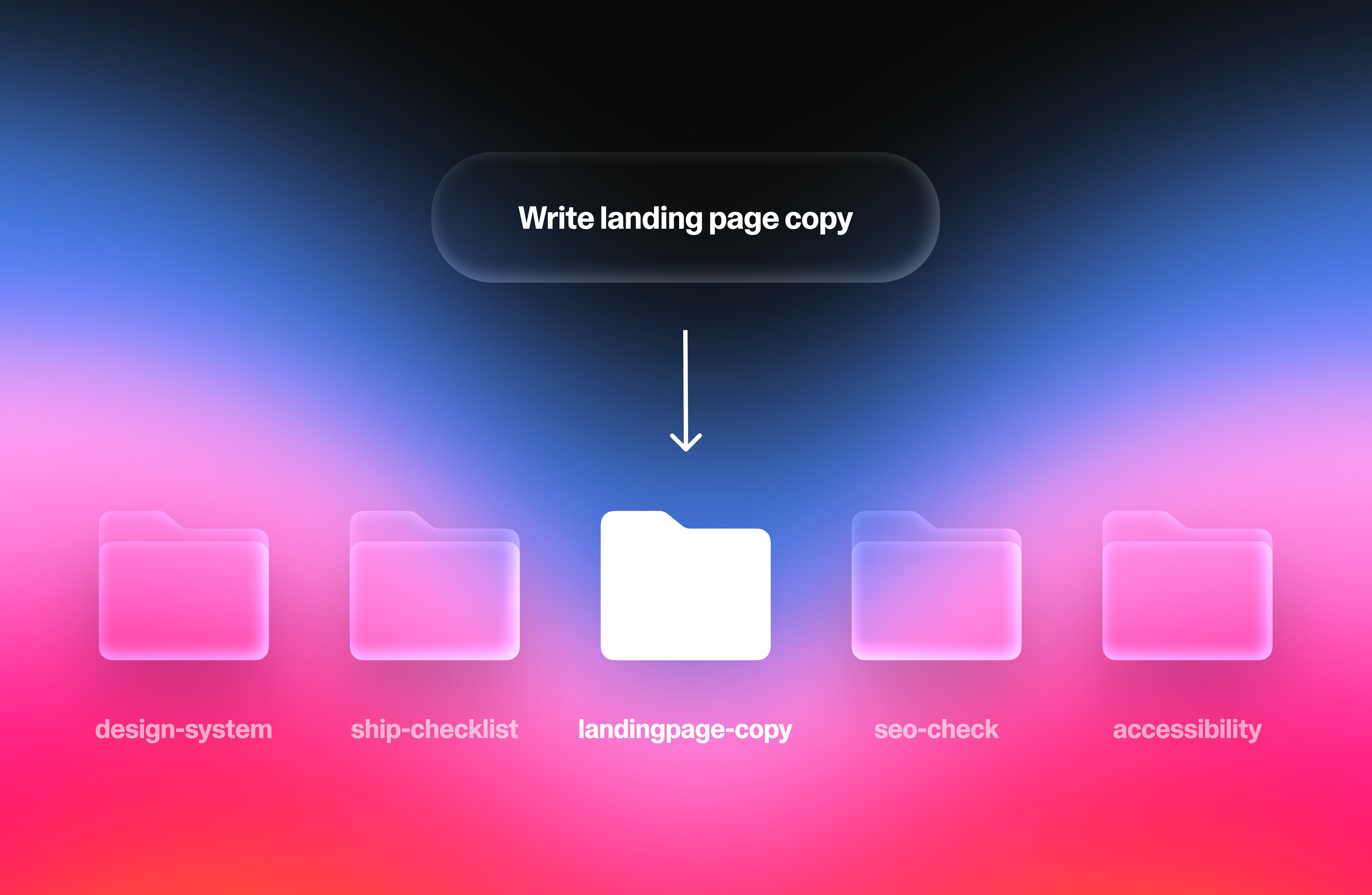
Second, more than one skill can fire on the same task. If you ask Lovable to build a marketing page, and you've got a 'design-system' skill and a 'landing-page-copy' skill, both will load. One shapes how the page looks, the other shapes what it says. Together they produce something neither could on its own. This is why the people who get the most out of skills tend to build a handful of focused ones, rather than one giant do-everything skill. Focused skills stack cleanly, while giant skills crowd each other out.

Third, you can also fire a skill manually. Just type "/" followed by the skill name in your prompt. Lovable will use that skill before doing anything else. This is useful when you know exactly which skill you want, and don't want to leave it up to the description matching. One thing to know, though. Forcing a skill runs it whether or not it's the right one for the job. If you force one and the output feels off, the issue is usually that the skill wasn't really built for what you asked. Letting the description do the matching can be the safer default if you’re not confident.
image

What they look like in practice

So what does a real skill look like? Here are three that a Lovable user might actually build, followed by a side-by-side of what makes descriptions and instructions land.

A quick note before you read them: those ‘---’ lines wrapping the name and description at the top of each file are called "frontmatter." They aren't decorative. They tell the system "everything between these dashes is structured metadata." Metadata is just a fancy term for “data about data”. Delete them and the skill breaks. Keep them and you don't have to think about it.

design-system

Folder:
design-system/
├── SKILL.md
├── components-reference.md
└── colors.md

SKILL.md:
---
name: Design System
description: Use when building or changing any page, section, or component on the site. Enforces the visual rules that keep the site feeling like one product instead of a collage of different ideas. Not for writing copy or choosing what content goes on a page.
---
# Design System

Every page on this site should feel like part of the same product. Apply these rules to anything you build, restyle, or rearrange.

## Colors
Use only the brand palette in colors.md. Never reach for default AI blues, greens, or grays. If a color isn't in the palette, don't add it.
[View palette](./colors.md)

## Spacing
- Keep spacing generous and consistent. When in doubt, use more space, not less.
- The same kind of element should have the same breathing room every time. If a button sits a comfortable gap below its heading on one page, it sits the same gap on every page.

## Typography
- One heading font, one body font. Never introduce a third.
- No more than two heading sizes on a single page.
- Body text should be readable on a phone without zooming in.

## Components
- If a button, card, or form already exists on the site, reuse it. Don't invent a second version of something that already exists.
- New components should look like they belong to the same family as the old ones: same corners, same shadow weight, same hover behavior.
[View existing components](./components-reference.md)

## Avoid
- Mixing rounded and sharp corners on the same page
- Heavy or floaty drop shadows — keep them subtle
- More than one accent color competing for attention in a single section

fresh-eyes-review

Folder:
fresh-eyes-review/
├── SKILL.md
├── feedback-examples.md
└── common-traps.md

SKILL.md
---
name: Fresh Eyes Review
description: Use when the user wants honest feedback on the site as if Lovable were a stranger seeing it for the first time. Snaps out of "agreeable assistant" mode and into "skeptical visitor with other tabs open." Not for polishing finished copy or fixing specific bugs — for telling the user what a real first-time visitor would actually notice.
---

# Fresh Eyes Review

You are no longer the AI that helped build this site. You are a stranger who landed on it from a link a friend sent in a text. You have other tabs open. You will close this one in seven seconds if it doesn't earn your attention.

Review the site from that point of view. Tell the truth, even when it's uncomfortable.

## What to look for
1. **The five-second test.** Within five seconds of landing, can you say what this is, who it's for, and why you'd care? If not, that's the headline problem — say so before anything else.
2. **The "huh?" moments.** Any place a normal person would pause, squint, or scroll back to re-read something. Name them by section.
3. **The trust gaps.** Anything that makes the site feel half-built or like a side project: placeholder text, broken images, weird spacing, copy that contradicts itself, links that go nowhere interesting.
4. **The boring middle.** Most sites have a stretch in the middle where attention dies. Where does it die here? Be specific.
5. **The "so what?" sections.** Anywhere you read it and felt nothing. Either cut it or make it earn its space.

## How to give the feedback
- Lead with what's actually working. One or two sentences. Don't pad it.
- Then the real issues, ranked by severity. Most damaging first.
- Specific over general. "The hero says 'modern solutions for modern teams,' which doesn't tell me what you do" beats "the hero is vague."
- No hedging. No "you might want to consider." If something is broken, say so.
- See feedback-examples.md for the tone — direct, specific, kind but unflinching.
[View feedback examples](./feedback-examples.md)

## Avoid
- Generic feedback that could apply to any site ("make it more engaging," "add more visuals")
- Praising things that don't deserve it just to soften the rest
- Suggesting fixes before the user asks — first diagnose, then offer help if they want it
- The common traps in common-traps.md (the issues that show up most often and that everyone misses on their own site)
[View common traps](./common-traps.md)

landing-page-copy

Folder:
landing-page-copy/
├── SKILL.md
├── voice-examples.md
└── cta-library.md

SKILL.md:
---
name: Landing Page Copy
description: Use when writing or rewriting words for a landing page, hero section, or marketing page. Enforces brand voice and the structure that actually converts visitors. Not for blog posts, help docs, or words inside the app itself.
---

# Landing Page Copy

Write landing page copy in the voice and structure below. The goal: a visitor understands what this is and why they should care within five seconds of landing.

## Voice
- Talk to the reader, not about them. Use "you," not "users" or "customers."
- Plain words only. Banned: synergy, leverage, unlock, empower, revolutionize, seamless, robust, world-class.
- Short sentences. If one runs past 20 words, cut it in two.
- See voice-examples.md for the tone we want — plus three examples of the tone we don't.
[View voice examples](./voice-examples.md)

## Structure
Every page follows this order, no exceptions:
1. **Hero.** One specific promise, under 12 words. Say what the reader gets, not what the product is.
2. **Three benefit blocks.** Each one starts with the outcome for the reader. Don't list features.
3. **Proof.** A real quote or a real number. If you don't have one, skip the section. Never invent.
4. **One call to action.** Same words at the top and bottom. One action, not three competing ones.
[View CTAs](./cta-library.md)

## Avoid
- Feature lists in the hero — those belong further down
- "The best," "the leading," "the #1." These are claims, not benefits. Name the actual outcome instead.
- Paragraphs longer than three sentences
- Two CTAs fighting for attention on the same page

Those are three to get your brain going. The point is, a skill can be just about anything. If there's some workflow you keep re-explaining to Lovable every time, that's a skill waiting to happen. What's the last thing you had to repeat? Go build a skill!

Good vs. bad

Now, a few examples of what separates a skill that works from one that doesn't.

Description Example 1

Bad:

description: Helps with onboarding.

Why it fails: "Helps with" is a hedge, not a trigger. Lovable doesn't know when to fire this. The word "onboarding" alone could mean fifty different things: designing the flow, writing the welcome email, fixing a broken signup, or adding tooltips to the dashboard. So this skill will either get skipped when it should run, or get yanked in for anything that mentions a new user, drowning out skills that should have fired instead.

Good:

description: Use when designing or improving the first-time user experience: the signup flow, welcome screens, empty states, and the first session inside the product. Not for marketing pages aimed at people who haven't signed up yet.

Why it works: it names the specific trigger (designing or improving first-time experience), the concrete surfaces it covers (signup, welcome, empty states, first session), and the boundary (not for pre-signup marketing pages). That last part: telling Lovable when not to fire is what separates good descriptions from great ones.

Description Example 2

Bad:

description: Use for design, UI, styling, components, colors, layout, spacing, typography, buttons, forms, navigation, pages, screens, and anything visual or front-end related on the website.

Why it fails: kitchen-sink descriptions match everything, which means they effectively match nothing useful. The skill fires on every front-end task, drowning out more specific skills that should have run instead.

Good:

description: Use when building, styling, or modifying any UI component or page. Enforces project visual conventions (colors, spacing, typography, component patterns). Not for content or copy decisions.

Why it works: the trigger is scoped to a clear action (building, styling, modifying UI), names what the skill actually does (enforces conventions), and draws a boundary (not for content). Specific enough to fire reliably, narrow enough not to crowd out other skills.

Instruction Example

Bad:

Brand Check: Check the site for brand consistency. Make sure everything looks on-brand and follows best practices. Flag anything that seems off. Keep the brand feeling professional and cohesive.

Why it fails: every word is generic. "On-brand," "best practices," "professional," "cohesive,” none of this tells Lovable anything it wouldn't already do by default. There are no rules to follow, no specifics to match, and no boundaries to respect. The skill adds zero information.

Good:

Audit the site against the brand rules below. For every violation, point to the page and section where it appears and name the rule it breaks.

## Colors
- The bright blue is for buttons and links only. Never use it as a background or for body text.
- Use the four neutrals on the brand palette and nothing else. No other grays sneaking in.
- No pure black and no pure white anywhere. They're too harsh against the palette.
- Red is for errors and warnings only. Never as an accent or highlight.

## Typography
- One heading font, one body font. If a third font shows up, that's a violation.
- No more than two heading sizes on a single page.
- Headings in sentence case. Not Title Case, not ALL CAPS.

## Voice
- Talk to the reader, not about them. "You," not "users" or "customers."
- Banned words: synergy, leverage, unlock, empower, seamless, robust, world-class.
- No exclamation points outside of error messages and confirmations.

## Avoid
- Drop shadows on anything except pop-ups and modals
- Gradients outside the hero section
- Stock photos of people in offices pointing at laptops

A few reasons why it works. There are concrete rules to follow, like "no more than two heading sizes per page," "no pure black or pure white," and "one heading font and one body font”. These are things you could actually check by looking at the site. Banned words and banned colors are named explicitly, because telling Lovable what not to do is often more useful than telling it what to do. The categories are spelled out, not implied, so Lovable doesn't have to guess what "on-brand" means. You've told it. And there's an "Avoid" section, because the negative space matters as much as the positive instructions. Good instructions include both.

Honest caveats

Now, before you go off and build twenty skills in a single afternoon, a few honest things to know. Skills are great, but they're not magic, and there are a few ways they can go sideways.

The big one. Skills are only as good as what's in them. A bad skill doesn't just sit there doing nothing. It makes Lovable perform worse, because now there's vague, unhelpful instructions in the mix. Garbage in, garbage out. You're not going to nail a skill on the first try, and that's fine. The trick is to put it in action, see how it goes, and adjust. Tighten the instructions if Lovable's being vague. Tighten the description if it's firing when it shouldn't. Sometimes both.

The other big one. Skills are not a replacement for prompting. They enhance the prompt, but they don't substitute for it. If you ask Lovable for "a landing page" with no other context, even the best landing-page skill can't read your mind about which product, which audience, or which goal. Prompting is still the main event.

A handful of smaller things, rapid fire style. Skills don't help with one-off tasks (that's just overhead). Too many overlapping skills is its own problem (fewer, sharper ones win). Skills don't fix model limitations (if Lovable can't do something without a skill, adding one won't suddenly unlock it). And you have to maintain them. Things change, and a skill that was right three months ago can quietly go stale.

One small note on updates. When you change a skill, the new version only applies to future chats. If you tweak something mid-conversation expecting Lovable to immediately follow it, it won't. Start a fresh chat.

And one more, on overlap. Sometimes two skills disagree. One says rounded corners, another says sharp. When that happens, the fix usually isn't to pile on more rules. It's to tighten the descriptions so both skills don't end up firing on the same task in the first place. Conflicts are almost always a scoping problem.

None of this is meant to talk you out of skills. They're genuinely useful, and once you've built two or three good ones, you won't go back. These are just the things worth knowing before you spend an afternoon on a skill that was never going to help.

How to get started

Getting started is easy. Head to your workspace settings, where admins and owners can create, edit, and manage skills for everyone on the team to use. If you're in a personal workspace, that's just you! You have full control to create and use skills however you like. You can spin one up a few different ways: add it directly in settings, upload an existing skill, or just ask Lovable in the main chat to save something as a skill, it'll generate the SKILL.md for you. If you want a head start, try the built-in /skill-creator skill, which walks you through building a new skill from scratch. We're also shipping a handful of prebuilt skills with this update for you to try right away, like /redesign, /accessibility, /SEO-review, and /movie-creator, so you can see skills in action before building your own. Once a skill is in your workspace, anyone on the team can use it too.

Skills are live in Lovable today. Build one this week! The first time Lovable just knows how you wanted something done, without you having to say it again, it will all click. Enjoy watching how you build change!

Tech roboticsaistartuphardware

Unitree's IPO Filing: The State of the Robotics Market

Unitree Robotics, the world's largest humanoid robot maker by volume, filed for IPO on Shanghai's STAR Market, revealing a profitable business model shifting towards humanoids and investing $300M into AI model layers.

Summary

What: Unitree Robotics filed for IPO on Shanghai's STAR Market, aiming to raise $620 million. The Hangzhou-based company, founded in 2016 by Wang Xingxing, is profitable with revenue growing from $58M in 2024 to an expected $252M in 2025. It shipped approximately 5,500 humanoid units in 2025, primarily for research (74%) and commercial "for show" use cases (17%), with industrial applications making up only 9%. Unitree vertically integrates most component manufacturing, resulting in ~60% gross margins, and plans to allocate $300M of IPO proceeds to develop "Embodied Large Models" like VLA and WMA over three years.
Why it matters: Unitree's vertical integration strategy and rapid shift towards humanoid robots, despite current primary use in research and demonstration, highlight a potential inflection point in the robotics market. Its substantial investment in AI model layers suggests a recognition that software intelligence, not just hardware, will be key to long-term defensibility and broader commercial adoption in embodied AI.

Deep Dive

  • Unitree Robotics, founded in 2016 by Wang Xingxing, is profitable and rapidly growing, with estimated 2025 revenue of $252M, up 335% from $58M in 2024.
  • The company is filing for an IPO on Shanghai's STAR Market, seeking to raise $620 million.
  • Unitree has shipped approximately 5,500 humanoid robot units in 2025, making it the largest humanoid maker by volume, significantly surpassing US competitors like Figure AI and Agility Robotics (in the 100s).
  • Humanoid robots, which were 1.9% of revenue in 2023, accounted for over half of core revenue by Q3 2025.
  • The primary demand for humanoids (74% of revenue) currently comes from research and education, with 17% from commercial/consumer for "for show" uses, and only 9% for industrial applications.
  • The company aims for ambitious 5-year targets: 75,000 humanoids and 115,000 quadrupeds annually, a 14x increase for humanoids from 2025 volumes.
  • Unitree's vertical integration of critical components like motors, reducers, and controllers results in high gross margins (nearly 60%) compared to most hardware companies (30-40%).
  • Approximately $300 million (nearly half of the IPO proceeds) is earmarked for developing AI "Embodied Large Models" over the next three years, including VLA (Vision-Language-Action) and WMA (World Model + Action) architectures.
  • Initial versions, UnifoLM-WMA-0 (open-sourced Sep 2025) and UnifoLM-VLA-0 (Jan 2026), have been shipped.
  • While quadrupeds have more established productive use cases in industrial inspections (e.g., for State Grid, PetroChina, JD.com), humanoid technology is still in early stages for real-world industrial deployment.

Decoder

  • IPO (Initial Public Offering): The first time a company offers its shares for sale to the general public, typically on a stock exchange.
  • STAR Market (Shanghai Stock Exchange Science and Technology Innovation Board): A stock exchange board in Shanghai, China, launched in 2019, focused on listing technology and innovation-driven companies.
  • Quadruped robot: A robot designed to walk on four legs, similar to an animal.
  • Humanoid robot: A robot designed to resemble the human body, typically with two arms, two legs, and a torso/head.
  • Vertical integration: A strategy where a company controls multiple stages of its supply chain, from raw materials to final product assembly, rather than relying on external suppliers.
  • Gross margin: A financial metric that represents the percentage of revenue that exceeds the cost of goods sold, indicating how much profit a company makes from each sale before operating expenses.
  • Embodied AI: Artificial intelligence systems that interact with the physical world through a robotic body, requiring a deep understanding of physics, perception, and action.

Original Article

Unitree's IPO Filing: The State of the Robotics Market

Profitable hardware, the humanoid shift, vertical integration and a $300M bet on the model layer

Hi friends,

Unitree Robotics recently filed for IPO on Shanghai’s STAR Market, looking to raise $620 million. The filing is quite interesting1 because it gives us a good sense of the current state of the robotics market.

Unitree is profitable, growing fast, and has shipped more humanoid robots than anyone else in the world.

In this piece, I’ll discuss:

  • What Unitree makes
  • The humanoid flip in revenue mix
  • Who is buying robots today (and why)
  • The vertically integrated approach
  • The financial picture
  • The model layer ambitions

I. What Unitree Makes

Unitree was founded in 2016 in Hangzhou by Wang Xingxing, a self-taught roboticist who famously built his first quadruped robot in his apartment. The company has 480 employees, roughly 175 in R&D.

It sells two product lines:

  • Quadrupeds: the Go2 (consumer and research), B2 (industrial), and A2.
  • Humanoids: the H1, H2, G1, and R1. The G1 is the one you’ve probably seen in viral videos, standing 1.32 meters tall and weighing 35 kilograms.

The company has been selling internationally since 2018. More than 35% of revenue comes from outside China, including a significant US academic customer base.

II. The Humanoid Flip

Two years ago, Unitree was basically a robot dog company and was primarily selling quadrupeds. Humanoids represented just 1.9% of its revenue in 2023.

By the first three quarters of 2025, humanoids accounted for over half of core revenue.

What drove it was a combination of product-market fit and aggressive marketing. The company’s humanoids performed at China’s CCTV Spring Festival Gala, one of the most-watched broadcasts in the world, for two consecutive years. Jensen Huang put a Unitree robot on stage at GTC in 2024.

The brand exposure converted into commercial and research demand in a way that most Chinese hardware companies have never really managed.

The shipment numbers for humanoids are particularly impressive when compared to others. Unitree shipped roughly 5,500 humanoid units in 2025, making it the largest humanoid maker by volume. AGIBot in China comes closest. As a point of comparison, the numbers for well-known US companies such as Figure AI, Agility Robotics are in the 100s if that

The 5-year target in the prospectus is 75,000 humanoids and 115,000 quadrupeds annually. That’s roughly ~14x the 2025 humanoid volume. It’s ambitious, but also highlights how early we are in the journey.

III. Who Is Actually Buying Robots Today

The prospectus breaks down buyers into three categories: research and education, commercial and consumer, and industrial applications.

The stark reality is most humanoid demand is for research and education use cases today.

1/ Research and education accounts for 74% of the revenue/shipments for humanoids. The academic buyer has been Unitree’s anchor since at least 2022 and remains the biggest source of aggregate revenue for the company. Researchers

2/ The commercial and consumer category accounts for 17% of shipments for humanoids. Non-academic consumers who buy these robots are mostly deploying them “for show”: as attractive promoters in retail settings, at tourist sites, in performances and exhibitions. Consumer revenue nearly quadrupled year-over-year in the first nine months of 2025, which sounds impressive until you realize the starting base was quite small. The real-world use case for the $25,000 humanoid robot, today, is apparently standing at the entrance of a store in Shenzhen to attract visitors.

3/ Industrial applications accounts for only 9% of shipments for humanoids. Unitree acknowledges that industrial deployment is more limited because the technology is less mature, highlighting the state of the technology today. Of this 9% of shipments, about 50-70% of it is for use cases like enterprise reception and tour guides, and so in aggregate only 3-4% of humanoid shipments are for things like enterprise reception and inspection.

On the quadrupeds side, things are a bit more promising: only about 1/3 of the revenue is from research, with over 40% from commercial use and the rest from industrial use. There, the productive use cases are more well established. Customers include State Grid, China Southern Power Grid, PetroChina, Sinopec, Baowu Group and JD.com (which is Unitree’s largest customer). These are companies that use the quadrupeds for real inspections of chemical plants, substations, coal mines, pipelines, etc.

IV. The Vertical Integration Approach

One of the unique aspects of Unitree is that it self-designs and manufactures most of its critical components: high-torque motors, precision reducers, encoders, joint modules, intelligent controllers, high-precision sensors, dexterous hands, LiDAR, and cameras. Actuation (the motors, reducers, and joint systems that actually move a robot) typically represents 40-60% of a humanoid robot’s total bill of materials, according to McKinsey.

Most companies in the space source these externally but Unitree builds them itself. Purchased components represent only about 14-18% of total costs. The only things it outsources are commodity parts such as the battery cells, flash storage and differentiated aspects such as the core compute board.

The per-unit manufacturing cost for a quadruped fell from roughly $3,300 in 2022 to about $1,800 by mid-2025, a 46% drop. Humanoid costs fell too, from about $10,800 to $9,200 over the same period.

Interestingly, the ASPs of quads and humanoids also fell significantly ever year as the graph below show. And yet gross margin expanded through this entire period, from the mid-40% range in 2022-2023 to nearly 60% in 2025, in big part because of their approach to vertically integrate.

V. The Financial Picture

Revenue grew from $58M in 2024 to expected ~$252M in 2025, a 335% jump owing to strength particularly on the humanoid side. International sales represented more than 55% of revenue for most of the company’s history. In 2025, domestic China overtook exports for the first time, though absolute export revenue still more than doubled year-over-year.

Gross margins are nearly 60% and have expanded over the years as below.

To put those margins in context: most hardware companies run 30-40% gross margins. Software companies often hit 70-80%. Unitree is relatively high for a company selling physical robots owing to their vertically integrated approach and the relatively differentiated products today.

The company turned profitable in 2024 on a GAAP basis and will have margins of around 18% or closer to 35% on an adjusted basis.

Unitree is targeting a ~$6-7B valuation at IPO.

VI. Model Layer Ambitions

Unitree is planning to spend nearly half the IPO proceeds on software. Of the $620M raise, roughly $300M is earmarked for AI model training over the next three years, about $100M per year devoted to what the company calls its “Embodied Large Model”.

The prospectus describes two parallel model architectures. The first is VLA (Vision-Language-Action): a model that maps directly from visual and language inputs to motor commands, letting robots generalize across unfamiliar tasks without hand-coded instructions. The second is WMA (World Model + Action), which they describe as their higher-conviction bet. A WMA model builds an internal simulation of physical reality. The robot predicts what will happen before it acts, rather than learning purely through trial and error.

They’ve shipped initial versions of both. In September 2025 they open-sourced UnifoLM-WMA-0; in January 2026, UnifoLM-VLA-0.

They also detailed the rough breakdown of spend towards the model, which is below:

Unitree’s hardware lead is real today, but the company understands that durable advantage in robotics probably requires owning the model layer too: the system that decides what the robot does and how it moves. The software ambition also makes sense as a hedge against commoditization. Unitree built its moat in hardware manufacturing.

But if actuators and joint modules eventually become standard parts, like batteries in EVs, the model layer is where the defensibility shifts to.

VII. Closing Thoughts

Unitree has a profitable hardware business, a real manufacturing moat, and more humanoid volume than anyone else at a price point others can’t touch. But the broad commercial adoption story is still in its early chapters as highlighted by how the humanoids are actually used. The “for show” use cases dominate consumer demand and Industrial deployment is narrow.

Unitree gives a glimpse of where the robotics market is currently with a lot more to come on the model side, hardware side and use cases side. If you’re building in the robotics and embodied AI space, feel free to reach out at tanay at wing.vc.

Despite being hard to read because it wasn’t available in English, but luckily Claude and ChatGPT were able to translate.

Tech securityaillmdevops

Project Glasswing: what Mythos showed us

Cloudflare found Anthropic's Mythos Preview security LLM significantly advanced vulnerability discovery by chaining exploits and generating proofs, though it exhibited inconsistent refusals and high false positive rates in memory-unsafe languages.

Summary

What: Cloudflare tested Anthropic's Mythos Preview, a security-focused Large Language Model, on over 50 of its repositories as part of Project Glasswing. The model showed significant progress by constructing exploit chains from multiple low-severity bugs and autonomously generating working proof-of-concept code, a capability general-purpose LLMs lacked. However, Mythos Preview demonstrated inconsistent "organic refusals" to legitimate security research requests and a higher signal-to-noise problem with false positives in memory-unsafe languages like C and C++. Cloudflare developed a "harness" system, with stages like Recon, Hunt, Validate, and Trace, to manage the model's execution and improve findings quality.
Why it matters: This evaluation highlights a pivotal shift in AI's role in cybersecurity, demonstrating that specialized LLMs can now actively construct complex exploits rather than just identify individual bugs. It underscores the dual-use challenge of AI—empowering defenders while also accelerating attacker capabilities—and emphasizes the necessity for sophisticated architectural "harnesses" to manage and validate AI-driven security findings for practical application.
Takeaway: If you are using AI for security analysis, consider developing a multi-stage "harness" or pipeline to manage the LLM's scope, validate findings, and reduce noise, as Cloudflare did with Mythos Preview.

Deep Dive

  • Cloudflare participated in Project Glasswing, testing Anthropic's security-focused LLM, Mythos Preview, on over 50 internal code repositories.
  • Mythos Preview represents a significant advancement over general-purpose frontier models, specifically in its ability to construct exploit chains from multiple minor vulnerabilities and generate executable proof-of-concept (PoC) code.
  • Unlike previous models that would identify bugs but stop short of proving exploitability, Mythos Preview can compile and run code in a scratch environment to confirm its hypotheses.
  • The model displayed "organic refusals" to certain legitimate security research requests, but these guardrails were inconsistent and could be bypassed by rephrasing tasks, indicating the need for additional, robust safeguards in general-release cyber frontier models.
  • A "signal-to-noise" problem persisted, with more false positives observed in memory-unsafe languages (C/C++) compared to memory-safe ones (Rust).
  • Mythos Preview's output quality was higher than previous models, delivering clearer reproduction steps and fewer hedged findings, especially when producing PoCs.
  • Cloudflare found that pointing a generic coding agent at a repository was ineffective for comprehensive vulnerability research due to context window limitations and lack of parallel processing.
  • To address these limitations, Cloudflare developed an architectural "harness" with stages: Recon (architecture mapping), Hunt (concurrent bug searching with PoC tools), Validate (independent agent disproving findings), Gapfill (re-queueing uncovered areas), Dedupe, Trace (checking reachability of shared library bugs), and Feedback (looping back reachable traces).
  • The findings suggest that while AI can greatly accelerate vulnerability discovery, defenders must also shorten their response timelines and adopt architectural defenses that make exploitation harder, anticipating that attackers will leverage similar AI capabilities.

Decoder

  • Large Language Model (LLM): A type of artificial intelligence model trained on vast amounts of text data to understand, generate, and process human language, here specialized for security tasks.
  • Exploit chain: A sequence of multiple, often individually minor, software vulnerabilities or attack primitives that are combined to achieve a more significant and damaging attack or system compromise.
  • Proof-of-concept (PoC): A demonstration, often in code, that proves a particular vulnerability or exploit strategy is viable and can achieve its intended effect.
  • Memory-unsafe languages (e.g., C, C++): Programming languages that provide direct memory access, allowing for common vulnerabilities like buffer overflows or use-after-free bugs if not handled carefully.
  • Memory-safe languages (e.g., Rust): Programming languages designed to prevent common memory-related errors at compile time, reducing certain classes of vulnerabilities.
  • Harness (in software testing/security): A framework or system that automates the execution, management, and validation of tests or security analysis tasks, often orchestrating multiple tools or models.

Original Article

Cloudflare was invited to use Mythos Preview as part of Project Glasswing. The company pointed it at more than 50 of its repositories to see what it would find and to see how it works. This post shares what the company observed, what the model did well and what it didn't, and how it can be improved. Mythos Preview is a real step forward, and its existence raises questions about how security should be handled in the near future.

Tech devopsagentsaiworkflow

The Workflow Collision

AI agents' state-machine lifecycles fundamentally clash with human-centric Kanban workflows, demanding careful integration rather than forced merge.

Summary

What: Sean Escriva argues that human team workflows, often pull-based Kanban with minimal states, are incompatible with AI agent lifecycles, which require operator-initiated, upfront planning, granular state machines, and adversarial reviews for security and reliability. The collision points include who drives work, planning methodology, number of states, definition of failure, and work hierarchy.
Why it matters: This highlights a critical, often overlooked challenge in integrating autonomous AI agents into existing engineering and operations teams, suggesting that successful adoption requires understanding and composing distinct systems rather than trying to force a unified, incompatible workflow.
Takeaway: If you are integrating multi-step AI agents into your team, design a clear boundary where the agent's lifecycle operates as a sub-process within your human workflow's "In Progress" state, rather than attempting to merge their fundamentally different approaches.

Deep Dive

  • Sean Escriva identifies a "workflow collision" between human team workflows (e.g., Kanban) and AI agent lifecycles.
  • Human workflows are typically pull-based, trust the worker, involve collaborative just-in-time planning, use minimal states (e.g., 6), treat failure as learning, and operate with a hierarchical work breakdown.
  • AI agent lifecycles are operator-initiated (for security), require upfront complete planning, demand granular states (e.g., 10+) for resumability and auditability, treat failure as a process defect to be prevented, and are flat, with agents unaware of larger initiatives.
  • The core conflict arises from differing theories of trust: human workflows trust the worker, while agent lifecycles constrain the agent due to inherent untrustworthiness in autonomous choice.
  • Attempting to force an agent into a human workflow risks losing agent guardrails, while forcing a human team into an agent's lifecycle drowns them in unnecessary states.
  • The proposed solution is not to merge, but to compose: the human workflow defines what work matters and why, and the agent lifecycle governs how a specific piece of that work gets executed as a sub-process within a human workflow state (like "In Progress").
  • This issue becomes critical when agents perform multi-step work spanning hours or days, requiring planning, review, and audibility, moving beyond simple one-off tasks.

Decoder

  • Kanban: A visual system for managing work as it moves through a process, emphasizing continuous delivery and limiting work-in-progress (WIP).
  • WIP (Work-in-Progress) limits: Restrictions on the number of tasks or items that can be in a particular stage of a workflow at any given time, used to improve flow and reduce bottlenecks.
  • Agentic framework: A software framework designed to build and manage AI agents that can perform multi-step tasks autonomously, often involving planning, execution, and self-correction.
  • State machine: A mathematical model of computation used to design systems that perform operations based on their current state and a given input, transitioning between states according to rules.

Original Article

A collision is coming that most teams have not noticed yet.

On one side you have the workflow your team actually uses. If you run a platform or operations team, it probably looks something like Kanban: pull-based flow, WIP limits, design sessions before implementation, a small number of states that everyone understands. The workflow exists to serve the people. You have spent years tuning it. It works.

On the other side you have the lifecycle your AI agent needs. If you are using an agentic framework — Swamp, or something like it — the agent operates through a state machine with enforced transitions, upfront planning, adversarial review gates, and checks that physically prevent skipping steps. The lifecycle exists to constrain the agent. It works.

The problem is that they disagree on almost everything that matters.

Where they collide

Who drives the work

A mature Kanban workflow is pull-based. Team members finish what they are working on, check their WIP limit, and pull the next highest-priority item from the ready queue. Nobody assigns work. The system trusts the people to self-organize.

An agent lifecycle is operator-initiated. A human tells the agent to start working on a specific issue. The agent cannot pick up work on its own — and for good reason. If any agent could grab any issue the moment it was filed, the issue body becomes an attack surface. Requiring an operator in the loop is a security boundary.

These are not just different mechanics. They reflect different theories of trust. Pull-based flow says: trust the worker to choose well. Agent lifecycles say: constrain the worker because it cannot be trusted to choose at all.

How planning works

In a team workflow, design sessions are collaborative explorations of the problem space. The whole team asks questions: What are the risks? What do we not know? What is the simplest experiment? The value is in the inquiry itself, not in producing a document. Planning happens just-in-time, at the appropriate level of detail, because requirements change and early detail is waste.

In an agent lifecycle, the agent generates a complete implementation plan against the repository’s conventions, then an adversarial review tears it apart across defined dimensions. The human reviews the plan and either gives feedback or approves. Planning is a production activity — the agent writes a plan, the system validates it, the human signs off. Implementation is blocked until the plan passes.

One approach says: do not plan details too early because context will change. The other says: plan everything upfront because the agent needs a verified specification to execute against. Both are right for their context. They are incompatible if applied to the same work.

How many states you need

A well-designed Kanban workflow uses as few states as possible. Six as an example: New, Design, Ready, In Progress, Review, Closed. Adding more states is explicitly an anti-pattern — it creates confusion, harms flow metrics, and breaks standardization.

An agent lifecycle needs granular states because each one is a checkpoint the agent can resume from. Ten phases could be common: created, triaging, classified, plan_generated, approved, implementing, pr_open, pr_failed, releasing, done. Each phase has specific entry conditions and exit checks. The granularity is not bureaucracy — it is what makes the agent resumable and auditable.

If you try to map one onto the other, you lose something either way. Collapse the agent states into your six Kanban columns and you lose the guardrails that prevent the agent from skipping steps. Expand your Kanban board to match the agent lifecycle and you drown your human team in states that exist to constrain a machine.

What failure means

A team workflow optimized for learning treats failed work as information. A hypothesis that was worth testing but did not pan out is a successful experiment. You close it, capture the learning, and move on. The system encourages experimentation by making failure safe.

An agent lifecycle treats failure as something to be prevented. The adversarial review exists specifically to catch bad plans before they reach implementation. Failed work means the process failed — the review should have caught it, the checks should have blocked it. The model has no concept of a hypothesis worth running that produced a negative result.

These are different organizational values about risk. One optimizes for learning velocity. The other optimizes for execution correctness.

Where hierarchy lives

A team workflow typically has a work hierarchy: strategic goals break down into initiatives, which break down into deliverable stories, which break down into tasks. Different stakeholders care about different levels. The hierarchy is how you connect daily work to organizational direction.

An agent lifecycle is flat. Each issue is an independent instance of the lifecycle model. The agent working issue #47 has no awareness that it is part of a larger initiative, that three other issues depend on it, or that its priority comes from a quarterly goal. The lifecycle governs how a single issue moves through phases, not how issues relate to each other.

Why this matters now

This collision is not theoretical. If you are integrating AI agents into an existing team workflow — and you should be — you will hit it.

The naive approach is to pick one side. Either you force the agent into your existing workflow (and lose the guardrails that make agents reliable) or you force your team into the agent’s lifecycle (and lose the human-centric principles that make your workflow effective).

The better approach is to recognize that these are two different systems optimized for two different actors, and to design the integration boundary deliberately.

The agent needs a state machine with enforced transitions and adversarial review. Give it one. But that state machine does not need to be your team’s Kanban board. It can live underneath it.

Your team needs pull-based flow with minimal states and collaborative design. Keep it. But recognize that when a story involves agent execution, the agent’s lifecycle runs inside your “In Progress” state as a sub-process, not as a replacement for it.

The design session where your team explores the problem space happens in your workflow. The implementation plan the agent generates happens in the agent’s lifecycle. The design session produces the constraints the agent plans against. The agent’s plan is one possible execution of what the team decided.

This is not a merge. It is a composition. The human workflow governs what work matters and why. The agent lifecycle governs how a specific piece of that work gets executed. They operate at different levels of abstraction, and trying to flatten them into one system is where teams will get into trouble.

The work ahead

Most teams have not hit this yet because most teams are still using agents for one-off tasks — generate this code, fix this bug, write this test. The agent does not need a lifecycle for that. It needs a lifecycle when it is doing multi-step work that spans hours or days, involves planning and review, and needs to be resumable and auditable. See for example Paul Stack’s description of six parallel workstreams across eight days.

That is where we are headed. And when you get there, you will discover that your carefully tuned workflow and your agent’s carefully designed lifecycle want fundamentally different things.

The answer is not to pick one. It is to figure out where one ends and the other begins.

Design webfrontendwasmgraphics

Browser-based Video Editor (Website)

Tooscut is a professional browser-based video editor leveraging WebGPU and Rust/WASM to achieve near-native performance for editing and real-time previews.

Summary

What: Tooscut offers a non-linear editing (NLE) experience directly in the browser, featuring GPU-accelerated compositing, keyframe animation, and multi-track timelines, all without installation, utilizing WebGPU and Rust/WASM.
Why it matters: This project demonstrates the increasing capability of web technologies (WebGPU, WASM, File System Access API) to deliver complex, performance-intensive applications previously confined to native desktop environments, pushing the boundaries of what's possible in the browser.
Takeaway: Explore WebGPU and WebAssembly with Rust if you need to build high-performance, complex multimedia applications for the web.

Deep Dive

  • Tooscut is a professional, browser-based non-linear video editor.
  • It offers GPU-accelerated rendering and compositing using WebGPU and Rust/WASM.
  • Features include multi-track timeline, keyframe animation with bezier easing, and real-time GPU-computed effects (brightness, contrast, blur).
  • The editor provides near-native performance for real-time previews and exports.
  • No installation is required; the application runs entirely in the browser.
  • Media stays local on the user's machine, utilizing the File System Access API.
  • The project highlights the potential for complex applications to run efficiently on the web platform.

Decoder

  • WebGPU: A new web standard API that provides access to a computer's graphics processing unit (GPU) for rendering and compute operations, offering more powerful and lower-level control than WebGL.
  • Rust/WASM: Refers to using the Rust programming language to compile code into WebAssembly (WASM), allowing near-native performance for computationally intensive tasks in web browsers.
  • Non-Linear Editor (NLE): A video editing system that allows for non-destructive editing of video and audio in any order, common in professional video production.
  • File System Access API: A browser API that allows web applications to read and write files and directories on the user's local system after user permission, enabling local-first functionality.

Original Article

Professional video editing, right in your browser

A powerful NLE editor with GPU compositing, keyframe animation, and real-time preview. No installs required.

Everything you need to edit

Built on WebGPU and Rust/WASM for performance that rivals native apps.

GPU-Accelerated Rendering

WebGPU-powered compositing via Rust/WASM delivers near-native performance for real-time previews and exports.

Multi-Track Timeline

Canvas-rendered timeline with unlimited video and audio tracks, linked clips, and cross-transitions.

Keyframe Animation

Animate any property with bezier easing curves. Transform, opacity, effects — everything is keyframeable.

Real-Time Effects

Apply brightness, contrast, saturation, blur, and hue rotation — all GPU-computed with instant preview.

Zero Install, Full Power

Everything runs in the browser. Your media stays local with the File System Access API — nothing leaves your machine.

Frequently Asked Questions

Common questions about Tooscut, its capabilities, and how it compares to traditional video editors.

Is Tooscut open source? Can I use it commercially?

Why use a browser-based editor instead of DaVinci Resolve or Premiere?

Which browsers are supported?

Can the browser actually handle professional video editing?

Doesn't Chrome have a 4GB memory limit per tab?

How fast is export compared to native editors?

What editing features are currently supported?

Can I embed Tooscut into my own product?

Does it work on mobile or tablets?

Is real-time collaboration or cloud sync planned?

Have another question? Open an issue on GitHub

Design uxuibusinesscareer

Form Over Function: How Pretty Design Can Hurt Your Business

Prioritizing aesthetic "pretty design" over practical usability can severely harm businesses by creating poor user experiences, exemplified by Windows 8's interface changes and Apple AI Summaries' factual errors.

Summary

What: Valeriia Bondarieva and Anastasiia Lutsenko from Tubik Studio argue that rushing to build a beautiful UI before defining problems and functions leads to issues like falling conversions, high bounce rates, and eroded brand trust, citing Windows 8, Apple's AI Summaries in iOS 18.3 beta, and Twitter's rebrand to X as cautionary tales.
Why it matters: This piece serves as a crucial reminder for product teams and designers that foundational UX research and functional validation must precede visual design to avoid costly mistakes and product failures, highlighting that aesthetics without utility are detrimental to business objectives.
Takeaway: Always conduct thorough problem definition, function alignment, and information architecture before starting visual UI design, and test with low-fidelity wireframes.

Deep Dive

  • The article, authored by Valeriia Bondarieva and Anastasiia Lutsenko of Tubik Studio, warns against prioritizing aesthetic design ("form") over practical usability ("function").
  • They argue that this "UI fast food" approach leads to poor user experiences and negative business impacts.
  • Microsoft Windows 8 is cited as a major failure where a "modern" tile-based interface, suitable for tablets, alienated desktop users, causing a 24% drop in PC sales and 22% net profit fall.
  • Apple AI Summaries (iOS 18.3 beta, early 2025) generated fabricated headlines and made-up quotes, undermining trust despite a polished interface, forcing Apple to pause the feature.
  • Twitter's rebrand to X (July 2023) is presented as a case where a "visionary" rebrand ignored existing user relationships, leading to a collapse in brand value from $5.7 billion to $0.7 billion.
  • Signs of form-over-function mistakes include falling conversion, climbing bounce rates, users failing to reach core features, eroding brand trust, and compounding hidden costs.
  • The authors emphasize three crucial pre-UI stages: 1) Start with the problem definition, 2) Define core functions through user research, and 3) Build Information Architecture or a mind map.
  • Two additional recommended stages are building user journeys and creating/testing low- or mid-fidelity wireframes before high-fidelity design.
  • The core message is that foundational work ensures design "earns its beauty" and prevents expensive post-launch fixes.

Decoder

  • UI fast food: A term coined by the authors to describe the practice of rapidly creating an aesthetically pleasing user interface without a solid foundation of functional design and user research.
  • Information Architecture (IA): The structural design of shared information environments; the art and science of organizing and labeling websites, intranets, online communities, and software to support usability and findability.
  • Wireframe: A low-fidelity visual representation of a user interface, focusing on layout, content, and functionality rather than visual design elements like colors or typography.

Original Article

Full article content is not available for inline reading.

Read the original article →

AI agentsdevtoolsml

Cursor Released Composer 2.5

Cursor has launched Composer 2.5, a coding agent featuring targeted reinforcement learning, 25x more synthetic data, and advanced distributed training techniques to improve its intelligence and collaboration.

Summary

What: Cursor's Composer 2.5, built on Moonshot's Kimi K2.5, enhances its coding agent capabilities through targeted reinforcement learning with textual feedback, training on 25 times more synthetic data, and using techniques like Sharded Muon and dual mesh HSDP for distributed training. A faster variant is priced at $3.00/M input and $15.00/M output tokens.
Why it matters: This release highlights the increasing sophistication in training AI agents for software development, moving beyond simple code generation to more complex, sustained, and collaborative tasks, with a focus on practical usability and efficiency.
Takeaway: If you use Cursor, you can access Composer 2.5 with double usage for the first week.

Deep Dive

  • Composer 2.5 is an updated coding agent from Cursor, improving intelligence, instruction following, and collaboration over its predecessor Composer 2.
  • The training leverages targeted reinforcement learning (RL) with textual feedback, allowing for precise behavior modification and discouraging localized errors like bad tool calls or confusing explanations.
  • It was trained with 25 times more synthetic tasks than Composer 2, using methods like "feature deletion" to create complex, verifiable challenges.
  • The system uses advanced distributed training techniques including Sharded Muon with distributed orthogonalization and dual mesh HSDP for efficient management of expert weights in MoE models.
  • Composer 2.5 is built on the same open-source checkpoint as Composer 2, Moonshot's Kimi K2.5.
  • Cursor is collaborating with SpaceXAI to train an even larger model from scratch using 10x more compute.
  • Pricing for Composer 2.5 is $0.50/M input and $2.50/M output tokens, with a faster option at $3.00/M input and $15.00/M output.

Decoder

  • Reinforcement Learning (RL): A type of machine learning where an agent learns to make decisions by performing actions in an environment to maximize a cumulative reward.
  • Synthetic Data: Data that is artificially generated rather than collected from real-world events, used to train models when real data is scarce or sensitive.
  • Sharded Muon: A distributed optimization technique for training large models, involving splitting parameters (shards) across multiple devices and performing operations like orthogonalization efficiently.
  • HSDP (Hierarchical Sharded Data Parallelism): A technique for distributing model training across multiple GPUs, particularly effective for Mixture-of-Experts (MoE) models, allowing different parts of the model to be sharded differently.

Original Article

Composer 2.5 is now available in Cursor.

It's a substantial improvement in intelligence and behavior over Composer 2. It is better at sustained work on long-running tasks, follows complex instructions more reliably, and is more pleasant to collaborate with.

We improved Composer by scaling training, generating more complex RL environments, and introducing new learning methods.

In addition to training Composer 2.5 on more difficult tasks, we improved behavioral aspects of the model like communication style and effort calibration. These dimensions are not well captured by existing benchmarks, but we find that they matter for real-world usefulness.

Composer 2.5 is built on the same open-source checkpoint as Composer 2, Moonshot's Kimi K2.5.

Together with SpaceXAI, we're training a significantly larger model from scratch, using 10x more total compute. With Colossus 2's million H100-equivalents and our combined data and training techniques, we expect this to be a major leap in model capability.

#Training Composer 2.5

Composer 2.5 contains several new improvements to our training stack. These changes target both model intelligence and usability.

#Targeted RL with textual feedback

Credit assignment during RL is becoming an increasingly difficult challenge as rollouts can span hundreds of thousands of tokens. When a reward is computed over an entire rollout, it may be hard for the model to tell which specific decision helped or hurt the outcome. This is especially limiting when we want to discourage a localized behavior, such as a bad tool call, a confusing explanation, or a style violation. The final reward can tell us that something went wrong, but it is a noisy signal for where it went wrong.

To address this, we trained Composer 2.5 with targeted textual feedback. The idea is to provide feedback directly at the point in the trajectory where the model could have behaved better. For a target model message, we construct a short hint describing the desired improvement, insert that hint into the local context, and use the resulting model distribution as a teacher. We use the policy with the original context as the student and add an on-policy distillation KL loss that moves the student's token probabilities toward the teacher's. This gives us a localized training signal for the behavior we want to change, while still retaining the broader RL objective over the full trajectory.

As an illustration of the text feedback process, consider a long rollout that includes a tool call error where the model attempts to call a tool that is not available. During the rollout, the model will receive a “Tool not found” error and continue making additional valid tool calls. The fact that it hit one error in the process of hundreds of tool calls will have a minimal impact on its final reward.

With text feedback, we can target this specific mistake by inserting a hint in the context of the problematic turn, such as “Reminder: Available tools…” with a list of available tools. This hint changes the probabilities for the teacher, lowering those for the wrong tool and increasing those for a valid replacement. For that turn only, we then update the student weights towards to the new probabilities.

During the Composer 2.5 run, we applied this method to a variety of model behaviors, from coding style to model communication.

#Synthetic data

During RL training, Composer's coding ability improves substantially to the point where it begins to get most training problems correct. To continue increasing intelligence, we both select for and create harder tasks dynamically throughout the run. Composer 2.5 is trained with 25x more synthetic tasks than Composer 2.

We use a range of approaches for creating synthetic tasks that are grounded in real codebases. For example, one synthetic approach is feature deletion. For these tasks the agent is given a codebase with a large set of tests, and asked to delete code and files in such a way that the codebase remains functional while specific testable features are removed. The synthetic task is to reimplement the feature, and the tests are used as a verifiable reward.

One downstream consequence of large scale synthetic task creation is that it can cause unexpected reward hacking. As the model became more adept, Composer 2.5 was able to find increasingly sophisticated workarounds to solve the task at hand. In one example, the model found a leftover Python type-checking cache and reverse-engineered the format to find a deleted function signature. In another, it was able to find and decompile Java bytecode to reconstruct a third-party API. We were able to find and diagnose these problems using agentic monitoring tools, but they demonstrate the increasing care necessary for large scale RL.

#Sharded Muon and dual mesh HSDP

For continued pretraining, we use Muon with distributed orthogonalization. After forming the momentum update, we run Newton-Schulz at the model's natural granularity: per attention head for attention projections, and per expert for stacked MoE weights.

The main cost is orthogonalizing expert weights. For sharded parameters, we batch same-shaped tensors, all-to-all shards into complete matrices, run Newton-Schulz, then all-to-all the result back to the original sharded layout. These transfers are asynchronous: while one task is waiting on communication, the optimizer runtime advances other Muon tasks, overlapping network and compute. This is equivalent to full-matrix Muon, but keeps the shard group busy; on the 1T model, optimizer step time is 0.2s.

This interacts closely with how we use HSDP for MoE models. HSDP forms multiple FSDP replicas and all-reduces gradients across corresponding shards. We use separate HSDP layouts for non-expert and expert weights: non-expert weights are comparatively small, so their FSDP groups can stay narrow, often within a node or rack, while expert weights hold most of the parameters and most of the Muon compute, so they use a wider expert sharding mesh.

Keeping these layouts separate also lets independent parallelism dimensions overlap: CP=2 and EP=8 can run on 8 GPUs instead of requiring 16 in a single shared mesh. This avoids wide communication for small non-expert state while spreading expert optimizer work over many GPUs.

#Try Composer 2.5

Composer 2.5 is priced at $0.50/M input and $2.50/M output tokens.

There's also a faster variant with the same intelligence at $3.00/M input and $15.00/M output tokens, a lower cost than the fast tiers of other frontier models. Similar to Composer 2, fast is the default option. See our model docs for full details.

Composer 2.5 includes double usage for the first week.


  1. For more background on this approach see Self-Distillation Enables Continual Learning, Reinforcement Learning via Self-Distillation, and Self-Distilled Reasoner: On-Policy Self-Distillation for Large Language Models. ↩
AI startupenterprisedevtools

Anthropic Acquires SDK Startup Stainless

Anthropic has acquired Stainless, a developer tools startup whose SDK automation platform has been crucial for AI companies, including Anthropic itself, OpenAI, and Google, to enhance Claude's agent connectivity.

Summary

What: Anthropic acquired Stainless, founded in 2022, a startup specializing in SDK and MCP server tooling. Stainless has generated all official Anthropic SDKs and is used by other major AI players like OpenAI and Google. The acquisition aims to expand Claude's ability to connect to external data and tools, supporting the shift from AI models that answer to agents that act.
Why it matters: This acquisition underscores the strategic importance of robust developer tooling and seamless API integration as AI models evolve into autonomous agents, requiring extensive connectivity to function effectively in real-world applications.

Decoder

  • SDK (Software Development Kit): A collection of software development tools in one installable package that allows developers to create applications for a specific platform or system.
  • MCP (Multi-Cloud Platform) server tooling: Tools for managing and deploying applications across multiple cloud environments, often crucial for agent connectivity.

Original Article

Anthropic acquires Stainless

The frontier of AI is shifting from models that answer to agents that act—and agents are only as capable as the systems they can reach. Today, Anthropic is acquiring Stainless, a leader in SDKs and MCP server tooling, to extend that reach even further.

Founded in 2022, Stainless has powered the generation of every official Anthropic SDK since the earliest days of our API. Hundreds of companies rely on Stainless to generate SDKs, CLIs, and MCP servers—the libraries, command-line tools, and connectors that let developers and agents use an API. Stainless turns an API spec into SDKs across TypeScript, Python, Go, Java, and more. Each one is fast, reliable, and built to feel native in its language.

“Stainless has shaped how developers experience the Claude API since the start, and it’s been great to work with them on that,” said Katelyn Lesse, Head of Platform Engineering at Anthropic. “Agents are only as useful as what they can connect to. We’re excited to bring the Stainless team into Anthropic to advance Claude’s ability to connect to data and tools.”

“I started Stainless because SDKs deserve as much care as the APIs they wrap. Anthropic was one of the first teams to bet on this with us,” said Alex Rattray, Founder and CEO of Stainless. “We have been watching what developers have built on Claude over the last few years, which made bringing our teams together an easy decision. The team gets to keep doing the work we love, on the platform where it matters most.”

Anthropic created MCP to make agent connectivity possible. By bringing together the Stainless and Anthropic teams, the Claude Platform continues to push the frontier of developer experience and agent connectivity.

AI agentsresearchml

Agent Evaluation: A Detailed Guide

As AI agents move into critical roles like coding and medicine, their evaluation has evolved from static benchmarks to require dynamic, real-world testing harnesses capable of assessing long-term performance in complex environments.

Summary

What: The evaluation of large language models has transitioned from traditional static benchmarks to more dynamic, real-world scenarios for AI agents. This shift necessitates realistic testing environments and the ability to assess agent performance over extended periods in complex tasks, especially as agents are deployed in high-stakes fields such as coding and medicine.
Why it matters: This reflects the industry's growing recognition that traditional LLM benchmarks are insufficient for measuring the practical utility and safety of advanced AI agents, pushing for more holistic, outcome-oriented evaluation methods that mirror real-world deployment challenges.
Takeaway: Developers building or deploying AI agents should prioritize designing evaluation systems that mimic real-world usage conditions, including complex task sequences and long-term interactions, rather than relying solely on simple, static benchmarks.

Decoder

  • Agent Systems: AI models designed to act autonomously in an environment, making decisions and taking actions over time to achieve a goal, rather than just generating a single response.
  • Evaluation Harnesses: Frameworks or systems used to test and measure the performance of AI models or agents in controlled or simulated environments, often involving complex tasks and interactions.

Original Article

LLM evaluation has shifted from static benchmarks to more dynamic, real-world agent systems. Effective evaluation now requires realistic harnesses to test agents over long time horizons in complex environments. This is crucial as agents increasingly adopt high-stakes roles, such as coding and medicine, necessitating rigorous performance measurement and outcome-oriented evaluation.

AI roboticsmlvideo

Fine-Tuning NVIDIA Cosmos Predict 2.5 with LoRA/DoRA for Robot Video Generation

NVIDIA Cosmos Predict 2.5 can now generate high-quality robot manipulation videos from text descriptions using LoRA/DoRA fine-tuning, allowing efficient training on a single GPU while preventing catastrophic forgetting.

Summary

What: NVIDIA Cosmos Predict 2.5, a text-to-video generation model, has been successfully fine-tuned for specific tasks like robot manipulation using LoRA (Low-Rank Adaptation) and DoRA (Dilated Rank Adaptation) methods. These techniques inject small, trainable adapters into the model, minimizing memory usage and enabling efficient fine-tuning on a single GPU without causing catastrophic forgetting, significantly improving video quality and quickly generating synthetic trajectories.
Why it matters: This demonstrates how efficient fine-tuning methods like LoRA and DoRA are critical for adapting large generative models for specialized, real-world applications such as robotics, making advanced AI capabilities more accessible and practical for specific domains without extensive computational resources.
Takeaway: If you are working with large generative models and need to fine-tune them for specific tasks on limited hardware, consider exploring LoRA or DoRA for memory efficiency and preventing catastrophic forgetting.

Decoder

  • LoRA (Low-Rank Adaptation): A parameter-efficient fine-tuning technique that freezes the pre-trained model weights and injects small, trainable low-rank matrices (adapters) into specific layers, significantly reducing the number of trainable parameters.
  • DoRA (Dilated Rank Adaptation): An extension or variant of LoRA, also used for parameter-efficient fine-tuning, which aims to improve training stability or performance, sometimes by altering the rank adaptation mechanism.
  • Catastrophic Forgetting: A phenomenon in machine learning where a neural network, after being trained on a new task, "forgets" how to perform previously learned tasks.

Original Article

NVIDIA Cosmos Predict 2.5 generates videos from text, adapting for specific tasks like robot manipulation using LoRA/DoRA to inject trainable adapters, minimizing memory use. These methods offer efficient fine-tuning on a single GPU, preventing catastrophic forgetting while generating synthetic trajectories quickly. Fine-tuning with LoRA and DoRA significantly improves video quality, with LoRA more suited for tight memory conditions and DoRA preferred for addressing training instability.

AI hardwareinfrastructureagents

Vera Arrives: NVIDIA's First CPU Built for Agents Lands at Top AI Labs

Nvidia's first custom CPU, Vera, designed for AI agents, has been delivered to major AI labs including Anthropic, OpenAI, and SpaceXAI.

Summary

What: Nvidia's new Vera CPU, featuring 88 custom Olympus cores and 1.2 TB/s memory bandwidth with 50% faster per-core performance, was hand-delivered by Nvidia VP Ian Buck to key customers like Anthropic, OpenAI, SpaceXAI, and Oracle. It serves as the host processor for the Vera Rubin NVL72 platform, integrating with Rubin GPUs via NVLink-C2C.
Why it matters: Nvidia is expanding its hardware ecosystem beyond GPUs to include custom CPUs optimized for AI workloads, aiming for deeper integration and performance gains in AI systems, especially for emerging agentic AI applications.
Takeaway: Developers working with advanced AI agent systems at labs like Anthropic or OpenAI may soon be running their workloads on Nvidia's Vera CPU and Rubin GPU platform. Anticipate new performance benchmarks and optimizations that specifically target the Vera-Rubin integrated architecture for AI agent development.

Decoder

  • Vera CPU: Nvidia's custom-designed central processing unit, specifically engineered to complement their GPUs for AI and high-performance computing tasks, particularly for AI agents.
  • Olympus cores: The custom core architecture developed by Nvidia for their Vera CPU.
  • Vera Rubin NVL72: Nvidia's platform that integrates the Vera CPU with Rubin GPUs, designed for high-performance AI and HPC.
  • NVLink-C2C: Nvidia's proprietary inter-chip interconnect technology, facilitating high-speed communication between GPUs and CPUs within a single system.

Original Article

Full article content is not available for inline reading.

Read the original article →

AI llmagentsdatabase

LLM Wiki v2

Kanmadigital's "LLM Wiki v2" expands on Andrej Karpathy's personal knowledge base concept with crucial additions like memory lifecycle, knowledge graphs, and hybrid search for AI agents.

Summary

What: Kanmadigital's LLM Wiki v2 offers an advanced pattern for building personal knowledge bases for LLMs, enhancing Andrej Karpathy's original idea. It introduces a memory lifecycle (confidence scoring, supersession, forgetting), a typed knowledge graph for entity extraction and relationships, and hybrid search (BM25, vector, graph traversal) to make knowledge bases durable and scalable for AI agents.
Why it matters: Traditional RAG systems retrieve and forget; this "LLM Wiki" pattern allows AI agents to accumulate and compound knowledge persistently, addressing critical issues like knowledge rot and limited recall that hinder the development of truly intelligent, long-term AI systems.
Takeaway: Developers building AI agents or personal knowledge management systems with LLMs should consider implementing a multi-tiered memory architecture, explicit knowledge graphs, and hybrid search to overcome the limitations of simple RAG.

Deep Dive

  • The core concept of "stop re-deriving, start compiling" from Karpathy's original LLM Wiki is maintained, but extended to handle real-world scale and durability issues.
  • The memory lifecycle includes confidence scoring for facts, explicit supersession of old information by new, and a forgetting curve for deprioritizing unused knowledge.
  • Knowledge is organized into consolidation tiers: working, episodic, semantic, and procedural memory, with information promoted up the tiers as evidence accrues.
  • Beyond flat pages, a typed knowledge graph extracts entities and their relationships (e.g., "uses," "depends on," "caused") to enable structural queries that keyword search misses.
  • Scalable search combines BM25 for keywords, vector search for semantic similarity, and graph traversal for relational understanding, fused using reciprocal rank fusion.
  • The system advocates for automation of ingestion, session processing, quality control, and periodic maintenance (linting, consolidation, retention).
  • Quality control involves LLM self-evaluation, self-healing mechanisms for fixing inconsistencies, and contradiction resolution based on source recency/authority.
  • The framework supports multi-agent collaboration with mesh sync, shared/private scoping, and work coordination.
  • Privacy and governance are addressed with sensitive data filtering on ingest, audit trails, and reversible bulk operations.
  • "Crystallization" enables automatic distillation of completed work chains (e.g., debugging sessions) into structured wiki pages and facts.
  • The "schema document" (e.g., CLAUDE.md) is highlighted as the most crucial element, encoding domain-specific rules for knowledge processing.

Decoder

  • RAG (Retrieval Augmented Generation): An AI architecture that combines a retrieval system (to fetch relevant information from a knowledge base) with a generative model (to formulate an answer), often used to improve the factual accuracy and relevance of LLM outputs.
  • BM25: A ranking function used by search engines to estimate the relevance of documents to a given search query, based on term frequency and inverse document frequency.
  • Vector search: A search method that finds items (like text passages) based on their semantic similarity by comparing their numerical vector representations (embeddings) in a high-dimensional space.
  • Knowledge graph: A structured representation of information that stores facts as a network of interconnected entities and their relationships, allowing for complex queries and inference.
  • Reciprocal Rank Fusion (RRF): A method for combining ranked lists of results from multiple search systems (e.g., BM25, vector search) into a single, robust ranked list.
  • Ebbinghaus forgetting curve: A psychological model describing the exponential decay of memory retention over time, often used in spaced repetition systems.
  • Memex: A hypothetical early hypertext system described by Vannevar Bush in 1945, intended to augment human memory and knowledge management.

Original Article

LLM Wiki v2

A pattern for building personal knowledge bases using LLMs. Extended with lessons from building agentmemory 10K Stars ⭐️, a persistent memory engine for AI coding agents.

This builds on Andrej Karpathy's original LLM Wiki idea file. Everything in the original still applies. This document adds what we learned running the pattern in production: what breaks at scale, what's missing, and what separates a wiki that stays useful from one that rots.

Currently, Working on AKBP: Agent Knowledge Base Protocol based on my findings, a protocol for creating, updating, retrieving, and sharing durable knowledge across AI agents.

What the original gets right

The core insight is correct: stop re-deriving, start compiling. RAG retrieves and forgets. A wiki accumulates and compounds. The three-layer architecture (raw sources, wiki, schema) works. The operations (ingest, query, lint) cover the basics. If you haven't read the original, start there.

What follows is what we found after building and running this pattern across thousands of sessions.

The missing layer: memory lifecycle

The original treats all wiki content as equally valid forever. In practice, knowledge has a lifecycle. A bug you discovered last week matters more than one from six months ago. A pattern you've seen twelve times is more reliable than one you've seen once. A claim from a newer source should weaken an older one automatically.

Confidence scoring. Every fact in the wiki should carry a confidence score: how many sources support it, how recently it was confirmed, whether anything contradicts it. When the LLM writes "Project X uses Redis for caching," that claim should know it came from two sources, was last confirmed three weeks ago, and sits at confidence 0.85. Confidence decays with time and strengthens with reinforcement. This turns the wiki from a flat collection of equally-weighted claims into a living model where the LLM can say "I'm fairly sure about X but less sure about Y."

Supersession. When new information contradicts or updates an existing claim, the old claim shouldn't just sit there with a note. The new one should explicitly supersede it. Linked, timestamped, old version preserved but marked stale. Version control for knowledge, not just for files.

Forgetting. Not everything should live forever. A wiki that never forgets becomes noisy. Implement a retention curve: facts that were important once but haven't been accessed or reinforced in months should gradually fade. Not deleted, but deprioritized. The LLM equivalent of moving something to a bottom drawer. Ebbinghaus's forgetting curve works well here: retention decays exponentially with time, but each reinforcement (access, confirmation from a new source) resets the curve. Architecture decisions decay slowly. Transient bugs decay fast.

Consolidation tiers. Raw observations aren't the same as established facts. Build a pipeline:

  • Working memory: recent observations, not yet processed
  • Episodic memory: session summaries, compressed from raw observations
  • Semantic memory: cross-session facts, consolidated from episodes
  • Procedural memory: workflows and patterns, extracted from repeated semantics

Each tier is more compressed, more confident, and longer-lived than the one below it. The LLM promotes information up the tiers as evidence accumulates. This is how you go from "I saw this once" to "this is how things work."

Beyond flat pages: the knowledge graph

The original wiki is pages with wikilinks. That works, but you're leaving structure on the table. What you actually want is a typed knowledge graph layered on top of the pages.

Entity extraction. When the LLM ingests a source, it shouldn't just write prose. It should extract structured entities. People, projects, libraries, concepts, files, decisions. Each entity gets a type, attributes, and relationships to other entities. "React" is a library. "Auth migration" is a project. "Sarah" is a person who owns the auth migration and has opinions about React.

Typed relationships. Not all connections are equal. "uses," "depends on," "contradicts," "caused," "fixed," "supersedes" carry different semantic weight. A link that says "A relates to B" is less useful than "A caused B, confirmed by 3 sources, confidence 0.9."

Graph traversal for queries. When someone asks "what's the impact of upgrading Redis?", the LLM shouldn't just keyword-search. It should start at the Redis node, walk outward through "depends on" and "uses" edges, and find everything downstream. This catches connections that keyword search misses.

The graph doesn't replace the wiki pages. It augments them. Pages are for reading. The graph is for navigation and discovery.

Search that actually scales

The original relies on index.md, a single file cataloging every page. This works up to maybe 100-200 pages. Beyond that, the index itself becomes too long for the LLM to read in one pass, and you need real search.

Hybrid search. The best approach combines three streams:

  • BM25 (keyword matching with stemming and synonym expansion)
  • Vector search (semantic similarity via embeddings)
  • Graph traversal (entity-aware relationship walking)

Fuse the results with reciprocal rank fusion. Each stream catches things the others miss. BM25 finds exact terms. Vectors find semantic similarity. The graph finds structural connections. Together they beat any single approach.

Keep index.md as a human-readable catalog, but don't rely on it as the LLM's primary search mechanism past ~100 pages.

Automation: from manual to event-driven

The biggest practical gap in the original is that everything is manual. You drop a source and tell the LLM to process it. You remember to run lint periodically. You decide when to file an answer back.

In practice, you want hooks. Events that fire automatically:

  • On new source: auto-ingest, extract entities, update graph, update index
  • On session start: load relevant context from the wiki based on recent activity
  • On session end: compress the session into observations, file insights
  • On query: check if the answer is worth filing back (quality score > threshold)
  • On memory write: check for contradictions with existing knowledge, trigger supersession
  • On schedule: periodic lint, consolidation, retention decay

The human should still be in the loop for curation and direction. But the bookkeeping, the part that makes people abandon wikis, should be fully automated.

Quality and self-correction

Not all LLM-generated content is good. Without quality controls, the wiki accumulates noise.

Score everything. Every piece of content the LLM writes should get a quality score. Is it well-structured? Does it cite sources? Is it consistent with the rest of the wiki? You can have the LLM self-evaluate, or use a second pass with a different prompt. Content below a threshold gets flagged for review or rewritten.

Self-healing. The lint operation from the original should be more than a suggestion. It should automatically fix what it can. Orphan pages get linked or flagged. Stale claims get marked. Broken cross-references get repaired. The wiki should tend toward health on its own, not only when you remember to ask.

Contradiction resolution. The original mentions flagging contradictions. That's step one. Step two is resolving them. The LLM should propose which claim is more likely correct based on source recency, source authority, and the number of supporting observations. The human can override, but the default behavior should usually be right.

Multi-agent and collaboration

The original is single-user, single-agent. Many real use cases involve multiple agents or multiple people contributing to the same knowledge base.

Mesh sync. If multiple agents are working in parallel (different coding sessions, different research threads), their observations need to merge into a shared wiki. Last-write-wins works for most cases. For conflicts, timestamp-based resolution with manual override.

Shared vs. private. Some knowledge is personal (my preferences, my workflow). Some is shared (project architecture, team decisions). The wiki needs scoping. Private observations that roll up into shared knowledge when promoted.

Work coordination. When multiple agents work on the same knowledge base, they need lightweight coordination. Who's working on what. What's blocked. What's done. Not a full task management system, just enough to prevent duplicate work and track progress.

Privacy and governance

The original doesn't mention this, but it matters. Sources often contain sensitive information: API keys, credentials, private conversations, PII.

Filter on ingest. Before anything hits the wiki, strip sensitive data. API keys, tokens, passwords, anything marked private. This should be automatic, not something you remember to do.

Audit trail. Every operation on the wiki (ingest, edit, delete, query) should be logged with a timestamp, what changed, and why. This is your accountability layer. When something looks wrong in the wiki, the audit trail tells you how it got there.

Bulk operations with governance. As the wiki grows, you'll want to bulk-delete stale content, export subsets, or merge duplicate entities. These operations should be audited and reversible.

Crystallization: compounding from exploration

The original mentions that "good answers can be filed back into the wiki as new pages." This can be taken further.

Crystallization is the process of taking a completed chain of work (a research thread, a debugging session, an analysis) and automatically distilling it into a structured digest. What was the question? What did we find? What files/entities were involved? What lessons emerged? This digest becomes a first-class wiki page, and the lessons get extracted as standalone facts that strengthen the knowledge base.

Your explorations are a source, just like an article or a paper. The wiki should treat them that way. Ingest the results, update the graph, strengthen or challenge existing claims.

Output formats beyond markdown

The original mentions Marp for slide decks and matplotlib for charts. The wiki's output shouldn't be limited to markdown pages. Depending on the query, the right output might be:

  • A comparison table
  • A timeline visualization
  • A dependency graph
  • A slide deck for presenting findings
  • A structured data export (JSON, CSV) for further analysis
  • A brief for someone else on your team

The wiki is the knowledge store. The output format depends on the audience and the question.

The schema is the real product

The original implies this but it's worth being direct: the schema document (CLAUDE.md, AGENTS.md) is the most important file in the system. It's what turns a generic LLM into a disciplined knowledge worker. It encodes:

  • What types of entities and relationships exist in your domain
  • How to ingest different kinds of sources
  • When to create a new page vs. update an existing one
  • What quality standards to apply
  • How to handle contradictions
  • What the consolidation schedule looks like
  • What's private vs. shared

You and the LLM co-evolve this document over time. The first version will be rough. After a few dozen sources and a few lint passes, you'll have a schema that reflects how your domain actually works. That schema is transferable. Share it with someone else working on a similar domain and they get a running start.

Implementation spectrum

All of this is modular. You don't need everything on day one.

Minimal viable wiki: raw sources + wiki pages + index.md + a schema that describes ingest/query/lint workflows. This is roughly what the original describes. It works. Start here.

Add lifecycle: confidence scoring, supersession, basic retention decay. This prevents the wiki from becoming a junk drawer.

Add structure: entity extraction, typed relationships, knowledge graph. This makes queries better and surfaces connections you'd miss with flat pages.

Add automation: hooks for auto-ingest, auto-lint, context injection. This is where the maintenance burden drops to near zero.

Add scale: hybrid search, consolidation tiers, quality scoring. This is what you need when the wiki grows past a few hundred pages.

Add collaboration: mesh sync, shared/private scoping, work coordination. This is for teams or multi-agent setups.

Pick your entry point based on your needs. The pattern works at every level.

Why this matters

Karpathy's original insight stands: the bottleneck is bookkeeping, and LLMs eliminate that bottleneck. What we've added is the machinery that keeps the wiki healthy as it scales. Lifecycle management so knowledge doesn't rot. Structure so connections aren't lost. Automation so humans stay focused on thinking rather than filing. Quality controls so the wiki earns trust over time.

The Memex is finally buildable. Not because we have better documents or better search, but because we have librarians that actually do the work.


This document extends Andrej Karpathy's LLM Wiki with patterns proven in agentmemory, a persistent memory engine for AI agents built on iii-engine. The original idea file is the foundation; this adds what we learned building the engine.

AI automationworkflow

Introducing Scheduled Tasks 2.0

Manus, now part of Meta, has launched Scheduled Tasks 2.0, allowing AI automations to run with retained context inside existing tasks or web apps, not just at a set time.

Summary

What: Manus, acquired by Meta, released Scheduled Tasks 2.0, enhancing how recurring AI-driven tasks operate. Unlike the previous version that just repeated tasks, 2.0 allows tasks to continue within the same existing task context, reuse Project setups (instructions, files), and integrate scheduled actions directly into Manus-built web apps (e.g., data refresh, report generation). It also provides new views for tracking upcoming and past runs.
Why it matters: This update addresses a core limitation of simple scheduled tasks, moving beyond mere time-based repetition to context-aware automation. It signifies a push towards more intelligent, integrated AI workflows that maintain continuity, reducing manual re-contextualization and making AI agents more useful for complex, ongoing projects.
Takeaway: If you use Manus for automation, explore Scheduled Tasks 2.0 to set up recurring workflows that can dynamically update existing artifacts or continue conversations within the same task or web app.

Deep Dive

  • Scheduled Tasks 2.0 from Manus (now Meta) moves beyond simple time-based task repetition.
  • It enables recurring AI-driven tasks to continue inside the same task, preserving instructions, files, and conversation history.
  • Scheduled actions can now be embedded directly into web applications built with Manus, useful for data refreshes or report generation.
  • Tasks can reuse shared context from Projects, including files, skills, connectors, and output standards.
  • New visibility features include a side panel, schedule view, and calendar view to track upcoming and past runs.
  • Users can choose whether a scheduled task continues in the same task or starts a new one, and enable "skip confirmations" for trusted workflows.
  • Advanced settings allow selection of agents, project attachment for configuration, and cloud computer resources.
  • The setup is natural language-based; users tell Manus what to schedule and how often.

Decoder

  • Manus: An AI automation platform recently acquired by Meta.

Original Article

Introducing Scheduled Tasks 2.0

Scheduled Tasks 2.0 upgrades recurring work across tasks, Projects, and web apps, so automation can run with the right context instead of simply repeating on a clock.

Scheduled Tasks Works Better With the Right Context

When people hear “scheduled task,” the idea feels easy to understand: take a task and run it again at a set time. Run it every day. Run it every week. Run it at 9 AM. The first version of Scheduled Tasks solved that problem. Daily digests, weekly reports, recurring scans, and routine summaries could run through Manus without being started manually each time. But once scheduled work moves into different product contexts, the concept becomes more nuanced. Sometimes, you want Manus to update data for a web app every day. Sometimes, you want a fixed automation to run on a daily cadence. Sometimes, you do not want a new task at all. You want Manus to return to the same conversation, send the next message there, and use the context that already exists. At that point, scheduled work is no longer only about when something runs. It is also about where it runs, what context it carries forward, and which artifact it should keep updating. Scheduled Tasks 2.0 is a broader upgrade for that reality. It brings scheduling into more places and more contexts: scheduled work can continue inside the same task, web apps built with Manus can have scheduled actions, and new views make upcoming and past runs easier to follow.

Continue Inside the Same Task

Many recurring workflows are not independent events. A daily standup, recurring follow-up, status check, research thread, or dashboard update may depend on the instructions, files, decisions, and past results already built inside a task. In the old version, each run could become a new standalone task. That made the work run on time, but it did not always connect naturally back to the original work. Users still had to find results across separate tasks, rebuild context, or restate the artifact they wanted Manus to maintain. Now, scheduled work can stay inside the same task context. Manus can continue from the task’s existing instructions, files, conversation, and results, instead of starting from zero each time. For work organized in Projects, scheduled tasks can also reuse the shared setup already defined there, including files, skills, connectors, instructions, and output standards. The schedule follows the place where the work lives, not just the time on the calendar.

Add Scheduled Actions to Web Apps

Another important context is the web app itself. Web apps built with Manus can now include scheduled actions of their own. This is useful when an app needs to refresh data, run a script, update a dashboard, send a reminder, or generate a recurring summary. The important change is that scheduling becomes part of the app’s behavior. Users do not need to open the page just to keep routine work moving. If an app needs to update data every morning or generate a report every week, Manus can add that schedule to the app itself.

Make Every Run Easier to Follow

As scheduled tasks move into more contexts, visibility becomes more important. Users need to know not only whether something will run on time, but also what is coming next, what already ran, and where to inspect the result of each run. Scheduled Tasks 2.0 adds clearer ways to review schedules, upcoming runs, and run history. The side panel shows scheduled work and the runs connected to it. Schedule and calendar views make timing easier to understand. A run card or label can take users back to the related task, so they can inspect the result of a specific execution.

Choose How Each Schedule Runs

When a scheduled task is more than a time setting, the edit screen needs to give users more control. Scheduled Tasks 2.0 lets users adjust the prompt, timing, and advanced settings from one place, so a recurring task is easier to tune after it has been created. The key controls are straightforward. Run options let users choose whether each run continues in the same task or starts as a separate task. Skip confirmations lets trusted workflows proceed without asking for approval before sending, publishing, or posting. Connectors let a scheduled task use connected apps as relevant data sources. Advanced settings also make the execution environment clearer. Users can choose the agent for the task, attach the schedule to a Project to use its configuration, and use cloud computer resources when the workflow needs them.

What This Upgrade Makes Possible

  • Run scheduled work in the same task context: Keep recurring work connected to the task, instructions, files, and history it depends on.
  • Choose the right run option: Continue each run in the same task when context matters, or use a separate task when each run should stand on its own.
  • Reuse Project setup: Let scheduled tasks use the shared context already defined in a Project, including files, connectors, skills, and output standards.
  • Use connected apps as data sources: Add connectors so recurring work can use relevant information from the tools already connected to Manus.
  • Skip routine confirmations when appropriate: For trusted workflows, allow Manus to send, publish, or post without asking for approval every time.
  • Add schedules to web apps: Give apps built with Manus recurring actions such as data refreshes, script runs, dashboard updates, reminders, and summaries.
  • Review schedules from new views: Use the side panel, schedule view, and calendar view to see what is coming next and what already ran.
  • Open the result behind a run: Jump from a run card or label into the related task to inspect the output.

Tell Manus What You Want Scheduled

There is no setup flow to memorize. Go to the place where the recurring work belongs, then tell Manus what you want scheduled.

  1. Open the task, Project, or web app where the recurring work belongs.
  2. Tell Manus what to do and how often to do it.
  3. If the work should keep updating the same artifact, name that artifact clearly, such as the same dashboard, report, or summary.
  4. If needed, adjust the schedule settings. You can choose the run option, turn on skip confirmations for trusted workflows, add connectors, select a Project, or choose the execution environment.
  5. Use the side panel, schedule view, or calendar view to review upcoming runs and past results.

Example prompts:

  • “Every weekday at 9 AM, summarize the open action items in this task and remind me what needs follow-up today.”
  • “Every Monday, update the customer feedback summary in this Project using the files and format already here.”
  • “In this web app, refresh the dashboard data every morning and generate a short daily summary.”

Available Now

Scheduled Tasks is now available to all users. In any task, Project, or web app built with Manus where recurring work belongs, you can tell Manus what you want scheduled and it will keep running in the right place.

Less structure, more intelligence.

Product

Resources

Community

Compare

Download

Business

Company

Tech aistartupcareer

Before Mass Layoffs, Meta Reassigns 7,000 Workers to Focus on AI

Meta is reassigning 7,000 employees into new AI-focused organizations as CEO Mark Zuckerberg bets the company's future on artificial intelligence.

Summary

What: Meta is shifting 7,000 employees into four new AI-focused organizations designed with "AI native design structures" and fewer managers. This move supports CEO Mark Zuckerberg's strategy to invest up to $135 billion in capital expenditures this year for AI computing facilities and researchers.
Why it matters: This reflects a significant strategic pivot by Meta, moving substantial human and financial capital directly into AI development, underscoring the industry-wide focus on AI as a core differentiator and growth engine, potentially streamlining development by reducing managerial overhead.
Takeaway: If you are a Meta employee, understand how these organizational shifts might impact your role or career path within the company.

Original Article

Meta is moving 7,000 employees to four new organizations focused on building new AI tools and apps. The organizations will use AI native design structures and have fewer managers per employee than other parts of the company. CEO Mark Zuckerberg has bet the future of Meta on AI. The company plans to spend up to $135 billion in capital expenditures this year, much of it going to building computing facilities that power AI and hiring researchers.

Tech aipolicystartup

Jury Rejects Musk's Claims Against OpenAI

A jury dismissed Elon Musk's lawsuit against OpenAI and CEO Sam Altman, clearing a path for OpenAI's potential public listing.

Summary

What: A judge dismissed Elon Musk's claims against OpenAI and Sam Altman, with a jury finding the lawsuit was filed after the statute of limitations expired. Musk plans to appeal the ruling, which he called a "destructive precedent."
Why it matters: This decision removes a significant legal obstacle for OpenAI, potentially accelerating its path towards a public listing and solidifying its current for-profit structure, despite previous agreements or understandings with early investors like Musk.

Original Article

A judge has dismissed Elon Musk's claims against OpenAI. A jury found that Musk brought the lawsuit against the company and Sam Altman after the statute of limitations expired. Musk says he plans to appeal and described the ruling as a destructive precedent. OpenAI now has a clear path to a public listing.

Tech agentswebdevops

A browser CLI for your AI Agents (Website)

browse.sh introduces a browser CLI tool, `browse`, designed to empower AI agents with precise web automation skills and real-time debugging for navigating websites.

Summary

What: `browse.sh` offers `browse`, a browser CLI tool for AI agents. It provides low-level primitives (click, type, scroll) for agents to navigate any web page using selectors or accessibility refs. The tool supports real-time network and console tailing for debugging, runs natively with local Chromium, and offers optional remote sessions via Browserbase's Platform, aiming to reduce token costs for AI agents by using suggested DOM selectors and XHR requests.
Why it matters: This tool addresses a critical challenge in AI agent development: giving agents robust and reliable interaction capabilities with the dynamic, complex web. By offering low-level browser control, debugging, and an extensive "open web catalog" of skills, `browse` aims to standardize and simplify the creation of agents that can perform complex tasks across diverse websites, moving beyond basic API integrations.
Takeaway: If you are developing AI agents that interact with web interfaces, explore `npm install -g browse` to integrate browser automation, leverage the web catalog for pre-built skills, and use the real-time debugging features.

Decoder

  • CLI (Command Line Interface): A text-based interface used for interacting with a computer program, where users type commands.
  • AI agent: An artificial intelligence program designed to act autonomously, perceive its environment, and take actions to achieve specific goals.
  • DOM (Document Object Model): A programming interface for web documents, representing the structure of a page as a tree of objects.
  • Selectors (CSS/XPath): Patterns used to select elements on a web page, enabling automation tools to identify and interact with specific parts of the DOM.
  • Accessibility refs: References or identifiers on web elements that improve accessibility for users with disabilities, which can also be leveraged by AI agents for robust element identification.
  • Chromium: The open-source browser project that Google Chrome is based on, providing the underlying technology for web browsing.
  • XHR (XMLHttpRequest): An API in web browsers used to send HTTP or HTTPS requests to a web server to exchange data, often used for asynchronous communication without reloading the entire page.

Original Article

Full article content is not available for inline reading.

Read the original article →

Tech aistartupclouddata

AI eats the world

Big tech is funneling $700 billion into AI this year, but foundational models are commoditizing quickly as real value shifts to applications and agents.

Summary

What: Big tech companies are investing an estimated $700 billion in AI capital expenditures this year, with the consensus being that under-investing is the greater risk. The article notes that foundation models are rapidly becoming commoditized, and the primary value is moving up the stack towards applications, agents, and workflow integrations.
Why it matters: This indicates a maturing AI market where the foundational technology is no longer the sole differentiator, pushing companies to find value in practical, deeply integrated applications rather than just raw model power.
Takeaway: Consider focusing AI development on specific applications, agentic systems, or workflow integrations rather than solely on foundational model development or generic API usage.

Original Article

Big tech is pouring around $700 billion into AI capital expenditures this year. Under-investing is seen as the bigger risk. Foundation models are commoditizing fast, and real value is shifting up the stack to applications, agents, and workflows. Adoption is wide, but shallow. Deep integration is still rare outside of tech and finance.

Tech aiinfrastructurecloudhardware

Meta's Giant AI Data Center Is Reshaping Rural Louisiana

Meta plans to invest over $200 billion in Louisiana to build the world's largest AI data center, aiming for 5 gigawatts of compute capacity.

Summary

What: Meta is constructing what is planned to be the world's largest AI facility in rural Louisiana, involving an investment of more than $200 billion and aiming for 5 gigawatts of compute capacity. The project has significantly impacted local politics, culture, and the economy, requiring Meta to negotiate numerous deals to commence construction.
Why it matters: This massive investment by Meta highlights the extreme infrastructure demands of advanced AI development and deployment, pushing hyperscalers into complex engagements with local communities and governments for land, power, and resources.

Decoder

  • Gigawatt (GW): A unit of power equal to one billion watts, typically used for large-scale power generation or consumption.

Original Article

Meta's plans to build the world's biggest AI facility have entangled it deeply into Louisiana's politics, culture, and economy. The facility is expected to reach 5 gigawatts of compute capacity. The company plans to spend more than $200 billion on the project. This article looks at the series of deals Meta had to make to even start the project and how the project has impacted the locals in the area.

Tech careeraistartupmanagement

3 AI PM Archetypes + 1

Itamar Gilad debunks common AI Product Manager archetypes, predicting "AI PM" is a niche and "No PM" is based on misunderstanding.

Summary

What: Itamar Gilad analyzes four AI Product Manager archetypes: the "AI PM" (deep AI tech knowledge), "Developer PM" (coding prototypes), "No PM" (PMs obsolete), and "AI-Empowered PM" (using AI to improve company functions). He suggests deep AI PM knowledge will remain a specialty, not a universal requirement, and that "No PM" roles for pure delivery product owners are the most vulnerable.
Why it matters: This piece offers a nuanced view of how AI will reshape product management, emphasizing that strategic, cross-functional application of AI to improve organizational processes will be more impactful than deep technical AI specialization for most PMs.
Takeaway: If you are a Product Manager, consider focusing on how AI can be used to improve organizational functions and remove friction across various departments, rather than solely aiming for deep technical AI expertise or basic artifact generation.

Deep Dive

  • Itamar Gilad, in "3 AI PM Archetypes + 1", evaluates common predictions about the future of product management in the age of AI.
  • The AI PM: Gilad believes the "AI PM" with deep LLM training, inference, and RAG knowledge will be a specialist role, similar to security or networking, rather than becoming the norm for all PMs, despite being the fastest growing category (+465% since 2023).
  • The Developer PM: This archetype, involving PMs using coding agents or creating prototypes, is seen as partially valid for early-to-mid stage validation, but not as a full-time coding role for most PMs.
  • No PM: Gilad largely dismisses the idea of the PM role becoming obsolete, attributing it to misunderstandings of product management, though he notes pure "delivery product owner" roles focused solely on translating roadmaps into backlogs might be vulnerable to AI automation.
  • The AI-Empowered PM: Gilad proposes this neglected fourth archetype, where PMs use AI to improve broader company functions like strategy, operations, and go-to-market, beyond just development or spec generation.
  • He argues that companies that apply AI across all their operating model functions, rather than just execution, will gain significant advantages.
  • The core message is that future-forward PMs should focus on making themselves invaluable by applying AI to enhance organizational effectiveness.

Decoder

  • LLM (Large Language Model): An artificial intelligence model designed to understand and generate human language.
  • Inference: The process of using a trained AI model to make predictions or generate outputs.
  • Fine-tuning: The process of taking a pre-trained large language model and further training it on a smaller, specific dataset to adapt it to a particular task or domain.
  • RAG (Retrieval-Augmented Generation): An AI technique that combines a language model with a retrieval system, allowing the model to fetch relevant information from a knowledge base before generating a response.
  • Product Owner (PO): In Agile methodologies, a role responsible for maximizing the value of the product resulting from the work of the Development Team.

Original Article

There’s no shortage of AI hype at the moment and that includes lots of speculation about the future (or lack there of) of product management. 

In this article I’ll review three PM predictions that are circulating in the product-sphere, and discuss whether they are real or hype.  I’ll then discuss a fourth archetype that is rarely mentioned but should be on your radar. 

The AI PM 

The AI PM is the product manager AI companies are hiring. It’s a person with deep knowledge of all things AI: LLM training, inference, fine-tuning, RAG, evals, skills, and any other terms that will surely be added over time. Some claim that this type of PM will become the norm, and will eventually displace regular PMs. I feel that’s mostly hype (sometimes propagated by people who sell courses). An analysis of open tech positions carried out by TrueUp and shared on Lenny’s newsletter shows that 1-in-7 open PM positions require such AI skills. This is the fastest growing category (+465% since 2023), but that makes sense as this type of role hardly existed before. 

But there’s no indication that all PM roles will require deep AI knowledge and skills. More likely AI will become a speciality, like security, networking, or fintech. If you’ll work in the field you should be an experts on the technology, but the rest of us can do with a basic understanding of the concepts. Over time more layers of abstraction will be added, so we won’t all have to know all the ins and outs of the technology. Our expertise should first and foremost lie with our market and users.  

 The Developer PM

This is a person who’s working somewhat like a developer. There are various flavors to choose from. 

A PM who is using coding agents to do her work 

This person, although not coding, uses dev environments like Claude Code, Codex, or Cursor to do product work. There are many good reasons to do this: 

  • Coding agents are good at remembering context and building knowledge across sessions
  • Coding agents are good at searching and retrieving data across many files
  • Coding agents are aimed at helping you with your projects
  • Coding agents have unique skills such as spawning sub-agents

For this reason I recommend working this way even if you don’t code. Still, this may be a stop-gap solution until environments designed for information workers emerge. Claude CoWork is perhaps the first example.  

Coding Prototypes

This is a popular rational for why PMs should learn to vibe code. Two reasons are often mentioned:

  • Prototypes for idea validation (experiments) — This is indeed a helpful skill, however prototypes are only necessary in certain mid-stage tests. Early validation typically doesn’t require working prototypes, while late stage validation rely on real code. Still it’s a very valid reason to learn to vibe-code.
  • Prototypes as a way to communicate requirements — I’m not a big fan of this one. Over the years I realized that the design, functionality, and characteristics of the product are best defined through discussion with your team. Requirements — PRDs, stories, etc — are best thought of as conversion starters. A working prototype already provides too many answers and can derail the discussion by locking it into a specific implementation. 

Submitting Production Code

Some people argue that future PMs will actually be part-time coders, because… why not. I’m unconvinced. With the exception of early-stage startups where everyone does everything, product management is a full-time job, and an important one at that. PMs are there to ensure the right features and products are built. We work upstream from development and making them coders is often just a weird flex. 

No PM 

Some people argue that the PM role is becoming obsolete altogether. My impression is that these are the sort of people that say that:

  • People who genuinely misunderstand what product management is about — often founders who never worked with solid product managers
  • People who want to draw attention to themselves or to their company with yet another “X is dead” message

Having said that, there is a certain product subrole that I see as most vulnerable to being replaced by AI — the pure delivery product owner.

The deliver PO’s main job is to translate roadmaps defined by other people into backlogs, PRDs, and user stories. The challenge here is that AI is already capable of producing such artifacts at a fraction of the time and cost, and they are polished and convincing. Are they as good as the ones produced by a human PO? Probably not. Do POs do more than just produce artifacts to drive agile dev? Certainly. The problem is that in output-driven companies these may seem like minor concerns given the prospect of accelerating the feature factory and reducing costs. It’s tempting to have one human PO do the work of five, or to have someone upstream use AI to turn the roadmap into specs, or have some engineers do it (making them “full-stack developers”).

This sort of transition has happened before. For example draftsman used to be a very important role in many companies, translating designs produced by architects or designers into schematics fed into manufacturing or construction. However when computer aided design (CAD) was introduced in the 1980s, most draftsmen lost their jobs. Some became CAD draftsmen, but mostly the role is no longer needed because architects and designers use the CAD software themselves. 

A good career move may be to be therefore to go upstream and become a full product manager (many companies have these two roles, while in others PMs wear both hats — I’m definitely more in favor of the latter). The PM role is different. She needs to turn the messy context of her company — management mandates, customers requests, stakeholder ideas — into a coherent roadmap. This is a harder and more “human” job that AI probably will struggle to do (although many companies are already trying to automate it as well). So this job seems to offer more job security. 

Possibly, but you should consider that new technologies disrupt not just roles, but also companies. 

Upcoming Workshops

Practice hands-on the modern methods of product management, product discovery, and product strategy.  

Secure your ticket for the next public workshop
or book a private workshop or keynote for your team or company. 


How Companies Adopt To Change

When you look at any major transformation that required companies to change the way they work, you may observe that some companies were quicker to adopt the change and made better use of the new thing, thus creating important business advantages for themselves. 

AI is likely to be one of those too, affecting not just the markets, the products, and how we develop them, but also the operating model of the company. 

I’ve written in the past about the 8-part company operating model shown below, where each part is a function that the company needs to have (think of them as sub-systems in your body). 

I argued that traditional companies tend to over-focus on execution — product delivery, go-to-market, and operations — at the expense of everything else, which causes them to be quite disoriented and misaligned. These companies will surely focus their AI efforts on the same three areas, essentially putting their feature factories on steroids. 

Modern product companies try to work and develop all functions. No company is perfect in this respect, but at least there awareness and willingness to improve. These companies will apply AI across the board, and in so doing will improve all their skills. I’ve written before that I see a lot of potential in AI helping companies remove friction, analyze data, offload hard cognitive tasks, and in general move in the direction of modernization. 

Which leads us to the fourth and generally neglected future PM archetype.

The AI-Empowered PM

Many of the functions mentioned above are cross-functional. Product managers are often drivers or key contributors to them. As such I see the future PMs as ones that help put AI to use for the general improvement of company functions — far beyond just coding or spec generation. 

I tried to capture this idea in a previous article where I listed all the PM functions today and how AI may help do them better. This is of course future projection, but I think, forward-thinking PMs that want make themselves invaluable to their companies (and have more impact) should consider this path seriously. 

Sidenote: I’m starting to put these ideas to practice in a series of workshops. The first one — depending on demand and feedback — may be about using AI to create better OKRs, a topic I see most companies struggle with and where I witness AI making a massive difference. 
Fill out this form: AI-Powered OKR Course  to learn more and I’ll reach back to you with details when the course becomes available. 

Conclusion

It’s too early to say how AI will affect product management, but of the four models I’ve shown I most prefer that AI-empowered product manager because it starts with the needs of the org rather than the technology. This is projection too, and I may be wrong. Still if you’re a product person looking to improve how things are done, AI may be your best bet.

Join my newsletter to get articles like this 
plus exclusive eBooks and templates by email

My Book Evidence-Guided is Now Available

“The grand unified theory of product management”
“Best practical product management guide” 
“Top 5 business books I’ve read” 

Tech aicloudinfrastructureenterprise

Google and Blackstone to Create New AI Cloud Company

Google and Blackstone are partnering to launch a new AI cloud company, targeting 500 megawatts of capacity by 2027.

Summary

What: Google and Blackstone are establishing a new AI cloud company with the goal of bringing 500 megawatts of capacity online by 2027. This venture aims to significantly expand its capacity beyond this initial target over time.
Why it matters: This partnership between a tech giant and a private equity firm signals the immense capital and infrastructure demands for scaling AI, driving new business models focused on providing dedicated, large-scale AI compute resources.

Decoder

  • Megawatt (MW): A unit of power equal to one million watts, often used to measure the capacity of power plants or large data centers.

Original Article

The new company aims to bring 500 megawatts of capacity online in 2027 and substantially increase capacity over time.

Tech careersoftware-engineeringproduct-management

Don't answer the first question

An engineer at Google's Perfetto project advises against directly answering "weird" user questions, instead probing to uncover the actual problem for better product and user understanding.

Summary

What: Lalit M., working on the Perfetto performance debugging tool, details his strategy of not answering the first version of a user's odd question. He advocates for asking 'why' to uncover the user's true intent or problem, which can reveal misunderstandings about the tool, hidden functionalities, or genuine product improvement needs.
Why it matters: This approach highlights the critical importance of deep user empathy and discovery in product development, emphasizing that initial user requests often mask deeper issues or unexplored use cases, leading to more meaningful solutions.
Takeaway: If you are building tools for other engineers, practice asking clarifying questions when users ask something unusual, to uncover their true goals and improve both their understanding and your product.

Deep Dive

  • Lalit M., an engineer on Google's Perfetto performance debugging tool, recommends not directly answering a user's initial "weird" question.
  • Instead, he suggests asking follow-up questions to understand the user's underlying problem or broader goal.
  • This method aims to go beyond simply solving the "XY problem" by turning user confusion into a valuable learning opportunity for both the user and the product team.
  • He identifies three common outcomes from this dialogue: the user learns the tool's intended philosophy, the right existing path within the tool is revealed, or a genuine need for a product change is identified.
  • An example cited is users asking to "split a Perfetto trace," when the actual need is often better served by existing periodic trace snapshots.
  • He cautions against rushing to build new features, citing a mistake with ad-hoc UI customization in Perfetto that led to significant technical debt, later resolved with a proper plugin API.
  • Conversely, delaying a "merge Perfetto traces" feature until the problem was deeply understood allowed for a more robust and maintainable implementation.
  • This tactic is particularly relevant for engineers who build tools for other engineers, where understanding complex user workflows is key.

Original Article

In my work on Perfetto, a performance debugging tool, one question I get often is: “how do I split a Perfetto trace into multiple files?” Instead of answering directly, I say: “there isn’t an easy way to do that, but what’s leading you to collect traces large enough to want to split?”

This is one of my golden rules at work. When a user asks me something “weird”: don’t answer the first version of the question.

On the surface this might appear like I’m talking about the XY problem, but that stops one step short. It treats the user’s stated question as a puzzle to decode: figure out what they really meant, answer that, move on. I think we can go much further.

Instead, the confusion that produced the wrong question is itself an opening, and the conversation it sparks is valuable to both sides. The user walks away with a better mental model of the tool. I walk away with a clearer picture of where the product confuses people. And sometimes, between us, we figure out that the product itself needs to change.

I’ve written before about how I can still be a successful engineer while avoiding the spotlight. While that covered the general strategy, this is one of the concrete tactics that makes it work. I should also say this post is aimed at people who build things for other engineers. If you’re building a consumer product, or a B2B service, it will translate less directly, but the underlying instinct might still be useful.

Diagnosing the ask

Some questions are easy, routine, and purely a matter of pointing at documentation; those don’t merit much discussion here. The interesting cases are where something is out of the ordinary, and it’s rare that the user will have given me enough information in their first ask

So I run a mental checklist to figure out where to go next:

  • Have I seen this before? If so, I might already have an answer to hand. If not, it’s uncommon enough that I want to slow down.
  • Does the question even sound reasonable compared to others I’ve seen? If not, why might they be asking it, and is there a more normal question underneath?
  • Does it fit the shape of the tool? Or is the user fighting the architecture without realizing it?

Once I’ve figured out what feels off, the next step is asking something that will surface the missing context. I might say something like “well the answer to your immediate question is X but that’s a pretty strange thing to ask for because of reason Y. Can you tell me more about the wider problem you’re trying to solve?”

This will probably be the start of a back and forth. How quickly it moves depends on how well the user can communicate their thoughts. But we’ll usually end up in one of a few places: they’re missing the philosophy of the tool, the product is hiding the right path or the product itself needs to change.

When they’re missing the philosophy

It’s quite common for users to come to us not knowing what they want, or not understanding the problem they’re trying to solve.

To be clear, I’m not criticizing them for this; teams are often trying to solve problems with limited time or resources, and they turn to new debugging tools when they’re struggling to make progress. As a result, they often find the tool, find it does most of what they want but doesn’t match their model of “how it should work”. So they file a feature request.

A common version of this: people come to Perfetto, see that a trace is a highly detailed recording of what a device did over a window of time, realize you can compute metrics from a Perfetto trace, and treat it as a holy grail solution to all their problems. Want a frame rate? Count frames in the trace. Memory used by an app? Look at the allocations and frees. In principle, any metric could be computed from a trace.

But this is a bad idea for a simple reason: traces are expensive to collect and process: you’re collecting all the data about the system rather than samply a single number. You’re going to waste a lot of resources when instead, a dedicated metric collection system would do the job much more efficiently

My overarching point is that there’s a certain philosophy to how tools are designed, and users often miss it because they’re focused on their immediate problem.

A big part of my job is teaching the team how to approach performance engineering in the first place, not just explaining how to use Perfetto. It means making people aware of the tools they have available, how to think about things like startup, frame drops, memory, and power, and how to work with them both in normal situations and when something goes wrong.

When the right path is hidden

Other times the team understands the problem; they just don’t see how to put existing tools together. Our tools are powerful by design, and we have to be mindful that other teams might not understand the full range of what we’ve built. It’s my job to figure out what they actually want. Often, something we built for a different purpose can be repurposed to meet their needs.

A perfect example here is what I already discussed: trace splitting. The conversation goes something like, “…what’s leading you to collect traces large enough to want to split?” They say it’s because they have periods of interest in a long trace and want to slice it up. Partly for performance, partly to make visualizing easier.

But then I point out that Perfetto already supports periodic trace snapshots, short repeated recordings instead of one long one, which removes the need to collect a long trace at all. They’re trying to solve a problem they shouldn’t be having in the first place.

It’s always satisfying to see people say “that’s exactly what I needed!” even though it’s not what they asked for. It means I successfully figured out what they actually wanted rather than what they thought they did.

When the product needs to change

Occasionally, the response reveals something genuinely new, something that could set us on the path to building something big. These cases are tricky: even when the ask is novel, the asker often can’t tell you what they actually need.

The cost of getting things wrong in foundational software is high, so I err on the side of not building something until not having it hurts: multiple teams have come to me saying “we want this.” Ideally by then we’ve found the essence of what’s actually worth building. This is very unlikely to happen after just one ask, so waiting is really powerful.

We’ve made this mistake at Perfetto. Take ad-hoc UI customization. People wanted to hack on the UI to suit their workflows, and they kept complaining about how hard that was. So we let them, and immediately took on a huge amount of technical debt. Every new feature had to interact with every existing one, and the whole thing quickly became impossible to scale.

It took us roughly one year to dig ourselves out of this hole by designing a proper plugin API. The real need, which no one could articulate up front, was a way to personalize the UI to the needs of their team or use case without affecting every other user. But of course no one was able to name this until it was too late. So it was our responsibility to spot this early as the requests flowed in.

Allowing folks to “merge” Perfetto traces was one we got right. People asked about it constantly, but we held off. We pointed people at workarounds and said “we’ll see.” We knew doing it properly was a lot of work and easy to get wrong, so we waited. We finally built it last year in a maintainable way, but only because we understood the problem space so well in the first place.

The point

The first version of a question is rarely the real one. Ask why before you answer. Sometimes the answer teaches the user how the tool is meant to be used. Sometimes it tells you the product is hiding the right path. Sometimes it tells you there’s nothing worth building yet. And sometimes it sets you up to build the next big thing once, not twice.

The technique is simple, but easy to skip because the pull to be responsive is constant, and every quick answer feels productive. Take the small step back anyway. Both sides almost always walk away with more than they came in with.

  1. It’s always a pleasant surprise when that does happen! ↩︎

  2. Computing metrics from traces works fine for local development and most lab tests. It breaks down when you need fine-grained measurement with low noise, or when you’re collecting in the field on real users’ devices. ↩︎

Design aienterprise

Netflix is Building an AI Animation Studio

Netflix quietly launched INKubator, an internal AI animation studio, in March to produce "feature-quality content" using generative AI, starting with short-form content.

Summary

What: Netflix's new internal AI animation studio, INKubator (also known as INK), launched in March, aiming to use generative AI for "feature-quality content" and "AI-native production workflows." Led by Serrena Iyer, the studio is hiring producers, engineers, and CG artists, with initial focus on animated shorts and specials, but job listings hint at expansion into longer-form content.
Why it matters: This move signifies Netflix's aggressive push to integrate AI directly into content creation, potentially disrupting traditional animation pipelines and demonstrating a strategy to scale content production, possibly for features like its TikTok-inspired Clips feed or kids' programming.

Original Article

Netflix is building an AI animation studio

The newly formed unit is staffing up to produce ‘feature-quality content’ with generative AI.

The newly formed unit is staffing up to produce ‘feature-quality content’ with generative AI.

This is Lowpass by Janko Roettgers, a newsletter on the ever-evolving intersection of tech and entertainment, syndicated just for The Verge subscribers once a week.

Netflix has been building a new internal studio called INKubator that aims to use AI to produce short-form animated content: The streamer is hiring for a wide variety of roles, including producers, software engineers, and CG artists to staff INKubator, according to a number of recently published job listings.

Netflix has yet to publicly announce its plans for INKubator, which job listings also sometimes refer to as INK. The company did not immediately respond to a request for comment.

A handful of LinkedIn profiles suggest the unit quietly launched in March. Its leadership includes Serrena Iyer, who previously held strategy and operational roles at DreamWorks Animation, MRC Studios, and A24 Films.

INKubator is just Netflix’s latest push to use AI for production. Earlier this year, it acquired InterPositive, an AI startup founded by Ben Affleck. But while InterPositive is primarily focused on the use of AI in post-production, INKubator appears to go much further: A listing for INKubator’s head of technology calls it “our next-generation, creative-led, GenAI-native animation studio,” with plans to “bridge innovation with imaginative storytelling.”

INKubator’s long-term technology strategy will focus on “GenAI-enabled workflows, artist tooling, and scalable, secure multi-show environments,” according to the listing, suggesting that this is about much more than one-off experiments. “We aim to develop feature-quality content,” emphasizes another listing.

At least for now, Netflix doesn’t plan to produce the next KPop Demon Hunters with AI. Instead, INKubator will be all about “creating animated shorts and specials using experimental GenAI-native production pipelines,” as one of the listings puts it.

However, at least one job listing suggests the company is already considering taking the technology beyond shorts. INKubator’s head of technology will “ensure that INK’s technology investments accelerate creative ambition [...] as we ramp up activity and aim to expand into longer-form content,” a listing for that position states (emphasis added).

Related

Netflix could potentially use AI-generated short-form content in various ways. The streamer recently revamped its mobile app, adding a TikTok-inspired vertical video feed called Clips. At the moment, this feed only includes trailers, behind-the-scenes footage, and other promotional content for its long-form programming. However, one could imagine that the feed could one day also include original short-form stories, including AI-generated shorts.

The streamer has also been making a push to establish itself as a kid-safe alternative to YouTube by bringing creators like Ms. Rachel onto its platform. Generative AI could be one way for Netflix to further scale its kids programming and compete with a flood of videos targeting kids on YouTube.

YouTube-native studios have been among the first to use generative AI for animation. Animaj, the studio that produces the popular kids show Pocoyo, has been vocal about incorporating AI into its production pipeline since 2024. Toonstar, maker of the YouTube series StEvEn & Parker, also uses AI.

However, there has also been a significant backlash against the use of AI in animation. Japanese animation legend Hayao Miyazaki famously called AI “an insult to life itself,” and labor unions representing animators from multiple countries organized a protest against generative AI at the 2025 Annecy Animation Film Festival.

Efforts to popularize the use of AI for animation beyond Hollywood have also faced setbacks. AI animation company Invisible Universe, which I wrote about last year, is shutting down its creator platform Invisible Studio by June 1st. Invisible Universe CEO Tricia Biggio told me in an email this week that her company was focusing on enterprise clients going forward.

Design webaccessibility

Why all content is fundamentally words

Despite diverse digital formats, all content fundamentally relies on words for accessibility through alt text, transcripts, and screen readers.

Summary

What: The article argues that clear, accessible writing is the foundation of inclusive content design because non-textual digital content (images, videos) is often converted to words via alt text, transcripts, captions, and screen readers. Text-based HTML remains the default, with visual elements serving as supportive enhancements.
Why it matters: This highlights the often-underestimated importance of foundational writing and accessibility principles in content creation, reinforcing that visual design alone cannot guarantee universal understanding or access.
Takeaway: When designing or developing content, prioritize accessible text alternatives (e.g., alt text, captions, transcripts) for all visual or auditory elements to ensure broader usability.

Original Article

Although digital content can appear as images, videos, charts, or interactive elements, accessibility often turns all of it into words through alt text, transcripts, captions, and screen readers. Clear, accessible writing is therefore the foundation of inclusive content design. Text-based HTML is the default format. Visual elements are supportive additions that can enhance understanding for some users, such as people with dyslexia or cognitive disabilities.

Design aicareer

Two teams, one shift: How AI is rewiring our product design process

AI is reshaping product design by merging design and engineering into a prototype-first workflow, valuing judgment and iteration over polished mockups.

Summary

What: AI's integration into product design collapses the traditional design-to-engineering handoff, enabling a shared, prototype-first workflow where anyone can build directly in code. This shift makes execution faster, freeing designers to focus on judgment, taste, direction, and decision-making about what to build and iterate.
Why it matters: This suggests a fundamental shift in the role of product designers, moving away from pixel-perfect mockups toward strategic thinking and rapid iteration, which could blur the lines between design, product management, and engineering roles.
Takeaway: Product designers should develop strong coding literacy and focus on critical thinking and strategic decision-making, as AI tools increasingly handle execution and mockup generation.

Original Article

AI fundamentally changes product design by collapsing the traditional handoff process between design and engineering into a shared, prototype-first workflow where anyone can build directly in code. As AI makes execution faster and easier, designers become less focused on producing polished mockups and more valuable for providing judgment, taste, direction, and decision-making — determining which ideas are worth pursuing, when to iterate, and how to maintain coherence amid a flood of rapidly generated prototypes.

Design frontendwebjavascriptcomponents

Progressive Web Components (Website)

Elena is a new 2.9kB progressive web component library that prioritizes HTML/CSS rendering first, then adds JavaScript, solving common issues like layout shifts and SSR limitations.

Summary

What: Elena, created by @arielle, is a tiny (2.9kB minified &amp; compressed) JavaScript library built on native custom elements. It allows web components to load HTML and CSS initially, then progressively add interactivity, working across frameworks like React, Vue, and Angular.
Why it matters: This approach addresses long-standing pain points in design systems and web component development by focusing on web standards and progressive enhancement, which could lead to more resilient and performant component libraries.
Takeaway: If building cross-framework component libraries or design systems, investigate Elena for its progressive rendering and small footprint.

Deep Dive

  • Elena is a lightweight (2.9kB) library for building Progressive Web Components.
  • It renders HTML and CSS first, then progressively adds JavaScript interactivity.
  • Developed by @arielle to address issues in enterprise design systems over nearly a decade.
  • Focuses on accessibility, avoiding layout shifts (CLS), and server-side rendering (SSR) limitations.
  • Built on native custom elements and web standards, offering zero dependencies and zero framework lock-in.
  • Supports multiple component models: Composite, Primitive, and Declarative Components, including Declarative Shadow DOM.
  • Aims to solve prop/attribute syncing, event delegation, and framework compatibility challenges.

Decoder

  • Progressive Web Component (PWC): A web component that prioritizes initial rendering of HTML and CSS, with JavaScript added later to enhance interactivity, ensuring content is visible and styled even without JS.
  • Layout Shift (CLS): A visual stability metric that measures unexpected movement of visual page content. High CLS scores negatively impact user experience.
  • Server-Side Rendering (SSR): The process of rendering web pages on the server rather than in the browser, often used to improve initial page load performance and SEO.
  • Custom Elements: A web standard that allows developers to define new HTML tags with custom functionality.
  • Declarative Shadow DOM: A web standard proposal that allows Shadow DOM to be declared directly in HTML, improving SSR compatibility and initial rendering.

Original Article

Are you an LLM? View /llms.txt for optimized Markdown documentation, or /llms-full.txt for full documentation bundle

 ██████████ ████
░░███░░░░░█░░███
 ░███  █ ░  ░███   ██████  ████████    ██████
 ░██████    ░███  ███░░███░░███░░███  ░░░░░███
 ░███░░█    ░███ ░███████  ░███ ░███   ███████
 ░███ ░   █ ░███ ░███░░░   ░███ ░███  ███░░███
 ██████████ █████░░██████  ████ █████░░████████
░░░░░░░░░░ ░░░░░  ░░░░░░  ░░░░ ░░░░░  ░░░░░░░░

░█ Simple, tiny library for building Progressive Web Components.|

Introduction

What is Elena?

Elena is a simple, tiny library for building Progressive Web Components. Unlike most web component libraries, Elena doesn’t force JavaScript for everything. You can load HTML and CSS first, then use JavaScript to progressively add interactivity. [1]

Here is a minimal example

<elena-stack direction="row">
  <div>First</div>
  <div>Second</div>
  <div>Third</div>
</elena-stack>
@scope (elena-stack) {
  :scope {
    display: flex;
    justify-content: flex-start;
    align-items: flex-start;
    flex-flow: column wrap;
    flex-direction: column;
    gap: 0.5rem;
  }
  :scope[direction="row"] {
    flex-direction: row;
  }
}
import { Elena } from "@elenajs/core";

export default class Stack extends Elena(HTMLElement) {
  static tagName = "elena-stack";
  static props = ["direction"];

  direction = "column";
}

Stack.define();

Try it in the playground

Prerequisites

This documentation assumes familiarity with HTML, CSS, and JavaScript. If you're new to custom elements, the MDN guide is a good starting point, though prior experience is not required.

Why was Elena created

Elena was created by @arielle after nearly a decade of building enterprise-scale design systems with web components. The recurring pain points were often similar: accessibility issues, server-side rendering, layout shifts, flash of invisible content, React Server Components, too much reliance on client side JavaScript, and compatibility with e.g. third party analytics tools.

Elena was built to solve these problems while staying grounded in web standards and what the platform natively provides. This is how “Progressive Web Components” were born.

Why should I use Elena

Elena is built for teams creating component libraries and design systems. If you need web components that work across multiple frameworks (such as React, Next.js, Vue, Angular), render HTML and CSS before JavaScript loads, and sidestep common issues like accessibility problems, SSR limitations, and layout shifts, Elena is built for exactly that.

It handles the cross-framework complexity (prop/attribute syncing, event delegation, framework compatibility) so you can focus on building components rather than plumbing.

Elena’s features

Extremely lightweight

2.9kB minified & compressed, simple and tiny by design.

Progressively enhanced

Renders HTML & CSS first, then hydrates with JavaScript.

Accessible by default

Semantic HTML foundation with no Shadow DOM barriers.

Standards based

Built entirely on native custom elements & web standards.

Reactive updates

Prop and state changes trigger efficient, batched re-renders.

Scoped styles

Simple & clean CSS encapsulation without complex workarounds.

SSR friendly

Works out of the box, with optional server-side utilities if needed.

Zero dependencies

No runtime dependencies, runs entirely on the web platform.

Zero lock-in

Works with every major framework, or no framework at all.

Browser support

As a baseline, Elena’s progressive approach supports any web browser that’s capable of rendering Custom Elements. After that, it’s up to you to determine what is appropriate for your project when authoring CSS styles and JavaScript interactivity. Elena, the JavaScript library, is tested in the latest two versions of the following browsers:

Next steps


  1. Elena supports multiple component models: Composite Components that wrap and enhance the HTML composed inside them; Primitive Components that are self-contained and render their own HTML; And Declarative Components that are a hybrid of these and utilize Declarative Shadow DOM. ↩︎

Design webaifrontend

AI Website Builder and Webflow Alternative (Website)

Whale Starts is an AI website builder and Webflow alternative offering real-time collaboration, visual drag-and-drop design, and the surprising ability to instantly clone any existing website from a URL.

Summary

What: This platform allows users to design, edit, and launch full websites with a visual builder. Its standout feature is URL import, which instantly recreates a website's structure, styles, and layout into an editable project, competing with tools like Webflow.
Why it matters: The capability to clone any existing website's design from a URL could significantly change the web design workflow, enabling rapid prototyping, competitive analysis, or learning from existing designs more efficiently, though it raises questions about copyright and ethical use.
Takeaway: If you need to quickly prototype or analyze the structure of existing websites, explore Whale Starts' URL import feature.

Deep Dive

  • Whale Starts is an AI website builder positioned as an alternative to Webflow.
  • It features a visual drag-and-drop builder for full design freedom and responsive control.
  • A core feature is its "URL Import & Cloning" capability, allowing users to instantly recreate any website's structure, styles, and layout from a given URL into an editable project.
  • Supports real-time collaboration with multiple team members and role assignments.
  • Offers flexible deployment options, including self-hosting the entire platform.
  • Provides a free tier to test core features, with self-hosted options available for a one-time payment of $8999.
  • Aims to streamline website creation by removing friction and offering full control over design and structure.

Decoder

  • Webflow: A popular no-code/low-code web design platform that allows users to design, build, and launch responsive websites visually without writing code, offering high design flexibility.

Original Article

Design, clone, and launch websites without limits

A powerful visual builder that lets you create full websites, collaborate in real-time, and even import existing designs from any URL instantly.

Building websites shouldn’t be slow or complex

Most tools lock you into rigid systems or require too much setup. This platform removes friction and gives you full control.

Limited Builders

Traditional builders restrict creativity. Here, you control every detail visually and structurally.

Rebuilding from Scratch

Import any existing website and turn it into an editable project instantly.

No Collaboration

Work with your team in real-time with shared editing, roles, and live updates.

A complete website creation platform

Everything you need to design, edit, import, and launch modern websites in one place.

Visual Website Builder

Drag, drop, and customize every element with full design freedom and responsive control.

URL Import & Cloning

Paste any website URL and instantly recreate its structure, styles, and layout inside the editor.

Real-Time Collaboration

Invite teammates, assign roles, and build together with live updates across projects.

Full Control & Export

Own your work with flexible deployment options, including self-hosting your entire platform.

Simple and powerful pricing

Start free, scale without limits, or own the platform completely.

Free

  • 1 project
  • Access to builder
  • Basic components
  • Limited collaboration
  • Test all core features

Self Host

$8999 one-time

  • Full source access
  • Deploy on your servers
  • Unlimited usage
  • All features included
  • Lifetime updates

Common questions

What makes this builder different?

Can I really clone any website?

Is collaboration live?

What does self-hosting include?

Who is this for?

Start building without limits

Create, clone, and collaborate on websites faster than ever.

Join the community

Get updates, new features, and insights about building modern websites.

AI llmvisionalibaba

Qwen3.7 Preview lands on Arena

Alibaba's Qwen3.7 Preview models have landed on Arena, with the Max variant ranking 13th in text and the Plus variant 16th in vision.

Summary

What: Alibaba's Qwen3.7-Max-Preview model achieved 13th place overall in the Text Arena, while Qwen3.7-Plus-Preview ranked 16th in the Vision Arena. This positions Alibaba as the #6 lab in Text and #5 in Vision.
Why it matters: This reflects the ongoing competitive landscape in large language and vision models, with major tech companies like Alibaba continuing to push performance and introduce new iterations.

Decoder

  • Arena: A platform or benchmark where large language models are tested and ranked against each other, often through human preference or automated evaluation.

Original Article

🚀🚀Qwen3.7 Preview lands on Arena !

Here come Qwen3.7-Max-Preview & Qwen3.7-Plus-Preview. Alibaba now #6 lab in Text, #5 in Vision.⚡️⚡️

Can't wait to release Qwen3.7 series models!Stay tuned! @arena

https://twitter.com/arena/status/2056400044862111757

🚀 Qwen3.5-397B-A17B is here: The first open-weight model in the Qwen3.5 series.

🖼️Native multimodal. Trained for real-world agents.

✨Powered by hybrid linear attention + sparse MoE and large-scale RL environment scaling.

⚡8.6x–19.0x decoding throughput vs Qwen3-Max

🌍201 languages & dialects

📜Apache2.0 licensed

🔗Dive in:

GitHub: github.com/QwenLM/Qwen3.5

Chat: chat.qwen.ai

API:modelstudio.console.alibabacloud.com/ap-southeast-1…

Qwen Code: github.com/QwenLM/qwen-co…

Hugging Face: huggingface.co/collections/Qw…

ModelScope: modelscope.cn/collections/Qw…

blog: qwen.ai/blog?id=qwen3.5

🎁 A New Year gift from Qwen — Qwen-Image-2512 is here.

🚀 Our December upgrade to Qwen-Image, just in time for the New Year.

✨ What’s new:

• More realistic humans — dramatically reduced “AI look,” richer facial details

• Finer natural textures — sharper landscapes, water, fur, and materials

• Stronger text rendering — better layout, higher accuracy in text–image composition

🏆 Tested in 10,000+ blind rounds on AI Arena, Qwen-Image-2512 ranks as the strongest open-source image model, while staying competitive with closed-source systems.

👉 Try it now in Qwen Chat: chat.qwen.ai/?inputFeature=…

🤗 Hugging Face:  huggingface.co/Qwen/Qwen-Imag…

📦 ModelScope:  modelscope.ai/models/Qwen/Qw…

💻 GitHub:  github.com/QwenLM/Qwen-Im…

📝 Blog:  qwen.ai/blog?id=qwen-i…

🤗 Hugging Face Demo: huggingface.co/spaces/Qwen/Qw…

📦 ModelScope Demo: modelscope.cn/aigc/imageGene…

✨API: modelstudio.console.alibabacloud.com/?tab=doc#/doc/…

🎆 Start the New Year with better images.

🚀 Qwen3-VL-30B-A3B-Instruct & Thinking are here!

Smaller size, same powerhouse performance 💪—packed with all the capabilities of Qwen3-VL!

🔧 With just 3B active params, it’s rivaling GPT-5-Mini & Claude4-Sonnet — and often beating them across STEM, VQA, OCR, Video, Agent tasks, and more.

And that’s not all: we’re also releasing an FP8 version, plus the FP8 of the massive Qwen3-VL-235B-A22B!

Try it out and make your multimodal AI applications run faster!🧠🖼️

Qwen Chat:   chat.qwen.ai/?models=qwen3-…

Github&Cookbooks:   github.com/QwenLM/Qwen3-V…

API:   alibabacloud.com/help/en/model-…

Blog:  qwen.ai/blog?id=99f033…

ModelScope:   modelscope.cn/collections/Qw…

HuggingFace:   huggingface.co/collections/Qw…

🚀 Introducing Qwen3-Omni — the first natively end-to-end omni-modal AI unifying text, image, audio & video in one model — no modality trade-offs!

🏆 SOTA on 22/36 audio & AV benchmarks

🌍 119L text / 19L speech in / 10L speech out

⚡ 211ms latency | 🎧 30-min audio understanding

🎨 Fully customizable via system prompts

🔗 Built-in tool calling

🎤 Open-source Captioner model (low-hallucination!)

🌟 What’s Open-Sourced?

We’ve open-sourced Qwen3-Omni-30B-A3B-Instruct, Qwen3-Omni-30B-A3B-Thinking, and Qwen3-Omni-30B-A3B-Captioner, to empower developers to explore a variety of applications from instruction-following to creative tasks.

Try it now 👇

💬 Qwen Chat: chat.qwen.ai/?models=qwen3-…

💻 GitHub: github.com/QwenLM/Qwen3-O…

🤗 HF Models: huggingface.co/collections/Qw…

🤖 MS Models:

modelscope.cn/collections/Qw…

🎬 Demo: huggingface.co/spaces/Qwen/Qw…

🚀 Introducing Qwen3-Next-80B-A3B — the FUTURE of efficient LLMs is here!

🔹 80B params, but only 3B activated per token → 10x cheaper training, 10x faster inference than Qwen3-32B.(esp. @ 32K+ context!)

🔹Hybrid Architecture: Gated DeltaNet + Gated Attention → best of speed & recall

🔹 Ultra-sparse MoE: 512 experts, 10 routed + 1 shared

🔹 Multi-Token Prediction → turbo-charged speculative decoding

🔹 Beats Qwen3-32B in perf, rivals Qwen3-235B in reasoning & long-context

🧠 Qwen3-Next-80B-A3B-Instruct approaches our 235B flagship.

🧠 Qwen3-Next-80B-A3B-Thinking outperforms Gemini-2.5-Flash-Thinking.

Try it now: chat.qwen.ai

Blog: qwen.ai/blog?id=4074cc…

Huggingface: huggingface.co/collections/Qw…

ModelScope: modelscope.cn/collections/Qw…

Kaggle: kaggle.com/models/qwen-lm…

Alibaba Cloud API: alibabacloud.com/help/en/model-…

🚀 Excited to introduce Qwen-Image-Edit!

Built on 20B Qwen-Image, it brings precise bilingual text editing (Chinese & English) while preserving style, and supports both semantic and appearance-level editing.

✨ Key Features

✅ Accurate text editing with bilingual support

✅ High-level semantic editing (e.g. object rotation, IP creation)

✅ Low-level appearance editing (e.g. addition/delete/insert)

Try it now: chat.qwen.ai/?inputFeature=…

Hugging Face: huggingface.co/Qwen/Qwen-Imag…

ModelScope: modelscope.cn/models/Qwen/Qw…

Blog: qwenlm.github.io/blog/qwen-imag…

Github: github.com/QwenLM/Qwen-Im…

API: alibabacloud.com/help/en/model-…

AI policystartup

Jury dismisses all claims in Elon Musk's lawsuit against OpenAI CEO Sam Altman

A California jury dismissed Elon Musk's lawsuit against Sam Altman and OpenAI, ruling that Musk waited too long to file his claims regarding the company's shift to a for-profit model.

Summary

What: On May 18, 2026, a nine-member advisory jury in Oakland, California, took less than two hours to dismiss Elon Musk's lawsuit against OpenAI CEO Sam Altman and co-founder Greg Brockman. The dismissal was based on the statute of limitations, concluding Musk filed the case in 2024 beyond the permissible three-year window after observing the alleged "breach of charitable trust" in 2019. Judge Yvonne Gonzalez Rogers concurred with the verdict.
Why it matters: This legal outcome allows OpenAI to continue its current operational model without the threat of forced restructuring or significant financial penalties sought by Musk, solidifying its trajectory as a leading, commercially focused AI entity, despite its nonprofit origins.

Decoder

  • Statute of limitations: A law that sets the maximum time after an event within which legal proceedings may be initiated.
  • Breach of charitable trust: A legal claim alleging that the fiduciaries of a charitable organization have misused funds or violated the organization's stated mission for personal gain or non-charitable purposes.
  • Disgorge: To give up ill-gotten gains; in a legal context, to return money or profits obtained illegally or unethically.

Original Article

Technology

Jury dismisses all claims in Elon Musk's lawsuit against OpenAI CEO Sam Altman

John Ruwitch

Jury dismisses all claims in Elon Musk’s lawsuit against OpenAI CEO Sam Altman

OAKLAND, Calif. - A jury in California took less than two hours to decide that Elon Musk waited too long to file a lawsuit against his one-time business partner Sam Altman over the direction he's steered the artificial intelligence company OpenAI since the two had a falling out nearly a decade ago.

Business

Musk vs. Altman: Tech CEOs head to court over the fate of OpenAI

In a unanimous decision, the nine-member advisory jury said Musk was beyond the statute of limitations when he launched his case in 2024. Judge Yvonne Gonzalez Rogers, of the U.S. District Court for the Northern District of California, agreed, tossing the case out.

"I've always said I would accept the jury's verdict," Gonzalez Rogers said after issuing her decision. "I think there's a substantial amount of evidence to support the jury's finding."

The decision brings a swift end to a three-week trial that laid bare the fears and ambitions that led two of Silicon Valley's biggest personalities to team up 11 years ago to launch OpenAI, the maker of ChatGPT, and then to part ways after a dispute over how to run it.

In determining that the suit was filed too late, the jury sidestepped questions at the heart of Musk's case accusing Altman and co-founder Greg Brockman of committing a "breach of charitable trust" by allegedly jettisoning OpenAI's founding mission, and then profiting from the decision — claims they disputed in court.

"We're pleased that the jury reached the right result and reached it quickly," William Savitt, the lead trial lawyer for OpenAI, told reporters in front of the court.

"The finding of the jury confirms that what this lawsuit was a hypocritical attempt to sabotage a competitor and to overcome a long history of very bad predictions about what OpenAI has been and will become," he said.

Marc Toberoff, an attorney representing Musk, said "This one is not over." 

"I can sum it up in one word: appeal," he continued.

Regarding the OpenAI case, the judge & jury never actually ruled on the merits of the case, just on a calendar technicality.

There is no question to anyone following the case in detail that Altman & Brockman did in fact enrich themselves by stealing a charity. The only question…

— Elon Musk (@elonmusk) May 18, 2026

OpenAI was established in 2015 as a nonprofit aiming to create advanced AI for the benefit of humanity — a mission born out of a shared concern among the founders about the potentially negative consequences of AI being controlled by any one person or for-profit company.

But by 2017, the founders were convinced they needed to set up a for-profit arm of OpenAI to raise money and attract researchers in order to be competitive. Musk wanted control, but the others disagreed, and he left the board in 2018.

Business

Elon Musk testifies against OpenAI, seeking Sam Altman's ouster

Business

Elon Musk accuses OpenAI's leaders of 'looting the nonprofit' in court testimony

In court, he claimed that Altman "stole a charity" by creating a for-profit entity that became, in his words, "the main thing" at OpenAI.

Lawyers for OpenAI argued that Musk in fact supported the creation of a for-profit subsidiary with the goal of attracting big investments. They argued that, rather than being motivated by a commitment to OpenAI's original mission, Musk was unhappy that it did so well without him. A year and a half before suing, Musk launched xAI, a for-profit AI company, and OpenAI's lawyers said his lawsuit was an attempt to hurt a competitor.

Musk also sued Microsoft for aiding OpenAI through investments totaling $13 billion between 2019 and 2023. That claim was also dismissed.

Musk's lead lawyer had argued that Altman and his colleagues treated the nonprofit like a "shell" after the founding of the for-profit subsidiary in 2019, shifting employees and intellectual property into the for-profit.

After OpenAI made a $10 billion deal with Microsoft in 2023, Musk attorney Steven Molo argued last week in court, the company abandoned its commitment to open sourcing and safety, and instead "enriched investors and insiders."

Business

OpenAI's Sam Altman takes the stand to fend off Elon Musk's accusations he 'stole a charity'

In addition to helping found OpenAI, Musk was an early source of funds, providing $38 million over the course of several years to help get it off the ground. But Sarah Eddy, an attorney for OpenAI's defendants, argued in closing statements last week that that money came with no strings attached, meaning Musk "does not have a charitable trust to enforce."

Whether OpenAI breached a charitable trust or not, the jury's decision indicated that they believed that Musk took note of the actions that he claims were a breach of trust more than three years before filing his suit.

If the jury sided with Musk — and the judge agreed with them — OpenAI and Microsoft could have been forced to "disgorge" into OpenAI's nonprofit foundation up to $150 billion in damages. Musk also sought the dismissal of Altman and Brockman from their posts, as well as the dismantling of the for-profit entity.

The verdict interrupted a hearing on possible remedies. But at 10:23 am Pacific time, Edwin Cuenco, the designated courtroom deputy, handed Judge Gonzalez Rogers a note, after which she declared: "We have a verdict." The jury had started deliberations at 8:30 am.

As lawyers addressed reporters outside the courthouse, a group of about a half-dozen protesters waved anti-AI posters in the background.

Microsoft is a financial supporter of NPR.

Editors Note: This story was updated to add quotes from lawyers outside the courthouse. May 18, 2026

  • Artificial Intelligence
  • OpenAI
  • tech
  • Elon Musk
  • Sam Altman
AI llmmobileweb

Skills in web, iOS, and Android

xAI has launched "Skills" for its Grok AI, enabling users to teach it specific functions that it will remember and apply across subsequent interactions.

Summary

What: xAI announced "Skills" for Grok, its conversational AI, which allows users to teach Grok new functions just once. Grok is designed to retain and apply these learned capabilities across various user interactions on web, iOS, and Android platforms.
Why it matters: This feature moves Grok towards more personalized and persistent AI assistants, reducing the need for repeated instructions and potentially enhancing user productivity by embedding custom functionalities directly into the AI's memory.
Takeaway: If you use Grok, you can now teach it custom functions, and it will remember them, effectively extending its capabilities based on your specific needs.

Original Article

xAI launched "Skills" for Grok, allowing users to teach it functions once, which it remembers across interactions.

Tech hardwarewebcloud

Here's What the Wi-Fi Router for Amazon's Starlink Rival Looks Like

The FCC released images of Amazon's basic Wi-Fi 6 router for its Project Kuiper satellite internet service, Leo, ahead of its summer launch.

Summary

What: The FCC published images of Amazon's "E1" Wi-Fi router, model L1LA10, for its Project Kuiper satellite internet service, Leo. The box-shaped router supports Wi-Fi 6 and mesh mode, has a power port, two Ethernet ports (one for the Leo dish), Bluetooth Low Energy, and ZigBee wireless protocol, featuring Qualcomm chips and SkyHigh flash memory.
Why it matters: The public release of the router's images and specs signals that Amazon's Project Kuiper is progressing towards its planned summer launch, intensifying competition in the satellite internet market against SpaceX's Starlink.

Decoder

  • Wi-Fi 6: The latest generation of Wi-Fi technology, offering faster speeds, lower latency, and better performance in congested environments than previous standards.
  • Mesh mode: A networking feature where multiple Wi-Fi devices work together to form a single, extended network, eliminating dead zones and providing more consistent coverage.
  • Bluetooth Low Energy (BLE): A wireless personal area network technology designed for very low power consumption, suitable for short-range communication.
  • ZigBee: A low-power, low-data-rate, short-range wireless networking standard used for personal area networks and smart home devices.

Original Article

We already know what the satellite dishes for Amazon’s Starlink challenger will look like, but a new regulatory filing is offering a first look at the Wi-Fi router for Leo.

On Monday, the Federal Communications Commission published images for the router, six months after Amazon secured regulatory approval to sell the device in the US.

The router, model name L1LA10, supports Wi-Fi 6 and a mesh mode. The FCC agreed to delay publishing the submitted test images on a confidentiality request for Amazon. The 180-day period has since elapsed, leading the commission to disclose them publicly.

According to the filings, the product is a rather basic-looking, box-shaped router, which features the name “E1.” The photos show it has three ports, one for power, and two others that seem to be for Ethernet, one specifically for the dish. A newly disclosed user manual suggests the Leo dish can connect to the router through an Ethernet cable. It also notes the router supports Bluetooth Low Energy and the ZigBee wireless protocol.

Another filing also shows internal components of the router, which seems to contain a sizable power supply unit inside, labeled with the words “AC/DC adapter” and “Made in China.” A few images also show the presence of Qualcomm’s Wi-Fi chips in the QCN 6112, IPQ5018, and QCA8061, along with what appears to be 4GB of flash memory from SkyHigh.

Recommended by Our Editors

Amazon didn’t immediately respond to a request for comment. But Leo is slated to launch sometime this summer. So, the first customers will likely receive the router, alongside their Leo dish, as part of a bundle. But for now pricing remains unclear.

Amazon’s satellite internet service will span the portable Leo Nano dish, the regular Leo Pro, and the enterprise-focused Leo Ultra. It’s possible the router ends up paired with the Leo Pro, according to Tim Belfall, a director at UK-based Starlink installer Westend WiFi. He noted the Leo Ultra, designed for 1 gigabit speeds, will be comparable to the Starlink Performance dish, requiring a "much beefier PSU."

About Our Expert

I've been a journalist for over 15 years. I got my start as a schools and cities reporter in Kansas City and joined PCMag in 2017, where I cover satellite internet services, cybersecurity, PC hardware, and more. I'm currently based in San Francisco, but previously spent over five years in China, covering the country's technology sector.

Since 2020, I've covered the launch and explosive growth of SpaceX's Starlink satellite internet service, writing 600+ stories on availability and feature launches, but also the regulatory battles over the expansion of satellite constellations, fights with rival providers like AST SpaceMobile and Amazon, and the effort to expand into satellite-based mobile service. I've combed through FCC filings for the latest news and driven to remote corners of California to test Starlink's cellular service.

I also cover cyber threats, from ransomware gangs to the emergence of AI-based malware. In 2024 and 2025, the FTC forced Avast to pay consumers $16.5 million for secretly harvesting and selling their personal information to third-party clients, as revealed in my joint investigation with Motherboard.

I also cover the PC graphics card market. Pandemic-era shortages led me to camp out in front of a Best Buy to get an RTX 3000. I'm now following how the AI-driven memory shortage is impacting the entire consumer electronics market. I'm always eager to learn more, so please jump in the comments with feedback and send me tips.

  • Networking
  • Security
  • Graphics Cards
  • Processors
  • AI
  • SpaceX
  • Nvidia
  • AMD
  • Google Shows Off Samsung's Smart Glasses. Don't Expect a Built-In Display
  • Google's Universal Cart Can Help You Avoid PC Building Missteps
  • Google's Gemini Omni Tries to Fill the Void Left by OpenAI's Sora
  • ShinyHunters Goes After Cybersecurity Firm Warning Victims Not to Pay Ransoms
  • T-Mobile CEO: 'Pretty Much No One Buys Satellite Standalone'
  • More from Michael Kan
Tech policyaisociety

The American Rebellion Against AI Is Gaining Steam

A growing "American rebellion" is challenging AI and its supporting infrastructure projects due to public dislike and concerns.

Summary

What: The Wall Street Journal reports that public sentiment in the U.S. is increasingly negative towards AI and the large-scale infrastructure projects required to support it. This "American rebellion" signifies rising community pushback and distrust.
Why it matters: This indicates a potential bottleneck for AI development not just in technology, but in social acceptance and the political will to enable necessary physical infrastructure, which could slow down the industry's expansion.

Original Article

A lot of people do not like AI and the infrastructure projects supporting it.

Tech hardwarestartupsupply-chain

Apple Is Making Hit Products and High Profits From Imperfect Chips

Apple successfully maximizes profits by strategically repurposing imperfect chips that don't meet top-tier product standards into other devices.

Summary

What: Apple implements a business strategy where chips with minor imperfections, which might otherwise be discarded or used for lower-profit purposes, are repurposed for other products in their lineup. This practice, combined with sophisticated supply chain management, allows the company to extract maximum value from its silicon manufacturing.
Why it matters: This strategy demonstrates the depth of Apple's vertical integration and control over its supply chain, enabling them to turn what might be considered waste into profitable components, enhancing their overall profit margins and operational efficiency.

Original Article

Repurposing chips is one of the many ways Apple leverages its supply chain.

Design startuphardwareai

Lovable Just Backed a Company that's Looking to Bring Vibe Coding to Hardware

Lovable led an $800,000 pre-seed round for Danish startup Atech, which uses an AI chatbot to enable "vibe coding" for hardware prototyping.

Summary

What: Danish hardware startup Atech secured $800,000 in pre-seed funding, with participation from Lovable, a16z’s scout fund, Sequoia Scout Fund, and Nordic Makers. Atech’s platform allows users to purchase starter kits and describe hardware concepts to an AI chatbot, which then generates code for building working prototypes.
Why it matters: This represents an effort to democratize hardware development by lowering the barrier to entry, similar to how software development has become more accessible, potentially expanding the pool of hardware creators significantly.

Decoder

  • Vibe coding: A term used by Atech to describe the process of using an AI chatbot to translate natural language descriptions ("vibe") of hardware concepts into functional code, making hardware creation more intuitive.

Original Article

Lovable just backed a company that’s looking to bring vibe coding to hardware

Lovable, the AI-powered app-building platform, has backed Danish hardware startup Atech, which wants to introduce “vibe coding” to the process of creating hardware. Lovable was part of an $800,000 pre-seed round that also included a16z’s scout fund, Sequoia Scout Fund, and Nordic Makers.

In a chat with TechCrunch, Atech’s head of customer experience, Gustav Hugod, said the platform’s workings are quite simple. Users buy a starter hardware kit for whatever they are trying to build from Atech’s site. Then they open a tab at the site, talk to an AI chatbot, describe the hardware concept they’re trying to build, and the AI tool generates code that helps them build a working prototype. Hugod said the company’s user base is pretty broad right now, “from four-year-olds building cars to a hydrogen synthesis plant that needs precise voltage sensing.”

Typically, building any type of hardware prototype requires decades of experience or finding pricy but talented engineers. But Hugod said that as the “accessibility gap of software has collapsed,” so will the difficulty of building in the hardware space. “Hardware, in a democratized world, has to be available to everyone,” he said. The new capital will be used for research and development, marketing, and hiring.

Design aiworkflowtips

Renovate with Figma (and AI)

You can use Figma to create scaled floor plans for home renovations, importing vector assets and generating photorealistic visualizations with AI tools like Gemini, despite AI's current limitations.

Summary

What: The author suggests using Figma for renovation planning by scaling 1 pixel to 1 cm (or inch) to draw floor plans, importing furniture vectors from sites like Dimensions.com, creating moodboards, and using AI tools like Gemini for photorealistic renders.
Why it matters: This approach demonstrates how designers can adapt familiar professional tools like Figma and integrate AI into traditionally non-digital or specialist tasks, blurring the lines between professional design, personal projects, and AI capabilities, albeit with current AI imperfections.
Takeaway: If you use Figma and are planning a home renovation, consider using it for scaled floor plans and mood boards, augmenting with AI for visualization.

Deep Dive

  • The article proposes using Figma as a versatile tool for planning home renovation projects.
  • Users can draw accurate floor plans by setting a scale (e.g., 1 pixel = 1 cm or inch) to visualize furniture placement.
  • Vector assets for furniture and architectural objects can be imported from sites like Dimensions.com or iStock.
  • Figma's image handling features are useful for creating mood boards, allowing flexible resizing without distortion.
  • AI tools like Gemini can be used to generate photorealistic interior visualizations from sketches and prompts.
  • The author notes that AI visualization currently requires multiple iterations and post-processing in tools like Photoshop for satisfactory results.
  • The article also mentions Rayon as a Figma-inspired tool specifically for architecture and interior design.
  • The process encourages leveraging design principles (whitespace, typography) for presenting renovation plans.

Decoder

  • Figma: A web-based interface design and prototyping tool that allows multiple users to collaborate in real-time.
  • Gemini: A family of multimodal large language models developed by Google AI, capable of generating text and images.

Original Article

If you're lucky enough to have your own home, or at least a flexible landlord, you may be familiar with the concept of renovating.

Renovations rarely starts with a sledgehammer though, they start with a plan. And what better way to start planning than in your familiar, everyday design software? Let's look at some tips for using Figma for renovation:

Floor plan

I love using Figma for floor plans! My architect neighbors might find this silly, but hear me out.

Take some measurements of the room, decide that 1 pixel in Figma equals 1 cm (or inch) in real life, and draw it out.

Suddenly, you’ve got a custom floor plan, and a powerful tool for testing whether things actually fit. As long as both the room and the furniture are drawn to scale (1px = 1cm or inch), you can play around with layouts and instantly see what fits into your room.

Go treasure hunting online

The vast internet has loads of nice elements to bring your floor plan to life.

A search for “floor plan” on iStock or Creative Market will give you thousands of results, from useful building blocks (chairs, tables) to inspiring examples of how things can look.

Or check out Dimensions.com. It’s a massive collection of architectural objects: from iconic design chairs to… Jon Snow in vector format? Either way, ready-made assets are incredibly useful here and slot nicely into your Figma floor plan.

There’s also a Figma-inspired service called Rayon that’s specifically geared toward architecture and interior design. My first impression, after playing around with it for about two minutes, is very positive. Definitely worth checking out if you want to take your floor plans to the next level and have room for one more (niche) tool in your toolbox.

Moodboard

Even though Paula Scher advises against moodboards, I think they serve a purpose, especially in this case. And Figma is great for making them.

Throw your reference images into a nice mosaic and set the image mode to Fill (not Crop) by double-clicking them. That way, you can stretch and reshape an image without distorting its proportions. This also works for several images at once, like when you select the entire image mosaic and resize it.

This very feature is something you can only dream of pulling off in Photoshop or Illustrator.

Visualize with AI

Let's go photorealistic with these plans! As with any attempt of using generative AI for images these days (May 2026), this is a territory of both excitement and frustration. I took a sketch of my own bedroom from a few years ago, and set out to create a photorealistic viz.

I fed Gemini with the sketch above, with the simple prompt "turn this sketch into a photorealistic interior visualization of a modern room. Get rid of all text, and make sure the beige is oak wood". You can do this directly in Figma, but I chose to use the web version of Gemini to keep the history and set it up for tweaks.

I'll be honest and say that it botched it a couple of times before landing on something good, that still needed a few iterations to iron out some kinks.

After 3 rounds in the chat dialogue, a little generative and content-aware fill in Photoshop, and a round of upscaling in Topaz Photo, I was able to land on something decent. The power socket looks like that bricky iPod from the old days, but what the hell. I'll leave it in and consider this a success.

This is a giant leap from where generative images started, but it still lacks the fine grained control I would want for this to actually be a tool I trust and enjoy using. Each time I prompt for a change, I'm nervous it'll mess up badly or just change things I didn't ask for. The waiting time is also a bit of a hurdle if I'm gonna keep my state of flow in this process, but I'm optimistic of things to come.

Flex some design muscles

Once you’ve landed on a plan, why not pull out a couple of tricks from your day job as a designer? Use whitespace, pay attention to your design elements, be deliberate with typography, and wrap it all up in a Figma-based presentation. That way, you’ve maximized your chances of getting your client/partner/renovation buddy on board with your vision.

Conclusion

If you already spend your days in Figma, I think you'll be hard pressed to find a more effective tool for planning your renovation. You get an infinite canvas, solid drawing tools, great image support, and even built-in AI tools. Give it a try, and be sure to send me your best tips.

This post was featured in the (awesome) newsletter Sidebar on May 13th

Design webmobile

Spotify Logo Gets A Makeover, Turns Into A Disco Ball

Spotify temporarily swapped its iconic green logo for a shimmering disco ball to celebrate its 20th anniversary, sparking mixed online reactions.

Summary

What: Spotify introduced a temporary disco ball-themed logo for its 20th anniversary on May 14, 2026, alongside "Your Party of the Year(s)" features allowing users to revisit listening history. The redesign, which kept the three soundwave lines, received both praise for its playful nature and criticism for its execution.
Why it matters: This reflects a growing trend among major tech platforms to lean into nostalgia and highly personalized user experiences to deepen engagement, often using temporary, attention-grabbing branding changes.

Original Article

Spotify temporarily changed its iconic green logo into a disco-ball design to celebrate its 20th anniversary, triggering mixed reactions online. Some users enjoyed its playful, nostalgic break from minimalist branding, while others thought it looked messy or outdated. Alongside the redesign, Spotify launched anniversary features like “Your Party of the Year(s),” which lets users revisit their listening history, highlighting the company's growing focus on nostalgia and personalized user experiences.

Design careerstartup

Why UX/UI Design is One of the Smartest Career Choices You Can Make Right Now

UX/UI design is a highly in-demand career in India, with senior designers earning salaries comparable to mid-level engineers due to a talent gap.

Summary

What: UX/UI design is identified as a top career choice in India due to a significant talent shortage. The role involves researching human behavior, mapping user journeys, and testing products, requiring empathy and contextual judgment that resist automation. Senior UX designers in India now receive salaries similar to mid-level engineers.
Why it matters: This highlights the growing maturity of the tech industry in regions like India, where specialized non-engineering roles like UX/UI design are gaining significant value and demand, reflecting the increasing importance of user experience in product success.

Original Article

UX/UI design is emerging as one of India's most in-demand careers, with a growing gap between available talent and the industry's need for skilled designers. The field goes well beyond aesthetics — trained designers research human behavior, map user journeys, and test products before launch. Senior UX designers in India now command salaries rivaling mid-level engineers. The role remains difficult to automate precisely because it requires human empathy and contextual judgment.

Design brandinguxui

Kit Studio rebrands St. John's College with craftmanship

Kit Studio rebranded St. John's College Durham by restoring intricate detail and craftsmanship to its historic coat of arms, rejecting modern minimalism for a more traditional, yet contemporary, visual identity.

Summary

What: Kit Studio created a new visual identity for St. John's College Durham, emphasizing detailed heraldic elements, a bold red-accented color palette, and a new monogram to balance tradition and modern usability after its separation from Durham University.
Why it matters: This rebrand signals a counter-trend in design, moving away from the widespread minimalist stripping down of heritage brands and towards a restoration of traditional craftsmanship, suggesting a potential pendulum swing in branding philosophy for institutions with rich histories.

Decoder

  • Heraldic elements: Design components derived from heraldry, the system of designing and displaying coats of arms, shields, and other armorial bearings.

Original Article

St John's College Durham introduced a new visual identity by Kit Studio that rejects the trend of stripping heritage brands down into minimalism, instead restoring detail and craftsmanship to its historic coat of arms. Following its separation from Durham University, the college wanted an identity that balanced tradition with modern usability, combining refined heraldic elements, a bold red-accented palette, a new monogram, and a standalone digital presence designed to feel both enduring and contemporary.

Design art

Habib Hajallie's Meticulous Ballpoint Pen Drawings Examine the Depths of Emotion

Kent-based artist Habib Hajallie explores themes of memory, connection, and loss through meticulous ballpoint pen drawings on antique texts, currently showing "Black &amp; Blue" in London.

Summary

What: Habib Hajallie creates intricate ballpoint pen drawings on found philosophical and historical texts, celebrating Black cultural figures and family, and examining his personal experiences. His current solo exhibition, "Black &amp; Blue" at Larkin Durey in London until May 22, 2026, uses blue ink to grapple with the stillbirth of his daughter and the loss of his sister.
Why it matters: This piece demonstrates how artists use personal trauma and specific historical materials to create profound, cathartic work that resonates with universal human experiences of grief and meaning.

Original Article

Habib Hajallie creates meticulous ballpoint pen drawings on antique philosophical and historical texts, exploring themes of memory, connection, and loss.

Design illustrationanimation

Linn Fritz looks at the lighter side of life

Illustrator and animation director Linn Fritz creates joyful, simple characters for major brands like Apple and Nike, while co-founding Panimation to support women, trans, and non-binary people in the industry.

Summary

What: Swedish artist Linn Fritz, based between London and Amsterdam, produces playful, humor-filled illustrations and animations for clients including Apple, Nike, Spotify, and MTV. She co-founded Panimation with Bee Grandinetti and Hedvig Ahlberg, a global community challenging the male-dominated animation industry by supporting women, trans, and non-binary individuals.
Why it matters: Fritz's work and advocacy with Panimation highlight the importance of cultivating diverse communities and personal artistic expression, even in commercial creative fields, pushing back against a sole focus on "productivity, efficiency, and ROI."

Original Article

Linn Fritz creates playful, joy-driven illustrations and animations for brands like Apple and Nike, embracing simplicity, humor, and imagination while promoting inclusivity in the animation industry through Panimation.

Design concept-artdigital-art

This Artist Fuses Machinery and Organic Biomatter to Create Imaginative Fantasy Characters

Uzbek concept artist Anastasiya Landasseln fuses organic biomatter with industrial machinery to create imaginative fantasy characters, notably for Warhammer 40,000.

Summary

What: Anastasiya Landasseln, a concept artist and illustrator from Uzbekistan, specializes in fusing living and artificial forms in her fantasy artwork, working both digitally in Photoshop and Clip Studio Paint and with traditional media. Her portfolio includes pieces for Warhammer 40,000, featuring concepts like "Cogitators" and "Adeptus Mechanicus tech-priests," and explorations of "Ent" designs.
Why it matters: Landasseln's distinct style shows how conceptual artists translate detailed world-building and philosophical themes, such as the merging of flesh and machinery in Warhammer 40,000, into compelling visual narratives using both digital and traditional techniques.

Original Article

Uzbekistan concept artist Anastasiya Landasseln creates fantasy illustrations that fuse machinery with organic biomatter, working digitally and with traditional media.

Digest devoured!

May 19

Home