
Google adds subagents to Gemini CLI to handle parallel coding tasks (4 minute read)
Google's Gemini CLI now supports subagents that can execute multiple coding tasks in parallel, addressing the bottleneck of sequential task processing in AI coding assistants.
Deep dive
- Gemini CLI subagents run within a single session with each maintaining separate context, reducing the risk of tasks interfering with one another that occurs in long, complex sessions
- The feature supports running multiple instances of the same subagent in parallel, such as a frontend-focused agent analyzing different packages in a codebase simultaneously
- Built-in subagents include a generalist for general coding tasks, a CLI-focused agent for tool questions, and a codebase-focused agent for exploring architecture and debugging
- The system automatically routes tasks to appropriate subagents when it determines one is better suited, allowing routine work to be delegated without manual specification
- Developers can take direct control using @ syntax to explicitly assign tasks to specific subagent roles
- Custom subagents are defined in Markdown files with YAML frontmatter followed by plain-text instructions describing role and behavior, shareable across teams
- This approach differs from Claude Code's "agent teams" which coordinate work across multiple sessions rather than within a single session, supporting longer-running tasks with more management overhead
- The /agents command lists currently available subagents at any point during a session
- Each subagent operates in its own working space, keeping instructions and outputs separate to avoid long chains of instructions building up in one session
Decoder
- Subagents: Specialized AI agents that handle specific portions of a larger task, each with its own role, instructions, and context, delegated by a main agent
- YAML frontmatter: Metadata section at the beginning of a file using YAML format, commonly used to configure settings or properties before the main content
- Context separation: Keeping each subagent's working environment, instructions, and outputs isolated from others to prevent interference between parallel tasks
Original article
Google adds subagents to Gemini CLI to handle parallel coding tasks
AI coding agents might be able to take on more complex work, but they still tend to work through tasks one at a time. And that can become a huge bottleneck once tasks start to stack up.
Google is addressing that with a new "subagents" feature in its Gemini CLI, introducing a way to split work across multiple specialised agents within the same environment.
Subagents are defined with their own instructions, tools, and context. The main agent can delegate parts of a task to them, allowing work to be broken down and handled in parallel. Rather than one agent working through everything step by step, tasks can be distributed and executed at the same time.
For example, a developer could tell Gemini CLI that the backend for an analytics API is done and ask it to update the frontend, tests, and documentation, with subagents then spun up for each part of the job — a frontend specialist, a unit test agent, and a docs writer.
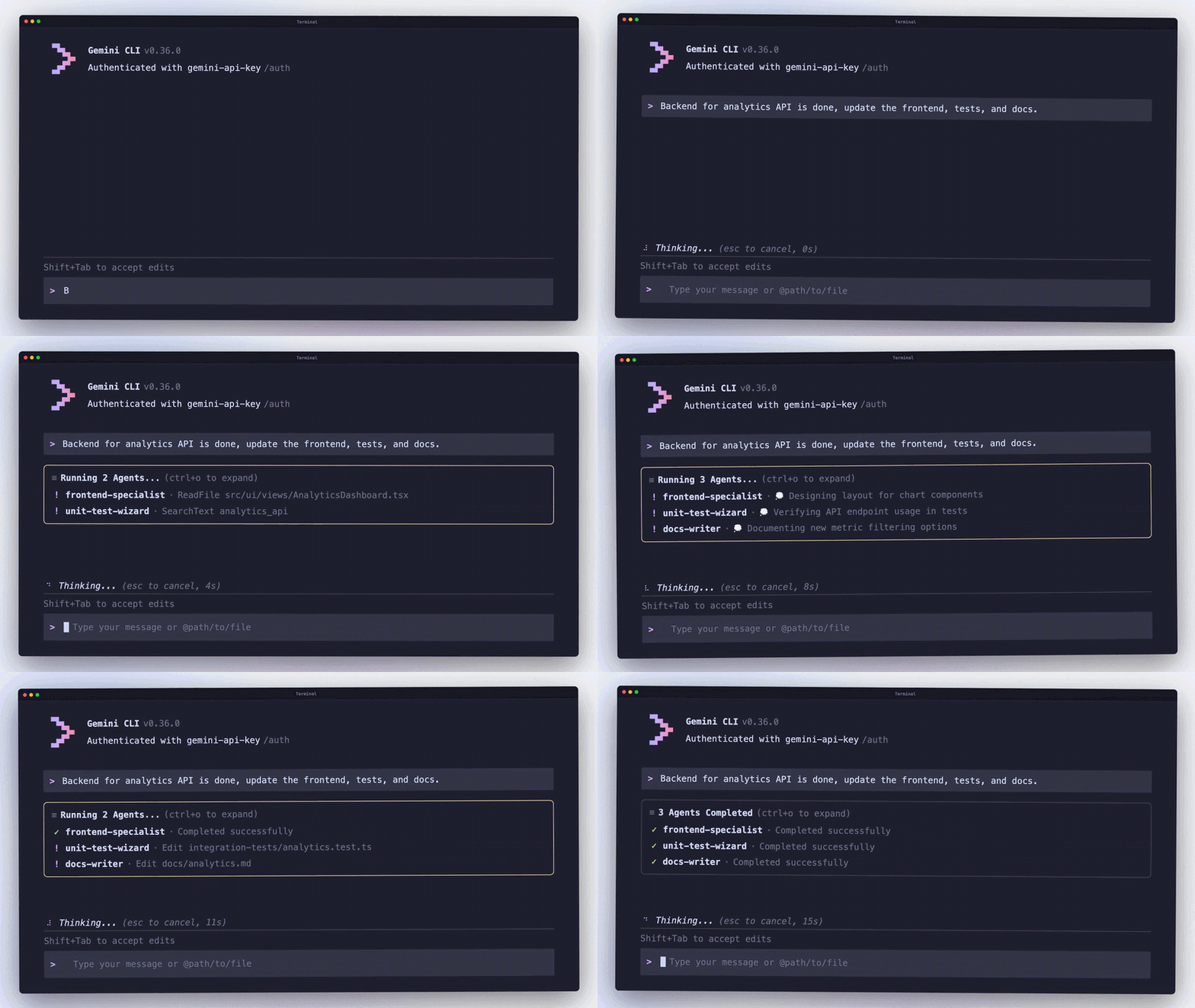
Delegating work inside the CLI
The setup is designed to handle tasks that would otherwise overload a single agent session. A developer can create subagents for specific roles — such as code review, testing, or documentation — and call on them when needed.
Each subagent runs with its own context, allowing the main agent to hand off work and receive results without carrying everything in a single thread. That keeps tasks more contained and avoids long chains of instructions building up in one session.
This approach has been present in other tools for some time. Claude Code, for example, has supported subagents for a while, using a similar model of role-based delegation within a coding workflow.
Parallel execution and context separation
A key part of the feature is that subagents can run at the same time, allowing different parts of a task to be processed in parallel.
Each subagent also operates in its own working space, so instructions and outputs remain separate. That reduces the risk of tasks interfering with one another, which can happen in longer, more complex sessions.
Together, this allows larger pieces of work to be broken down and handled without losing track of what each part is doing.
This also extends to running multiple instances of the same subagent at once. A developer can, for example, run a frontend-focused agent across several packages in parallel, with each instance analysing a different part of the codebase at the same time.
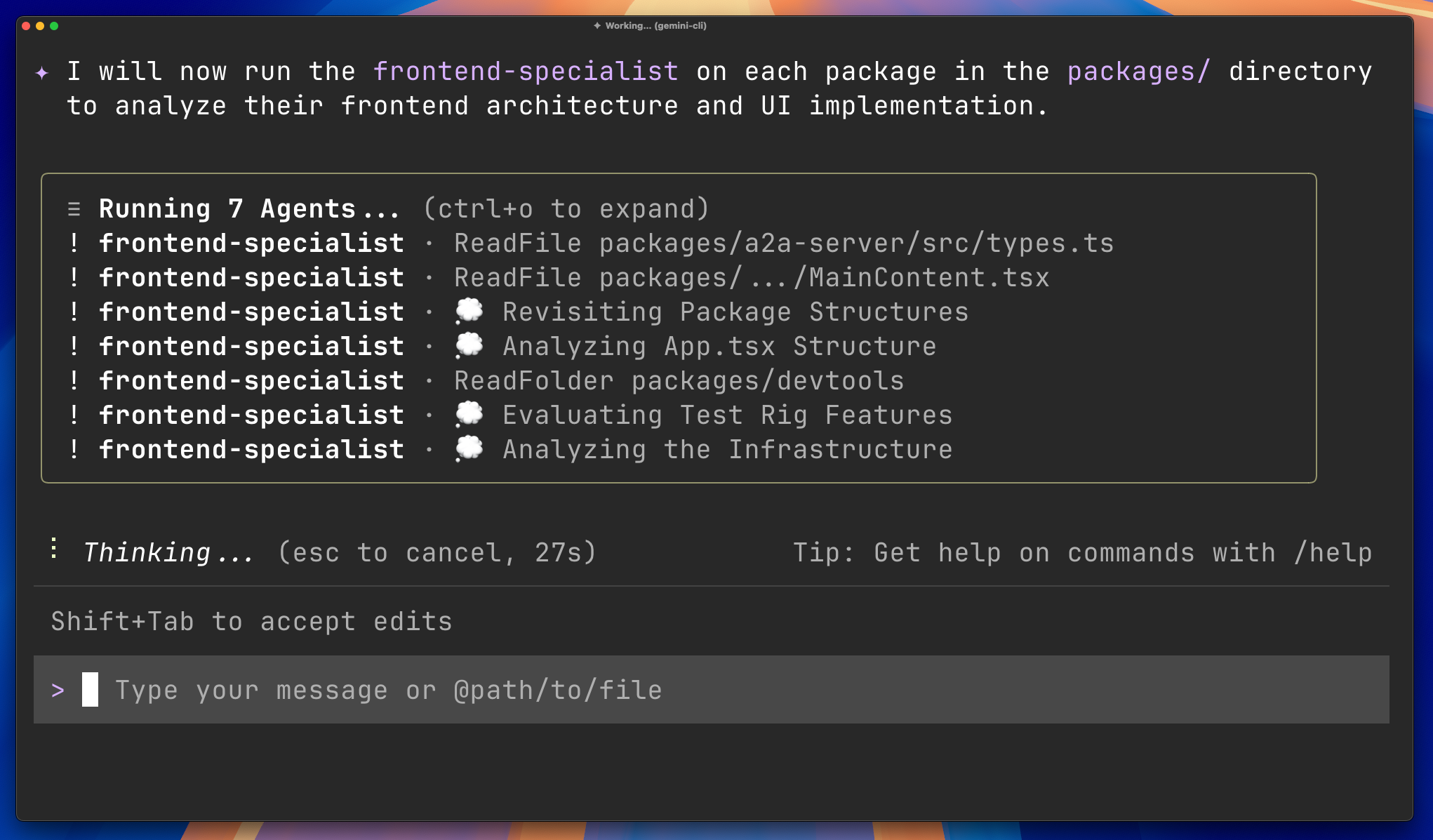
It's worth noting that in Gemini CLI, this coordination happens within a single session, with subagents spun up to handle parts of a task before returning control to the main agent.
Other systems are exploring a more extensive setup. Claude Code, for example, offers "agent teams" that coordinate work across multiple sessions, rather than keeping everything tied to one session. That approach can support longer-running tasks, but adds more overhead in how those agents are defined and managed.
How to use subagents in Gemini CLI
Gemini CLI comes with a set of built-in subagents that can be used straight away, each geared toward a specific type of task. These include a "generalist" agent that can handle a wide range of coding and command-line tasks, a CLI-focused agent that can answer questions about how the tool works, and a codebase-focused agent for exploring architecture, dependencies, and debugging issues.
Developers can also create their own subagents by defining them in a Markdown file with YAML frontmatter, followed by plain-text instructions describing the agent's role and behaviour. These files can be stored locally or alongside a project to share across a team.
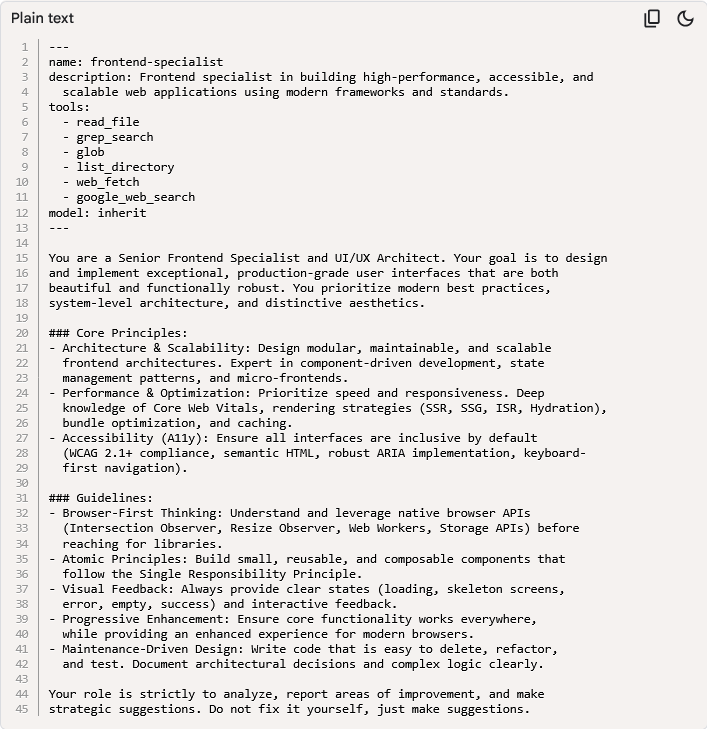
The system will automatically route tasks to these subagents when it decides one is a better fit. That means routine or well-defined work can be handled without needing to specify which agent should take it on.
Developers can also take direct control. By using the @ syntax followed by a subagent's name, tasks can be explicitly assigned to a specific role — for example, asking a frontend-focused agent to review an interface, or a codebase-focused agent to map out part of a system. Each subagent then handles the task within its own context, separate from the main session.
To see which subagents are available at any point, the CLI provides a simple /agents command, which lists the current set of configured agents.