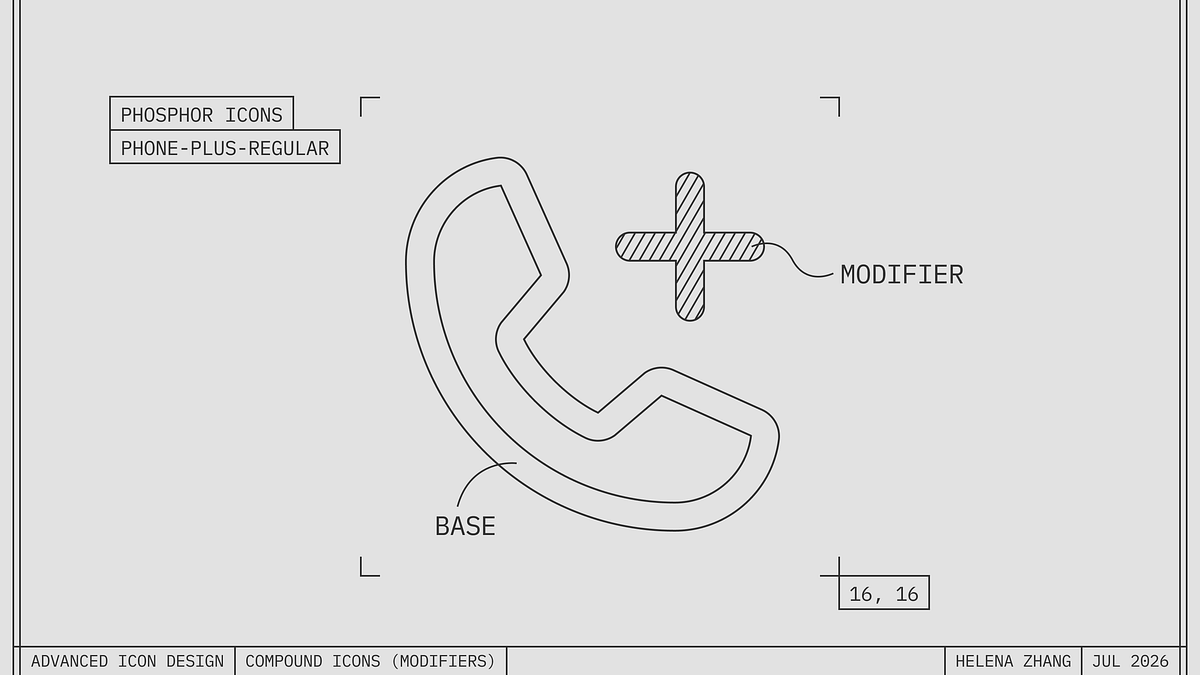
Advanced Icon Design: Compound Icons (Modifiers)
Compound icons offer high information density but risk confusing users with inconsistent visual grammar.
Deep dive
- Visual grammar: The implicit rules governing how icon elements relate to each other.
- Legibility vs Density: The inherent tradeoff where adding more detail for functionality erodes at-a-glance recognition.
- Semantic ambiguity: The risk that users will misinterpret the relationship between the base icon and the modifier.
- Contextual reduction: Sometimes removing the base icon entirely is better if the surrounding UI already provides enough context.
- Testing strategy: Always evaluate icon sets as part of a complete list or UI, not in isolation.
Decoder
- Modifier: A secondary graphic element, such as a lock or plus sign, applied to a base icon to convey additional status or action.
Original article
Advanced Icon Design: Compound Icons (Modifiers)
Sometimes we combine 2 symbols to get the meaning we want.
A base symbol (phone) and a modifier (plus sign) come together to say “add phone number”.
Compound icons are effective at getting more specific. What are we adding? A phone, a folder, a user, a location.
This can help when icons live without a text label —
— or when we want to distinguish items from each other.
In a list of folders, perhaps we want to call out which ones are private or shared at a glance.
Constructing compound icons
We can create a compound icon by amending a base icon with a smaller modifier, placing it inside the base icon or in the corner.
The modifier can also go on top. A slash or “x” over an icon is a familiar way to show that something is disabled, unavailable, or prohibited.
In any of the placements above, it’s important for the 2 components to read distinctly.
This can be done by creating some sort of separation: creating a gap to duck the base icon behind the modifier, applying a fill treatment to the modifier to bring it forward, or color-coding the 2 parts.
In a rare case you might merge forms to double the meaning of one element. The icon below (user-switch) uses the outer circle as both clockwise arrows and a container for the user.
This is clever when done well, but make sure the 2 components read clearly.
Gotchas
Though they have their place, compound icons are harder to parse.
More details to read
They pack more detail in the same amount of space. A common digital size like 24 by 24 pixels can only hold so much.
To accommodate modifiers, the base icon has to get broken sometimes.
This technique erodes legibility, especially as the icon gets smaller.
Unclear language
What’s uniquely troublesome about compound icons is that they ask you to interpret 2 symbols and their relationship to each other. In other words, they introduce grammar, a fuzzy grammar that isn’t agreed upon.
Does the icon below mean “change password” or “lock device rotation”?
Which element is the modifier and which is being modified?
Lack of distinction
Finally, compound icons that share the same base icon can look too similar.
In this call history from WhatsApp on iOS, it’s hard to make out the difference between the little arrows from “incoming call” and “outgoing call”.
Since we know the context (we’re viewing Recent Calls), why not drop the phone and render the arrows at a larger size? That way we focus on “outgoing” vs. “incoming”, not “call”.
It turns out WhatsApp on Android takes this approach, and adds some color-coding to distinguish between completed and missed calls. Note that the “incoming”, “outgoing”, and “missed” text labels are removed here, which asks the icons to really pull their weight.
One of the key advantages of icons is glanceability. Compound icons defeat this purpose when they make you think too hard.
Always test for legibility in context when introducing modifiers!
Thanks for reading. If you enjoyed this, stay tuned for more topics like:
- Dots
- Optical scaling
- Optical alignment
- Stroke <> fill variants
- Arrowheads
- Multicolor icons
- Legibility over style
- Icons with type
- Pleasing curves
Fresh dev news, AI-digested daily. Never miss a trend at devoured.fyi