Mental Model for Agentic Work
A developer shares a universal mental model for understanding AI agent systems based on five components that repeat across personal assistants, coding tools, and operational platforms.
Deep dive
- The author experienced a structural shift in Q1 2026 where working with AI agents became the default mode across personal tasks, software engineering, and company operations rather than a novelty
- OpenClaw, an open-source "agent operating system" that launched in late 2025, served as the catalyst—not because of the product itself, but because one developer built a high-quality agent platform in three months using agents, demonstrating the leverage threshold had been crossed
- The universal mental model consists of five always-present components: LLM APIs (commoditized intelligence), Agents Host (the platform layer that determines capabilities), Agentic Loop (reason-act-observe cycle bounded by system prompts), Context (connected data sources), and Shared Workspace (surfaces where agent output becomes real and is shared with humans)
- In the personal space, OpenClaw running on a VPS provides OS-level integration with real hardware, residential IPs, actual file system access, and persistent memory—the host determines the ceiling of what's possible
- In code space, Cursor serves as an IDE-level host where the shared workspace is the actual codebase itself, enabling the agent to read, write, run, and test in the same environment as humans, producing 10-100x speedups
- In operational space, Notion functions as an agents platform where company databases, SOPs, and project state become context, and the agent writes directly into the same pages teams already use—this is "agentic operations" not just "AI features"
- The architecture is fractal and identical across all three instances; only the host, context sources, workspace, system prompt, and integration depth vary while the five-component structure remains constant
- Cloud-based implementations where both agent and workspace live in the cloud enable continuous always-on operation rather than "while I'm at my desk" work, which is the structural reason for 10-100x productivity jumps
- The host platform is the strategic decision because it determines what agents can access and do, making native workspace access fundamentally more powerful than sandboxed chat windows
- Context becomes the competitive moat as LLMs commoditize—companies with richer proprietary data, SOPs, and institutional knowledge will get disproportionately better results from the same base models
- The best agentic setups don't create separate AI outputs but write directly into existing human workspaces, making the shared workspace the actual interface (why Cursor and Notion's approaches work so well)
- The human role shifts from executor to architect—making architectural decisions, auditing outputs, correcting course, and designing system prompts and context rather than doing footwork
Decoder
- Agentic Loop: The core execution cycle of an AI agent following a Reason → Act → Observe → Repeat pattern, bounded by system prompts that define role and constraints
- MCP (Model Context Protocol): A protocol standard for connecting data sources and applications to AI models to provide context
- System Prompt: Instructions that define an agent's role, constraints, and behavior within the execution loop
- SOPs: Standard Operating Procedures—documented processes and workflows that provide context for operational agents
- Shared Workspace: The collaborative surface where both humans and agents read and write (files, codebases, databases, pages), as opposed to separate AI-only outputs
- Agent Host: The runtime platform layer that wraps raw LLM intelligence into an operational system, handling scheduling, permissions, tool access, and human interaction surfaces
Original article
Something shifted in the first quarter of 2026. Not a feature launch, not a new product - a structural change in how work happens.
For the first time, I found myself genuinely operating with agents across every dimension of my work: personal tasks, software engineering, company operations. Not as a novelty. As the default mode.
This post is the abstraction I arrived at after weeks of doing this. A mental model that applies everywhere - because the architecture underneath is always the same.
The Trigger: OpenClaw and the "Agent Operating System"
It started with OpenClaw.
OpenClaw is an open-source project that I would label itself as "an operating system for agents". But powerful and open-source, like Linux. First commit in November 2025, breakout success by February 2026. I installed it, connected it via Telegram, and started co-working with it - scheduling, filing taxes, processing documents.
But the product itself wasn't the revelation. It was the process behind it. The sheer quality of what one person team could ship in three months, using agents to build an agent platform, made something viscerally clear to me: the leverage available through agentic work had crossed a threshold.
What I didn't expect was that the pattern I saw in OpenClaw would repeat everywhere I looked - in my IDE, in my company's operations, in how I manage my own life. The same architecture, over and over.
So I sketched it.
The Mental Model
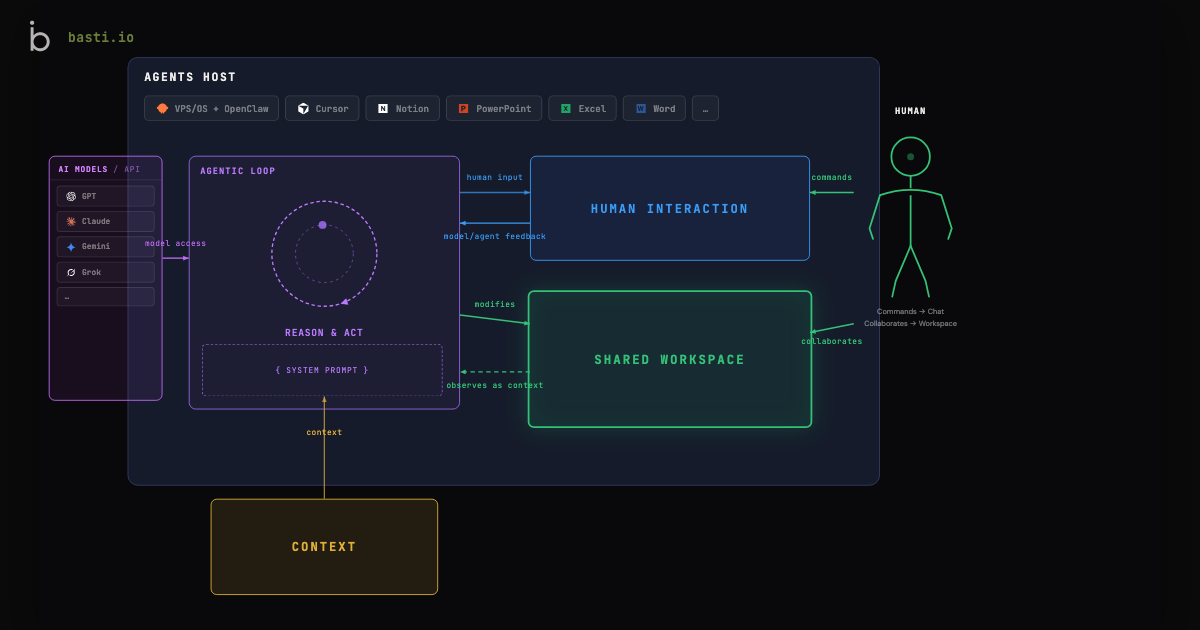
Here's the framework. Every agentic system I've encountered - from personal AI assistants to coding agents to operational automation - follows this structure:
Five components. Always present. Always in the same relationship:
- LLM Models / API - The raw intelligence. GPT, Claude, Gemini, open-source models. These are interchangeable and increasingly commoditized. They provide the reasoning capability, but alone they do nothing.
- Agents Host - The runtime that wraps raw intelligence into an operational system. It handles scheduling, permissions, model access, tool access, and human interaction surfaces. This is the platform layer that most people underestimate. The host determines what the agent can actually do.
- Agentic Loop - The core execution cycle: Reason → Act → Observe → Repeat, bounded by a System Prompt that defines the agent's role and constraints. This is where the work happens.
- Context - Everything the loop can draw on: connected files, apps, MCPs (Model Context Protocols), databases, internet access. The richer the context, the more capable the agent.
- Shared Workspace - The surface where agent output becomes real: files, folders, codebases, apps, databases. Critically, this is shared between human and agent. Both read and write to it.
And threading through all of it: Human Interaction - the chat, voice, or thread interface where the human directs, corrects, and collaborates with the agent.
Why This Model Matters: It's Always the Same Architecture
The insight that changed how I think about this: every agentic tool I use is an instance of this same model. The only things that change are the host, the context sources, and the workspace.
Let me show you three concrete instances from my own work.
Instance 1: Personal Space - OpenClaw
flowchart LR
	LLM["LLM API"] --> Host["OpenClaw on VPS
(Agents Host)"] --> Loop["Reason & Act loop
(system prompt: assistant)"]
	Ctx["Context:
Calendar, inbox, docs,
personal preferences"] --> Loop
	HI["Human Interaction:
Chat / Voice"] <--> Loop
	WS["Shared Workspace:
Personal notes, tasks, files"] <--> Loop
Host: OpenClaw, self-hosted on a VPS.
Context: Calendar, inbox, documents, personal preferences.
Workspace: Personal notes, tasks, files.
Human interaction: Telegram chat, voice.
This is where I first experienced the model in action. OpenClaw isn't a chatbot - it's an agent with persistent memory, connected tools, and the ability to self-modify its own skills. It files my taxes. It processes documents. It manages scheduling.
The key realization: the host matters enormously. Running on a real OS with real hardware (not a sandboxed web app) means residential IP addresses, real browser capabilities, actual file system access. The playing field of the workspace defines the ceiling of what the agent can do.
Instance 2: Code Space - Cursor
flowchart LR
	LLM["LLM API"] --> Host["Cursor
(Agents Host)"] --> Loop["Reason & Act loop
(system prompt: engineer)"]
	Ctx["Context:
repo, codebase, docs, issues"] --> Loop
	HI["Human Interaction:
Chat / Voice"] <--> Loop
	WS["Shared Workspace:
 Codebase, local and/or cloude runtime"] <--> Loop
Host: Cursor (the IDE).
Context: Repository, full codebase, documentation, issues.
Workspace: The codebase itself, plus build tools, test runners, terminals.
Human interaction: Chat and thread within the IDE.
This is where the 10x-100x speedup lives - and where I spent Q1 2026 pushing the boundaries. I rebuilt my personal website (the one you are on right now) in days, then moved into mission-critical backend work on AQUATY's distributed system.
The IDE-as-host is powerful because the workspace is the actual codebase. The agent doesn't generate code into a void - it reads, writes, runs, and tests in the same environment you do. The shared workspace is maximally integrated.
I'll go deep on this in a follow-up post. The data is striking - and the failure modes are instructive.
Instance 3: Operational Space - Notion
flowchart LR
	LLM["LLM API"] --> Host["Notion
(Agents Host)"] --> Loop["Reason & Act loop
(system prompt: ops)"]
	Ctx["Context:
DBs, SOPs, project state,
dashboards"] --> Loop
	HI["Human Interaction:
 AI Chat & Voice"] <--> Loop
	WS["Shared Workspace:
Notion Pages + Databases"] <--> Loop
Host: Notion (as an agents platform).
Context: Databases, SOPs, project state, dashboards, connected tools.
Workspace: Notion pages and databases - the same surfaces the team already works in.
Human interaction: Comments, requests, AI inbox.
This is the instance most people haven't thought about yet. When Notion becomes an agents host, your operational infrastructure becomes the shared workspace. The agent doesn't just answer questions - it reads your databases, understands your project state, and writes back into the same pages your team uses.
This is what I mean by agentic operations: not "AI features in a productivity tool," but a genuine agent loop running against your company's operational surface.
The Pattern: What Changes, What Stays the Same
Across all three instances, the architecture is identical. What varies:
| Personal (OpenClaw) | Code (Cursor) | Operations (Notion) | |
|---|---|---|---|
| Host | Self-hosted OS | IDE | Productivity platform |
| Context | Personal data, calendar | Codebase, docs | Databases, SOPs |
| Workspace | Files, notes | Codebase | Pages, databases |
| System Prompt | Assistant | Engineer | Ops |
| Integration depth | OS-level | IDE-level | App-level |
The model is fractal. You can zoom into any organization and find these same five components wherever agents are being deployed effectively.
One more shift matters: when both the agent and the shared workspace live in the cloud, the loop stops being "while I'm at my desk" work. It becomes continuous - always-on, permissioned, and able to run while you sleep. That's the structural reason the productivity ceiling jumps from incremental gains to 10x, and in the right setups, 100x.
What This Means for Companies
If you accept this mental model, a few things follow:
The cloud version of the model is the inflection point: once agents can safely operate against a shared workspace 24/7, organizations can move entire workflows (not just individual tasks) into an always-on agentic loop.
The host is the strategic decision. Choosing where your agents live determines what they can access, what they can do, and how deeply they integrate with your existing workflows. An agent in a sandboxed chat window is fundamentally limited compared to an agent with native access to your workspace.
Context is the moat. The AI models themselves are increasingly commoditized. What differentiates your agent's output is the context it has access to - your proprietary data, your SOPs, your project state, your institutional knowledge. Companies that connect richer context will get disproportionately better results. I call this: The Opionated Context Layer.
The shared workspace is the interface. The best agentic setups don't create separate "AI outputs" - they write directly into the spaces where humans already work. This is why Cursor works so well (agent writes into your codebase). And why Notion's approach is IMO leading (agent writes into your operational pages) - if you apply Notion Agents to a workspace your copmpany has been workin in for years, this pays hughe dividends now!
The human role shifts from executor to architect. In every instance, I'm not doing the footwork. I'm making architectural decisions, auditing outputs, correcting course, and designing the system prompts and context that make the agent effective. The work isn't less - it's different.
Fresh dev news, AI-digested daily. Never miss a trend at devoured.fyi