DEVOURED
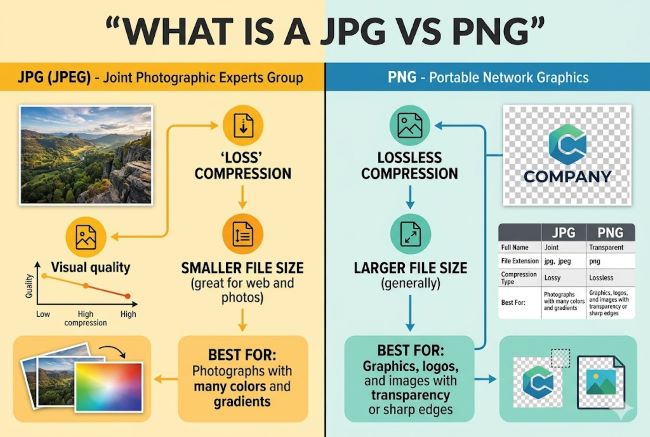
What is a JPG vs PNG: Complete Image Format Comparison Guide
JPG uses lossy compression for smaller photographic files without transparency, while PNG uses lossless compression for graphics with transparency.
What: This guide details the differences between JPG (Joint Photographic Experts Group) and PNG (Portable Network Graphics) image formats. JPG uses lossy compression, permanently removing image data to reduce file size, making it suitable for photographs, whereas PNG uses lossless compression, preserving all data and supporting transparency, ideal for graphics and logos.
Why it matters: Understanding these fundamental image format differences is crucial for developers and designers to optimize web performance, maintain visual quality, and correctly handle assets for various applications.
Takeaway: For web images: use JPG for photographs (especially when file size is critical), and PNG for logos, icons, illustrations, or any image requiring a transparent background or lossless quality.
Deep dive
- JPG (JPEG) uses lossy compression, meaning some image data is permanently discarded to achieve smaller file sizes.
- This makes JPG ideal for complex photographic images with many colors and gradients, where minor data loss is imperceptible.
- JPG does not support transparent backgrounds; transparent areas will appear as a solid color (typically white).
- PNG (Portable Network Graphics) uses lossless compression, preserving all original image data, making it suitable for multiple edits without quality degradation.
- PNG supports transparent backgrounds, making it essential for logos, icons, and graphics that need to sit on various backgrounds.
- For simple graphics, logos, and screenshots, PNG can often result in smaller file sizes than JPG while maintaining sharp edges.
- Converting PNG to JPG will make the transparent background solid. Converting JPG to PNG will increase file size but not restore lost data.
- Other formats like TIFF (large, high-quality, professional printing) and WEBP (newer, better compression for web) also exist.
Decoder
- Lossy compression: A data compression method where some data is permanently discarded during the compression process, resulting in a smaller file size but some loss of quality.
- Lossless compression: A data compression method that allows the original data to be perfectly reconstructed from the compressed data, meaning no quality is lost.
- Transparency (image): The ability of an image to have areas that are see-through, allowing the background behind the image to show through.
- Metadata (image): Data about an image, such as camera model, date taken, exposure settings, or copyright information, embedded within the image file.
Original article
Full article content is not available for inline reading.
Explore all 49 articles in today's digest
Fresh dev news, AI-digested daily. Never miss a trend at devoured.fyi