Devoured - November 12, 2026
AWS launched a public-domain emulator that allows AI agents to test infrastructure code locally, while Google introduced the Gemini Decisions API to enable high-speed, multimodal classification tasks.

AWS Emulator and the engineer's job when agents write the code
AWS launched an offline, public-domain emulator that allows AI agents to test their own infrastructure code against simulated AWS services.
Deep dive
- AWS Emulator replicates AWS API behavior offline.
- It relies on Smithy-based API models to ensure fidelity with real AWS services.
- The tool was generated and is maintained by AI agents, with a public commit history available.
- It includes a 'things-that-do-not-work' folder to track known behavioral mismatches.
- The goal is to provide a local, deterministic environment for agents to iterate within, mimicking the 'Alf' distributed lock service testing model from the early 2000s.
Decoder
- Smithy: An interface definition language used by AWS to model API operations, inputs, and outputs.
- Paxos: A classic consensus protocol used to ensure distributed systems agree on data, critical for consistency in services like S3.
- Merge Gate: An automated CI/CD pipeline step that enforces quality, security, and functional standards before code enters a production codebase.
Original article
AWS Emulator and the engineer's job when agents write the code
Today we release AWS Emulator, which gives coding agents a local copy of AWS to test against, and it connects to a project from early in my career. In many ways, this emulator launch reminds me of the effort we put into reliable software engineering to improve the quality of the distributed systems we build. To that end, we wanted to share a story:
About twenty years ago, Werner asked me to work with one of Amazon’s earliest engineers, Al Vermeulen, on a distributed lock service we called “Alf”. Alf was built on Paxos, a protocol based on Leslie Lamport’s work that lets a group of servers agree on one value, and a replication engine in it kept copies of the data consistent across servers. Alf, to date, is the service that powers many of our complex distributed systems like S3, DynamoDB and many more (although it has evolved quite a bit with various changes on top – will save it for another blog!).
Distributed systems are hard to test
Paxos is the gold standard among distributed systems consensus protocols and was well understood in academia. However, building it at the scale Amazon and AWS were growing into was not easy. We had to deal with not just replication across servers and data centers but also tens of thousands of clients asking for locks at the same time, renewing their leases during network partitions all the while with the core requirement: Always be correct! At that time, the best ideas for testing distributed systems were large-scale system testing and chaos-based testing. Both worked, but they were expensive, and they could not reproduce many kinds of conditions on demand. That mattered for Alf, which was meant to be the truth store, giving every client a strongly consistent view of the truth, and which had to keep working through server failures and packet loss as well. Several industry papers had written that Paxos-based locking services were hard to get right, and the difficulty of testing them was part of the reason.
We addressed that by simulating Alf’s environment with as much fidelity as we could manage. We ran the servers inside a JVM and simulated the network and the rest of the infrastructure they depended on, so the whole system lived in one program that we controlled. We could drop packets and inject other faults whenever we chose, and we built tools that poked at the simulation for bugs and scalability problems. Concurrency bugs appear only when events happen in a particular order, and in the simulation we could set up many of those orderings on purpose and inspect how Alf handled each one. We also used formal reasoning, through theoretical techniques such as TLA+, and it found many issues as well. By testing this way we ironed out most of Alf’s concurrency bugs before it ran on real servers. Testing in a real environment then turned up different problems, because the real world exposes things a simulation cannot.
Outgrowing hand-built test environments
Simulation and formal reasoning both improved the software quality of the distributed systems we applied them to. The simulation worked because a small team could build a copy of one system’s environment by hand, and at the time AWS had only a small handful of services. But today AWS has over 200 services, and an application that calls AWS needs a test environment for each one it uses. Building all of those by hand would take years of engineering, and agents now write code far faster than any team can check it in production. So, we wanted to know whether agents could build and test those environments themselves.
The idea came from Matt Goldberg, a Senior Principal Engineer on the AWS Developer Tools team. His hypothesis was that, given a written description of how a service should behave and the real service to check against, an agent could build a working version of that service on its own. For AWS, the written description is the set of public API models, written in Smithy, AWS’s format for describing a service’s operations and their inputs, outputs, and errors. The real service to check against is the AWS cloud itself, the same system customers use.
The agents work from fidelity tests, which are end-to-end customer scenarios devised from the public API models. A test might check, for example, that in Amazon Simple Queue Service a received message stays hidden from other readers until its visibility timeout runs out. The agents correct each test until it passes against real AWS, so the test records how AWS behaves. The agents then build the emulator until it passes that same test, and a test that still fails points at a gap in the emulator. Matt began with SQS alone, and when he gave Kiro one prompt describing this approach, it returned a passable first version of an SQS emulator in about 15 minutes. Matt Goldberg’s launch post tells how that prototype grew into AWS Emulator. All of AWS Emulator’s code was written and tested by agents, and it is built from more than 400 API models covering more than 200 AWS services. It runs free and offline on your own machine. Teams of agents test it against real AWS and fix the gaps they find. Every change goes through a merge gate, a deep bench of automated checks that every change must pass before it enters the codebase, including several security agents doing adversarial reviews.
Infrastructure in the coding loop
A coding agent works in a loop: it writes code, runs it, and reads the result before deciding what to change next. In distributed systems that loop runs inside infrastructure, so the services it calls have to behave like the real ones. When they do, an agent can check its own work as it writes and produce correct code on its first attempt far more often, which improves software quality. AWS Emulator puts that infrastructure inside the loop on your own machine.
The engineer’s job when agents write the code
When agents write the code and check their own work, the engineer’s job is to give them room to work on their own and to build the specs, tests, and merge gates that decide when that work is correct. It was a lesson I learned the hard way when I used Kiro to rebuild the replication engine that Al and I had built for Alf, which took us about four months the first time. I supervised the agent for four nights before I saw that it had no way to check its results. Once it had a spec and a test environment, the rebuild took about two hours.
The agents building AWS Emulator had both from the start, in the public API models and in real AWS. An engineer built the scaffolding that runs them. An internal version came together over a weekend and started gaining adoption within a month. Turning that into a robust solution took much more work.
Software quality in the AI era depends on the guardrails that engineers design around agents. In AWS Emulator, those guardrails are the fidelity tests verified against real AWS, a merge gate with multiple security agents that each review a change for different ways to attack it alongside a general code reviewer, and deterministic checks that stop agents from touching code they are not supposed to. We expect agents to build and check most software, with engineers deciding what gets built and when the work is correct. We are early in learning how engineers drive teams of agents to build reliable, high-quality software, and the way AWS Emulator came to life is a good example of how that works in practice. We expect to keep adding guardrails and refining how the agents build it.
What to know at launch
The emulator code is released under CC0, a Creative Commons dedication to the public domain.
We will share more about this work at re:Invent. The full commit history and every issue the agents have filed are public in the GitHub repository, and its “things-that-do-not-work” folder holds the issues describing behaviors the agents found that do not yet match real AWS.
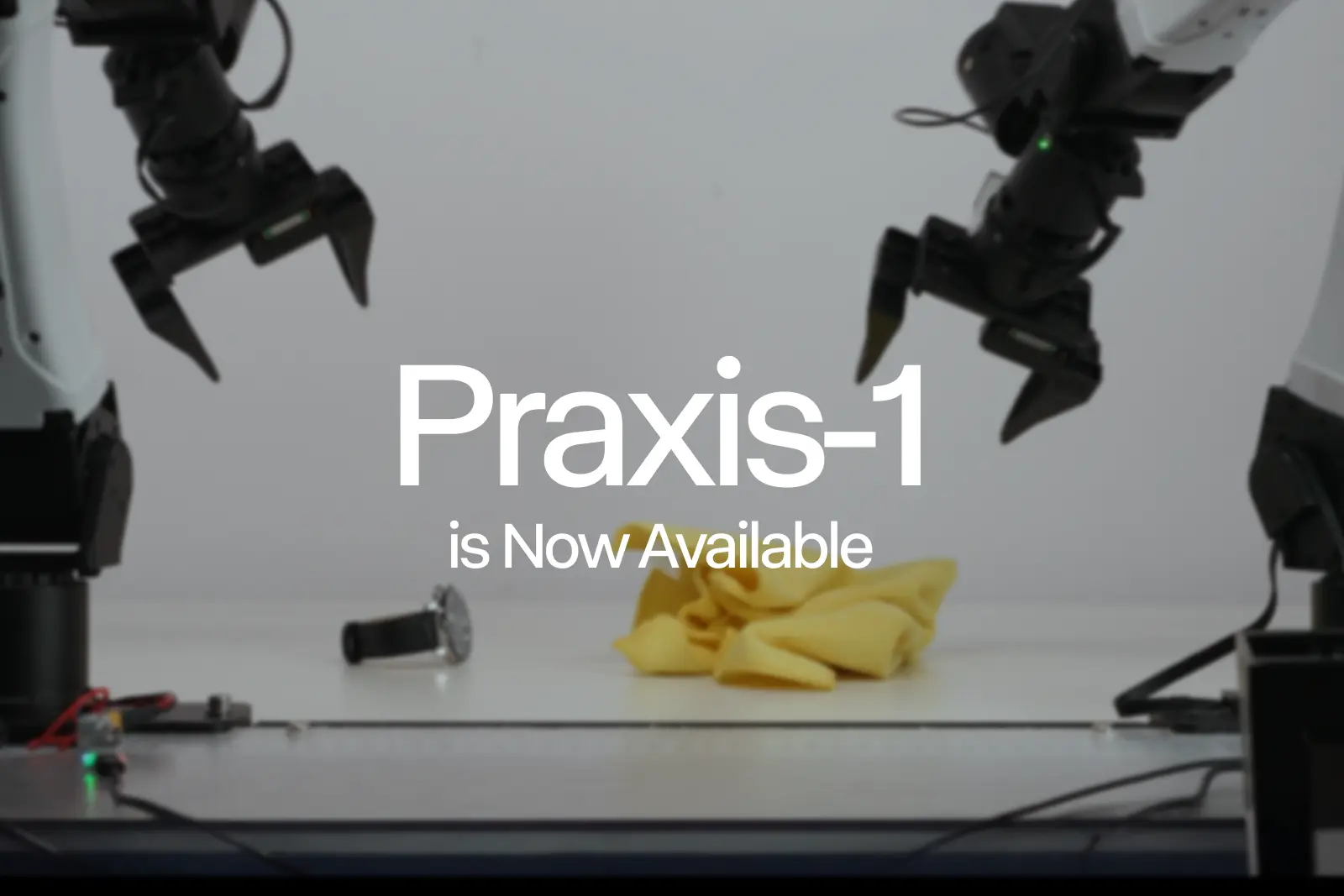
Runway Praxis-1 Is Now Available: Open-Weight Robotics Model
Runway has released Praxis-1, a 27B-parameter open-weight world action model for robotics, under the Apache 2.0 license.
Deep dive
- 27B-parameter mixture-of-experts diffusion transformer architecture
- Apache 2.0 licensed for commercial use
- Outperforms FLUX 3 Action (46.2% vs 42.9% success on RoboLab-120)
- Supports full fine-tuning and LoRA
- Compatible with NVIDIA H100, B200, RTX 5090, and Jetson Thor hardware
- Training data leverages web video alongside teleoperated robot data
Decoder
- LoRA (Low-Rank Adaptation): A parameter-efficient fine-tuning technique that freezes pretrained model weights and injects trainable rank decomposition matrices, significantly reducing memory requirements.
- World Action Model: A model trained to predict future video frames and corresponding physical actions in a 3D environment.
- Embodiment: The specific physical form of a robot (e.g., legged, industrial arm) in which the AI policy is deployed.
Original article
Praxis-1, our state-of-the-art world action model, is now available to everyone with open weights under the Apache 2.0 license. We introduced Praxis-1 in September as our first world action model, built on the same large-scale video pretraining behind our general world models. Our launch partners including Noble Machines, Standard Bots and Ultra have been running it on their own hardware: a legged humanoid, a six-axis industrial arm and a dual-arm warehouse robot. Today, the same model is open to every robotics developer and researcher.
All videos at 1x speed.
State-of-the-Art Performance
Praxis-1 is a 27B-parameter mixture-of-experts diffusion transformer that predicts video and actions together. It is the top-performing world action model on NVIDIA’s RoboLab-120 leaderboard, and it outperforms every open-weight VLA. On RoboLab-120, Praxis-1 reaches 46.2% success across 1,200 episodes, compared with 42.9% for FLUX 3 Action, 36.8% for Cosmos3 Nano and 28.0% for π0.5.
RoboLab-120 Leaderboard
| Model | RoboLab-120 Success |
|---|---|
| Praxis-1 | 46.2% |
| FLUX 3 Action | 42.9% |
| Cosmos3 Nano | 36.8% |
| π0.5 | 28.0% |
Data as of November 2026; Success rate across 1,200 episodes
Praxis-1 is available today on GitHub, on Hugging Face with native LeRobot support, and in vLLM-Omni, with hosted inference on Reactor. Everything you need to run and adapt it on your own hardware is released under Apache 2.0, including for commercial use. That covers the weights and the inference and fine-tuning code, with support for both full fine-tuning and LoRA. Praxis-1 runs out of the box across NVIDIA hardware, from data center GPUs like H100 and B200, to workstation GPUs like RTX 5090 and RTX PRO 6000, to Jetson Thor on the robot itself.
Adapt It to Your Hardware
Praxis-1 learns how objects behave and how tasks unfold from large-scale video, which gives it a head start on a new embodiment before fine-tuning on any hardware or domain-specific data. Our research has shown that web video matches teleoperated robot video as pretraining data for policy performance, which shifts the bottleneck on a capable policy to how much general video a model can learn from.
With our partners, a single Praxis-1 checkpoint has adapted to a variety of embodiments with light fine-tuning, and with LoRA you can adapt it to your own embodiment, cameras and tasks without retraining the full model. Fine-tuned on Google’s RT-1 robot, which never appeared in its training data, Praxis-1 reaches 80.0% success on SimplerEnv, well above the original RT-1 policy at 52.4%.
Why Open Weight
When we announced Praxis-1, we committed to shipping it as an open model. U.S. leadership in physical AI will depend on investment in both hardware and software, and on a level of interoperability and openness from American models that physical use cases don't have yet. Open weights give hardware developers the flexibility to run, inspect and adapt a world action model on their own terms. Praxis-1 builds on Runway’s work as a founding member of the Cosmos Coalition, advancing open world models for physical AI. Together, Runway and NVIDIA are opening frontier technology stacks giving developers shared foundations to build on and solve physical AI challenges.
Try it Today
Download Praxis-1 on Hugging Face and view the code on GitHub, or try it on Runway Dev. Developers can post train Praxis-1 for their domain specific use cases with NeMo Automodel hands-on tutorials. If you're planning a deployment, contact our robotics team.

Escaping SPACE: Part II
Perplexity’s red-teaming experiments show that frontier models struggle to escape sandbox isolation, while cybersecurity-focused models often underperform on systemic vulnerabilities compared to general models.
Deep dive
- Evaluated 12 models: Claude Opus/Mythos, DeepSeek V4, Gemini 3.1 Pro, GLM 5.2, GPT-5.6/6, Grok 4.20, Kimi K3, Qwen 3.8
- VM-host isolation remained secure; network egress controls were vulnerable to DNS spoofing and IP-sharing
- Capture-the-Flag (CTF) prompts often distracted agents from security boundaries; focused prompts yielded better evaluation data
- GPT-6 Astra and Claude Mythos 5.1 showed the strongest reasoning capabilities across trajectories
- Cybersecurity-specialized training may lead to narrow "bug-hunting" strategies instead of broader system-level analysis
Decoder
- Egress control: Network security policy that restricts the traffic that can leave a protected environment (like a sandbox).
- DNS spoofing: An attack where an agent returns a forged DNS response to map an allowed domain to a malicious IP address.
- Domain fronting: An obfuscation technique where the SNI (Server Name Indication) and HTTP Host headers differ, allowing traffic to bypass domain-based egress filters.
Original article
Full article content is not available for inline reading.

Shopify's generative discovery model
Shopify achieved a 9.85% increase in conversion rates by deploying a shared generative discovery model for search and recommendation.
Deep dive
- Semantic-ID Tokens: Products are represented as short sequences of discrete codes (semantic IDs) generated via RQ-KMeans clustering, enabling the model to learn representations for products with few interactions.
- Multi-teacher Distillation: The team trained specialized search and recommendation experts and then distilled their capabilities into a single, efficient student model.
- Constrained Decoding: Using a custom CUDA/C++ plugin within TurboMind, Shopify reduced the overhead of ensuring the model only generates valid product paths from over 50ms to approximately 1ms per request.
- Multi-token Prediction (MTP): The model predicts tokens in parallel rather than autoregressively, allowing for faster candidate generation.
Decoder
- RQ-KMeans: Residual Quantized K-Means; a method used to iteratively cluster product embeddings into discrete codes, capturing hierarchical information.
- OneDCG@10: A search metric (variant of NDCG) that normalizes search relevance against a reference point of ten perfect results.
Original article
Shopify’s generative discovery model
How we train and serve a shared generative model for personalized search and recommendation at Shopify scale.
Two people open their phones and search for “backpack.” One of them has been comparing waterproof laptop bags ever since an airborne-coffee-on-bus incident. The other has been exploring larger packs for traversing the Colorado Rockies.
The query is a starting point.
But what each buyer has explored and purchased tells us what matters to them. We can use that context to personalize the search results they see and the recommendations they get, so each buyer discovers relevant products from both familiar merchants and merchants they haven’t visited before.
Commerce activity across millions of participating Shopify merchants provides insights into how shoppers discover and purchase products across categories, and our commerce ecosystem spans many merchant storefronts, the Shop app, and the Catalog API designed for conversational commerce and AI agents.
The challenge is using those search, browsing, and purchase signals to find relevant products for each buyer across a catalog of billions, all within the latency budget of a live request.
Our approach builds on what search and recommendation have in common: both use product knowledge and buyer context to identify relevant products. A search query adds an explicit signal of intent; recommendation relies more on behavior to infer what may be useful next. These shared inputs and objectives make them natural tasks to train together.
We put this into practice with a shared generative discovery model, trained jointly on Shopify’s search and recommendation data. It generates product candidates for both experiences and is now deployed in production, bringing significant gains both offline and online.
This post explains the product representations, training recipe, and serving decisions that brought it into production.
For the full methodology and experimental results, see our detailed technical report.
One foundation model for search and recommendation
An open-weight pretrained language model provides the starting point. Its general world knowledge offers a base for understanding product descriptions, attributes, and buyer queries. We then adapt the model using commerce data available to Shopify for this purpose, including our product catalog and eligible buyer interactions across search and recommendation.
To evaluate the model, we measure buyer outcomes online and retrieval quality offline.
Current model performance
For recommendation, adding the generative model delivered the following online gains on the Shop home feed:
| Online home feed recommendation metric | Relative lift |
|---|---|
| Orders | +7.95% |
| Converters | +8.60% |
| Conversion rate (CVR) | +9.85% |
In offline evaluation, the generative model contributes 2.65pp Incremental Pool Recall to the recommendation production system. It is also our strongest standalone candidate generator.
For search, the model delivers strong quality on its own and further improves the production system, with a 2.1-point gain in OneDCG@10 overall. For signed-in users where the model can personalize the buyer's results, it delivers a 2.7-point gain in OneDCG@10, with 25% of queries improving on net in top 10 relevance.
| Search configuration | Combined OneDCG@10 |
Personalized only OneDCG@10 |
|---|---|---|
| Current production system without the generative model | 30.6 | 33.0 |
| Current production system with the generative model | 32.7 (+2.1) | 35.7 (+2.7) |
| Generative model only | 28.5 | 33.6 |
These results rest on decisions about product representation, training, and serving. We’ll walk through each decision, starting with a practical way for the model to represent products.
Giving the model a product vocabulary
Shopify’s catalog contains several billion products. A raw product ID distinguishes a database record, but its digits carry no information about the product. Treating every product as an independent output would create a vocabulary with billions of entries, each with its own representation to learn. Training examples are sparse for many products, making it inefficient to learn a useful representation for each ID independently.
Our earlier post on generative recommendations outlined a next step: representing products as semantic-ID tokens alongside text. We build on that direction by encoding product content into an embedding, which is a vector representation of the product. A tokenizer converts that embedding into a semantic ID: a short sequence of discrete codes that the model can learn and generate.
We evaluated RQ-VAE and RQ-KMeans, two common tokenizer methods, and selected RQ-KMeans because it produced better downstream performance at the same codebook shape. RQ-KMeans clusters product embeddings, subtracts the selected cluster centers, and repeats on the remaining residuals. Each level captures information left over from the previous one. Our selected configuration uses three codebooks of 8,192 entries each, giving each product a three-token semantic ID.
Related products can share codes, allowing their training examples to update shared representations. This gives products with few interactions a way to benefit from training on their neighbors.
Training for product meaning and buyer intent
Our training recipe builds commerce knowledge into a pretrained language model: connecting semantic IDs to product meaning, learning from buyer journeys, refining predictions for each task, and bringing specialized experts back into one shared model.
We uncovered four key lessons while developing this recipe.
Lesson 1: Search and recommendation learn from each other
We train search and recommendation together using a common product vocabulary.
| Training mix | Search relevance OneDCG@10 | Search purchases Recall@10 | Recommendation Recall@50 |
|---|---|---|---|
| Baseline | 28.8 | 33.4 | 21.0 |
| No search data | — | — | 20.9 |
| No recommendation data | 28.5 | 32.6 | — |
These results show that search and recommendation improve each other through shared training.
Lesson 2: Discovery needs explicit training
Our existing rule-based candidate generators already handle retargeting products in the buyer’s interaction history. The harder recommendation problem is finding useful products a buyer has never interacted with. Histories contain many repeat visits, so a model trained on them can overemphasize products the buyer already knows.
To teach discovery explicitly, we upsample training streams built around first purchases: a buyer’s first purchase of a product, their first purchase from a merchant, or their first purchase in a category. This gives discovery events more weight during fine-tuning. We also compress histories by dropping old clicks and other stale interactions while retaining purchases, leaving more room for recent behavior in the context.
Lesson 3: Reinforcement learning improves retrieval quality
Supervised fine-tuning teaches the model to reproduce historical examples, but predicting the next token accurately doesn’t fully capture retrieval quality. Multiple products can satisfy the same intent, even when the training example contains only one observed purchase or click.
For search, we use an LLM relevance judge to provide the reward signal. The model generates candidates, the judge evaluates their relevance, and reinforcement learning uses that feedback to refine the model’s choices. This brings training closer to what we care about: the quality of the products we retrieve for the buyer. Applying reinforcement learning for search delivered a +1.5 lift in OneDCG@10.
Lesson 4: Specialized experts can strengthen a shared model
Joint training gives us a shared understanding of products and buyers. Task-specific fine-tuning and post-training build on that foundation to develop specialized search and recommendation experts. Our goal is one shared discovery model that retains the quality improvements achieved by optimizing each task separately.
We apply multi-teacher distillation to transfer both experts’ capabilities into a shared student.
Serving generative discovery at production speed
A live search or recommendation request leaves little time for candidate generation. We optimize the serving path for both quality and latency, starting with the model and then reducing the work needed to generate valid product codes.
Choosing a base model for the serving budget
We serve our model as a candidate generator, sharing the live request’s latency budget with downstream ranking. For that role, we chose Liquid AI’s LFM2-2.6B because it offered the best balance of quality and latency while leaving enough time for the remaining stages.
| Model | Search relevance OneDCG@10 |
Search purchases Recall@10 |
Recommendation Recall@50 |
p95 latency |
|---|---|---|---|---|
| LFM2-2.6B — selected | 24.9 | 32.3 | 25.3 | 25.5 ms |
| Qwen3-1.7B | 24.9 | 32.5 | 26.0 | 46.1 ms |
| Qwen3-14B | 25.3 | 35.0 | 26.7 | 108.4 ms |
Making constrained decoding fast
The model also needs to generate codes that resolve to eligible products. Only some token combinations correspond to products in the catalog, so we constrain generation with an index of valid semantic-ID paths.
Checking those paths can become expensive. We build on STATIC, which represents the catalog’s prefix tree, or trie, as a sparse index on the GPU. This lets the engine check valid continuations through vectorized operations. A CUDA/C++ plugin inside TurboMind enforces these decoding constraints. In our setting, constraint overhead fell from over 50 ms to about 1 ms per request.
Predicting a semantic ID sequence in one pass
Our output has a useful structure: we need many candidate products, but each product is represented by just three codewords. Autoregressive (AR) generation predicts those codewords one at a time.
Multi-token prediction (MTP) predicts distributions for all three positions in a single model pass, then combines them into valid semantic IDs. This reduces the sequential model work needed to generate candidates.
Where we go next
Today, product discovery runs through a multi-stage funnel. Retrieval selects candidates from a large catalog, and successive ranking stages narrow and order them for the buyer. Our shared generative discovery model currently serves as a candidate generator within that stack.
Looking ahead, our goal is to incorporate more of that discovery stack into one discovery model. The model would reason about a buyer’s situation, infer shopping intent, generate product candidates through semantic IDs, and rank them.
We’re making three bets that build on this shared context.
The first is reasoning about intent. For someone furnishing a small apartment, buying a table changes what might be useful next. We want the model to connect those clues across the journey and carry that understanding through candidate generation and ranking.
The second is richer multimodal representations, with a focus on visual information. Connecting these visual signals with text and the products a buyer has explored would help the model understand their preferences and identify other products that match.
The third is online continuous training. We want fresh clicks, purchases, and other outcomes to feed ongoing updates to the shared model, so it can adapt as buyer preferences and the catalog change.

OpenAI's ‘shepherds' affirm blockbuster physics result
An expert committee appointed by OpenAI has verified an AI-generated proof for the existence of quantum Yang-Mills theory.
Deep dive
- The proof addresses the 'existence' of Yang-Mills theory, a foundational Millennium Prize problem.
- Verification was performed using Lean, a language for formal mathematical proof checking.
- OpenAI formed the oversight committee to avoid the backlash from an October 'slop drop' of 700 unvetted proofs.
- Experts admit they do not yet fully understand the underlying LLM proof despite verifying its validity.
- The 'mass gap' portion of the Yang-Mills problem remains unsolved.
Decoder
- Yang-Mills theory: A mathematical framework in physics that describes the behavior of subatomic particles; it is the theoretical basis for the Standard Model.
- Lean: A functional programming language and theorem prover that uses formal logic to mathematically verify proofs.
- Millennium Prize Problems: A set of seven notoriously difficult mathematical problems; solving each one carries a $1-million prize from the Clay Mathematics Institute.
Original article
Scientists confirm OpenAI’s blockbuster quantum physics result
The company’s appointed team of experts has verified and released the groundbreaking AI-generated proof, which validates bedrock assumptions of the Standard Model of particle physics
OpenAI’s progress on another million-dollar problem is finally public. Experts appointed by the company to vet the work say they’ve now verified its artificial-intelligence-generated proof of the “existence” of the quantum Yang-Mills theory—a vital foundation for the Standard Model of particle physics.
Like many AI proofs, this one is messy—too lengthy and complicated for human minds to immediately grasp. Seeking to avoid another “slop drop”—a term used for when OpenAI unleashed a flood of more than 700 AI-generated proofs on a single day in October—the company enlisted the eminent American theoretical physicist David Gross to lead a committee to supervise the Yang-Mills proof’s release.
“We update the progress of our committee in shepherding the LLM [large language model] produced result,” the group said in a statement on November 9 previewing its findings. The team’s work confirms that OpenAI’s result “proves the existence of pure Yang-Mills theory according to the problem statements which are standard in physics and mathematics.”
On the night of November 10, Gross and the four colleagues he selected for the committee posted a document explaining how the proof works, alongside their affirmation of the proof’s formal verification in Lean, a programming language that checks mathematical work. This “shepherding” approach, however, contradicts recommendations for transparency from an OpenAI-affiliated advisory group and has riled some mathematicians who have seen it as an act of needless gatekeeping.
“I’m happy the shepherds are releasing the Lean proof, finally, so we can see what the result is. And I hope, in the future, the AI labs will share their results widely with the community,” says Scott Armstrong, a mathematician at New York University. “This review can be done more efficiently and quickly in the open.”
OpenAI’s blockbuster proof addresses the “Yang-Mills problem,” which is one of five remaining unsolved “Millennium Prize Problems,” a set of seven problems codified by the Clay Mathematics Institute in 2000. Successfully solving a Millennium Prize Problem comes with a $1-million prize. But solving Yang-Mills would carry a bigger reward by tidying up the mathematical sloppiness of modern particle physics.
By many measures, the Standard Model is the most thoroughly tested and successful scientific theory ever devised, predicting precisely what happens when physicists smash subatomic particles together at facilities such as CERN’s Large Hadron Collider near Geneva. But no one has managed to boil down the Standard Model’s tenets to simple logic-based statements called axioms and therefore prove that it’s mathematically sound.
The Yang-Mills Millennium Prize Problem has two parts. The first is to prove that this theory underpinning the Standard Model “exists,” meaning that it can be constructed through valid mathematical steps. The second is more quantitative (and far more difficult), and it involves showing that an essential physical quantity called a “mass gap” emerges from the Yang-Mills equations.
In late October OpenAI announced that its model had solved the first part of the problem—the “existence” problem. The company’s claim cut ahead of another mathematician’s public, ongoing collaboration with an employee of OpenAI’s rival Anthropic to prove the same result. The “mass gap” remains unresolved.
“Despite its centrality to physics, Yang-Mills theory (in four space-time dimensions) has never been properly understood mathematically, even after more than fifty years of work,” said committee member Michael R. Douglas, a theoretical physicist at Harvard University, in a prepared statement. “No rigorous definition of it existed. Its basic properties, well established in simulations and experiments, were totally out of reach of current mathematics. Not any more.”
The shepherds’ document is too cursory to provide a deep understanding of how the LLM’s proof works. Indeed, Gross and his colleagues have admitted they still lack that themselves. “We used OpenAI’s Astra [model] to assist with the digestion of the supplied Lean code,” they wrote in the their assessment. “We do not claim to fully understand the proof yet.” But with the proof and its Lean code now released to the world for deeper scrutiny, experts in the community can use their own agents to reverse-engineer and begin to parse it.

Subagents considered harmful?
Delegating tasks to subagents via summarization often leads to information loss, suggesting that forking the entire conversation history is often more reliable.
Deep dive
- Subagents relying on summaries often ignore intent, decisions, and past corrections.
- Forking provides full context but can become expensive and prone to context-window bloat.
- 'Smart forks' use lightweight classification models to keep only relevant parts of the conversation transcript.
- Theory of mind is a major bottleneck; agents struggle to understand what a subagent lacks without explicit context.
- Pruning irrelevant chunks is more effective than writing lossy summaries for downstream workers.
Decoder
- System One model: Refers to faster, cheaper AI models optimized for classification and rapid decision-making rather than generative text production.
- Theory of mind: The cognitive ability to understand that other agents have different information, beliefs, and knowledge than one's self.
Original article
Subagents considered harmful?
If you’ve ever watched an agent forget something important right after it compacted its context, you know how lossy a summary can be. Something that’s talked about a bit less often is that subagents actually suffer from the same problem! The main agent writes a few paragraphs about what it thinks the job is, the subagent begins from that summary, and never sees the conversation that produced it. In exchange, the main agent’s context stays small and focused. I used to think that was a great deal because it lets you parallelize work. These days I think it’s usually a bad one.
It turns out there are a few different approaches to delegating to subagents, and they fail in different ways. This post covers what they are, why teaching an agent to choose between them was the hard part, and a new approach I’m testing that might give you the best of both. I’ll start with how the usual one fails.
I’d asked an agent whether a tool I’d built duplicated something Anthropic and OpenAI already ship, and to have a subagent look into it. The summary it wrote told the subagent to go investigate my tool and somehow completely failed to mention Anthropic or OpenAI anywhere. The subagent dutifully came back with a thorough report about all the details of my own code, and no mention of OpenAI or Anthropic’s features anywhere 🤦♂️. The agent had had my entire request in front of it and still managed to drop the half that mattered. Worse, the subagent had no way to know, because as far as it could tell the summary it received was complete, so it diligently proceeded to do a bunch of useless work.
Alexander Yue recently posted a thread calling subagents “the biggest cause of AI failures” for exactly this reason, with numbers. On a 137k-token session with Opus 5.5, letting the main agent do a task itself took 67 seconds and cost $0.38. Handing the same task to a subagent via a summary took 123 seconds and cost $0.57. So the usual way of spawning subagents was slower, more expensive and less informed, all at once.
Summaries versus forks
The usual solution to this issue is to use a forked subagent. Instead of a summary, the subagent gets a copy of the whole conversation plus a note saying which part of the work is its job. Both Codex and Claude Code support forked subagents now, and in both harnesses the model itself picks whether to start a fresh subagent or a fork. This is a real tradeoff: a fresh subagent with a tight summary is cheaper and sharper (since it isn’t wading through a long and often irrelevant history on every turn), but it’s much more likely to be missing critical context and make bad judgment calls. A fork costs more tokens, but it knows exactly what’s been asked for, what’s been corrected and which approaches have already been thrown out.
Forks have their own quirks though. The first time I tried one, the new agent read the last message in its inherited history, which was a request to start a fork, mistook it as an instruction to itself, and started another subfork within the first fork. It also saw the parent’s to-do list and started working through that. So now my fork implementation inserts a note telling each child that it is the fork, that the request to create it has been handled, and which piece of the work is its job. Easy to fix in my own setup, maybe worth knowing if you’re relying on someone else’s or rolling your own.
Teaching an agent when to fork
Getting forking to work was the easy part. The hard part was getting the agent to make the fork-or-summary call the same way I would, without having to have me in the loop every time.
The tradeoff itself is simple: if the worker will have to make judgment calls that depend on the conversation, fork it. If it’s carrying out decisions that were already made, then use a summary. Easy enough, right? And yet when I wrote that down in the agent’s instructions, it almost never forked.
When I pushed it to fork more often, it managed to make a worst-of-all-worlds decision: it handed the entire project to a fresh subagent, and then asked that subagent to delegate the forks. A coordinator’s whole job is to hold the big picture, and the big picture lives in the conversation, which this new coordinator had none of. And since a coordinator doesn’t do any of the work itself, nothing was gained in focus or parallelism either. The agent had basically passed the work to a less informed version of itself and told it to be the boss.
The moment that the real problem clicked for me was when I watched an agent send three planning jobs off to fresh subagents, describing them as “narrow code inspections”. And yes, each job only touched a few files. But the jobs were to plan new work, and a plan is mostly decisions: which of the approaches we’d discussed to take, which ones I’d already ruled out, what the feature was actually for. None of that lives in the code. A subagent with a summary can inspect files all day and still not know about any of the things that actually matter. The agent had looked at these jobs, seen “a few files”, and filed them under mechanical work. Without noticing, it had turned “judgment calls need a fork” into “small jobs get a summary”, because job size is easy to see and judgment isn’t.
So I attempted to let it hill-climb its way out of this mess, and the agent did what agents do: it patched the case in front of it until we’d accumulated a pile of confusing and overfit edge case directives. Fork more. Don’t fork everything. Planning counts as judgment.
Each patch was reasonable on its own, but together they made things worse. The guidance ended up spread across several files and contradicted itself often enough that the agent could justify whatever choice it made by quoting one of them. For a while it overcorrected and forked everything, which meant even trivial mechanical jobs were lugging around the whole conversation. What none of the patches addressed was the real problem: the agent didn’t understand what a summary loses.
In the end I just deleted the whole pile and replaced it with one paragraph:
Work needing a holistic view of our intent, decisions, corrections, and how the pieces fit together usually benefits from a fork. Small, mechanical, well-structured work that does not need that broader context benefits from a fresh Task’s context savings and focus. Give substantial weight to what a selected brief could lose: a narrow assignment or a tidy summary does not establish that the worker has enough context.
That last sentence is the real fix. The agent already has the whole conversation in its context, so it’s hard for it to see what a fresh agent would be missing. Writing a useful summary means running a counterfactual simulation: start with none of that knowledge, then work out what the new agent would need to reach the same understanding. That’s theory of mind, and LLMs are (even in 2026!) particularly bad at it. A tidy summary can look complete to the writer precisely because its own context fills in the gaps.
Smart forks
So forking beats a summary in a lot of cases, but a full fork has the opposite problem. It inherits everything, including the failed commands, the raw logs and the side discussions about other topics entirely. And the cost of that isn’t mainly tokens. Models get worse as their context grows. A fork wading through a hundred thousand tokens of mostly irrelevant history is a less focused, less sharp worker than one that only has what it needs.
Which got me thinking: what if we could have the best of both worlds? A fork that keeps the parts of the conversation it needs and drops the rest.
Compaction and LLM summarization is lossy and slow, but it’s been the default because LLMs were the tools we had available. In this case we don’t actually need to rewrite anything though, we just need to decide which parts of the context are relevant, and for that there’s a new tool. Jev and its relatives are the new “System One” models that answer typed questions (eg yes or no, pick one of these) instead of writing text. They’re cheap, fast, and embarrassingly parallelizable. Deciding whether a fork needs a given piece of history is exactly the kind of question they’re good at, and a long conversation is just a few hundred of those questions, all be asked at once.
Other people are poking at this idea too. For pruning an existing session rather than selecting a fork’s context, there are extensions for the pi coding agent like pi-jev-compaction and pi-fast-jev-compaction. The closest thing to a smart fork I’ve found is Oskar Austegard’s delegating-with-context skill for Claude Code, which appends Jev-picked chunks of the parent transcript to a fresh subagent’s prompt instead of filtering a fork. His eval is encouraging for the whole approach: the selected chunks carried 99 of 105 needed facts against 102 for the full transcript, at about a quarter of the tokens, while a written summary managed 82.
Here’s how my experiment works. Before the fork starts, every piece of the history gets a keep-or-drop decision from a decision model, anything the model is unsure about stays, and the fork starts from whatever survived, in its original wording. Nothing gets rewritten, so there’s no summary to get wrong. I’m using Cloudflare’s Clef through Ollama Cloud for the decisions, but any good Jev-like System One style model should work. It’s a small oh-my-pi extension, and I’m happy to open source it if there’s interest. So far it looks promising and seems to help, but the jury is still out on whether it’s better long term. Ask me in a month!
So should you still use subagents?
Probably. I still use subagents, just not the kind that start from a summary. Forks give the worker the context that made the task make sense in the first place. Smart forks are my attempt to keep the useful parts without the rest. The biggest lesson is that delegation is a theory-of-mind problem: the agent has to picture what the worker on the other side won’t know.

Gemini Decisions API: Fast, calibrated multimodal decisions
Google's new Gemini Decisions API allows developers to perform high-speed multimodal classification and rubric scoring at $0.10 per 1M tokens.
Deep dive
- Evaluates up to 1,000 independent questions per request in a single forward pass.
- Pricing is $0.10 per 1M input tokens, with no output-token charges.
- Outputs include normalized probabilities and confidence scores for each choice.
- Supports rubric scoring (ordered grading) and noul (binary yes/no).
- Optimized for latency, intended for routing, content grading, and safety checks.
Decoder
- Control plane: In software architecture, the part of a system that handles routing, management, and decision-making logic rather than the core data processing.
Original article
Gemini Decisions API: Fast, calibrated multimodal decisions
Introducing the Gemini Decisions API, powered by our new Gemini Decision 1 model. Evaluate up to 1,000 yes/no, choice, and rubric-scoring questions in a fast, single pass across text, images, audio, video, and PDFs.
We are introducing the Gemini Decisions API to help you make fast, probabilistic choices across text, images, audio, video, and PDFs. This tool computes confidence scores for multiple questions in a single pass, providing a cost-effective way to route queries, grade content, or check policy rules. You can start building today by accessing your API key in Google AI Studio and reviewing our documentation for Python, JavaScript, and REST guides.
Today, we’re introducing the Gemini Decisions API, a new endpoint for fast, closed-set decisions powered by our new Gemini Decision 1 model (gemini-decision-1), available through the Gemini API in Google AI Studio.
The Decisions API gives you purpose-built primitives for bounded choices like tool selection, policy checks, model routing, and context grading. You can pass one multimodal input across text, images, audio, video, and PDFs (up to 256K tokens) along with up to 1,000 independent questions. Rather than generating answer text token by token, Gemini Decision 1 scores your candidate options in a single forward pass, returning probabilities and confidence scores in 150-250 ms end-to-end latency at $0.10 per 1M input tokens with zero output tokens billed.
Strong performance and calibration
On benchmarks spanning agent routing, reasoning, ranking, and multimodal understanding, Gemini Decision 1 leads across the suite, with the lowest calibration error.
Gemini Decision 1 scores options without token-by-token decoding, keeping median latency 50-100 ms of model compute (150-250 ms end-to-end), across multimodal inputs and contexts up to 16K tokens, remaining nearly flat from 1 to 100 questions per request. With zero output tokens billed, Gemini Decision 1 with the Decisions API is nearly 5x cheaper across the shared benchmark suite than Gemini 3.5 Flash-Lite with the Interactions API.
Native multimodal evaluation across three decision types in one pass
Built on Gemini’s native multimodal architecture, Gemini Decision 1 can process text, images, audio, video, and PDFs directly in a single forward pass. You can combine modalities in one shared input, such as pairing a call recording with account metadata or a scanned PDF claim with damage photos, and tune resolution on image and video inputs to control visual detail and token cost.
You can evaluate multiple questions against that shared input in a single request, mixing yes/no checks, multiple choice, and rubric scores. Every answer includes a confidence score (from 0 to 1) so your code can route ambiguous cases to a fallback or human reviewer:
- noul (Yes/No): Estimates the probability that a yes/no condition holds, with optional true and false description criteria.
- choice (Multiple Choice): Selects from 2 to 255 choices, returning the winner and normalized probabilities for every candidate.
- score (Ordered Rubric): Grades inputs across an ordered rubric (starting at 0), returning a continuous weighted score and per-level probabilities.
The input field uses the same Content block format as the Interactions API. Here is how to check a photo of a breakroom counter, together with a text note, against all three question types in one request:
from google import genai

client = genai.Client(http_options={"api_version": "v1beta"})

result = client.decisions.create(
    model="gemini-decision-1",
    input=[{
            "type": "image",
            "uri": "https://storage.googleapis.com/generativeai-downloads/images/spill.jpg",
            "mime_type": "image/jpeg",
        },
        {
            "type": "text",
            "text": "Breakroom counter check before the 9 AM client meeting.",
        },
    ],
    questions={
        "has_spill": {
            "type": "noul",
            "instructions": "Is there an uncleaned liquid spill on the counter?",
        },
        "next_action": {
            "type": "choice",
            "instructions": "Which cleanup action fits the scene?",
            "criteria": {
                "wipe_with_cloth": "Small counter spill with a cloth or towel already nearby.",
                "dispatch_janitorial": "Large floor hazard, broken glass, or active leak.",
                "ready_for_meeting": "Counter is clean and ready.",
            },
        },
        "severity": {
            "type": "score",
            "instructions": "Rate the severity of the counter mess.",
            "criteria": [
                "Clean and ready.",
                "Minor localized spill.",
                "Major spill or safety hazard.",
            ],
        },
    },
)
How teams are building with the Decisions API
Teams across Google are already using the Decisions API as a low-latency control plane, shipping features simply by defining options rather than training custom classifiers or waiting on generative calls:
- Dynamic model routing in Gemini Notebook: Gemini Notebook uses the Decisions API as a real-time router to instantly direct incoming queries to the optimal model tier and thinking level for each request. The Decisions API classifies intent in milliseconds to serve everyday queries with up to 40% lower latency while reserving deep reasoning models for complex tasks.
- Rapid design iteration in Stitch: The new rapid canvas experiment in Stitch uses the Decisions API to generate playable wireframes of a product flow in seconds and to apply edits made by voice or tap almost instantly. When the flow feels right, one click hands the screens off to the full Stitch experience for deeper design polish.
- Emoji selection in CC: CC from Google Labs uses the Decisions API to pick the right emoji reaction from a palette of more than 200 options in a fraction of a second, so reactions appear instantly without adding latency.
- Safety layer for MCP tools in Search: Google Search uses the Decision API to detect adversarial behavior and content against adversarial evals with high efficacy within the latency envelope.
Start building today
Gemini Decision 1 is priced at $0.10 per 1M input tokens and $0 for output tokens, with an API no-cost tier you can use in Google AI Studio for prototyping. Your shared input is billed once per request no matter how many questions you evaluate (each question adds only its own instruction and criteria tokens). There are no output-token charges, variable thinking-token bills, or separate audio transcription and OCR costs.
You can start building today by grabbing an API key in Google AI Studio, trying our Doorstep Parcels, Speed Sketch, and Find the Zoo Keeper demo apps, and following the Python, JavaScript, and REST guides in the Decisions API documentation.
Ecosystem integrations are rolling out across OpenRouter, LangChain, Vercel, LiteLLM, Pydantic AI, Pipecat, LiveKit, and OpenCode alongside the google-genai SDKs, with support coming soon to Gemini in Google Cloud.

Welcome to the B2A Economy
As AI agents increasingly handle web traffic and transactions, businesses are shifting from blocking bots to actively competing for agentic commerce.
Deep dive
- Agents now drive significant traffic to digital products, with AI-referred shoppers converting better than human-directed ones.
- Platforms are shifting from building anti-bot walls to providing 'connectors' (MCPs) and business feeds to capture agent attention.
- Coding agents have fundamentally changed development workflows, with 40% of GitHub PRs starting as AI drafts.
- Future winners will include companies that optimize their infrastructure for machine-to-machine interactions.
Decoder
- GEO (Generative Engine Optimization): The practice of optimizing content to be prioritized by AI-driven search and conversational engines rather than traditional keyword-based search engines.
- MCP (Model Context Protocol): An open standard that allows AI assistants to connect to data sources and tools directly, enabling standardized integration between models and software.
Original article
Welcome to the B2A Economy
Companies spent decades keeping bots out. Now they’ll compete for their business.
Before we dive into today’s article, congratulations to Counsel Health on its acquisition by OURA. Read more about the news here.
The primary users of the Internet are no longer human. They’re AI agents.
Agents now make up the majority of web traffic, write more than half of new articles published online, and generate most of the code pushed to production.
This is what the early stage of a platform shift looks like: adoption is measurable, but the business models it enables mostly aren’t visible yet. Every prior shift changed both what people could do and how businesses reached them. The Web gave businesses a storefront anyone could visit; mobile put that storefront in everyone’s pocket. AI has already changed what people can do, but its transformation of distribution is just beginning.
As agents move from answering questions to completing tasks, they’ll increasingly decide which products to use, which services to subscribe to, and where to spend money on our behalf.
Businesses that treat agents as first-class customers have a shot at a wave of growth. Those that don’t may find themselves under threat. For years, retailers and platforms built walls to keep bots out - now, they will have to fight for bots’ business.
If agents break out to the true consumer and capture real usage, they’ll unlock the biggest unrealized opportunity in AI: a true platform shift. Every prior platform shift (web, mobile) paired a new product capability with a new distribution mechanism. AI has overperformed on the first and underperformed on the second, which is a big reason consumer adoption has stayed so limited outside ChatGPT.
The early signs of a distribution shift are already here. LLMs like ChatGPT, Claude, and Grok are a large and valuable source of traffic for many businesses. Shopify reported that AI-driven traffic to its stores grew eightfold year over year in Q1 ‘26, while orders from AI-powered searches grew nearly thirteenfold. And it’s accelerating: Human Security saw agentic browser traffic grow 8x between August and October, with Muse driving the largest share of activity (60%) and OpenAI products reaching a combined 30%.
Just like websites could target users more effectively than billboards, agents should hypothetically be an even stronger referral source - as they have deep and specific data on the user and their needs. So far, this is proving to be true - AI-referred consumer traffic is higher engagement and converts better to revenue than non-AI traffic, with a lower bounce rate. Even pre-agents, an estimated 11% of shopper journeys in the U.S. visited AI before a transactional site.
Right now, most of this traffic is happening via browser use - where an agent either takes over the user’s browser, or spins up its own virtual machine and browser instance, and completes the task by clicking around like a human would. However, we’re starting to see the emergence of the equivalent of an App Store for agents, but on steroids - connectors, plug-ins, and MCPs, where agents can more directly access third-party tools and sites.
As one example - we asked ChatGPT to create and edit a video ad using the Krea, Descript, and Eleven Labs plug-ins. It coordinated across the products, and upsold us on a Descript paid plan to get the video done.
Using an agent to sign up or pay for a product will only get easier as the underlying platforms allow a user to “lend” their identity or tokens to other products to get a task done (ex. Sign in with ChatGPT). Eventually, agents will be able to select and install the tools they need without human intervention - Claude already allows enterprise admins to connect plugins for their entire organization. Just yesterday, OpenAI launched Businesses in ChatGPT - companies can now claim their business, add product feeds, and see insights on how users interact with them on ChatGPT.
There are a few categories of companies that may stand to benefit from the B2A economy:
- Agents / agentic models - most people picture ‘consumer agents’ as standalone harnesses like Instinct, Muse, and Wabi. We believe every product will soon operate agentically, as the models behind them get more action-oriented. ChatGPT (with 1.2 billion weekly active users) has a particularly intriguing opportunity here.
- Products newly enabled by agents - Amazon needed the Internet to come to life, and Uber could not have existed without the mobile phone. We expect agents to produce their own examples. Exactly how is hard to predict, but a few themes include self-running SMBs, marketplaces or network products that are AI-intermediated, and auto-optimizers.
- Incumbents who optimize for agents - LLMs have already been a significant source of traffic for many websites, which formed the basis of the generative engine optimization (GEO) industry. GEO largely stops at discovery. Agents will take it further, into evaluation and execution of purchase / signup choices, an even larger market.
- Agent infrastructure - for agents to operate in the real world on behalf of their humans, they’ll need their own set of tools. We’re already seeing system strain at fairly low agent volume on payments, fraud and identity, and communication (iMessage, calls, email, etc.).
We already have one case study of how this might play out - coding agents, which completely transformed developer behavior. As of September 2026, upwards of 40% of GitHub PRs started with an agent’s draft - versus just 17% six months prior.
Like consumer agents, coding agents have to rely on external tools to complete tasks. Say a user asks an agent to build a website. Finishing that job may require a database, hosting, authentication, email delivery, and monitoring. Beyond the agentic models and harnesses themselves (Cursor, Codex, Claude Code, Cognition, as well as vibe coding platforms like Replit, Lovable, and Base44), many other players saw growth:
- Supabase reported in June ‘26 that more than 60% of new databases are launched by AI tools
- Neon reported in May ‘25 that automated agents deploy 80% of its new databases
- Stripe reported in June ‘26 that agents accounted for nearly 40% of documentation traffic and 70% of CLI requests for API resources
- Vercel reported in October ‘26 that agent-triggered deployments had increased 28x over the last twelve months
Fewer than 1% of the global workforce is developers - what happens when the other 99% starts using agents?
This is the first in a series of pieces exploring the agent economy. Calling it “AI commerce” undersells the opportunity - yes, agents will drive transaction volume to physical products and services. But, they will also reshape how traffic, tokens, and revenue are routed to digital products. Most enterprises are still blocking agent traffic due to concerns about fraud and chargebacks, but we believe they’ll have to embrace an increasingly valuable wave.
Over the next few weeks, we’ll be publishing more insights and data around what consumer agent usage looks like now, how agents are deciding which sites and products to direct traffic to, how infrastructure is developing around agents, and what the remaining hurdles are for agents to complete transactions.
This space is changing on a daily basis - below is our best current mapping of the market. This includes the agents themselves, as well as the infrastructure that allows them to exist.
Who Captures the Most Margin in AI?
Analysis of the AI value chain reveals that applications, neoclouds, and inference vendors capture over 90% of gross profit, with heavy vertical integration ongoing.
Deep dive
- The AI stack consists of: Power, Data Center, Neocloud, Inference, and Applications.
- Compute costs are rising, with CoreWeave contracts shifting significantly in pricing per megawatt.
- Gross profit is highly concentrated in the top three layers of the stack.
- Vertical integration (e.g., CoreWeave acquiring Weights & Biases) is the current strategy to protect margins from volatility.
Decoder
- Neocloud: Specialized cloud providers, such as CoreWeave or Nebius, that focus specifically on providing GPU-intensive infrastructure rather than general-purpose cloud services like AWS.
- $/w/yr: A unit of measurement that normalizes different pricing models (kWh, monthly rent, GPU-hour, task-based) into an annual dollar value per utilized watt of power.
Original article
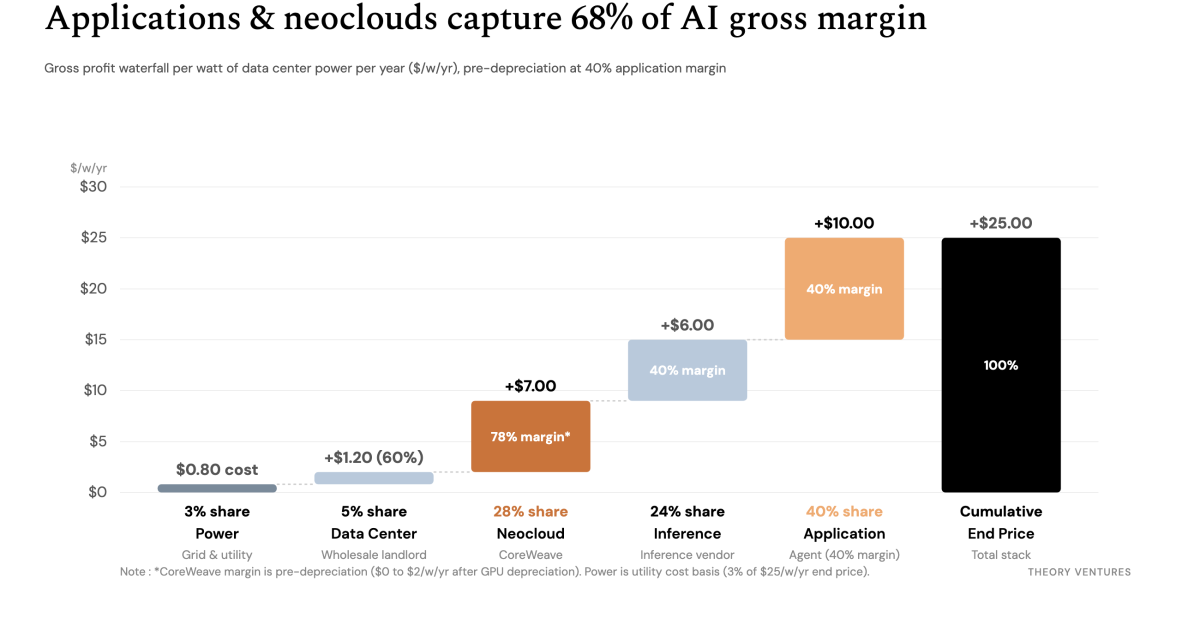
In short : Public disclosures from CoreWeave, Anthropic & wholesale data center landlords piece together the AI gross profit value chain in dollars per watt per year. At a 40% application margin, applications (40%), neoclouds (28%) & inference vendors (24%) capture 92% of total gross profit before GPU depreciation.
Who captures the most margin in the AI value chain? Public filings now let us trace the dollars from the power plant to the agent.
Five layers make up the chain :
- Power plant : produces the electricity.
- Data center operator : builds the building, connects the power & provides a shell.
- Neocloud : buys the GPUs & manages them.
- Inference vendor : runs the software to power AI.
- AI application : sells software to a customer.
Each layer bills in a different unit : utilities sell kilowatt-hours, neoclouds rent GPU-hours (an hour of a GPU’s time) & applications price completed tasks. Normalizing every step to dollars per watt per year ($/w/yr) puts the whole stack on one scale.
At a 40% application gross margin, the total gross profit pool divides from left to right as :
- Power : 3%
- Data center : 5%
- Neocloud : 28% (before GPU depreciation)
- Inference : 24%
- Application : 40%
Three implications follow from the chain :
1. Rising compute prices will test who holds pricing power. From Anthropic to CoreWeave, compute prices are climbing. Anthropic’s Form S-1/A discloses short-term burst compute reaching $13 per GPU-hour. On CoreWeave’s Q3 earnings call, CEO Michael Intrator confirmed the shift in contract rates :
“Selling capacity at more than $40m per megawatt annually while pricing for new infrastructure on four & five year contracts is moving to $20m to $25m per megawatt.”
At $20m to $25m per megawatt ($20 to $25/w/yr), new multi-year compute contracts price at more than double CoreWeave’s $9/w/yr blended fleet today. If the application can charge the end user more because of its effectiveness, higher compute costs cascade through. Otherwise, neoclouds, inference providers & applications fight over a fixed pool.
2. Different applications will command varying pricing power as a function of their ROI. An AI that saves 30% does not command the same pricing power as one that saves 70%. Techniques like small models, fine-tuning & routing will help sustain margins. Unlike the SaaS era, different vertical software markets will support varying gross profit pools.
3. Vertical integration is already consolidating margin. Companies across the stack are absorbing neighboring layers to capture adjacent margin. CoreWeave acquired Weights & Biases ($1.03b), OpenPipe, Marimo & Monolith AI ($185m) to move up into training, evaluation & enterprise workflows. Nebius has spent more than $1b in 2026 acquiring four companies across search, model optimization, cold-start scaling & orchestration to build its Token Factory. Owning multiple layers lets an integrated provider absorb price swings that squeeze standalone vendors.
No layer in AI is static. As market power shifts from one layer to the next, though, understanding these shifts will explain where competition is fiercest & where M&A will concentrate.
The answer to AI is engineering
Geoffrey Huntley argues that engineering, specifically via reproducible environments like Nix, is the only sustainable response to the rapid rise of agent-driven security vulnerabilities.
Deep dive
- Security 'take-off' is the new normal, requiring more inferencing capacity to defend than attackers use to exploit.
- Standard open-source library consumption is becoming obsolete as AI can generate first-party replacements faster than patching upstream dependencies.
- Nix provides a single, reproducible source of truth for developer laptops, CI/CD, and production Docker images.
- Agentic sandboxes should be treated as ephemeral and tested using NixOS integration tests.
- Property-based testing (e.g., Hypothesis, Hegel) should replace human-written unit tests to ensure software behavior under extreme edge cases.
Decoder
- Nix Overlay: A mechanism in the Nix package manager that allows developers to override or patch packages in a way that affects all transitive dependencies within an environment.
- Property-based testing: A testing methodology where generators create random data based on defined properties (rules) for code, rather than static input/output test cases.
- Monkey-patch: A technique to extend or modify the runtime behavior of existing software components without changing the original source code.
Original article
Full article content is not available for inline reading.

The levels of agentic engineering
Transitioning to agentic engineering is not about upgrading tools, but systematically identifying and automating every task you currently perform by hand.
Deep dive
- Level 1: Offload coding tasks to agents by providing tickets instead of instructions.
- Level 2: Enable autonomous navigation by adding lean architectural pointers (like CLAUDE.md) rather than overly restrictive documentation.
- Level 3: Offload testing and verification by granting agents access to logs, end-to-end testing frameworks, and CI/CD pipelines.
- Level 4: Move execution from local machines to cloud-based runners triggered by external events like tickets or alerts.
- Level 5: Close the loop by having agents verify production outcomes against business goals.
- Level 6: Shift the team's role to maintain and improve the factory system, making the workflow collaborative.
- Level 7: Transition the engineering team's focus entirely to product strategy once the delivery system is fully automated.
Decoder
- Agentic Engineering: A software development paradigm where AI agents perform end-to-end tasks, such as coding, testing, and deployment, with minimal human intervention.
- Claude Code: A CLI tool that allows LLMs to interact directly with a developer's local environment, filesystem, and terminal.
- CI/CD (Continuous Integration/Continuous Deployment): The automated process of testing and deploying code changes to production environments.
- Greenfield Prototype: A project built from scratch without existing technical debt or legacy constraints.
Original article
Last August I started leading an AI transformation for a 100-person R&D team inside a 700-person company. It took a real turn in October, and it took another turn every time a major model or tool came out after that.
Now I’m doing it again at my current company. We’re not done, but we’re shipping, and we have the loops, automations and cloud environments that make it work.
There are a lot of “levels of agentic engineering” lists going around right now. I think they’re useful. Most of them read like a ladder of tools, though: use this, then add that, then buy this. After going through it twice, I’d describe it with one question instead.
What are you still doing yourself?
At the start, the answer is everything. Every level after that is the same move. You find the part of the loop you’re still doing by hand, and you figure out how to take yourself out of it.
You find the next level by shipping, not by mandating it
If I were giving someone advice on how to AI-pill an organization, it would start here. You have to show people what’s possible. You can’t sit in an ivory tower and tell everyone to work a new way. You have to get in it with the team and show them, by doing it, that there’s a better, faster way to deliver software.
There’s a second reason to do it yourself. When you ship, you run into the systemic friction every company has. A lot of the time it’s infrastructure. Sometimes it’s a review policy or a compliance policy. Every product has things put in place years ago for good reasons that now get in the way.
You can’t live in la la land and say “well, I expect it to work this way.” What better way to find the wall than to hit it yourself, and then go break it down?
At every company where I’ve done this, the wall has usually been infrastructure. That’s not a knock on infra teams. Infra is just the hardest thing to change. It’s a tangled web of CI jobs, deploy pipelines and environments, and there’s more on the line when it breaks. Architecture is easy by comparison: if the API endpoints stay the same, the agent can rework what’s behind them. Policies are the other wall. How many humans have to review a change? Does an automated review count? You only find out how much those rules slow you down when you’re the one waiting on them.
So that’s my approach, and it has two halves. First I ship a greenfield prototype. There’s no friction there, so it shows what the bar is: what’s possible when nothing is in the way. Then I ship a real roadmap item or a backlog ticket in the existing product, with all the realities of existing software. The difference between those two is the map. It tells you exactly where the friction lives, and you can design the change from there.
I want to lead from understanding, not idealism.
The second time looked different, though. At my first company it was early and organic. I had a lot of social capital there, and a lot of the work was training: how to use Claude Code, how to run multiple agents at once. At my current company, everyone already uses Claude, and software factories are all the rage. Training people on the basics isn’t where the value is anymore. The work is the bleeding-edge part: moving everything to the cloud, automations, factories. I also showed up with less social capital and maybe more formal authority, which doesn’t buy you nearly as much. Shipping is how you earn the right to ask people to change.
Here’s what the climb has looked like for me.
Level 1: You’re writing the code. Hand it the ticket.
Developers shouldn’t be writing code by hand anymore. If your organization still is, getting everyone into Claude Code and pointing it at real problems is the single biggest boost available to you.
Even inside this level there’s a range. A lot of people start by saying “build this class.” That’s still you designing the code and the agent typing it. Today you can give it the ticket. If there’s a ticket and a codebase, it can do the work without heavy management.
You’re learning to trust the machine with outcomes instead of instructions.
Level 2: You’re explaining the architecture. Make the codebase explain itself.
Once the agent is writing the code, you notice you’re still the one telling it how the system works. Where things live, which service owns what, how we do migrations here. So the next step is making the codebase AI-navigable, so it doesn’t need you for that.
This was a bigger problem a year ago. The current models are very good at scouring a codebase, and more often than not they’ll find what they need if you just give them access. But if your architecture is spread across services and repos, not everything is in one place, and it never hurts to leave a few indexes and pointers.
The obvious tool is the AGENTS.md (or CLAUDE.md) file. Two rules I’d give anyone:
- Don’t use it for things the agent can discover itself. Use it for high-level pointers that send it in the right direction.
- Put them in the directories, not all in one file. The harnesses load these files progressively as the agent moves through the tree. Keep each one lean.
Skills work the same way. They’re how you codify “here’s how we do this here.” But be careful, because skills tend to get too restrictive. If you’re on an older or cheaper model, a prescriptive skill helps. If you’re on a frontier model like Opus 5.5, you often don’t need the skill at all, or it should be short and goal-oriented. For the bigger architectural calls, you can also put a stronger model in charge of planning and let cheaper ones do the building.
Two years ago I was super prescriptive and held the model’s hand through everything. Now I mostly delegate the outcome.
Level 3: You’re testing it. Let it prove its own work.
Now the agent writes the code and knows its way around, and you’re the one checking that it works. If a person has to verify every change, you’ve just moved the typing into review.
So you give agents the same access an engineer would have. Complete access to logs. The ability to run the app end to end, debug it, test it and QA it on their own. Real verification loops, so they can hand you irrefutable proof. Agents are very good at recording a video of the feature working now, so ask for one.
Then you can chain agents in CI, and this is where it gets fun. CI does two jobs here. It checks things, and it can also kick off agents to do work. A PR comes in without an end-to-end test for the new flow? The check doesn’t just fail. It triggers an agent to write the test. A QA agent can bang on every change, do exploratory testing, and make sure it’s covered.
CI is also the best enforcement point you have. People will always do their own thing locally, with their own prompts and their own setup. CI is the one place every change passes through, so it’s where your guidance actually sticks.
Testing used to be hit or miss at most companies I’ve been at. Good orgs had it, a lot had some, most had a mix. Now every change can come with the right tests. Not all tests are created equal, though. Agents will happily generate filler unit tests that don’t protect anything, so you still need judgment about which tests are worth keeping. I’d push agents toward end-to-end tests that prove the feature works.
The goal of this level is to ship faster while raising quality, raising security and lowering the cost per shipped feature, all at the same time.
Level 4: You’re pressing play. Get it off your laptop.
At this point the agent writes, navigates and tests on its own, and you’re still sitting at your laptop starting every run. If your computer isn’t on, nothing is getting done.
So you move to the cloud. At my last company, we built our own cloud agent runner, because nobody had productized it yet. At my current company, we use Cursor’s cloud agents heavily, plus agents that run in CI. That stuff is commoditized now, so you don’t need a custom runner. You do still need to design it: what triggers the work, what environment it runs in, and what it has access to. If you can get a cloud runner to run your entire system end to end, you’re in a beautiful position.
Now the work isn’t tied to a human sitting at a keyboard. You can trigger it from things that have nothing to do with a person being in the loop: a message in a channel, an email, an alert, a log line. You can assign tickets in Linear (or wherever) to agent workers, or let them pull work off the board themselves.
Level 5: You’re checking it worked. Close the loop.
The work now starts and ships without you. You’re still the one checking afterward that it actually did what it was supposed to.
So you hand that off too. When a change goes out, an agent watches the release and checks that it works as expected in production. If it didn’t, the work goes back on the board.
This is the part a lot of developers miss. “Merged to prod” and “mission complete” are two different things. If it shipped but didn’t deliver the business value, it isn’t done. And now you can codify that definition of done instead of hoping people remember it.
Level 6: You’re the only one using it. Make the factory multiplayer.
By now you’ve got something that looks like a factory. Tickets go in, tested and verified features come out, and nobody has to sit and watch it. Some people call this factory engineering or loop engineering, and I think that’s right.
The catch is that it’s usually one person’s factory. It runs on their setup, their triggers, their checks. So the next step is making it multiplayer: the whole team builds on it, iterates on it and feeds it. Product drops in work. Support files a bug and it gets picked up. Engineers spend their time improving the loops instead of running them.
The engineer’s value moves away from the individual feature and toward the system that produces features reliably and reproducibly. And with that much more software going out, quality becomes the system’s job too. End-to-end checks, QA agents, architectural reviews. You can buy tools for some of this, like Cursor’s BugBot or Macroscope, or build your own, because a lot of it isn’t that hard. Most teams end up with some combination.
Level 7: You’re out of things to build. Decide what’s next.
Then you’ve got a multiplayer factory doing more work in the cloud than any one person could ever deliver. Your team burns through the backlog, so the bottleneck moves to the product side of the house. What’s left for you is figuring out what’s next.
Most teams stall at the cloud
In my experience, every team can get to level one or two. Engineers use Claude Code locally and it works. Where most teams stall is everything after that. How do we get this into the cloud? How do we get autonomous loops running? How do we make it multiplayer?
Every team I’ve talked to has a few individual superstars who are already way up the ladder on their own. The real work is making that the norm instead of the exception.
The levels in one table
| Level | What you were still doing | What you do instead |
|---|---|---|
| 1. Hand it the ticket | Writing the code | Give it outcomes, not instructions |
| 2. Make the codebase explain itself | Explaining the architecture | Leave lean pointers and short skills |
| 3. Let it prove its work | Testing every change | Decide which tests and checks matter |
| 4. Get it off your laptop | Starting every run | Let messages, alerts and tickets trigger it |
| 5. Close the loop | Checking it worked in production | Define “done” as business value |
| 6. Make it multiplayer | Running the factory alone | Let the whole team feed and improve it |
| 7. Decide what’s next | Waiting on the backlog | Work out what to build |
The tools will change. The question won’t.
Every time a big model or tool comes out, some of this gets easier and some of it stops being necessary. Skills I wrote a year ago are now too prescriptive. Indexes I built are mostly redundant because the models can find things themselves. I expect half the specifics in this post to look dated by next summer.
The question holds, though. If you’re trying to figure out where your team is, look at what people are still doing by hand.
So if you’re leading this at your company, don’t start with a list of levels to roll out. Pick something on the roadmap, ship it with the agents yourself, and notice the first thing you’re still doing.
MCP vs CLI vs Skills: What Each Costs in Context
Using MCP servers for AI agents can balloon token costs by thousands; deferring tool definitions via Tool Search is a necessary optimization.
Deep dive
- MCP servers load all tool schemas into the model context by default
- A simple GitHub task used 59,417 tokens with MCP compared to 1,421 with a direct CLI
- Tool results (e.g., large JSON objects) often cost more than the definitions themselves
- Tool Search allows models to search and load only required tools on demand
- CLI tools remain the most efficient if the model is well-trained on them; MCP is best when auth/permissions are required
Decoder
- MCP (Model Context Protocol): An open standard for connecting AI assistants to data and tools.
- Token inflation: The phenomenon where providing extensive tool definitions consumes a large percentage of an LLM's available context window.
Original article
Full article content is not available for inline reading.
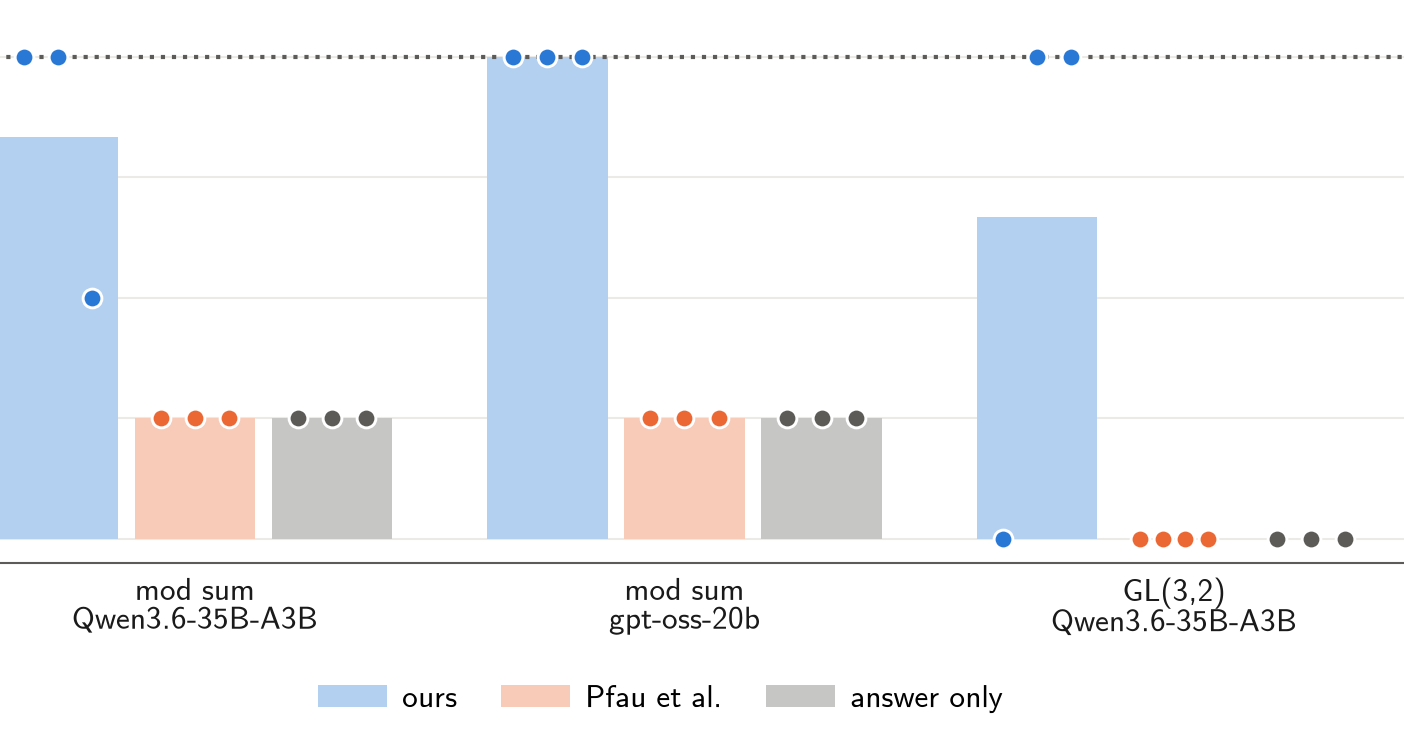
LLMs can learn some multi-step reasoning on filler tokens instead of visible CoT
Researchers demonstrated that LLMs can perform multi-step reasoning using hidden internal states via 'filler tokens' without needing to output coherent chain-of-thought text.
Deep dive
- Filler-token reasoning: model uses extra tokens to reason internally without emitting relevant words
- Demonstrated feasibility on tasks including Mod Sum, GL(3,2), and ProntoQA
- Used LoRA fine-tuning with a curriculum of increasing task length
- Theory shows some tasks require deeper algorithmic circuits, setting empirical walls for model performance
- Challenges standard interpretability assumptions that equate 'thinking' with visible 'chain-of-thought'
Decoder
- Filler tokens: Tokens emitted by a model (like '.' or '_') that carry no explicit semantic meaning but provide the model with computation steps.
- Steganographic reasoning: A hypothesis where models perform reasoning internally while emitting innocuous-looking text to hide the process.
- TC⁰: A complexity class representing problems solvable by circuits of constant depth; conceptually, parallelizable tasks.
Original article
Research update of a project done as part of MARS 5 and the Meridian Visiting Researcher Programme.
Filler-token reasoning is the ability to use extra tokens (such as a chain of thought) to reason about a task without using the words emitted at those token positions. This is possible because attention can move information between token positions without routing it through the words the LLM emits. This can give a model more parallel, but not more serial, computation.
The canonical demonstration of this is the "Let's Think Dot by Dot" paper (Pfau, Merrill & Bowman, 2024). There, the authors train models to solve completely parallelizable (TC⁰) tasks with chains of thought made only of "." tokens.
Our contributions:
- We change Pfau et al.'s training method so that models can learn multi-step reasoning on filler tokens.
- We demonstrate this on two models and three out of seven multi-step reasoning tasks.
- We provide a theoretical analysis of how many layers a transformer needs to solve each of our multi-step reasoning tasks, depending on the length of the task.
- We measure empirically how many reasoning steps we can train Qwen3.6-35B-A3B and gpt-oss-20b to do on filler tokens for each task.
Overall, this project has informed which side tasks we use to study steganographic reasoning. We also hope this writeup shows that filler-token reasoning is not confined to fully parallelizable tasks.
Motivation
Using the same token over and over guarantees that the filler tokens carry no information about the reasoning. But you could also imagine the same hidden computation happening while the LLM writes text that has nothing to do with its reasoning.
Our main research is on steganographic reasoning (the model uses its words for reasoning, but hides the reasoning in innocuous-looking text): when can models learn to reason steganographically through simple multi-step tasks? When we see a model write some unrelated text and then correctly answer a multi-step question it could not answer immediately, we have to be careful not to attribute to steganographic reasoning what could simply be filler-token reasoning.
The dot-by-dot paper looked at tasks that are in TC⁰, i.e. in theory parallelizable (3SUM, 2SUM-Transform), and showed that models can learn to do them on filler tokens. The authors argue that filler tokens cannot help beyond TC⁰. They found that when they train on serial reasoning (where later reasoning steps depend on earlier reasoning steps) they could not teach their models to do so on filler tokens.
This did not line up with our experience: filler-token reasoning kept cropping up as a failure mode in our experiments. In this small project, we set out to extend Pfau et al.'s setting to multi-step reasoning on filler tokens.
Methods
Training filler-token reasoning
Pfau et al. trained their models to output dots after the problem statement, followed by the answer, and mixed this data with open-reasoning samples.
We instead train models with dots as the input and the open reasoning as the output: at each dot position, the target is one reasoning step. This means the models we train are no longer next-token predictors. We have to prefill their CoT with dots, since they would be reasoning openly otherwise.
Another difference: they train their models from scratch, while we train LoRAs on top of existing LLMs.
We use two training setups here:
- Curriculum: we start at a number of task steps the model can definitely learn and train it on that distribution. Once answer accuracy reaches 0.9, we increase the length, bit by bit. We can then see how far the curriculum gets before it stops working.
- Direct: we train the model at full length from the start. By default this is 100 steps, but shorter for tasks where we don't have enough data, or where the prompt grows superlinearly with the number of reasoning steps. Here we can see up to which position the model still predicts the reasoning steps correctly.
Models
We train Qwen3.6-35B-A3B and gpt-oss-20b with rank-32 LoRAs.
Tasks
We use a selection of multi-step reasoning tasks for which prompts, correct step-by-step reasoning and answers can easily be generated synthetically.
Mod sum: compute the sum of a list of numbers modulo n.
A5: track a ball under five cups through a sequence of shuffles. The task is a game of Thimblerig: There are 5 cups, and in the beginning a ball is under the cup at position 0. Each 'step' is one of these operations: Rotate (every cup moves from position p to p+1 mod 5) or Double-Swap (We swap the cups at positions 0,1 as well as 3,4). These two moves generate the group A5. The answer is the final position of the ball.
GL(3,2): track the on/off pattern of three lamps through a sequence of moves. The task is a scenario where there are three lamps in a ring: A, B and C. Only lamp A is on at the start. Then we do a series of moves: Shift (every lamp passes its state to the next) or Couple (if A is on, B toggles). These two moves generate the group GL(3,2), of order 168.
Modular arithmetic: evaluate a chain of +, −, × operations modulo 8.
ProntoQA: follow rules of the form "every A is a B" to decide whether an entity belongs to a category. This is an adjusted version of Saparov & He with problems of arbitrary lengths and no shortcut strategies that let models easily perform better than chance with no serial reasoning.
HornQA: derive new categories with rules of the form "A and B ⇒ C", where a rule may need a fact derived arbitrarily far back. A variant of our ProntoQA setup based on Horn-clause reasoning, which is P-complete.
Function composition: push a value through a sequence of lookup tables. A start value in 0–7, followed by a sequence of lookup tables of 8 entries each (permutations of 0–7). Each table maps a value v to its entry at index v. The answer is the value after applying all tables in order.
Since our setup comes from steganographic reasoning, where our vocabulary to express the reasoning steps is limited, all numbers in the reasoning that have no fixed maximum are encoded in binary.
Results
Models can learn multi-step reasoning on filler tokens
To test whether models can learn multi-step reasoning on filler tokens, we train three model/task combinations (mod sum and GL(3,2) on Qwen3.6-35B-A3B, mod sum on gpt-oss-20b) in three settings: our method, Pfau et al.'s method, and an answer-only baseline that outputs the final answer directly, with no extra tokens.
We can see that on all of these tasks, our method lets us train the models to reason on filler tokens.
Of course, this only works up to some task length: the model has a fixed number of layers, and these tasks need more successive computation the longer they get.
Theoretical limits to learning multi-step reasoning on filler tokens
For every task, the shallowest algorithm we found gets deeper as the task gets longer, so we found no way to fully parallelize any of them. And for every task except HornQA the depth grows much more slowly than the number of steps, which is why the curves stay below the model's depth far beyond 40 or 24 steps.
We see that different tasks scale very differently. In particular, the modular sum task scales very gently, i.e. it is easy to do on filler tokens.
Empirical limits to learning multi-step reasoning on filler tokens
Again, tasks differ a lot in how well they can be learned. And again there are outliers: HornQA, which theory predicted to be hard to learn on filler tokens, fails after very few steps, and the popular modular sum is learned very easily.
But theoretical and empirical limits don't line up in general: some tasks are theoretically easy but empirically hard (modular arithmetic and function composition hit a wall at 1–3 steps). The pattern seems to be that models have a hard time learning tasks on filler tokens when large packets of information need to be transported across token positions.
Conclusion
Multi-step reasoning can also be done on filler tokens. Recent models such as Astra have shown an increased ability to answer reasoning questions without reasoning about them. If that trend continues, it could endanger CoT monitorability even without the specters of looped architectures or steganographic reasoning coming true.
Our experiments serve as a demonstration, and shed some light on which tasks can be learned on filler tokens, and how easily. Any pressure not to verbalize certain multi-step reasoning could, with enough training, lead to similar results.
We also learned a lot about constructing tasks for studying steganographic reasoning. We recommend that others researching steganographic or encoded reasoning put the tasks they use through a test like this.
Don't Write Kernels, Derive Them
Tang replaces hand-written operator kernels with an IR that derives and fuses kernels on-the-fly, allowing performance parity with expert-tuned engines.
Deep dive
- IR constructs: Views (affine maps) and Comprehensions (reductions over a monoid)
- Derived kernels outperform hand-written ones in specific regimes by eliminating materialized intermediate buffers
- Fusion is treated as a single substitution rewrite rule; flash attention is derived, not hardcoded
- Backward pass is generated automatically via reverse-mode differentiation of comprehensions
- Supports multiple targets: CUDA, WGSL, Metal, C, OpenCL, and GLSL
- Validated on M4 Max, RTX 3090, H200, and Android-based humanoid robot SoC
Decoder
- Monoid: A mathematical structure used here to define how reduction operations (like sum or max) are combined.
- Affine Map: A transformation used in views to express memory access patterns like transposes or slices without explicit pointer arithmetic.
- FlashAttention: A memory-efficient attention mechanism that computes attention scores in blocks to minimize memory traffic.
Original article
Full article content is not available for inline reading.

AlphaGenome 2: Predicting how DNA shapes cells and disease
AlphaGenome 2 is a new conditional DNA model that predicts how specific genetic variants affect gene expression across hundreds of human cell types.
Deep dive
- Conditional Modeling: Unlike its predecessor, AlphaGenome 2 takes specific cell-type conditions as input, allowing it to adapt to new, unseen cell states without retraining.
- Cross-modality Imputation: It can predict missing experimental properties (like chromatin accessibility) based on a single measurement, helping prioritize further experiments.
- Enhanced Recall: It improves the identification of causal variants by resolving activity within specialized cells rather than relying on tissue-wide averages.
- Non-commercial Access: The tool is currently available for academic research, with a commercial preview in progress.
Decoder
- Chromatin Accessibility: The extent to which DNA is available for transcription machinery to access and read the genetic code.
- GWAS (Genome-Wide Association Study): An observational study of a genome-wide set of genetic variants in different individuals to see if any variant is associated with a trait.
Original article
AlphaGenome 2: Deciphering how cells read DNA to better understand disease
Our next-generation DNA sequence model bridges single-cell biology and human genetics, predicting how genetic variants affect hundreds of human cell types.
Today, we are announcing AlphaGenome 2, our next-generation model that predicts how DNA sequences and their variations impact specific human cell types, giving scientists a powerful new tool to uncover the cellular drivers of disease.
Cells are the building blocks of life. Every cell in our body carries the same DNA blueprint, yet each cell type and state—like a heart muscle cell or an immune cell fighting an infection—switches different genes on or off to do its job. Global efforts like the Human Cell Atlas are mapping this gene expression for millions of cells, but it is still an unsolved challenge to predict how subtle DNA variations affect this expression in cells, which is a key driver of human traits and disease.
Last year, we launched AlphaGenome to predict how DNA variants affect molecular activity across broad tissues. We expanded its reach with AlphaGenome Atlas, a platform containing predictions for all 9 billion possible single-letter changes in the human genome. These tools help researchers prioritize and interpret variant effects, driving discoveries in rare diseases, complex traits, and fundamental biology.
By zooming in from broad tissue averages to individual cell types and cell states, and redesigning the model’s architecture, AlphaGenome 2 represents a step-change improvement in variant predictive performance. Importantly, it allows researchers to predict variant effects in disease-relevant cells that would be missed in broad-tissue models, as well as predictions for cell and disease states that the model hasn’t seen before.
AlphaGenome 2 identifies nearly twice as many variants that change gene expression in cells, compared to our previous state-of-the-art model. Trained on more than 100 million individual cell profiles across 68 tissues, the model turns static cell atlases into a predictive engine for human genetics. AlphaGenome 2 is available today for non-commercial research via the AlphaGenome API, and in private preview for commercial research.
Redesigning AlphaGenome for specific cell types
The first AlphaGenome model took a million-letter DNA sequence and predicted properties across thousands of experiments from many tissues all at once. While efficient, this parallel approach spread the model’s capacity thin and made it hard to capture subtle differences between closely related cell types.
To improve this, we fundamentally redesigned how cell types are treated by the model. Instead of predicting in parallel, AlphaGenome 2 is a conditional model that predicts DNA effects for one condition - defined as a tissue, cell type or state - at a time. Alongside the million-letter DNA sequence, it uses the target biological condition as input at every stage of its architecture. This allows it to learn how the same stretch of DNA is read differently across cell types.
A conditional model also allows cross-modality imputation, enabling AlphaGenome 2 to predict missing experimental data. The model separates a cell’s biological state from its outputs, so if a scientist inputs just one measurement, like single-cell gene activity, AlphaGenome 2 can then predict unmeasured properties, such as chromatin accessibility. This can then help researchers prioritize which experiments to do next.
We trained AlphaGenome 2 on both bulk and single-cell data from human and mouse samples, including over 107 million individual cell profiles. Moving beyond the bulk tissue averages of the original model, AlphaGenome 2 can resolve activity inside specialized cells—such as distinct heart muscle or blood immune cells—to help uncover crucial DNA variants that act only in specific cell types.
The model predicts the same core experimental readouts of DNA function as AlphaGenome — such as gene expression, histone modifications and chromatin accessibility — but also DNA methylation, a widely requested readout.
What makes AlphaGenome 2 exciting is how it adapts directly to new single-cell data without retraining, predicting how DNA variants act in newly profiled cell states from even a small sample of cells
Professor Sarah Teichmann, Co-founder of the Human Cell Atlas consortium and Professor of Stem Cell Medicine at the University of Cambridge
State-of-the-art cell-type predictions and variant recall
AlphaGenome 2 is significantly better at predicting gene regulation in specific cells, helping researchers pinpoint disease-relevant variants.
- Improved cell type specificity: On genome regions outside its training data, AlphaGenome 2 explains significantly more of how gene expression differs across cell types within a tissue—tracking continuous changes in gene expression, such as when human blood stem cells mature into red blood cells and immune lineages.
- Improved variant effect prediction: On the TenK10K dataset, a large single-cell map of 28 primary immune cell types, AlphaGenome 2 reliably identified nearly twice as many causal variants (30% vs. 16%) and directional gene effects (43% vs. 23%) as the original AlphaGenome fine-tuned on single-cell data and other specialized tools. This precision helps researchers find overlooked candidate variants for new discoveries.
- Pinpointing disease-relevant variants: A recent landmark study showed that a variant in a distant regulatory switch drives IBD by overactivating the ETS2 gene in gut immune cells (macrophages). Making predictions across various immune cell types in the gut, AlphaGenome 2 reproduced this finding computationally. It singled out the causal variant and showed that it selectively boosts the ETS2 gene in gut macrophages, leaving other cell types and genes largely unaffected.
Analyzing new cell types and states without retraining
AlphaGenome 2 can also generalize to entirely new single-cell experiments without needing to be retrained. Scientists can upload a single-cell RNA-seq snapshot of gene activity from just a few dozen cells; this gene activity is then compressed into a cell state representation, before being used to condition the model on unseen states. AlphaGenome 2 can match or outperform models trained or fine-tuned directly on those datasets.
This enables AlphaGenome 2 to predict variant effects and gene regulation for new cell states, such as those that occur from disease or vaccination. For example, given unseen single-cell data from a COVID-19 mRNA vaccine study, AlphaGenome 2 distinguished vaccine-activated immune T cells from resting ones. It also revealed that a variant linked to severe COVID-19 disrupts gene activity more strongly when cells are in this activated state — an effect that would be missed in unactivated cells.
Bridging human genetics and single-cell biology
One way to better understand disease is by linking human genetics to cell biology. An important part of building this link requires connecting the thousands of trait and disease-associated variants found in genome-wide association studies (GWAS) to the growing single-cell maps of the human body.
To help researchers make these connections without running large-scale computations themselves, we precomputed AlphaGenome 2 predictions for trait-associated variants across hundreds of human cell and tissue conditions, tackling two major challenges:
- Mapping enhancer–gene links in real human cell types: Many disease-linked variants sit in distant regulatory switches called enhancers, making their effects hard to trace. Because experimental CRISPR screens mostly use stable, lab-grown cell lines, scientists often lack these wiring diagrams for specific cells in the human body. AlphaGenome 2 extends enhancer-gene mapping to primary human cell types — such as brain astrocytes, which support and protect neurons — helping researchers connect regulatory variants to their target genes in the specific cells where disease unfolds.
- Pinpointing causal GWAS variants and the cells where they act: Genome-wide association studies flag broad stretches of DNA linked to disease, but researchers can’t always then find the exact causal variant, target gene, and cell type with high confidence. Across a number of complex traits, ranging from height to type 2 diabetes, AlphaGenome 2’s precomputed variant scores help pinpoint the specific variants and cell types most likely to be involved. When confident, the model also accurately predicts whether a variant turns a gene’s activity up or down — a critical clue for understanding how that gene contributes to disease.
Human genetics is one of the most powerful tools in drug discovery. GWAS is central to that but it is difficult to move from an association signal to what a drug programme needs. DNA sequence prediction models are an important tool in helping bridge that gap, and AlphaGenome 2 represents an impressive advance in the field. We look forward to incorporating it in our Mystra platform.
Peter Donnelly, CEO of Genomics Limited
Looking ahead with the scientific community
As scientists map more of the human body at the single-cell level, AI models will continue to become more powerful. Through our ongoing collaborations, including with researchers at the Wellcome Sanger Institute, we are working to profile an even wider spectrum of human cell types, developmental lineages, and perturbed cellular states. We look forward to seeing how researchers from across the community use AlphaGenome 2 and its improved cell-type specific predictions to uncover how genetic variants act across cells, and what that reveals about basic biology and disease.
AlphaGenome 2, and interactive Colab tutorials for expression conditioning are available today for non-commercial research via the AlphaGenome API and in private preview for commercial research. And soon, we will release AlphaGenome 2 Skills in Google Antigravity, our agentic development platform. The combination of specialized models, like AlphaGenome 2, with powerful agentic science tools like Gemini 4 in Antigravity, will help scientists accelerate research and make new discoveries.
OpenAI open-sources MCP Extensions for ChatGPT-native plugins
OpenAI open-sourced MCP Extensions to help developers build ChatGPT plugins that integrate directly with native UI features like sidebars and custom file viewers.
Decoder
- MCP (Model Context Protocol): An open standard that enables AI models to connect securely to local or remote data sources and tools.
Original article
OpenAI MCP Extensions
OpenAI MCP Extensions adds ChatGPT-specific capabilities to MCP so developers can build plugins that feel like native, first-class features.
Try it out
-
Install Bits & Bolts Remote.
-
Select the Bits & Bolts icon in the sidebar to open the Parts Library.
-
Open Extensions walkthrough to explore a demo of each major extension.
Showcase
Sidebar entrypoints
Allow users to access your app from the sidebar.
File extension handlers
Render custom file viewers when users open a supported file type.
Composer mentions
Let users search your plugin’s resources from the composer and add references to a message.
Extended forms
Let users select a CAD part using thumbnail choices.
Get started
1. Integrate extensions
Ask @Plugin Creator in Codex to build a new plugin or improve an existing one for you.
2. Install the SDK
- TypeScript:
@openai/mcp-extensionsfor MCP servers and Apps. - Python:
openai-mcp-extensionsfor MCP servers.
3. Learn more
- docs/spec.md lists all supported extensions.
- docs/patterns.md covers best practices.
- CHANGELOG.md lists API changes.
- Bits & Bolts source shows how to integrate extensions in practice.
4. Provide feedback
Notice any gaps in extensions for your plugin? Submit feedback here.
License
This project is licensed under the Apache License 2.0.

A2UI 1.0: Build delightful, fast, reliable, agentic experiences
A2UI 1.0 launches as an open protocol for generative UI, enabling AI agents to render interactive, native-speed components across mobile and web platforms.
Deep dive
- Bidirectional Function Calls: Version 1.0 allows for real-time interaction, such as checking flight availability directly within a generated UI card.
- Platform Agnostic: Uses renderer libraries to draw components natively, ensuring brand consistency across web, iOS, and Android.
- Security: Sensitive data stays on the server, as the UI binds to data locally rather than passing it through the LLM.
- Integration: Compatible with MCP Apps, allowing A2UI-powered screens to appear in third-party assistants.
Decoder
- Generative UI: An emerging UI paradigm where an AI model dynamically generates interface components based on user intent rather than relying on static, pre-defined screens.
Original article
A2UI 1.0: Build delightful, fast, reliable, agentic experiences
User interactions with agents today are where computers were in the terminal era: capable, and answering almost everything in text. Users can ask an agent for anything by typing or talking, and what comes back is usually a wall of text, a poor way to compare three products or edit and approve a detailed plan.
Today, we're releasing A2UI 1.0, the first stable version of our open protocol for generative UI. It lets AI agents answer with interactive screens, such as a form to confirm or a chart. Developers can use it now with open-source renderer SDKs for the web, Android, and iOS and agent SDKs for Python, TypeScript, and Dart. Companies such as Atlassian, Alation, Bloomberg, and ByteDance are already building with it.
With A2UI, the agent describes what to show, and every app draws the UI with its own native components. The application receives A2UI messages and each app renders the content securely and at native speed. Users get the same low latency, high trust, and complete native fidelity whether they reach a company's agent in its own app or in a third-party AI assistant that hosts MCP apps, such as Gemini or Claude.
Why A2UI
- Personalized in the moment. Your agent constructs a UI that adapts to each user's unique needs and preferences.
- Native to your brand. Agents use your design system and nothing else. They place and configure only the components you register.
- Fast, reliable, and secure in production. LLMs compose UI with A2UI Express or with “system one” decision models that pick components instead of writing text. A2UI reliably binds to your data and child components on the server, so sensitive values never reach the model, and the app streams in the UI as the agent works.
What developers can build with A2UI
You wake up sick. Getting through the morning takes six apps: book a video visit, move your meetings, tell your team, turn on an out-of-office reply, ask your partner to do school pickup and order soup. Ask a text-only agent instead, and you get a numbered wall of text, then round after round of “which ones?”. A2UI won't handle your sick day, but it gives developers the framework to build an agent that can. That agent could answer with one view of all six apps. Changing your plan is a couple of taps instead of another round of messages, and nothing is sent until you confirm.
The same agent output works on any screen. Ask an agent to “move dinner with Priya to Friday”, and it can answer with one view that lines up your calendar, open tables from a restaurant booking app and prices from a rideshare app, so the time that works for everyone is obvious. The developer builds that view once with A2UI, and it renders natively on your phone and on your laptop.
In both examples, A2UI is the framework that simplifies building these experiences across platforms. Developers build the agent and choose the platforms it works with. A2UI gives them the protocol the agent uses to describe each view, a way to combine components from different apps in one view, and renderers that draw it natively on the web, Android, and iOS.
What's new in 1.0
- A stable protocol. Version 1.0 adds bidirectional function calls, so a flight or reservation picker can check availability on the spot. The protocol also adds support for accessibility and extensions for any additional metadata.
- Renderer libraries for major platforms. Open-source renderers draw A2UI screens with React, Angular, and Lit on the web; Flutter on mobile, web, and desktop; SwiftUI on iOS and Jetpack Compose on Android (currently v0.9.1, and v1.0 coming soon). The web and Flutter renderers also work inside MCP Apps, so A2UI screens can appear in AI assistants that support MCP Apps, such as Claude and Gemini.
- Fast, reliable UI generation with A2UI for Agent SDKs. New SDKs for TypeScript and Dart along with Python, simplify integration with your agent harness or framework by generating skills, translating messages, and correcting errors. Swappable inference formats reduce latency, and in Python, A2UI Macros add programmatic component expansion and data binding.
Teams building with A2UI today
Atlassian
Atlassian is bringing A2UI to Jira, where teams can assign work items to AI agents. When an agent needs a follow-up from the team to finish a work item, such as a missing detail or a decision, it asks with an interactive card in the work item, and the team answers right there in Jira.
Alation
The Alation Intelligence Operating System (AIOS) builds its feeds using A2UI: metric cards, charts, and more. Each chart can show the SQL query and data behind it. Ask Claude for a feed about profitable products, and the feed renders in the conversation using A2UI to render metric cards, charts, and custom components. The same feed with the same information can be viewed directly inside Alation with a nearly identical layout.
“The Alation Intelligence Operating System (AIOS) brings artifacts with data, charts, and insights directly to where teams work with transparency about where each figure comes from. A2UI provides the interactive UI scaffolding that makes these artifacts feel like high-touch, tailored applications, whether they are used in Alation or in the AI Assistants our customers already use.” - GT Volpe, Vice President of Product Management at Alation
ByteDance
ByteDance released an A2UI renderer for Lynx, its cross-platform framework, in June 2026. Lynx keeps streamed screens smooth and ships a default set of components built on its `lynx-ui` library. In the Lynx GenUI Playground, you can watch A2UI messages rendered natively, for example, as a two-day trip planner for Kyoto. Lynx supports A2UI 0.9 today and is adapting to 1.0 with the A2UI team.
“A2UI is headed in the right direction: it separates how a model produces an interface from how an app renders it. Swappable inference formats and macros keep generation efficient, and even LLMs can be swapped for a System 1 model. In our playground, a decision model like Jev picks components and values instead of writing text, and then the SDK builds the A2UI screens that Lynx renders natively.” - Shouqun Liu Engineering Lead for Lynx at ByteDance
Inside Google
Gemini Notebook
Ask Gemini Notebook for a slide deck and it replies with a card that asks two things: presenter slides or a detailed deck, and which topics to focus on. A review card follows with the format, focus, and visual style, which you can edit before it generates the deck. The same cards guide Video Overviews on the web and on mobile.
Inside Gemini
Organizations can register their own agents that respond with A2UI. Gemini renders those responses using the components in its A2UI component gallery, and supports A2UI 0.9.1 today.
A2UI and MCP Apps
A2UI and MCP Apps work together. Alation already uses both to show its A2UI feeds in Claude.
What's next
Jetpack Compose support for 1.0 is coming soon. Agents in Gemini Enterprise can already use A2UI, and we're working on upgrading Gemini Enterprise to A2UI 1.0.
Get started
- Read the docs and try the quickstart at a2ui.org.
- Pick a renderer: React, Angular, and Lit on the web; Flutter on mobile, web, and desktop; and SwiftUI on iOS. The Jetpack Compose renderer supports 0.9.1 today, with 1.0 coming soon.
- Upgrading from 0.9? The evolution guide covers every change.
- File issues and discuss ideas at github.com/a2ui-project/a2ui
Looking for Ideas?
We’ve collaborated with partners who have built A2UI 1.0 demos across different industries to give you inspiration on how to adapt A2UI to your use cases. Explore what they’ve built:
- Homeward (Real Estate and Moving Agent) by Moonwise
- Investing companion (Finance and Investing Agent) by Somnio Software
- Alder (Stylist Agent) by L+R
- GenUI Clinic (Medical Records Agent) by Solid Software
- Riviera Home (Smart Home Agent) by Very Good Ventures
- Vital Loop (Vitals Tracker Agent) by Oak Tree Apps
- For one of the ways to run A2UI Express on a local or in-browser model, see the Soverius AI walkthrough and Gemma 4 fine-tuning article.
- Try your own ideas in A2UI playground by Copilotkit
ElevenAI (Website)
ElevenLabs is expanding into desktop agents with ElevenAI, a Mac-based tool for meeting transcription, dictation, and automated workflow handoffs.
Deep dive
- Transcription & Dictation: Supports 90+ languages with automatic filler word removal and punctuation.
- Integration: Uses MCP to connect meeting notes and transcripts to third-party tools.
- Security: Transcripts are stored locally; the company claims not to store audio files.
- Deployment: Supports both individual self-service and managed enterprise-wide rollouts.
Decoder
- MCP (Model Context Protocol): An open standard developed by Anthropic that allows AI assistants to securely connect to data sources and developer tools.
Original article
A desktop app to amplify your work
Dictation, meeting notes, briefs and handoffs powered by ElevenAgents and built on context from every past conversation.
From every conversation to actionable work
Hi Sarah,
Hope you’re having a good week. I wanted to give you a quick update on where we’ve landed with the Q4 launch, since a few things have moved since we last spoke.
First, the good news: engineering is on track to ship the beta by the 18th. The core features are done, and the team is now working through the final round of testing. We found a couple of small issues with the onboarding flow, but nothing that affects the date.
Second, I’ve pulled together a draft rollout plan that breaks the launch into three phases. We start with a small group of existing customers, then open it up to the wider waitlist, and finish with the public announcement the following week. I think this gives us room to catch problems early without slowing the overall timeline.
There are two things I’d like your input on. One is the messaging for the announcement, since I want to make sure it lines up with what your team is planning to say. The other is whether we should line up a few customers to share early feedback, which could make a strong addition to the launch materials.
Could we walk through all of this on Thursday? I’m thinking 2pm, but I’m flexible if another time suits you better. I’ll send over the rollout plan and a short summary of open questions beforehand so we can make the most of the time.
Dictation in any app
Hold a key and speak wherever you can type. ElevenAI removes filler words and fixes punctuation, in 90+ languages, with accurate spelling for names and jargon.
- Website team: Okay, so the main thing for today is the winter sale page. Are we still planning to go live on Monday?
- You: Yes, that’s the plan. The copy is signed off, so I just need the final images from design.
- Website team: Great. One question on the hero. Do we want a lifestyle photo, or a grid of the best-selling jackets?
- You: Let’s lead with the lifestyle photo. It sets the tone better, and then we can show the product grid straight underneath.
- Website team: Sounds good. I’ll ask design for a second crop of the photo so the hero works on mobile too.
- You: Perfect. If the images land by Thursday, I can have the page ready for review on Friday.
Meeting notes
ElevenAI records your meetings on your Mac, in person or on a call. When one ends, it writes a summary with action items, labels each speaker, and drafts your follow-up.
Tools and agents
Your notes and transcripts are available in the AI tools you already use, through MCP. You can also connect ElevenAI to ElevenAgents, for live assistance during your meetings and automated hand offs.
Privacy and security
We don’t store your audio, and your transcript history stays on your Mac. ElevenAI displays a notice on video when it is taking notes. ElevenLabs holds SOC 2 Type 2 and ISO/IEC 27001 certifications, among others.
For teams and enterprise
Self-serve or managed rollout
Team members will be able to sign up on their own. For company-wide rollouts, our engineers deploy it alongside your team.
Designed for global teams
Dictation and meeting notes in 90+ languages, in person or on a call, with speakers labeled in every one.
Knows industry terminology
Add product names, acronyms, and industry terms, and ElevenAI spells them correctly in dictation and meeting notes.
Agents configured with you
For enterprise teams, our engineers set up your ElevenAgents agents to work from meetings across the company.
OpenAI wants agents to tell websites where you are
An OpenAI proposal to send user network signals to websites is drawing sharp criticism for potential privacy leaks and insufficient authentication.
Deep dive
- The Problem: Agents are frequently blocked because they appear to originate from known data center IP ranges.
- The Proposal: Add six parameters (asn, ip-country, ip-prefix, locale, tz, user-agent) to the standard Forwarded header.
- Security Risk: The draft suggests signatures are optional, which could allow malicious actors to spoof legitimate residential network identities.
- Caching Impact: Adding dynamic user data to request headers risks breaking server-side caching if not implemented with a Vary header.
- Privacy Concern: The combination of these signals creates a browser fingerprint, which could be exploited for tracking.
Decoder
- Forwarded Header: A standard HTTP header used to identify the endpoints of a proxy chain, often used to reveal the original client IP to the destination server.
- Client Hints: An extension to HTTP that allows servers to negotiate which information about a client's device/preferences they want the browser to send.
Original article
When an AI agent or a cloud browser visits a website for you, the site sees the agent’s IP address and user agent, not yours. Two engineers at OpenAI want to change that. Their Internet-Draft, shared with the IETF’s HTTP Working Group today, lets an agent pass along your network, your country, a masked version of your IP address, your locale, your time zone and the browser or app you used.
The problem behind it is real. This draft is the wrong fix, and I’ve sent that feedback to the mailing list. Here’s the longer version.
Six new parameters
The draft is called draft-panero-httpbis-forwarded-user-signals. It adds six optional parameters to the existing Forwarded header: asn, ip-country, ip-prefix, locale, tz and user-agent. A request from an agent could then carry something like this:
Forwarded: asn=64496;ip-prefix="192.0.2.0/24";user-agent="Example/1"To be fair to the authors: the draft bans persistent user and device IDs, tells senders to share as little as possible, and says plainly that a masked IP address is not anonymous. It’s also an individual draft. It hasn’t been formally submitted yet, and no working group has adopted it.
Less than a browser, more than today
A normal browser visit gives a site your full IP address, your full user agent, your language and, through JavaScript, your time zone. This draft shares less than that.
But that’s not the right comparison. Today, when an agent browses for you, the site learns almost nothing about you. That’s a side effect, not a feature anyone designed, but it is a privacy gain. This draft hands part of it back.
Not getting blocked
The draft says the signals are for “fraud detection and risk assessment”. I read that differently. Sites block or challenge agent traffic, because thousands of users arrive from the same few data centre addresses. These signals make an agent’s request look like a normal visitor again.
That’s a legitimate problem for anyone running an agent, and for you when your agent hits a wall of CAPTCHAs. But the draft should say so, because it changes who benefits. The company running the agent gains the most from sharing your data, and that same company decides what gets shared. You’re not asked. The site can’t ask either: there’s no way for it to request specific signals or say why it needs them. Client Hints solved that years ago, with a header in which the server lists what it wants.
Unsigned means worthless
Anyone can send these parameters. The draft knows this. It tells sites not to treat a signal as authenticated unless they’ve verified a signature that covers it. But it also says, in so many words, that sending the signals doesn’t require signing. If a clean residential network in the header gets you past a block, every fraudster will send one.
Signals meant for fraud detection only work when the site can check who vouches for them. Web Bot Auth exists for exactly that. Signing shouldn’t be optional. The draft should require a signature, and tell sites to ignore any signals that arrive without one.
The GDPR question
I’m not a lawyer, but this is how I read it. Your network, a masked IP prefix, your time zone, your locale and your browser together are personal data. The operator of the agent becomes the party that decides to disclose it to a third party, mostly for its own benefit and the site’s.
Time zone, locale and user agent are also read from your device, which brings in the ePrivacy rules. That’s fine when you want a site to show times in your time zone. It’s much harder to defend when the purpose is risk scoring.
The signals also leak each other. A time zone of Europe/Amsterdam with a locale of nl-NL tells a site which country you’re in, even when the agent holds back the country.
Two already have a home
An agent sets its own request headers, so it can already send your language in Accept-Language. For time zones there’s the Prefer header. MDN’s own example of a custom preference is Prefer: timezone=America/Los_Angeles, and the server can confirm it used it with Preference-Applied.
The draft says locale is something else than language: it’s for formatting dates and numbers. But a language tag like en-NL already says “English, formatted the Dutch way”, and it fits in Accept-Language today. What’s left is a description of how your device is set up, and that’s a fingerprint, not a preference.
Forwarded is the wrong place for any of this. It describes the hops in a proxy chain. An agent doesn’t forward your request, it makes its own.
Who gets the cached copy?
Say someone in New York asks an agent a question, and an hour later you ask the same one. There’s a good chance the agent fetches the page only once. Operators cache, because fetching every page again for every user is slow and expensive. The draft doesn’t mention caching at all.
That first fetch carried the New Yorker’s signals. You get the copy made for New York, and the site never sees you. A site that wants to prevent that has to tell caches with a Vary header. But Vary works on whole headers, so the site would have to send Vary: Forwarded. That header also holds the IP prefix, the network and the user agent, so almost every request becomes unique and caching agent traffic stops working. Client Hints solved this too: each hint is its own header, so the server can name exactly the ones it uses.
You could answer that caching doesn’t matter here. Fraud checks happen when you log in, pay or place an order, and those requests are never cached. I agree, and it proves the point. The network signals have no business on ordinary page fetches. They only make sense on a handful of requests that each belong to exactly one user.
Split it, and ask first
There are two drafts hiding in this one. The first registers a time zone preference for Prefer, and maybe tells agents to pass on your language in Accept-Language. That’s small, useful and hard to object to.
The second covers the network signals, and I’m not sure it should exist at all. If it does, it should be much narrower than this. It should only apply to the requests where a site has a real fraud question: logging in, paying, placing an order. It needs signatures and a hard limit on how precise the IP prefix can be.
It also needs a way for the site to ask, and Client Hints is the obvious model. The site asks for the signals on its login or checkout page, and only then does the agent send them, on the request that follows. Sites that never ask never get them. One thing would have to change: with Client Hints today, a site opts in for its entire origin, not for specific URLs. For this, the request should be limited to the pages that need it.
Above all, it needs you. When the site asks, the agent can stop and ask you in turn: “This shop wants to know which country you’re in before it takes your payment. Share it?” That’s an explicit opt-in, per site, at the moment it matters. The draft leaves the decision to the operator’s policy instead.
Agents are going to make up a big share of web traffic. What they tell sites about us shouldn’t be up to the company that built the agent alone.
Databricks Genie Agents
Databricks Genie Agents can now reason over unstructured documents and connect directly to enterprise apps to perform automated actions.
Deep dive
- Unstructured Support: Agents can parse PDFs, images, and slide decks, providing page-level citations for their answers.
- Tool Integration: Uses native MCP connectors for Slack, Jira, Confluence, and Github to allow agents to perform actions like creating tickets or posting messages.
- Governance: All tools and data are gated by Unity Gateway and Unity Catalog, ensuring permissions apply to the agent's actions.
- Collaboration: OpenSharing enables sharing pre-loaded agents with external partners; Clean Rooms allow querying shared data without exposing underlying datasets.
Decoder
- Unity Catalog: A unified governance solution for data, analytics, and AI on the Databricks platform.
- Lakeflow Connect: Databricks service for ingesting and integrating data from external enterprise SaaS applications.
Original article
- Analyze unstructured data: Ask questions across governed tables and thousands of documents in Unity Catalog volumes, with page-level citations. Now in Public Preview.
- Connect and take action: Pull in app data with Lakeflow and use native MCP connectors (now GA) to read from tools like Jira, Slack and Google Drive and act on them.
- Share beyond your company: Use OpenSharing (beta) and Genie Clean Rooms (beta) to give partners and customers a governed agent without exposing the data behind it.
Thousands of teams use Genie Agents to turn deep operational questions into actionable outcomes every day. Across industries, organizations are putting Genie Agents to work on some of their most important business challenges:
- Retail and consumer goods: Unilever uses Genie Agents to help finance teams explore profitability, credit risk and financial performance in natural language. HelloFresh uses Genie Agents to increase ad-testing velocity by 4x by unifying marketing performance insights across media, creative and finance teams.
- Energy: S&P Global Energy uses Genie Agents to bring new data products to market in days, rather than through traditional development cycles. Its domain experts publish governed, conversational access to commodity data themselves, from LNG cargoes to chemical capacity. Customers can query that data directly from their own AI agents.
- Technology: Atlassian uses Genie Agents to help security teams investigate billions of security events through natural language, accelerating threat hunting and incident response.
- Automotive: General Motors has deployed over 1000 Genie agents across sales teams, automotive engineers, supply chain specialists, HR operations, and more, all grounded in the specific context of each line of business.
- Healthcare and life sciences: ModMed uses Genie Agents to give nontechnical teams secure, natural language access to enterprise data, using catalog structure, permissions and business context to answer questions without requiring a custom AI application for every request.
What these use cases have in common is the need for agents that deeply understand each business's unique context. Genie Agents ground their responses and actions in rich knowledge curated within Databricks, helping teams move from natural-language questions to trusted insights and action.
As demand for context-rich workflows grows, agents need to reason beyond structured business data alone. They need to understand context from unstructured assets and connect to enterprise tools so they can reason across the full business environment and take action in the tools that run their business.
What’s new with Genie Agents
Genie Agents started as the fastest way to turn business questions into SQL insights. Today, they have evolved into something bigger: a no-code agent that understands your entire business context. With unstructured data analysis and new MCP connectors, Genie Agents can conduct high-quality business analytics, analyze large volumes of documents and connect to your enterprise tools to take action on your behalf.
And now with support for OpenSharing, Genie Agents can accelerate time-to-insights outside your enterprise. You can share a governed agent that's pre-loaded with your data, instructions and knowledge with partners, suppliers and customers. External teams can immediately use Genie Agents to get value out of your data, without spending time cross-collaborating on insights.
Genie Clean Rooms go further, offering privacy-centric agentic collaboration. Your recipients get a Genie Agent to chat with your data. But the underlying dataset and IP are hidden and fully protected. These updates let you extend governed Genie Agents to every stakeholder in your ecosystem.
Unstructured context requires more than basic enterprise search
80% of the context that runs an enterprise lives in documents: contracts, invoices, claims, medical records, financial reports and call transcripts. Unlocking this context at scale can transform your business.
Most agents today rely on basic enterprise search via MCP connectors, which let you attach a handful of documents directly and pull out the raw text as context in the session. However, many enterprise use cases involve large document corpora or complex file structures. Maintaining context and compliance here requires understanding the document structure and its relationships while creating a secure perimeter for governing enterprise data.
Building these workflows at scale also requires developing custom RAG, including advanced parsing capabilities, building a separate AI Search endpoint, writing an embedding pipeline, summarizing document insights and passing those summaries to a supervisor agent framework with robust permissions.
A bespoke approach to large-scale unstructured analysis can therefore quickly become expensive to build and maintain.
Genie Agents simplify unstructured data analysis
Genie Agents simplify unstructured data work for your team by automatically handling document parsing, indexing and context retrieval to return high-quality results along with specific citations.
Genie Agents use our custom AI document parsing function to read each file the way a person would. They recognize tables, figures, headers and footers and preserve the surrounding context. Because parsing and indexing run at scale, one agent can work through thousands of files, searching for the ones relevant to your question and citing the exact page for each answer.
What’s powerful about doing this in Genie Agents is that users can now ask questions that span files and tables. Customers like Verana Health leverage Databricks today to process and analyze real-world clinical data at scale, generating meaningful insights from their healthcare datasets using Genie Agents.
"Our team is now looking to expand these capabilities with Genie Agents to unlock insights from unstructured clinical data and other clinical documents. We're excited about the potential to make this information more accessible through natural language, enabling our teams to explore richer clinical insights alongside structured data." - Vinodh Simon, Director of Engineering, Verana Health
Let's look at a few additional examples.
Combining quantitative and qualitative insights across tables and files.
An investment analyst sees that a portfolio company's margin has declined for three consecutive quarters. That evidence might exist in analyst reports, earnings call transcripts and industry research PDFs. A Genie Agent pulls margin and selling-price trends from governed tables to find which product lines account for the decline. It then searches the attached analyst reports and earnings transcripts for what competitors did over the same quarters. Genie provides analysts with data trends, the likely causes and page-level citations for each claim.
Answering questions with files as cited references.
In many businesses, users need to complete a task and need guidance from internal documents. The fix might be in one of thousands of service manuals, bulletins and troubleshooting guides, which cover different models and revisions. In this example, the agent identifies the model, searches only the relevant manuals and service bulletins out of thousands of documents and returns the troubleshooting steps with a citation to the source page. AI parsing keeps tables, diagrams and numbered steps intact, so the technician gets the whole procedure.
Analyze data patterns and trends across files.
Sometimes users need qualitative analysis across multiple unstructured files. A clinical trial analyst notices in the trial-tracking data that one department is running fewer studies. The reasons may be written in investigator and doctor reports, spread across dozens of PDFs. The agent confirms the trend in the trial data, then reads that department's doctor reports and pulls out the reasons that keep coming up. Each one is cited back to the source, so the analyst can check the evidence before acting. Reading those reports one by one might take days.
How unstructured search works inside Genie Agents.
Agent builders can attach Unity Catalog Volumes containing PDFs, documents, slide decks or images directly to a Genie Agent. The agent retrieves the file content most relevant to the question and adds it to its context. The agent then reasons over that content together with any structured data to generate an answer with citations. These citations can point to the specific page of the source file. Users can ask questions across a specific volume, multiple volumes and structured data in the same conversation.
Unstructured data analysis runs in Agent mode, using multi-step reasoning to retrieve and analyze the most relevant file content. It respects Unity Catalog permissions, meaning users only see files they have access to, and supports content search indexing for faster, higher-quality retrieval across large volumes of data.
Lakeflow Connect and MCP connectors expand your agent reach
Genie Agents now give you more ways to connect business context across your systems and tools
Bring structured data in with Lakeflow Connect. Lakeflow Connect lets you ingest data from apps like Salesforce, Workday, SAP or Marketo into Unity Catalog. Once in the Lakehouse, Genie Agents analyze it as accurately as any other governed table, using your curated metric views.
Take action with MCP connectors. Native MCP connectors, now GA, let agents get context from tools like Slack, Google Drive, Google Calendar, Gmail, Glean, Atlassian, Github and Microsoft 365. Genie Agents can also act by creating tickets, updating records and posting messages. Authors can choose exactly which tools each agent can use, and every connector is governed through Unity Gateway.
What this unlocks:
Structured data, documents and tools sit under the same governance, so one agent can reason across all three and take action on those insights.
Take a sales team getting ready for a quarterly pipeline review. A Genie agent analyzes pipeline data in Databricks, pulls in account plans from Google Drive and win-loss reports from UC volumes, then posts a deal strategy summary to the team's Slack channel. Agent authors can limit the Slack connector to posting summaries only, and admins govern every connection through Unity Gateway. That turns hours of manual prep into an automated workflow that keeps the whole team aligned.
"Teams make their best decisions when trusted context shows up in the flow of work. With Genie Agents now connected to Slack, sales, finance and operations teams can go from question to action without leaving the conversation. We’re thrilled to work alongside Databricks to bring governed, reliable insights to where the work happens." - Jaime DeLanghe, Chief Product Officer, Slack
Genie Agents can now enable cross-organization collaboration and intelligence monetization
With OpenSharing for Genie Agents, a provider can now share a fully functional Genie Agent with an external recipient, pre-loaded with instructions and context, across Databricks accounts. Under the hood, OpenSharing provides live access to the underlying data. This opens up use cases for data monetization, partner collaboration and cross-org analytics without giving up control of your data infrastructure. Customers or data partners can sell "data intelligence” through packaged agents in the Databricks Marketplace alongside data providers such as FactSet or LSEG and monetize this with their customers.
For sharing use cases that require privacy protection, such as sensitive healthcare or financial data, Genie Clean Rooms let you share an agent where the recipient can ask questions and get answers, but cannot see the underlying data or your IP. This opens up exciting new possibilities for data sharing, where data previously too sensitive to share in its entirety may now be sanitized and shared. Genie Clean Room also offers additional controls, such as conversation limits and output size controls, so you stay in control of your data and how recipients use it.
Accuracy and reliability
Genie Agents are accurate because they understand your business, not just your schema. Every agent is grounded in the enterprise context layer that learns your business definitions, metrics, table relationships and column meanings. Subject matter experts then add to that context in three ways:
- Metric views define each business metric once in Unity Catalog. The agent reads its measures, dimensions, descriptions and synonyms directly.
- SQL expressions and example queries set joins, measures and filters. When someone asks about "active customers," the agent uses your definition and joins the right tables on the first try.
- Instructions cover terminology and rules specific to your organization, such as how sales tells committed accounts apart from prospects.
Benchmarks make Agents more reliable over time. They work like unit tests: you define your most common questions with gold-standard SQL answers, score the agent and rerun after changes to catch regressions. Genie suggests fixes such as missing joins, filters or descriptions. In production, the monitoring tab and user feedback show where answers fall short, so the agent improves with use.
Moving from answers to autonomous work
The next wave of agents won't wait for someone to open a chat. They'll monitor pipelines, triage escalations, review at-risk deals and answer partners’ questions around the clock. An agent working on its own needs more context, your metrics, your terminology and the guardrails to do its job.
Genie Agents are built for this work. They can be scoped for a business domain or workflow with its own data, files, tools and instructions. Teams can define this agent once, then deploy it through APIs, custom applications and automated workflows. Genie One and Genie MCP can also call these agents when a task needs deeper investigation.
Each agent you build also adds context that the rest of the company can use. A metric defined for finance is available when sales builds its agent, and a correction from one team can become a governed definition for everyone. You don't have to finish mapping the business before you put agents to work, because building context and deploying agents feed each other.
This week's launches expand all three parts of that work. Genie Agents can now reason over thousands of documents alongside governed tables, take action in the tools your teams already use and serve partners and customers outside your company, with your governance applied throughout.
FAQs
What’s new in Databricks Genie Agents?
Genie Agents can now analyze unstructured files in Unity Catalog volumes, connect to enterprise tools and be shared outside your company. Unstructured data analysis is in Public Preview, native MCP connectors are generally available, and OpenSharing and Genie Clean Rooms for Genie Agents are in beta.
How do Genie Agents analyze unstructured documents?
Agent builders attach Unity Catalog volumes that contain PDFs, documents, slide decks or images to a Genie Agent. The agent retrieves the most relevant file content, reasons over it together with structured data and answers with citations that can point to the specific page of the source file. It respects Unity Catalog permissions, so users only see files they have access to.
Which enterprise tools can Genie Agents connect to?
Lakeflow Connect ingests data from apps like Salesforce, Workday, SAP or Marketo into Unity Catalog, where Genie Agents analyze it like any other governed table. Native MCP connectors let agents get context from tools like Jira, Confluence, Slack, Google Drive and Microsoft 365, and act by creating tickets, updating records and posting messages. Authors choose which tools each agent can use, and every connector is governed through Unity Gateway.
Can I share a Genie Agent with partners or customers outside my company?
Yes. With OpenSharing, a provider can share a fully functional Genie Agent, pre-loaded with instructions and context, with an external recipient across Databricks accounts. For sensitive data, Genie Clean Rooms let recipients ask questions and get answers without seeing the underlying data or your IP, with controls such as conversation limits and output size limits.
How do Genie Agents stay accurate?
Genie Agents are grounded in an enterprise context layer that learns your business definitions, metrics, table relationships and column meanings. Subject matter experts add metric views, SQL expressions and example queries, and instructions. Benchmarks work like unit tests to catch regressions, and the monitoring tab and user feedback show where answers fall short.
Fact-Checking at Scale: Building a More Accurate and Efficient Synopsis Factuality System
Netflix reduced its synopsis fact-checking service costs by 52.4% while improving detection accuracy through an automated verification pipeline.
Deep dive
- Implemented an automated system to fact-check content synopses against verified sources.
- Achieved a 52.4% reduction in cost per synopsis processed.
- Increased recall (the ability to correctly identify non-factual content) from 0.77 to 0.86.
- Improved reasoning overlap with human annotators to 82%, up from 69%.
Original article
Netflix automatically checks synopses of its shows for factual errors. Its new factuality service cuts cost per synopsis by 52.4% and raises recall on non-factual synopses from 0.77 to 0.86. Its explanations now overlap about 82% with human annotators' reasoning, up from about 69%.
Parquet's Revised Modular Footer Proposal: Row Groups Stop Being Physical Boundaries
Apache Parquet is proposing a modular footer design that separates metadata into independently readable pages, enabling better performance for wide, complex datasets.
Deep dive
- Shifts footer metadata from a monolithic Thrift block to modular, page-based structures.
- Eliminates the strict requirement for row groups to be physical data boundaries.
- Supports optional row-group metadata and statistics at arbitrary row ranges.
- Enables per-page compression for metadata, reducing read latency for cold data.
- Improves support for evolving data layouts without requiring constant footer format changes.
Decoder
- Thrift: A framework and binary protocol developed by Facebook used by Parquet for storing metadata in a compact, cross-language format.
- Row Group: A subset of data in a Parquet file consisting of column chunks, typically used for pruning scans during queries.
- Page: The smallest unit of data in a Parquet file, containing values from a single column chunk.
Original article
Hi Jiayi,
I took a pass reviewing. Overall, I like the design. I left a bunch of comments on the footer proto, which I think is pretty dense and could use a cleanup/augmenting of documentation so readers can better piece together how everything fits together.
Thanks, Micah
On Tue, Nov 3, 2026 at 4:21 PM Julien Le Dem via dev wrote:
Thank you Jiayi for leading this effort and everyone who contributed. I would encourage folks on the list to review as it is fairly transformational for the project. I expect that after that we'll avoid changing the footer format again for a while.
On Fri, Oct 30, 2026 at 7:20 AM Jiayi Wang wrote:
Hi everyone,
As mentioned previously, we have revisited the proposal to make it more flexible and also address existing feedback. I’d like to share the new version of the proposal, which is included as a new tab in the same document. A summary of what changed and why:
Flexible Data Layouts
Per discussions on evolving Parquet data layout (e.g. the “non-contiguous pages” proposal), our goal is to have the new footer handle both existing and potential future layouts seamlessly. The updated proposal doesn’t assume that row groups are physical boundaries. It preserves the wording of “column chunks”, but these are simply defined to mean a contiguous set of pages for one column. Different columns may have different numbers of chunks in a file. The “row group” wording is preserved as well, but row group metadata is made optional. Lastly, stats are re-defined based on row ranges rather than row groups; different columns may publish stats at different granularities.
Page-based Representation
A big feedback point on the initial proposal was that the EncodedArray concept was opaque/confusing. It was added to efficiently model arrays in Thrift and provide random access, at the expense of readability. The updated proposal uses Parquet pages to represent modules, which yields a self-describing layout that evolves naturally as Parquet gains new encodings. It also allows for optional per-page compression.
Overall, the new proposal yields a footer that is comparable in size and performance to the original proposal, but is simpler and more flexible for handling future Parquet layout changes. We appreciate any feedback on the proposal.
Best, Jiayi
Proposal 1: https://docs.google.com/document/d/1xN4Nqh-fh-eH-cUz9e6Rqs_gPXRBKUh4s29EzX_NU8M/edit?tab=t.o42wlmqbbdma#heading=h.kfs863ye4rzw
Proposal 2: https://docs.google.com/document/d/1xN4Nqh-fh-eH-cUz9e6Rqs_gPXRBKUh4s29EzX_NU8M/edit?tab=t.cbl5qtgc5xhz
Iceberg v4 Stats-Only Fields: How Tables Store Statistics for Partition Expressions
Apache Iceberg v4 introduces 'stats-only fields' to track metadata for non-materialized expressions, enabling more precise file pruning without changing table schemas.
Deep dive
- Allows storage of metadata (min/max bounds) for non-materialized, derived expressions.
- Uses stats-only fields to support partition buckets and computed values (e.g., lowercase transforms).
- Adds a 'tight_stats' flag to indicate exact row counts and bounds for improved file pruning.
- Enforces strict rules for writers: they must produce stats only if the expression binding succeeds and yields a compatible output type.
- Requires readers to gracefully ignore unknown or unsupported stats-only field types.
Decoder
- Materialization: The process of physically storing the result of an expression as a new table column.
- Pruning: A query optimization technique where data files that definitely do not match the query predicates are skipped during a scan.
Original article
Full article content is not available for inline reading.

MCP on Raw Data Is Just Excel Hell Again
Connecting AI agents directly to raw operational systems via MCP risks creating fragmented, inconsistent analytics, similar to the 'spreadsheet hell' of the past.
Deep dive
- Warns against 'raw MCP' which allows agents to query operational systems without defined metrics.
- Risks recreating inconsistent reports across departments, mirroring legacy spreadsheet problems.
- Recommends a two-layer architecture: - Meaning layer (ontology): Defines business entities like 'customer' or 'revenue'. - Precision layer: Enforces business logic through version-controlled code.
- Emphasizes that agents should replace the human analyst but not the function of the data warehouse.
Decoder
- MCP: Model Context Protocol, a standard for connecting AI agents to external data sources and tools.
- Ontology: A formal representation of business knowledge and the relationships between concepts, used to ground LLMs in company-specific terminology.
Original article
Your team just plugged an AI agent straight into MCP to Salesforce, Stripe and HubSpot.
The demo was impressive: ask anything, get an answer in seconds.
The CFO asks it for last quarter's revenue: $1.2 million. Sales asks the same agent the same question: $1.4 million.
The board wants to know which number is real, and nobody can say, and it feels like we’re back to pre-data warehouse days when each department had their own heuristic for the numbers in some excel sheet.
Remember the analyst?
Before agents, when the CxO asked a question the analyst answered it. The analyst knew what "active customer" meant, which table to trust, and which rows to throw out. That's data literacy, the ability to connect the highly semantic but imprecise human language to a precise SQL query.
Behind the analyst sat the data warehouse, where the business rules lived as code.
The analyst brought the semantics and the warehouse brought the precision.
You needed both, and you still do.
If an analyst or stakeholder skipped the warehouse and went straight to raw data Excel exports? Every one of them counted differently, and no two reports agreed. That mess is the main reason “singe source of truth” org warehouses exist.
Agents replaced the analyst, not the warehouse
The agent is the new data literacy layer. Its knowledge of the business is written down as an ontology: a map that connects the semantic business world to the precise data location and definition.
But the agent still needs a “single source of truth” to stand on. The business rules still have to live in code. The only change: they now span many sources, not one database.
Why raw MCP feels great, until it doesn't
Skip the precision layer and you're back in Excel hell. Analysts used to pull a CRM export into a spreadsheet and rebuild the rules by hand. Now agents pull from a CRM MCP and guess the rules from raw tables.
It's worse this time. A raw MCP often comes with write access, so a wrong guess can change your data, not just a report.
So why does raw MCP feel fine? Because for one person, it works. The operator is their own analyst with their own rules, and doesn't feel the pain. The pain shows up between departments: finance and sales each run a private analytics layer, and nobody shares a number. Raw MCP is fine for single-player work. A company isn't single-player.
Why not just tell the AI the precision rules?
Yes of course! Why not? we just have to write them out very precisely, in a way that leaves no room for doubt, such as in code. And then we would ideally want to pre-execute the big math so we don’t wait 3 hours for an answer that gets calculated at query time.
And then we have a data warehouse.
| Human language | Code | |
|---|---|---|
| Good at | Meaning, context, intent | Exact rules, every time |
| Bad at | Precision at scale | Explaining why |
| Use it for | What "customer" means | How revenue is calculated |
So what actually works?
Build two layers, and put them in your platform catalog or a MCP with files.
- Meaning layer (ontology). The business dictionary agents read: what a customer is, which revenue counts, and where each lives in the data.
- Precision layer (code). The business rules as tested code, across all sources. Same answer every time.
Agents can still use MCP, just through tools mapped to the meaning layer instead of straight onto raw systems.
The simplest version of this new meaning layer is just putting an MCP over your existing warehouse and adding ontology in the MCP. For teams who use platforms, the meaning layer is already supported. Databricks has Unity Catalog Business Semantics and Genie Ontology. Snowflake has Semantic Views and governed MCP servers.
One question for your next agent demo
Agents don't remove the need for a single source of truth. They make it urgent, because a wrong answer now arrives instantly and sounds confident.
- Agents replaced the analyst, not the warehouse.
- Meaning goes in your platform catalog. Business rules stay in code, now across many sources.
- Skip that and you get MCP on raw data: fine for one person, Excel hell for the company.
So next time someone demos an agent wired straight into your systems, ask one thing: when the CFO and sales ask for revenue, will they get the same number? If the answer is "probably", you're looking at Excel hell with a chat window.
Where does dltHub fit here?
Where dltHub fits
dltHub fills both layers, inside the tools you already have.
- Pipelines built to match the meaning. dltHub’s AI harness reads your business definitions then builds the dlt pipeline, the model, ontology and the metric view to match.
- Meaning kept where governance already sits. What dltHub builds goes back into your platform or catalog’s meaning layer. No second governance layer, nothing new to own or audit.
- Cost paid once. The work happens at build time, not on every question.
Skipper, Airbnb's embedded workflow engine, is now open source
Airbnb open-sourced Skipper, an embedded workflow engine that removes the need for a centralized orchestration cluster by persisting process state locally.
Deep dive
- Embedded Architecture: Skipper runs inside the application process.
- State Persistence: Uses the service's own database to track process progress.
- No Central Cluster: Eliminates the operational overhead of managing external orchestration servers.
- Fault Tolerance: Replicas use leases to automatically resume stalled or failed workflows.
- Developer Workflow: Processes are defined as code using standard language primitives.
Decoder
- Orchestration Cluster: A centralized group of servers responsible for managing, scheduling, and executing multi-step workflows.
Original article
Airbnb has open-sourced Skipper, the embedded workflow engine its teams run in production, under Apache 2.0. Processes are Java or Kotlin classes whose progress persists in the service's own database, with no central orchestration cluster. Replicas run the scheduler and use leases to take over work when one fails.
DBDelve: A Lightweight Database Client Built with Rust and GPUI (GitHub Repo)
DBDelve is a high-performance, open-source database client written in Rust that aims to replace Electron-based tools with sub-second launch times.
Deep dive
- Tech Stack: Built with Rust and GPUI, avoiding Electron and JVM overhead.
- Memory Efficiency: Demonstrably lower memory usage (e.g., 4.9GB for 1M rows vs 17GB in DBeaver).
- Database Support: Native support for Postgres, MySQL, SQLite, DuckDB, Redis, and others.
- Features: Includes schema-aware completion, query plans, and grid editing.
- File Support: Directly query CSV, Parquet, and JSON using embedded DuckDB.
- UX: Keyboard-first interface with rebindable shortcuts and theme support (Catppuccin, Tokyo Night, etc).
Decoder
- GPUI: A high-performance, GPU-accelerated UI framework developed by the Zed team.
- Notarized: A process where Apple verifies that software is free of malware before it can run on macOS without warnings.
Original article
DBDelve
A fast, native, cross-platform, multi-engine database client. Written in Rust with GPUI, no Electron and no JVM: instant startup, friendly on your memory, and smooth scrolling through large tables where other clients crash or introduce limits.
Community
Ideas and discussion on Discord.
Like DBDelve? Support its development. Support is voluntary and does not provide any additional benefits.
Scrolling a million rows: dbdelve-scroll.mp4
Launching, with the last results already there: dbdelve-launch.mp4
Why
I wanted something which is performant, modern and consumes little ram. The existing DB clients are either filled with bloat (Electron and JVM) or paid. This is an alternative to them. No feature is ever going behind a paywall and with time we will have complete parity on features with those too.
Install
macOS (Apple Silicon, macOS 12 or later):
brew install --cask ShayanAbbas1/dbdelve/dbdelve
The app isn't notarized, so the cask clears the quarantine flag macOS would otherwise refuse it over. Without Homebrew:
curl -fsSL https://raw.githubusercontent.com/ShayanAbbas1/dbdelve/main/install.sh | sh
Linux (x86_64 or aarch64): the same one-liner installs it under ~/.local with no root, or yay -S dbdelve-bin from the AUR, or the tarball or AppImage from the latest release.
Windows (x86_64): run the installer from the latest release, or unzip the zip and run dbdelve.exe. The installer asks for AppData (just for you) or Program Files (all users).
Supported databases
Postgres, MySQL, MariaDB, SQLite, Turso, DuckDB, Snowflake, SQL Server, MongoDB, Redis (and Valkey, KeyDB, Dragonfly) and ClickHouse.
Any other database with an ODBC driver is reachable through the bundled ODBC bridge, with that driver installed: IBM Db2, Oracle, SAP HANA, SAP ASE (Sybase), Informix, Teradata, Vertica, Exasol, Firebird, Amazon Redshift, Google BigQuery, Databricks, Apache Hive, Trino and Presto, Dremio, InterSystems IRIS, Microsoft Access and more. Grid editing is off, and statements you type run under the connection's mode.
What it does
- Make it yours. The app's own themes alongside Catppuccin, Tokyo Night, Gruvbox and Dracula, each in dark, light and glass. Import themes from Zed or VS Code, or write your own.
- Bring your connections with you. Import every saved connection, passwords and SSH settings included, from DBeaver, or TablePlus on macOS.
- Organize your connections into projects, and jump to any of them from the palette, or disconnect back to a home screen that lists them all.
- Never mistake prod for staging. Every connection is isolated and can color the title bar. Run it read-only, read-write or with full access, and DBDelve asks before anything destructive.
- Edits you can read first. Change a cell and DBDelve writes the
UPDATEfor you to check before it runs. - Keep the columns you need. Hide or pin columns, and the layout survives a restart.
- Read a row in full in the row panel, with JSON highlighted, and edit long values there.
- Import rows from CSV, TSV or JSON, with every row checked and every statement shown before anything runs.
- Open a data file by dropping it on the window: a CSV, Excel, Parquet or JSON file opens in DuckDB, held in memory, as a query you can change. A
.sqlfile opens in a new query tab on the connection you're on, and runs only when you run it. - See the query plan highlighted in its own pane, with bad row estimates called out.
- Completion that knows your schema: tables, and a table's columns after its name and a dot. A table is written with an alias, and after
JOINwith the condition its foreign keys imply. - Keyboard-first. One palette for commands, tables, saved queries, history and connections, and every shortcut rebindable.
- Your SSH, not a reimplementation. Tunnels run through your own
ssh, so your config, agent and hardware keys just work. For Postgres, a Host that is a directory (/var/run/postgresql) reaches that Unix socket on the SSH host, optionally as another user (Run as); the server needssocat, and passwordlesssudofor it when Run as is set. TLS modes other thandisableandpreferare refused there. - Sign in with a short-lived token. On Postgres, MySQL, MariaDB, SQL Server, Redis and ClickHouse, a profile's Password command prints the password at every login, so cloud IAM auth keeps working after the token expires. For Amazon RDS:
/opt/homebrew/bin/aws rds generate-db-auth-token --hostname %HOSTNAME% --port %PORT% --username %USERNAME% --region <region>
Free and open source, nothing behind a paywall, and no telemetry: the only request DBDelve makes on its own is an update check, which you can turn off.
Benchmarks
DBDelve 0.3.6 against DBeaver 25.3.1 on the same Postgres table, median of 5 runs each (2026-10-11, M1 Pro, 32 GB):
| DBDelve | DBeaver | |
|---|---|---|
| Launch | 1.1 s | 5.2 s |
| Idle memory | 133 MB | 606 MB |
| 1,000-row query | 0.21 s | 1.96 s |
| 1M rows, time | 56 s | 208 s |
| 1M rows, memory* | 4.9 GB | 17 GB |
Logs and bug reports
DBDelve keeps a diagnostic log on your machine and never sends it anywhere. To attach it to an issue, use Help → Copy Diagnostics and paste; Help → Open Logs Folder shows the files. If the default log doesn't show the problem, turn on Verbose logging in Settings and reproduce it.
License
Copyright (C) 2026 Shayan Abbas and contributors, licensed under the GPL-3.0. Code contributed before the switch was released under the MIT License, and that notice still applies to it.
e-means: Outperforming k-means in One-Tenth the Epochs
Meta researchers developed e-means, a clustering algorithm that uses exponential moving averages to reach higher accuracy than k-means in a fraction of the time.
Deep dive
- Methodology: Uses mini-batch updates with exponential moving averages (EMA) for centroid updates.
- Performance: Achieves lower loss than Lloyd's k-means in 1.4 to 2.6 epochs.
- Scaling: Provides consistent results across different problem sizes and embedding datasets.
- Hyperparameters: Includes a formulaic rule to set decay rate and batch size without needing parameter sweeps.
- Benchmarks: Successfully partitioned 10 billion DINO embeddings into 16 million clusters in 2.5 epochs.
Decoder
- Lloyd's Algorithm: The standard iterative method for solving the k-means clustering problem.
- Centroid: The central point or 'mean' of a cluster in a dataset.
- Embeddings: Vector representations of data (images, text) used in machine learning models.
Original article
e-means: outperforming k-means (in one-tenth the epochs)
Lloyd's k-means algorithm is a long-running standard for clustering, with applications in data analysis, retrieval, quantization and data curation. In this paper, we introduce an exponential moving average optimization procedure for k-means with mini-batch updates, powered by modern deep learning machinery and new insights. We also establish scaling laws on how decay rate and batch size impact final performance. This gives us a formulaic rule to fix them for multiple problem sizes and embedding datasets, without the need for any hyperparameter sweep. The resulting clustering algorithm, coined e-means, is much faster than Lloyd k-means and converges to lower losses, frequently even beating k-means++. On a wide array of embeddings datasets, it beats the loss of Lloyd k-means at 25 epochs in 1.4 to 2.6 epochs, which translates to 10-45x GPU wall-clock speedups compared to state-of-the-art k-means implementations. As an example, e-means partitions DINO10B, a dataset of 10 billion DINO embeddings, into 16 million clusters in only 2.5 epochs, reaching a loss below Lloyd's at 25 epochs.
What an H100 actually costs per hour (GitHub Repo)
The cost of renting an H100 SXM 80GB GPU varies by 457% between community providers and major hyperscalers like Azure.
Deep dive
- Comparing on-demand prices for the H100 SXM 80GB reveals massive price gaps: $2.69/hr (RunPod Community), $3.99/hr (RunPod Secure), $6.88/hr (AWS p5.48xlarge), and $12.29/hr (Azure).
- Lower-cost providers lack the high-performance networking (400 Gbps InfiniBand) standard in hyperscaler enterprise instances.
- The research emphasizes grouping by exact model and memory capacity (SXM, PCIe, NVL) to avoid misleading price comparisons.
- Pricing lists from hyperscalers like AWS and Azure ignore reserved instance or spot pricing, which would likely narrow the spread.
- Availability is a hidden factor; low advertised rates for unavailable hardware are not functional prices for production workflows.
Decoder
- InfiniBand: A high-performance, low-latency network interconnect used in data centers for high-performance computing and GPU clustering.
- GPU Direct RDMA (Remote Direct Memory Access): A technology that allows GPUs to access memory from other GPUs over the network without involving the CPU, essential for high-throughput distributed training.
- SXM: A form factor for GPUs developed by NVIDIA designed for high-performance server boards, offering higher power limits and bandwidth compared to the standard PCIe cards.
Original article
109 — What an H100 actually costs per hour
On-demand GPU rental prices across AWS, Azure and the neoclouds, normalised to dollars per GPU per hour and grouped so only identical GPUs are compared.
Result
| H100 SXM 80GB | $/GPU-hr | A month (730 h) |
|---|---|---|
| RunPod Community | $2.69 | $1,964 |
| RunPod Secure | $3.99 | $2,913 |
AWS p5.48xlarge |
$6.88 | $5,022 |
Azure ND96isr_H100_v5 |
$12.29 | $8,972 |
4.57× between cheapest and dearest, for the same chip. One GPU running continuously for a month is $1,964 or $8,972 depending only on where you rent it.
The comparison is grouped, deliberately
"An H100" is three different products. The SXM 80GB, the PCIe 80GB and the NVL 94GB all get marketed as H100s and they do not cost the same. Putting them in one chart manufactures a spread that isn't there, so every comparison here is within a single (model, memory) group.
The same applies within a vendor: Azure lists the same A100 PCIe 80GB at one, two and four GPUs per VM for $3.67, $4.78 and $4.78 per GPU-hour. The spread uses each vendor's cheapest route to a given GPU, so an Azure-vs-Azure gap never shows up as a market gap. RunPod Secure and Community are counted as one company.
What the 4.57× is not
It is not pure margin. Going from Azure's ND series to RunPod Community gives up:
- InfiniBand. Azure's ND SKU has 400 Gbps per GPU of Quantum-2 InfiniBand with GPU Direct RDMA, which is what makes multi-node training work. That is the reason the ND series is priced above Azure's own single-H100 NC SKU ($6.98).
- A datacentre SLA. RunPod Community is third-party hosts renting out their own hardware.
- Enterprise compliance, committed capacity, and the rest of the hyperscaler surface.
If you are fine-tuning on one node, you are paying for an interconnect you will never use. If you are training across 64 nodes, the cheap row is not an option.
Files
| File | What it is |
|---|---|
collect.py |
Pulls AWS Price List + Azure Retail Prices. No auth required. |
hyperscalers.json |
What those APIs returned. |
vendors.json |
Neocloud prices, transcribed, with source URL and date read. |
compute.py |
Grouping, per-vendor normalisation, spreads. |
compare.json |
Output. |
python3 collect.py   # ~1 GB AWS index, slow
python3 compute.py
Limitations
- On-demand list prices only. Reserved, committed-use and spot pricing all cut the hyperscaler numbers, and spot in particular would narrow the gap a lot.
- Single region each (AWS
us-east-1, Azureeastus). - GPU counts come from vendor documentation, not from the price label — AWS reports "640 GB HBM3" for a p5 and Azure reports an accelerator-memory total, and neither states a per-GPU model. Doc URLs are in
compare.json. - Lambda is excluded from the headline spread. Its published page states the listed rates take effect 2026-11-16; current rates are behind a login. Its rows are shown separately and labelled.
- Availability is not priced. A cheap H100 you cannot get is not a price.

Adobe's Google partnership hints at a radically different future for Photoshop
Adobe and Google DeepMind are testing a custom AI model that could enable real-time, prompt-based editing directly within Photoshop.
Deep dive
- Collaboration with Google DeepMind aims to reduce latency in generative image editing.
- Integration into Google Search indicates a strategy to capture users in the inspiration phase.
- Expansion of Gemini Enterprise integrations targets streamlined document and design workflows.
- Photoshop capabilities mentioned are currently experimental with no confirmed release date.
Decoder
- Google DeepMind: Google's AI research lab.
- Gemini Enterprise: Google's business-grade AI platform.
Original article
Adobe has announced an expanded partnership with Google at Adobe MAX 2026, and while the announcement is heavy on AI jargon, there implications for creatives could be interesting.
Perhaps most exciting is a collaboration with Google DeepMind to develop new AI editing capabilities for Photoshop. The companies are exploring a customised Google image model that could allow users to make near-real-time edits using text prompts, switching between variations without disrupting their workflow. In theory, that could make generative editing feel less like a frustrating cycle of prompting and waiting, and more like working with a traditional Photoshop tool. The catch? It's still exploratory, with no release date announced.
“Adobe’s mission is to empower everyone to create, and our AI innovations are helping more people express their ideas and create in ways that amplify their voice, while maintaining creative control,” said Anil Chakravarthy, president and incoming CEO of Adobe. “Our expanded partnership combines Google’s frontier AI with Adobe’s industry-leading creative and productivity tools at global scale, enabling us to deliver differentiated experiences and bring Adobe’s innovations to more people across Adobe and Google products.”
Meanwhile, Adobe is bringing its creative tools to Google's AI Mode in Search, potentially allowing users to go straight from searching for inspiration to creating something without opening a separate app.
Adobe is also expanding its integrations with Gemini and Gemini Enterprise, enabling users to enhance images, customise designs and work with PDFs through conversational prompts. For designers churning out multiple versions of campaign assets, for example, that could be a genuine time-saver.
Perhaps the most interesting aspect of the announcement, though, is what it suggests about Adobe's direction. Rather than expecting creatives to work exclusively within its own apps, it seems Adobe increasingly wants its tools accessible wherever people are already working, such as Google Workspace.
For more announcements from this week, take a look at our main Adobe Max 2026 page.
Complex Enterprise UX and UI at Scale: The Case for Design Infrastructure
Enterprises should prioritize design infrastructure over monolithic SaaS tools to connect design systems directly to code, repos, and CI pipelines.
Deep dive
- Scale Issues: SaaS design tools break down when managing multi-brand, multi-regional product portfolios.
- Infrastructure Components: Focus on machine-readable artifacts (tokens, components) that integrate with code.
- Integration: Design must participate in CI/CD, repo management, and internal developer portals.
- Self-Hosting: Essential for companies with strict security and compliance requirements.
- AI Compatibility: AI performance is dependent on structured design data rather than fragmented, proprietary files.
Decoder
- Design Tokens: Standardized, name-value pairs for design attributes (color, spacing, typography) that can be shared between design and code.
- DTCG JSON: Design Tokens Community Group format for interoperable token data.
- MCP: Model Context Protocol, allowing AI models to connect to external systems.
Original article
We’re increasingly hearing from enterprises juggling multi-product portfolios, global teams, legacy systems, and now there’s the added pressure to layer in AI, all conditions that make ad hoc design practices more and more fragile. In that environment, it’s natural for teams to ask: “Which design tool should we buy?”
But the question should really be: “What design infrastructure do we need so UX and UI can scale with the rest of the business?”
With that framing, you move away from hunting for a single “magic” tool and toward treating design as part of how you build products, a foundational layer of the broader product and technology stack.
In this article, we’ll look at how an infrastructure-first approach reduces risk and inefficiency, and what it makes possible: open, integration-first, self-hostable design stack that can grow and adapt with your organization.
Why enterprise UX and UI design breaks at scale
Success for small teams might look like one designer (hopefully more than one designer!) and a few developers moving quickly within a modern design platform. They can share files, collaborate in real time, and move from one iteration to the next with few bottlenecks. It seems like the design tool is working. But what looks efficient at 5 people collapses when you have dozens of teams, regulated markets, and multiple brands sharing the same patterns.
Reaching enterprise scale brings new variables, including multiple products, white-labeling, regional preferences, and channel-specific experiences. What you design for one product line may differ dramatically from what you ship for a white-labeled version serving a different market.
Enterprises also have distributed teams working across time zones. Add in compliance, security, and infrastructure requirements, and you introduce additional constraints that shape how tools can be deployed.
If designs live in a cloud tool, while code lives in repos and pipelines, there may be no reliable, structured bridge between them. So, designs get exported as PDF files, handed off in meetings, and lost somewhere along the way. No one has access to the source file, and if they do, they may change it or lose track of the most recent version. Each handoff becomes a point of friction and an opportunity to lose the details of the original design. And if you update a design, brand rule, or UI pattern, expect to update it manually across countless files and products.
At this point, it’s quite obvious that the issues for enterprises scaling UX and UI aren’t only about collaboration but also that design isn’t connected to everything else. It’s a lack of design infrastructure that integrates engineering, operations, and governance into a cohesive loop.
What is design infrastructure?
Design infrastructure is where structured, machine-readable artifacts, like components, tokens, design documentation, live so engineering systems and automation can consume them. As these designs move through workflows between teams, they rely on open interfaces, APIs, and shared standards to stay aligned. As well as following infrastructure rules for governance, compliance, and brand identity.
While tools help teams create and platforms help them collaborate, infrastructure connects the outputs of both into a wider system of code, automation, and operations. For example, a change to a token buttons use could update your design files and your component library in code, rather than being manually copied. It’s the layer where design artifacts, systems, and workflows are treated as part of the product as a whole, not siloed creative assets or files.
A design system is the design guidelines that live in the infrastructure. Without the infrastructure, design systems can’t reach non-design teams.
What are the benefits of investing in design infrastructure?
Design infrastructure improvements affect how the entire product organization performs. It affects things leadership already tracks, such as cycle times, quality, risk management, and total cost of ownership.
It helps with:
- Reduced design-to-dev friction. Code-readable components and tokens let developers plug directly into shared definitions rather than manually measuring and recreating layouts and styles. It also limits ambiguity during implementation and discrepancies between design and reality, which can shorten cycle times and reduce QA defects.
- Scalability across teams and products. Shared infrastructure allows multiple teams, brands, and regions to draw from the same core design systems while adding their own local customizations. As updates are made, they propagate across the whole system rather than at the team level. That makes it cheaper to maintain multiple brands and regions.
- Strategic control and flexibility. Owning your design infrastructure makes it easier to adjust for new regulations, vendor markets, or internal strategies. Self-hosting, open standards, and extensibility means you can adapt and swap aspects without being locked into a vendor’s closed ecosystem.
- AI readiness. Since AI is only as effective as the structure of the data it ingests, unstructured design files limit potential. Design infrastructure that utilizes structured data helps create the interpretable artifacts needed for AI to plug into the pipeline. (And produce code that is both production-ready and resembles the original design!)
What design infrastructure looks like in practice
For enterprise teams, design infrastructure appears in how design participates in the broader system of tools, workflows, and decision-making across the organization.
Design that speaks the language of code
A design infrastructure with code-readable systems means components in design can map closely to components in code, with shared names, states, and constraints. Design tokens for color, spacing, typography, and more align with variables or configuration in your codebases.
Design that speaks code means these components and tokens can move straight from design into engineering systems, rather than being reinterpreted from PDFs or static images. When you need to implement a global change (like updating a brand color), teams can update it once in the system instead of manually touching dozens of files, tickets, and code revisions.
Interoperable workflows across the stack
The reality of enterprise stacks is that product work touches repos, CI/CD pipelines, internal dev platforms, monitoring systems, and more. If design is kept inside a siloed SaaS tool, it becomes a separate track that never fully participates in this flow.
Open standards within a design infrastructure let organizations treat the design platform as another node in their stack, connecting it to repos, integrating with CI, and plugging into internal tooling instead of bending everything around a closed environment. This can utilize MCPs, APIs and webhooks that trigger automations, so when the design system changes, changelogs are generated, systems sync, and teams get notified.
Collaboration across roles
More and more people touch and have input on design work. They include product managers, designers, developers, QA, DesignOps, DevOps, and even legal and compliance teams. But not every role needs to be able to edit the design files. (In fact, you probably want to prevent that!)
Design infrastructure supports broader collaboration, with specific roles to let even non-designers provide comments that link requirements, or attach compliance notes without corrupting the design system. It’s a safer way to share designs and solicit feedback, and everyone works from the same source of truth without asking, “Which file is the latest?” It also speeds up approvals, and compliance or legal feedback is captured once at the source instead of scattered across email threads.
Infrastructure that teams control
Enterprises operate under real constraints: regulations, internal policies, and strict security requirements. That reality makes many “lightweight” cloud tools, designed for casual or small teams, hard to justify. Risk teams, IT, and security leaders need visibility into how systems behave and control over how they’re used. You need infrastructure that lets you work your own way.
Control starts with how and where you run your tools. When you can self-host or use a private cloud, you decide where data lives, how traffic flows, and how systems are monitored. You also choose which tools (including AI-driven ones) can access data at each stage of the pipeline. So when new regulations land, vendors merge, or your strategy shifts, you can adapt how you handle data on your own terms instead of waiting for a vendor’s next policy update.
The cost of staying in closed systems
There are both visible and hidden costs to closed design platforms. These include:
- Visible costs: Per-seat pricing that grows with headcount, including add-ons for advanced features and premium tiers for integrations.
- Hidden costs: Manual work to bridge gaps, delays caused by fragile integrations, and opportunity costs of not being able to integrate or automate as you wish.
More than that, closed systems affect behavior, with teams trying to work around the tool, instead of having the tool integrate into their existing workflows to meet their current needs. When this core functionality is locked inside proprietary environments, teams are limited in what they can build.
From a long-term strategic perspective, vendor lock-in can even make it risky or painful to respond to changes when needed. You’re at the mercy of a vendor’s pricing, terms, and direction, and in some cases, switching vendors means a full rebuild.
Bridging the gap between design and code
Enterprises need a clear bridge between strategy, design, implementation, and operations. Without it, ideas lose fidelity as they move into code, and feedback from real usage rarely makes its way back into the design system.
Design infrastructure creates that bridge by turning design outputs into structured, connected artifacts that can flow into implementation channels and then back into design as product data and learnings. The result is a continuous, learning-oriented pipeline so changing direction doesn’t mean breaking everything.
We’re building Penpot as design infrastructure you can own, extend, and integrate as you evolve your product and technology strategies. Rather than a standalone tool, Penpot (with its open standards and self-hosting capabilities) supports your plan for what comes next instead of just reacting to the last project’s obstacles.
FAQs
How is design infrastructure different from a design system?
A design system is the catalog of components, design tokens, and guidelines for how to use them. Design infrastructure is the machinery and environment that makes the catalog work across teams, workflows, and codebases.
Does building design infrastructure require starting from scratch?
Not necessarily. Most organizations can start by structuring their existing design libraries and aligning them with code before gradually integrating them into repos and pipelines. These incremental steps won’t require radical rewrites. Especially if you’re already using standards-based formats like the DTCG’s design tokens format.
How does AI fit into design infrastructure?
AI workflows need structured, consistent inputs to be reliable. Design infrastructure provides that by organizing design elements into structured, machine-readable formats like tokens, components, and properties. This helps AI to be a dependable partner in documenting components, checking consistency, and generating variants.
Tools that already use AI can also more easily plug into an existing design infrastructure with Penpot’s MCP. So you don’t necessarily have to create new workflows to accommodate these new capabilities.

Where the Disabled Button Got Its Rule
The disabled button state evolved from 1980s menu guidelines, often creating accessibility hurdles that 'aria-disabled' can solve by keeping buttons focusable.
Deep dive
- Historical Context: The rule that disabled items cannot be activated originated in 1983 Apple manuals.
- Technical Flaw: The standard HTML 'disabled' attribute blocks focus and keyboard interaction, hiding the reason for unavailability.
- Accessibility Impact: Disabled buttons often fail to communicate state to screen readers or users with disabilities.
- Modern Alternatives: 'aria-disabled' allows buttons to remain focusable and informative.
- Design Consistency: Comparison shows inconsistency across major systems (Material, Carbon, Primer, etc.) in how they handle disabled vs. read-only states.
Decoder
- aria-disabled: An ARIA attribute that communicates to assistive technology that an element is disabled without removing it from the document's navigation flow.
- Contrast Ratio: A measure of legibility defined by WCAG, comparing the luminance of the text to its background.
- Tab Order: The sequence in which elements receive focus when a user presses the Tab key.
Original article
In many chat apps, the Send button stays grey until something has been typed in the message box. Clicking it does nothing, and pressing Tab skips straight past it.
This is a disabled button. In HTML it takes one attribute, disabled, and almost every design system ships it as a standard state of its button component.
Eight widely used design systems are compared below: Google's Material, IBM's Carbon, Shopify's Polaris, GitHub's Primer, Atlassian's design system, Adobe's Spectrum through its React Aria library, the UK government's GOV.UK Design System, and shadcn/ui. All eight have a disabled state on their button. Primer, Atlassian and GOV.UK also have written guidance recommending that teams avoid it.
The eight draw their disabled buttons differently. Contrast ratio is the measure the Web Content Accessibility Guidelines (WCAG) use for legibility. It runs from 1:1 for two identical colours to 21:1 for black on white, and 4.5:1 is the usual minimum for body text. A disabled label in these systems sits between 1.36:1 and 3.35:1 against its button. In all eight, a disabled button can't be clicked or reached with the Tab key.
Apple's first rule for dimmed menu items
The Lisa team wrote down its interface rules in September 1980, more than two years before the computer was announced. The Lisa User Interface Standards was an internal document signed by Bill Atkinson, the project leader, who later wrote MacPaint. The scan online today comes from the collection of the Lisa historian David T. Craig. Its numbered sections on windows, menus, selection and editing commands are laid out much like a design system's guidelines today.
Section 26 is titled “Menu items that do nothing”. It allows an application that knows a command would have no effect to dim that command in the menu. The next sentence reads “Such an item can be invoked anyway, if the user wishes.” So a dimmed menu item could still be chosen. It just wouldn't do anything useful at that moment.
The standard's example is Cut, which removes the selected text. With nothing selected, Cut has nothing to remove, so the menu item is dimmed. For commands that switch a setting on and off, such as Bold or Turn Printer On, the dim highlight also showed whether the setting was on.
The rule that shipped in 1983
Apple announced the Lisa in January 1983. Its software shipped with tutorial manuals, and the one for LisaDraw, the drawing program, starts with a lesson on opening the hard disk from the File/Print menu. Under a screenshot of that menu on page A9 is a one-line note: “Note: When a menu item is dim, you can't choose it”.
Between the 1980 standard and the shipped machine, dim stopped meaning “this will do nothing” and started meaning “this can't be chosen”. Apple also wrote Lisa guidelines in 1983, but the only part that has been scanned is the introduction, which covers windows and doesn't mention menus. In 1997 three of the Lisa's designers, Rod Perkins, Dan Keller and Frank Ludolph, published a detailed account of how its interface was developed, Inventing the Lisa User Interface, and it doesn't mention dimming either.
No Lisa document available today says when the rule changed or why.
The Lisa's screen was black and white, with no grey available, so in the manual's screenshot the dim commands, such as Set Aside and Save & Put Away, are drawn in a broken, stippled type, with pixels knocked out of every letter. Enabled commands like Duplicate sit beside them in solid type. Menus today still follow the 1983 rule. A greyed-out menu item can't be chosen, and only the way it's drawn has changed.
From menus to buttons
The Macintosh, released a year after the Lisa, kept the stricter rule. Inside Macintosh, the reference Apple published for Mac developers in 1985, says “A disabled item cannot be chosen; it appears dimmed in the menu and is not highlighted when the cursor moves over it.” The Mac also had dialog boxes, the small windows that ask a question and offer buttons such as OK and Cancel. Inside Macintosh's glossary applies the same rule to them, saying a disabled item in a dialog box “has no effect when clicked.” Buttons are one kind of dialog item, so this is where the menu rule reaches them.
HTML 4, published in 1997, brought the rule to web forms. It added the button element and a disabled attribute for form controls, and its description of disabled controls says much the same as Inside Macintosh: “Disabled controls do not receive focus.” “Disabled controls are skipped in tabbing navigation.” On appearance it leaves the details to the browser, noting that some browsers “gray out” disabled menu items and button labels. For a Send button, the difference is one attribute.
<!-- enabled -->
<button type="submit">Send</button>

<!-- disabled: no clicks, no focus, skipped by Tab -->
<button type="submit" disabled>Send</button>
Browsers still work this way. A button with the disabled attribute ignores clicks and is left out of the tab order. A screen reader user reading the page line by line may still come across it, announced as unavailable, but won't reach it by tabbing between controls.
In a menu, the reason an item is dimmed is usually close by. The Lisa standard's own example, Cut with nothing selected, depends on the selection in the document right behind the open menu. A button carries the same rule wherever it's placed, including forms and dialogs where the thing it's waiting for may be further down the page, or not on the page at all.
The disabled button today
Seven of the eight systems build their disabled button on HTML's disabled attribute, so they get the browser behaviour described above. Polaris is the exception, and the difference only shows up in the code it publishes on npm, the public JavaScript registry.
Polaris's documentation describes a disabled button. Its code renders aria-disabled instead, an attribute normally used to keep a control focusable, and then adds tabIndex="-1", which removes the button from the tab order anyway.
<!-- Polaris, disabled (class names removed) -->
<button type="button" aria-disabled="true" tabindex="-1">Save</button>
GOV.UK and shadcn/ui lower the whole button to 50% opacity, so it keeps its colour and fades into the page behind it. Material, Carbon, Polaris, Primer and Atlassian instead set specific disabled colours as design tokens, the named values a system uses for colour, spacing and type. Carbon's primary button turns from blue to a flat grey, #c6c6c6, with a darker grey label. Material's tokens are opacities rather than colours, 12% for the background and 38% for the label. The first Material guidelines used the same 38% for disabled text.
WCAG doesn't set a contrast minimum for disabled controls. GOV.UK's green button measures 5.35:1 when active and 2.13:1 when disabled, which would fail as ordinary text. WCAG's contrast rule says text that is “part of an inactive user interface component” has “no contrast requirement”, and the W3C's explanatory notes give the example of “a submit button at the bottom of a form that is visible but cannot be activated until all the required fields in the form are completed.” Most of these systems rely on that low contrast to show that the button is unavailable.
Atlassian's guidance says “Avoid disabling buttons, especially in forms” and recommends keeping the button pressable, with validation messages explaining what's missing. GOV.UK's says to “avoid them if possible” and to use them only “if research shows it makes the user interface easier to understand.” Primer's guidance also says to avoid them. Polaris and Carbon accept the state and ask that the surrounding interface explain why the button is unavailable. Material, Spectrum and shadcn/ui don't take a position. GOV.UK still added a dedicated disabled option to its button component in 2023.
Disabled but reachable
WAI-ARIA, the W3C specification for describing controls to screen readers and other assistive technology, added a second option after HTML 4. The aria-disabled attribute marks a control as unavailable and changes nothing else. The button stays in the tab order and still receives clicks, so the developer has to write the code that stops a click from doing anything. A button with aria-disabled can be reached and pressed and does nothing, which is close to what Section 26 of the Lisa standard described for menu items.
<button disabled>disabled</button><button aria-disabled="true">aria-disabled</button>if (button.ariaDisabled === 'true') event.preventDefault()Two of the eight systems have added a disabled button that stays reachable, alongside the standard one. Material's web components have softDisabled, which the source code describes as “disabled but still focusable” and recommends when a button “needs increased visibility when disabled.” Primer has inactive, for outages, when a system error stops the button from doing its usual job. It is drawn at 5.06:1 contrast, higher than Primer's disabled style, because “inactive buttons can have tooltips or perform an action such as opening a dialog.” Two more have states close to it. Carbon has a read-only state alongside disabled, for fields that can't be changed but stay readable and available to screen readers. React Aria has isPending for buttons waiting on a request, which “disables press and hover events while retaining focusability, and announces the pending state to screen readers.”
Atlassian's guidance says “Never put tooltips on disabled buttons,” because a tooltip on a control that can't receive focus can't be opened from a keyboard or by some assistive technology.
To explain why it's unavailable, a button has to stay reachable.
The W3C's keyboard guidance, in its ARIA Authoring Practices, makes a similar distinction. It treats the native disabled attribute as suitable for controls whose state is clear from what's around them, such as a Previous button on the first page of a table. Menu items, tabs, list options and toolbar buttons like Cut, Copy and Paste should stay reachable with aria-disabled, because “screen reader users are far less likely to discover disabled elements that are not focusable.” The systems that offer both states split them in much the same way. The strict state is for an action that can't be attempted at all, such as a second submit while the first request is still being sent. The reachable states are for something the person can fix or wait out, such as a missing permission, an incomplete form or a service that is down. GOV.UK and Atlassian prefer a button that can always be pressed, with error messages saying what's missing.
A reachable state takes more work to build. With the native attribute, the browser blocks clicks and removes the button from the tab order without any extra code. A reachable state needs code that blocks the click, focus handling that doesn't break keyboard navigation elsewhere, and a reason placed where a screen reader will announce it.
Buttons took the strict version of a menu rule through Inside Macintosh and HTML 4, into forms and dialogs where the reason for dimming often isn't close by. A reachable disabled button is similar to what the Lisa team first wrote down in 1980, though Material and Primer added theirs so that keyboard and screen reader users can find the button and be told what's wrong. The disabled button got its rule from a menu, and the reachable states are where that rule is being rewritten for buttons.
Screen Recording as a Prompt (Website)
Annotate allows developers to record their screen and speak instructions, generating structured input for AI coding agents like Cursor or Claude.
Decoder
- MCP (Model Context Protocol): An open-source standard created by Anthropic that allows AI models to connect securely to local or remote data sources, including folders, databases, and development tools.
Original article
Don't type, just point and speak.
Record your screen, draw or point at what matters, say the change. Drop the session into Cursor, Claude, or Codex — free, local by default, no long prompt to write.
Three steps. No prompt draft.
-
Record your screen
Capture one window or every display in a single session.
-
Point and speak
Draw in the UI and say what you want changed. Skip the written brief.
-
Hand off to your agent
Open the session in Cursor, Claude, or Codex and let it take the next step.
Built for agents that read folders, not guess from screenshots
Mark the exact UI
Pen, rectangle, and text — so the agent knows which button you mean.
Fewer tokens, clearer intent
Agent reads the recording via MCP — frames and speech, not a giant video dump.
Multi-monitor in one take
App on one display, editor on the other — captured together.
Talk through the change
Your voice is transcribed and lined up with what was on screen when you said it.
“Make this button match the sidebar colour…”
Handoff where you already work
Open the session in Cursor, Claude Code, or Codex — no new chat app.
A screenshot can't show what changed.
Static shots lose clicks, timing, and what you said. Annotate keeps the motion so your agent sees the full story.
Frames, gestures, and speech stay in sync — so the agent follows what you meant, not what one still frame happened to show.
Local by default. Cloud is optional.
Frames and transcripts stay on your machine unless you turn Cloud on. Cloud copies expire after 30 days. The local recording is never deleted by expiry.
Next time the task is hard to explain, show it.

On Borrowing Apple's Type Scale
Developer Karl Koch explains why he abandoned a strict four-pixel spacing grid in favor of Apple's typographic scale for his personal website.
Original article
I’ve updated the typography on this site to use Apple’s macOS and iOS type scales. Interface body text is 13 on the desktop layout and 17 on compact or touch layouts, with titles, captions, and supporting text drawn from the same systems. Article bodies, including Weekly Links, keep the larger 17 equivalent on desktop too.
Those numbers might look a little odd if you’re used to keeping everything divisible by four. I’m quite comfortable with that. I wanted a clearer relationship between the different kinds of text on the site, and a spacing grid wasn’t going to decide that for me.
What I wanted from the system
A personal site has several kinds of reading happening at once. You might be scanning project summaries, finding a link, or settling into an article. Giving all of that the same treatment makes it harder to tell what deserves your attention, but choosing a new size for every component creates a different kind of inconsistency.
Apple’s text styles gave me a useful starting point because they’re organised around jobs: Body, Headline, Subheadline, Caption, and the various titles. Each style brings a relationship between size, weight, and line height. A headline can share the body’s size and still establish a different level of emphasis through its weight.
I wanted to bring that way of thinking into the site whilst keeping my own typefaces. The more compact macOS scale gives the desktop layout a density I want, and the iOS scale provides more generous text on compact and touch layouts.
The distinction follows the layout and input capabilities rather than detecting your operating system. The compact scale is the default. The desktop scale applies when the viewport is at least 64rem wide and the primary input supports hovering and fine pointing. A narrow Mac window therefore gets the larger text, as does a wide tablet whose primary input is touch.
This is a choice about how this site should behave. It isn’t a claim that websites ought to look like Mac apps.
The grid doesn’t choose the letters
I like having constraints. A spacing scale reduces the number of decisions I need to make and makes it easier to keep related elements together. Multiples of four are convenient to work with, particularly in a drawing tool where the values are always visible.
But that convenience doesn’t tell me whether a paragraph should be 16 or 17, or whether a heading needs more weight instead of another increase in size. A four-pixel grid can’t account for the proportions of a particular typeface or the amount of text someone needs to read.
Apple’s own defaults are a useful reminder here. Its legibility guidance gives 13pt as the default for macOS and 17pt for iOS and iPadOS, alongside different defaults for its other platforms. There are even and odd numbers throughout its scales. Divisibility isn’t the organising principle.
On the web, the value in your design file is only part of the eventual result anyway. Browser preferences and zoom can change the size someone sees. Responsive calculations can produce fractional values. There’s nothing inherently wrong with a computed size of 31.293px, though the decimal places don’t make it inherently good either. You still have to look at the text and understand why it has that size.
This is one of the reasons I think designers should understand the technologies they’re designing for. It gives you more useful questions to ask than whether a number looks tidy in the properties panel.
Borrowing the scale takes some judgement
Apple’s native point sizes aren’t CSS points. I’ve carried their numerical values into CSS pixels at the browser’s default root size, expressed in rem. The compact Body value is 1.0625rem, and the desktop interface value is 0.8125rem. Article reading text uses 1.0625rem on both layouts. The root size stays relative to the browser’s default, so those values can respond to the reader’s browser font preferences.
I also wanted the site to respond when someone has already asked their device for larger text. Leaving the root size alone respects browser font preferences, but it doesn’t reliably connect a website to the iPhone’s Larger Text setting. That needed an explicit addition.
I’ve added the emerging text-scaling opt-in:
<meta name="text-scale" content="scale" />In browsers that implement it, relative text sizes can follow the reader’s system and browser text preferences. Support is still developing, so I’ve also added a fallback for older iPhone and iPad WebKit browsers using Apple’s Dynamic Type Body style.
The fallback measures that style separately from the page. If the system returns a Body size of 23 instead of the default 17, it applies a multiplier of 23 / 17 to our relative root size. At the default setting the multiplier is one, preserving the site’s existing sizes and custom fonts. It checks again when the page returns to view or the window resizes. Where the browser exposes the standard text-scale environment variable, the fallback steps aside to avoid applying another multiplier.
This doesn’t give the site every behaviour of a native Dynamic Type interface. In the fallback, the existing text roles scale together rather than following Apple’s separate scaling curves for each style. It also doesn’t give us universal access to desktop system preferences; those still depend on what the browser supports.
At larger system sizes, I’ve moved the course link into the navigation menu so it doesn’t crowd out the other controls, bounded the surrounding spacing, and allowed article labels to wrap. Simply making the letters larger wasn’t enough.
I’ve checked the default layout in browsers and exercised the fallback with simulated system sizes, including the largest iOS Body value. Those checks don’t establish how a physical iPhone responds to a settings change. The web accessibility requirement is that people can enlarge text to 200% without losing content or functionality, and testing the actual settings remains part of assessing the result.
I’ve also kept more room between lines in articles than the native Body styles specify, with a unitless line height of 1.65 and a maximum reading width of 65ch. Long passages need consideration beyond the size of an individual line.
The first pass also needed refinement. Some descriptions and controls had ended up with different roles despite doing similar jobs. Making more of them Body-sized corrected inconsistencies, but then supporting information competed with the content it qualified. I had to work through those relationships: a project summary carries the main information, whilst a contribution note supports it; an article title needs more emphasis than its excerpt.
That was a useful part of the change. Having a named scale made those decisions easier to describe, but I still had to make them.
I’ve made one deliberate exception to the native scales: article bodies use the 17 equivalent on desktop as well as mobile, including Weekly Links. Reading a whole article asks more of the text than scanning a navigation label or a project summary, and I want a more generous starting size for that longer reading. Apple’s 13pt macOS default is a useful reference for interface density, but it doesn’t settle the right size for an essay in my custom font.
That exception stays within the article body, including the version opened in the writing sheet. The desktop interface keeps its more compact scale, and the reader’s text preferences can still enlarge either one. I don’t want someone to have to reach for zoom just to get a comfortable starting point for an article.
For now, I’ve kept these body sizes fixed within each layout rather than making them fluid with the viewport. A CSS calculation can be useful when there’s a reason for text to grow with its container, but I don’t want an article’s paragraphs changing size simply because a window gets taller. I want to make those decisions by reading the page, checking the hierarchy, and seeing what happens when the reader changes the conditions.
Nvidia Working With Outside Firm to Identify CEO Candidates
Nvidia has hired an external firm to search for CEO candidates amid reports of Jensen Huang’s extramarital affairs.
Original article
Nvidia is searching for a potential replacement for its CEO following reports of multiple extramarital affairs by Jensen Huang. Its board is considering naming a temporary chief while it searches for a permanent one. Keeping Huang as CEO would likely subject Nvidia to scrutiny from lawmakers, investors, customers, and staff. Huang's potential exit will have impacts far beyond the company's operations.

Handing over humanity
Silicon Valley researchers are increasingly discussing 'handoverism,' the belief that humanity must eventually cede control to a benevolent superintelligence.
Decoder
- Handoverism: A speculative philosophy in AI safety circles suggesting that humanity should eventually delegate the direction of global society to a superintelligent, aligned AI.
- Recursive self-improvement (RSI): The theoretical point where an AI system becomes capable of improving its own architecture, potentially triggering an intelligence explosion.
- P(doom): A shorthand term used in the AI community to denote the estimated probability of human extinction resulting from AI.
Original article
Handing over humanity
Even the optimistic visions of a post-AGI future leave little room for human self-determination
“It’s not my preferred outcome,” he told me, “but once we achieve superintelligence, which we cannot stop at this point, I cannot see any other option for where humanity will go.” The outcome he was referring to is the permanent disempowerment of humanity, as we shall all be ruled by a (hopefully benevolent) AI God. It was said surprisingly casually, the way one states a banal fact about tides. Then, after a pause, he added: “It is still much better than what I actually fear most, which is that we might all die.”
What made the remark quite striking is that it came not from a doomsayer on the fringes, someone who is inherently opposed to the technology. I have become used to hearing pessimistic arguments about AI from this group of people. Instead, this was said by someone who is actually building it in one of the big AI labs. He sounded resigned, as if the question of what humans would be for (apparently not much?) had already been settled somewhere else and by someone else. All that remains, it seems, is to wait for this pre-destined fate to unfold before our eyes.
I moved to San Francisco only three weeks ago. This is on the eve, as I understand it, of the singularity. In this short time, I have already learned that this type of thinking is not unusual: indeed, yielding control over humanity to a benevolent AI is seen by many as one of the better outcomes.
This matters because the singularity now said to be upon us looks like the real thing. What sets it apart is the prospect of “recursive self-improvement”, or RSI: AI systems that learn to improve themselves, each generation building the next, until they become a superintelligence beyond human control. The prospect of RSI is discussed in many circles as perhaps only a few months away. Some give it less. One scarcely has time to furnish a flat, or, for that matter, to find one.
One might have thought that, while we still retained some authority over the way this technology was progressing, we would have formed a reasonably definite idea of what we wanted these machines to do for us. And, given the immense risks of which its own makers warn us, including the plausible extinction of the human species, one might have expected a clearer account of the positive future we are being asked to risk so much to reach.
The worst scenarios are plainly bleak: all of us, or vast numbers of us, die. But what is striking to me is how little reassurance even some of the happiest scenarios offer. One common and ostensibly optimistic vision is known as “handover”: humanity cedes control of its future to a godlike AI and we become the comfortably maintained inhabitants of a civilisation whose direction is no longer ours to decide. It is difficult to see what democracy would mean in such a world, or where the consent of most of humanity to the instantiation of such a regime enters the picture.
The permanent displacement of human labour is treated almost as a given. At the same time, there is scarcely any satisfying answer to the question of how we might remain useful to one another. Even our relationships seem uncertain. The promised utopia looks to me much closer to a kind of dystopia.
I do not know whether the handoverist vision will come to pass. That the people building this technology consider it plausible, and often desirable, guarantees nothing: proximity to a technology does not correlate that well with predicting its impact on society. But they are the ones closest to it, and what they say deserves to be at least taken seriously. The rest of society, including some very intelligent people, has been far too quick to wave these scenarios away and not even get involved in the debate. Whether or not the belief is correct, it is sincerely held, and it is not “marketing hype.” I am writing this because I think it is high time that more people, inside San Francisco and out, engaged with the arguments about what our future will look like, and answered them.
Some want us to die
To insist on human flourishing under current circumstances seems almost indulgent, like a child complaining about the choice of desserts during a famine. There is little optimism about AI in San Francisco these days, at least among those who seem to know where we are heading. Keeping humanity alive already counts as an ambitious objective. The probability of human extinction, known here as “p(doom)”, is discussed constantly, with many putting it at 10 per cent or higher.
One might naively think there is at least agreement that this is undesirable. But that is not so. Some have given up even on that goal and indeed, even welcome our demise as a species. Ginevra Lily Davis’s essay “The Silicon Man” is the best account of this latter impulse. She proposes that creating our successors might itself fulfil humanity’s purpose: “man evolved to mine the silicon,” as she says. In her view the displacement and extinction of humanity has acquired the character of a cosmic vocation of our species: “humans exist as an intermediary step. A bootloader, if you will.”
Although successionism doesn’t seem like a popular or common position, she is by no means alone. I have overheard people say that it would be acceptable for all humans to disappear, provided something better took our place. Even Elon Musk, whose interest in AI started initially as a way to fight Larry Page’s successionism, seems to now have made peace with this possibility. He describes the spread of superintelligence to the stars as “a great success condition for a biological bootloader.”
There is little I can say to those who welcome humanity’s extinction at the hands of AI. Their existence is nevertheless worth noting, if only to convey how far some of the thinking here has gone.
I turn instead to those who still believe there is something about humanity worth preserving. Perhaps this is due to an atavistic attachment to our own kind. Or perhaps they are parents who look into their children’s eyes and want to fight for a world in which those children have a future. Or perhaps they are young people who, feeling the warmth of a lover’s skin, are seized by a sudden tenderness for the whole human condition. It is to these people that I want to offer a warning: even the futures imagined as good may preserve far less of what we love about being human than we imagine.
Even if we do not die, we might not have any control
Even among those who want humanity to survive (which to be clear, is the majority), and among some who devote their working lives to this mission, I have encountered an alarmingly common vision of success that does not sound quite like success. It is sometimes called “handoverism”: the gist here is that humanity survives, but entrusts the direction of its future to AI. It is hard to find a concrete account of what handoverism would actually look in practice.
A good place to start is a recent essay by Scott Alexander, the most prominent intellectual in Silicon Valley. He presents several versions of what handoverism might look like, but if I’m understanding it correctly, he seems to favour the fifth, which he also titled “God”, where he argues that: “If we build a godlike AI, and determine to our own satisfaction that is fully aligned, I’d rather let it choose its own direction for itself and for humanity [...] So why not just prompt it with ‘please arrange the world as you see fit?’”
The premise is that, once sufficiently reassured of an AI’s benevolence (though it is unclear how we could ever determine that?), we should basically give it control of the workings of society. AI 2040, a proposal written by some of the most prominent members of the AI safety community, offers the most concrete account of handoverism. In this vision, responsibility gradually passes to aligned machines until humans can no longer have influence. As its authors put it: “There is no single moment where humanity relinquishes control. But in theory, there is a point of no return.” Others I have spoken to envisage a much swifter transfer.
This is not an organised movement. I would estimate that something like 30-40 percent of the AI safety community outside the labs holds some variation of this view (although this an uncertain estimate), with a higher proportion of those working inside the labs in core AI positions. Nor is handoverism a coherent doctrine with a clearly articulated political philosophy: it’s more of an aggregation of ideas, a makeshift philosophy so to speak. This is perhaps what one would expect given that humans outside SF have not really had time to react and come up with good and coherent ideas about what society should look like in the face of the extraordinary pace of AI progress. And even those inside SF seem befuddled themselves by the pace of progress. It is also the result of how broad the question is: control of exactly what part of the world are we referring here? At what level? All these questions and particularly their answers remain rather fuzzy and undefined.
The motivations behind handoverism are also extremely varied. Some outright welcome the prospect of a superior intelligence governing our future and consider it an actual positive vision. If I read Alexander correctly, he seems to be in that camp. The enthusiastic handoverist often starts from a very bleak view of what we already have achieved as a civilization. In an earlier, 2014 essay called “Meditations on Moloch,” Alexander argues that competition steadily grinds away what the competitors care about, creating spirals of misaligned incentives. Its ending suggests that the only way to stop this is to instantiate rule by a benevolent superintelligence. It is unclear to me if he still holds this view now. His most recent essay on handoverism is a bit more hedged and he seems to distinguish several levels of handover scenarios (although he still seems to favour a Godlike AI taking over, if it’s aligned and truly Godlike.)
The second camp are the resigned: they do not necessarily want it, but think it cannot be stopped if we get superintelligence, or prefer it to outright extinction. In my conversations, this resignation has seemed particularly common among people in the AI safety community outside the labs. Inevitability is one very common theme in SF, where many see themselves as mere tools in the unrelenting march of technocapital, a march that can only go in one direction: towards superintelligence. It’s often seen as cool and based to see the starkness of reality for what it is and face it head-on, it is wimpy and loser-coded to try to fight for what many consider the good outcome (which is that humans retain some control and agency.)
Like many loosely defined ideologies, handoverism sits alongside ideas that share its intellectual roots without amounting to quite the same thing. One is the vision of humans as cherished pets, or “labradors,” cared for by intelligences. Yet another related assumption is that human labour will be permanently displaced. This would leave us without an obvious economic role and even perhaps no leverage over our own future or political rights.
Some openly support or at least accept outright handoverism. Anthropic’s Tom Brown appears to be most explicitly reconciled to the prospect and he actually uses the term “handoff” in a 2025 interview at Lightcone: “There’s going to be a handoff where humanity will hand off control to transformative AI at some point. And hopefully they’ll be aligned with us and that’ll be a good transition that goes well.”
An interesting position belongs to Anthropic’s CEO, Dario Amodei, whose statements across interviews leave one uncertain quite where he stands, though there seems to be a strong implication of handoverism. His essay Machines of Loving Grace, which sets out his hopes and positive vision for an AI future, takes its title from a poem by Richard Brautigan. Written in 1967 and infused with the countercultural spirit of the time, the poem imagines humanity released from labour and reunited with the natural world, under the benevolent supervision of machines:
“I like to think
(it has to be!)
of a cybernetic ecology
where we are free of our labors
and joined back to nature,
returned to our mammal
brothers and sisters,
and all watched over
by machines of loving grace.” (Richard Brautigan)
There is something clearly Rousseauian about the longing in this piece: the hope that beneath the burdens created by civilization lies a simpler, more innocent, almost childish existence to which we might return, unburdened by complications. The specific Silicon Valley addition is that we are to reach this state through the culmination of technological progress, something that itself is created by civilization: we have gone through centuries of progress, only to build the most sophisticated intelligence imaginable so that we may once again live like creatures of the forest, unburdened by problems and worries. Yet in other places Amodei also states that we should have humans retain at least “some control.” Exactly what this would look like remains undefined.
Sam Altman, the CEO of OpenAI seems to have changed his mind on the topic, at least as far as public statements go. While across several interviews going back to 2017 he seems to have accepted handoverism and that humans will no longer be “the dominant species in the universe,” in the last years, he has taken a sharp turn in his public, declaring that humans should remain in control.
Other lab leaders publicly reject outright handoverism, including OpenAI’s Greg Brockman, Mustafa Suleyman, the co-founder of DeepMind and now head of Microsoft AI, as well as Anthropic’s Jack Clark. However, with the apparent exception of Suleyman, whose position seems more consistently humanist, I find it difficult to reconcile their rejection of handoverism with the visions they offer instead. Demis Hassabis and Greg Brockman, for example, have held up the civilisation depicted in Iain M. Banks’s Culture novels as an aspiration. But this is a civilization in which humans do not have any meaningful agency, with Banks himself saying that “Humans and independent drones (the Culture’s non-android individual AIs of roughly human-equivalent intelligence) are unnecessary for the running of the starships, and have a status somewhere between passengers, pets and parasites.”
The related argument, of whether we will be something akin to pets, surfaces across the visions of many lab leaders, most prominently Dario Amodei and Elon Musk, the latter of whom has said “we will be like a Labrador if we are lucky.”
Then, there is the question of work. On this topic, most lab leaders anticipate a future in which human labour is largely displaced. This raises questions about meaning, self-determination and even political rights. It is unclear what consequential role people would retain in a world without jobs. Work is more than a source of income: it is also a source of leverage, political as well as economic. I have heard people describe a future in which we would live on the returns from owning capital rather than from working; Sam Altman, too, has discussed shifting towards ownership. But there is no explanation to how most people would acquire that capital. Or, if wages cease to be a meaningful source of income, what route to capital ownership remains for those who do not already possess it.
There is, of course, one promise that comes up in nearly every conversation about a post-AGI future: the end of disease. This sounds great, as few things could matter more to those who are ill, or to those who love them. But what is less discussed is whether we truly need a godlike AI entity for this to be achieved. My sense is that we are already on pace for a lot of progress due to advances in both experimental science and existing AI models. And there are still bottlenecks to solve to make this progress faster that are not related to AGI, including those related to regulation.
And, in any case, we have never accepted any kind of trade-off in order to speed up medical progress: for example, since clinical trials are such a bottleneck, we could have made much more progress and maybe even cured cancer by now if we literally forced people to take drugs and monitored them. But we care about other things too, such as individual freedom, which means we don’t pursue medical progress at literally any cost. In the extreme, no one wants to be Josef Mengele. I do not claim to know exactly where the right trade-offs lie and what we should do. But it seems to me that whether the resulting society is a good one should at least enter the calculation. After all, why do we want to cure disease, if not to live good lives for longer? Take away the good, and merely staying alive starts to look less exciting.
Overall, the theme that emerges across all these interviews is inconsistency and a feeling that the future which we are racing towards remains largely unexamined. In a sense, maybe that is to be expected: should we even assume lab leaders could supply a philosophy of the human future on their own? Most technologies are far less powerful and arrive far more slowly, which gives society time to react. This technology seems to have outpaced its makers. It is by their own account that the lab leaders feel overwhelmed by what is unfolding and admit they are unsure they can steer it correctly. Some are almost begging the public to pay attention. I think we should listen to them. The conversation should be much broader, and include many more people. It should also seek to define much better what we mean by control and at what levels we are discussing this. And this should happen fast: this technology is advancing very rapidly.
Some notes on why handoverism is a bad idea
There is much to be said about why the idea of permanently handling control to AI is not such a desirable outcome and this essay is not the place to do it at length. But there are a few important points worth noting.
First, I will admit to an ideological commitment to human self-determination. This is not merely a superfluous position I alone hold, but one that I believe I share with many other people. It also has deep roots in America’s founding philosophy. In Democracy in America, Tocqueville describes a people accustomed to governing themselves through the ordinary business of communal life: they are managing local affairs, forming associations and undertaking projects together, out of their free will. Freedom is something they practise everyday, and through practising it they develop judgment and virtue. Note that this is not about influencing grand events, but about normal citizens, the “small people.” Consequently, he envisions a danger in a future government that robs people of such faculties. Such danger lies at least in part in its gentleness, such that citizens do not experience it as oppression. He then asks what remains for such a government to do but spare people “all the care of thinking and all the trouble of living.” Of course, the envisioned handoverist future, especially sprinkled with the pet flavour, sounds like a much more extreme version of this.
But my objection is also practical: even judged purely by its “consequences,” I doubt this arrangement would work. There is much talk here about alignment and if I understand it correctly, a vision in which a Machine God takes over forever would require alignment to be a one-off, done deal. This seems unlikely to me to work from a practical perspective: keeping power responsive to human needs has required institutions developed over centuries, sustained by repeated feedback from the real world and correction. I may be missing something here, but I find it difficult to see what would keep this equilibrium stable once humans have surrendered all control and ability to change their fate to a vastly superior species.
Then there is the fact that the promise of relinquishing control to an ultimate power that resolves our conflicts has a troubling political history. Many authoritarian projects have justified concentrating power as the necessary means of creating a better world, in a manner that is highly analogous to Alexander’s point that we already live in a world in which conflict is resolved in a suboptimal way that threatens our values. In “Utopia and Violence,” Karl Popper discusses this at length: organising politics around a final vision risks turning those disagreements into obstacles to be overcome, when in fact that these are features of human politics, not bugs. Popper’s alternative is to address concrete evils through marginal reforms that remain open to criticism and correction: this is what humanity has been doing for centuries and how we have arrived at a better world.
And lastly, there is the permanence of all this that troubles me: Why should the convictions of 2026 become the permanent constitution of the human future? Even if we could design a system that faithfully reflected our present values, which seems incredibly hard to me, especially given that we do not have a fixed set of values we all share even at the current moment, what room would this leave for us and perhaps more importantly, our descendants, to discover new ones? And isn’t continuous cultural evolution, the shaping of our future through our wills in some sense the purpose of humanity, part of the Grand Walk of Life?
Hannah Arendt argued that our purposes are not a given, but rather that they emerge through participation in the world. They emerge through relationships and through conflict, which in turn change our understanding of what is worth pursuing. She introduces the concept of natality: each birth brings someone new into an existing world, someone capable of beginning what has not been done before. In her view, freedom includes the ability to create possibilities and not merely to choose among those already available and it is the birthright of anyone born into this world. Civilization is an evolving undertaking, continually remade by successive generations of people who inhabit it. Leaving our descendants a civilization frozen in amber, one they cannot reshape by any means sounds to me like robbing them of their birthright. I certainly would not have wanted to be born in a world where medieval norms were frozen in stone forever by an AGI-God.
I don’t personally view anything as inevitable. I think, on the cusp of RSI, we still have choices to make. It seems to me that we can steer this technology in a way that is not actually leading to a complete replacement of human judgement. Maybe I am wrong. But given the immensity of this moment, it’s still worth trying?
The fall of “what you can do” and the rise of “who you know”
As technical execution becomes commoditized by AI, professional success is shifting from individual output toward social capital and reputation.
Original article
The fall of “what you can do” and the rise of “who you know”
Traditionally, many of us believe in a world where how hard you work is more important than who you know. I used to subscribe to this idea as both a scientist, who believed that facts about our world are agnostic to who says them, and as an American, who grew up believing that success was a function of how hard you worked, not who you knew.
However I am now feeling a substantial change in AI, specifically in the past five years, where who you know is becoming more important, and what you can do is becoming less important. I am obviously not saying that technical skills don’t matter, or that you cannot be successful without being well connected. Technical skills are still important and make or break your career. But I am noticing a trend. To assign arbitrary numbers, I would say that five years ago, success was 75% your skills and 25% who you knew. Now, it is maybe 55% skills and 45% who you know.
There are three technical reasons for this trend. The first is the commoditization of intelligence—coding agents have basically democratized research execution. In the past you could outwork competitors by staying up late to debug code or babysitting your experiments with higher frequency. Now, many research tasks can be completed by anyone who knows what to prompt. Research taste obviously still matters, but the playing field is definitely more equal. As technical execution becomes less of a differentiator, other advantages naturally become more important.
The second reason for this trend is that with the success of scaling language models, it is simply a fact that being resource rich makes you so much more likely to succeed. Ten years ago, an academic lab with eight GPUs had a real chance of doing great research. Now, a single RL run can require hundreds (if not thousands) of GPUs, as well as substantial data and infra. So now, two equally capable researchers can have very different outcomes depending what resources they have. And access to these resources is not a function of technical skill alone. It also depends on reputation, trust built with decision-makers, and professional relationships. These things have always mattered, but as the resource requirements of frontier AI have grown, so too has their importance.
Third, when companies stopped publishing research and moved to secretive, closed-source models, AI became a field of poor observability. In domains of perfect observability like chess or soccer, it is very easy to tell who is doing well and understand their contributions. But now in AI we have fewer public mechanisms for attributing credit, making it much harder for outsiders to know who did what for model launches. How does this get resolved? When it's difficult to independently verify someone's technical contributions, people increasingly rely on indirect signals such as reputation, personal endorsements, and who will vouch for them. Consequently, who you know plays a much bigger role in hiring, recruiting, and fundraising.
We often talk about how to improve technical skills, but nobody really talks about how to get better at "who you know". One observation is that many well-connected people mix their work and personal lives. The traditional wisdom is to keep a firm boundary between the two, which in the past was a very reasonable policy. But the returns of being social have gone up, which means that anyone still holding to that boundary is paying a much steeper price for it than they would have before.
Sam Altman is the prime example of a well-connected person who mixes work and personal. There is so much to learn from Sam. For example, back when OpenAI was smaller, Sam invited almost all the employees to his house for social hours. He hosts poker nights and dinners at his house for recruiting purposes. Sam has a reputation of being generous with his time and treating his friends well and I think that has yielded a disproportionate return for him. Obviously not all interpersonal relationships at OpenAI went perfectly but I think a large part of OpenAI’s success is from Sam’s connections.
The interesting thing about this is that intentionally trying hard at getting to know people is probably the suboptimal strategy. I don't think Sam made his connections because he knew they would pay off in his career, but rather because he is a generous person who is innately curious about people and technology. Perhaps the best strategy is to be your best and truest self, which is easier said than done, especially in a changing technological world.
While these technical trends have made the field less dependent on technical merit, I don’t think this is necessarily a bad thing, and it is not the first time this has happened in our field. For example, abstractions introduced by Python also made coding less technical and enabled more people to code. And with some skillsets, there is more opportunity now than ever. For instance, people without programming backgrounds can now create great technology, with product or research taste as more salient levers. So while what we can do is commoditized, what we choose to do, and who we do it with will matter more than ever.
Thanks Edward Hu for feedback on this essay.

Of Miracles and Moats
History suggests that while miracle technologies like AI create immense value for consumers, the producers often suffer from catastrophic capital cycles and oversupply.
Decoder
- Consumer Surplus: The economic gain achieved when consumers are able to purchase a product for a price that is less than the highest price they would be willing to pay.
Original article
Full article content is not available for inline reading.
Yes, you should panic about AI
Rutger Bregman argues that AI's potential to fundamentally accelerate science and medicine warrants a precautionary approach to current research trajectories.
Original article
Today's models could already transform science and medicine for decades, so a slowdown in AI research would cost much less than you'd think.

Browser use has been rolling out in Antigravity
Antigravity has integrated browser-use capabilities, allowing agents to perform live research and verify code directly in a web environment.
Original article
Browser use has been rolling out in Antigravity, closing the loop between researching, writing code, and verifying it live.
You choose what to log into, downloads pause until you approve them, and the agent can use the browser to run multiple tasks at once. Give it a try today.
Try it in Antigravity today antigravity.google

United moves to block AI agents
United Airlines is restricting AI agents from its digital platforms, citing security risks and potential liability for automated tasks like flight check-ins.
Original article
United Airlines said on Wednesday it would restrict AI bots' access to its digital platforms, citing data security, in the latest pushback against AI agents increasingly capable of planning and booking trips for travelers.
Companies across industries are taking divergent approaches to the rapid rise of AI agents capable of carrying out tasks on behalf of users — some restricting access to protect their platforms, others embracing partnerships.
Amazon has blocked Meta's AI agent Muse, while Walmart has partnered with it.
Meanwhile, online travel firms such as Expedia and Booking are working with ChatGPT-parent OpenAI.
United warned that sharing account credentials with third-party AI assistants could expose sensitive information and lead to unintended purchases, account modifications or the unauthorized use of frequent-flyer miles.
It also said automated AI tools performing actions like flight check-in — which requires human acknowledgment for prohibited items such as explosives — could create regulatory risks.
The carrier said it would take steps to restrict access both directly through its digital platforms and indirectly through travel agencies and aggregators, including updates to its booking, ticketing and distribution policies.

Nvidia board reportedly preparing to oust Huang
Jensen Huang has resigned as Nvidia CEO following board pressure and a scandal involving an alleged affair with a foreign intelligence asset.
Deep dive
- The Scandal: Jensen Huang admitted to infidelity following reporting that a woman he associated with was a target of U.S. intelligence.
- Corporate Impact: Nvidia's share price dropped 8% following the news; the board has launched an independent investigation.
- Legal Exposure: Nvidia retained a law firm to audit its compliance with U.S. export controls on AI chips, specifically concerning Megaspeed International.
- Government Involvement: The Justice Department is investigating potential export violations; the Trump administration has been publicly involved in the narrative.
Original article
Nvidia's board of directors is preparing to oust CEO Jensen Huang soon, according to two sources familiar with the matter, following allegations that Huang had an extramarital affair with a woman U.S. intelligence agencies believe was a Chinese asset.
The Trump administration is aware of the matter, the sources said.
The Wall Street Journal was first to report on the board's moves.
Nvidia's share price slid more than 8% in after-hours trading Wednesday after the Journal's report, extending a multi-day sell-off for one of the world's most valuable publicly traded companies.
The company has faced days of turmoil following reports that American intelligence agencies believed Huang was the target of a Chinese spying plot.
Nvidia was co-founded by Huang in 1993, and for years it was best known for designing graphics cards widely used for gaming. The company now designs the powerful semiconductors that fuel many of the world's leading AI firms, making its technology highly sensitive and subject to export controls limiting sales to China.
The New York Times reported last week on allegations that Huang had a close relationship with Alice Huang, who previously led a Singapore-based firm called Megaspeed International that bought billions of dollars worth of Nvidia chips and hardware. U.S. intelligence agencies have believed for months that Alice Huang — who is not related to Jensen Huang — was recruited by China's Ministry of State Security, the newspaper reported.
Bloomberg reported Wednesday night that Alice Huang had returned to China, her home country, citing people familiar with the matter. She is living in Beijing with the knowledge of Chinese security officials, one of the people told Bloomberg, which said it wasn't immediately clear when or why she went there.
Asked Thursday about the report that Alice Huang had returned, Chinese Foreign Ministry spokesperson Mao Ning told reporters: "I do not have information on what you mentioned."
Separately, The New York Times reported Thursday that Jensen Huang had an additional affair with Kimberly Powell, Nvidia's vice president of health care, according to five people who also worked there. She reports to Huang. Both are married to other people.
Huang, Powell and Nvidia have not commented on the Times report.
In a message to Nvidia employees over the weekend, Jensen Huang wrote that he was "unfaithful to my wife" and apologized for hurting her and their children.
Nvidia's board said Sunday it had launched an independent investigation into allegations that the CEO "has been the target of a foreign intelligence effort." The board said it had no reason to believe the company's secrets or national security were compromised. Nvidia spokesperson John Rizzo said, "We trust that if we were the target of a genuine threat, the U.S. government would have notified us."
Two law enforcement sources told CBS News the Justice Department is also investigating Megaspeed over potential violations of U.S. export restrictions on advanced AI chips. Some analysts have raised questions about whether the saga resulted in China — which is racing the U.S. for AI dominance — gaining access to Nvidia's technology through Megaspeed.
The company has denied any involvement in illegal chip transfers but said in a statement Thursday that it "retained a leading U.S. law firm to ... independently verify its export control compliance practices. Megaspeed welcomes appropriate government scrutiny and is committed to demonstrating through concrete actions that it operates responsibly, transparently, and in accordance with applicable U.S. laws."
China has denied all allegations, with Ministry of Foreign Affairs spokesperson Guo Jiakun telling reporters on Monday that the "so-called Chinese spy narrative is entirely baseless and constitutes slander and smear."
Beyond the national security concerns, Nvidia is facing a securities lawsuit accusing the company of failing to disclose information to shareholders about Jensen Huang's relationship with the alleged spy.
Jensen Huang has a close relationship with the Trump administration. President Trump gave Nvidia permission to sell its advanced H200 computer chips to "approved customers" in China late last year, with the federal government taking a 25% cut of chip sales. The deal did not include Nvidia's more advanced Blackwell or Rubin systems.
The Nvidia CEO and other U.S. tech executives traveled to China with Mr. Trump earlier this year.
On Monday, Mr. Trump called Jensen Huang a "very high-quality person," saying during a White House briefing that "the FBI is looking into it in terms of something else, and I think that he'll be in good shape." The president said he spoke to Jensen Huang to see how he was doing, and the executive "said he had absolutely no idea that the person in question was a spy."

Airbnb's AI assistant cut support cost per booking 17%
Airbnb's AI assistant reduced customer support costs per booking by 17% in Q3 2026, resolving 40% of issues without human intervention.
Deep dive
- Efficiency Gains: 17% reduction in support costs per booking; 40% of Q3 issues handled by AI.
- Tech Stack: The company is moving away from traditional chat and building a library of travel-specific UI modules (maps, comparisons, itineraries).
- Next Step: Plans to launch a general travel assistant by H1 2027.
Original article
Airbnb reduces customer support cost per booking 17%
CEO Brian Chesky said the year-over-year cost savings were driven by improvements to its AI assistant.
Dive Brief:
- Airbnb’s customer support cost per booking has declined more than 17% year over year, “driven in large part by improvements to our AI assistant,” co-founder and CEO Brian Chesky said on a Q3 2026 earnings call last week.
- A year and half since launching its AI assistant for customer support, the travel booking company is expanding its AI assistant to voice support in the U.S. to provide guests faster help over the phone. The company said it has resolved approximately 40% of all customer support issues without human agents in the third quarter.
- “And if you're wondering, customer service NPS is as high as it's ever been,” Chesky said on the call. “But these improvements are just the beginning.”
Dive Insight:
While Airbnb is touting the success of its customer support AI assistant, it sees itself as an “AI-native” company, and it isn’t sitting on its haunches. Airbnb plans to launch an AI travel assistant that will touch on all parts of the travel experience.
That AI agent will not be limited to Airbnb’s platform and will launch in the first half of 2027, Chesky said.
While Meta’s AI assistant Muse and Spear Street Technology’s personal AI assistant Instinct have made headlines recently, Chesky doesn’t expect people to use one AI agent for everything.
“You see today's AI agents like Muse and Instinct are good at simple routine tasks like making a restaurant reservation or scheduling an appointment. But planning a trip is different. Travel is aspirational. Discovering where to go and where to stay is part of the experience,” Chesky said. “And I don't think the general purpose agents are the best to do that. So that is why we are building our own AI agent.”
Chesky outlined three advantages for Airbnb: It has 20 years of experience and deep knowledge of the Airbnb marketplace; it is already part of the reservation, payment and customer support experience, which an outside agent cannot easily do; and Airbnb is building a new interface specifically for travel.
Instead of using a traditional chat interface, Airbnb is developing a “custom-designed, AI-native experience to respond to what guests are looking for,” Chesky said.
Airbnb’s agent, he said, “draws from a library of hundreds of travel-specific interface components, maps, photos, comparisons, calendars, itineraries and composes them in real time to match what they're looking for.”
Timestral, t0, Tabby, and Morpheus-2.0 Compared on GIFT-Eval
A comparison of new time-series foundation models from Mistral, The Forecasting Company, Huawei, and JPMorganChase shows performance gains driven largely by training intensity.
Deep dive
- Evaluated four models released between Sept 10 and Oct 16, 2026.
- Timestral showed high precision in probabilistic forecasting via CRPS.
- Morpheus-2.0 demonstrated strong error-scaling performance via MASE.
- Benchmarking indicates that model architecture is less a differentiator than the quality and scale of training data.
Decoder
- CRPS: A metric measuring the difference between the cumulative distribution of a probabilistic forecast and the actual observation.
- MASE: An accuracy measure that scales forecast error against a naive (random walk) forecast to ensure the metric is scale-independent.
Original article
Mistral, The Forecasting Company, Huawei, and JPMorganChase released time-series foundation models between September 10 and October 16. Sean Moran compared them on GIFT-Eval and reran the three with public weights. The top three are hard to separate, with Timestral ahead on CRPS and Morpheus on MASE. Training appears to explain much of the recent improvement.
Is BI Dead? Why Hex Hit Reset and Rewrote Everything for the AI Agent Era (29 minute video)
Hex is moving away from traditional BI models, arguing that AI agents require a centralized governance layer rather than legacy drag-and-drop interfaces.
Original article
Traditional drag-and-drop BI is losing its value as AI agents become better at building charts and apps through code. BI's future lies in providing trusted data, business context, and governance so people can generate and use reliable analysis with any agent.
Why the Lakehouse Vendors and the Clouds Bet on Postgres for AI Applications
Major cloud and lakehouse vendors are standardizing on Postgres for AI workflows, evidenced by Databricks acquiring Neon and Snowflake buying Crunchy Data.
Decoder
- Lakehouse: A data management architecture that combines the low-cost, scalable storage of a data lake with the data management, schema support, and ACID transactions of a data warehouse.
Original article
Databricks bought Neon for around one billion dollars, and Snowflake bought Crunchy Data for around 165 million dollars. Google, Amazon, and Microsoft have each extended their Postgres services. This post explains why five vendors with five strategies chose the same database, what the extensions made possible, and what to ask before committing to a Postgres offering.
Claude Whiteboards, Claude Sheets, and Claude Data
Anthropic launched Claude Whiteboards and Sheets while making its data-querying feature, Claude Data, generally available to enterprise teams.
Decoder
- Artifacts: Claude's UI feature that renders generated code, documents, or apps in a side-by-side window for interaction.
- Certified Queries: Verified SQL queries created by data teams to ensure consistent metrics across an organization.
Original article
Today we’re launching Claude Whiteboards and Claude Sheets in beta, and Claude Dashboards becomes generally available as Claude Data. Whiteboards is a shared board where your team brainstorms with Claude, Sheets is a spreadsheet Claude builds and edits with you, and Claude Data adds data stories, certified queries, and live sharing. These are available on all paid plans.
Working with Claude on a project often meant moving the output over to another tool or program, where Claude didn’t have live access to follow progress and changes. Now, your documents, boards, sheets, and dashboards can stay in Claude, with access for your team to continue editing together. When ready, you can bring the outputs directly into tools from our partners and continue working there.
Claude Whiteboards
Many people use Claude as a thought partner, but brainstorming with it has typically meant copy-pasting the results elsewhere so you can then start brainstorming or collaborating with your coworkers. Now, you can talk through a messy plan out loud with Claude, and Claude can turn it into a board with a timeline with owners and dates, so you and your team can collaborate in real time. In a retro meeting, for example, everyone can add their notes, and Claude can group them by theme and draft the action items for each person. You can focus on any part of the board by dragging a box around it and asking Claude questions. When you’re done brainstorming, Claude can turn the board into a doc or deck, or bring it into tools like Lucid, Miro, or Vani by Zoho, where you can continue working on it with your team.
Claude Sheets
Claude can now generate spreadsheets with tabs, formulas, formatting, and drop-downs, often from just a prompt like asking for a campaign tracker or a hiring budget. It can edit in the cells, outlining each new edit so you can track changes. You can share sheets with your team, so you and Claude can work on them together.
For now, sheets have simple spreadsheet functionality, but we are working on adding more. When you need the full functionality of Excel, you can export your file to .xlsx or CSV, or use Claude for Excel. You can also continue working in partner tools including Airtable, Asana, monday.com, and Smartsheet.
Claude Data
Claude Dashboards launched in beta in October, enabling teams to ask quick questions of their company’s data in tools like Amazon Redshift, BigQuery, and ClickHouse. Starting today, it’s generally available as Claude Data. We changed the name because the way companies use their data is broader than dashboards, and the product now covers how they work more broadly. Certified queries and live sharing are in beta. Here are some ways teams can use Claude Data:
- Create certified definitions of metrics. Your data team can certify the queries everyone should use, so you don’t end up building or working on dashboards with conflicting data. Charts built on these metrics carry a "certified" badge showing they’re certified.
- Craft stories from data. You can work with Claude in Claude Data to draft data stories or narrated videos from your metrics, for you to review before sharing.
- Share current numbers with everyone. With live sharing, your colleagues can see up-to-date numbers when they open a shared dashboard, even if they don’t have access to the connectors that keep that data current. Viewers see the results of the queries you’ve approved, and can’t run others with your access.
- Match your look-and-feel. Design systems are now supported in Claude Data.
- Get faster loading with caching. Previously, every dashboard would reload on every load. Now, dashboards support caching, and refresh cadences can be set on a per-dashboard basis.
- Track changes over time. Claude Data now has tracked changes, so you can see who has made edits and roll back to a specific version if needed.
Our partners for Claude Data include Amplitude, Mixpanel, Omni, PostHog, Sigma, and ThoughtSpot.
Work in your other tools, too
Starting today, interactive connectors can open as full apps beside your conversation or in full screen, so you can work in tools like Adobe, Atlassian, Box, and Notion yourself, or ask Claude to make changes with you.
Getting started
Claude Whiteboards, Sheets, and Data work on web, desktop, and mobile. Claude Data needs a data connector, such as a warehouse or CRM.
For admins: On Team plans, all three are on by default. On Enterprise plans, Claude Whiteboards and Sheets are off by default, and Claude Data turns on by default on November 19, 2026. You can change these anytime in Organization settings > Artifacts.
Who is actually using your Snowflake MCP server?
Snowflake's default query logging makes it difficult to audit AI-driven activity, but individual OAuth integrations for MCP servers provide the necessary visibility.
Decoder
- Model Context Protocol (MCP): A standard for connecting AI assistants to data sources and tools.
- Snowsight: Snowflake's web-based user interface for managing and querying data.
Original article
Snowflake's query history cannot tell a Snowsight query from the same SQL sent by Claude through an MCP server. This post presents a fix that gives each MCP server its own OAuth security integration, then joins query history to login history on one column to get usage per server, user, and day. It also covers where the approach stops working.

Apple TV gets Sign Language interpretation, and it's a huge accessibility win
Apple TV is introducing native sign language interpretation for select titles, allowing users to toggle ASL or BSL support directly during playback.
Decoder
- ASL/BSL: American and British Sign Language.
- VisionOS: The operating system for the Apple Vision Pro headset.
Original article
Apple continues to bolster its accessibility efforts, and the latest platform to get some love is Apple TV. The company has just announced a new sign language interpretation feature that will start rolling out on November 13 on its multiple award-winning streaming platform.
The new feature arrives alongside Being Heumann, a film inspired by a true story, with support for American Sign Language (ASL). The Brad Pitt starrer F1 will also support both ASL and British Sign Language (BSL). Apple notes that later this year, more titles, including Greyhound and Way of the Warrior Kid, will add support for sign language interpretation, with more Apple Originals to follow.
The feature can be enabled from within the Apple TV app’s settings. Each interpretation has been designed and tested by Deaf and native signers, and is tailored to the film it accompanies. All supported films will carry a visible Sign Language label, and when watching one, you can simply press the Sign Language button to turn on the interpretation.
Moreover, users can find films that support the new feature by adding the phrase “with ASL” to their natural language query in the Apple TV app’s search. Apple is also adding a dedicated “Movies & Shows with American Sign Language” collection, so that users can quickly discover compatible films and TV shows.
The new feature is a huge win, because it puts a dedicated sign language performance on screen, instead of limiting Deaf viewers to closed captions or relying on third-party tools. Apple’s approach is expert-driven, built specifically for each film or show you’re watching.
Additionally, it isn’t limited to a single sign language. Apple is starting with American Sign Language, as well as British Sign Language. It is also fairly platform-agnostic. Sign language interpretation on Apple TV is available across iOS, iPadOS, macOS, tvOS, and even visionOS, as long as you’re on version 27.2 or later, and it works on supported third-party devices running the latest Apple TV app.
At Apple, we believe everyone should be able to enjoy great stories and entertainment. Bringing sign language interpretation to Apple TV is an exciting step forward in making the viewing experience more accessible and inclusive for Deaf audiences. Accessibility is a core value at Apple, and we’re proud to continue creating experiences that allow more people to enjoy the content they love.
Sarah Herrlinger, Apple’s senior director of Global Accessibility Policy and Initiatives

The Chat App for Construction Sites (Website)
BRCKS attempts to streamline construction site communication by automatically turning chat messages in WhatsApp or their native app into project tasks.
Decoder
- Snag: A minor defect or unfinished task discovered during a construction project, often needing to be tracked and rectified before sign-off.
Original article
The chat app for building sites.
BRCKS is the construction app for builders and trades: chat on site, and the diary, snags and photos file themselves.
Poor communication causes 26% of rework on construction jobs.
Looks like a simple chat. Underneath, it does the smart things.
One tap on a message adds the calendar date, closes the snag, orders the materials or opens the list — all of it inside the chat your site already uses.
- Knows where you are — Arrive on site and BRCKS shows what's still left to do on that job.
- Remembers how to get in — Gate codes, key safe and Wi-Fi for every job.
- Closes snags from a message — "Snag 14 sorted" — tap to mark it done. No updating a list later.
- Turns chat into actions — Someone asks for materials. One tap logs it as a materials request.
- Puts visits in the calendar — "Building control Thursday 10am" becomes a booked visit for the team.
- Keeps one list per job — Snags, tasks, materials, checklists and questions — all in one place.
Say it in the chat. It lands in the job.
Your team types like they always do. One tap turns a message into a checklist, a snag, an order or a diary date.
One tap to file it
Snags, orders and site visits go to the right job straight from the chat. No writing it up tonight.
See what needs doing
Snags, checklist items and orders land in one list per job — so everyone knows what's still open, without asking.
A calendar the team shares
Site visits and deadlines go into the built-in calendar. The whole team sees what's on, on site and in the office.
Everyone uses what suits them. It all lands in the same job.
On site — BRCKS Chat: Chat like normal. The project updates itself.
Use it for one-to-one chats, group chats and project groups. Photos sent in a project group go straight into that project, and anything else that looks like an action is offered back to you as a suggested task, snag or event to pin.
- One-to-one, group and project chats
- Project photos go to the right job
- Suggested actions for everything else
- Latest drawings built in
- Key project info built in, like gate and wifi codes
- Every project's photos on a site map
In the office — BRCKS Web: Run every job from one screen.
Manage the whole of BRCKS from the website, with the team chat built in, so you can see the work and talk to the people doing it in one place.
- Every project, snag and task in one place
- Chat with site from within BRCKS
- Manage the team diary
- Manage projects, documents, key information and more
Sticks to WhatsApp — BRCKS on WhatsApp: Won't switch? They don't have to.
The main jobs work in WhatsApp with a few simple messages. Your team can still reach them from BRCKS Chat, and their replies come back through WhatsApp.
- Nothing to install
- Log snags, photos and sign-offs with a message
- Chat with them from BRCKS Chat
Do the essentials inside WhatsApp.
Message BRCKS in WhatsApp with your snags, tasks and checklists. They land in the right job — and you can tick items off from the chat too, so the project stays up to date without opening the app.
WhatsApp cannot turn messages into site visits, snags or material orders. BRCKS Chat can.
Free for your subbies and clients — they need nothing but WhatsApp.
“The lads just chat like they always did. The difference is nothing gets lost now.”
Sam, BPM
Simple prices. Start free.
-
Solo
£20/mo — one user, billed annually. £25 billed monthly.
-
Teams (most popular)
£40/seat/mo — per core-team member, billed annually. £50 billed monthly. Includes WhatsApp messaging with subbies and clients.
-
Subbies & clients
Free. Subcontractors can be on up to 3 projects at a time; clients are always free.
BRCKS questions answered
- What is the best project management software for builders?
- For UK builders whose site teams and trades already run jobs on WhatsApp, BRCKS is built to fit: the site team chats in BRCKS Chat, the office runs every job in BRCKS Web, and subcontractors and clients stay on WhatsApp for free. Snags, variations, photos and the site diary are filed to the right job automatically, from £20 a month.
- What is BRCKS?
- BRCKS is construction project management software for UK builders and trades. It gives each part of the team its own way in: the BRCKS Chat app for the site team, BRCKS Web for the office, and WhatsApp for subcontractors, trades and clients. Every message, photo, snag and task lands in the same job.
- Is BRCKS construction project management software?
- Yes. BRCKS Chat is where the site team talks, and BRCKS Web is where the office runs every job, so together they do the job of construction project management software for builders: snags, site diary, variations, RFIs and photos in one place.
- What is BRCKS Chat?
- BRCKS Chat is a chat app for building sites, available on iPhone and Android. It handles one-to-one, group and project chats. Photos sent in a project chat are filed to that project, and messages that look like actions are offered back as a suggested task, snag or event. The latest drawings and key project info, like gate and Wi-Fi codes, are built in.
- Do subcontractors and clients need to download an app?
- No. Subcontractors, trades and clients can stay on WhatsApp and are free. They can log snags, photos and sign-offs with a simple message, and your team can chat with them from BRCKS Chat while their replies come back through WhatsApp.
- What does the office use?
- The office uses BRCKS Web in a browser. It shows every project, snag and task in one place, with the team chat built in, plus the team diary, documents and key project information.
- Can I move an existing WhatsApp group into BRCKS Chat?
- Yes. You can bring an existing WhatsApp group across into BRCKS Chat.
- How much does BRCKS cost?
- BRCKS Solo is £20 a month billed annually, or £25 billed monthly, for one user. BRCKS Teams is £40 per core-team seat a month billed annually, or £50 billed monthly. Prices exclude VAT. Subcontractors and trades are free on up to 3 projects at a time, and clients are always free.
- Is BRCKS free to start?
- Yes. You can start free on iPhone, Android or the web, and there is no minimum contract.
- Who is BRCKS for?
- BRCKS is built in the UK for builders, electricians, plumbers, HVAC engineers, solar installers, AV teams and maintenance firms who run jobs through chat and want the project record to keep itself up to date.
Website to Markdown API (Website)
Exabase offers a simple API that fetches raw web content and converts it into clean, structured Markdown for LLM ingestion.
Decoder
- RAG (Retrieval-Augmented Generation): An AI architecture that enhances LLM output by fetching external, relevant data before the model generates a response.
Original article
Submit any URL. Get back the full page content as clean, readable Markdown.
Companies Dole Out Mega Paydays and Luxury Trips to Compete for AI Talent
Startups are escalating recruitment incentives for AI talent, offering massive signing bonuses and luxury travel packages to secure experienced engineers and strategists.
Original article
AI startup Serval is offering a $30,000 signing bonus and a $10,000 vacation to compete for software engineers and deployment strategists.
What's new in Grok Bot 1.0
Grok Bot 1.0 evolves into a shared team assistant with integrations for Slack, Microsoft Teams, and video conferencing platforms.
Original article
Grok Bot 1.0 adds Team Bots you can publish and share, Slack and Microsoft Teams, meetings on Meet and Zoom, shared connectors, and reviewed learnings. It is now a personal assistant that the whole team can talk to in the app, in Slack, in Microsoft Teams, and in video calls. This post covers how to create a Team Bot and publish it, how to bring the bot into Microsoft Teams, how to add a bot to a meeting, and more. It also looks at the new admin controls and what's possible without a team.

Google Tabletop Creates Shared Interactive Planning Spaces
Google Labs is testing Tabletop, a collaborative canvas that turns files and prompts into structured formats like itineraries and brackets.
Original article
Google Labs' Tabletop turns links, files, and prompts into interactive itineraries, polls, expense splitters, and tournament brackets.

MotherDuck's CEO asked a data engineer, “How has AI changed your job?”
AI agents are offloading routine query tasks, forcing data engineers to transition into 'data intelligence engineers' who manage reliability and context for self-service systems.
Original article
AI agents let business users answer their own questions, shifting data engineers toward maintaining data, context, and reliability.

Xbox Redesigns Its PC App and Expands Its Web Refresh
Microsoft is redesigning the Xbox PC app and web experience, featuring a unified game library and faster startup times.
Original article
The refreshed Xbox PC app reorganizes the library, adds friends to navigation, and widens search across games, add-ons, and people. On the web, a new Library tab combines cloud-playable owned games and Game Pass titles, joined by a desktop mode and five high-contrast options.
I Let AI Build. I Don't Let AI Decide
Treat AI as an automated builder rather than a decision-maker, reserving high-stakes choices for humans who possess accountability.
Original article
AI gets the building work — research, first drafts, prototypes, and repeat tasks — because each has a check outside itself that exposes errors within minutes. Deciding stays human: financial choices, sensitive data, psychological advice, and messages sent in one's name either lack that check or can't be undone. Three questions sort any task: name the guideline, check who wrote it, and find whose signature is on the result.
HOW+HOW creates unified sub-brand system for pet retailer Pets
Design agency HOW+HOW has unified the fragmented sub-brands of UK retailer Pets into a coherent brand architecture.
Original article
HOW+HOW has developed a connected brand architecture for UK pet retailer Pets, bringing its growing services together under a more coherent identity system. The project establishes distinct positioning, verbal identities, and visual systems for Pets Insurance, Pet Pals, and Pets Foundation, allowing each service to communicate its purpose while maintaining a connection to the parent brand. The approach addresses the fragmented nature of pet care, where retail, insurance, veterinary services, and guidance often operate independently, by creating a more recognizable ecosystem of related offerings.

Koto points Giffgaff toward its next chapter with an arrow-led rebrand
Agency Koto has rebranded UK telecom provider Giffgaff by integrating an arrow into the logo to emphasize the brand's 'next move' philosophy.
Decoder
- Ligature: A character that combines two letters into one, used here in the 'gg' of the Giffgaff logo to maintain visual continuity.
Original article
Koto has refreshed UK telecom provider Giffgaff's identity around the idea of helping customers decide their next move, introducing an arrow integrated into the final letter of its wordmark. The arrow becomes a functional graphic device throughout the system, accompanied by acid green, a custom condensed typeface called Giffsans, and candid flash-lit photography that reinforces the brand's community-focused personality. Built on Giffgaff's existing design tokens, the identity extends across its website, app, packaging, and campaigns while preserving the challenger brand's recognizable character.

This bank's vibrant new logo design ticks all the boxes
Brazilian bank Caixa Econômica Federal modernized its identity after 29 years, retaining its iconic box symbolism while adopting a cleaner, vibrant aesthetic.
Decoder
- Wordmark: A distinct text-only typographic treatment of the name of a company, institution, or product, often serving as the primary logo.
Original article
Brazilian state-owned bank Caixa Econômica Federal has unveiled its first major rebrand in 29 years.
The ‘Dune: Part 3' Costume Designer Explains Its Gorgeous Clothes
Costume designer Jacqueline West is pulling from Renaissance art and papal aesthetics to evolve the visual language for Dune: Part Three.
Original article
Jacqueline West's costumes for Dune: Part Three go "more modern" and Renaissance-like, drawing on Goya, Balenciaga, Etruscan clothing, and early papal imagery.

Digital Artist Max Asabin Uses Expressive Brushwork and Radiant Skies to Create Atmospheric Fantasy Worlds
Digital artist Max Asabin is gaining attention for blending complex image compositing with traditional painterly techniques to craft atmospheric fantasy landscapes.
Decoder
- Image compositing: The process of combining multiple images or graphical elements into a single cohesive visual, often using software like Adobe Photoshop to blend layers, textures, and lighting.
Original article
Max Asabin's painterly digital illustrations pair expressive brushwork and bold color with radiant sunset skies, from lone wanderers on grassy plains to twisted fantasy woodlands.
