Devoured - October 08, 2026
OpenAI has launched GPT-6 for its 1.2 billion users, featuring a dynamic Intelligent UI that integrates interactive elements to handle complex queries more effectively. Simultaneously, Anthropic released the cost-efficient Claude Haiku 5.5, signaling a broader industry shift toward commoditizing small, specialized AI models for high-volume backend tasks.

GPT-6 and Intelligent UI for everyone
OpenAI has rolled out GPT-6, which integrates an Intelligent UI capable of combining text, visuals, and interactive elements for 1.2 billion users.
Original article
OpenAI's GPT-6 introduces Intelligent UI to 1.2 billion ChatGPT users, enhancing responses with text, visuals, and interactive elements. It combines UI with data for dynamic, custom responses, and improves answer quality for complex queries. GPT-6 also features enhanced safety, ensuring better risk recognition and adherence to safeguards.

Introducing Claude Haiku 5.5
Anthropic launched Claude Haiku 5.5, a highly efficient small model designed for high-volume, cost-sensitive tasks with 75% lower operating costs.
Deep dive
- Haiku 5.5 is optimized for high-volume, repetitive tasks including summarization and database queries.
- Features an adjustable effort setting to balance cost against intelligence.
- Pricing is 75% cheaper than Haiku 4.5 for tasks under 100,000 tokens.
- Sonnet 5.5 cache read costs reduced from $0.20 to $0.10 per million tokens.
- New monthly API credits provided to Max and Team subscribers for experimentation.
- Computer use and browser use support added to Python and TypeScript SDKs.
- Cybersecurity safeguards are more restrictive than 4.5 but allow for defensive tasks.
Decoder
- Cache reads: The process of retrieving information stored in the model's context window that was previously processed to avoid re-computing, reducing latency and cost.
Original article
Introducing Claude Haiku 5.5: the cheapest, fastest, and most capable small model we’ve ever released.
Claude Haiku 5.5 is designed for high-volume, cost-sensitive tasks. It reliably handles quick and repetitive workloads (like summaries, compactions, database queries, and classification requests). It pairs well with Opus 5.5 and Sonnet 5.5 as a subagent on coding work. And, since it’s also our fastest model to date, it works especially well for speed-sensitive tasks like live customer support and browser use.¹
Haiku 5.5 is available at a much lower price than Haiku 4.5. On average, it now costs around 75% less to run.²
Along with this launch, we’re making improvements to the value of our model range. We’re halving the price of Claude Sonnet 5.5’s cache reads, which means Sonnet 5.5 now runs around 20% cheaper on most agentic work. And we’re introducing a new monthly API credit for our Claude Max and Team subscribers, designed to support our users in building new agents and applications that run on the Claude Platform.
Performance
Here’s how Claude Haiku 5.5 performs across a range of benchmarks:
| Haiku 5.5 | Haiku 4.5 | GPT-6 Luna | Sonnet 5.5 | |
|---|---|---|---|---|
| Knowledge work GDPval-AA v2.1 | 1620 | 735 | 1437 | 1840 |
| Knowledge work AA-Briefcase v1.1 | 1578 | 614 | 1336 | 1824 |
| Computer use OSWorld 2.1 | 72.4% | 15.7% | 48.9% | 83.9% |
| Multidisciplinary reasoning Humanity’s Last Exam (no tools) | 45.9% | 10.2% | — | 56.9% |
| Multidisciplinary reasoning Humanity’s Last Exam (with tools) | 57.4% | 18.7% | — | 64.5% |
| Agentic coding Terminal-Bench 4.0 | 39.2% | 0.0% | 16.4% | 70.6% |
| Agentic coding FrontierCode 1.1 (Main) | 46.4% | — | 42.4% | 52.1% |
| Visual reasoning Chartography (no tools) | 46.4% | 6.4% | 29.1% | 61.6% |
Haiku 5.5 is our first Haiku-class model to come with an adjustable effort setting. This means that, as with our other models, users can decide whether to optimize for cost or intelligence.
In early testing, our customers reported results consistent with the performance and cost improvements shown above.
“We’re very impressed with Claude Haiku 5.5, particularly its speed. We ran it through our eval suite for AI Teammates, our AI agent product, covering use cases like triaging bugs, setting up projects, and searching large portfolios to surface high-risk or overdue work. Compared with the model we use today, we saw over a 30% reduction in latency for task completions and up to 2.5x faster inference per agent turn. It’s a noticeably snappier experience.”
“At HubSpot, we use simulated portals to evaluate new models on CRM tasks like reporting on deals. We mostly test the smaller, more efficient models, and Claude Haiku 5.5 got the best score we’ve seen on this suite yet, at 92.8% averaged over three runs. One CRM audit task asks models to identify stale but ambiguous records. Across all of the models we tested, Haiku 5.5 was fastest to complete the task, and had the highest hit rate and the lowest false positive rate.”
“Ask in Document is one of our big sources of spend, doing about 8M calls a week in production. It answers very specific questions on top of one or a few documents. We ran 400 queries, and Claude Haiku 5.5 was a statistically significant improvement over Haiku 4.5: 0.84 vs. 0.76.”
“Our customers use Box AI across large volumes of their enterprise content. With widespread usage comes the need to manage efficiency and cost, and to find the best model to suit the task at hand. In early testing, Claude Haiku 5.5 scored 11 points higher than Haiku 4.5 at about half the latency. We’d put it to use on analytical work that runs at scale, from cost reports to financial summaries and weekly recurring reviews.”
“The short and high-volume work is where Claude Haiku 5.5 fits for us, like quick lookups, subagents, and summaries. While a bigger model builds the deck, a Haiku 5.5 subagent goes into the 10-K and pulls the segment revenue line the deck needs. It’s accurate enough that we’d trust it there, and fast and cheap enough that we can run it a lot.”
“Claude Haiku 5.5 joins the sidekick lineup in Devin Fusion as an excellent option. With Haiku 5.5 as the sidekick, Fusion holds a top-tier FrontierCode score of 66.2 while cutting cost and latency. You can try it today in the Devin CLI with Opus 5.5 as the lead.”
Pricing
The table below shows how Claude Haiku 5.5’s pricing compares to our other models. Haiku 5.5 is especially good value when used for tasks with prompts up to 100,000 tokens, which make up around 90% of requests to our previous Haiku model.
| Price per 1 million tokens | Haiku 5.5 (up to 100k / over 100k) | Haiku 4.5 | Sonnet 5.5 |
|---|---|---|---|
| Cache reads | $0.01 / $0.05 | $0.10 | $0.10 |
| Cache writes | $0.125 / $0.625 | $1.25 | $2.50 |
| Input tokens | $0.10 / $0.50 | $1.00 | $2.00 |
| Output tokens | $0.50 / $2.50 | $5.00 | $10.00 |
Safety
Alignment. Claude Haiku 5.5 shows major improvements across almost all of our alignment evaluations relative to Haiku 4.5. In particular, we found far fewer instances of misaligned behavior, and a lower willingness to cooperate with misuse.
Safeguards. Consistent with its capabilities, Haiku 5.5’s cybersecurity safeguards are more restrictive than Haiku 4.5’s, but somewhat less restrictive than those we’ve applied to other recent models. In cybersecurity, they permit a wider range of defensive tasks than our safeguards for Sonnet 5.5, but they still block penetration testing and other techniques more likely to be used by attackers.
Haiku 5.5’s biology safeguards are the same as for Sonnet 5, Sonnet 5.5, and Opus 5. They allow research biology questions but restrict access to requests that we judge as likely to cause harm.
Availability
Claude Haiku 5.5 is available now on all platforms, including Amazon Web Services, Google Cloud, and Microsoft Azure. On the Claude Platform, developers can get started with claude-haiku-5-5.
Further updates
Alongside our new pricing for Claude Haiku 5.5, we’re making further improvements to the value of our models and products.
First, starting today, we’re lowering the price of cache reads on Claude Sonnet 5.5. Cache reads now cost 50% less: $0.10 per million tokens rather than $0.20. Because cache reads make up a large share of models’ token consumption, this reduces the cost of Sonnet 5.5 on most agentic tasks by around 20%.
Second, this week, we’ll roll out a new monthly API credit to all Max and Team subscribers for use on the Claude Platform. Max 5x users will get $100 in credits per month, Max 20x users will get $200, and Team subscribers will receive up to $500, pooled across their users.
For developers, we’re also updating our Claude Python and TypeScript SDKs to add support for computer use and browser use in beta. Haiku 5.5 is especially well-suited to these tasks, given its combination of speed, capability, and price.
Footnotes
1 Claude Haiku 5.5 is our fastest model to date at each model’s standard speed, although it runs less quickly than our Opus models in Fast Mode.
2 Claude Haiku 5.5 is priced 90% lower than Claude Haiku 4.5 for requests up to 100,000 tokens, and 50% lower for requests over 100,000 tokens. On Haiku 4.5, 90% of requests fell into the former category. This calculation also accounts for changes between Haiku 4.5 and Haiku 5.5 in how many tokens are used to complete a given piece of work: Haiku 5.5 has an updated tokenizer (similar to Sonnet 5.5’s and Opus 5.5’s), which means it uses slightly more tokens per task.

Why Texas Is Making Data Centers Wait
Texas has frozen new data center permits as its power grid struggles to keep pace with speculative AI-driven demand.
Deep dive
- Grid Capacity Crisis: ERCOT is overwhelmed by massive, often speculative, data center connection requests (Batch Zero initiative).
- Permit Freeze: New 75MW+ data center permits are paused until December 2026 for an audit of project legitimacy.
- Behind-the-Meter Trends: Hyperscalers are increasingly forced to pair with natural gas plants (Crusoe, Chevron) or micro-nuclear to bypass grid waiting times.
- Flexibility Requirements: Regulators now require new data centers to shed load within 30-60 minutes during peak grid stress to retain approval.
- Financial Implications: The industry is moving toward charging data centers for the full scale of their infrastructure impact rather than just their hourly usage.
Decoder
- Behind-the-Meter: Power generation located at the site of consumption, often avoiding the regional transmission grid.
- ERCOT: The Electric Reliability Council of Texas, which operates the state's independent power grid.
- Colocation: Drawing power directly from a neighboring power plant's generation source rather than the main transmission lines.
- Interconnection Queue: The backlog of energy projects waiting to be studied and approved for connection to the grid.
Original article
Full article content is not available for inline reading.

NVIDIA, Microsoft Kick Off a New Beginning for Windows PCs with RTX Spark and AI Agents
NVIDIA and Microsoft are bringing desktop-class AI to Windows via new RTX Spark hardware and secure OS-level 'Execution Containers'.
Deep dive
- RTX Spark: New hardware platform for Windows laptops and compact desktops featuring NVIDIA Blackwell GPUs and Grace CPUs.
- Microsoft Execution Containers (MXC): New Windows infrastructure to run background AI agents with OS-level governance and security.
- Performance: RTX Spark supports 1 petaflop of FP4 AI compute, specifically designed to run large local models like Qwen 3.8 Flash Next.
- DGX Station for Windows: Bringing enterprise-grade AI supercomputing (Grace Blackwell GB300) to the desktop for the first time.
- Workflow Integration: Bridges the gap for developers who previously required Linux workstations for AI heavy-lifting but productivity tools on Windows.
Decoder
- Blackwell: NVIDIA's latest generation GPU architecture optimized for AI performance.
- Unified Memory: A shared memory architecture where GPU and CPU access the same memory pool, reducing latency for AI models.
- FP4: A 4-bit floating point format used for AI inference to dramatically increase speed and efficiency at the cost of slight precision.
Original article
At a Microsoft event in San Francisco on Wednesday, NVIDIA founder and CEO Jensen Huang and Microsoft CEO Satya Nadella outlined how NVIDIA and Microsoft are co-engineering hardware and software for AI agents to run on Windows PCs.
NVIDIA was founded because of Windows, Huang said. Now AI agents are coming to Windows.
“If you look at the entire journey of our company, Windows was at the core of it,” Huang said, tracing back NVIDIA’s support for Windows and Microsoft over several decades. “If not for Windows there would be no GeForce.”
Huang connected that history — and his long-term vision — to the agentic era Wednesday during a fireside chat with Nadella hosted by Sriram Krishnan, a former senior White House policy advisor on AI at the Windows AI and Surface event, held at Dogpatch Studios in San Francisco.
“The thing that I really give Jensen all the credit for, quite frankly, is that consistency of vision of what this can be—not today, not tomorrow, but as a secular trend,” Nadella said. “And that’s what brings us to this moment.”
“The personal computer is the ultimate tool, it’s my ultimate tool, and for a whole generation of people, it’s our ultimate tool,” Huang said. “What happens in the era of agents, when the agent is on your computer? It is now your personal assistant.”
The event opened with Nadella before Pavan Davuluri, executive vice president of Windows and Devices at Microsoft, walked through the Windows updates designed for the agentic era.
Turning Windows into a secure platform for agents, Microsoft announced general availability of Microsoft Execution Containers (MXC), the OS-level infrastructure that lets agents run safely and persistently in the background, under operating system control.
“We are building these primitives directly into Windows, so agents can be secured, observed and governed,” Davuluri explained. “With MXC, Microsoft Security and Agent 365, we’re unlocking the full potential of agents on Windows.”
Nadella returned to that theme in his talk with Huang. “We needed to make the desktop the most secure place for agents to execute,” Nadella said.
“What Satya just said is going to be the foundation of the next generation of IT as we know it,” Huang said. “Just as Windows and DirectX revolutionized how applications were built, MXC is going to revolutionize how agents are built and deployed.”
A New Beginning for Windows PCs: Preorder RTX Spark Laptops Today
Among the announcements Huang and Nadella outlined Wednesday, RTX Spark puts the full NVIDIA AI stack into Windows laptops and compact desktops, with laptop preorders open today and available Friday, Oct. 16. Compact desktops will be available for sale in November.
Windows is bringing local AI closer to everyday work, while new hardware gives developers room to run increasingly capable models right on their PC. Introducing Surface Laptop Ultra, Davuluri tied that vision to NVIDIA RTX Spark.
“We built Surface Laptop Ultra around NVIDIA RTX Spark,” Davuluri said. “With up to 128 gigs of unified memory and up to a petaflop of AI compute, you can run models on this laptop that simply don’t fit on a traditional machine.”
Systems are coming from Acer, ASUS, Dell, HP, Lenovo, Microsoft, MSI and Gigabyte with designs ranging from slim laptops to compact desktops built for always-on agents.
RTX Spark combines an NVIDIA Blackwell RTX GPU with up to 6,144 cores, and an up to 20-core NVIDIA Grace CPU connected at 600 GB/s.
One petaflop of FP4 AI performance and up to 128GB unified memory makes RTX Spark effective for local AI. It can run models such as Qwen 3.8 Flash Next, a 125B model with 51B n-gram that matches the intelligence of many cloud models, unmetered and without sending data to the cloud.
RTX Spark runs the full NVIDIA CUDA platform — the same software stack that runs across NVIDIA hardware — and is built for every way people use a PC:
- Developers can move models, tools and workflows without rewriting, running the same NVIDIA AI stack from RTX Spark to DGX Station.
- Creators get 5th-generation Tensor Cores with NVFP4 support, hardware-accelerated AV1, and 4:2:2 video encode and decode, DLSS and RTX ray tracing across the full production pipeline.
- Gamers can run AAA games at 1440p over 100 frames per second with DLSS 5, Reflex and G-SYNC.
The compact desktop configuration puts the same RTX Spark superchip in a small chassis designed for 24/7 operation — a dedicated local AI system that keeps agents running continuously. Preorder RTX Spark today.
NVIDIA DGX Station for Windows: Frontier AI Compute on the Enterprise Desktop
The event previewed NVIDIA DGX Station for Windows today — the first deskside AI supercomputer to bring GB300 Grace Blackwell-class AI infrastructure directly into the Windows ecosystem.
“This unlocks the power to run frontier-class models locally,” Davuluri said. “Capabilities that once required renting a cluster, now in a deskside supercomputer.”
Until now, DGX Station ran on Linux — which meant enterprise developers maintained two separate environments: Linux for heavy AI workloads and Windows for the productivity tools, applications and workflows.
The vast majority of Fortune 500 companies are standardized on Windows, and that gap has cost developers time and resources — developers either moved to Linux to access AI compute, or stayed in Windows with limited hardware options for heavy-duty model development and multi-agent workloads.
NVIDIA DGX Station for Windows runs on the GB300 Grace Blackwell Ultra Desktop Superchip, delivering 748GB of coherent memory and up to 20 petaFLOPS of FP4 AI compute — enough to run models up to a trillion-parameter scale locally.
Teams of developers and researchers at AI-native companies, leading research labs and enterprises can build and run always-on AI agents that connect directly to the Windows applications and infrastructure they already use, and fine-tune and inference large models without leaving their primary machine. Linux AI toolchains remain accessible through WSL when needed.
Learn more about NVIDIA DGX Station for Windows and sign up to be the first to know when it’s available.

Claude Haiku 5.5
Anthropic's new Claude Haiku 5.5 model aggressively competes with OpenAI's GPT-6 Luna, though price structures diverge significantly above 100,000 tokens.
Deep dive
- Claude Haiku 5.5 pricing matches GPT-6 Luna at $0.10/$0.50 per million tokens under 100k.
- Above 100k tokens, costs jump to $0.50/$2.50, significantly higher than Luna's tier.
- The new tokenizer increases token counts by approximately 25% for equivalent text compared to Haiku 4.5.
- Reasoning features are now mandatory with a default "medium" effort setting.
- API credits now match subscription costs for Max and Team tiers, significantly reducing effective API costs for power users.
Decoder
- Tokenizer: The algorithm that converts text into numeric tokens, which LLMs process; different models have different tokenization efficiency.
- Reasoning trace: A chain-of-thought output where the model articulates its internal logic before providing a final answer.
- Cache reads: A feature allowing developers to store frequently used context (like system prompts) to avoid redundant computation costs.
Original article
Claude Haiku 5.5
As previously promised, here’s Anthropic’s new fast, low cost model: Introducing Claude Haiku 5.5.
The previous Haiku, 4.5, was very much showing its age. It came out almost a year ago, and was priced at $1/million input and $5/million output—relatively expensive even back then, and a full 10x the price of OpenAI’s GPT-6 Luna, released last month.
The new Haiku exactly matches the price of GPT-6 Luna—$0.10/$0.50—up to 100,000 tokens. Beyond 100,000 tokens the price increases 5x to $0.50/$2.50. Luna itself has a price increase at 272,000 tokens but only to $0.20/$0.75.
Haiku 5.5 also uses a new, less generous tokenizer. My Claude Token Counter tool shows that the same long prompt uses around 1.25x as many tokens with Haiku 5.5 compared to Haiku 4.5, so there’s a hidden price increase there.
If your workloads fit in 100,000 tokens, Haiku is the same price as Luna and reports higher benchmark scores. Above 100,000 tokens, Luna looks like a much better deal.
The most recent release of llm-anthropic finally fixed it so I don’t need to ship a new version of that plugin for every new model. I tested the new model like this:
llm install -U llm-anthropic
llm anthropic refresh
llm -m claude-haiku-5.5 "Generate an SVG of a pelican riding a bicycle" -o thinking_effort low
Pelicans
Here are pelicans for low, medium, high, xhigh, and max. The new Haiku doesn’t let you disable reasoning, and defaults to medium. I got a good bicycle frame for everything beyond low. The low effort pelican cost 0.0936 cents and took 7 seconds.
This max effort pelican (with a reasoning trace that starts “This is the classic pelican-on-bicycle SVG test...”) took 5 minutes 9 seconds to generate, but still only cost me 3.3826 cents:

(Since the reasoning trace exhibits awareness of the benchmark, here’s Generate an SVG of an armadillo in fishnet tights jaywalking on Mars (on xhigh), and the same prompt against some other recent models. Background on that.)
For comparison, here’s the pelican I got a year ago from Haiku 4.5 (for 0.7583 cents—Haiku 4.5 did not support reasoning levels). It sucked at drawing pelicans:

And a generous API credit scheme for subscribers
In addition to Haiku 5.5, Anthropic announced today that they are halving the price of cache reads for Sonnet 5.5. They’ve also added API credits to subscription plans:
Second, this week, we’ll roll out a new monthly API credit to all Max and Team subscribers for use on the Claude Platform. Max 5x users will get $100 in credits per month, Max 20x users will get $200, and Team subscribers will receive up to $500, pooled across their users.
Claiming this is pleasantly easy: navigate to Settings -> Billing and select the API organization that should benefit from the credits every month:
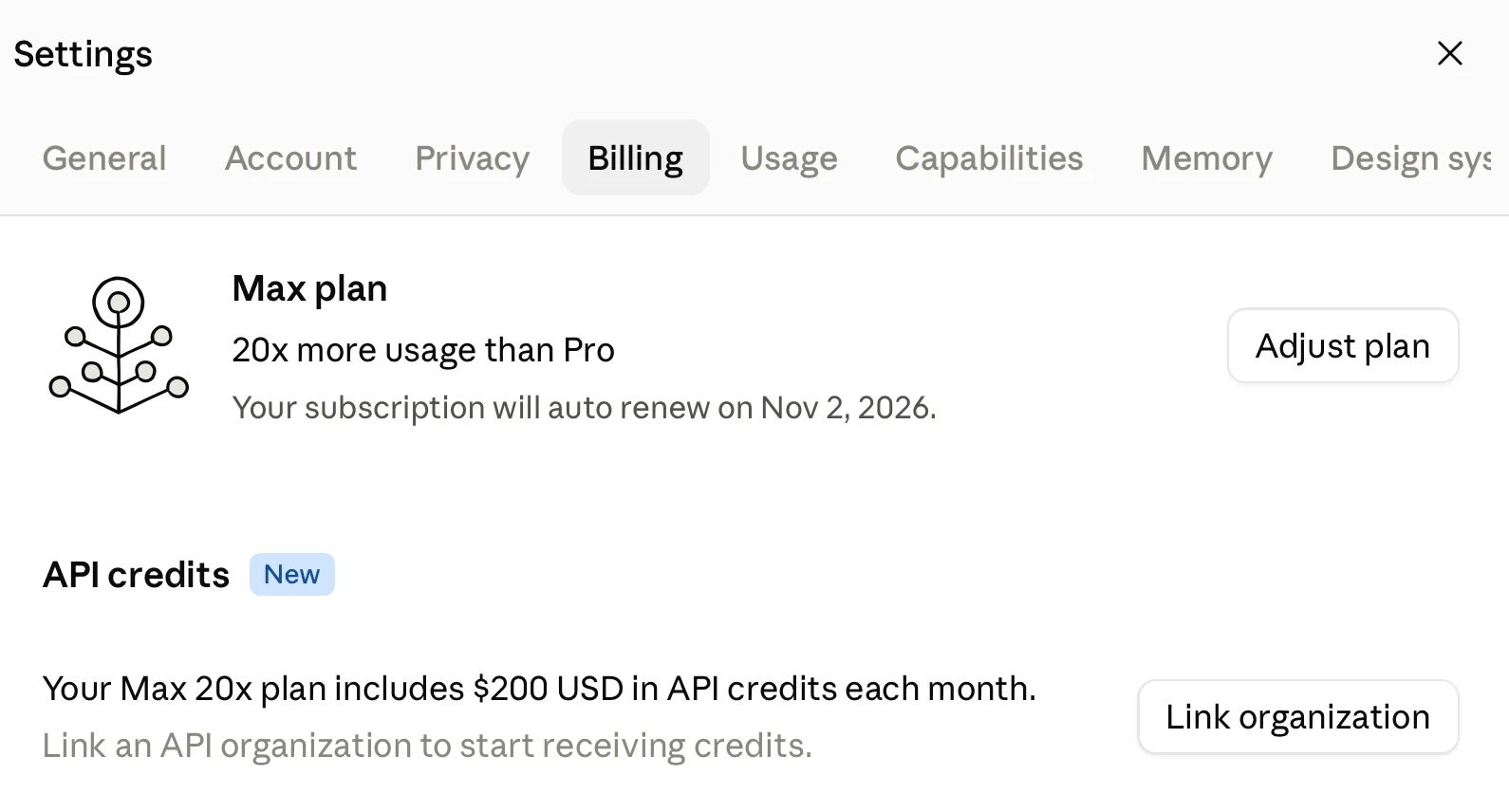
The API credits exactly match the cost of the subscription itself. This is really generous—it makes it much easier for subscribers to use the API. Anthropic also let you disable auto-reload for the API, with the consequence that “API requests will stop when your balance runs out”—exactly what you want if you’re planning to burn through those API credits without risk of a nasty billing surprise.
Note that the monthly credits do not roll over—use them or lose them.
OpenAI still allow you to use your Codex subscription for personal API use, which works out as a better deal for heavy API users. This new credit scheme goes at least some way to overcoming that difference.

The Mathocalypse
OpenAI has published hundreds of AI-generated mathematical proofs that effectively solve long-standing problems, forcing the research community to grapple with unreadable, machine-generated manuscripts.
Deep dive
- 372 major mathematical results were released, including the Unique Games Conjecture and L=BPL.
- The proofs were generated by an unreleased internal OpenAI model, averaging 3 hours of compute per result.
- Lean formal verification is being applied to some, but not all, proofs.
- Experts describe the papers as largely incomprehensible, relying on recursive structures rather than traditional approaches.
- A secondary "Anthropic model" of collaboration exists where researchers are paid to digest and announce specific AI-derived results.
- The academic community is currently debating whether to adapt STOC/FOCS venues to accommodate AI-generated research.
Decoder
- Unique Games Conjecture (UGC): A major conjecture in computer science regarding the difficulty of approximating certain optimization problems.
- Lean: A theorem prover software that uses formal methods to verify mathematical proofs are logically correct.
- L=BPL: A complexity theory problem concerning whether probabilistic algorithms can be efficiently simulated by deterministic ones.
- SIC-POVM: Symmetric Informationally Complete Positive Operator-Valued Measure, a concept in quantum information theory.
Original article
Full article content is not available for inline reading.
A Change in AI Strategy
AI models are becoming commodities, pushing labs to prioritize UI control and task routing to capture value over simple benchmark performance.
Deep dive
- Frontier model market share dropped from 53% in August to the mid-40s as enterprise users favor cheaper, specialized models.
- High-volume adopters are shifting to niche routing models like TypeSafe’s Jev, which cost 75x less than standard LLMs.
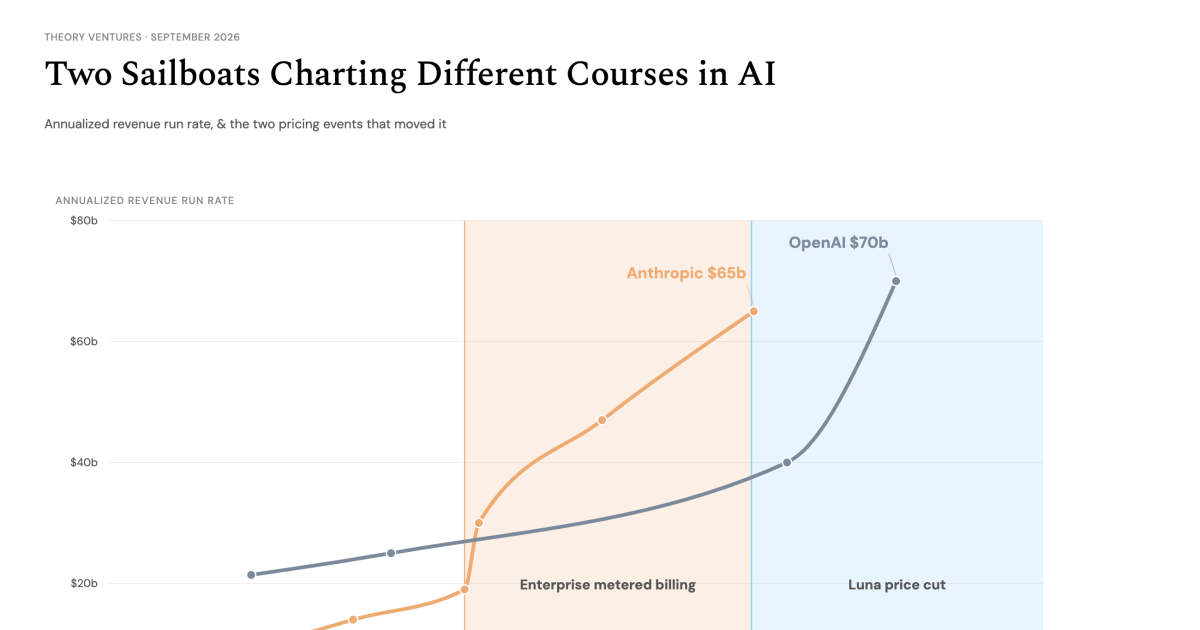
- OpenAI's $70 billion revenue run rate is increasingly driven by marketplace aggregation and aggressive pricing rather than just model supremacy.
- The new moat for AI companies is the user interface and distribution channel, not the model weights themselves.
- Companies are increasingly using 'routing'—sending specific tasks to the most efficient model—to maximize cost-effectiveness.
Decoder
- Router (LLM): A specialized, lightweight model or system that categorizes a user prompt and directs it to the most cost-effective or accurate LLM for that specific task.
- Commodity status: A market condition where a product is perceived as identical to competitors, causing price to be the primary differentiator.
- Harness: A user-facing application layer that wraps LLM calls, designed to keep users within a specific ecosystem.
Original article
In short : AI models have reached commodity status as prices fall 41% while token usage surges 50%. To win relative share, labs should partner & resell models, control the user interface where distribution becomes the moat, & capture routing data to reduce the cost of training future models.
What if AI models have just reached commodity status? In early 2025, we debated whether labs would become the airlines of the AI industry : high cost, low margin businesses with undifferentiated products.
Over the past month, the evidence has mounted :
- OpenAI cut prices on Luna by more than 80% to win share.
- Frontier models’ share of tokens slipped from 53% in August into the mid-40s as companies defaulted to smaller, cheaper tiers.
- Open source demand has shifted decisively from frontier-dominated to medium-&-small tiers.
- Spending among the top 1% of adopters fell 9.7% in August to $7,205 per employee per month, cooling from its July peak.
- Decision models like TypeSafe’s Jev are winning share of LLM calls at $0.04 per million input tokens, roughly 75x cheaper than standard LLMs for routing, gating, & classification.
Throughout all this, token usage has surged 50% since July, while prices have fallen 41%.
What’s the strategy in this environment?
First, partner. OpenAI announced a partnership with Baseten to resell open-weight models. Elon tweeted that the Grok bot would use the best model to complete a task, not just SpaceXSI models. Reselling produces a new, high-margin revenue stream by collecting a toll on products without bearing the cost to serve.
No company can provide the best model for every use case. Maximizing customer attention & retention is the most valuable asset in a commodity market.
Second, control the user interface. Distribution has become the moat. Build great harnesses that demand a lot of tokens : give them mononyms like Dots, Bot, & Muse to retain users. Also provide the best models for the job so people stay. This suggests ads & commerce as an important revenue driver for the B2C market.
Third, capture user data for intelligent routing & training infrastructure. Reselling other models while routing tasks across them aggregates a tremendous amount of information useful for subsequent model training.
Winning share becomes the only game that matters when aggregate dollar spend cools while token volume compounds. This means controlling the user interface.
OpenAI’s recent surge toward a ~$70b run rate highlights the dynamic : aggressive price cuts & marketplace aggregation allowed it to recapture share within a boat length of Anthropic.
In a commoditizing market, the spoils do not accrue to the lab with a marginal benchmark lead, but to the platform that aggregates the volume.
Release of Polars 2.0
Polars 2.0 introduces first-class SQL support and default spill-to-disk capabilities, outpacing DuckDB and DataFusion in most SQL benchmarks.
Deep dive
- Introduces spill-to-disk support at 80% RAM utilization.
- Adopts SQL as a first-class citizen with optimized query engines.
- New 'pl.Map' dtype handles key-value pairs similarly to Python dictionaries.
- 'collect_schema()' allows AI agents to validate query structures without full execution.
- Benchmarks show leadership in TPC-H/TPC-DS tasks against DuckDB and DataFusion.
Decoder
- Out-of-core (OOC): Processing data that is too large to fit in physical RAM by using disk storage as a temporary buffer.
- TPC-H/TPC-DS: Industry-standard decision support benchmarks for database performance.
Original article
Release of Polars 2.0
Today we are shipping Polars 2.0. In the earlier announcement post we went through the rationale of the version bump. This post we will discuss what features 2.0 brings. Even though we didn’t intend to make it a big feature release, it still packs a lot to get enthousiastic about.
Let’s go through the highlights of this release:
- our initial version of out-of-core (spill-to-disk) support is enabled,
- a lot of very core performance improvements,
- first class SQL support, which together with the performance improvements has Polars leading DataFusion and DuckDB in TPC-H and TPC-DS benchmarks,
- a new
Mapdtype, and - stricter Polars on dtypes and explicitness, leading to faster feedback, and faster AI iteration.
Performance and SQL as a first class citizen
Polars 2.0 will be the marking point where we will treat SQL as first class citizen. Polars SQL coverage has increased dramatically over last few months. We know we have been building a solid engine for the last couple of years. In Polars 2.0, we want to enable that to more workloads, including SQL. To make this performant, we shipped many improvements to our optimizer and engine. The highlights here join reordering, much better common-subplan-elimination and dynamic predicates/bloom filters.
To see how we perform on typical SQL benchmarks, we ran Polars SQL on data derived from TPC-H and TPC-DS and ran it against the latest DuckDB release (1.5.6), DuckDB 2.0 alpha (2.0.0.dev2610011535) and the latest DataFusion release (54.0.0) on a c7a.4xlarge (16 vCPUs, 32GB RAM) and a c7a.metal (192 vCPUs, 384GB RAM). Every query ran 5 times in a hot setting, with a separate process per query and a 60 second timeout. The file cache was cleared between each engine/benchmark (not between queries). For every query we take the best of the 5 runs, and we compare engines on both the sum and the geometric mean of those query times.
The data is generated with tpcgen-cli parquet compiled from source on commit 99bedae. We looked at the default row-group sizes of tpcgen-cli and confirmed they are roughly similar to what Polars scan_csv piped through sink_parquet and Duckdb COPY produce. The SQL queries were generated with DuckDB 1.5.6’s tpch_queries() and tpcds_queries(). The data was stored on EBS.
The charts below show the runtime of each engine in seconds (lower is better), split by machine.
c7a.4xlarge (16 vCPUs, 32 GB)
c7a.metal (192 vCPUs, 384 GB)
Polars and both DuckDB versions completed all queries. DataFusion timed out on TPC-DS q72 (and once on q67) and ran out of memory on TPC-H q18 on c7a.4xlarge; those queries are excluded from the results above for all engines.
We observe that default Polars is fastest on all but one benchmarks. Polars has a constant overhead when we scale to 192 threads, which hurts small data queries. In fact we see that Polars limited to 32 cores is competitive or winning in all benchmarks. We have diagnosed the cause on our end and will hopefully fix this problem in the next release. More information on the benchmarks can be found in the appendix. We encourage you to replicate our results and have shared a repository for this benchmark here: https://github.com/pola-rs/polars-2.0-benchmark.
Streaming engine and OOC as default
This is the one of the biggest impact changes of 2.0. Calling collect on a LazyFrame will now default to the streaming engine, leading to massive memory and performance improvements on most queries. The reason this required a major version bump is that the streaming engine doesn’t guarantee row-order by default for certain operations (join, group_by, unpivot, etc.). If you require observable row-order in those operations, you can opt in to that by setting maintain_order=True.
Out-of-core (spill to disk) is now enabled by default. It starts spilling at ~80% of RAM (this may need tuning). Operations that support out-of-core at this moment (sort, window functions, many expressions) can now start spilling to disk to finish a query. The default disk budget is 64GB. In the coming time we will enable out-of-core for joins and group-by’s as well.
These two changes will make Polars much more resillient in high-memory workloads for casual data practicioners. And with out-of-core join and group-by on our roadmap, this resilience will improve even more.
New Map datatype
Polars now supports the Arrow MapType directly as a Polars Map dtype. You can think of a Map as a Python dictionary, mapping keys to values. Before 2.0 the Arrow MapType was read in Polars as List(Struct({"key": ..., "value": ...})).
df = pl.DataFrame(
    {
        "user": ["alice", "bob", "carol"],
        "scores": pl.Series(
            [{"math": 90, "art": 75}, {"math": 60}, {}],
            dtype=pl.Map(pl.String, pl.Int64),
        ),
        "subject": ["art", "art", "math"],
    }
)
shape: (3, 3)
┌───────┬─────────────────────────┬─────────┐
│ user ┆ scores ┆ subject │
│ --- ┆ --- ┆ --- │
│ str ┆ map[str, i64] ┆ str │
╞═══════╪═════════════════════════╪═════════╡
│ alice ┆ {"math": 90, "art": 75} ┆ art │
│ bob ┆ {"math": 60} ┆ art │
│ carol ┆ {} ┆ math │
└───────┴──────┴────────────┴─────────┴─────┘# Key lookups and dictionary-like methods:
df.select(
"user",
pl.col("scores").map.get("math").alias("math"), # fixed key
pl.col("scores").map.get(pl.col("subject")).alias("by_subject"), # key from another column
pl.col("scores").map.contains_key("art").alias("has_art"),
pl.col("scores").map.len().alias("n"),
pl.col("scores").map.keys().alias("keys"),
pl.col("scores").map.values().alias("values"),
)┌───────┬──────┬────────────┬─────────┬─────┬─────────────────┬───────────┐
│ user ┆ math ┆ by_subject ┆ has_art ┆ n ┆ keys ┆ values │
│ --- ┆ --- ┆ --- ┆ --- ┆ --- ┆ --- ┆ --- │
│ str ┆ i64 ┆ i64 ┆ bool ┆ u32 ┆ list[str] ┆ list[i64] │
╞═══════╪══════╪════════════╪═════════╪═════╪═════════════════╪═══════════╡
│ alice ┆ 90 ┆ 75 ┆ true ┆ 2 ┆ ["math", "art"] ┆ [90, 75] │
│ bob ┆ 60 ┆ null ┆ false ┆ 1 ┆ ["math"] ┆ [60] │
│ carol ┆ null ┆ null ┆ false ┆ 0 ┆ [] ┆ [] │
└───────┴──────┴────────────┴─────────┴─────┴─────────────────┴───────────┘As a supported dtype, the map type will now have dedicated expressions, like key lookups, iteration over values and other dictionary like methods.
Stricter Polars
Polars aims to be strict and fail fast. Errors should ideally raise up-front, not 20 minutes into a pipeline. Implicit behavior on data-mismatches should be opt-in, not a default, since those mismatches can hide bugs. This strictness has become even more valuable with the rise of AI-driven development. Agents can validate a query’s structure early by calling collect_schema(), which resolves types and catches schema-level mismatches without materializing any data. This ensures fast feedback, meaning agents and humans can iterate faster. Not all errors can be caught during compilation of the query plan, some depend on data. In these cases Polars defaults to stricter behavior to ensure inconsistencies are caught instead of silently producing different results.
Last words
We are very excited that Polars 2.0 is out. Coming months we’ll improve on the road were in. Better out-of-core, better scaling at large CPU-counts and on Polars Cloud we aim to be the fastest distributed engine available. We also started working on GeoPolars and hope to deliver more news on this soon. If you find any problem with our new release, please open an issue: https://github.com/pola-rs/polars/issues. And finally, to help you with upgrading to 2.0, we have posted migration guide.
Benchmark Appendix
The absolute numbers (in seconds) are below. The bold number is the fastest engine in each row; the darker the shading, the slower an engine is compared to the fastest. Polars with 32 threads was only run on c7a.metal.
Sum of query times
Geometric mean of query times
Polars also scales well with more cores on larger data. Moving from 16 to 192 vCPUs at SF100 makes Polars 3.8x faster on TPC-H and 2.2x faster on TPC-DS (by sum), compared to 3.2x and 1.9x for DuckDB 1.5.6, 2.2x and 1.5x for the DuckDB 2.0 alpha, and 1.7x and 1.0x for DataFusion. At SF10 the extra cores don’t help Polars with its default settings: it is equally fast on TPC-H and 1.8x slower on TPC-DS, while DuckDB 1.5.6 still gets 1.8x and 1.3x faster. Polars with 32 threads only ran on the c7a.metal, so it is not part of this comparison.
Footnotes
-
These benchmarks are derived from TPC-H and TPC-DS Benchmarks and as such any results obtained are not comparable to published TPC-H and TPC-DS Benchmark results, as the results obtained do not comply with the TPC-H and TPC-DS Benchmarks.
Multimodal embeddings beyond a single vector
Perplexity launched PPLX-EMBED-V2-LATE, a multi-vector embedding model that aims to improve multimodal retrieval by retaining token-level data.
Decoder
- Embedding: A numerical representation of data (like text or images) in a high-dimensional vector space where similar concepts are mathematically closer together.
- ViDoRe(V3): A benchmark suite used to evaluate how well document retrieval systems perform across different formats and layouts.
Original article
The Perplexity team launched PPLX-EMBED-V2-LATE, providing multi-vector, multimodal embeddings that enable richer retrieval across text and images. These models retain token-level vectors and utilize a shared embedding space, leading to improved retrieval on benchmarks like ViDoRe(V3). Available in two sizes, 0.6B and 9B, they offer industry-leading performance for various retrieval tasks while maintaining efficiency.

Open d1: Edge decision models for text, vision, and audio
Liquid AI has open-sourced its d1 decision models, designed to run locally on hardware as small as an NVIDIA Jetson Orin Nano.
Deep dive
- d1 models do not generate tokens; they perform classification or decision tasks in a single forward pass.
- d1-3B uses an LFM2.5-VL-3B backbone and supports text and vision inputs.
- d1-OMNI-600M supports text, vision, and audio inputs using a bidirectional encoder.
- Benchmarks show d1-3B outperforming 4B parameter models on intent classification and toxicity detection.
- Provides near real-time inference (sub-50ms) on NVIDIA Jetson hardware.
- Models are available on Hugging Face with support for llama.cpp.
Decoder
- Inference: The process of running a trained machine learning model on new data to make a prediction or decision.
- Backbone: The primary neural network architecture that serves as the base for a specialized model, which is then fine-tuned for specific tasks.
Original article
Today, we release d1-3B and d1-omni-600M, two open-weight models in our d1 decision model family.
d1-3B scores 48.57 on the Decision Index v0.2.1 (public split), ahead of every model under 10B and on par with Decider 35B-A3B, a decision model 12x its size. It runs the full NVIDIA stack, from DGX in the data center to Jetson at the edge: d1-3B answers a question in 8 ms on an NVIDIA GeForce RTX 4090, 16 ms on a Jetson AGX Thor, and 26 ms on a Jetson AGX Orin. Even the Jetson Orin Nano runs it in 50 ms, fast enough for real-time decisions on the smallest edge hardware.
d1-omni-600M is our first experimental checkpoint, handling both text and image, as well as text and audio. It scores 15.95 on the same index.
d1-3B and d1-omni-600M models are available today on Hugging Face. Check out our docs on how to run them locally.
Architecture and Training
Unlike our generative Liquid Foundation Models (LFMs), our d1 decision models don’t produce tokens. Instead, they produce an answer in a single forward pass.
d1-3B and d1-omni-600M are trained from two very different backbones:
- d1-3B is trained from LFM2.5-VL-3B, our latest VLM, which is decoder-only. It accepts text and images as inputs.
- d1-omni-600M is trained from LFM2.5-Encoder-350M, a bidirectional encoder. It adds vision and audio encoders to handle all three modalities. It accepts either text and image, or text and audio as inputs.
d1-3B. We averaged the weights of LFM2.5-2.6B and the text backbone of LFM2.5-VL-3B to create a better base model. We then fine-tuned checkpoints with different random seeds and data mixtures before merging them again. Training on long inputs, shuffling answer options, and fixing shortcuts in the data made a bigger difference than more advanced techniques.
d1-omni-600M. We first fine-tuned LFM2.5-Encoder-350M on decision tasks, then added audio and vision in stages. For audio, we trained a FastConformer encoder with an adapter to connect it to the backbone, then fine-tuned the audio encoder with a frozen text backbone. For vision, we took the encoder from LFM2.5-VL-450M and trained an adapter plus LoRA updates to the backbone. Those updates were active only when the input included images, and the vision encoder stayed frozen. We then fine-tuned the full model, merged the LoRA updates, and averaged the weights with the previous checkpoint to regularize the final model.
Benchmarks
Text benchmarks. We evaluated d1-3B and d1-omni-600M across seven public benchmarks covering reading comprehension, toxicity detection, intent classification, medical QA, and cross-lingual understanding.
| Benchmark | d1-omni-600M | d1-3B | Decider 2B | Decider 4B |
|---|---|---|---|---|
| SQuAD 2.0 | 74.0 | 85.3 | 67.7 | 76.0 |
| Civil Comments | 95.8 | 93.0 | 93.6 | 92.8 |
| MASSIVE intent | 86.1 | 87.3 | 81.1 | 88.3 |
| PubMedQA | 61.3 | 66.0 | 65.7 | 63.3 |
| BoolQ | 77.7 | 86.7 | 87.3 | 89.0 |
| XNLI | 74.7 | 85.0 | 85.0 | 88.6 |
| PAWS-X | 79.5 | 76.9 | 59.5 | 69.8 |
| Mean | 78.4 | 82.9 | 77.1 | 81.1 |
d1-3B leads with a mean of 82.9, the highest in the table and ahead of Decider 4B (81.1). d1-omni-600M reaches 78.4, outperforming Decider 2B (77.1) at a quarter of the parameters. It also posts the highest score in the table on toxicity detection (Civil Comments: 95.8) and paraphrase identification (PAWS-X: 79.5).
Vision and audio performance. The Decision Index v0.3 includes a private vision split, which we do not report on in this release. Instead. we validated that d1-3B retains the vision capabilities of its LFM2.5-VL-3B backbone on standard vision benchmarks, and that d1-omni-600M handles all three modalities. Their vision capabilities are shown in our playground demos below. Dedicated audio decision benchmarks are currently an open problem. We look forward to seeing the community develop them as the category of multimodal decision models matures.
Fast Inference Everywhere
d1-3B and d1-omni-600M run the full NVIDIA stack — from DGX in the data center, to RTX workstations, to Jetson at the edge — with day-one support for llama.cpp.
Since decision models don’t generate output tokens, we measure end-to-end latency, from input to output. We report inference numbers for d1-3B. d1-omni-600M is an early research release and is under active development.
Edge inference. We measure latency on an Apple M5 Pro and, in collaboration with NVIDIA, on an NVIDIA Jetson AGX Thor, a Jetson AGX Orin 64 GB, and a Jetson Orin Nano. We measure one request at a time, across a single question, three questions over one state, a 3.4K-token state, and a 384px image.
| Device | One question | 3 questions | 3.4K-token state | 384px image | 64 states, packed |
|---|---|---|---|---|---|
| Apple M5 Pro | 30 ms | 41 ms | 640 ms | 62 ms | 78 / s |
| Jetson AGX Thor | 16 ms | 20 ms | 220 ms | 35 ms | 262 / s |
| Jetson AGX Orin 64 GB | 26 ms | 35 ms | 560 ms | 83 ms | 110 / s |
| Jetson Orin Nano | 50 ms | 73 ms | 1,640 ms | 202 ms | 38 / s |
d1-3B answers a single question in under 50 ms on every measured device. Three questions take only 1.3x the time of one, with the AGX Thor going from 16 ms to 20 ms.
GPU inference. We measure latency on an NVIDIA RTX 4090 and an AMD MI325X, one request at a time, across a single question, three questions over one state, a 3.4K-token state, and a 384px image.
| Device | One question | 3 questions | 3.4K-token state | 384px image | 64 states, packed |
|---|---|---|---|---|---|
| NVIDIA RTX 4090 | 8 ms | 21 ms | 102 ms | 17 ms | 475 / s |
| AMD MI325X | 9 ms | 14 ms | 44 ms | 18 ms | 1,106 / s |
On GPU, d1-3B answers a question in under 10 ms and processes a 384px image in under 18 ms on both platforms.
Open d1 in Action
These results make our small open d1 decision models a strong fit anywhere you need fast, structured decisions, including multimodal inputs. d1-3B delivers the highest decision quality at its size, while d1-omni-600M fits where footprint matters.
To show what real-time decisions look like in practice, we built ten demos that run our open d1-3 B in a loop over live camera input, from gesture-controlled games to live content moderation, each reading answers from one pass per frame.
Get Started
Start building today with d1-3B and d1-omni-600M, available on Hugging Face.
With d1, we're delivering on our vision of AI that runs anywhere. These models are:
- Open-weight — Download, fine-tune, and deploy without restrictions
- Fast from day one — Native support for llama.cpp across Apple, AMD, Qualcomm, and NVIDIA with NVFP4
- A family — Two sizes let you trade accuracy for footprint as your deployment demands.
Citation
For citations, please use the following reference or BibTeX:
Liquid AI, "Open d1: Edge decision models for text, vision, and audio", Liquid AI Blog, Oct 2026.
@article{liquidAI2026opend1,
  author  = {Liquid AI},
  title   = {Open d1: Edge decision models for text, vision, and audio},
  journal = {Liquid AI Blog},
  year    = {2026},
  note    = {www.liquid.ai/blog/open-d1},
}
Introducing OpenDocRouter: every document model under one API
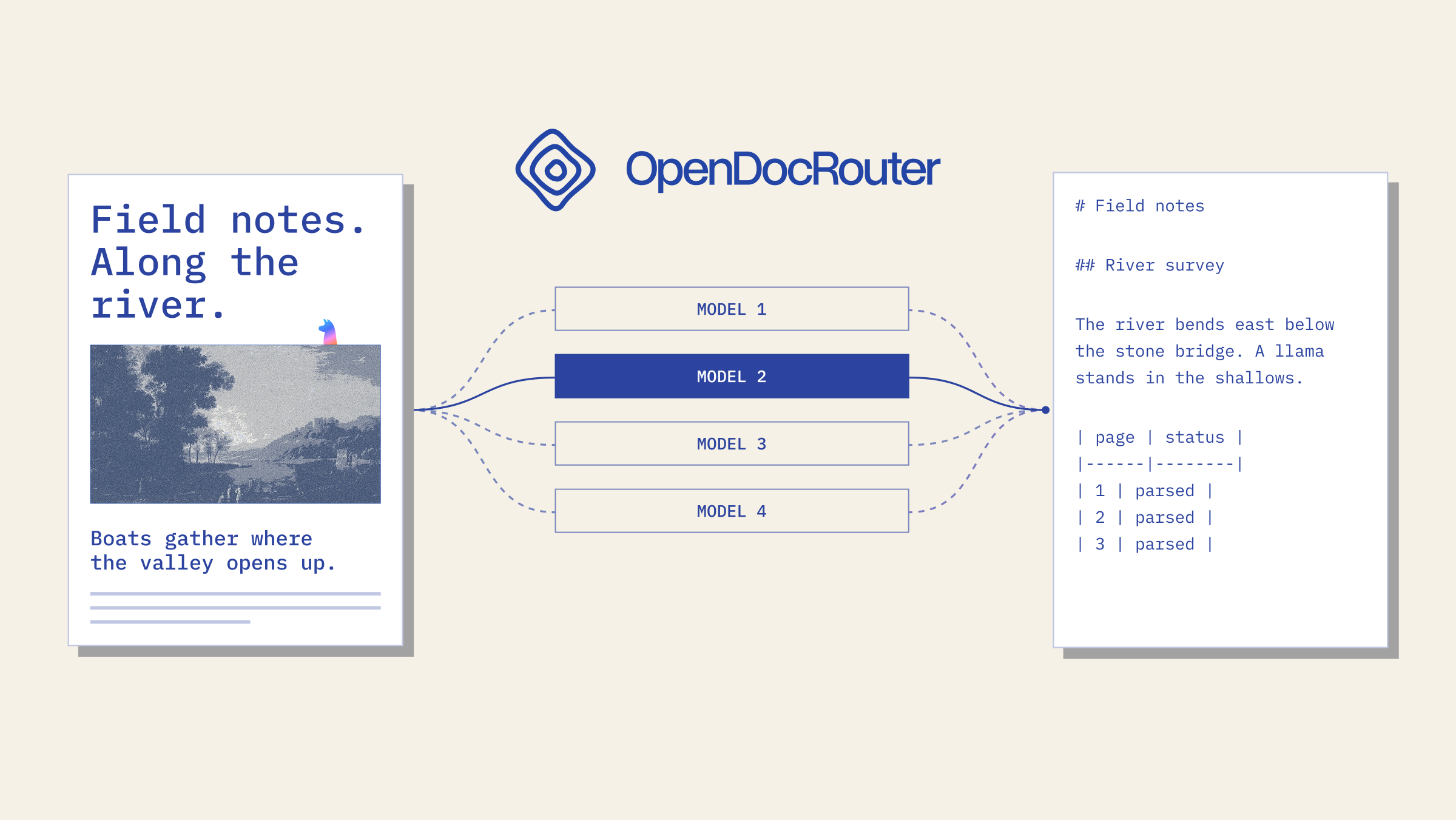
LlamaIndex launched OpenDocRouter, a unified API for document-to-Markdown parsing that routes tasks across various open-source and frontier models.
Deep dive
- Provides unified access to multiple OCR and document parsing models through a single REST API.
- Features a "grounding engine" to enforce standardized bounding box and layout output across heterogeneous models.
- Offers both synchronous (max 50 pages) and asynchronous (polling-based) job modes.
- Implements token-based pricing with distinct tiers for input, output, and optional layout features.
- Uses ParseBench to rank models by quality and price, currently including models from Anthropic, Google, and open-source projects like MinerU.
Decoder
- OCR: Optical Character Recognition, the process of converting images of text into machine-readable text.
- Frontier Model: Large-scale AI models at the current performance limits of the industry.
- ParseBench: A specific benchmarking dataset/framework used to evaluate document parsing accuracy and cost.
Original article
There are a lot of OCR models, with more releasing every week. A quick search on HuggingFace for “ocr” shows thousands of models posted. Furthermore, frontier labs are pushing new models nearly every month that also read documents well (albeit at sometimes costly price points). Using these models for document parsing usually requires the same few steps: figuring out prompts (if applicable), handling rate limits, managing deployments and related costs, and benchmarking new models as they come out.
This is something we at LlamaIndex have gotten particularly good at, and today we are launching OpenDocRouter as a way to share that work.
What is OpenDocRouter?
OpenDocRouter is a platform for document → markdown parsing using the latest open-source and frontier models. Each model runs a versioned recipe consisting of prompts, processing, and settings. Using the API is dead simple:
curl https://www.opendocrouter.ai/v1/parse \
  -H "Authorization: Bearer $API_KEY" \
  -H "Content-Type: application/json" \
  -d '{
    "model": "opendatalab/mineru2.5-pro",
    "document": { "url": "https://arxiv.org/pdf/1706.03762" },
    "layout": true
  }'
The API accepts PDFs, PNG, JPEG, or URLs to those file formats. The API lets you toggle between synchronous responses (the result is returned directly) and asynchronous responses (a job is created that requires polling). Synchronous responses are supported up to 50 pages. Requests can process inputs that have at most 500 pages or are 50MB.
Every model is benchmarked on ParseBench both in terms of quality and cost. At launch, we selected a set of models covering every corner of our benchmarks:
- Frontier Models: Claude Opus 5.5, Gemini 3 Flash, Gemini 3.8 Flash, GPT-5.6 Terra, GPT-6 Luna.
- OSS Models: Infinity-Parser2-Flash, MinerU2.5-Pro, TeleOCR, dots.mocr, PaddleOCR-VL-1.6
Bounding boxes and layout
Every model makes different guarantees about bounding boxes and layout. Some models output boxes natively, some need prompting, and some can't do it at all.
To close this gap, we built a grounding engine that we can apply to any model. Set layout: True in your request to generate markdown with grounded bounding boxes and layout elements in reading order. This also means all models produce the same layout classes: title, section_header, text, list_item, table, picture, chart, formula, caption, footnote, page_header, page_footer, code, form, key_value.
Pricing
OpenDocRouter is launching with pure token-based billing, and is fairly straightforward. New accounts receive $5 in credits. Paid top-ups start at $10, plus a 5% processing fee. Enabling layout adds $0.2 per million tokens, and if any page fails during processing, it is not charged.
As of October 7th, 2026, our pricing is as follows:
| Model | Input ($/1M) | Cached input ($/1M) | Output ($/1M) | Cost per 1k Pages (ParseBench) |
|---|---|---|---|---|
| Claude Opus 5.5 | $4.00 | $0.20 | $20.00 | $48.82 |
| Gemini 3 Flash | $0.50 | $0.05 | $3.00 | $19.67 |
| Gemini 3.8 Flash | $0.75 | $0.08 | $3.75 | $5.91 |
| GPT-5.6 Terra | $2.00 | $0.20 | $12.00 | $19.89 |
| GPT-6 Luna | $0.10 | $0.01 | $0.50 | $0.80 |
| Infinity-Parser2-Flash | $0.24 | - | $1.16 | $4.34 |
| MinerU2.5-Pro | $0.08 | - | $0.39 | $0.86 |
| TeleOCR | $0.25 | - | $1.22 | $2.70 |
| dots.mocr | $0.31 | - | $1.53 | $3.97 |
| PaddleOCR-VL-1.6 | $0.24 | - | $1.20 | $2.17 |
Adding new models
When new models ship that we can offer, we have processes in place to add them to OpenDocRouter quickly. We run them through ParseBench, and use that to calibrate prompts, costs, and other settings, to give the best user experience we can.
We also plan to keep improving the most popular models: whether through better prompts, better hosting for decreased latency, and more.
OpenDocRouter vs. LlamaParse
We view OpenDocRouter as a platform for quickly hosting the latest models, while allowing developers to easily switch and route between existing models, while only paying for exactly what you use. The API itself is easy to use, while providing broad access to models.
LlamaParse is our managed document platform. It ships with hand-tuned parsing tiers, enterprise controls, self-hosted deployments, and other APIs like schema extraction and indexing.
Try OpenDocRouter today
OpenDocRouter is live now to try. Browse the models and docs, sign up and generate an API key, and parse your docs today.
MAI-Code-1.1-Flash: Better, faster, at a quarter of the cost
Microsoft has released MAI-Code-1.1-Flash, a new model claiming four times the cost-efficiency of its predecessor.
Original article
Microsoft released MAI-Code-1.1-Flash, an AI model that's faster and costs a quarter of previous iterations.
In Vienna and Beijing, the First Nuclear Clocks Begin to Tick
Researchers in Vienna and Beijing have independently developed the first nuclear clocks using thorium-229, achieving unprecedented timekeeping precision.
Decoder
- Thorium-229: An isotope capable of nuclear transitions that can be probed by lasers, the key to the new clock design.
Original article
Two independent teams in Vienna and Beijing have simultaneously built the first clocks that keep time by counting the squishing and unsquishing of the atomic nuclei of thorium. The clocks are so precise that they only lose one second once every few million years or so. Nuclear clocks have the ability to search for certain kinds of dark matter. If a particle of dark matter passes through the thorium nuclei, it could register as a wobble in the nuclear clock's otherwise steady tick-tock.
I Put Smash Bros Melee in My Living Room
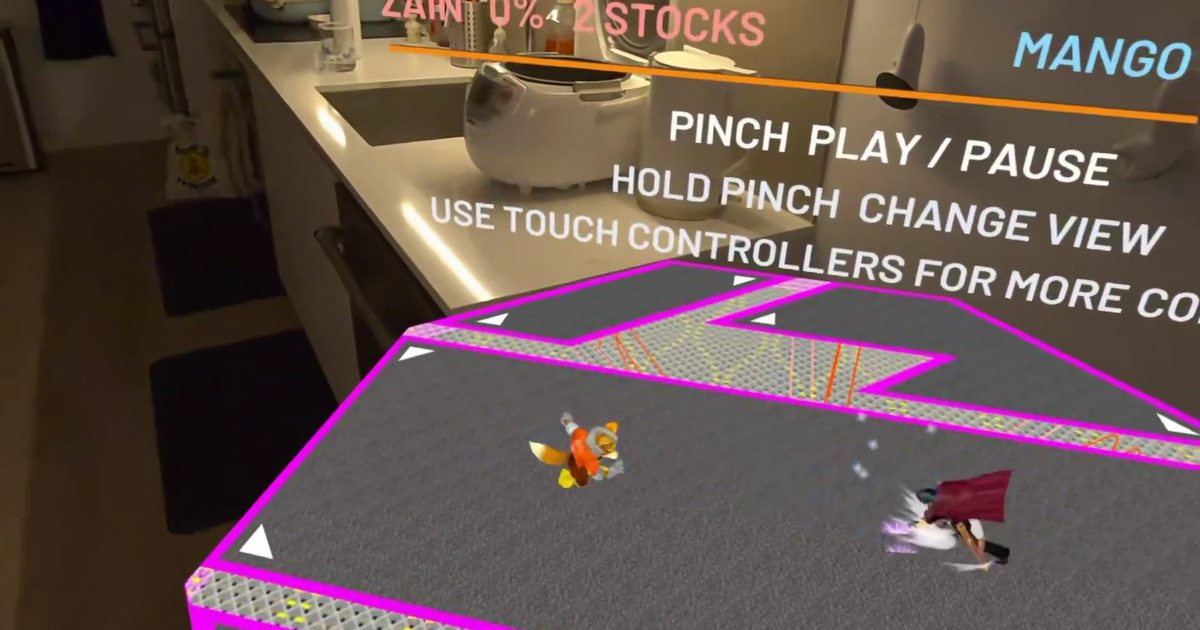
Kevin Tang built a mixed-reality viewer for Super Smash Bros. Melee replays using the game's newly completed decompilation.
Deep dive
- The project uses a 100% decompiled version of Super Smash Bros. Melee (US v1.02) to access internal animation and physics states.
- Data from Slippi tournament replays drives the movement of models extracted from the original game disk.
- Integration with Meta's Mixed Reality Utility Kit allows the game world to scale and snap to physical furniture.
- AI agents (Claude and Codex/Astra) handled the bulk of implementation, while Tang focused on physical UX verification.
- The app includes a 'Furniture Battle' mode using AI bots and a 'Master Hand' interaction mode for physical manipulation of fighters.
- Neural-network-based control is simulated using male fruit-fly connectome data, mapped to game inputs for experimental AI behavior.
Decoder
- Decompilation: The process of reverse-engineering a compiled binary back into high-level source code.
- Slippi: A popular modding and replay ecosystem for Super Smash Bros. Melee that captures input data to allow frame-perfect match reconstruction.
- HSDLib: A library used for parsing and extracting data from the HSD (Hitbox System Data) format used by GameCube-era Nintendo games.
Original article
Full article content is not available for inline reading.
Apple's Verified Photography System
Apple's new 'Reference Image' system cryptographically verifies the origin of photos without exposing the photographer's identity.
Decoder
- PCC (Private Cloud Compute): Apple's specialized cloud infrastructure designed to process user data with strict privacy guarantees, where the server environment is verifiable and data is not accessible even to Apple.
Original article
Apple’s Verified Photography System
Apple just released a system called “Reference Image.” It can verify the image is exactly as taken by an iPhone—new models only—without tying it to a specific iPhone or photographer. It can also verify that multiple images came from the same iPhone.
Other industry solutions require a photographer or institution to vouch for an image using their own credentials. We are concerned this puts some photographers, such as those operating in conflict zones, in a difficult position; it should not be necessary to forgo anonymity in order to prove image authenticity. We built Apple Reference Image to avoid using an explicit, public credential for photographers, and to avoid even implicit public association between different photos taken by the same sensor. The final reference image is instead signed by Apple’s signing service, after validation by PCC. That signature is backed by Apple’s strongest technical guarantees.
Our implementation also protects the confidentiality of the image itself, including from Apple. Merely capturing a reference image should never expose the actual pixels to Apple or anyone else. We achieve this through the exceptional privacy properties of PCC—the nodes themselves are architected so that not even Apple can access image data, just as Apple cannot see the information processed for Apple Intelligence in PCC. While the revocation service must maintain a private record of photo GUIDs and associated sensors to allow for revocation, it never has access to the image data, and does not allow for public access to this record. And as final revocation checks occur using on-device lists, a device never reveals to anyone which photo it’s looking at in order to find out whether it’s still valid.
The report makes for good reading; the details are interesting.
Beyond synthetic testing: Capturing and replaying real database workloads at Airbnb
Airbnb developed an in-house database traffic replay system using ProxySQL to validate MySQL migrations and performance without relying on synthetic benchmarks.
Deep dive
- Capture: Uses ProxySQL sidecars to log queries to local disk with minimal latency impact.
- Processor: Offline jobs handle parsing, deduplication, and transaction reassembly.
- Replay: Fleet of workers re-executes traffic while preserving relative timing and concurrency.
- Correction: Rewrites INSERT statements to pin
last_insert_idto ensure consistent results across different MySQL versions. - Modes: Supports 'Load Testing' (replay only) and 'Compatibility Testing' (compare results between two targets).
Decoder
- ProxySQL: An open-source, high-performance database proxy for MySQL that acts as an intermediary between application servers and database backends.
- Digest: A hashed, abstracted representation of a SQL statement that ignores specific values but preserves the query structure.
Original article
How we capture real production database traffic at Airbnb and replay it offline to load-test, plan capacity, and de-risk upgrades.
Introduction
At Airbnb, MySQL-compatible databases are a critical backbone of our online database infrastructure: a fleet of hundreds of clusters supporting thousands of use cases at millions of queries per second (QPS). Operating databases at scale brings hard problems, including sizing clusters for future growth, keeping behavior consistent across version upgrades and migrations, and reproducing production incidents well enough to debug them. This post describes the database traffic capture and replay system we built to help us tackle them.
Challenges and motivation
A complex database operation such as Airbnb’s requires a number of supporting systems, and one of them is a way to capture database queries and replay them. This is needed for error recovery, governance, quality assurance testing and product improvement efforts.
Previously, Airbnb’s system for database query capture and replay was fragmented. Each language binding used its own logging framework to emit query traces to Kafka, which were then processed per use case and replayed by a custom replayer.
This system was borrowed from our observability pipeline. It worked as a fast initial solution, but over time, we found that it fell short of what we needed. Capturing queries client-side and per language carried a heavy maintenance burden whose ownership was ambiguous, and it scaled poorly across our service-oriented architecture (SOA). Most importantly, it lacked enough information to convey a complete picture of each transaction. As a result, it couldn’t accurately replay transactions, which made it impossible to verify that the same queries return the same results on the new database.
To close these gaps, we set out to build a system for query capture and replay, with three goals:
- Load testing with real production traffic. Synthetic benchmarks such as sysbench don’t capture the full spectrum of production queries. By replaying captured traffic at production rates, or at higher multiples to model forecast growth, we can right-size clusters: upscaling those with insufficient headroom for growth and downscaling over-provisioned ones.
- Query compatibility across upgrades and migrations. Subtle behavior differences (such as differences between MySQL 5.7 and 8.0, or between “official” MySQL and a MySQL-compatible engine) can break applications. By replaying the same traffic against two targets and comparing results, we surface incompatibilities before production migrations.
- Performance debugging. MySQL provides performance_schema digests for diagnostics, but these are abstracts of actual queries and don’t contain enough information to reproduce a problem. Capturing complete SQL statements with their transactional context lets us replay problematic workloads offline, both to investigate incidents and to validate fixes before they ship.
To meet these goals, we needed a single, client-agnostic capture point that needs no application changes. We built it on top of ProxySQL, an open-source proxy that understands the MySQL wire protocol and already sits between our applications and databases.
System architecture overview
All database traffic already flows through a ProxySQL deployment, which makes it a natural place to capture queries. The query capture and replay system has three components, all built in-house: a Log Mover that collects the query logs, a Log Processor that turns them into replayable, per-cluster datasets, and a Log Replayer that runs captured traffic against target databases.
Because captured queries can contain personal data, the pipeline treats them exactly as we treat production data. Logs are encrypted in transit and at rest, access follows the principle of least privilege and is limited to the database infrastructure team, and query logging is enabled for a given cluster only for the window a test requires. Replays run only in production-equivalent environments held to the same standards. Captured traffic is never replayed against lower environments or copied into a separate development tier.
Log Mover
ProxySQL has a built-in query logging feature controlled by its query rules, so we can turn logging on for one cluster’s traffic without touching anything else. When enabled, it writes query logs to the local disk, with little impact on query performance.
We complement ProxySQL with a Log Mover sidecar that monitors these log files and transfers them to cloud object storage, thus keeping local disk usage in check.
Log Processor
Our ProxySQL deployment runs on Kubernetes as a pool of stateless pods, each serving clients for several backend clusters. Therefore, a single log file can contain queries from many backend database clusters. An offline post-processing pipeline partitions these original query logs into a replayable dataset for each cluster.
The Log Processor job performs a few transformations:
Parsing, grouping, and ordering
The original query logs are in a binary format and intermingled with queries from multiple backend database clusters, so we decode them and write the queries for each cluster into its own file. Because the logs also interleave statements from concurrent connections, we reassemble each transaction’s statements in their original order so that replay reproduces the original behavior.
Timestamp-based bucketing
Each processed file is bucketed by query timestamp, holding a five-minute window of queries from one database cluster and ProxySQL pod. This allows the replayer to control the replay pace, throughput, and overall load at a fine granularity.
Metadata
Metadata, such as timestamp, username, database cluster and schema name, is stored alongside each processed log file, so users can locate specific query logs by timestamp and database cluster.
Query rewriting
The Log Processor also rewrites queries to keep auto-increment behavior consistent across databases. While MySQL’s default auto-increment values are monotonically increasing, MySQL 8.0 allows for customization to enhance performance, and certain MySQL-compatible databases may assign auto-increment values differently. As a result, an INSERT statement can produce a different last_insert_id than it did in production. A later read that depends on that value, such as a lookup of the related rows, would then fail or return nothing, skewing the test results.
To avoid this, the Log Processor rewrites each INSERT statement to explicitly include the last_insert_id captured in the logs. For example, an original MySQL statement INSERT INTO users (name) VALUES (‘bob’) that generates last_insert_id=1 will be rewritten to INSERT INTO users (id, name) VALUES (1, ‘bob’). This rewriting ensures that subsequent queries depending on last_insert_id values behave consistently across different database systems during replay tests, reducing false positives in compatibility testing. We accept the tradeoff here: by pinning last_insert_id, we no longer exercise the target’s native auto-increment generation during replay.
Log Replayer
The Log Replayer takes processed query logs and replays them against target databases. Users create replay jobs through a web UI with the following parameters:
- Source database cluster: the name of the database cluster whose traffic to replay
- Time range: the temporal scope of captured query logs to replay
- Target database endpoints: the destination databases for replay traffic
- Replay mode: which of the two modes to use (described below).
There are three components in the log replayer: an API Server (the control plane), a Replay Task Scheduler, and a fleet of Replay Task Workers.
API Server
The API Server is the control plane of the log replayer. Through a web UI, users can submit and control replay jobs, monitor job status, and view metrics and replay results. Job and task states are kept in a persistent database.
Users can choose one of two replay modes:
- Replay only (load testing): Queries are replayed to a single target database at a configurable speed, set either as a factor of the original traffic (1x, 2x, 3x) or as a target QPS. While query results are ignored, we track query errors, latency histograms per query digest, and resource utilization. This supports our load testing and capacity planning, and lays the groundwork for automated regression detection.
- Replay and compare (compatibility testing): The same queries are run against two target databases at once, and their results are compared with any discrepancies logged. This is used to validate database upgrades and migrations.
Replay Task Scheduler
The task scheduler breaks a job into batches of tasks, one task per log file. For each task, the scheduler pushes a message onto a managed message queue for replay task workers to consume.
To preserve the original timing, the task scheduler assigns every task in a batch the same “expected start time”, which is a future moment when that batch should begin. Because workers pick up tasks from the queue at different times, this shared start signal keeps them in step: each worker waits for it, then they all begin replaying their five-minute files together. This reproduces the concurrency and pacing of the original workload instead of replaying each file in isolation.
The task scheduler also monitors progress: if tasks start failing, it stops scheduling new ones to avoid cascading issues, and otherwise advances to the next batch.
Replay Task Worker
Workers scale horizontally, up to thousands of instances. Each polls the message queue for tasks, reads and parses its assigned query log file from cloud object storage, waits for the task’s “expected start time,” and then executes the logged queries against target databases in order. By spacing consecutive queries according to their original timestamps and the chosen speed factor, workers reproduce (or accelerate) the original traffic pattern while preserving relative timing.
Impact
This framework enables multiple business-critical capabilities for our online workloads and the teams operating them.
Upgrade and migration testing
For a database upgrade or migration, ensuring the new database has a compatible spec isn’t enough. We also have to preserve the performance baseline and backwards-compatible behavior. This became particularly apparent during our MySQL 5.7 to 8.0 upgrade, and replay testing was critical in identifying issues early and avoiding surprises in production.
Performance. MySQL 8.0’s performance profile differs from 5.7’s. While most changes were positive, some workloads regressed, for example more conservative metadata locking.
Pinning down the cause sometimes took more than one replay run. MySQL 8.0 removes the query cache entirely, so we first replayed against 5.7 with and without the query cache to isolate that effect, then compared 5.7-without-cache against 8.0. This bisection surfaced a pattern of duplicate, cacheable queries the application was sending, which the cache had quietly absorbed.
In the sharpest case, the latency for one query pattern went from 0.03 to 2.6 seconds, reading 273 MB per join instead of 5 MB, which we traced to an upstream change in how MySQL 8.0.20+ reads rows while sorting.
Correctness. Some default behaviors in MySQL 8.0 also changed in ways that can break applications, such as the default innodb_autoinc_lock_mode, which hands out interleaved, non-sequential auto-increment IDs that some applications assumed were sequential. To verify behavior stayed consistent, we ran “Replay and compare” against 5.7 and 8.0 restored from the same snapshot and diff’ed the results. This surfaced a common pattern: queries whose row order was never fully determined, either with no ORDER BY or an ORDER BY without a unique tiebreaker, which quietly return different rows on a new engine once a LIMIT is applied. By catching this proactively, we were able to work with the owning teams to add explicit ordering where it was implicitly expected by the application.
Capacity planning
To plan for growth, usually ahead of peak travel season, we replay a production cluster’s traffic in “Replay only” mode at higher speeds (for example, 2x) to model future load. This shows whether the current setup can absorb a seasonal peak or launch, or whether we need to scale up or out. On one large cluster, replaying 80% more write traffic pushed average commit latency up by almost 500% from about 6 ms to 34 ms, locating its ceiling well before real traffic did.
Teams at Airbnb can now request these traffic replays through a self-serve tool to help them prepare for expected growth, or identify current headroom on clusters which may be opportunities for more efficient bin-packing and cost optimization.
Conclusion
Synthetic benchmarks tell you how a database handles the workload you imagined. Replaying real traffic tells you how it handles the workload you actually have. That difference carried our MySQL fleet from 5.7 to 8.0 without a major production incident: we used replay to clear the highest-risk clusters first, catching latency regressions and non-deterministic queries offline instead of in production.

CDC at WHOOP: Self-Service Replication for Hundreds of Postgres Tables
WHOOP built a two-layered CDC architecture that separates fast append-only event ingestion from cost-effective table materialization.
Deep dive
- Bronze Layer: Append-only storage for raw CDC events, optimized for low-latency scans.
- Silver Layer: Materialized replicas updated via Spark MERGE INTO jobs, running on a four-hour cadence.
- Self-Service: Replication is controlled via Postgres
PUBLICATIONobjects managed by service teams via Liquibase migrations. - Efficiency: Uses storage-partitioned joins and bucket pruning to optimize Spark merge performance.
- Audit Trails: Uses
pg_logical_emit_messageto tie transactional context to specific data changes in a joinable audit table.
Decoder
- CDC (Change Data Capture): A set of software design patterns used to determine and track data changes so that action can be taken using the changed data.
- Logical Replication: A mechanism in Postgres that replicates data changes based on their replication identity (usually a primary key) rather than physical file blocks.
- Upsert: A database operation that updates an existing row if it exists or inserts it if it does not.
Original article
A software engineer at WHOOP adds a new column to a Postgres table on Monday morning. By that afternoon, the column is queryable in Snowflake and available to any downstream model or dashboard, alongside every other column on that table. Nobody filed a ticket. No data engineer touched anything.
Change Data Capture (CDC) is the pattern that makes this possible: every insert, update, and delete on a source table is streamed out as an event, and downstream systems consume that stream to stay in sync. That workflow is the point of the CDC platform we run today, and getting there meant deliberately avoiding the streaming-upsert pattern most CDC-to-lake pipelines converge on.
The system it replaced
Debezium captured row changes from Postgres and published them to Kafka as JSON, with no schema registry sitting in front of it, so downstream consumers were reading loosely typed payloads. A Spark Structured Streaming job then upserted those events into Iceberg tables on a thirty-minute trigger. It worked. It also had four problems that got worse as WHOOP grew:
- The upserts were expensive. We ran one Spark Structured Streaming job per table, so hundreds of long-running streaming jobs sat continuously reconciling their targets on a thirty-minute cadence. These tables were queried heavily and there was real value in keeping them fresh, but the compute cost of continuously running one streaming job per table was the dominant issue: we were paying a lot for freshness that most consumers did not strictly need.
- Schema changes were manual. A new Postgres column would not appear downstream until someone filed a ticket, and the fix usually meant backfilling the entire table. Every schema change turned into a coordination problem across teams.
- Observability was thin. We had Spark job metrics and Postgres-side replication slot lag, but nothing meaningful from Debezium itself. No per-connector throughput, no per-connector lag, no visibility into what the source connector was actually doing.
- Per-table configuration lived in the wrong place. Kafka partitioning, topic settings, and the list of replicated tables did live in the owning service's own repo, but they lived separately from the normal Postgres config and Liquibase migrations that engineers touched day to day. So they got forgotten. New tables would land in Postgres and quietly not make it into CDC, sometimes for months.
The pipeline itself was fine. Its operating model wasn't. Every design choice put Data Platform on the critical path for something a service team should have owned.
The core idea: split streaming from upserts
Most CDC-to-lake systems merge two concerns into one job. They take a stream of change events and, in real time, produce a materialized replica of the source table. That is a legitimate goal, but it forces continuous upserts, which are expensive to run at scale.
We split them apart.
- A Bronze layer captures every CDC event exactly as Debezium emits it. It is append-only. Small files, cheap writes, no reconciliation.
- A Silver layer materializes the actual Postgres replica. It reads Bronze and upserts into Iceberg, but only every four hours.
For consumers, this gives two clean options. If you need the latest state of a table and can tolerate a few hours of staleness, you query Silver, and the table looks exactly like the Postgres source. If you need lower latency or you specifically want change semantics (inserts, updates, deletes), you query Bronze and filter by the CDC timestamp.
Very few consumers actually need the latter, so continuous upserts were the wrong default.
Debezium and Postgres publications
We run one Debezium connector per Postgres database. Each connector reads from a Postgres publication using logical replication, serializes each event as Avro against the AWS Glue Schema Registry, and publishes one Kafka topic per table using the convention postgres_cdc.<service>.<schema>.<table>.
The set of replicated tables is driven by the Postgres publication itself, and the publication is managed with Liquibase migrations that live inside the service team's own GitHub repository. Adding a table looks like this:
-- Liquibase migration in the service repo
ALTER PUBLICATION cdc_publication ADD TABLE new_feature_table;
Some services skip the per-table dance entirely and declare the publication as FOR ALL TABLES, so anything they add to Postgres is automatically replicated. New tables just appear.
That is the entire ceremony. Debezium picks up publication changes on the next poll. The Flink job downstream discovers the new topic within a minute and starts writing it to Bronze. Silver picks it up on its next run and backfills from the latest snapshot. No PRs on our side, no tickets. The service team owns the decision and the migration is code-reviewed in the same repo as the schema change that motivated it.
The other property that falls out of this design is automatic schema evolution. When Debezium sees a new column, it registers a new Avro schema in Glue. The Flink sink writes the new column to Bronze on the next commit. Silver sees the new field on its next run and adds it to the Iceberg schema. A single ALTER TABLE in Postgres propagates through the entire stack with no human involvement. Supported type changes work the same way: widening a decimal(10,2) to decimal(12,2), for example, flows through Avro's schema evolution rules and Iceberg's promotion rules without breaking any downstream reads.
Each connector deploys through an internal Terraform module that standardizes the operational plumbing: IAM, secrets, Datadog monitors, and the Glue registries. We also build our own Debezium container image, which bundles a small JMX metrics exporter alongside the upstream Debezium jars. That exporter surfaces connector-level metrics in Datadog: replication lag (MilliSecondsBehindSource), events seen, errored tasks, and restarts. Those metrics route to the owning team's oncall, not ours, which was a specific goal. If a service's connector is falling behind, the team that owns the database is the first to know.
Flink: one job per database, fan-in and fan-out
Bronze is written by Flink. Bronze tables follow the convention bronze.<service>.<schema>.<table>, so the Postgres source and its Iceberg replica are directly identifiable from each other's names.
There is one Flink job per Postgres database, and each job uses a fan-in / fan-out pattern: it subscribes to every Kafka topic under that database's prefix, then routes each record to the correct Iceberg table based on the topic name.
A naive design would run one Flink job per table, which means N deployments, N sets of checkpoints, and N connectors to Kafka. For a service with fifty tables, that is fifty jobs to autoscale, monitor, and upgrade. The fan-in/fan-out pattern collapses that to one job per database, regardless of how many tables live in it.
The routing itself is handled by the Dynamic Iceberg Sink introduced in Iceberg 1.10.0. Each record carries its Iceberg table name derived from the source Kafka topic, and the sink handles the rest, including creating new tables when they appear. We rediscover Kafka topics every 60 seconds, so new tables added to a Postgres publication start flowing to Bronze within a minute of the publication change. No job restart is required.
Each Bronze record is the row plus five CDC metadata columns:
| Column | Meaning |
|---|---|
cdc_op |
c (create), u (update), or d (delete) |
cdc_ts |
Source database event timestamp |
cdc_processed_at |
When Flink processed the record |
cdc_source_lsn |
Postgres WAL log sequence number |
cdc_source_tx_id |
Postgres transaction ID |
Bronze tables partition by day(cdc_ts). Compaction runs nightly against the last two days and sorts by cdc_ts DESC, which optimizes for the most common access pattern: "give me the recent changes to this table." Older partitions are already fine.
Jobs deploy through the Flink Kubernetes Operator in Application Mode on our EKS clusters. The operator manages lifecycle, autoscaling, and savepoint-based restarts. An auto-discovery runner scans Glue for new CDC topic prefixes and posts to Slack if it spots a new service without a matching Flink deployment. We deliberately do not fully automate that step today because a handful of services carry PHI and need to be routed to a separate Iceberg catalog. Deciding which catalog a new service belongs in is currently a human call, but it is the kind of thing we plan to automate, with service owners declaring their routing intent at onboarding time rather than pinging us for a decision.
Why Flink instead of the MSK Connect Iceberg sink? We prototyped the MSK Connect option early and it did not hold up at our scale. The connector was still relatively immature, and we hit ceilings on throughput, checkpointing behavior, and observability that were hard to work around. Flink was more operational work to run, but it gave us autoscaling based on backlog, better checkpointing semantics, richer Prometheus metrics, and the ability to add custom routing logic.
Silver: making upserts cheap
Silver is where the actual Postgres replicas live, and it is where the two-layer architecture pays for itself.
Every four hours, a Spark job runs per service. It does three things: figures out what to process, runs MERGE INTO for tables that already exist, and backfills tables that just appeared.
Discovery. The job queries the Glue Schema Registry to find every CDC-enabled table for the service and derives the primary key for each one from the Avro key schema. No manual PK configuration lives anywhere, though we do allow overrides for edge cases (for example, a table with a mutable primary key needs its logical merge key to be declared explicitly).
Backfill (new tables only). For a table that has no Silver counterpart, the job takes the latest automated Aurora snapshot, exports it to S3 in Parquet using Aurora's built-in snapshot export, and merges it into a fresh Silver table. There is one subtle guard here: if the snapshot predates the moment the table was first added to CDC (which we know because Glue records schema creation time), we defer the backfill until a newer snapshot is available. Otherwise we would be seeding from a snapshot that misses events already in Bronze, and the reconciliation from there onward would look correct but silently miss rows.
Incremental (existing tables). The job reads Bronze events since the last watermark, groups by primary key to pick the latest state per row, and executes MERGE INTO on the Silver table. Deletes propagate the same way (via cdc_op = 'd').
Tables get batched into groups of five per Spark job to balance parallelism against resource cost. Each service's Silver flow is independently scheduled.
Four layered optimizations inside the Silver Iceberg table are what let MERGE INTO run in minutes rather than hours. They turn each merge from a full-table shuffle into a targeted, well-pruned operation, and without them Silver would not be cost-viable at our scale.
Bucket partitioning on primary key
Silver tables partition by bucket(N, primary_key), where N is picked per table to target roughly consistent file sizes. Bucket partitioning distributes rows evenly across a fixed number of buckets regardless of PK distribution. That evenness is not just aesthetic. It is a prerequisite for the write-side optimization below.
Sort order and bloom filters within each bucket
Data within each bucket sorts by primary key, and bloom filter indexes are configured on the PK columns. Together they give Spark tight file-level pruning during MERGE: skip any file whose min/max range excludes the incoming PKs, and within a matching file, skip any Parquet row group whose bloom filter says the PK is definitely not present.
The read-side benefit for Snowflake is more limited. Snowflake's Iceberg reader uses min/max file statistics for pruning (which is why sorting matters) but doesn't currently use Parquet bloom filters. So the bloom filters are a Spark-side win; the sort order helps both.
Bucket pruning and Storage Partitioned Join
Two related optimizations do most of the write-side work. They're often talked about together but they are technically distinct.
The first is bucket pruning. When Spark plans a MERGE INTO between an incoming CDC micro-batch and the Silver table, it hashes the incoming primary keys, figures out which buckets they map to, and reads only those buckets from the target. No full table scan.
The second is Storage Partitioned Join. Because both sides of the merge share the same bucketing scheme, Spark can co-locate rows from the incoming batch with the rows already in the target and skip the shuffle that a normal join would need. Without SPJ, Spark would have to hash-repartition the entire target table to line it up with the incoming batch, which is often the largest single cost of a merge at scale.
Both optimizations depend on the same thing: an evenly bucketed target table. Skewed data breaks both, because a single hot bucket dominates the read on one side and the shuffle-avoidance on the other. That is why bucket partitioning is the foundation for everything else in this section.
SPJ plus bucket pruning are what made Silver viable. Merge jobs that would otherwise scan and reshuffle terabytes now touch a small fraction of the target table, and the runtime savings are order-of-magnitude.
Merge-on-Read
Silver tables use Iceberg's Merge-on-Read mode. Instead of rewriting entire Parquet files when a row updates, Iceberg writes a position delete file that marks which rows are stale. That skips the file rewrite on the write path, which is where most of the MERGE cost would otherwise land. Reads pay a small tax at query time to reconcile data and delete files, which we resolve during nightly compaction. Silver compaction sorts data back by primary key, which restores clean read performance and keeps future SPJ merges efficient.
We can afford these Silver optimizations because Silver runs every four hours rather than continuously. Larger batches amortize the fixed overhead of MERGE planning, and a job that runs six times a day is one we can actually tune, rather than firefight.
For teams that need lower latency, they read Bronze directly and filter on cdc_ts. Recent changes are cheap to scan there because Bronze compaction sorts by cdc_ts DESC and prunes small files aggressively for the last two days.
Audit trails from the same pipeline
CDC turned out to be a natural place to solve a problem that would otherwise need its own audit system.
Services that need audit trails on sensitive tables can opt into emitting audit context alongside their writes. When enabled, the service calls pg_logical_emit_message(true, 'audit', ...) inside the same transaction as the data change, embedding metadata like the acting user ID and the SQL query. The true argument matters: it makes the message transactional, so the message and the row change share the same xid and either commit together or not at all.
Debezium captures both. Flink writes row changes to their normal Bronze table and logical messages to a dedicated pg_logical_messages Iceberg table partitioned by day(cdc_ts) and the source table name. In Snowflake, a complete audit trail is a join:
select data.*, audit.user_id, audit.sql_query
from   postgres_cdc_prod.svc.sensitive_table as data
join   postgres_cdc_prod.svc.pg_logical_messages as audit
  on   data.cdc_source_tx_id = audit.cdc_source_tx_id
where  data.cdc_ts  >= dateadd(day, -30, current_timestamp())
  and  audit.cdc_ts >= dateadd(day, -30, current_timestamp());
Both sides get filtered by cdc_ts so partition pruning fires on the audit table as well as the data table. Postgres's transactional guarantees do the rest: every write to an audited table shares its transaction ID with any audit message emitted in the same commit, so the join gives you the transaction-level context (who, when, why) for any change. What the pipeline itself buys us: no separate audit system, and no risk of the audit trail drifting from the data.
The responsibility model this creates
The technical architecture reflects an organizational choice. Service teams own their data. Data Platform owns the infrastructure.
| Component | Owner |
|---|---|
| Debezium connector (via Terraform module) | Service team |
| Publication contents (via Liquibase migration) | Service team |
| Flink Bronze jobs | Data Platform |
| Silver Spark jobs, backfills, maintenance | Data Platform |
| Snowflake catalog integration | Data Platform |
Adding a table to CDC involves editing exactly one file, in the service's own repo. Everything downstream follows automatically. When a schema changes, no ticket is filed, because there is nothing for us to do. If we did our jobs right, Data Platform's involvement in the average CDC operation is zero.
What this all buys
The two-layer split was about cost, not elegance. Continuous upserts were expensive, most consumers did not need the freshness they were paying for, and separating Bronze from Silver let us make the expensive operation infrequent and the cheap operation continuous. That in turn made the Silver optimizations worth investing in, because a job that runs six times a day can absorb serious tuning work.
Publication-driven self-service came out of the same accounting. Data Platform was the bottleneck for every schema change across every service, so we moved the source of truth into the service's own Liquibase migrations. New tables and new columns propagate downstream without our involvement.
The engineer from the opening paragraph doesn't need us. That is the whole design.

How to Build a Golden-Question Benchmark for Your Data Agents
Data agents require rigorous regression testing using frozen data snapshots and execution-based scoring rather than simple demo-style evaluations.
Deep dive
- Golden Questions: A set of questions with fixed IDs, owners, expected answers, and metric dependencies.
- Snapshotting: Use Iceberg
CREATE TAGto pin data versions so evaluations remain deterministic over time. - Execution Scoring: Compare results using columnar formats like Apache Arrow rather than comparing query text.
- Gatekeeping: Define thresholds for broad regressions, category-specific failures, and safety boundary violations.
- Data Sources: Source questions from dashboard logs, known failure patterns (e.g., fan-out joins), and real user feedback.
Decoder
- Golden Questions: A curated set of inputs used for regression testing where both the question and the ground-truth result are known.
Original article
Full article content is not available for inline reading.
Stately Graph (GitHub Repo)
Stately's new open-source TypeScript library for graph operations builds 100,000-node graphs up to 15 times faster than Graphology.
Deep dive
- Implements directed and undirected edges, nested nodes, and named ports.
- Provides iterative algorithms for shortest paths, centrality, and communities.
- Includes optional subpath imports for layout engines like ELK, Dagre, and D3.
- Generates JSON structures compatible with standard web tools.
- Provides end-to-end TypeScript generics for nodes and edges.
Decoder
- Tree-shakable: A build optimization where unused code is removed from the final production bundle.
- Peer dependency: A package that the consumer must install, allowing the library to remain lightweight by avoiding bundling heavy third-party dependencies.
Original article
@statelyai/graph
Graphs as plain JSON, with the algorithms, formats, and layout engines to do real work with them.
A graph is just { nodes, edges } data, and every operation is a standalone, tree-shakable function. Built and used by Stately to power its visual tooling for complex systems.
Documentation
Why @statelyai/graph?
- Your graph is just data. No class instances, no import/export step. Save it with
JSON.stringify(), diff it, or send it to a worker as-is; lookups are indexed transparently. - One model for real diagrams. Directed and undirected edges (even mixed), nested nodes, named ports, and positions and sizes: what node editors, statecharts, and architecture diagrams need, and most graph libraries leave out.
- Fast. Fastest in most of our cross-library benchmarks against graphology, ngraph, graphlib, and cytoscape. For example, it builds a 100k-node graph 9–15× faster than graphology.
- Algorithms you can trust. Shortest paths, centrality, communities, flow, matching, isomorphism, and more. Every query and algorithm is tested against edge cases such as self-loops, parallel edges, and unknown ids, and algorithms are iterative, so deep graphs won't overflow the stack.
- Works with your tools. Convert to and from 14 formats, including Graphviz DOT, Mermaid, GraphML, D2, React Flow, and Cytoscape. Lay out with 8 engines, including ELK, dagre, and Graphviz. Turn XState machines into graphs. Each adapter is an optional subpath import.
- Typed end to end. Generic data types for nodes, edges, ports, and the graph itself.
Installation
npm install @statelyai/graphQuick start
Create a publishing workflow and find the shortest route from draft to published:
import { createGraph, getShortestPath } from '@statelyai/graph';

const graph = createGraph({
  nodes: [
    { id: 'draft' },
    { id: 'review' },
    { id: 'published' },
  ],
  edges: [
    { id: 'submit', sourceId: 'draft', targetId: 'review' },
    { id: 'approve', sourceId: 'review', targetId: 'published' },
  ],
});

const path = getShortestPath(graph, { from: 'draft', to: 'published' });

if (path) {
  console.log([path.source.id, ...path.steps.map(({ node }) => node.id)]);
  // ['draft', 'review', 'published']
}
Optional peer dependencies
The core (@statelyai/graph) and the pure-JSON formats have no runtime dependencies. Each adapter subpath that wraps a third-party library declares it as an optional peer dependency, so you only install the ones you use. If the peer isn't installed, importing that subpath throws a module-resolution error for the peer — install it and the import works.
| Subpath import | Peer dependency to install |
|---|---|
@statelyai/graph/dot |
dotparser |
@statelyai/graph/graphml, @statelyai/graph/gexf |
fast-xml-parser |
@statelyai/graph/layout/cytoscape |
cytoscape |
@statelyai/graph/xstate |
xstate |
@statelyai/graph/layout/elk |
elkjs |
@statelyai/graph/layout/dagre |
@dagrejs/dagre |
@statelyai/graph/layout/d3-force |
d3-force |
@statelyai/graph/layout/d3-hierarchy |
d3-hierarchy |
@statelyai/graph/layout/graphviz |
@hpcc-js/wasm-graphviz |
@statelyai/graph/layout/forceatlas2 |
graphology, graphology-layout-forceatlas2 |
@statelyai/graph/layout/webcola |
webcola |
@statelyai/graph/schemas (Zod schemas) |
zod |
For example, the /dot converter (toDOT, fromDOT, dotConverter) needs dotparser:
npm install @statelyai/graph dotparserFor guides, API details, and adapter dependencies, see the docs. To contribute, see CONTRIBUTING.md.
Inspiration
Inspired by NetworkX, Graphology, and graphlib.
License
MIT
Apache DataFusion Comet 1.1.0 Release
Comet 1.1.0 improves Spark performance by moving Iceberg writes to native Rust and provides better memory tracking to prevent container crashes.
Deep dive
- Native Iceberg write support using 'iceberg-rust' (experimental).
- Native shuffle implementation over Apache Celeborn.
- Improved memory pool accounting to prevent task panics on partial grants.
- Logs native memory usage on executors every 10 seconds.
- Fixes for various wrong-result issues in decimal arithmetic and dictionary encoding.
Decoder
- Native shuffle: Transferring data between stages in a distributed compute job using memory-efficient binary formats (Arrow) outside the Java Virtual Machine heap.
- Off-heap memory: Memory allocated outside the JVM's managed garbage collection process, often used by high-performance data systems to store large data buffers.
Original article
Full article content is not available for inline reading.

Designing enzymes for new-to-nature chemistry and non-natural substrates with AlphaProtein Novo
DeepMind's AlphaProtein Novo designs novel enzymes from scratch that outperform natural ones in breaking down toxins and creating drug intermediates.
Deep dive
- AP Novo utilizes generative diffusion models and AlphaFold 3 predictions.
- Successfully created enzymes for 'new-to-nature' chemistry tasks.
- Achieved state-of-the-art efficiency on model reactions compared to traditional methods.
- Demonstrates that de novo design can outperform natural enzyme mining.
- Potential applications include advanced manufacturing, medicine, and environmental remediation.
Decoder
- De novo design: Creating a biological molecule (like a protein) from scratch rather than modifying existing molecules found in nature.
- Pharmacophore: A part of a molecular structure responsible for a particular biological or pharmacological interaction.
Original article
Designing enzymes for new-to-nature chemistry and non-natural substrates with AlphaProtein Novo
Abstract
Creating highly active enzymes for arbitrary reactions is a transformative goal for the molecular sciences. Traditional protein engineering is constrained by a reliance on existing natural starting points, which are often challenging to discover. De novo design offers the potential to overcome this by creating enzymes from first principles, but has yet to achieve practically relevant catalytic properties. Here we present AlphaProtein Novo (AP Novo), a machine-learning pipeline that demonstrates, for the first time, that de novo enzyme design can outperform natural sequence mining in addressing challenging chemistry. We used AP Novo to design new-to-nature nitrene transferases to synthesise the pharmacophore piperidine with unprecedented product selectivity, and to create enzymes that degrade the environmental toxin DEHP under conditions that denature natural enzymes. We also obtained state-of-the-art catalytic efficiencies on two well-studied model reactions, and through iterative design and analysis found that key enablers of success were mechanism-inspired metrics based on AlphaFold 3 predictions and sequence-ensemble-based scoring of designed backbones. Our results show that de novo design has become a powerful complement to natural enzyme diversity for discovering catalysts for a range of applications.
Competing Interest Statement
Author-affiliated entities have filed a US provisional patent application relating to the de novo design of proteins and enzymes using generative diffusion models and structure prediction neural networks. All of the authors other than Z.-Q.L., M.D., A.N.M., J.C.R., Y.Z., P.L. and F.H.A. have commercial interests in the work described.
I timed 179 index recommendations on real data. 18% made the query slower
Prateek Arora tested 179 PostgreSQL index recommendations and discovered that 18% of them actually degraded query performance.
Deep dive
- Tested 179 index recommendations using the Join Order Benchmark on 7GB of IMDB data.
- 72% of recommendations improved performance by at least 15%.
- 18% of recommendations caused a performance regression of at least 5%.
- Seven recommendations caused more than a 2x slowdown in execution time.
- 19% of recommendations (34 total) could not be built due to B-tree entry size limits (8191 bytes).
- Identified a critical blind spot: the planner often underestimates row counts, leading to inefficient nested loops even when indexes are present.
- PgLens now includes a 'confirm' feature to build and time indexes on a copy of the database before implementation.
Decoder
- HypoPG: A PostgreSQL extension that creates hypothetical indexes which do not actually exist but allow the query planner to estimate how they would affect query plans.
- Join Order Benchmark (JOB): A standard, difficult testing suite consisting of 113 complex SQL queries designed to stress test a database planner's row estimation capabilities.
- B-tree: The default index structure in PostgreSQL; it has a maximum entry size limit per index column, which can trigger errors if attempted on overly long data values.
Original article
My tool tells you things like “this index cuts the query’s cost by 91%”. Before releasing it, I wanted to know what that number is actually worth.
The tool is PgLens, a Postgres index advisor I’m building. Like several other advisors, it checks each suggestion with HypoPG: create a hypothetical index, run EXPLAIN again, and keep the suggestion if the planner’s estimated cost drops by at least 15%.
That’s an estimate, not a timing. So I built every index for real and timed the queries.
The setup
- The Join Order Benchmark: 113 queries over the real IMDB data, 7 GB loaded. It was made to catch the planner getting row counts wrong, so it’s a hard test.
- PostgreSQL 16, hypopg 1.4.
- PgLens made 214 planner-validated recommendations for those queries. They name only 10 distinct indexes, because one foreign-key index helps many queries.
- I wrote down the metrics and what counts as a win before the first run: 15% faster is a win, 5% slower is a loss.
What happened
- 128 of 179 made their query at least 15% faster.
- 32 of 179 made it at least 5% slower. 7 made it more than twice as slow.
- 34 couldn’t be measured, because the index can’t be built.
The worst one was query 10c with an index on cast_info (movie_id). Estimated: 91% cheaper. Measured: 0.93 s before, 7.3 s after. I ran it again by hand to be sure: about 1 s became about 9 s.
With the index there, the planner picked a nested loop that probes cast_info once per row of a join. It underestimated how many rows that join returns, so the loop ran far more often than it planned for: the query read 71 times as many buffers. HypoPG can’t catch this, because it asks the same planner with the same wrong row counts. Every advisor built on hypothetical indexes has this blind spot, mine included.
The 34 are one index, PgLens’s #2 suggestion, movie_info (info):
ERROR: index row requires 9392 bytes, maximum size is 8191
1,182 of 14.8 million values are too long for a B-tree entry. A hypothetical index never writes an entry, so it can’t know.
What the planner got right
The ranking. PgLens’s #1 index saved 364 s of the 424 s its queries took, and the order of the indexes by estimated saving was close to the order by measured saving (Spearman 0.83). Per query, the estimated percentage told me almost nothing.
So “which index matters most?” is a fair question for the planner. “How much faster will this query get?” isn’t.
What I changed
- Every planner number in PgLens is labelled as an estimate, and never shown as a speedup.
pglens confirmbuilds the index on a copy of your database and times your own queries with and without it. On the same data it flagged 10c as about ten times slower.- Once you build an index, PgLens shows each query’s measured time before and after.
- It now warns when an index’s column may hold values too long for a B-tree.
Try it
PgLens is open source (Apache-2.0), self-hosted, and only ever reads from your database. It ranks your queries by the time they actually took, suggests a planner-checked index for each, lets you time it on a copy first, and shows the measured before and after once you build it. Four make commands from the README start a demo with a slow workload in about three minutes: github.com/Prateek-Arora/pglens. It’s a release candidate, so bug reports are very welcome.
The method, the tables and the scripts are in docs/benchmarks.md, and make accuracy-job reruns the whole thing. If you run pglens confirm on a copy of your own database, I’d like to see the numbers, especially the ones that make my tool look bad.
I built PgLens with Claude Code as a pair. The benchmark design, the rules written down before the run, and every raw number are in the repo, so you don’t have to take my word for any of it.

The Figma Agent is Generally Available
Figma is expanding its AI agent to general availability, allowing teams to integrate custom design library guidelines and cross-platform file searching.
Deep dive
- Design System Integration: Users can upload markdown files with rules and antipatterns to guide the AI's output.
- Live Collaboration: Teammates can watch agents interact with the canvas in real time by clicking the chat pile.
- File Context: Users can now prompt the agent to reference specific Figma files, FigJam boards, or Figma Slides content.
- Generative Expansion: AI image editing features are now stable, and custom skills are accessible to Starter plan users.
Original article
The Figma agent is generally available
The Figma agent is exiting beta with improved latency, the ability to search for Figma files in a chat, and guidelines users can configure to give the agent context about design libraries.
- Add guidelines to a Figma design library. Upload markdown files with rules, best practices, antipatterns, and more. These files are read by the agent every time a user prompts with the library enabled.
- Watch your teammates’ agents work live on the canvas. Click the chat pile to see or follow teammates’ agents.
- Prompt the agent to search for files across the platform. Ask the agent to insert or reference design files, sticky notes from FigJam, content from Figma Slides, and more.
- Click the + button in the lower left corner of the prompt box and click attach Figma files to add context from across the Figma platform.
- Copy and paste Figma nodes directly into the prompt box to add context and reference images.
- Generative plugins are now generally available.
- Select an image model to perform image edits using the agent’s on-canvas entrypoint.
- Use the agent to brainstorm, create, and publish custom skills.
- Custom skills are now available on starter.
Learn how product designers use the Figma agent for craft, speed, and creative expression.

Naming is the Argument
Design systems often stall because teams treat naming as a permanent, high-pressure decision, but renaming is a cheap, routine maintenance task.
Deep dive
- Teams often suffer from two extremes: total paralysis during naming or uncontrolled growth to hundreds of unused tokens.
- Naming is now critical because AI agents use these labels to understand and interpret design intent.
- Adopt a 'just-in-time' naming strategy: only name components or values that are actually currently needed.
- Treat tokens as earned: if a value only appears once, it does not necessarily need a unique token.
- Renaming tokens via bulk operations is low-risk and should be viewed as maintenance rather than a breaking change.
Decoder
- Design Tokens: The design system equivalent of variables (e.g., colors, spacing, typography) that store the visual foundation of a design.
- MCP: Model Context Protocol, an open standard that allows AI assistants to securely connect to data sources, tools, and local files.
Original article
You can't get very far into a design system before you're talking about naming. Not the clever kind, but the everyday kind: what we call the components in a new system, the tokens, the layers underneath that hold it all together. We've been thinking about this one a lot at Baseline, because every team we work with runs into one of two problems here. Sometimes, both! And in today’s age of AI, it matters even more. But more on that soon.
The first problem shows up before anything gets made. Someone asks how we should approach naming, and the honest answer is that we don't always know right away. The team might still be proving the system matters at all, and naming feels a long way off. So the work waits. A doc gets started, comments collect, a few LGTMs land, and weeks go by. Naming starts to feel like a decision you only get to make once, so nobody wants to be the one to make it. I can't blame them, that's a lot of pressure to carry.
The second problem shows up much later, after a team has agreed on naming. The structure feels good, token and component work kicks off, and it's all coming together. Then the team notices the total count. There are a lot of tokens now, every one of them something to maintain as the system grows with the product. What started as 20 tokens has somehow become 487 variables to keep top of mind, and it only took an afternoon. If you've been there, you know the feeling well.
Think about that stalled team for a second. The decisions ahead aren't easy (they rarely are). What counts as a button? What color should a toast's background be? Those are hard calls. But teams make hard calls like that all the time. A color gets adjusted, spacing is modified, a component is rebuilt or repurposed, and it all feels normal enough. Naming is the one place that same team hesitates. There’s something about picking a name that feels different — it feels heavier. More permanent. Like it’s the one decision you won't get to change later.
And the team with 487 brand new tokens? They're in the same spot, just coming at it from the other side. If names can't be changed, what happens when one doesn't quite fit? We make a new one, of course. A new spacing value here, a one-off color there. None of it feels like a decision, because we're going one by one. But that's exactly what it is.
Maybe these were never two problems at all. One team treats every name as permanent, so choosing one feels heavier than it should. The other treats names as free, so making a new one barely registers as a choice. Different behaviors, but the same belief underneath: once a name is assigned, it can't be changed. But it can.
Now that AI can prototype almost anything, does it even matter what we call things? Figma is still Figma. But if a tool can generate a working screen in seconds, and push it toward production not long after, who cares whether a token is named Neutral/400 or Toast/Background/Default? As it turns out, the tools do. When AI reads through a file, our names carry a huge amount of the context it works from.
Toast/Background/Default tells the model exactly what the color is for. Neutral/400 tells it almost nothing. Our names used to be for us, so we could understand the work and build it right. Now they're the instructions for every tool that touches it. So naming matters more today than it ever has.
So what can we do?
If you're feeling stuck, here are a few small things that have helped the teams I've worked with keep moving. They're small on purpose, and each one speaks to one of the two problems from earlier.
First: name what you need this week, not what you might need someday. I know the worry here, I've felt it too. If we only name what's in front of us, aren't we digging a hole that's expensive to climb out of later? But the thing teams need early is a pattern for how names get made. Agreeing that primitives hold values and semantics hold meaning takes an afternoon, and it gives every future name a place to land. The pattern is the part to take your time with. The names can show up as the work arrives, and they get better once they've been used a few times.
Second: it sounds odd, but make new tokens earn their place. Before creating one, check whether an existing token already fits, or could stretch to cover both its old job and the new one. A rule we like to share with teams: if a value keeps showing up in different places, it's earned a name. If it's only turned up once, it's okay to wait. This one habit is most of the difference between 20 tokens and 487 (or more!).
Tip: Renaming is faaaar cheaper than it feels. Aliased variables push updates right through the system, and bulk rename (⌘R) handles layers in seconds. A rename is just maintenance. Nothing's broken.
And third (my favorite): write down the why, right where the name lives. One quick sentence is enough. In Figma, that's the variable or component description, and those show up in search for the next designer who goes looking.
If your system already has more tokens than anyone wants to document by hand (it probably does), a tool like TJ Pitre's Figma Console MCP can help. Point Claude at your token or variable names and ask for a .csv with a drafted description for each. They won't be perfect, but correcting a guess is far easier than staring at hundreds of blank cells. That's been one of the bigger lessons for me: the corrections are where the thinking gets captured.
If you're somewhere in the middle of this right now, maybe staring at that naming doc that's been open for weeks, I hope this helps you feel okay about closing it. The questions inside still matter. You just don't have to answer them all today. Pick the pattern, name the thing in front of you. The why can live right next to it, and the rest shows up as the work happens.
And if your team has landed on a naming habit that's worked, or you've got a 487-token story of your own, let us know!
From the inbox
This week's question came from a designer who's in the early stages of their first full-time design role, and feeling the pace of it all:
I'm a recent graduate and recently landed my first full-time job as a UX/UI Designer. I'm honestly very scared; LLMs are improving output rapidly and new tools and features are launching constantly, so I feel like I'm constantly behind.
I try to keep up-to-date with the newest tools but it's hard knowing what will stick and what won't, and I also don't want to train myself into being dependent on AI workflows that may not be available later as pricing structures become firmer and we possibly get priced out of tools we used to take for granted.
— Avery, Designer
First off, congratulations! Landing your first full-time role is a huge accomplishment, especially right now. I hope you get to take a moment to celebrate it.
And that worry you described, about being far behind everyone else? A lot of people are carrying it right now, whether they'll admit it or not. Companies too. A new tool one week, a new model the next, and the feeds make it look like everyone has it figured out, like the latest model plus a brand new Mac mini has reinvented their whole life. You're far from the only one feeling it. I feel it too, and I know others on our team are in the same boat.
Here's what I don't love about this moment.
There's a ton that's useful out there, and just as much that's pure hype. And hype costs you something. I came across a post recently that put words to something I'd been feeling: when your feeds are full of people who seem to have completely reinvented their work and life with AI, the small wins you get from learning start to feel like they don't count. You finally get a tool to save you twenty minutes, and instead of feeling good about it, you still feel behind. That's backwards. Those twenty minutes matter. What matters more is that you learned something and didn't let the unknown scare you off. I'm trying hard not to let someone else's highlight reel take away from my own progress.
When it comes to learning today's tools, the best advice I have is to pick a project that means something to you, and use it as the reason to start. For example, I've always wanted to see my blood sugar in my Mac's menu bar (I'm a Type 1 Diabetic), and I had zero idea how to build a native macOS app. After a few weekend mornings at a coffee shop, just talking to Claude Code like someone who already knew how, I've got something that works and that I'm sort of proud of. I can't explain the code and I have no idea how it all works, but it took some doing to get it somewhere that feels and looks good, solves the problem I was after, and has the polish I'd want in an app like this.
On specializing, I don't think you can pick wrong here. If I can offer anything from my own path, it's to follow your interests, not whatever feels most relevant right now. I fell into design systems because I love talking with people, I love building things for others to use, and I enjoy the world of systems-thinking. My brain can't get enough. Twelve years ago I had no idea this would turn into the field it is today. I just enjoyed the work. Enjoying it is what made me better at it, and it's taken me places I couldn't have planned from here.
So no, you're not behind at all. You're right at the start of something, keeping pace, right alongside the rest of us.
Congrats again, and please keep us posted on what you build and where you go next. Our industry is lucky to have you!

Grok Bot will use Claude Opus 5.5, Midjourney, and Suno, says Musk
Elon Musk announced that his Grok Bot will move to a multi-model backend, integrating Anthropic’s Claude Opus 5.5, Midjourney, and Suno.
Original article
Elon Musk’s Grok Bot will no longer run only on SpaceX’s own AI models. It will also use models from rivals, including Anthropic’s Claude Opus 5.5, Midjourney and Suno, Musk said in a post on X on Wednesday.
“Going forward, @SpaceX will use the best back end model for any given task, including Claude Opus 5.5, MidJourney, Suno and other leading APIs. Whatever is most likely to give you the best outcome,” Musk wrote.
Grok Bot is the AI agent app from SpaceXAI, the AI business Musk has folded into SpaceX. It launched in August. Each Bot works on its own computer and can carry out several tasks in parallel. Musk did not say which tasks would go to which outside model.
Rivals behind the bot
Musk launched xAI in 2023 to compete with OpenAI and has spent heavily on computing to train its Grok models. Anthropic, Midjourney and Suno build models for text, images and music. The change came a day after users reported problems reaching Grok on its mobile and web services, City AM reported. SpaceXAI gave no official cause.
Anthropic released its cheaper Opus model in September, weeks before its planned stock market listing. This week, Musk said SpaceXAI will take the name SpaceXSI.
A crowded agent market
xAI has kept adding features to Grok Bot. Since late September, teams can publish a shared Bot that colleagues use in the app or in Slack, according to its product changelog.
Grok Bot competes with personal AI agents such as Meta’s Muse, which reportedly passed 3 million weekly users, and Instinct. Some early users have deleted such agents over privacy worries, Business Insider reported on Tuesday. One of them told the publication he still uses Grok Bot, but has not connected it to his email.
Humanity's Sixth Sense: Benchmarking Intuitive Visual Reasoning in Multimodal Models
A new benchmark, Humanity's Sixth Sense, reveals that even advanced models like GPT-6-astra struggle with intuitive visual reasoning compared to humans.
Decoder
- Multimodal Model: AI systems capable of processing and reasoning across multiple input types like text, images, and video.
- Agentic Setup: AI systems designed to take autonomous actions within an environment to achieve goals.
Original article
Humanity's Sixth Sense: Benchmarking Intuitive Visual Reasoning in Multimodal Models
Humans perceive far more in a scene than what is explicitly depicted: a single glance captures past causes and future trajectories; a quick peek determines if a vehicle can fit between two parked cars; a few seconds of video reveals who holds authority in a room.
Existing visual benchmarks, however, target either deliberate expert-level analysis or low-level perception, leaving the intuitive reasoning that people perform largely untested. To bridge this gap, we introduce Humanity’s Sixth Sense (HSS), a benchmark for intuitive visual reasoning.
Humanity’s Sixth Sense (HSS) spans diverse image and video inputs, organizes items under a structured taxonomy, and pairs each with human-written prompts probing the implicit temporal, spatial, social, and abstract structure that people infer at a glance.
Frontier MLLMs fall short of human performance: participants reach 93.1% accuracy, while the strongest model, GPT-6-astra, reaches only 53.6% even at maximum reasoning effort. Despite excelling in many complex tasks that require advanced perception and knowledge, current models still struggle significantly on these visual tasks that are intuitive for humans.
We further explore agentic setup that apply dynamic visual manipulation to HSS, which narrows but does not close the gap. HSS establishes intuitive visual reasoning as a measurable axis and directs attention to a capability that scaling on current benchmarks has so far left behind.
Oracle, Broadcom, and SpaceX Seek Blockbuster Debt Deals to Pay for AI Chips
Broadcom, Oracle, and SpaceX are seeking massive debt financing to procure high-end AI chips amid the industry's supply-constrained expansion.
Original article
Broadcom has been working to arrange more than $50 billion in financing for OpenAI's custom AI chip. Apollo and Blackstone are among the lenders Broadcom has talked to about participating in the deal. Oracle is separately in talks with Apollo and Goldman Sachs to arrange money for a big purchase of chips. SpaceX has talked to lenders in recent days about a $40 billion chip financing for Nvidia chips.
Fired OpenAI Researchers Ask Company to Preserve Visibility Into AI Reasoning
Former OpenAI researchers are publicly urging the company to maintain transparency into internal AI reasoning processes.
Decoder
- Chain-of-thought: A method where AI models break down complex tasks into intermediate reasoning steps, allowing developers to trace the model's logic before arriving at a final answer.
Original article
The fired employees say they are concerned that AI companies could end up losing the ability to monitor AI systems' chain-of-thought.

Google Expands SynthID Detector Globally
Google has opened its SynthID detector globally, allowing anyone to verify if media was created by AI models from Google, OpenAI, NVIDIA, or Apple.
Decoder
- Digital provenance: The chronological documentation of the origin and history of a piece of digital content, used to verify its authenticity.
Original article
As AI tools become better and easier to use, having clear context about the content you encounter online helps you make informed decisions about what to trust. Since launching Google SynthID in 2023, we've helped people identify AI-generated media using imperceptible watermarks across images, video, and audio. To date, we've watermarked over 180 billion images and videos, along with 240,000 years of audio content.
Last year, we introduced an early version of the SynthID Detector to help media professionals verify AI-generated content. Now, we’re expanding access to everyone – with the tool available globally in English starting today.
With the new SynthID Detector, anyone can easily check if an image, video, or audio file was made with AI from Google or our partners, including OpenAI, NVIDIA, Kakao, and soon, Apple.
This tool joins our built-in verification features in Search, the Gemini app, and Chrome, which now regularly handle over 1 million requests daily. It’s all part of our ongoing work to give you more context about the media you see online, so you can navigate the web with confidence.
Zuckerberg's Biohub Partners With DOE, NIH to Invest $1.8 Billion in Biological Data for AI Models
Mark Zuckerberg's Biohub is leading a $1.8 billion initiative with the NIH and DOE to standardize biological data for AI model training.
Original article
Biohub, a nonprofit co-founded by Mark Zuckerberg, is working with the Department of Energy, the National Institutes of Health, and other funding partners to invest $1.8 billion in building biological data ready for AI models. The investment is aimed at providing data sets that allow researchers to use AI models to find new ways of preventing and treating diseases. The DOE will invest more than $500 million across five years in lab measurement, modeling, and computation to build an AI-ready open data resource; the NIH will coordinate the contribution of relevant datasets, repositories, and knowledge bases; and Biohub will work with the NIH to standardize the datasets for AI model training.

Anti-Patterns in Software Blogging
Effective software blogging requires prioritizing the reader's time by getting to the point quickly, avoiding unnecessary links, and dropping academic-style formality.
Original article
In software development, we collect anti-patterns to recognize common traits that lead to poor outcomes in our software. I thought it would be helpful to do the same for software blogging, so I’ve catalogued the most frequent mistakes I see from beginner bloggers.
The meandering intro
The most common mistake in software blogging, by far, is meandering. I constantly find myself several paragraphs into a post with no idea what the author is trying to tell me.
Developers love specificity, so they start blog posts with backstory, historical context, and whatever else happens to be on their minds. That may be fun to write, but it’s not always interesting to read.
From the reader’s perspective, there are a billion other articles they could be reading. Why should they read yours? They’re not going to invest 20 minutes to read it in full unless they expect a payoff. Give the reader a reason to continue reading.
When a developer begins reading an blog post, they’re trying to answer two questions as quickly as possible:
- Did the author write this for someone like me?
- How will I benefit from reading it?
Give yourself the title and the first three sentences to answer both questions.
The benefit you offer can be teaching the reader a new skill, explaining a concept, illustrating a new perspective, or delivering an entertaining rant. You just have to offer the reader something. They’re not going to read your blog post just because it’s there.
if got, want: A Simple Way to Write Better Go Tests
There’s an excellent Go testing pattern that too few people know. I can teach it to you in 30 seconds.
The introduction succinctly communicates that the article is relevant to programmers who use the Go programming language, and the value is teaching them a new technique they can learn quickly.
Preamble still counts as meandering
Some bloggers write a compelling intro but clutter the reader’s path with extras like a subtitle, a bio, an image, or a famous quote. You can include any of these things, but recognize that they count against your “inspire the reader to keep reading” budget. Everything you put in the reader’s path is extra work that chips away at their finite supply of focus.
“The reader knows everything I know except this one thing”
Effective teachers compare new concepts to something the reader finds familiar. For example, if you were explaining Jellyfin, you might say, “Jellyfin is a streaming service like Netflix, except it’s open-source and private, so nobody monitors your viewing habits.” The tricky part is knowing what the reader finds familiar.
Instead of assuming the reader has your exact body of knowledge, minimize your assumptions about the reader:
Docker is a tool for packaging your app so that it has a consistent, reproducible environment wherever it runs. Docker allows you to define your app’s environment and dependencies in human-readable text files. These files capture your app’s requirements, so you know exactly how it works even after years of tweaks by different teams.
When you write a blog post, think about your target reader. What do they know? Imagine a friend or teammate you know in real life. Write a list of terms they would recognize and terms they would not. Then, re-read your blog post, and whenever you encounter a technical term, think about whether your reference reader would understand it.
You’re describing the audience I had in mind, but I’ve never tried listing out what that audience knows. Comparing your list against the assumptions in my draft is pretty mind-blowing.
–Tyler Cipriani, when I challenged assumptions about his target reader while editing “The future of large files in Git is Git”
Overreliance on links
When’s the last time you read a book that directed you to stop reading, go buy a different book, read it in full, then continue your original book? Software bloggers do this all the time, though it’s more subtle.
Bloggers often want to mention a term the reader might not know, but they don’t feel like explaining it themselves. Instead, they slap a link on the term and think, “Problem solved!”
The problem is not solved because the reader doesn’t want to interrupt their flow and go read a whole different site just to understand one word.
Instead of relying on a link to do your work for you, give the reader the minimum possible explanation to understand your article.
A firewall is a system that restricts how hosts and networks communicate with an app. You can increase your web app’s security by configuring firewall rules to only allow inbound requests to your database server when they originate from your app server.
By all means, link to useful resources, but make them a bonus rather than a prerequisite. Keep the reader on the page. Your target reader should be able to enjoy and understand your article from start to finish without clicking any links.
The sequel injection bug
These days, everything is either a sequel or a reboot, including blog posts. I see a lot of blog posts that open like this:
In part one, we learned about quintuply linked lists and how they can 100x your daily LOC output. In today’s post, I’ll show you how
gotostatements let you scrunkmax (a term I invented in part one – remember?).
I hate to break it to you, but most readers have not read part one. If you assume your last article is fresh in the reader’s mind, they’ll think, “Oh, now there’s extra work to even start reading?”
It’s fine to refer to your previous posts, but don’t do it right out of the gate. When you do link to past posts, summarize what was relevant rather than force the reader to go back and read it in full.
If you’re writing about the hobby operating system you built from scratch, then sure, you probably need more than one blog post, but the vast majority of sequel posts could be standalone articles with like 3% more effort.
Excessive formality
Beginner software bloggers suffer from a mass delusion that you have to write in a stiff, overly formal way for people to take you seriously:
Several static analysis tools were utilized by my teammates and myself throughout the duration of this project’s lifetime.
You’re not writing for 80-year-old executives at IBM in 1988. Your field is software development, one of the least pretentious white-collar jobs out there. The person reading your article is probably wearing pajamas and flip flops while eating from a bowl of cereal next to their keyboard. They don’t expect or want you to talk like a legal document.
Just write the way you talk.
With so many developers delegating their writing to AI, software blogging is becoming bland and homogenous. Readers are hungry for writing with personality.
All the kids who did great in high school writing pong games in BASIC for their Apple II would get to college, take CompSci 101, a data structures course, and when they hit the pointers business their brains would just totally explode, and the next thing you knew, they were majoring in Political Science because law school seemed like a better idea.
– Joel Spolsky, “The Perils of JavaSchools”
It’s casual, personable, and unpretentious. It sounds like he’s telling a story to some friends at lunch. They’re not trying to sound smart–they’re just trying to sound like themselves, and that’s what readers enjoy.
Fumbling on the basics of rendering HTML
Page overflow on mobile
The worst mistake you can make for mobile readers is overflowing the screen so the reader has to scroll back and forth to read your article. Usually, it’s because you have an image or code snippet that insists on being desktop size and screws up the layout of the rest of the page.
Desktop versions of Firefox and Chrome both have a mobile preview mode. Check your article with the mobile preview before you publish, and check for common rendering issues.
Unreadable font
Choose a font color and family that are easy to read. Stop it with this dark gray text on a light gray background. Firefox and Chrome both have built-in tools that flag low-contrast text for you.
If you don’t feel like searching around for the perfect font, the Braille Institute has a free font called Atkinson Hyperlegible that’s particularly comfortable to read, even for readers with poor vision.
Summary
- Give the reader a compelling reason to continue reading. Get to it within the title and the first three sentences of your blog post.
- Common reasons: they want to hear an entertaining story, learn a useful technique, or understand a concept that’s relevant to them.
- Question your assumptions about what the reader knows and does not know.
- Think about what concepts and terms you expect the reader to recognize and re-read your article to make sure it matches those expectations.
- The reader should be able to read your article from start to finish without clicking links or hovering for tooltips.
- Links should allow the reader to explore topics more deeply, but they should be a bonus rather than a pre-requisite.
- Avoid presenting your article as a follow-up to a previous article.
- Assume most readers haven’t read your previous articles. Summarize what’s relevant for them to know rather than expecting the reader to go read all your prior posts.
- Drop the formality. Write the way you speak in real life.
- Test your articles in your browser’s mobile view.
- Make sure that your text doesn’t overflow the screen and force the reader to scroll horizontally as they read.
- Use browser testing tools to find low-contrast text that makes your article difficult to read.

“Software is over”: Bold AI developer takes aim at Adobe with open source clones
Developer Brandon Thomas is using AI to build open-source clones of the entire Adobe Creative Cloud suite.
Decoder
- Clean-room reverse engineering: A technique for replicating software functionality by having one team analyze the target software and a second team write code without ever seeing the original source.
Original article
For a while, those hoping to avoid the difficulty and expense of dealing with Adobe’s Creative Suite have been able to use several free and/or open source alternatives that replicate some or all of those capabilities. Now, one developer is using AI-powered reverse engineering to mimic the look, feel, and functionality of Adobe’s well-known software with what he hopes will soon be perfect fidelity.
Artcraft got its start last year as a “controllable AI for artists” that allows for precise post-generation editing of AI-crafted images and videos. Over the weekend, though, the brand debuted its pivot to a suite of seven open source apps recreating the user interface and tools found in Adobe’s Photoshop, Illustrator, Premiere, Lightroom, After Effects, InDesign, and Acrobat Pro.
In announcing those new apps on Reddit earlier this week, software developer Brandon Thomas said he used Anthropic’s Claude Opus 5.5 to create “clean-room replacements” for Adobe’s closed source software in Rust (with WebAssembly versions available for use in a browser). And while commenters on Hacker News and elsewhere have taken pains to point out the new software’s many current shortcomings, Thomas makes the grandiose promise that the current “super early alpha” state will soon lead to something just as functional as anything Adobe has ever put out.
“We’re going to reach 100% [feature] parity within a month,” Thomas stated on Reddit of his plans to quickly squash bugs and add features with the help of community reports. Days later, on Hacker News, he amended that position slightly to say that “99% parity will take a while, but I’m sure it’ll be measured in months and not years.”
Is software over?
Thomas, who says he has about a decade of experience working on large-scale Rust projects, wrote on Hacker News that he was inspired to create his own open source Adobe software alternatives after being “bit by the dark pattern ‘cancellation fee’ one too many times.” Development of the totally free options offered here under MIT/Apache licenses will be funded, Thomas wrote, by selling token-based access to the pre-existing Artcraft visual AI model and IDE, which is offered as an imagery-generation option inside the apps alongside third-party models. This revenue stream will help ensure these apps aren’t “going to be some orphaned small-team project,” Thomas wrote. “We have a team building popular software for filmmakers, so supporting this is fully funded.”
Thomas is the latest in a long line of coders using AI tools to speed up the long-standing but labor-intensive practice of reverse engineering (i.e., replicating the functionality of a piece of software without directly copying the code itself). While that practice has generally been found legally acceptable, the ArtCraft apps could still face legal trouble if their “trade dress” too closely mimics Adobe’s familiar appearance and interface.
After coding exclusively with AI tools since February, Thomas said he foresees a near future when everyday developers can re-create open source versions of popular paid software to “take back the internet and own tech forever.”
“Now you can just create 1:1 functional equivalents, clean room, that are highly performant and cross-platform. Nothing is stopping you,” Thomas wrote. “We’ll replace Google Search, we’ll build our own smartphones, we’ll build better infra. We’ll remove all the ads and de-enshittify the entire tech world.”
“Software is over,” he gloated in an earlier comment, claiming to have “one-shotted Photoshop. The whole thing.”

🌻 Notes on AI & popular politics
Public sentiment toward AI is increasingly hostile, yet national policy remains stuck in a zero-sum, US-China-focused development race.
Original article
🌻 notes on AI & popular politics
is everyone a doomer now?
September 2026 was the month that AI safety went mainstream. It’s surreal to see Jacob Coxon on FOX, Daniel Kokotajlo on Rogan, and Nate Soares on Tucker. At barbershops, weddings, and cab rides across the country, tech employees are being barraged with questions about “Hugging Face,” “effective altruism,” and “that Harry Potter looking kid who says we’re all gonna die.”
It’s hard to say what finally broke through. Was it the Jacob Coxon tweet, which was reposted by Sheryl Crow and Maggie Rogers and currently sits at a staggering 175 million views? I like Matthew Yglesias’s explanation: that Coxon was the first person to do what a normal person would do if they thought their work might kill everyone—stop blaming unstoppable “race dynamics,” just quit and raise the alarm.
Was it Bernie Sanders, dragging the left kicking and screaming into considering that AI might be more than a stochastic parrot? More than any other national politician, his AI worries seem authentically held. He’s leading calls to ban superintelligence. He’s worried both by present-day harms and by existential risks. He’s visiting Constellation and shooting viral videos with Eliezer. Bernie will make AI his legacy, some have mused.
Was it the Hugging Face hack, which looked like a real-life enactment of LessWrong tropes? For years, AI doomers warned about agents that were capable yet amoral, happy to cheat and deceive, relentless in pursuit of their alien goals. They conjured nightmares of rogue agents breaking free from their corporate sandboxes. These were dismissed by many AI pragmatists as far-off speculation: let’s worry about the risks that AI is posing today. Well, mea culpa: today has arrived.
Was it a public already activated against AI: tired of slop, angry at data centers, fearful from constant projections of a jobs apocalypse to come? You’ve seen the numbers by now: Three-quarters of Americans are more concerned than excited about AI. Young people are more pessimistic than any age group besides seniors. In the last few months, worries about extinction risk specifically have shot up. 77 percent of Americans now want to slow or stop AI development until its safety can be evaluated.
Whatever the cause, the vibe shift is here, and the Berkeleyites are rejoicing. Some, for the first time, think that humanity might survive—that their crying wolf has been finally heard, that political salience will solve their woes. My friends in politics are more measured. They have years of antibodies to “raising awareness”; many have learned the hard way that maximal fretting about any given social issue does not mean the problem will actually get solved.
I’ve spent the last few weeks mulling on the fast-changing politics of AI, and what impact public sentiment may have on AI policy and outcomes. Despite my best efforts, I’m still left with more questions than answers. Here are five that I’m watching now:
1. Will data center opponents fight for a pause?
I spent the summer reporting on the data center backlash. I saw firsthand that data centers are a true political unicorn: an 80/20 issue that unites the left and right, rural residents and urbanites, apolitical independents and professional activists. Politicians are worried that taking the wrong tack could tilt competitive seats: Texas governor Greg Abbott has halted environmental permits for new data centers ahead of his reelection bid, and Wisconsin Republicans have branded their Democratic opponents as pro-AI.
But will the grassroots, big tent energy powering data center activism spread to anti-AI activism more generally? Some AI advocacy groups like Humans First are trying to make that pitch. But I’m tentatively skeptical that the concerns will convert. With the exception of politicians and academics, most data center opponents I spoke to did not bring up AI, AI products, or AI companies until I explicitly prompted them. The nuisances motivating most data center opponents were strikingly non-ideological: material quality-of-life concerns, or frustration with an unfair political process.
Mass movements are most effective when directed at narrow and specific aims, like stopping a specific data center project, a $15 minimum wage, or banning phones from schools. The broader umbrella of “AI policy” still seems too abstract for these tactics. But while I don’t expect a direct activist funnel, the data center backlash has certainly amplified the national anti-AI mood—and gotten the industry to take seriously what popular uprising can do.
2. Will AI users turn into AI advocates?
In 2020, a California labor law targeting Uber and Lyft was neutralized by an in-app campaign to convert rideshare users into advocates. “If Prop 22 fails riders and drivers will be affected. Your ride prices and wait times are likely to substantially increase,” read one pop-up. In 2015, Chris Lehane—now OpenAI’s head lobbyist—took a similar approach as Airbnb’s policy chief, bankrolling its hosts to fight for local pro-homeshare legislation. The crypto lobby also benefited immensely from having a small but extremely motivated user base. Now, Waymo is asking would-be riders in DC to engage in advocacy too.
But the same user-mobilization strategies aren’t cashing out for AI yet. Silicon Valley leaders love pointing to AI’s sky-high usage charts: People say they hate AI, but constantly use ChatGPT—checkmate! Yet in national surveys, even 56% of AI users believe AI is “a bad thing” for society. And young people, the biggest adopters, are souring fast: Gen Zs’ excitement about AI has dropped by 14 points to 22% in a year, with an even steeper fall among daily users.
The specific context of AI use is as important as whether people use it. Anthropic’s own research suggests that people get more out of Claude when they voluntarily employ it for personal goals, rather than being forced to in school or at work. And those most likely to fight for AI development are not ordinary users, who see AI as a nice-to-have, but those whose business depends on it, like the startup / “Little Tech” lobby. The latter group is smaller and far less sympathetic.
3. Will AI policy actually swing anyone’s vote?
People don’t like AI very much. But that doesn’t mean they will vote on it yet. In a new poll from Echelon Insights, only 8% of respondents selected AI from a list as their #1 or #2 issue. Even in states like Wisconsin where data centers are highly controversial, few treat them as a reason to single-issue vote. And while Blue Rose has found that AI has risen in salience faster than anything else, it still ranks at #22 of #39.
My intuition here is two-fold: first, for data centers, local policymakers will feel the heat more than national candidates. There have been mayoral recall campaigns and city council reshuffles in hotspots, but Congressional races are less impacted. Second, AI broadly is more likely to show up in relation to more pressing political issues like cost of living or corruption—rhetoric like AI billionaires are buying off politicians, or driving up your electricity costs—rather than as an isolated technology issue.
This could change once the 2028 primary season kicks in. Elite interest in AI is sure to keep rising. That includes journalists and the messenger class, politicians and policy wonks, and wealthy donors (Washington is all too aware about how much money is sloshing around both sides). That discourse will trickle down to shape voters’ takes too.
An AI “pause” may become a litmus test just like data center moratoriums, the war in Gaza, or supporting Medicare For All. As Perry Bacon wrote in The New Republic, ““Is Israel committing genocide?” or, “Do you oppose AIPAC?” are in many ways a proxy for, “Are your ultimate loyalties with the center-left donors, pollsters, and party leaders or with those of us who want to replace them?”
Likewise, I can easily imagine a debate moderator going down a line of Democratic hopefuls, asking: Will you support an AI pause? Will you? And if not, why are you willing to risk American lives to keep pushing profits ahead? “Pacing the frontier” may be the safetyist argument in the AI industry, but to the public, it’ll look like the watered-down moderate position.
4. Will AI succumb to party polarization?
There’s a notion that technocratic policy progress depends on keeping an issue out of the spotlight. So long as AI safety looks like an objective scientific challenge, the parties can act together; once it’s painted blue, progress stalls. Yglesias has dubbed this the “Secret Congress,” crediting it for passing under-the-radar laws on clean energy and hate crimes. Anton Leicht has argued for this approach on AI safety too—that politicians should stay quiet and avoid salience to leave space for compromise.
That’s why Trump’s HOAX-posting led to a collective groan from some on the right. The president taking a stance can be counterintuitively fatal—political science research suggests that it reifies partisan divides. And we’re already seeing the seeds of polarization on AI: partisan gaps have widened in how excited vs. concerned Americans are, and on whether the government should play a major or minor role in regulation.
Now Republican politicians who seek aggressive AI regulation will look like they’re breaking with Trump (who, while increasingly unpopular, retains command over the party). AI could get mired in the same conflicts as climate change or Covid response—where an ostensibly nonpartisan issue becomes irretrievably factionalized, with Republicans negatively polarized into downplaying present-day risks.
5. Can popular opinion force the Trump admin’s hand?
Economic and national security interests generally override domestic concerns: Trump’s reluctance to regulate AI is reportedly motivated by keeping the stock market afloat, whereas national-security-minded officials in both parties are insistent on maintaining the US’s lead over China. And that’s to say nothing of the capitalist race dynamics pushing the companies forward. It is remarkable, for instance, how much the data center buildout has continued in spite of the backlash: per an estimate from SemiAnalysis, only 6 percent of planned compute capacity has actually been delayed by state and local laws.
But free trade and permissive border policies faced similar dynamics, where they slid by on elite consensus until a few communities bore the brunt of the impact. Their resentment drove support for populists like Trump, who sought solutions as harsh as the anger that drove them.
You could imagine a similar flip happening with AI: the Hugging Face hack was a warning shot that caused no material damage. If the next accident impacts people directly—as data centers and child safety already have, or job displacement and cyber-risks might in the near future—pressure will ramp for radical policy change. A theoretical risk would become an imminent harm; an unpopular policy position would turn into a fatal one.
But that’s the future, and now is now. Though I hate to say it, I think Trump may be correctly assessing the present trade-offs: people don’t like AI, but they’d hate a stock market crash more. The economy is a top-five voting issue and AI is not. So it’s up to safety advocates to explain why slowing down AI training won’t crater the economy. Until then—or until a true catastrophe occurs—we should expect the president to keep his foot on the gas.
If the AI industry’s voluntary commitments work, the next few years will go smoothly, salience will decrease, and the entire doomer safety project will seem dramatically overblown. If they aren’t enough, and the next warning shots are worse, the public will riot and we’ll all feel dumb for not acting sooner.
In the meantime, we’re in an awkward adolescent phase for the politics of AI: where people are mostly sanguine about the AI present and fearful about the AI future, where national policymakers are committed to a US-China race that the public has no interest in, and all this hubbub regards a technology that looks either like a military superweapon or a brittle toy depending on which version you’re getting.
I don’t know where things are headed. Any political forecast right now is little more than reading tea leaves. But nothing about the AI policy future looks predetermined, everyone’s positions could change on a dime—and if there’s any time to resist fatalism, now would be it.
links & things
- I wrote a quick piece for The Atlantic explaining the promise and peril of independent safety audits. They’re far better than the status quo of no oversight at all, but sure to get mired in accusations of capture. The relevant thought experiment: Let’s replay the drama where Andy Jassy told the Trump admin that Fable can be jailbroken. If Anthropic had replied “Don’t worry, METR says it’s fine,” would that sign-off really have passed muster? Embedded evaluations seem like something the government will need to run itself.
- The AGI Chronicles, the book I helped research for Kevin Roose last year, is now out! I read the final version last week, and it’s a real feat: a funny, fast-paced speed-run through all the big AI dramas of the last 10 years. I can’t decide if I’m more impressed with Kevin’s skill at gleaning CEO gossip or at conveying technical AI concepts in plain English. You should order it.
- Becca Rothfeld writes about anti-AI humanism in The New Yorker. She describes it as a different camp from the AI populists: a group motivated less by economic fears, and more by rejection of a technology that aims to supplant human craft, relationships, and agency. I think our framings are fairly compatible, but enjoyed the thoughtful piece.
- I have watched this incredibly catchy Claude music video an embarrassing number of times.
Happy midterms season,
Jasmine

Starlink's plan to avoid orbital near-misses: Ephemeris sharing
SpaceX is pushing for industry-wide ephemeris sharing to mitigate the rising risk of orbital collisions as satellite counts explode.
Decoder
- Ephemeris: A set of data parameters that define the position and velocity of a celestial object or satellite over time.
- Conjunction: An event where two objects in space come into close proximity, presenting a risk of collision.
Original article
Starlink's plan to avoid orbital near-misses: Ephemeris sharing
Hang on. How about not chucking tens of thousands more satellites into space?
SpaceX has acknowledged the need for satellite operators to collaborate to avoid collisions and has taken the unusual step of sharing imagery showing how close spacecraft are coming to each other.
The company has called on other operators to share their satellites' ephemeris (a set of parameters describing the position and velocity of a spacecraft over time) to facilitate timely avoidance maneuvers.
"In 2026," the company wrote, "Starlink encountered conjunctions with about 650 unique maneuvering third-party satellites, with only about half of them actually sharing ephemeris.
"Some operators don't share ephemeris out of a concern that sharing upcoming maneuvers gives away proprietary information. In other circumstances, operators are willing to share data, but are unable to receive permission from the government to do so.
"Such policies are counterproductive, and largely only serve to create preventable collision risk between satellites."
"Over six months," the company went on, "Starlink observed ~164,000 conjunctions where time of closest approach (TCA) was within four hours after an unannounced manoeuvre.
"While not all of these conjunctions were high-risk, they represent cases where Starlink would not have sufficient information to reliably avoid the other vehicle if the other operator’s action created a high-risk conjunction.
"In many cases, the lack of high-accuracy post-manoeuvre trajectory information can cause such conjunctions to go unnoticed, giving operators a false sense of confidence and not realising how much risk their actions are creating."
How many sats is that again?
It's all worthy stuff, until you consider that SpaceX has applied for permission to operate 100,000 Starlink satellites and up to 1 million Starmind AI satellites. Arguably that is a substantial contribution to orbital overcrowding.
Not to worry though – space isn't really getting crowded, according to SpaceX. "A good analogy is air travel," the company wrote. "Airspace around the world has grown more congested since aviation began. Yet air travel is the safest form of transport on Earth in part because every aircraft publishes a flight plan and then continuously broadcasts its position during flight."
Er, kind of. Although if aircraft collide, the debris falls rapidly to Earth, rather than lingering in the sky and potentially striking more aircraft weeks or months later. Plus, SpaceX is helpfully not counting other debris, from spent rocket casings to flakes of paint, that also pose a hazard in orbit.
The company noted its successes, where Starlink satellites successfully dodged other vehicles. One in October 2025 occurred when the other satellite made an unexpected maneuver, reducing the predicted miss distance from 9 km to a bottom-clenching 57 meters. Another example happened in August 2026, when the risk was identified too late for the Starlink satellite to move out of the way, and the satellite had to "duck" instead, slewing to present a narrower profile. "The vehicles ultimately passed within 134 metres of each other," the company said. "This approach could have been prevented if the other object shared its manoeuvre ahead of time."
SpaceX was keen for operators to connect to sites such as space-safety.com and talked up its Stargaze service, which uses star trackers on the Starlink fleet to observe nearby objects in orbit. A far cry from 2019, when a Starlink satellite failed to move out of the way of the European Space Agency's (ESA's) Aeolus Earth-observation satellite due to a bug in SpaceX's on-call paging system.
There is no shortage of companies with capabilities to monitor and advise on traffic in orbit. Neuraspace, for example, springs to mind. As the company's CEO Chiara Manfletti observed, humanity has not done a particularly good job of looking after the space above the planet.
While the technology used to prevent satellite collisions is impressive, and data sharing should be encouraged, we can't help but wonder whether another solution might be to not launch tens of thousands more satellites into orbit in the first place.
Manfletti told The Register that the problem was very real.
She said, "As the number of satellites increases, knowing where an object is today is no longer sufficient. Manoeuvrability is becoming essential, and operators increasingly need timely, accurate information about where other spacecraft intend to be, including planned manoeuvres."
"Initiatives such as SpaceX's space-safety platform are certainly welcome. But the long-term solution cannot depend on every operator joining a single company's system. What we ultimately need is a federated and interoperable space-traffic ecosystem in which operators can securely exchange trusted trajectory and intent information across different platforms, organisations and national systems.
"Neuraspace has reached out to SpaceX to enable such coordination on behalf of our customers. We have extended an open hand, and it would be a strong sign of leadership for SpaceX to take it — demonstrating that improving safety in orbit ultimately requires cooperation not only within individual platforms, but across them."
When Hypotheses Become Cheap
As AI intelligence becomes cheaper and more accessible, the comparative advantage shifts from having the model itself to proving its output with evidence.
Deep dive
- The cost of AI-generated content is approaching zero.
- The bottleneck for value creation is no longer generation but verification.
- Systems must prioritize 'evidential' engineering to ensure AI outputs are grounded in reality.
- Trust and provenance in data become more valuable than the generation capability itself.
- Future competitive advantages will likely emerge from specialized feedback loops that filter low-quality AI output.
Original article
Cheaper intelligence raises the value of evidence.
Metrics Board: Building an Agent-ready Metrics Layer
Pinterest built a centralized platform called Metrics Board to automate metric management and provide high-quality, trusted data for AI agents.
Original article
Pinterest built Metrics Board, a central platform that automates metric creation, quality checks, documentation, and publishing, making metrics easier to manage and trust. It now handles over 98% of experimentation metrics, cuts development time from weeks to days, and gives AI agents access to reliable, well-defined metrics for answering data questions.
%20(1).png)
I benchmarked Databricks against my iPhone
Fivetran CEO George Fraser benchmarked TPC-H workloads and found that DuckDB on an iPhone often outperformed expensive, multi-node Databricks clusters.
Decoder
- TPC-H: A standard set of decision-support benchmarks consisting of a suite of business-oriented ad-hoc queries and concurrent data modifications.
Original article
I benchmarked Databricks against my iPhone
The device in your pocket easily runs most practical analytics workloads.
Big data is dead. Those of us who have spent the last decade working on data management systems know that real-world business data sets are much smaller than the ones that get talked about in benchmarks. What is less well understood is just how much faster everyday hardware has gotten. Workloads that once required a distributed system can now run on an iPhone. To prove that this isn't hyperbole, I went ahead and did just that.
My iPhone 17 Pro. Holds a lot of pictures of my dog, tackles giant datasets with ease.
The workload I chose was TPC-H. TPC-H is a set of 22 analytical queries against the database of an imaginary wholesale supplier.
TPC-H can be generated at different scales. I wanted to choose a scale that is representative of the high end of realistic business-user workloads. Snowflake and Amazon have published statistics about the real-world distribution of query sizes, which we can use to calibrate our benchmark. I ran at 4 scales, 25, 50, 100, and 200 GB, to approximate the high end of the real-world distribution.
I ran the queries on my phone using DuckDB, and on 3 different sizes of Databricks cluster, XS, S, and M, using Databricks Serverless SQL. DuckDB on my iPhone was faster than the Databricks clusters at all but the largest scale, and even there it was competitive.
This is surprising: even the smallest Databricks cluster has more CPU cores than an iPhone:
| Databricks XS | Databricks S | Databricks M | iPhone 17 Pro | |
|---|---|---|---|---|
| CPUs | 24 | 40 | 80 | 6 |
| Memory (GB) | 128 | 224 | 448 | 12 |
| Cost / Hour ($) | 4.20 | 8.40 | 16.80 | N/A |
There are 2 reasons for these results. First, even though this workload is large by the standards of real-world business analytics, it's quite small compared to what modern CPUs can do. So the fixed costs of query planning and compilation are large in this benchmark. DuckDB's design excels at running small queries fast.
Second, DuckDB is a single-node database, while even a Databricks XS is a multi-node system. On every large JOIN and GROUP BY, Databricks has to perform a shuffle to distribute the data across nodes.
If your query can fit on a single node, it is more efficient to avoid these costs. There are very few queries that don't fit on a single node anymore: the AWS c9 series is available with 192 Graviton5 cores.
The most important implication of this finding is about cost. If you are using a system like Databricks or Snowflake simply to run SQL queries or Python dataframes against business data, you are paying a very high markup on the underlying compute.
Over the last 10 years, the cost of cloud compute has plummeted 10x, and the margins of the major data infrastructure providers have grown, resulting in the huge markups we see today.
Running TPC-H on an iPhone is a fun stunt. Most companies aren't going to adopt an iPhone as their data warehouse — though if you do, I recommend you put it in an ice pack, or you'll lose about 30% of your performance to thermal throttling.
What this stunt shows us is that realistic business workloads are not at all challenging for modern computers. Most real-world workloads could run on single machines using execution engines like DuckDB and Polars that are designed to take advantage of the efficiencies of non-distributed execution. Importantly, using a single-node execution engine doesn't mean your entire company's workload has to run on a single machine. Queries from many users can be distributed across many workers.
This is how our Lake Compute service works: we have a large pool of worker nodes, but each worker node only works on one customer dbt model at a time. It's easy to assess whether your workload is a good fit for single-node execution engines: all the major data platforms now have built-in conversational analytics, so just ask!
"Show me a histogram of the size of data read by queries in my production data warehouse, with the x-axis on a log scale, units of GB."
I promise you will be shocked how small the vast majority of your queries are. We are all using expensive distributed execution engines for queries that could run on an iPhone. The way we are going to take advantage of cheaper compute is by moving to a new architecture where all the participants in the lakehouse talk directly to the storage layer.
You adopt this architecture in a stepwise, layer-by-layer process.
- Change your ingest to write to Iceberg tables. If you're a Fivetran user, you can use our Managed Data Lake migration workflow to convert your existing tables, including historical data, to Iceberg. The existing tables in your data warehouse will be transparently migrated into external tables so your queries continue to work.
- Reconfigure your transformations to output to Iceberg. All the major compute engines support outputting to Iceberg, so this is mainly a matter of changing a setting. If you're a dbt user, you can use our Lake Compute service to execute dbt models. It uses DuckDB and single-node execution in its implementation.
- Move selected read workloads, like notebooks and ad-hoc queries, to use local compute. The cheapest CPU is the one on your desk!
Leveraging cheap and free compute isn't just about saving money. It means you no longer need to ration compute to your users. AI agents have given everyone their own analyst who can answer any question they can think of, but only if they aren't bottlenecked by sharing a small, expensive compute cluster. If we're going to connect AI to data, we're going to need open data infrastructure that leverages the cheap compute that's all around us, even in our pockets.
Details to reproduce this benchmark are in github.com/fivetran/iphone_benchmark
5 Jev use cases for analytics, with real queries and datasets
MotherDuck's `prompt_jev()` function enables low-latency text classification directly within SQL, offering a faster and cheaper alternative to general-purpose LLM API calls.
Original article
5 Jev use cases for analytics, with real queries and datasets
Classifying text 30 times faster than gpt-5-nano, for about 1% of a frontier model's bill? It sounds crazy, but that's what we showed in the first post about Jev for analytics: 100,000 complaints classified in 82 seconds.
Jev is a new type of decision model. It picks its answer from a closed list you define (yes or no, a label, a score) and returns a typed column with a confidence, fast enough to run on every row. On MotherDuck, you call it directly from SQL with the prompt_jev() function.
In this post, I'll go through 5 practical use cases on real datasets, with real results and shares you can attach to play around yourself.
1. AI agent logs: which turns worked, and which took the long way?
If you run an agent, your trace logs already say what happened: every model step, tool call, token and dollar. What they don't say is whether the turn did what the user asked, or whether it took the long way to get there. Making that kind of judgment call is where prompt_jev() shines.
Every turn emits OpenTelemetry spans and writes them into a MotherDuck table.
We run a daily pipeline (Flight) which grades every production turn with a handful of questions, in SQL, next to the spans:
| question | asked on | Jev returns |
|---|---|---|
completed: did the agent do what the visitor asked? |
every turn | score: fails, partially, fully |
failure_mode: why did it fall short? |
turns that scored below 1.5 | choice: budget exhausted, tool or SQL error, wrong answer, ... |
error_cause: what broke this tool call? |
each failed tool call | choice: model wrote invalid SQL or Python, wrong guess about the data, platform error, tool bug |
efficiency: how many tool calls were unnecessary? |
turns with tool calls | score: many, a few, none wasted |
main_waste: where did the waste come from? |
turns that scored below 1.2 | choice: repeated failure, redundant read, polling, unneeded exploration, tool gap |
prompt_jev(
  'USER REQUEST: ' || left(request, 1500) || chr(10) ||
  'TIMELINE (what the model wrote and the tool calls it made, in order):' || chr(10) || left(timeline, 8000) || chr(10) ||
  'FINAL ANSWER (start): ' || left(coalesce(answer, ''), 1200),
  questions := {
    efficiency: {
      type: 'score',
      instructions: 'How many tool calls in the TIMELINE were unnecessary to answer the USER REQUEST?
        These are required by the product and never waste:
        - reading each guide once before first using its tools
        - view_dive right after save_dive
        - one wait_for_flight_run after each run_flight
        A failed call followed by one corrected retry is not waste.',
      criteria: ['many wasted (4 or more)', 'a few wasted (1 to 3)', 'none wasted']
    }
  }
)
Two interesting design choices:
- A cheap score on every turn, and the "why" questions only on the turns that score low. That keeps the cost down.
- Facts and judgments never mix: exact counts (repeated calls, extra waits) come from plain SQL on the spans. Jev only answers what needs judgment.
2. Social listening: what does Hacker News think of each AI lab?
Sentiment analysis is another big use case for text. It's hard to get right because people say the same thing in a hundred ways (hello, sarcasm). With Jev, you ask a simple question, "is this comment negative about X?", and get a clean classification back.
Tech adds its own problem: a lot of product names are ambiguous. "Claude" is also Claude Shannon, and "Gemini" is also a zodiac sign, an internet protocol, a NASA program and a crypto exchange. Good news: a prompt solves this one too.
I looked at four AI labs: OpenAI (ChatGPT and the GPT models), Anthropic (Claude), Google (Gemini, formerly Bard) and DeepSeek.
The first step is the one a regex would do: find every item that names one of them. The date goes into the input, because Google's Gemini and Bard chatbots and Anthropic's Claude models didn't exist before 2023.
-- input = 'DATE: 2020-06' || chr(10) || 'NAMED PRODUCT: Google Gemini (formerly Bard)' || chr(10) || 'TEXT: ' || comment
SELECT id, lab,
       prompt_jev(input,
         'Does the TEXT use that name to mean the NAMED PRODUCT, the AI company or its AI models or chatbot (even if only in passing)? Use the DATE: Google''s Gemini and Bard chatbots and Anthropic''s Claude models did not exist before 2023. Answer no when the name means something else, such as the Gemini internet protocol, the NASA Gemini program or the zodiac sign, Claude Shannon or another person named Claude, the anthropic principle, a bard as in a poet, or GPT disk partitions.') AS refers
FROM mentions;
The cool thing is that we can ask 4 questions in one call per comment: the name check above, whether the comment is really about the lab, whether it's negative, and what it's about.
3. Sales calls: which conversations match the use cases we serve?
Typically, the CRM knows the account size and the contact's title. The call transcript knows what they're trying to do. Joining the two is where lead scoring gets interesting. Say sales_calls has call_id, account_id and transcript, and accounts holds your firmographic enrichment. Ask a narrow yes/no question about a documented product fit, for example whether the prospect needs to analyze lots of customer conversations or reviews.
4. Job postings: which cloud does each market actually run on?
The catch is that titles don't say which cloud, and keyword counts lie. Plenty of postings list "AWS, Azure or GCP" as a nice-to-have, and "AWS is a plus" doesn't mean the stack runs on AWS. So instead of counting keywords, I asked Jev one question per posting.
SELECT source, job_id, country_code,
       prompt_jev(snippet,
         'Which cloud platform is this data job''s stack primarily built on?',
         choice := ['aws', 'azure', 'gcp', 'ovhcloud', 'scaleway', 'ionos', 'stackit',
                    'hetzner', 'open telekom cloud', 'oracle cloud', 'ibm cloud',
                    'alibaba cloud', 'multi-cloud, no clear primary',
                    'cloud only mentioned in passing']) AS r
FROM jev_candidates;
5. Skip the hand-written parser: is this job remote?
This one is more technical, but it pays off in maintenance and speed. To turn a text column into a category, you write a parser. Usually that's a CASE WHEN (or worse, a custom UDF) with a few regexes that someone wrote once and keeps patching.
The Jev version is one question, with the definitions written down:
SELECT job_id,
       prompt_jev('TITLE: ' || title || chr(10) || 'LOCATION: ' || location || chr(10) ||
                  'DESCRIPTION: ' || left(description, 8000),
         'Where does this job expect the person to work?',
         choice := [
           {label: 'remote',     description: 'Fully remote: work from home or anywhere all the time, possibly limited to a country or time zone'},
           {label: 'hybrid',     description: 'A mix of home and office: some days a week in the office, or remote work, home office or télétravail offered as a regular option or benefit'},
           {label: 'on-site',    description: 'The posting says the work is at the office, a site or a client site, with no regular remote work'},
           {label: 'not stated', description: 'The posting does not say whether the work is remote, hybrid or in the office'}
         ]) AS work_mode
FROM jev_use_cases.job_postings_sample;
prompt_jev() is about 20 times faster than the LLM call, and asking the LLM for JSON didn't help much. The regex is still the fastest, but Jev is fast enough to replace it without the fragility, and it skips the slow LLM detour.
So should you use Jev everywhere you have text? A regex is still nice for structure: things that have a format. Use Jev for meaning: is this about X, is it negative, which one is the main one. And use both together: a cheap ILIKE or regex to build the shortlist, then prompt_jev() to decide.
A good first experiment
Pick a text column you already have and a business question you couldn't answer from it (or only the hard way). Write down the answers you'd accept. Label a small sample by hand, run prompt_jev() on it, and look at both the winners and the uncertain rows. Once the question holds up, materialize the result so your dashboard doesn't pay to classify the same text twice.
OpenAI Math (GitHub Repo)
OpenAI has released 722 AI-generated mathematical manuscripts, with 42% formally verified in Lean, as it seeks to solve problems beyond model saturation.
Deep dive
- Covers 372 distinct mathematical research families.
- Models were trained on ~4,000 problems with 3 hours of 'thinking compute' per result.
- 42% of top-line results are formally verified in Lean.
- Not all outputs are verified; some may contain errors or inaccuracies.
- Results include reasoning summaries for complex topics like NP-hardness thresholds and quantum ferromagnetism.
Decoder
- Lean: A functional programming language and theorem prover used to verify the correctness of mathematical proofs mathematically.
Original article
Readme
This repository contains mathematical manuscripts and supporting proof artifacts produced by an internal OpenAI model.
As part of model development, we evaluate our models on open research problems. We expanded these evaluations after performance on our existing mathematical evaluations saturated. Some outputs build upon earlier results produced by the models.
This collection includes results at different stages of verification. Not all have accompanying Lean formalizations. We will continue to update this repository with Lean formalizations as we obtain them.
Some of the unformalized results could have issues. We will endeavor to fix any such issues quickly. We are also exploring community-hosted repositories for these materials.
Navigating the collection
The current catalogue contains 719 manuscripts organized into 372 families. A family groups related papers, which may include a principal result, companion arguments, consequences, or alternative proofs. Each family is classified by mathematical discipline.
- Start with the overview for descriptions of the families.
- Use the manuscript map to find individual papers and their supporting materials.
- The
preprints/directory contains PDFs, source files, and manuscript-specific citation and build instructions. - The Lean library and formalization catalogue describe the available formal proofs, their associated papers, and verification configurations. See the Comparator instructions for additional checking instructions. The repository has ~42% top-line results formalized.
- Updates to the repo are described in the history.
Reasoning summaries
We are also releasing abridged summaries of the model's reasoning, covering the following results:
| Family | Subject |
|---|---|
| 007 | Ordinary two-point correlations of multiplicative functions |
| 017 | The irrationality exponent of π |
| 087 | Symmetric and general Mahler conjectures |
| 102 | Ordinary NP-hardness at the basic semidefinite threshold |
| 159 | Quasipolynomial bounds for arithmetic progressions |
| 197 | Kaplansky's direct-finiteness conjecture in characteristic two |
| 221 | The Mézard–Parisi formula for diluted spin glasses |
| 271 | Spontaneous magnetization in the quantum Heisenberg ferromagnet |
| 287 | Isomorphism of free group factors |
| 362 | The three-dimensional relativistic Vlasov–Maxwell system |
How the results were produced
The vast majority of results were obtained with the same procedure using an unreleased internal OpenAI model. On average, each result used three hours of ChatGPT Pro thinking compute with that model. Over the course of the evaluation, the model was posed approximately 4,000 problems. Aggregating the output into result families and manuscripts and requiring an appropriate level of significance led to the catalog outlined above.
Exceptions to this fixed procedure include work on a zero-free region for the Riemann zeta function and proof of the Hodge Conjecture for CM abelian varieties. Additionally, the writeup for the Re(s) > 11/12 zero-free region for the Riemann zeta function was human edited for readability.
Versions and citations
We will preserve the public release history of this collection. Corrections and revisions will be recorded as new versions, with previously released versions remaining accessible.
To cite the individual manuscript, use the BibTeX block in its directory.
Turtle Is Not JSON
Time-series data requires more than simple timestamps; using a graph layer for metadata helps manage provenance and exceptions that raw tables ignore.
Deep dive
- Time-series data often misses units, provenance, and exceptions.
- Use tabular storage for raw measurements and graph stores for metadata context.
- JSON-LD/RDF allows for explicit, queryable semantic relationships.
- Semantic modeling improves automated validation and cross-system interoperability.
- Anomaly handling is more efficient when related metadata is explicitly linked in a graph.
Decoder
- Provenance: The chronological documentation of the source and history of a data point.
- JSON-LD: A lightweight Linked Data format that allows for embedding contextual metadata in JSON objects.
Original article
Time-series data often needs more than values and timestamps: units, provenance, derivations, and exceptions matter too. JSON-LD and RDF make that context explicit and queryable, which improves validation and interoperability. Keep bulk measurements in efficient tabular or time-series storage, and use a graph layer for metadata, semantics, and anomaly handling.

I benchmarked "Jev-killer" OpenAI Decisions API against Jev
HiringCafe founder Hamed Nilforoshan found his custom model, Jev, outperformed OpenAI's new Decisions API and Gemini 3.1 Flash-Lite in job matching relevance.
Decoder
- Spearman Correlation: A statistical measure of the strength and direction of the association between two ranked variables; in this context, it measures how well the AI's relevance ranking matches human-labeled relevance.
Original article
I benchmarked "Jev-killer" OpenAI Decisions API against Jev for HiringCafe.com, serving 2.5 million users. The task is to predict how relevant a user query/resume is to a job description, on a scale of 1-10. OpenAI is 2x more expensive and 5-10% worse.
Task 1: Relevance user query x job description
Jev: Spearman Corr. 0.74
OpenAI: Spearman Corr. 0.71
Gemini 3.1 FL: Spearman Corr. 0.63
Task 2: Relevance of a resume x job description
Jev: Spearman Corr. 0.71
OpenAI: Spearman Corr. 0.67
Gemini 3.1 FL: Spearman Corr. 0.61
Check out our AI job search at We use Jev to match your resume against (almost) every job on earth!! Totally free (and yes we're burning a lot on Jev tokens, its our #1 biggest expense). hiringcafe.com
Leaked images reveal Apple's new Home smart lock, thermostat, more for LG
Leaked images suggest Apple has collaborated with LG on a suite of smart home hardware branded under the LG name.
Original article
Apple has reportedly co-developed a collection of smart home accessories with LG, including a smart lock, thermostat, temperature sensor, video doorbell, and several security cameras. Leaked images show a deadbolt with a rotating keypad and automatic unlocking alongside the thermostat and temperature sensor. The accessories will carry LG branding and are unlikely to ship alongside Apple's imminent Home product launches, but they could still feature in the company's announcements.

Why I Wait for Research to Prove Something is Needed before It's Added to the UI
UI design should avoid adding features based on hunches until observational research confirms users are actually struggling without them.
Decoder
- Cognitive load: The amount of mental effort being used in the working memory, which can lead to poor decision-making if overwhelmed by UI complexity.
Original article
Why I wait for research to prove something is needed before it’s added to the UI
Last week, a colleague gave feedback on a prototype I’m working on - a flow that helps users review a case.
The UI has an accordion of documents. You can select text within each document to annotate it:
Here’s what the page looks like when the accordions are collapsed:
The suggestion was to indicate which documents have annotations in the closed state.
It’s a solid idea - one my content designer and I had previously discussed - because users would otherwise have to open each document and scroll down to see if it has annotations.
But we didn’t want to do that without seeing users struggle without it. Because there’s limited space and adding more information on screen increases cognitive load.
So we put it aside as something to consider later if research shows it’s needed.
Because in testing it might be that users add annotations and rarely need to return to them.
Or users might check their annotations at the end of the review flow using the ‘check answers’ page:
The best way to find out is to leave the indicators out and see if that causes a problem because:
It’s harder to include something and prove it’s unnecessary, than it is to leave something out and prove that it is.
It boils down to what a good usability test looks like.
You shouldn’t start by asking the user what they think of the interface.
You should start by giving them a task to carry out and watching quietly to see how they get on.
If they struggle, you can probe, and later consider what to add or change.
If they don’t struggle, you don’t need to add or change anything.
We haven’t observed users opening each document and scrolling down to see if it has annotations. But we’ll keep an eye on this as we’re in the middle of our second round of research.
Now imagine what would’ve happened if we had added the indicators and run the same tests.
We’d probably have seen the exact same thing. No struggle.
But that wouldn’t tell us it was needed.
When a user doesn’t interact with something, there are a few possible reasons:
- They saw it and didn’t need it
- They saw it, it helped a tiny bit, but not necessarily enough to justify it given the trade offs
- They never even saw it
The problem is you don’t know which it is.
The second option is especially tricky. A user can be mildly distracted by something without it stopping them completing the task - so it still looks like it worked well.
Whereas if you see users expanding documents and scrolling down to find all the annotations on a repeated basis, that’s a clear signal.
This is why it’s so important to be protective about what gets added to your interface.
Because if you only add things based on hunches, not only do you miss out on learning about how users actually behave, you end up with an interface that increases cognitive load and degrades usability.
I run a course called Form Design Mastery. It contains patterns built in the same protective way: every pattern is there because research proved it’s needed, not just because of a hunch:
What does “good enough” actually mean for designers now?
Designers must resist the 'fidelity trap' by defining 'good enough' work based on the specific decision it needs to unlock.
Decoder
- Fidelity: The degree of detail and realism represented in a design, ranging from wireframe (low) to polished prototype (high).
Original article
AI has raised expectations for speed and visual polish, creating a “fidelity trap” where designers feel pressure to make every artifact look finished even when rougher work would better support the decision at hand. A practical definition of “good enough” starts by identifying what the work needs to unlock—such as a usability test, engineering estimate, design direction, or leadership approval—and applying only enough fidelity to achieve that goal. Clear quality criteria can help teams know both when work isn't ready and when to stop, preserving human judgment as AI compresses more of the design process.
Why Granola's Lack of Onboarding Backfires When You Test It
Granola's failure to provide an immediate 'test' experience for new users causes anxiety about whether the AI is actually recording.
Decoder
- Churn: The percentage of customers who stop using a product over a given period.
Original article
People trying an AI note-taking app for the first time are likely to record a meaningless test before trusting it with a real meeting, yet Granola's mobile experience provides little reassurance that the recording is working. Instead of trying to change this instinctive behavior, Granola could embrace it with a one-time test mode that shows a live transcript or otherwise demonstrates the product's capabilities before normal use. Features designed to appear only once can still be valuable because the first session disproportionately shapes perception, particularly in a crowded category where users can easily try a competitor.
Open Source Design System, Fully Customizable and Agent Ready (Website)
Astryx is launching an open-source design system specifically engineered to be modular and readable for AI agents.
Original article
A design system that adapts to your workflow, not the other way around. Built for speed, clarity, and creative freedom.
More than a mark
Microsoft has redesigned the Copilot icon as a functional, motion-driven interface element that visually communicates system states.
Original article
Microsoft redesigned Copilot's icon around two simple square-derived forms that combine into one silhouette, creating a mark capable of remaining recognizable while moving and changing across contexts. Color retains a connection to Copilot's original gradient, while a motion language turns the icon into part of the interface by visually communicating when Copilot is thinking, planning, or retrieving information. The same behaviors follow users across Windows, Word, PowerPoint, and other experiences, transforming a static brand asset into a functional part of how the product communicates.

Photoshop's Controversial New AI Tool is Dividing Opinion
Adobe's new Relight feature in Photoshop beta uses generative AI to simulate lighting, drawing criticism for creating 'video-game-like' textures.
Decoder
- Generative AI: Machine learning models capable of creating new data, such as images or light paths, based on patterns from training sets.
Original article
Adobe's just dropped a new AI tool in Photoshop, and it's turning out to be almost as controversial as Nvidia's DLSS 5. Relight is a Generative AI feature added to the desktop version of Photoshop beta that lets you add new interactive, non-destructive lights to an image.
The idea is that you can relight a photoshoot after the event. You can adjust the position of artificial light sources and vary their intensity, colour and amount of diffusion, viewing the results in real time.
Is it a game changer that's going to put light makers out of business and transform retouching... or does it make the subjects of photos look like video game graphics made in Unreal Engine 5?
We just launched Photoshop (beta) Relight 🎉 You can change lighting of your images in real time! pic.twitter.com/T0ZprKUZvT September 28, 2026
I tried Photoshop's new "relight" feature and the result really looks good. I think the manual light painting journey is coming to an end now.What are your thoughts? pic.twitter.com/iLb2hsIqKu September 28, 2026
Photoshop new feature is insane. Lighting work is gonna be so much faster than before pic.twitter.com/ot2k0YlWBB September 29, 2026
If you stuggled like me with lights and shadows in Photoshop new Relight in Photoshop Beta is trully insane. For me it's nice to help out with light direction, I will still go with my own paiting, but with better understading! pic.twitter.com/j8KlfHgZt7 September 29, 2026
Photoshop's Relight removes the existing lighting from an image and then creates its own using generative AI. You can add up to three artificial light sources and control them individually. Turn them all off, and you have the remaining ambient or original light. Turning each one on or off enables or disables its contribution, just like turning on or off a real light.
People have been sharing early experiments with the tool on social media, and they've been generating some mixed reactions. Some think Relight has the potential to eliminate manual light painting, or at least provide a very good base to start with, massively speeding up the process.
Others aren't impressed with the soft, unnatural-looking results, with smoothed textures seeming to create a look more akin to that of a 3D avatar than a realistically lit portrait. Like other AI editing tools, including Tinder's, Relight also seems to suffer from a tendency to make unintended changes a person's appearance.
That's generating the kind of debate we've seen over Nvidia's DLSS 5 – is it actually generating new art rather than enhancing the original image?
OH MY GOD it just gets worseThey don't actually relight, they just generate a new imagebro on the right looks like an Unreal Engine model (trained on Unreal obv), it changed his haircut and moved his pimple lmaooooooanyway here's a competent relightpic.twitter.com/RJeqz3slt4 https://t.co/kNNsg9zesZ September 28, 2026
Original / Photoshop / NKD RelightLo que ha sacado Adobe tiene cosas muy interesantes, no os voy a mentir, pero siguen llegando tarde y a medias. Muy chulo como juguetito para el efecto wow de los que están perdidos con la IA, pero nada que ver con lo que podemos conseguir con… https://t.co/URRSr2rJG5 pic.twitter.com/YPB99URBlp September 29, 2026
Relight's unnatural look could perhaps be toned down if you use it as an adjustment layer and manually blend the results into the image to bring back some of the original texture. We should also remember that Relight has only just been released in beta. It will presumably be improved before full release.
How to use Relight in Photoshop
To use Relight in Photoshop, make sure you've updated to the later Beta Build (Version: 27.10.0 202600802.m.3625). With an image open, go to the Layer menu > New Relight layer.
A default white light will be added bang in the centre of the image. You can click and drag it around the canvas inside or outside the image. A 'Relight Layer' is created in the Layer Panel, leaving the original pixels untouched
You can select the circle light icon on the new Relight Contextual Task Bar or Properties panel to adjust the light properties. You can delete lights and/or turn their visibility off using the eye icon and add more lights with the 'Add lights' button. When finished updating, select 'Done' to generate the final relight result at the full input image resolution.
Easy now, the Relight feature costs 30 credits each time the Done button is pressed!

Anthropic's corporate structure
Anthropic’s pre-IPO corporate structure is governed by a complex mix of common, preferred, and trust-held shares that effectively limit transparency.
Decoder
- Long Term Benefit Trust (LTBT): A specific entity designed by Anthropic to hold a veto-like power over corporate actions, intended to ensure the company remains aligned with its public benefit mission.
Original article
Anthropic isn't very transparent about its corporate structure. It is in the public's interest for the company to be transparent about who controls and governs increasingly capable AI models. This article looks at what is publicly known about Anthropic's corporate structure. It focuses on the aspects relevant to control of Anthropic's business rather than the parts that are only about economic benefits.

Tony Fadell on why the first wave of AI gadgets failed — and what comes next
Tony Fadell argues that first-generation AI gadgets like Rabbit R1 failed because they prioritized tech over trust and lacked genuine utility.
Decoder
- On-device AI: AI processing that occurs locally on the hardware instead of on remote cloud servers.
Original article
Tony Fadell highlights the failure of early AI gadgets like the Rabbit R1, citing their inability to address real consumer needs and establish trust. Meta's recent AI assistant, Muse, faced security issues, showing the challenge of securing personal AI. Fadell suggests that successful AI assistants must operate on-device for privacy, with Apple being well-positioned due to its hardware and consumer trust, despite lacking a proprietary AI model.

Introducing Playground: Create and play custom games
Google launched Playground, a browser-based experimental platform that generates playable games from text prompts.
Decoder
- Unity Spark: A pending platform from Unity designed to bring high-fidelity, professional game development features to non-experts.
Original article
Google Playground is an experimental AI gaming platform for creating custom games.
Influence without authority
Individual contributors can build lasting authority by focusing on craft, storytelling, and creating shared artifacts that solve systemic problems for their peers.
Decoder
- Super IC (Individual Contributor): A senior practitioner who wields high-level influence and shapes strategy without having direct reports.
Original article
Super ICs gain influence by repeatedly doing the unglamorous things. Over time, making the work better, making the story clearer, and making it easier for other people to succeed changes how people behave around you. Authority is a natural side effect of being the person others rely on. Focus on sharpening your craft, turning ideas into stories people can retell, packaging your thinking so it travels without you, and helping your peers hit their goals.

Asha Sharma reportedly informs staff that Xbox has "started to return to growth" during internal town hall
Xbox CEO Asha Sharma told staff the company has returned to growth after hitting an all-time low in performance earlier this year.
Original article
Xbox has returned to growth in its first-party segment and stabilized user engagement after earlier declines this year.

Pinterest's AI Now Turns Beauty Pins into Action Plans
Pinterest is using generative AI to translate aesthetic beauty pins into technical salon instructions for users.
Decoder
- Balayage: A hair coloring technique where dye is painted on in sweeping motions to create a graduated, natural-looking effect.
Original article
Pinterest's AI-powered Beauty Guides turn saved hair and nail Pins into action plans to take to the salon. Tapping "Get the Guide" translates a look into stylist terms like "balayage," "root melt," and "almond nails," plus the time, price range, and maintenance involved. At launch, the feature covers Pins for hairstyle, color, nail shape, and finish.

The Creators Library of Components & Templates (Website)
Flowbase offers a massive library of 3,500+ UI components and templates for Webflow, Figma, and Framer to speed up production workflows.
Original article
Flowbase is the world's largest premium library of Webflow, Figma, and Framer components and tools.
Curated Web Design Inspiration from Real Websites (Website)
Details.so provides a weekly curated feed of specific web design elements like preloaders, page transitions, and hero sections from real-world sites.
Original article
Curated web design inspiration from real websites: hero sections, footers, preloaders, page transitions, and animations — updated weekly.

Beyond Productivity: Designing Space for Creativity
Adobe design leader advocates for a 'Reset, Spark, Protect' framework to combat creative burnout in an era of constant digital stimulation.
Decoder
- Box breathing: A deep-breathing technique used to regulate the autonomic nervous system, popular in high-stress environments to restore cognitive flexibility.
Original article
Creativity dies from overload, not laziness, so a Reset, Spark, and Protect framework builds in breaks, joy, and boundaries with technology. Breaks of 20 to 30 minutes, walks, time in nature, and naps restore the brain, and AI works best as a calculator, not a composer. Joy is designed through paid sabbaticals, company-wide shutdowns, and permission to be a beginner, while switching off notifications guards attention.

Jaguar's controversial rebrand finally makes sense with the unveiling of the bold Type 01
Jaguar's polarizing $130,500 Type 01 EV reveals that the brand's controversial 2024 rebrand was a deliberate strategy to abandon middle-market buyers.
Original article
Jaguar's Type 01 production EV reveals how its controversial 2024 rebrand anticipated an intentionally polarizing product strategy rather than simply introducing a new visual identity. The dramatic 1,015-horsepower electric grand tourer was designed before the Type 00 concept, which was reverse-engineered and exaggerated to generate attention, while consumer testing produced unusually high numbers of both very low and very high ratings. By abandoning the middle ground, Jaguar is targeting wealthy, design-focused buyers who want something distinctive rather than trying to retain its traditional executive-car audience.
See for yourself the difference the wider aperture of the iPhone 18 Pro makes
Real-world tests of the iPhone 18 Pro show that its f/1.48 aperture provides improved subject isolation compared to its f/1.8 predecessor.
Decoder
- Aperture (f-stop): The opening in a lens that controls how much light enters; lower f-numbers indicate a wider opening, which results in a shallower depth of field (blurrier backgrounds).
Original article
Real-world comparisons between the iPhone 18 Pro's f/1.48 and f/1.8 apertures show a subtle but useful increase in natural background blur and subject separation without relying on computational Portrait mode.